-
-
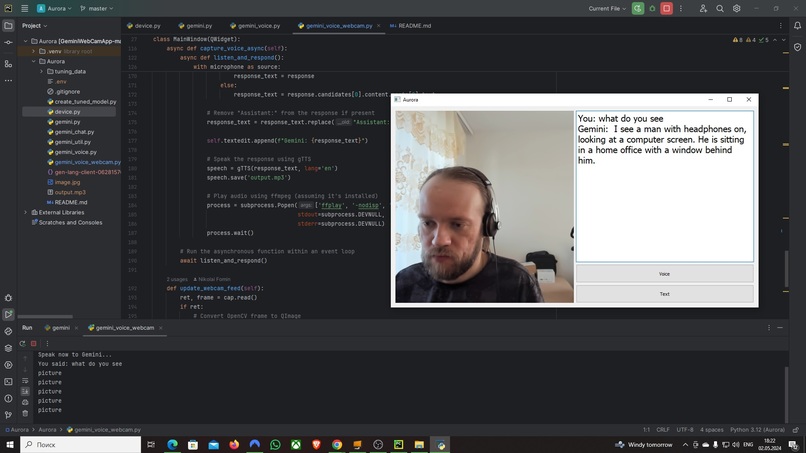
gemini_voice_webcam.py
Inspiration
My inspiration for creating Aurora stemmed from the desire to enhance user interaction with computers, making it more intuitive and hands-free.
What it does
Aurora is a webcam voice assistant built using Python, integrating speech recognition via microphone and OpenCV. It allows users to perform tasks, and access information using voice commands and object recognition.
How I built it
I built Aurora using Python, harnessing the power of OpenCV for computer vision and libraries for speech recognition. I integrated microphone input for voice commands and leveraged object recognition algorithms.
Challenges I ran into
One of the main challenges I faced was optimizing the accuracy and speed of speech recognition. Integrating real-time object recognition with webcam input also presented technical hurdles that I had to overcome.
Accomplishments that we're proud of
I'm proud to have developed a functional webcam voice assistant that seamlessly combines speech recognition and computer vision. Achieving a robust and reliable system capable of understanding natural language commands and recognizing objects was a significant accomplishment for me.
What we learned
Throughout the project, I gained valuable insights into speech recognition algorithms, computer vision techniques, and real-time processing in Python. I also learned effective strategies for integrating multiple technologies into a cohesive system.
What's next for Aurora
In the future, I plan to further enhance Aurora's capabilities by implementing advanced features such as natural language processing, expanding its compatibility with various applications, and optimizing its performance for a wider range of environments and user scenarios.
Built With
- ffmpeg
- google-ai-generativelanguage
- google-ai-studio
- google-cloud
- google-generativeai
- gtts
- opencv-python
- pycharm
- pyqt5
- python
- python-dotenv
- speechrecognition

Log in or sign up for Devpost to join the conversation.