-
-
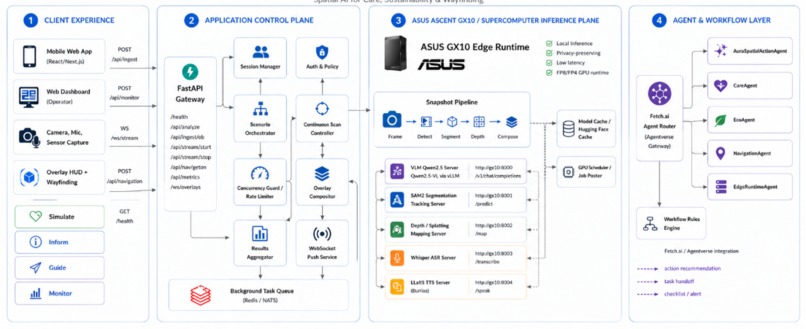
Architecture Diagram
Inspiration
We wanted to make spatial AI feel like something people could actually see and use instead of just another chatbot or camera app. A lot of AI tools explain the world through text, but in real life people do not always need a paragraph, they need to know what matters in the scene in front of them. We were inspired by AR and VR experiences where digital information feels attached to the physical world, and by the idea that a phone camera could become more than a lens. That led us to AURA: an augmented reality understanding assistant that turns everyday environments into interactive spatial guidance.
What it does
AURA is a spatial intelligence experience that transforms a phone camera snapshot into an augmented action layer. Users can point their phone at everyday environments and see animated overlays that highlight important objects, risks, recommendations, and next steps. We focused on three example use cases to show the range of what AURA can support: care safety, sustainability, and wayfinding.
In the care use case, AURA can highlight medication safety cues like a pill bottle, pill organizer, water bottle, phone, and written instructions. In the sustainability use case, it can point out energy use and waste sorting opportunities. In the wayfinding use case, it can draw a route through a hallway while warning about obstacles. Our goal was to make AI feel more physical, visual, and useful by showing information exactly where it matters.
How we built it
We built AURA as a mobile-first web experience focused on turning camera input into spatial overlays. Users capture a scene with their phone camera, and then AURA renders an augmented result view on top of the captured image. The overlay layer uses spatial anchors, normalized coordinates, animated labels, route paths, and action panels so the output feels attached to the real environment instead of floating separately from it.
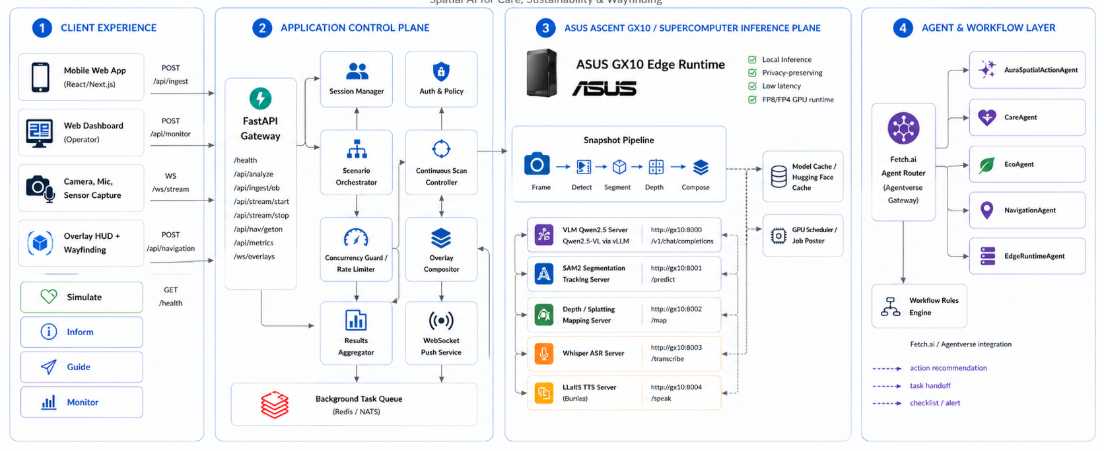
We also designed the ideal architecture around an edge AI runtime, where AURA can connect camera input to local inference, segmentation, depth, speech, and agent workflows. The goal was to build something that could be shown clearly during the hackathon while still pointing toward a larger system where real-world scenes become interactive, explainable, and actionable.
Tech Stack
We built AURA with React, TypeScript, and Vite for the mobile web app, using browser camera APIs to capture live scene input and render an augmented overlay experience directly on the phone. The frontend handles the camera view, spatial HUD, animated bounding boxes, route guidance, scenario controls, and real-time overlay updates so the experience feels like an AR layer on top of the physical world.
On the backend, we used FastAPI as the application control plane to manage scene requests, streaming sessions, health checks, concurrency control, and WebSocket overlay updates. The inference layer was designed to run on the ASUS edge supercomputer, with vLLM serving Qwen2.5-VL for vision-language understanding, SAM2 for object segmentation and tracking, Depth Anything-style depth estimation for spatial mapping, and Whisper for voice input. These model servers work together through a snapshot and streaming pipeline that turns camera frames into object detections, masks, depth-aware spatial anchors, and composed overlays.
We also built the architecture around agentic handoffs, where structured scene context can be passed to Fetch.ai-style agents for next-step recommendations across care, sustainability, and wayfinding use cases. We chose this stack because AURA needed to combine a polished mobile AR interface with serious local AI infrastructure: fast enough to feel interactive, private enough to keep camera data local, and modular enough to support future real-time scene understanding.
Challenges we ran into
One of our biggest challenges was balancing ambition with reliability. The original vision involved live local model inference, real-time segmentation, depth mapping, and agentic workflows running through a supercomputer-backed architecture. That was exciting, but it also introduced a lot of environment, startup, GPU, and model-serving complexity. We had to think carefully about how to still communicate the full product vision through a focused and polished experience.
Another challenge was making spatial overlays feel meaningful. We did not want to just show boxes on a picture. We had to design the flow so the phone camera, capture step, animated scan, overlay timing, route drawing, severity labels, and action panels all worked together to create the feeling of spatial intelligence. The hardest design problem was making the experience feel like AURA was augmenting the real world, not just decorating an image.
Accomplishments that we're proud of
We are proud that AURA feels like a real product experience instead of just a technical prototype. The demo turns phone camera captures into polished augmented scenes with visual guidance, action summaries, and spatial overlays that feel attached to the environment. We are also proud that the three example use cases cover very different kinds of real-world value: care safety, sustainability, and wayfinding.
We are especially proud of the visual direction. The animated overlays, scanning effects, route guidance, and HUD-style interface make the project feel futuristic while still being understandable. We are also proud that we preserved the bigger architecture vision. AURA is designed around a broader model-backed pipeline where the same interface can be powered by local inference, segmentation, depth, and agents.
What we learned (New Skills!)
Farrell: I learned how important it is to design for the demo experience, not just the technical architecture. At first, we were focused on getting the full model-serving pipeline working, but I learned that a hackathon project also needs a reliable story that judges can understand immediately. Building AURA made me think much more carefully about how to turn AI outputs into a visual interface that actually helps people in the moment.
Nischay: I learned how to structure a mobile-first camera experience in a way that feels natural on a phone. This meant thinking about the full flow from choosing an experience, opening the camera, aligning the scene, capturing the image, and transitioning into the augmented result view. It was challenging because even small delays or awkward UI states could make the experience feel less real.
What's next for AURA
Next, we want to expand AURA into more live and adaptive scene understanding. That means connecting the camera flow more deeply to vision-language inference, adding segmentation so overlays can lock more accurately onto objects, and eventually using depth to make the guidance feel truly spatial. We also want to expand the number of supported environments so AURA can help in classrooms, dorm rooms, labs, clinics, public spaces, and emergency situations.
Longer term, we would love to make AURA a full spatial action platform. Instead of only identifying what is in a scene, AURA could help users understand what matters, decide what to do next, and hand off actions to the right agent or person. The goal is to make AI less like a separate chat window and more like a layer of understanding that appears directly on top of the world around you.
Built With
- agentverse
- anything
- apis
- ascent
- asus
- browser
- camera
- css
- depth
- fastapi
- fetch.ai
- python
- qwen2.5-vl
- react
- sam2
- typescript
- vite
- vllm
- websockets
- whisper

Log in or sign up for Devpost to join the conversation.