-
-
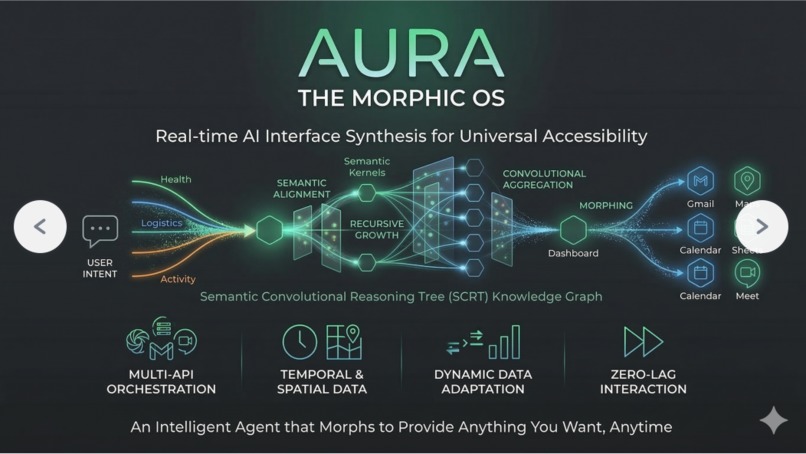
systems architecture
Aura: The AI Operating System for Google Workspace
Inspiration
Modern professionals spend too much time switching between email, calendar, documents, spreadsheets, and maps just to complete a single task. We were inspired by the idea that AI should not only answer questions, but also build the right interface and take action across tools in context. Instead of forcing users to jump between apps and tabs, we wanted to create an AI Operating System that understands intent, orchestrates real actions, and dynamically generates the workspace the user needs at that exact moment.
Aura was born from that vision: an assistant that does not just chat, but actively reads, writes, plans, navigates, and composes workflows natively across the Google API ecosystem.
What it does Aura is an AI Operating System that dynamically generates contextual interfaces on top of connected Google productivity tools. It interprets natural language requests, orchestrates actions across the Gmail API, Google Calendar API, Google Docs API, Google Sheets API, and Google Maps API, and visually guides the user through the process step by step.
For example, Aura can:
- Show unread emails and today's calendar in a custom split-screen dashboard.
- Create a welcome letter via the Google Docs API, convert it, and email it as a PDF via the Gmail API.
- Process an appointment email, extract key details, add the event via the Google Calendar API, locate the clinic using Google Maps, and generate a composite summary workspace.
Rather than returning only text, Aura creates task-specific interfaces in real time, giving the user both execution and clarity.
How we built it We built Aura as a node-based orchestration system powered by AI and connected Google Cloud APIs.
At the core is a dynamic SCRT node graph that represents views, workflows, setup states, and contextual workspaces. The agent can navigate between nodes, create new ones, patch existing ones, and progressively update the UI as a task unfolds. This allows Aura to generate interfaces on the fly instead of relying on fixed screens.
On the AI side, we integrated the Google Gemini API for reasoning, tool selection, and live interaction. We used structured tool calling so the model can trigger live Google endpoints for reading emails, creating events, generating documents, updating sheets, and searching locations. We also created scripted demo flows for critical paths so the system remains reliable during live interaction while still preserving the intelligence of the agent.
On the frontend, we built a React-based interface with dynamic rendering, visual state updates, and live progress cues. We also introduced an agent visual state layer so the user can see what Aura is doing step by step rather than waiting blindly.
Challenges we ran into One of the biggest challenges was making AI orchestration across multiple Google APIs feel reliable enough for a real-time demo. Freeform tool use is powerful, but live demos require structure, clear sequencing, and predictable visual feedback. We had to balance flexibility with determinism.
Another challenge was designing a UI system that could safely render dynamically generated workspaces without breaking the application. This meant carefully defining the SCRT node schema, supported UI structures, and patch/update mechanisms.
We also ran into issues around multi-step persistence. For example, if Aura created a document via the Docs API in one step and needed to email it later, we had to make sure that context, file IDs, and OAuth tokens survived across transitions. Integrating Google Maps and live location-based logic also forced us to think carefully about permission handling and fallbacks when user geolocation is unavailable.
Finally, making the AI feel alive visually was harder than expected. It was not enough for the API calls to succeed; users had to see navigation, progress, focus, and completion in a way that kept them engaged.
Accomplishments that we are proud of We are proud that Aura goes beyond being a chatbot. It dynamically builds interfaces, performs real actions across multiple Google tools, and turns natural language into visible workflows.
We are especially proud of the composite workspace experience. The ability to process an email, extract meaning, create a calendar event, resolve a location, and present everything in a single summary interface demonstrates the kind of AI-native operating model we believe users will expect in the future.
We are also proud of the architecture we built around node orchestration, Gemini tool calling, and visual state management. It gave us a foundation that is flexible enough for experimentation while still structured enough for polished demos and future productization.
What we learned We learned that AI UX is not only about intelligence, but about choreography. Users need to see what the system is doing, where it is going, and why it is making progress. Step-by-step feedback, active panel highlighting, and dynamic workspaces made a major difference in how intelligent the system felt.
We also learned that hybrid systems are stronger than purely freeform ones. The best results came from combining Gemini's reasoning with bounded scripted flows and structured tool use against Google APIs. This gave us the creativity of AI with the reliability of software engineering.
Technically, we learned a lot about schema design, state propagation, runtime orchestration, and how important it is to align AI-generated outputs with real UI and strict API contracts.
What is next for Aura Next, we want to make Aura even more autonomous, visual, and extensible.
Our roadmap includes deeper coverage of the Google Workspace API ecosystem, richer composite interfaces, better contextual memory across tasks, and stronger animation and visual guidance during AI processing. We also want to expand beyond Google Workspace into broader enterprise workflows, so Aura can become a true operating layer across a professional's digital tools.
Longer term, we see Aura evolving into a full AI-native productivity environment where the interface is no longer static. Instead, the UI becomes something the system composes in real time based on the user's intent, their context, and the task at hand.
Aura: The AI Operating System for Google Workspace is our step toward that future.
Built With
- audio
- calendar
- css
- docs
- drive
- express.js
- gemini
- genai
- gmail
- maps
- node.js
- react
- sheets
- tailwind
- typescript
- websockets

Log in or sign up for Devpost to join the conversation.