-
-
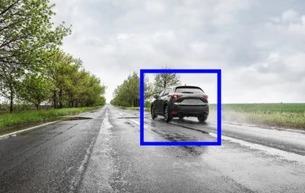
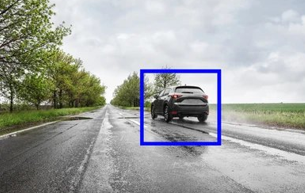
Target acquired. Aura detects exactly what you're looking for, highlighted, guided by voice.
-
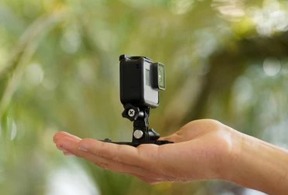
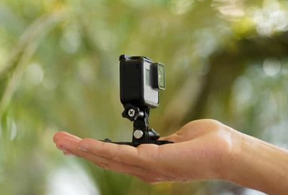
Small camera. Big vision. Aura turns this tiny device into your eyes, anywhere, anytime.
-

Aura turns any camera into eyes that never blink, mounted on a cap, ready to assist

Inspiration
Independence is often limited not by ability, but by accessibility. Visually impaired individuals face daily challenges that many of us take for granted—identifying objects, understanding unfamiliar surroundings, and reading printed text like medicine labels or restaurant menus.
While artificial intelligence has advanced rapidly, most assistive solutions remain either prohibitively expensive, tied to specialized hardware, or limited to a single function. We saw a gap: there was no affordable, multi-functional AI companion that could truly listen and respond in real-time.
Aura was born from a simple question: Can AI become a real-time companion that detects, describes, and reads on demand—entirely through voice?
We wanted to build something that doesn't just output information passively, but actively empowers users through natural conversation. Something that treats accessibility not as an afterthought, but as the core design principle.
What it does
Aura is a real-time, voice-controlled AI assistant that performs three core functions, completely hands-free:
1. Detect
User says: "Detect a chair" or "Find my water bottle"
Aura instantly:
- Identifies the object in the camera feed using YOLOv8
- Calculates its position relative to the user
- Provides intuitive directional audio guidance:
- "Move left"
- "Move right"
- "Straight ahead"
The system continues guiding until the object is found, with visual feedback showing detected objects in real-time.
2. Describe
User says: "Describe my surroundings"
Aura captures the scene and uses BLIP (Bootstrapping Language-Image Pre-training) to generate a natural language description. Whether it's "a living room with a couch and coffee table" or "a busy street with people walking," users get an instant mental picture of their environment.
3. Read
User says: "Read this text"
Aura:
- Extracts printed text using Tesseract OCR
- Processes longer content through DistilBART summarization
- Reads the text aloud clearly and naturally
Perfect for reading signs, menus, medicine bottles, or any printed material.
All of this happens through simple voice commands, starting with the wake word—"Aura."
How we built it
Aura is built using a modular Python architecture that integrates multiple AI models into a real-time assistive pipeline:
Core Technologies & Models
Speech Recognition & Synthesis
- Google Speech Recognition API via
speech_recognitionfor voice commands - Custom wake word detection ("Aura", "hey Aura") with flexible pattern matching
- pyttsx3 for offline text-to-speech with optimized rate and volume
- Ambient noise adjustment for improved accuracy
Computer Vision Models
- YOLOv8 (Ultralytics) for real-time object detection with directional guidance
- Optimized with
imgsz=416for faster inference - Confidence threshold of 0.4 for reliable detection
- Directional guidance based on object position relative to frame center
- Optimized with
- BLIP from Salesforce for scene description
- Generates natural language captions (max_length=40) of surroundings
- Converts camera frames to PIL images for processing
Text Recognition & Processing
- Tesseract OCR for extracting printed text from images
- Grayscale conversion for improved text detection
- DistilBART-CNN for text summarization
- Fallback handling if model fails to load
- Generates concise summaries (max_length=80) of longer text
Hardware Integration
- Primary: DroidCam for wireless mobile camera access
- Fallback: Built-in webcam
- Optimized buffer settings for smooth streaming
System Architecture
- Wake Word Detection: Constantly listens for "Aura" activation
- Intent Classification: Parses commands for three modes
- Mode Execution: Switches between detect, describe, or read
- Real-time Feedback: Voice and visual feedback simultaneously
Challenges we ran into
Real-Time Processing Latency
Running multiple heavy AI models (YOLO, BLIP, OCR) sequentially created significant delays. We implemented:
- Reduced YOLO inference size to 416×416
- 2.5-second cooldowns between voice instructions
- Frame resizing (640×480) for consistency
- Buffer management to prevent frame accumulation
Speech Recognition Accuracy
Background noise and varied pronunciations affected command detection:
- Flexible wake word matching ("aura", "ara", "ora", "aurora")
- Ambient noise adjustment before each listening session
- 5-second phrase time limits to prevent hanging
- Confidence thresholds for command validation
Model Resource Constraints
Loading multiple transformer models caused memory issues:
- Graceful fallbacks when summarizer fails to load
- Sequential loading with progress indicators
- Recreated TTS engine per call to prevent Windows threading issues
- Comprehensive exception handling throughout
Real-time Object Guidance
Providing intuitive directional feedback required careful calibration:
- Object position relative to frame center (80px threshold)
- 60-second search timeout to prevent indefinite searching
- Color-coded bounding boxes (green for target, blue for other objects)
- Cooldown system to prevent voice instruction flooding
Accomplishments that we're proud of
Fully functional multi-mode AI system - Successfully integrated detection, description, and reading into one seamless voice-driven assistant
Real-time object detection with directional guidance - Achieved under 2-second response time with intuitive audio feedback
Truly hands-free experience - Complete voice control with wake word activation, no touch required
Cost-effective solution - Runs on standard hardware (laptop + smartphone camera) instead of expensive specialized devices
Error-resilient design - Graceful fallbacks for every component ensure the system never crashes
Social impact potential - Built a solution that can genuinely improve independence for visually impaired individuals
Scalable architecture - Modular design allows for easy addition of new features
What we learned
Accessibility must drive AI design decisions, not be an afterthought. Every feature we built was tested against the question: "Would this actually help someone with visual impairment?"
Real-time systems demand careful optimization - A slow solution is not a helpful solution. We learned to balance model accuracy with inference speed.
Model accuracy alone isn't enough - Usability, clarity, and reliability determine real-world impact. A 95% accurate model that crashes is useless.
Error handling is critical - In accessibility tech, the system must gracefully handle failures. We learned to build fallbacks for everything.
Voice interfaces require flexibility - People speak naturally, not in fixed commands. Our wake word matching had to account for accents, mispronunciations, and background noise.
The power of open-source - Standing on the shoulders of giants (YOLO, BLIP, Hugging Face) allowed us to build something complex in limited time.
What's next for Aura
Short-term Roadmap
- Distance estimation - Add depth perception for safer navigation
- Obstacle detection - Warn users about obstacles in their path
- Mobile optimization - Port to Android/iOS for true portability
- Offline speech recognition - Remove internet dependency entirely
Medium-term Goals
- Multilingual support - Serve diverse communities worldwide
- Faster models - Explore distillation and quantization for mobile
- User testing - Structured field testing with visually impaired users
- Wearable integration - Smart glasses or bone conduction headphones
Long-term Vision
Our goal is to scale Aura into an affordable, widely accessible AI companion that enhances independence for visually impaired people globally. We envision:
- A free mobile app available on app stores
- Partnerships with blindness organizations
- Open-source community contributions
- Continuous improvement based on user feedback
Aura is not just a hackathon project—it's the beginning of a mission to make AI-powered accessibility available to everyone who needs it, regardless of their economic circumstances.

Log in or sign up for Devpost to join the conversation.