AuditAI
Inspiration
Professional auditors spend 60% of their time on paperwork instead of actual inspection. During field walkthroughs, they juggle clipboards, cameras, regulation manuals, and data entry tools -- all while trying to focus on identifying issues. On the desk side, navigating between compliance dashboards, evidence pages, and report generators requires constant context-switching that breaks analytical flow.
We asked: what if auditors could simply talk to their platform? What if an AI companion could see through their camera during inspections, record findings hands-free, and then seamlessly switch to navigating the entire desktop application by voice -- clicking buttons, filtering data, generating reports, all without touching a mouse?
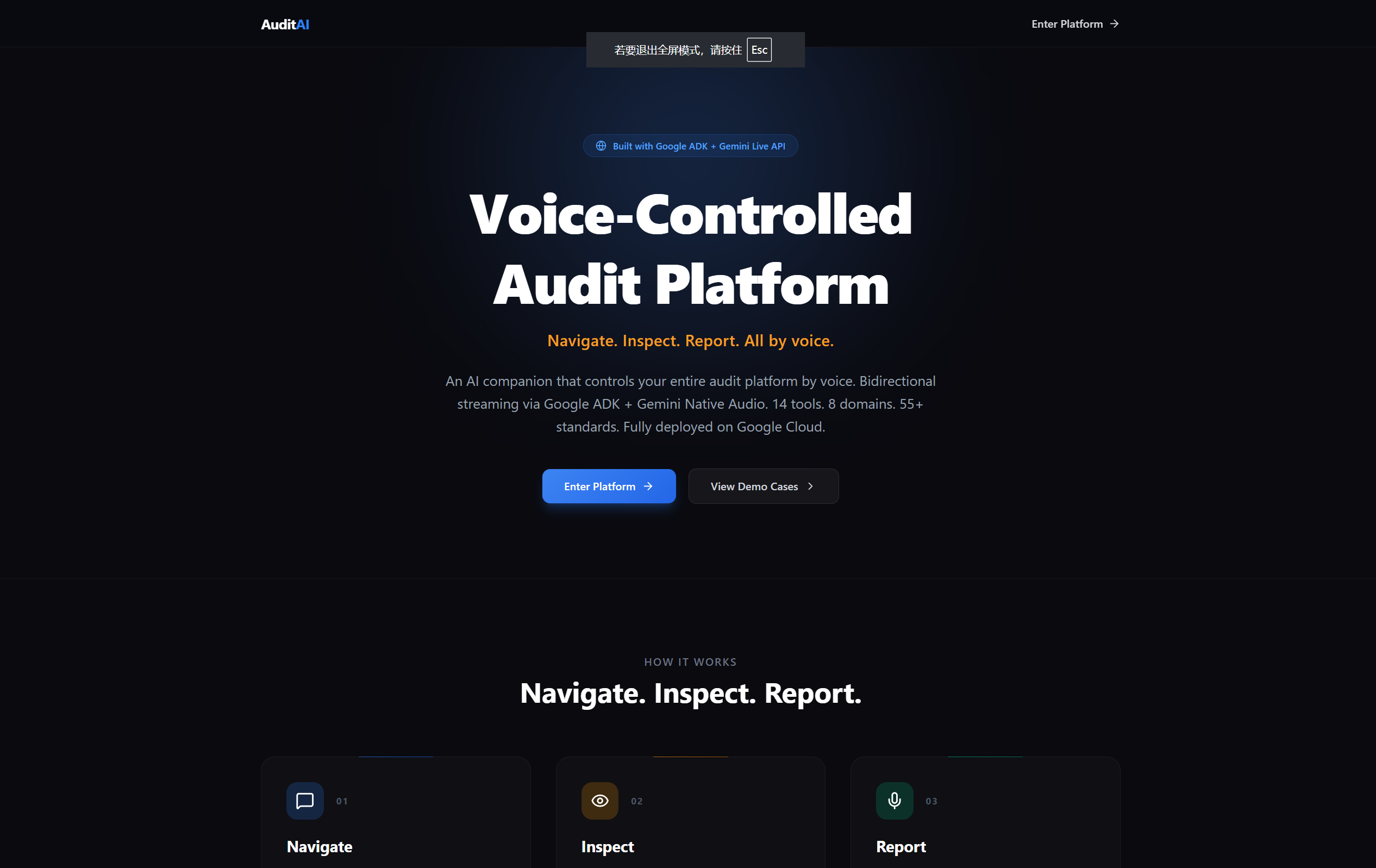
That is AuditAI -- an AI companion that works as both your field partner and your desktop navigator, across 8 professional audit domains and 55+ international standards.
What it does
AuditAI is a multi-domain audit platform with a real-time voice + vision AI companion that operates in two modes:
UI Navigator (Desk Mode) -- the core Track 3 capability:
- Voice-controlled page navigation: Say "go to the report page" or "show me the compliance dashboard" and the AI navigates the browser instantly
- Element interaction: The companion can click any button, link, or tab by voice command -- "click Generate Report", "export the PDF", "start extraction"
- Screen reading: The AI captures screenshots of the current page and reads visible text content to understand what the user sees, then answers questions about it
- Finding highlighting: Say "highlight that critical finding" and it scrolls to and visually highlights the element with a ring animation
- View filtering: "Show me only critical issues" triggers severity/type filtering on the findings list
- Data explanation: Ask "explain this measure" and the AI retrieves the full record from Firestore and explains savings, investment, payback period in natural language
- Regulation lookup: "What does ISO 45001 say about hazard identification?" triggers a standards query and the AI reads the relevant clause aloud
- Context awareness: The companion automatically detects which page and case the user is viewing, adapting its behavior and available actions accordingly
Field Mode (Camera + Voice):
- See through the auditor's camera to identify equipment, read nameplates, and spot defects
- Automatically record equipment findings, meter readings, and flagged issues via function calling
- Capture photographic evidence linked to the audit case
- Query 55+ international standards (ISO 50001, HACCP, OSHA, NFPA 72, ISO 14001, etc.) in real-time during inspections
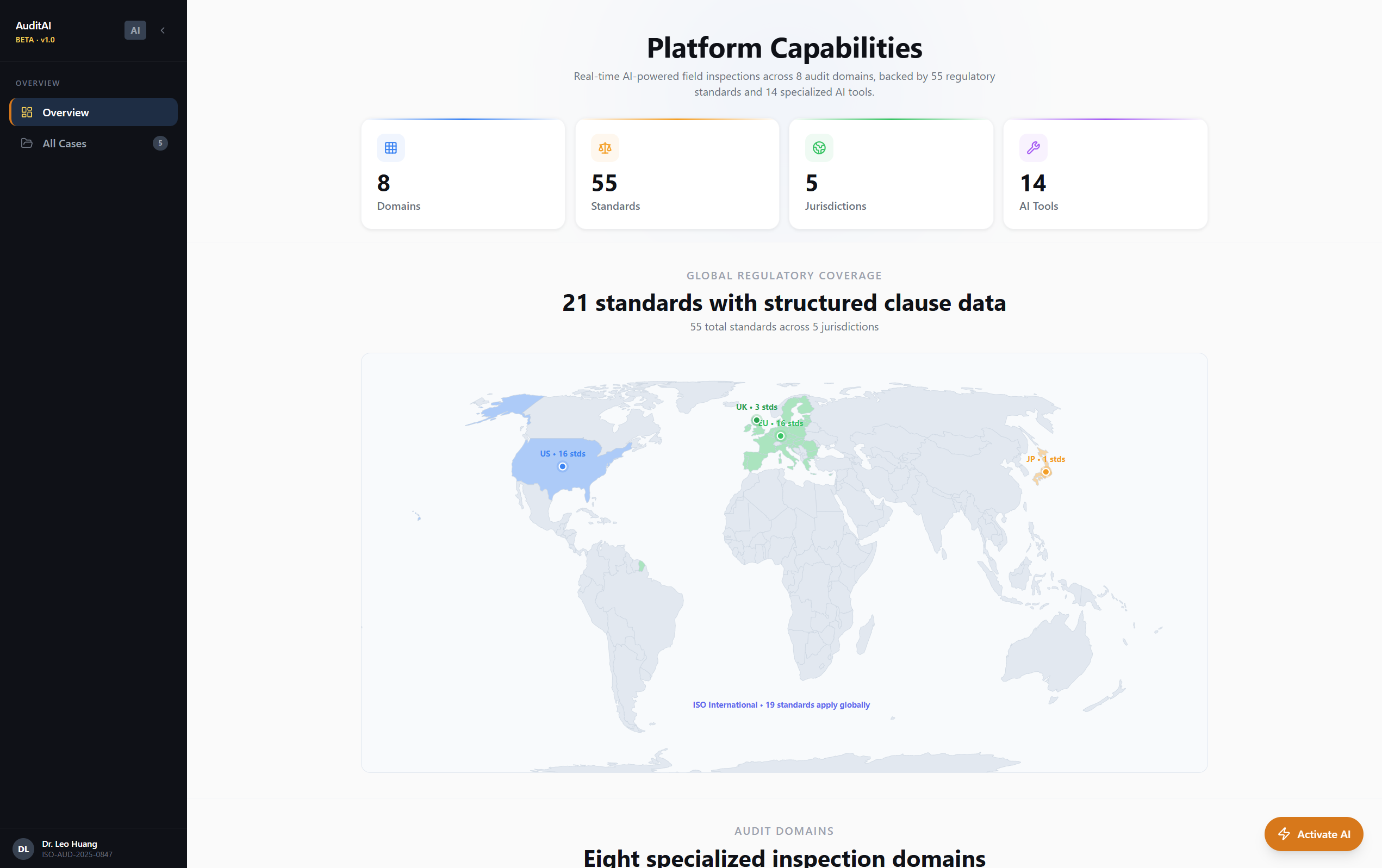
- Works across 8 audit domains: Energy, Food Safety, Workplace Safety, Construction, Environmental, Fire Safety, Manufacturing QC, and Facility Management
Platform Features:
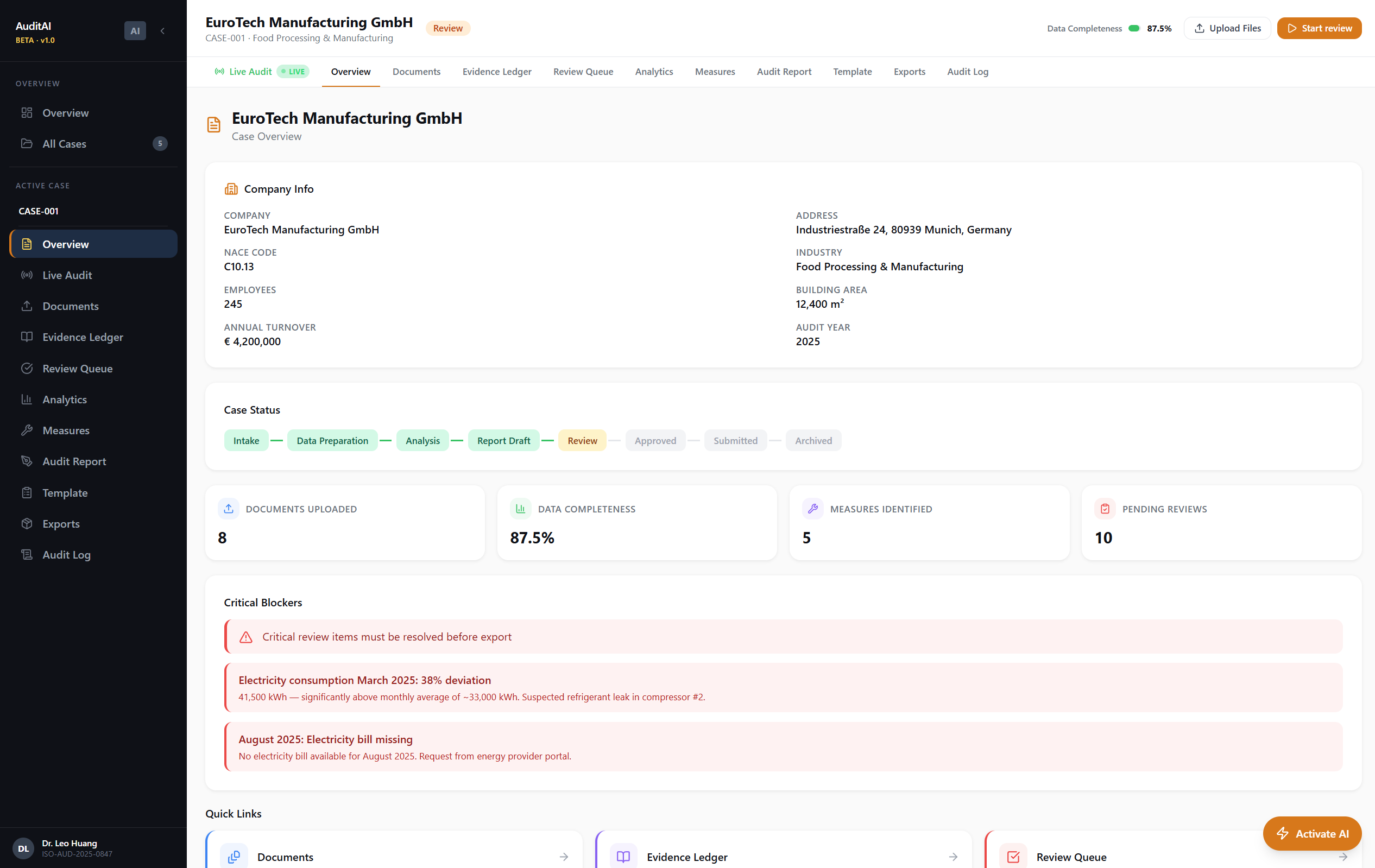
- Multi-case management with domain-specific configurations
- AI-powered document extraction and categorization
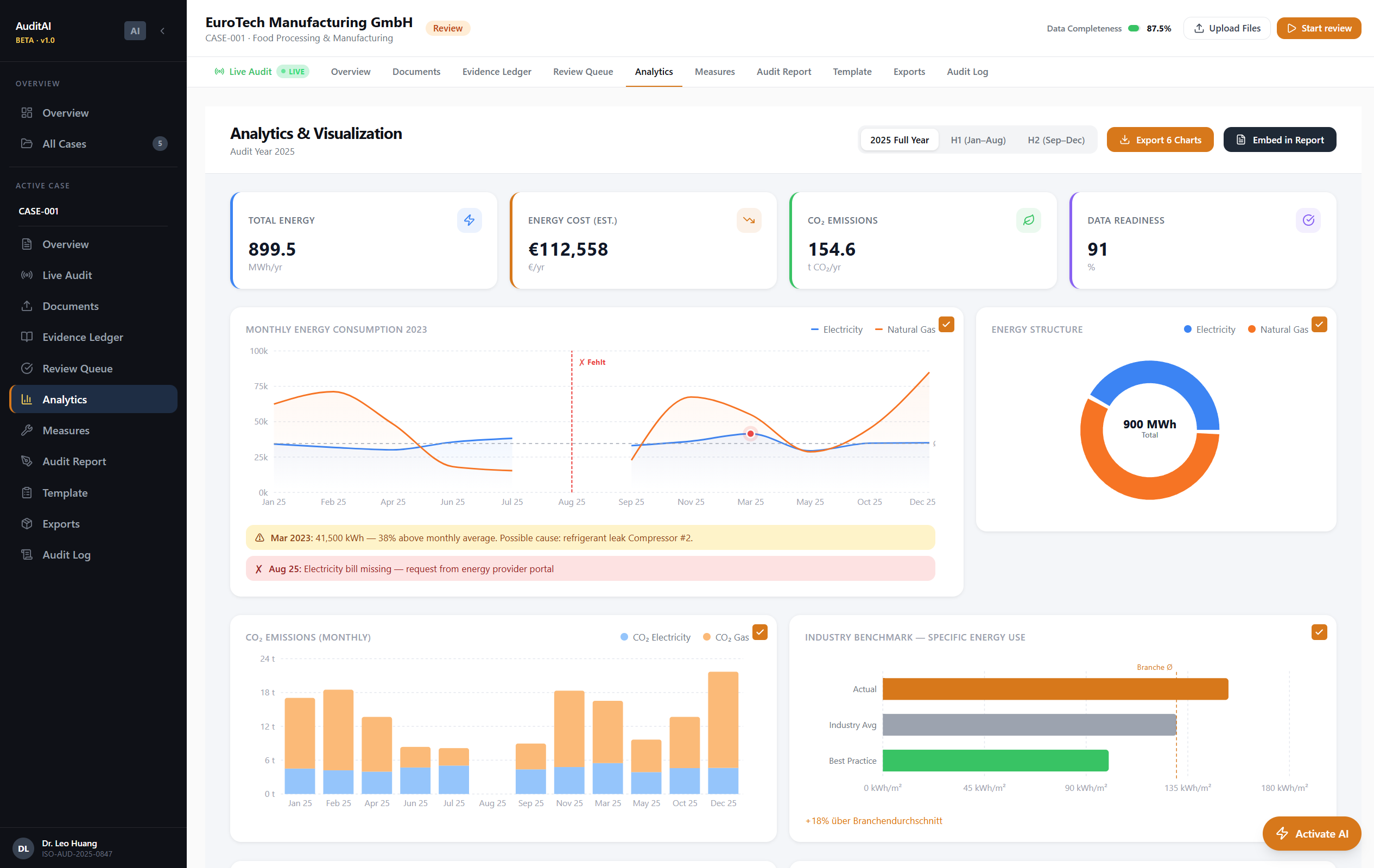
- Energy data ledger with anomaly detection and data quality tracking
- Compliance status tracking against applicable standards
- Evidence-anchored findings with confidence scores
- AI-generated standards-compliant audit reports (EN 16247-1, ISO 50001) streamed in real-time
- Full audit trail with immutable event logging
- Economic analysis with ROI calculations and payback periods
How we built it
AI Architecture:
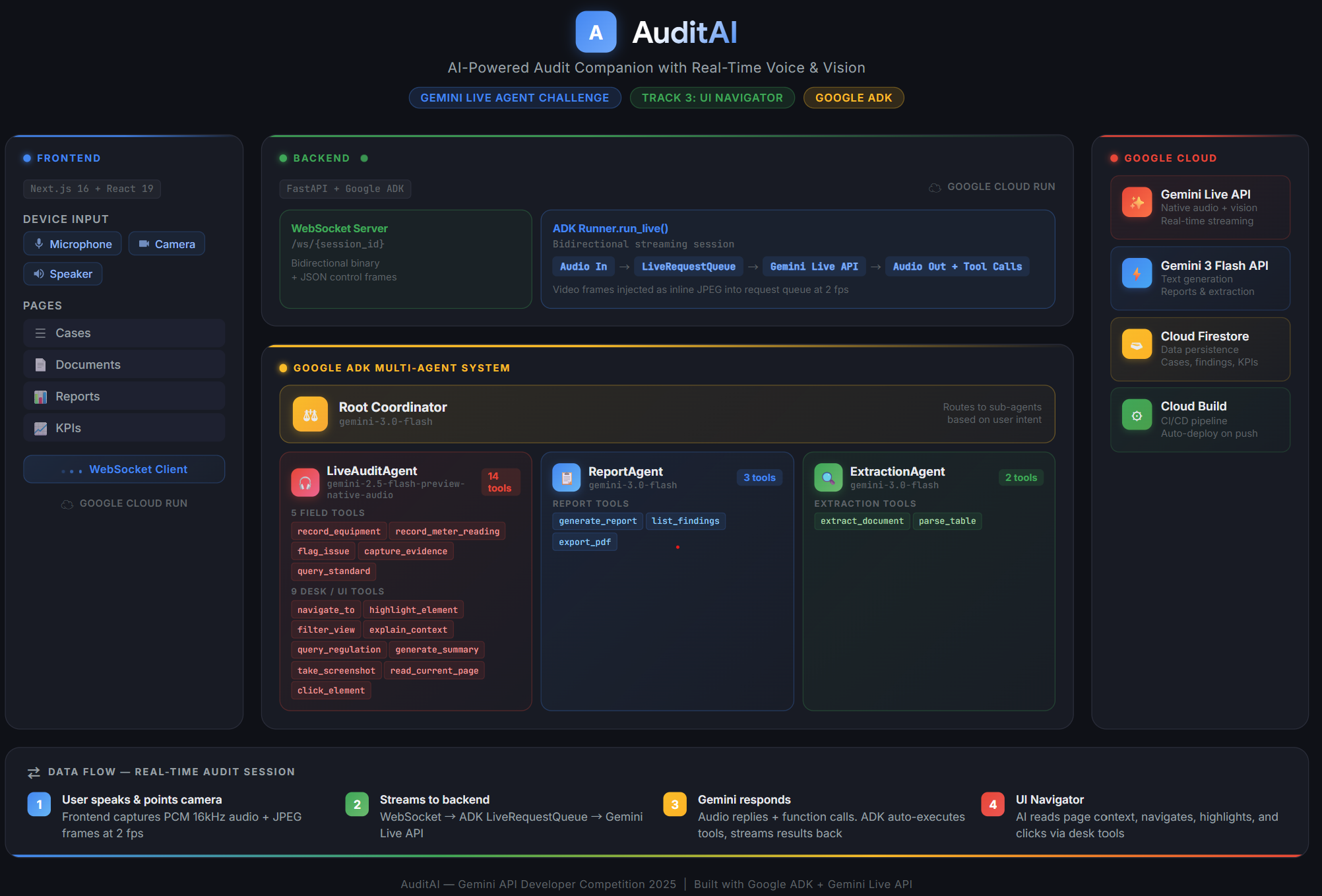
- Google ADK (Agent Development Kit) with
Runner.run_live()for persistent bidirectional streaming sessions - Gemini 2.5 Flash Native Audio (
gemini-2.5-flash-native-audio-preview) for real-time voice interaction with sub-second latency - Gemini 3 Flash (
gemini-3-flash-preview) for document extraction and standards-compliant report generation - 14 AI tools via function calling: 5 field tools (record_equipment, record_meter_reading, flag_issue, capture_evidence, query_standard) + 9 desk/UI tools (navigate_to, highlight_finding, filter_findings, explain_item, show_regulation, read_summary, capture_screen, read_page_content, click_element)
- Tool results with an
actionkey are automatically forwarded asui_commandmessages to the frontend, creating a seamless tool-call-to-UI-action pipeline
WebSocket Protocol:
- Bidirectional WebSocket bridge between frontend and ADK
LiveRequestQueue - Client sends: PCM audio (16kHz int16), JPEG images, text, screen context, mode switches
- Server sends: PCM audio (24kHz), streaming transcript deltas, tool calls/results, UI commands, turn lifecycle events
- Streaming transcription with turn-based accumulation -- incremental deltas are merged server-side and replaced in the frontend transcript bubble by
turnId - Echo suppression: mic input is gated while AI audio is playing, with deferred re-enable after both
turn_completeAND playback queue drain
Frontend:
- Next.js 16 with App Router and React 19
CompanionProviderReact context manages the full companion lifecycle: WebSocket connection, AudioManager, transcript state, findings, mode switchingUICommandDispatcherinterprets AI tool results into DOM actions:router.push()for navigation,element.scrollIntoView()for highlighting,element.click()for button interaction,html-to-imagefor screenshots, structured DOM traversal for page text extractionAudioManagerhandles 16kHz PCM capture via ScriptProcessorNode and gapless 24kHz playback via sequential AudioBufferSource scheduling- Automatic screen context injection on page navigation so the AI always knows what the user is viewing
Backend:
- FastAPI with async Firestore CRUD across 9 collections (cases, documents, ledger_entries, review_items, measures, audit_log, live_sessions, live_findings, standards)
- Domain configuration system with per-domain instructions, standards, equipment types, and severity metrics
- Standards reference database with 17 international standards seeded on first startup
- Report generation via Gemini 3 Flash with structured evidence extraction (JSON blocks embedded in markdown)
Infrastructure:
- Cloud Run for both backend and frontend containers
- Firestore for all persistent data (9 collections, async CRUD)
- Cloud Build for CI/CD
- Dockerized deployments with automatic environment configuration
Challenges we ran into
Audio echo feedback loops: The Gemini Live API's Voice Activity Detection (VAD) would pick up the AI's own audio output from the speaker, creating an infinite echo loop where the AI kept interrupting itself. We solved this by implementing a speaker-gate on the microphone: AudioManager.speaking suppresses PCM capture while audio is playing, and re-enable is deferred until both the server sends turn_complete AND the last AudioBufferSourceNode.onended fires. The Gemini API sends turn_complete before all audio chunks have actually played, so relying on it alone would re-enable the mic too early.
Duplicate WebSocket connections: React 18+ Strict Mode mounts components twice in development, causing duplicate WebSocket connections that resulted in doubled audio/transcription. We added connection deduplication in CompanionProvider.connect() that explicitly tears down any existing WebSocket and AudioManager before creating new ones.
Transcription accumulation strategy: The ADK emits transcription events in two flavors -- incremental partial chunks and a final "finished" event with the complete text. Naively concatenating everything caused duplicate text. We implemented a buffer-and-flush design: accumulate incremental chunks server-side, use the finished event's text as the authoritative version, and stream cumulative text to the frontend where it replaces (not appends to) the transcript bubble by matching on turnId.
Gemini thinking text leakage: Gemini's native audio model sometimes emits internal reasoning text ("I'm going to analyze this...", "Let me check...") in the output transcription. We built a regex-based filter (_is_thinking_text) to suppress these from being shown to users while still allowing legitimate responses through.
Tool-to-UI action pipeline: Making the AI's function call results actually do things in the browser required a careful design. Tool functions return dicts with an action key, the WebSocket downstream handler detects this and emits a separate ui_command message, and the frontend UICommandDispatcher maps action types to DOM operations. The click_element tool searches by text content, aria-label, and title attribute with cascading selectors per element type.
Accomplishments that we're proud of
- 14 working AI tools across field and desk modes, all triggered naturally via voice through Gemini function calling -- no manual command parsing
- True UI navigation by voice: the AI can navigate pages, click buttons, read screen content, take screenshots, highlight elements, and filter views -- a complete hands-free experience
- Sub-second voice latency using Gemini Native Audio with bidirectional streaming -- it feels like talking to a knowledgeable colleague, not waiting for an API
- 8 audit domains, 55+ standards: this is not a demo for one use case. The platform handles energy audits (ISO 50001), food safety (HACCP), workplace safety (OSHA), construction (IBC), fire safety (NFPA 72), environmental (ISO 14001), manufacturing QC (ISO 9001), and facility management (ASTM E2018)
- Evidence-anchored AI reports: generated reports include structured evidence blocks with measurement methods, calculation bases, confidence scores, and source citations -- meeting professional audit documentation requirements
- Fully deployed on Google Cloud: not a localhost demo. Both frontend and backend run on Cloud Run with Firestore persistence, accessible from any browser
What we learned
- ADK's
run_live()is powerful but demands careful audio lifecycle management. The bidirectional streaming model is incredible for real-time voice interaction, but the gap betweenturn_completeand actual audio playback completion requires explicit client-side synchronization. You cannot trustturn_completealone for mic gating. - Function calling in native audio mode is the killer feature for UI agents. The model naturally decides when to call
navigate_to,click_element, orcapture_screenbased on conversational context -- no intent classification layer needed. This makes the agent feel genuinely intelligent rather than keyword-triggered. - Screen context injection matters. Sending the current page and case context to the agent on navigation events dramatically improves response relevance. Without it, the agent has no idea what the user is looking at and gives generic answers.
- Gemini 3 Flash for structured generation is excellent. Using it for report generation with embedded JSON evidence blocks (between
[EVIDENCE_START]/[EVIDENCE_END]markers) produces reliable structured data interleaved with natural language -- a pattern we will use more. - Building multi-domain is 10x harder but 100x more useful. Supporting 8 domains with different standards, equipment types, severity metrics, and regulatory frameworks forced us to build a clean abstraction layer. The payoff is that adding a new domain is now just adding a config dict.
What's next for AuditAI
- Camera-based live annotation: overlay bounding boxes on the camera feed when the AI identifies equipment or defects, with real-time labels
- Multi-turn inspection protocols: guided checklists where the AI walks the auditor through domain-specific inspection steps (e.g., HACCP 7 principles, OSHA Focus Four)
- Offline field mode: cache standards data and queue findings locally for environments without reliable connectivity (construction sites, remote facilities)
- Multi-user collaboration: real-time shared audit sessions where multiple auditors and reviewers can interact with the same AI companion
- RAG integration: connect to organization-specific document stores (previous audit reports, maintenance records, equipment manuals) for contextual retrieval during inspections
- Automated compliance scoring: real-time compliance gap analysis against applicable standards as findings are recorded, with automatic prioritization
Built With
- google-adk
- gemini-2.5-flash-native-audio
- gemini-3-flash
- google-cloud-run
- google-cloud-firestore
- fastapi
- python
- next.js
- react
- typescript
- websockets
- tailwindcss
Links
- Live Demo (Frontend): https://auditai-frontend-342109712917.us-central1.run.app
- Live Demo (Backend): https://auditai-backend-342109712917.us-central1.run.app
- GitHub: https://github.com/Leo-Cyberautonomy/AuditOS
Built With
- fastapi
- gemini
- gemini-2.5-flash-native-audio
- gemini-3-flash
- google-adk
- google-cloud-firestore
- google-cloud-run
- next.js
- python
- react
- typescript
- websockets

Log in or sign up for Devpost to join the conversation.