-
-
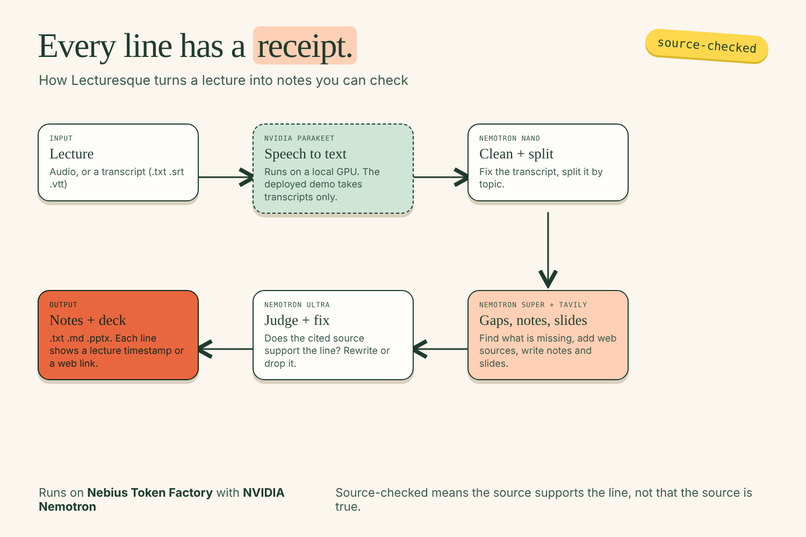
How Lecturesque works: audio or transcript in, notes and slides out. Every line cites a lecture timestamp or a web link.
Inspiration
Lecture notes are only useful if you can trust them. AI summaries often sound right but give you no way to check where a sentence came from. We wanted notes where every statement carries a "receipt": a timestamp in the lecture or a web link you can open.
What it does
Lecturesque turns a lecture transcript (.txt, .srt, .vtt) into:
- Notes split by topic, each statement tagged with a lecture timestamp or a web source
- Gaps: things the lecturer left out that a student probably needs, filled from the web with links
- Slides (
.pptx) built from the same notes, with sources in the speaker notes and on a Sources slide - Downloads as
.txt,.mdand.pptx
Every statement is then source-checked: a judge model reads the statement and its cited source and says whether the source supports it. If not, a fixer rewrites the statement or drops it.
How we built it
Lecture audio --> Parakeet (local GPU) --> transcript
transcript --> Nemotron Nano: cleaning + topic split
           --> Nemotron Super: gap finder, notes, slides
           --> Tavily: web sources
           --> Nemotron Ultra: judge + fixer
           --> .txt / .md / .pptx
- Nebius Token Factory runs all language-model calls:
NVIDIA-Nemotron-3-Nano-30B-A3B,nemotron-3-super-120b-a12bandNemotron-3-Ultra-550b-a55b. - NVIDIA Parakeet TDT 0.6B v3 turns audio into text. It runs on a local RTX 4060 in WSL2 (about 160x real time), because Token Factory has no speech model. The deployed demo has no GPU, so it accepts transcripts only.
- Design rule: the model returns ids, our code fills in the facts. The model picks which source a statement uses, and code copies the timestamp or URL from the original transcript or the search results. That way a model cannot invent a timestamp or a link.
- A cheaper light mode skips web search, the judge and the fixer, and marks every line "not judged" so it is never shown as checked.
- Backend in Python (FastAPI), frontend in Next.js, deployed on Vercel and Render.
Challenges we ran into
- What "checked" really means. The judge checks that the cited source supports the statement. It does not check that the source is true, and it cannot catch speech-recognition mistakes, because the transcript is the reference. We renamed our label from "verified" to "source-checked" to stay honest.
- A fixer that rewrote statements into empty sentences. We let it drop a statement instead.
- Model calls that got cut off. A Nano call can truncate and retry, which made the cleaning step the slowest part.
- No GPU on the free server. The deployed backend cannot transcribe audio, so we made that limit visible in the app instead of hiding it.
- A security upgrade. We pinned Next.js 16.4.3 after a critical vulnerability in 16.4.0.
- Costs. We measured every run from the call log instead of estimating.
Accomplishments that we're proud of
- On a real university database course (11 short lectures, 70 minutes), the whole batch cost about $0.26. The full pipeline costs about $0.011 per lecture minute, and light mode about $0.0023 per minute.
- That course produced 194 statements: 45 source-checked and 149 marked "not judged" (light mode). We never label a light-mode statement as checked.
- Roughly 80% of the key terms in the course's own 25 slides also appear in our notes. This is a word-overlap measure, not a measure of understanding.
- Every number, timestamp and link in the output is copied by code from a real source, never typed by a model.
What we learned
- A code check proves copying; only a judge reads meaning.
- A metric that looks good (coverage, word overlap) can hide a real problem, so we kept reading the output.
- Measure cost and quality before and after every change, on the same input.
- Be explicit about limits. Saying what the tool does not check makes the rest believable.
Limitations (please read)
- The app hears the lecture but does not see it. Slides, tables and diagrams that are shown on screen but not spoken are missing.
- Speech-recognition mistakes pass through the judge.
- The public demo accepts transcripts only; audio needs a local GPU.
- The live demo depends on trial credit that ends in early November, so the demo video is the main evidence.
What's next for Lecturesque
Use the class slides as a glossary to fix misheard terms, read on-screen images with a vision model, let users choose full or light mode per upload, and add real accounts with durable storage so lectures survive a server restart.

Log in or sign up for Devpost to join the conversation.