-
-
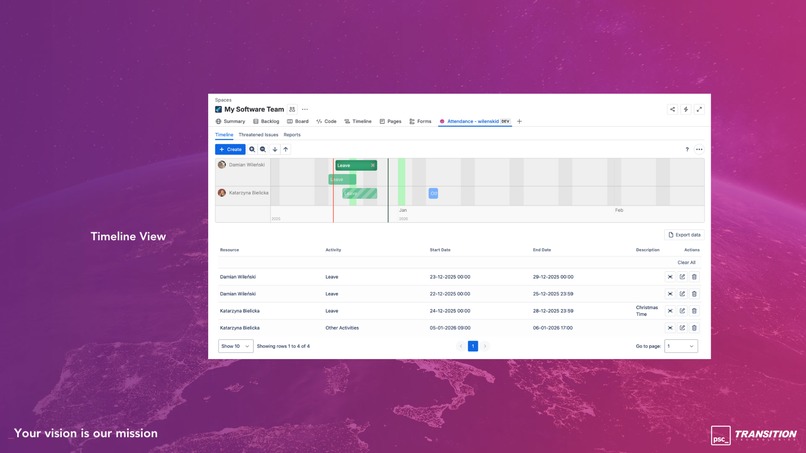
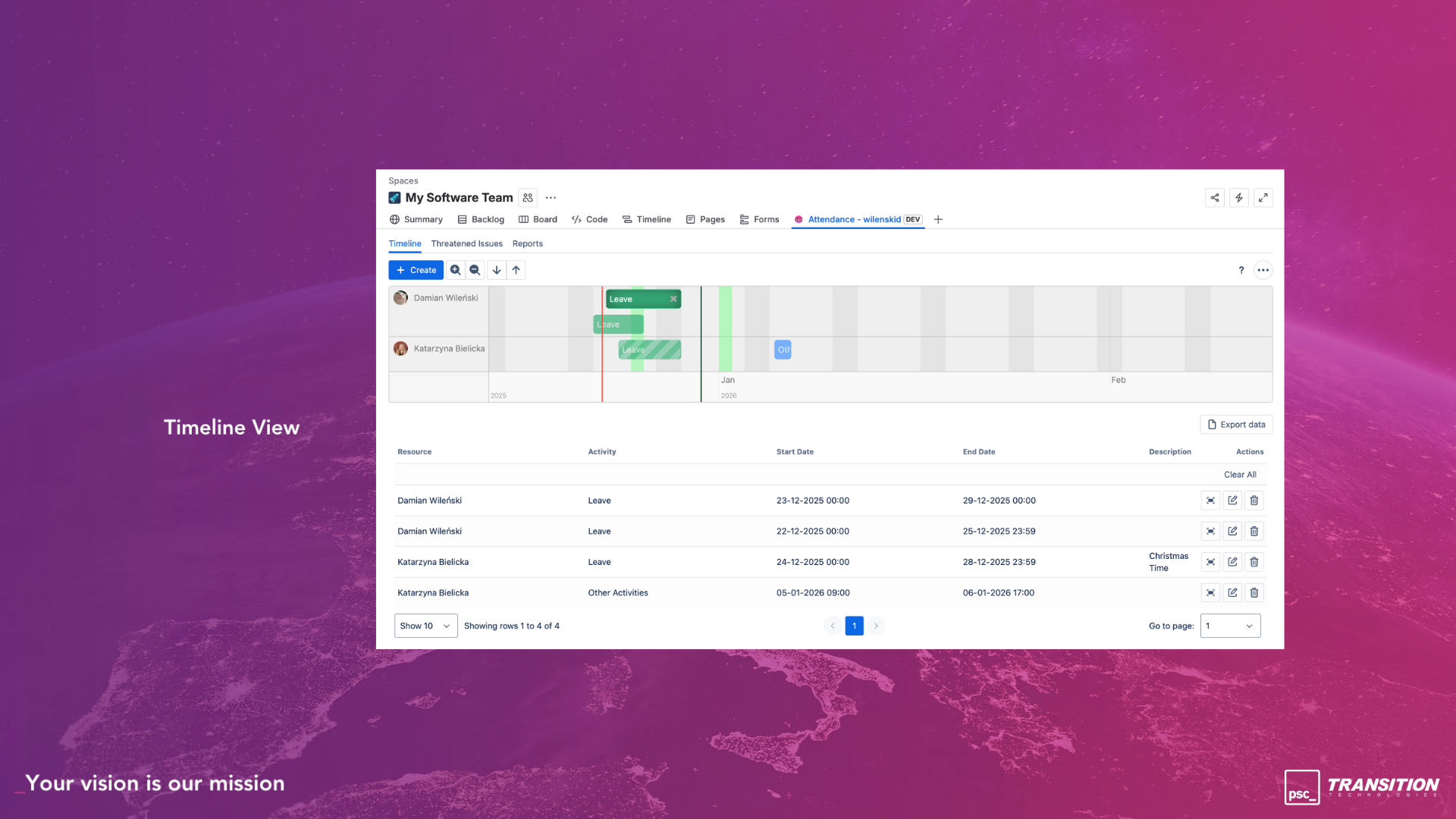
Timeline View
-
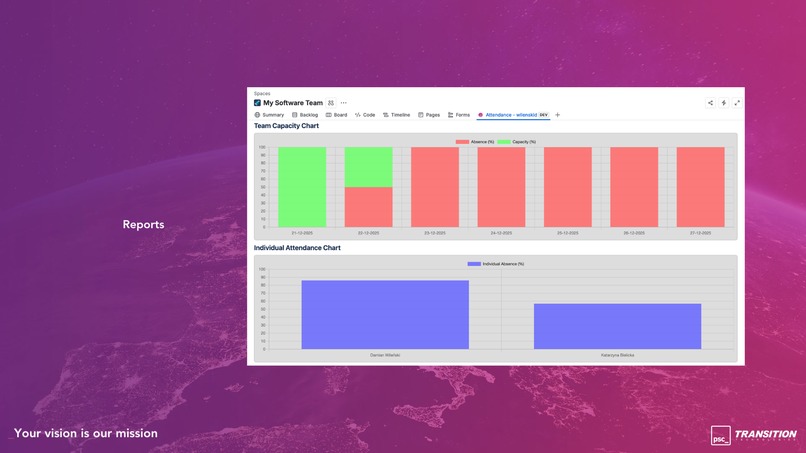
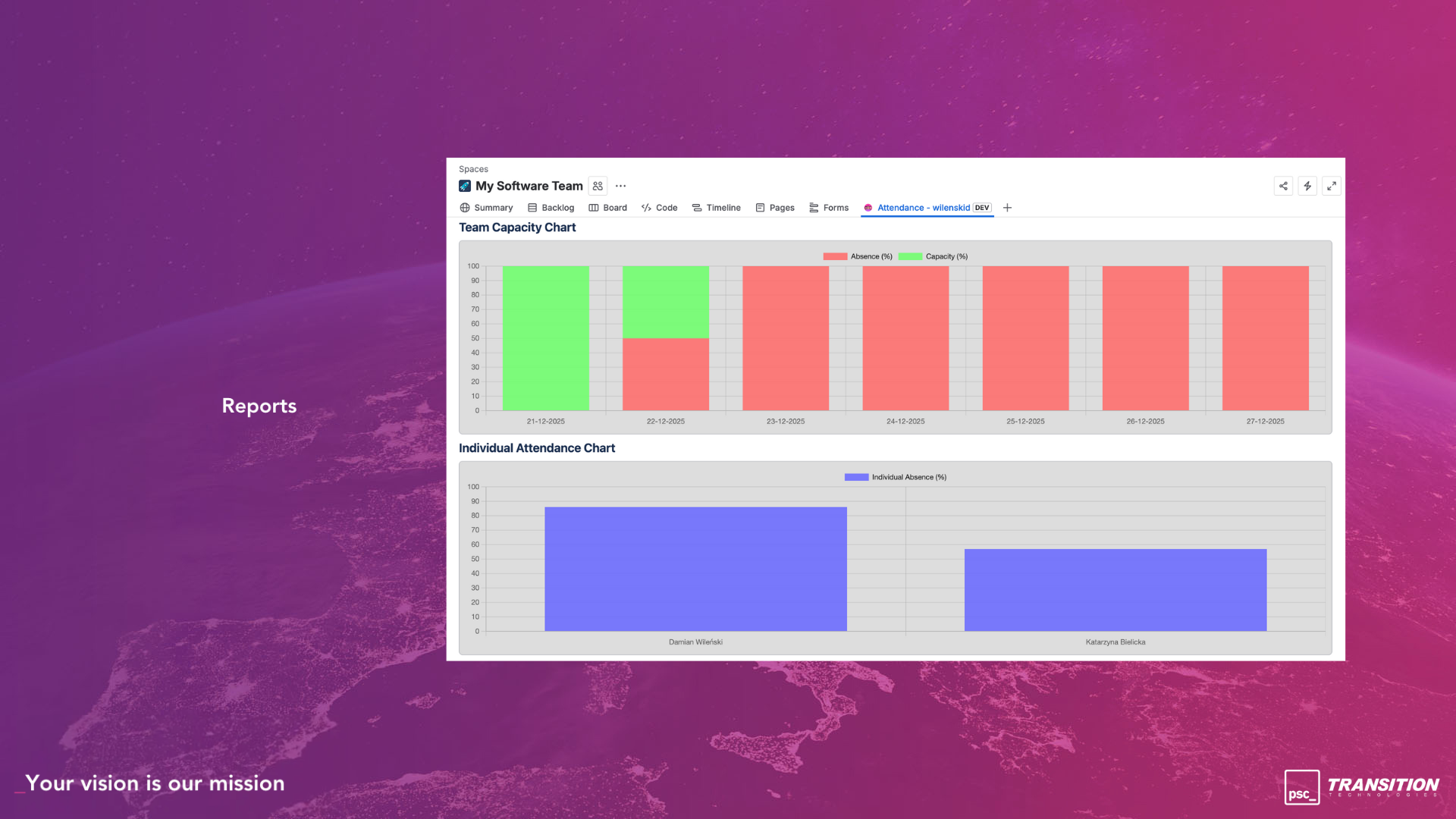
Reports
-
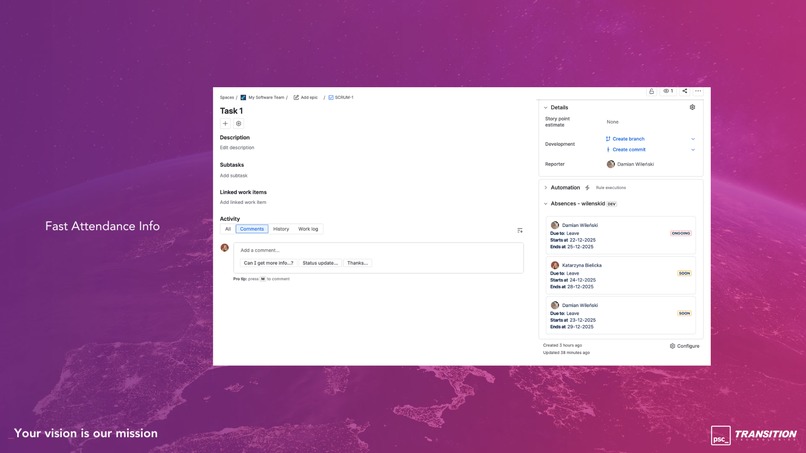
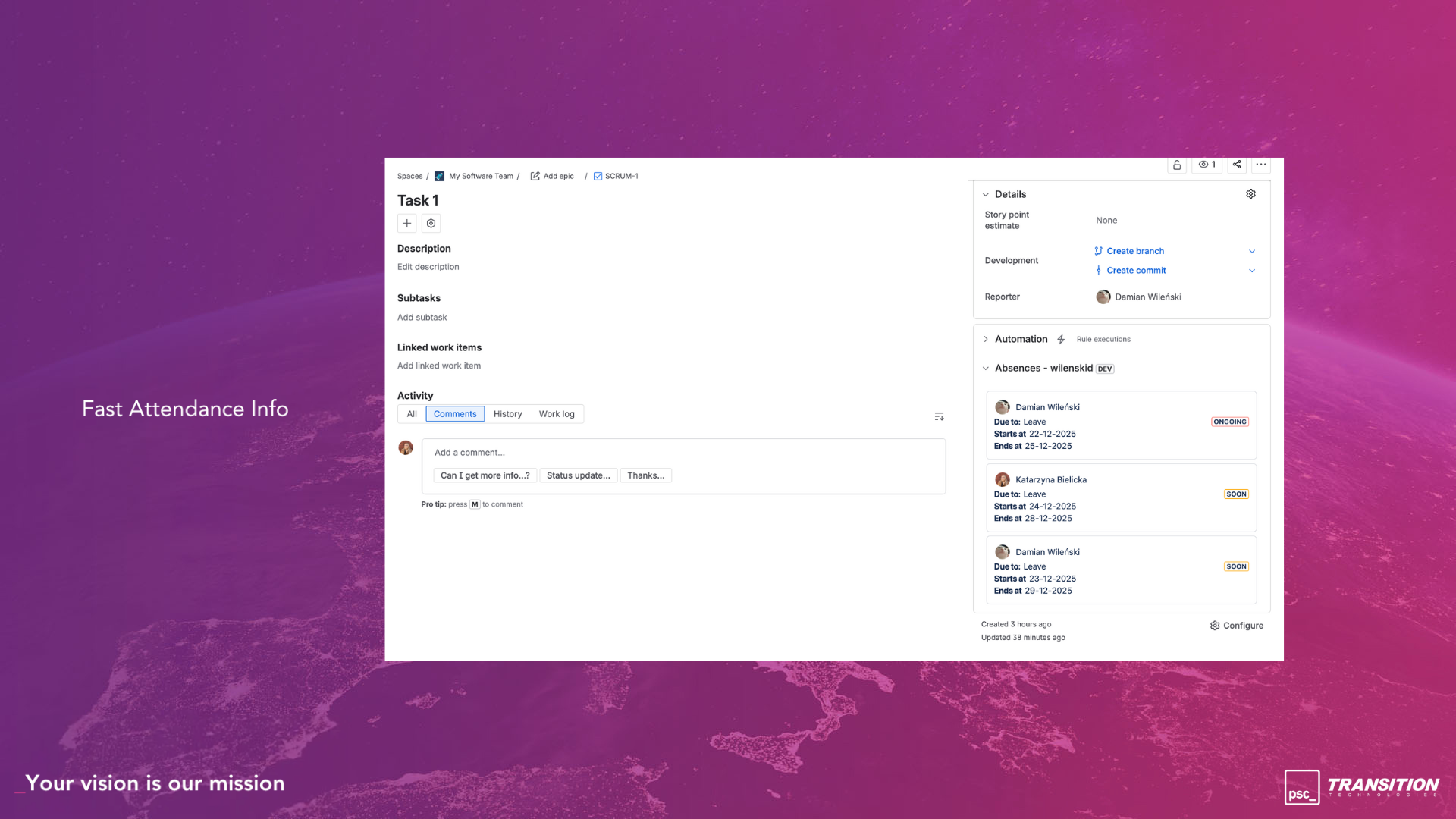
Info about absences in issue view
-
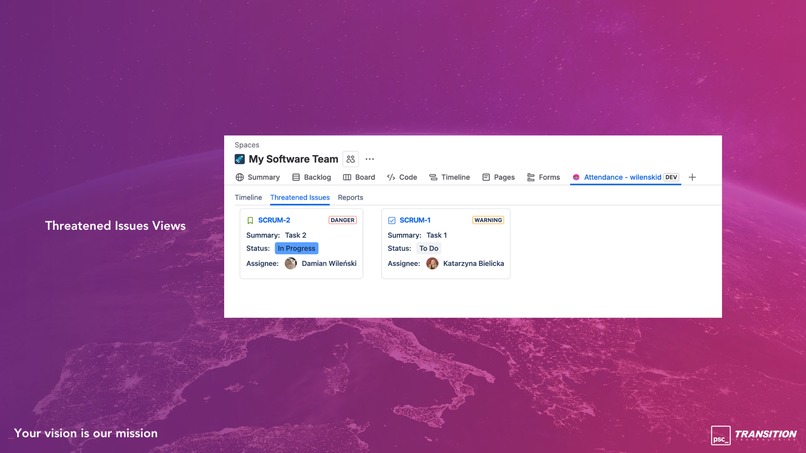
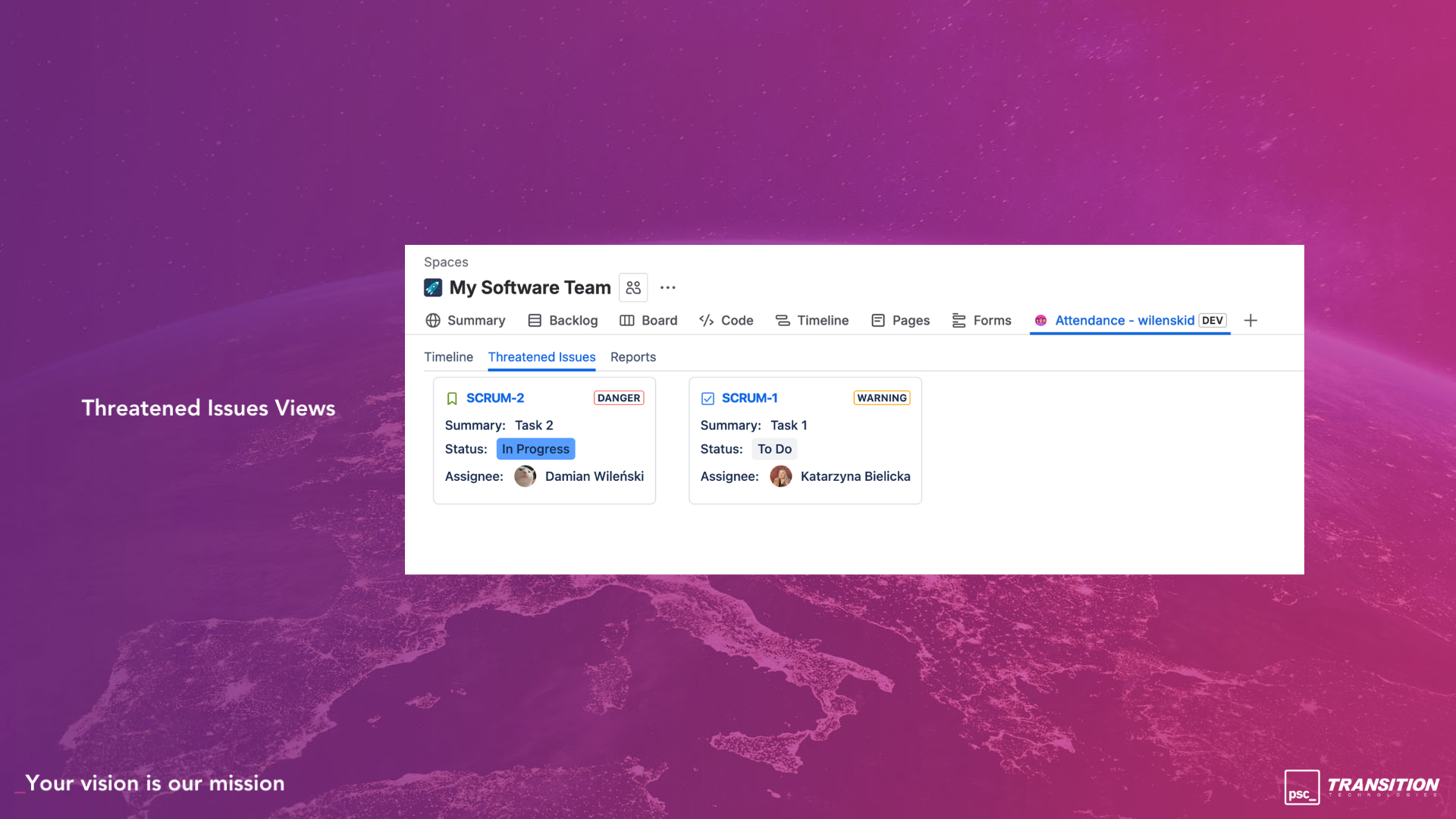
Threatened Issues
📌 The Challenge of Managing Absences
In our teams, managing absences and sprint participation in Jira often felt like solving a complicated puzzle. Time off, schedule changes, and temporary reassignments were scattered across emails, messages, and separate spreadsheets. Every time we tried to plan a sprint or adjust timelines, we found ourselves piecing together fragments of information, slowing down our workflow and creating frustration—especially when coordinating across multiple teams.
Because of this, we often couldn’t accurately forecast delivery dates, balance workloads, or make informed decisions about prioritisation. Over time, we realised this wasn’t just a challenge for us; many organisations face the same struggle when trying to keep projects on track while juggling constantly changing team availability.
It became clear that there had to be a better, more efficient way to see who’s available, when, and how it impacts the work ahead.
🚀 What It Does
The solution makes team availability visible right where work happens, transforming absences from last-minute surprises into clear, actionable insights.
🗓 Visual Timeline with Absences
View team schedules and planned absences in a single, interactive timeline. Add custom markers, activity definitions, make quick changes on the fly, and use soft booking to plan work flexibly—so capacity constraints and coverage gaps are visible before they become problems.
⚠️ Threatened Issues at a Glance
When team availability changes, it’s easy for work to quietly fall at risk. That’s why issues impacted by reduced availability are gathered into a dedicated tab, giving teams a clear, calm place to see what’s threatened. Instead of discovering problems at the last minute, teams can review affected issues early, talk through options, and decide whether to reassign work, adjust scope, or move timelines—before deadlines are missed.
🤖 Atlassian Rovo Integration
The app integrates with Atlassian Rovo to automatically bring Attendance.app information into the chat. This integration alloww teams to both pull existing absence data and create new absences.
📊 Absence-Aware Reports
New reports show team capacity - enabling more accurate forecasting, better planning, and data-driven decisions.
🔔 Smart Availability Notifications
Get notified when work is assigned to someone who’s absent or about to be, enabling you to proactively reassign tasks if needed.
✨ The Result
Fewer surprises, clearer plans, and smoother delivery—even as team availability changes.
🧱 How we built it
The app is built on Atlassian Forge Custom UI and leverages a modern, maintainable frontend stack:
- ⚛️ React & TypeScript – for a robust, type-safe UI that’s easy to maintain and extend.
- 🎨 Atlaskit – to provide a seamless, consistent Atlassian look and feel across the app.
- 🔄 TanStack Query – for efficient data fetching and near real-time updates, keeping information fresh without slowing down the UI.
- 🗄️ Custom Entity Store – enabling structured, scalable storage for notes and other app data.
The architecture is modular and extensible, making it straightforward to add new features.
⚡ Challenges We Faced
One of the trickiest challenges we ran into was creating a timeline that truly updates in real time. We wanted users to see absences, schedule tweaks, and soft-booked work instantly—without refreshing the page or losing their place. 🕒
Making this seamless required a careful balance of speed, accuracy, and reliability. To pull it off, we used a Custom Entity Store 🗄️ for structured, scalable data storage and TanStack Query 🔄 to keep everything in sync across users.
The result is a timeline that feels alive: as soon as someone updates their schedule, the change appears for the whole team. 🎯 Getting there wasn’t easy, but solving these challenges made the app far more intuitive and powerful. 💪
🏆 Accomplishments We’re Proud Of
✨ Built to feel native, not bolted on
One of our biggest achievements is creating a solution that feels like a natural part of Jira. By using Atlassian Forge, we built an app that’s secure, scalable, and deeply integrated with the Atlassian ecosystem—while still delivering a modern, responsive user experience with the help of Atlaskit.
🔍 From reactive to proactive planning
We’re especially proud of how the app helps teams stay ahead of problems. Instead of discovering issues late—when someone is already away and work is blocked—teams can now see risks early and have better conversations around scope, priorities, and ownership.
🧱 A foundation built for growth
Finally, we’re proud of the strong foundation we’ve put in place. The app is modular, extensible, and designed with the future in mind, giving us confidence it can evolve alongside the teams who rely on it. 🚀
📚 What We Learned
👥 Availability is core, not optional
We learned that availability isn’t an edge case—it’s a fundamental part of how teams actually work. When absences aren’t visible, planning quickly turns into guesswork, and even experienced teams struggle to stay aligned.
⚡ Real-time changes everything
Building real-time experiences raised the bar for both technical design and usability. Keeping timelines accurate and in sync across users required careful data modeling and a thoughtful syncing strategy, but it reinforced just how powerful an always-up-to-date view can be when teams plan together.
🎯 Details make the difference
Perhaps most importantly, we were reminded that small details have a big impact. Clear visuals, fast interactions, and calm, focused views truly matter when teams are under pressure. Designing with empathy helped us create an experience that supports better planning—not just more information.
🌱 Looking ahead
These lessons continue to shape how we think about the app’s future and guide the problems we’re excited to tackle next.
🔮 What's Next for the App
The journey doesn’t stop here. We’re thinking about several exciting improvements to make the app even more powerful:
- ⚡ Enhanced Absence Management – support for recurring time-offs
- 📈 Advanced Reporting & Insights – deeper analytics to help teams forecast capacity, identify bottlenecks, and optimise workload distribution
- 🎨 UI/UX Enhancements – more interactive views and improvements for a smoother planning experience.
Our goal is to continue turning team attendance into actionable insights, helping teams plan smarter, reduce surprises, and deliver on time—every time.


Log in or sign up for Devpost to join the conversation.