ATP Rankings Data Visualization
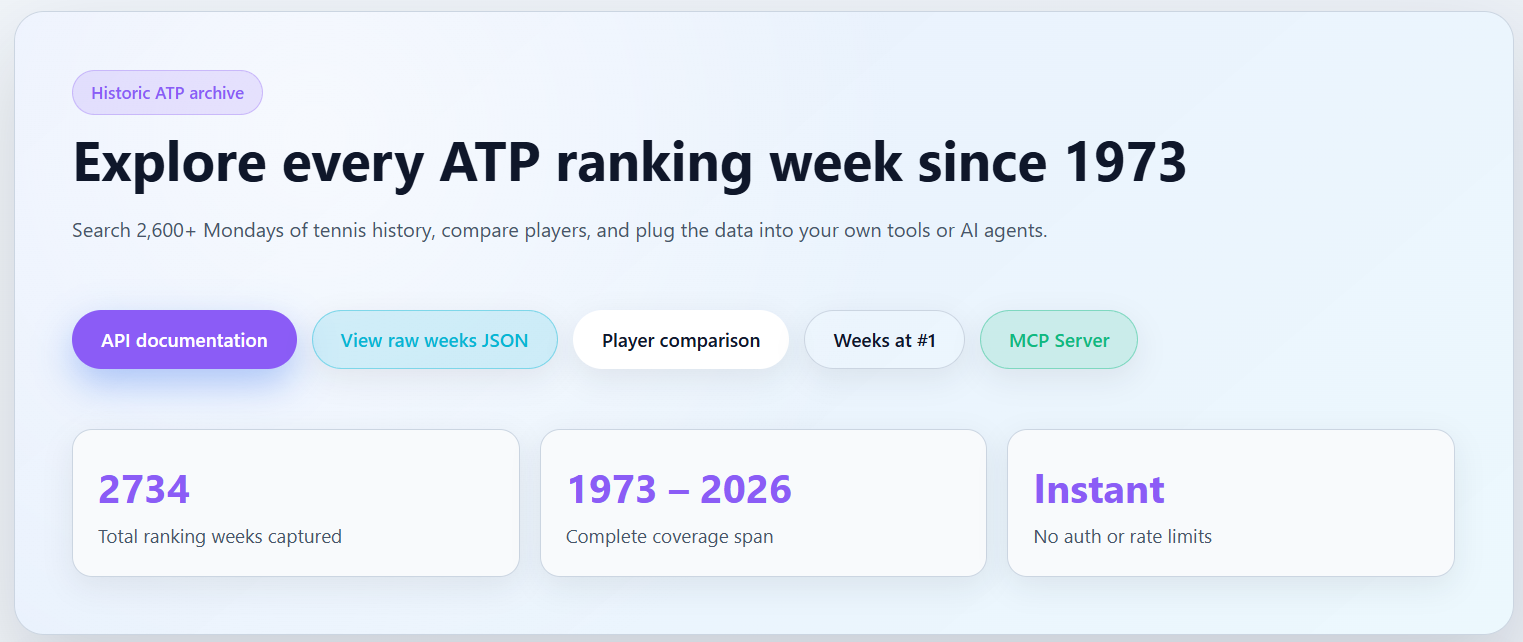
A comprehensive Python project for ATP tennis rankings data collection, analysis, and visualization. Features include web scraping, database management, interactive web interface, and AI integration via Model Context Protocol (MCP).
🌟 Features
- 📊 Data Collection: Automated scraping from atptour.com
- 🗄️ Database: 2,600+ weeks of historical ATP rankings (1973-2025)
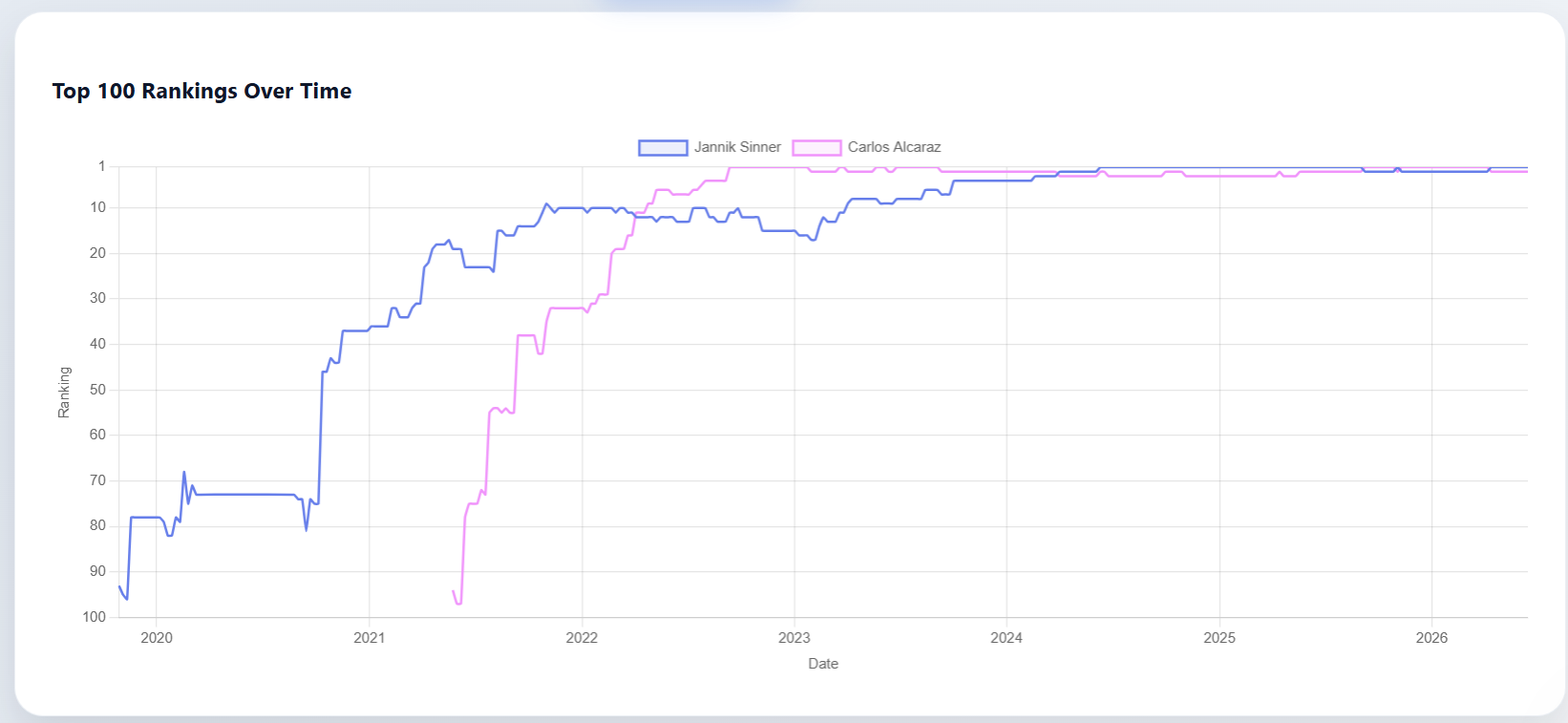
- 🌐 Web Interface: Modern FastAPI application with interactive charts
- 📈 CLI Analysis: Command-line tools for player statistics and comparisons
- 🤖 AI Integration: MCP server for AI assistant access
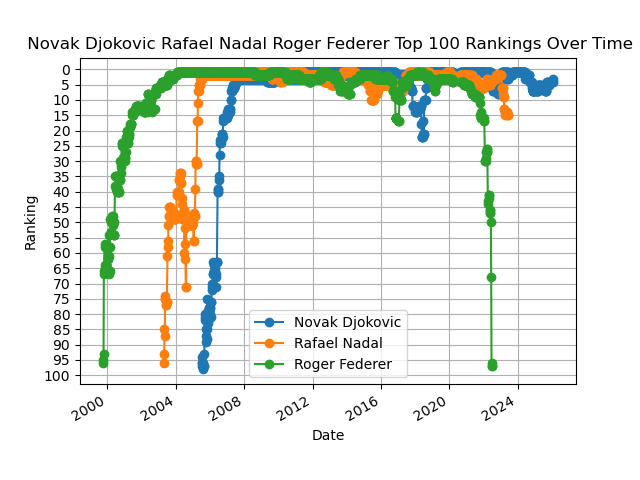
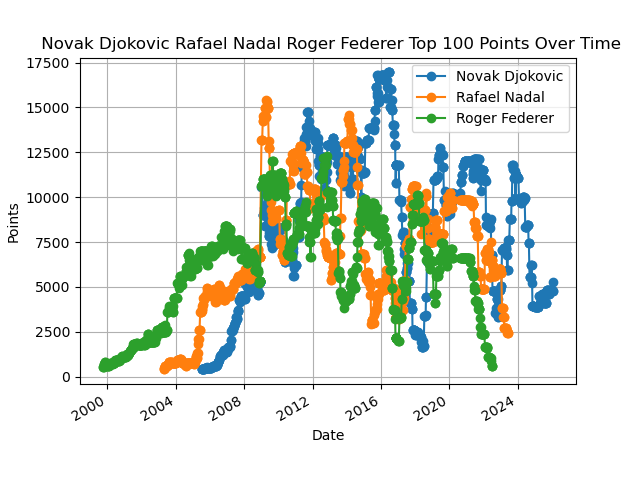
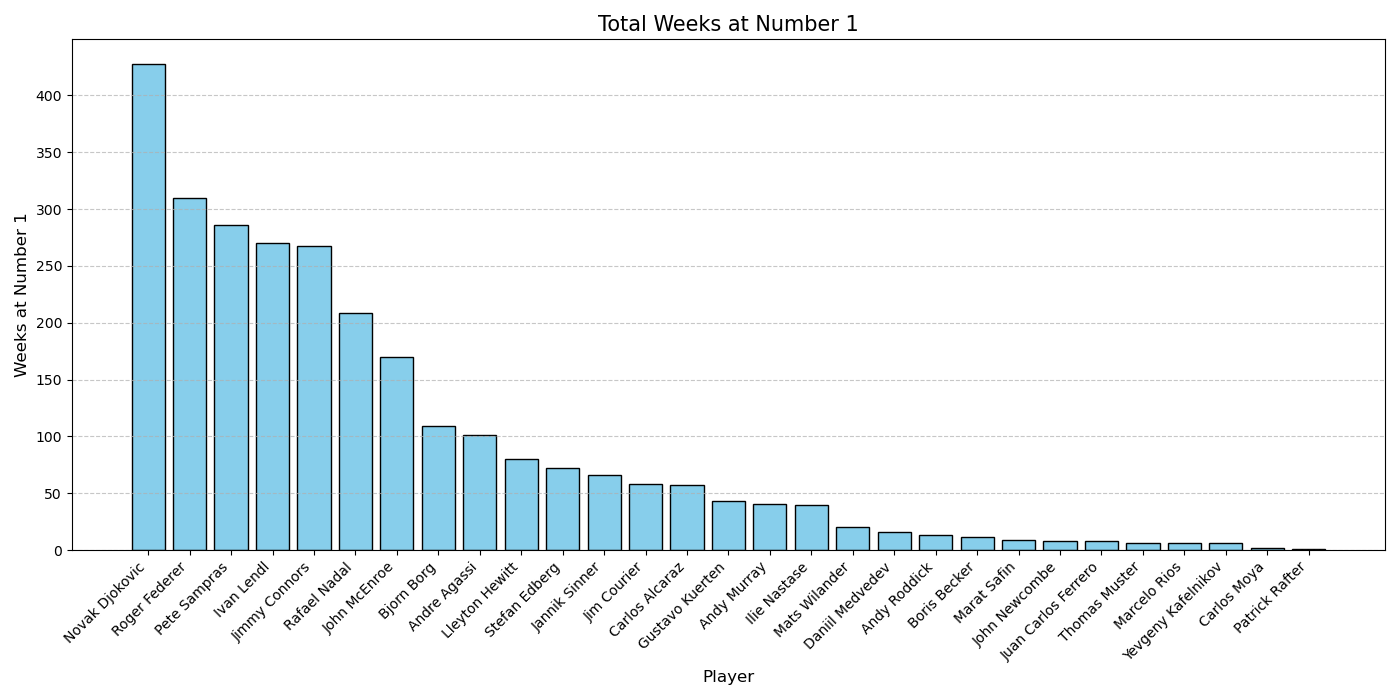
- 🎨 Visualizations: Matplotlib (CLI) and Chart.js (web) graphs
- 🧪 Testing: Comprehensive test suite with pytest
🚀 Quick Start
Installation
Clone the repository
git clone https://github.com/Jupiterian/ATP-Rankings-Data-Visualization.git
cd ATP-Rankings-Data-Visualization
Install dependencies
pip install -r requirements.txtRun the web application
uvicorn src.main:app --reload
Open your browser to http://localhost:8000
Update Database
To get the latest rankings data:
python scripts/filler.py
📁 Project Structure
ATP-Rankings-Data-Visualization/
├── src/                      # Core application code
│   ├── main.py              # FastAPI web application
│   ├── services.py          # Business logic layer
│   ├── mcp_router.py        # MCP API endpoints
│   └── mcp_manifest.json    # MCP schema definition
├── scripts/                  # Utility scripts
│   ├── generate.py          # Regenerate entire database
│   ├── filler.py            # Update database with latest data
│   ├── analyze.py           # CLI data analysis tool
│   ├── debug.py             # Database debugging utility
│   ├── test_mcp.sh          # Quick MCP endpoint tests
│   ├── test_render_mcp.py   # Production deployment tests
│   ├── keep_alive.py        # Render free tier keep-alive
│   └── deploy.sh            # Deployment helper
├── docs/                     # Documentation
│   ├── MCP_README.md        # MCP server documentation
│   ├── MCP_DEPLOYMENT.md    # Deployment guide
│   ├── MCP_IMPLEMENTATION_SUMMARY.md
│   └── MCP_QUICK_REFERENCE.md
├── templates/                # HTML templates (Jinja2)
│   ├── index.html           # Home page
│   ├── week.html            # Weekly rankings
│   ├── comparison.html      # Player comparison
│   ├── weeks_at_no1.html    # Histogram visualization
│   └── api_docs.html        # API documentation
├── tests/                    # Test suite
│   └── test_mcp.py          # MCP endpoint tests
├── Examples/                 # Example visualizations
├── rankings.db              # SQLite database (2,600+ tables)
├── Dockerfile               # Container image
├── docker-compose.yml       # Docker Compose config
├── Procfile                 # Render/Heroku deployment
├── runtime.txt              # Python version
└── requirements.txt         # Python dependencies
🌐 Web Application
Features
- Browse Rankings: View all 2,600+ weeks organized by year
- Player Search: Autocomplete search across all players
- Player Comparison: Side-by-side statistics with career graphs
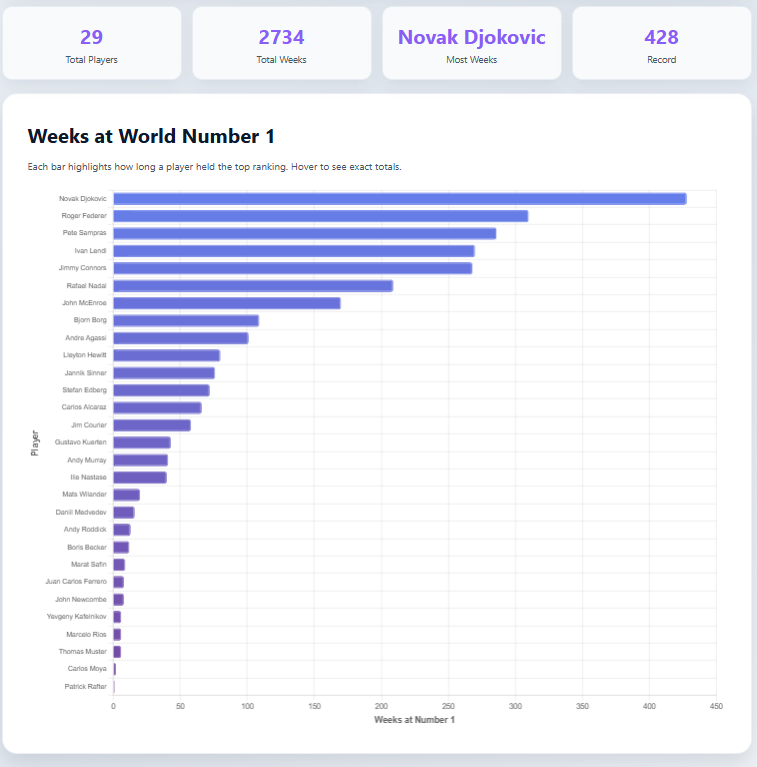
- Weeks at #1: Interactive histogram of world #1 rankings
- API Access: RESTful API with comprehensive documentation
- Keyboard Navigation: Arrow keys to navigate between weeks
Running Locally
uvicorn src.main:app --reload
Access at http://localhost:8000
API Endpoints
GET /- Home pageGET /week/{week_id}- Weekly rankingsGET /comparison- Player comparison toolGET /weeks-at-no1- Weeks at #1 histogramGET /api-docs- API documentationGET /api/weeks- List all available weeksGET /api/week/{week_id}- Get week dataGET /api/search-players?q={query}- Search playersPOST /api/player-factfile- Player statisticsPOST /api/player-career- Career time-series data
🤖 MCP Server (AI Integration)
The MCP server allows AI assistants like Claude to query ATP rankings data.
MCP Endpoints
Base URL: http://localhost:8000/mcp
GET /mcp/health- Health checkGET /mcp/manifest- Server capabilitiesPOST /mcp/tools/search_players- Search for playersPOST /mcp/tools/get_player_factfile- Player statisticsPOST /mcp/tools/get_player_career- Career historyGET /mcp/tools/get_weeks_at_no1- Weeks at #1 leaderboardGET /mcp/tools/get_all_weeks- Available weeks listPOST /mcp/tools/get_week_rankings- Specific week data
Testing MCP
# Run test suite
pytest tests/test_mcp.py -v

# Quick smoke test
bash scripts/test_mcp.sh

# Test production deployment
python scripts/test_render_mcp.py https://your-app.onrender.com
Full Documentation: See docs/MCP_README.md
📊 CLI Analysis Tools
analyze.py
Analyze player data and generate matplotlib visualizations.
# Show player statistics
python scripts/analyze.py -f Roger_Federer

# Plot ranking history
python scripts/analyze.py -r Roger_Federer Rafael_Nadal

# Plot points history
python scripts/analyze.py -p Novak_Djokovic

# Weeks at #1 histogram
python scripts/analyze.py -n
Options:
-h- Show help menu-f- Player factfile (statistics)-r- Ranking history plot-p- Points history plot-n- Weeks at #1 bar graph
Examples: See Examples/Examples.md
🗄️ Database Management
Update Database (Recommended)
Add latest rankings data:
python scripts/filler.py
Regenerate Database
Complete database rebuild (takes ~1 hour):
python scripts/generate.py
Debug Database
Find and fix problematic tables:
python scripts/debug.py
Browse Database
Recommended GUI tool: DB Browser for SQLite
🚀 Deployment
Deploy to Render (Free)
Push to GitHub
git add .
git commit -m "Deploy ATP Rankings"
git push origin main
Connect to Render
- Go to render.com
- Click "New Web Service"
- Connect your GitHub repository
- Render auto-detects settings from
Procfile
Deploy
- Click "Create Web Service"
- Wait 2-3 minutes for deployment
Keep Alive (Optional)
python scripts/keep_alive.py https://your-app.onrender.com
Full Guide: See docs/MCP_DEPLOYMENT.md for Railway, Fly.io, Heroku, Docker, and VPS options.
🧪 Testing
# Run all tests
pytest tests/ -v

# Run with coverage
pytest tests/ --cov=src --cov-report=html

# Test specific module
pytest tests/test_mcp.py::TestMCPHealth -v
🛠️ Technologies
Backend:
- Python 3.12
- FastAPI (web framework)
- SQLite3 (database)
- Uvicorn (ASGI server)
- Pydantic (validation)
Frontend:
- Jinja2 (templates)
- Chart.js (interactive charts)
- HTML5/CSS3
Scraping & Analysis:
- BeautifulSoup4 (web scraping)
- Matplotlib (static visualizations)
Testing & Deployment:
- Pytest (testing framework)
- Docker (containerization)
- Render/Railway/Fly.io (hosting)
📝 License
See LICENSE file for details.
🤝 Contributing
Contributions welcome! Please:
- Fork the repository
- Create a feature branch
- Make your changes
- Add tests
- Submit a pull request
📧 Contact
For questions or issues, please open a GitHub issue.
⭐ If you find this project useful, please star the repository!


Log in or sign up for Devpost to join the conversation.