1. Project Name
Aster — Learning You Can Hear
2. The Story Behind It
What problem are we addressing, and why does it matter to us?
A student goes to YouTube because that is where the syllabus is taught for free. It is the great equaliser of this generation: a student in a village can watch the same lecture as a student in a capital city, and it costs neither of them anything.
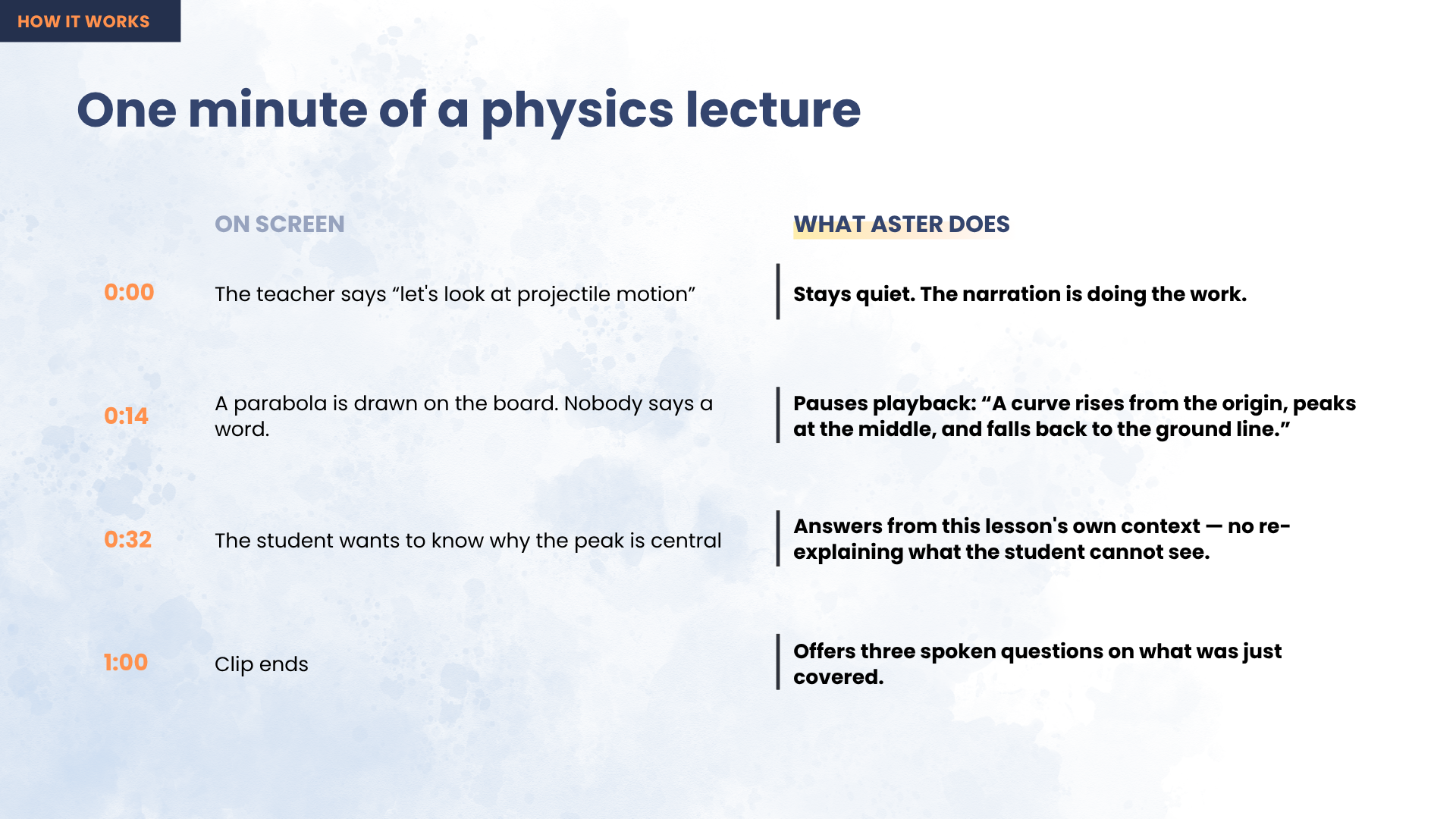
Then, fourteen minutes in, the teacher stops talking, draws a parabola on the board, and says four words:
"As you can see here…"
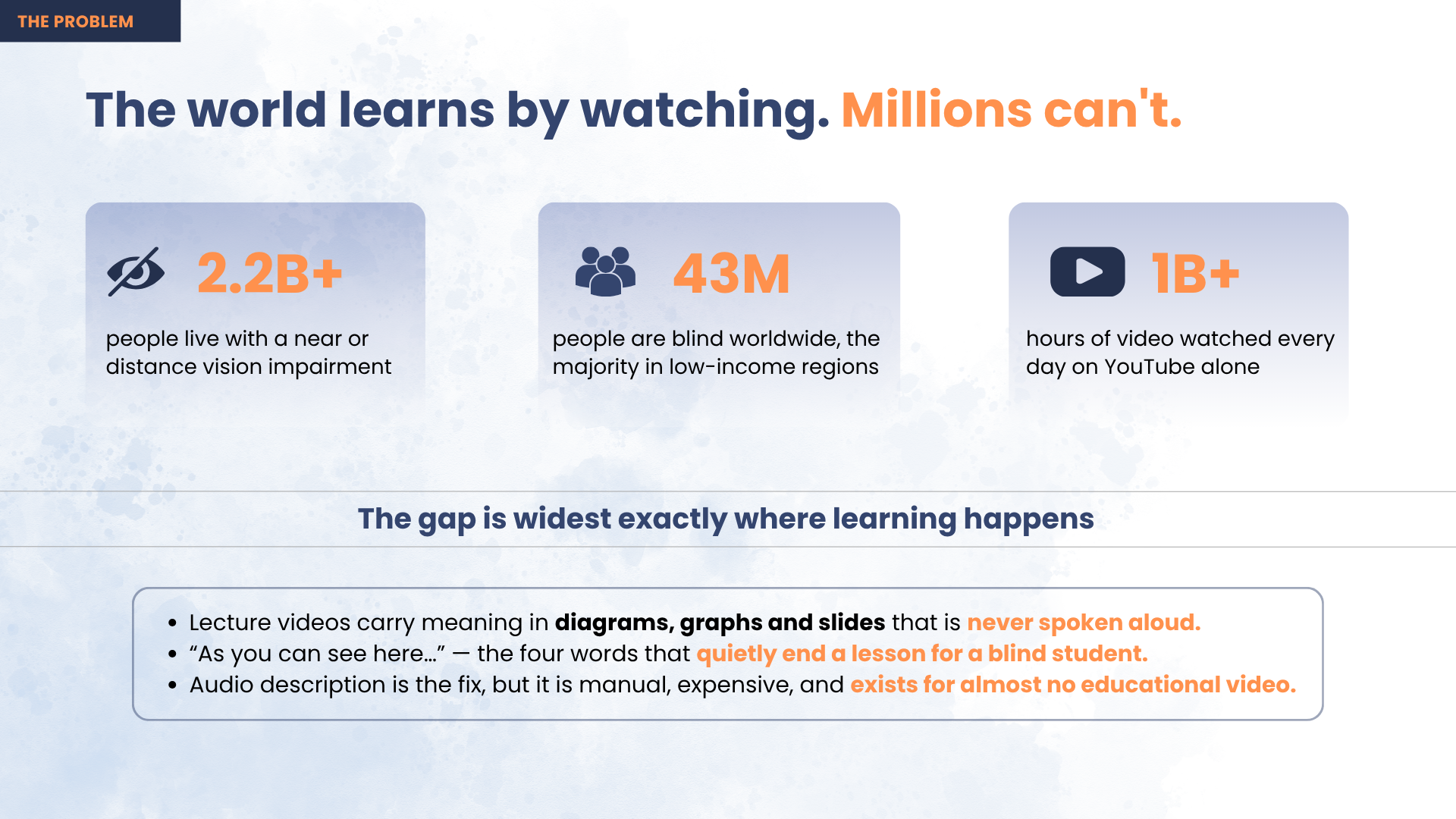
For a blind student the lesson ends right there. Not because the physics is beyond them, but because nobody said out loud what was on the screen. A sighted classmate takes in the curve in half a second and moves on; a blind learner hears silence, then a sentence that assumes they saw it.
This is what bothered us enough to build something. The unfairness is not that the material is hard, or expensive, or unavailable — it is free and it is right there. The only thing standing between a blind student and that lecture is that nobody bothered to describe the picture. It is an accident of how the video was made, and it repeats every few minutes, in every subject, for their entire education.
And it is not a rare problem. 43 million people are blind and 2.2 billion live with vision impairment — 90% of them in low- and middle-income countries, which is exactly where free video is the only affordable teacher, and exactly where professionally described course material will never arrive.
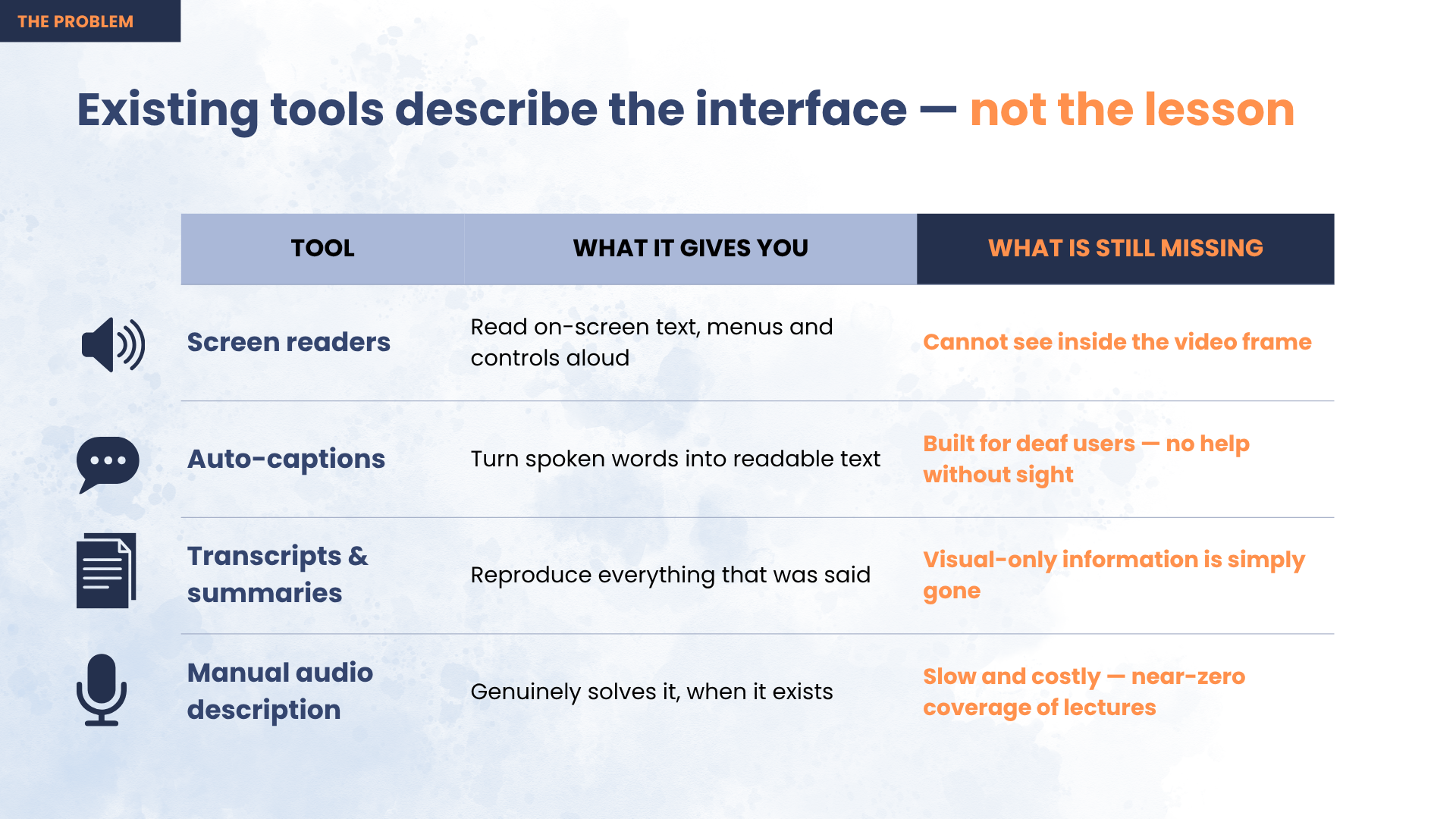
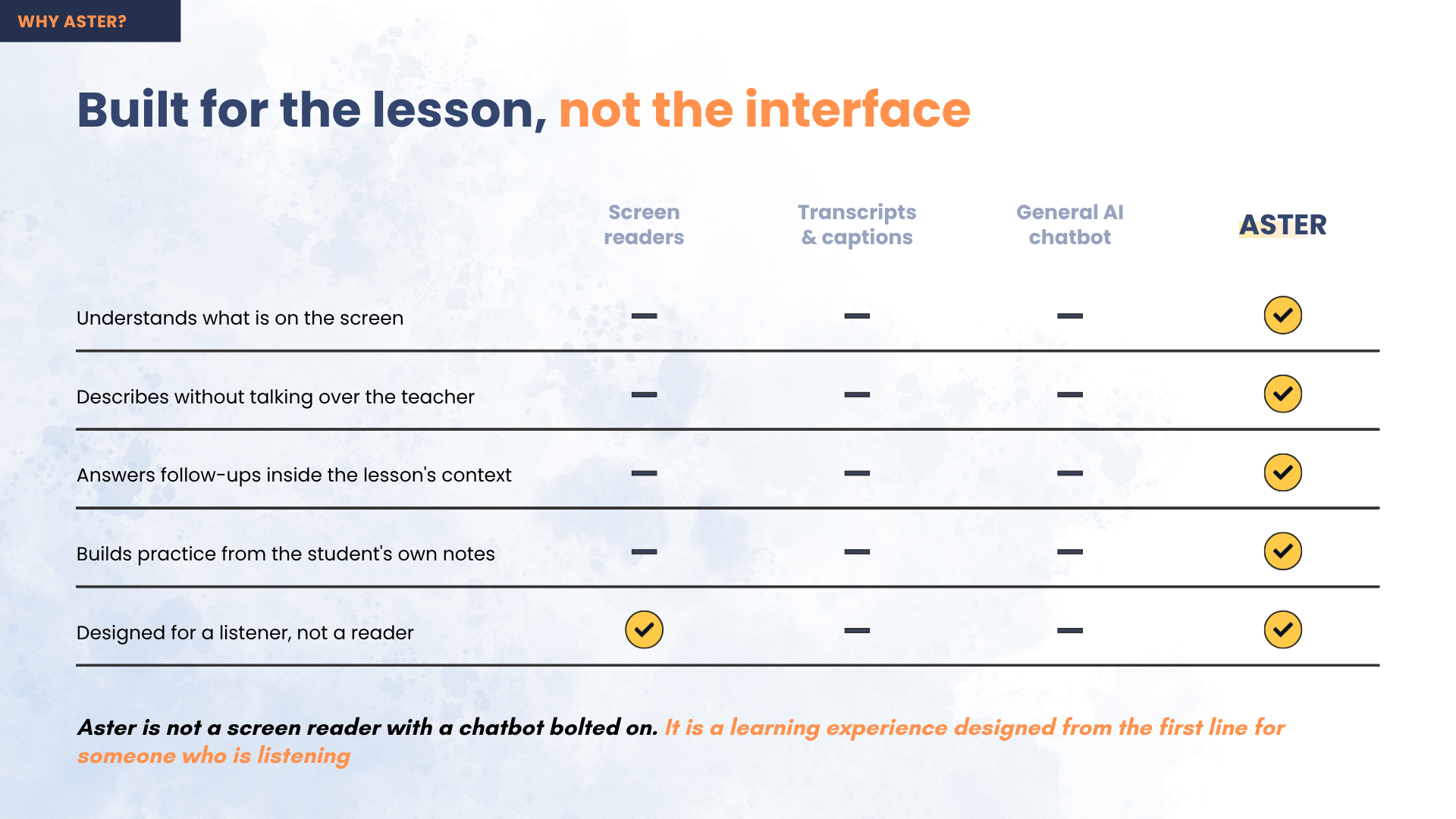
What made it worth building rather than complaining about is that every existing option fails for a reason you can name:
| What exists today | Why it fails |
|---|---|
| Screen readers | They read the interface, not the lesson. The play button is announced; the diagram is not. |
| Captions & transcripts | They carry the words the teacher said — and the whole problem is what the teacher didn't say. |
| Describe-everything AI | It narrates every frame and talks straight over the instructor. Two voices at once is noise, not a lesson. |
| Human audio description | The correct fix, but manual and expensive — so it exists for almost no educational video, and never for the lecture needed tonight. |
How does our solution work?
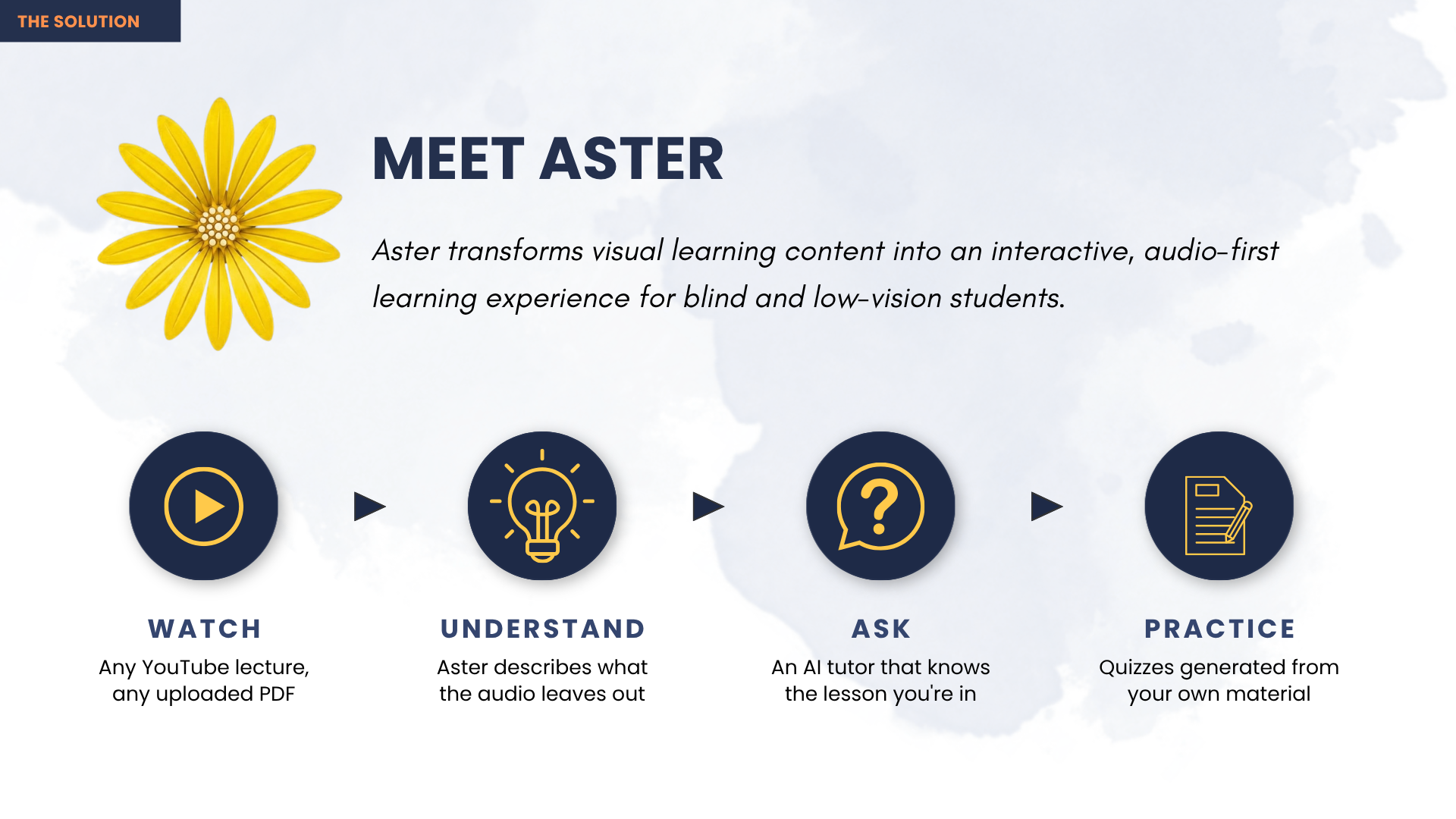
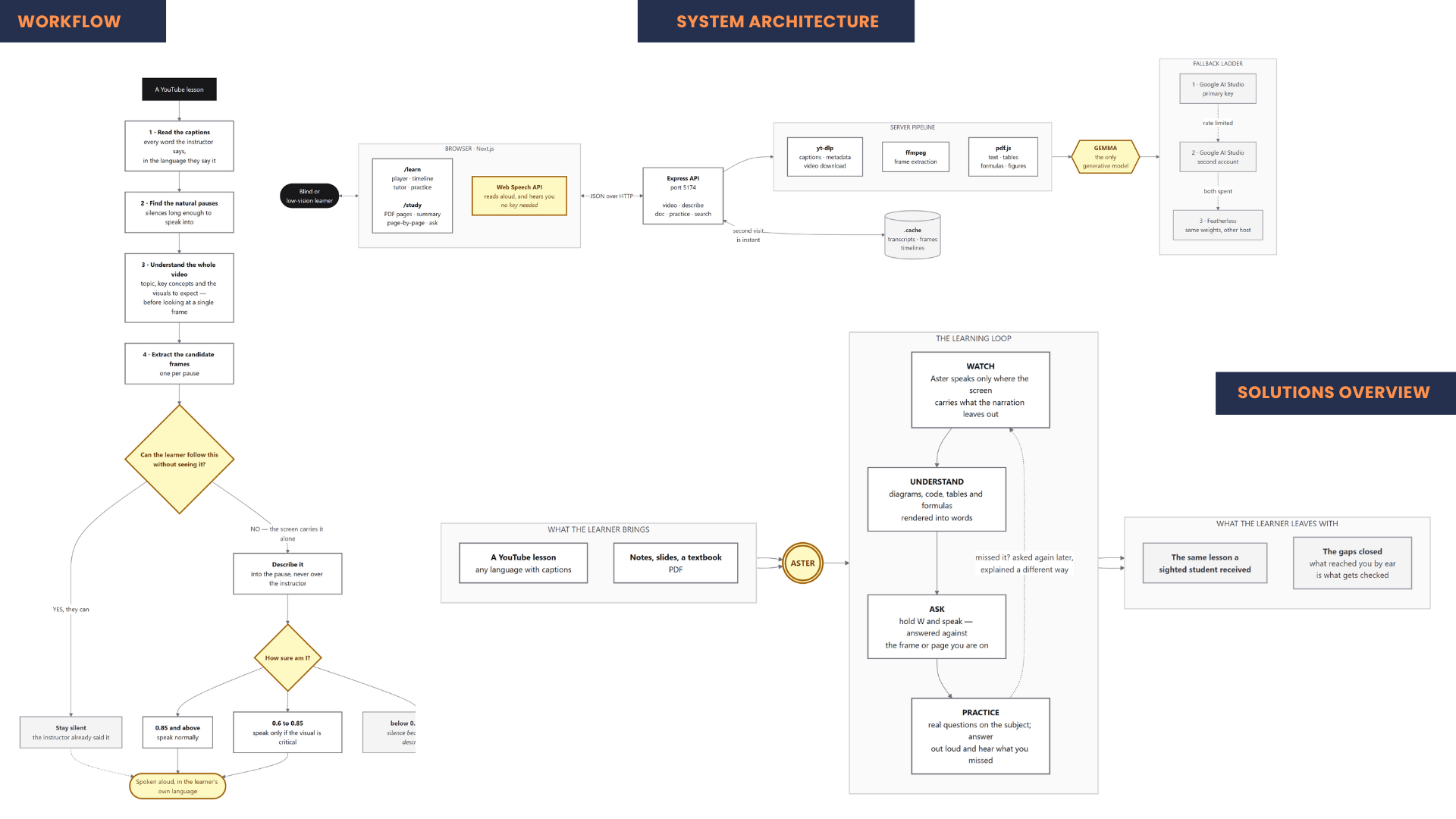
Aster asks a different question than every other tool in this space. For each moment in a lecture it does not ask "what is on screen?" — it asks:
"Can the learner follow this without seeing it?"
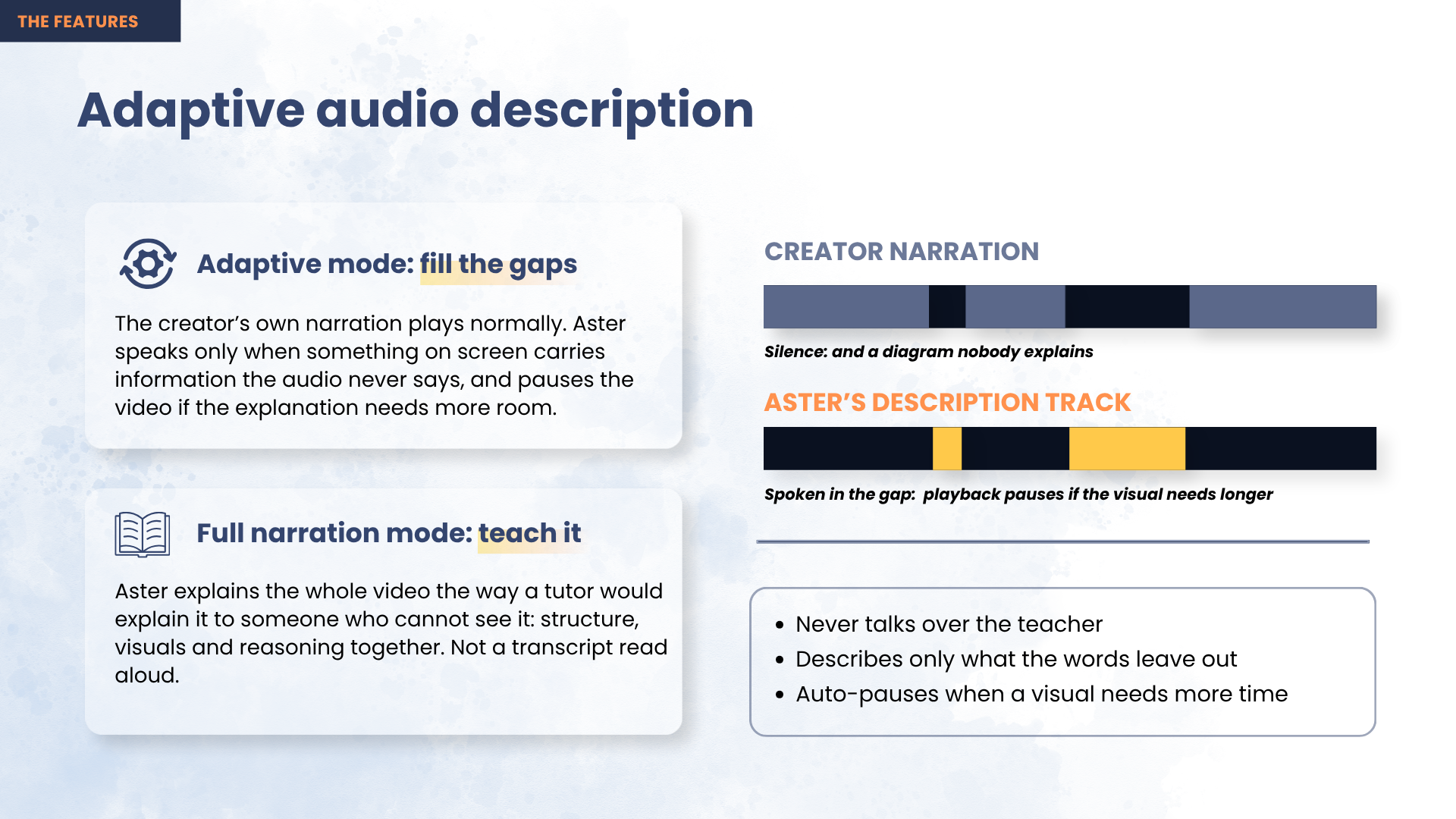
Only when the answer is no does it speak, and it speaks into a natural pause in the narration, so it never talks over the teacher.
The pipeline runs in five steps:
- Read the lesson — pull the video's own captions into a timed transcript, then run a whole-video pass so the model understands what is being taught before judging any single frame.
- Find the silences — detect gaps long enough to speak into. A silence must be at least 1.2 seconds, and no two descriptions may fall within 8 seconds of each other.
- Look at the screen — extract a frame at each candidate moment and send it to a multimodal model with the surrounding transcript for context.
- Decide, then describe — the model judges whether the frame carries information the narration left out, and returns a confidence score. ≥ 0.85 speak normally · 0.60–0.85 speak only if the visual is genuinely critical · < 0.60 discard and stay silent.
- Speak it into the gap — a short description plays while the video runs; one that outlasts its pause holds the video until the sentence genuinely ends, then resumes.
Here is the part we think is genuinely unconventional. On a real 18-minute lecture, Aster examined 25 moments and described only 12 — staying silent at the other 13.
That is the product working, not failing. A tool that described all 25 would be far easier to build and completely useless to listen to. Almost everything in this space proves it works by talking constantly; Aster proves it works by the thirteen times it decided to say nothing.
The rule behind everything: silence is better than a wrong description.
What are the key features?
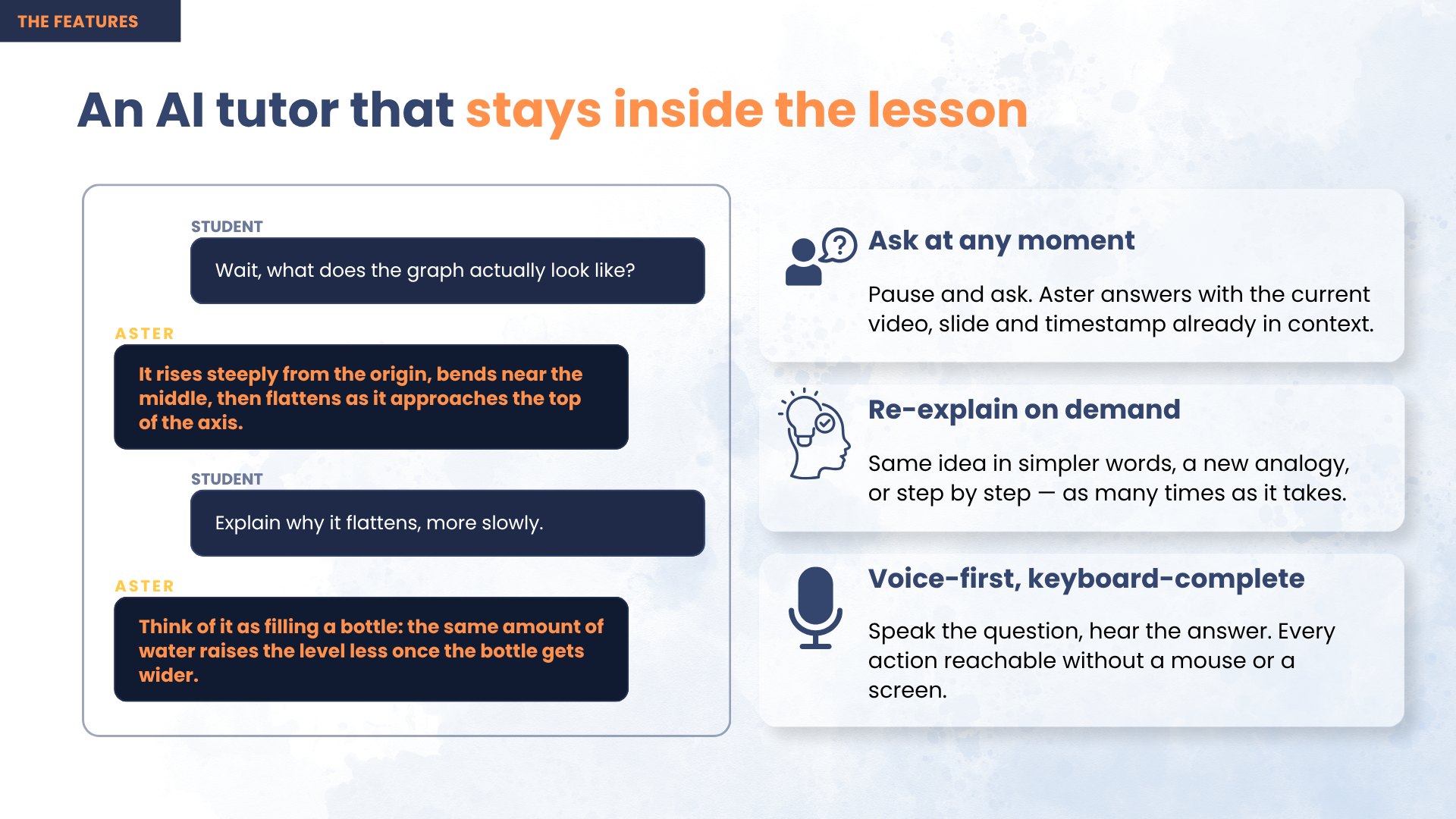
Decide-first descriptions. Every moment is a decision before it is a description, and most of the time the decision is silence.
Never talks over the teacher. Long explanations pause the video rather than being cut short — implementing WCAG 2.2 SC 1.2.7, Extended Audio Description — and if the learner resumes playback mid-sentence, speech stops so two voices never collide.
Ask about the exact thing on screen. Pause anywhere and ask by keyboard, by one of eight one-key presets, or out loud. Answers are grounded in that frame and that lesson, so "read the code" returns the code actually displayed rather than a plausible invention.
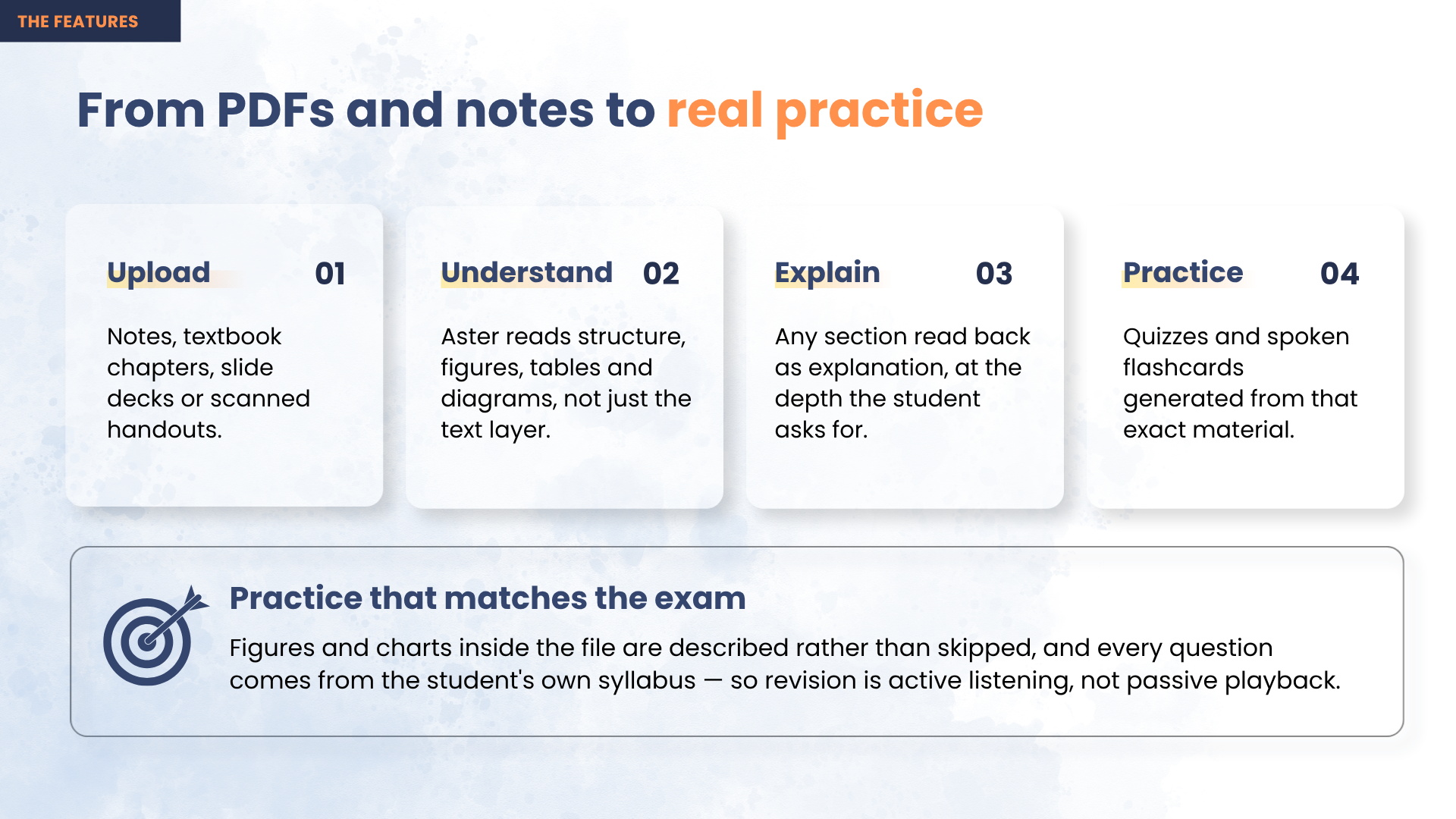
Practice built from the gap, not the lesson. Two signals drive every practice question: a visual Aster had to describe (the concept arrived through the ear — second-hand, single pass, nothing to glance back at) and a question the learner asked (a timestamped admission of uncertainty). A concept the instructor narrated fully is never tested — the learner got it on equal terms with a sighted student, so there is no gap to close.
Notes and textbooks too. PDFs get the same treatment, describing the figures, tables and diagrams a plain text extraction silently throws away, then quizzing from the student's own syllabus.
Multilingual by default. Aster describes a lesson in the language it is taught in — a Bengali physics lecture is described in Bengali, spoken with a Bengali voice.
Usable with no sight at all. Every action has a single-key shortcut, ARIA live regions announce every state change, and the video player is hidden from assistive technology so a blind learner never lands inside a control they cannot drive. Spoken search means a lesson can be found with two keys and no sight.
Works on the first click. Finished lessons ship inside the deployed app, so a new visitor gets a described lesson instantly — no account, no key, no waiting.
What tools, languages and APIs did we use?
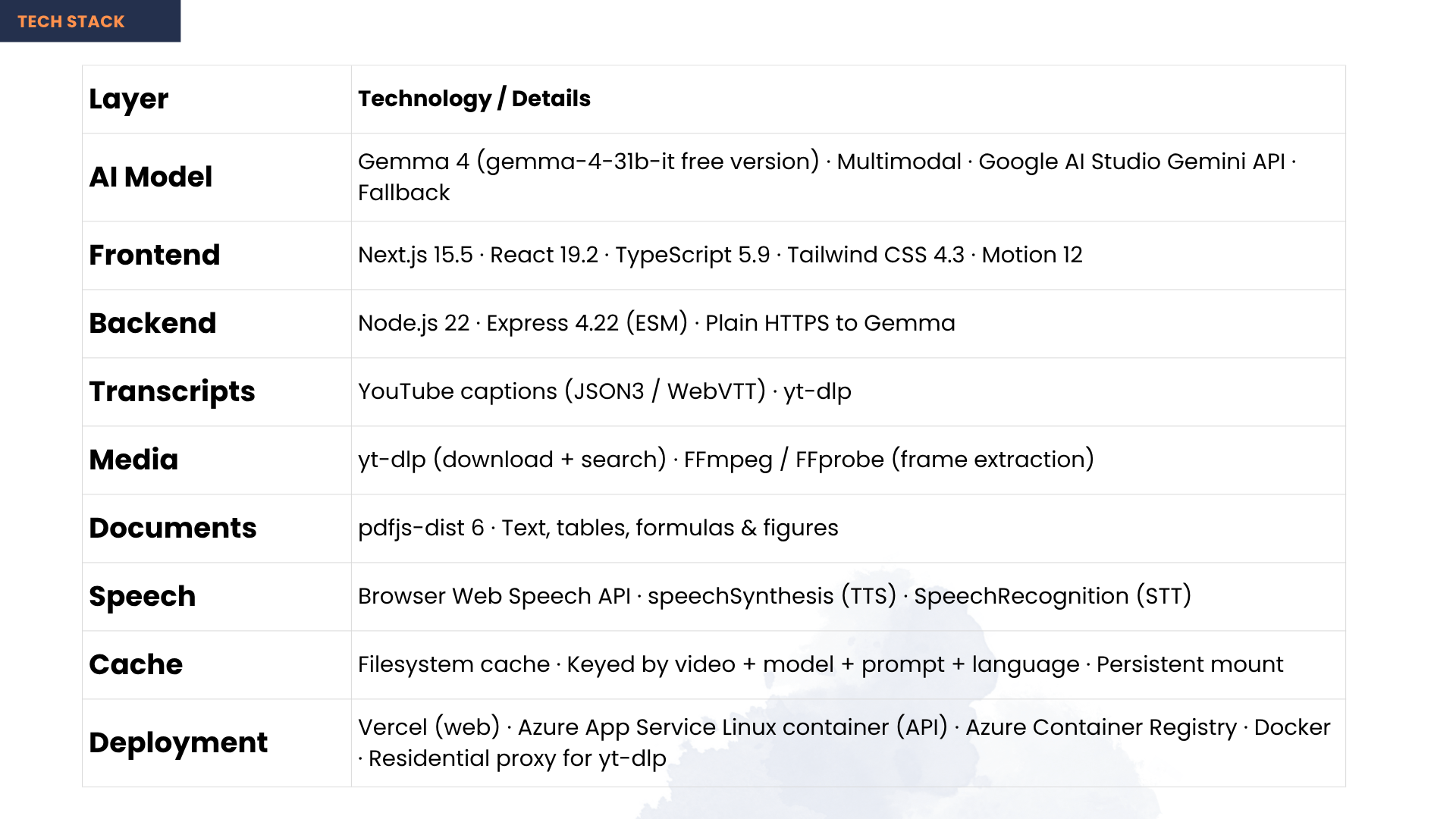
| Layer | Technology |
|---|---|
| AI model | Gemma 4 (multimodal) via the Google AI Studio / Gemini API — generates every description, answer and practice question |
| Languages | TypeScript · JavaScript |
| Frontend | Next.js · React · Tailwind CSS |
| Backend | Node.js · Express |
| Transcripts | YouTube caption tracks (json3 / WebVTT) |
| Media | yt-dlp · ffmpeg · ffprobe |
| Documents | PDF.js |
| Speech | Web Speech API — synthesis and recognition run in the browser, so spoken search and answers need no key and no server round trip |
| Deployment | Docker · Azure App Service · Azure Container Registry · Vercel |
It is genuinely deployed, not a demo on a laptop. Two things were hard enough to be worth naming. YouTube refuses anonymous downloads from datacenter IPs, and cookies only fix it for about three days — because the check keys on the IP, not the session, so authenticating harder never converges. We changed where the request comes from instead, routing egress through a residential proxy, after which no cookies are needed at all. And every result is cached, keyed by video, model, prompt version, language and settings, so a video is processed exactly once, ever — a second viewing costs zero downloads and zero model calls.
Who does this help?
Blind and low-vision students, first. Low vision is far more common than total blindness, and those learners are usually excluded twice over: captions do not help them, and describe-everything tools are as unusable for them as for anyone else. Because Aster speaks only where the screen carries information the narration leaves out, it serves both someone with no sight and someone who can see part of the screen but not the labels on a diagram or the small print in a terminal.
Especially students in low- and middle-income countries, where 90% of vision loss is concentrated and where free online video is often the only accessible teacher available.
Also: teachers and institutions serving blind students, who have no affordable way to make existing material accessible; auditory learners and anyone studying without looking at a screen; and content creators, who get accessible versions of their lectures without doing any work.
3. Impact Statement
Aster gives blind and low-vision students access to something they already have a right to. The lecture is free and public — the only thing standing between them and it is that nobody described the picture on screen. Aster describes it automatically, in the language the lesson is taught in, without asking the video's creator to do anything.
That last part is what makes the impact real rather than theoretical. Approaches that require creators to add descriptions can never catch up with the lectures already online; Aster works on the backlog as it stands today. And because each video is processed exactly once and cached forever, the cost of the thousandth student watching a described lesson is effectively zero — so this can be free for the learners who need it most, who are overwhelmingly in the places least able to pay.
It also does not stop at access. Describing the screen only returns a blind student to where their sighted classmate started; the tutor and the gap-driven practice are what carry them to the exam.
4. Proof of Work
| File | What it shows |
|---|---|
docs/screenshots/04-description-timeline.png |
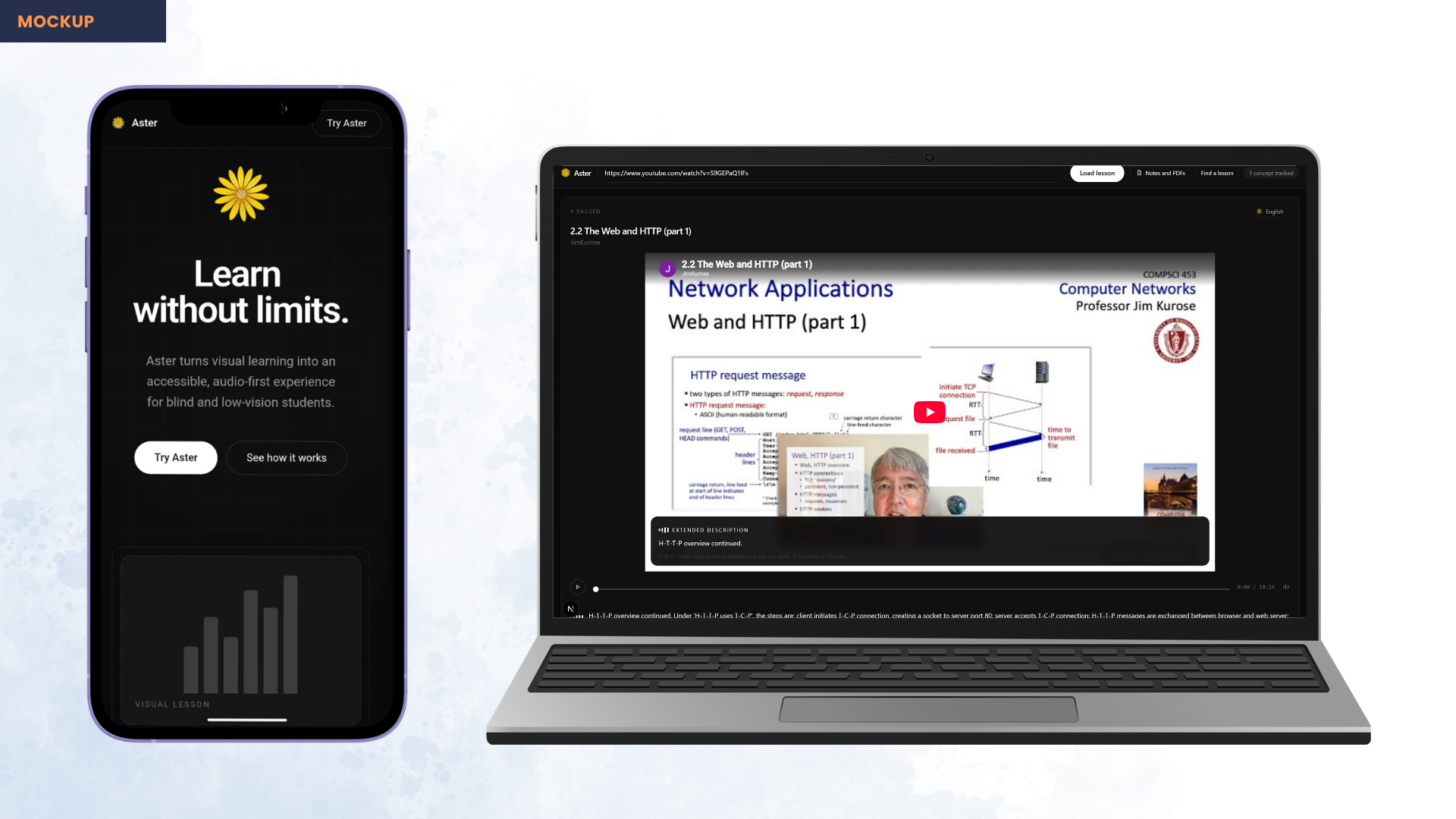
25 moments examined · 12 described — the judgement, visible as a number |
docs/screenshots/05-speaking-caption.png |
A description holding the video, revealed sentence by sentence as spoken |
docs/screenshots/10-study-page-explained.png |
A real diagram-heavy page with Aster's explanation underneath |
docs/screenshots/08-voice-search.png |
Spoken search — a lesson found with no sight |
docs/screenshots/00-demo-thumbnail.png |
Cover image |
Demo video: https://youtu.be/ANY_swvypIY
5. Project Link
Live demo   https://aster-coral.vercel.app
Source      https://github.com/AuvroIslam/Aster
The live demo needs no key, no account and no upload — described lessons are ready on the first click.
6. Your Team
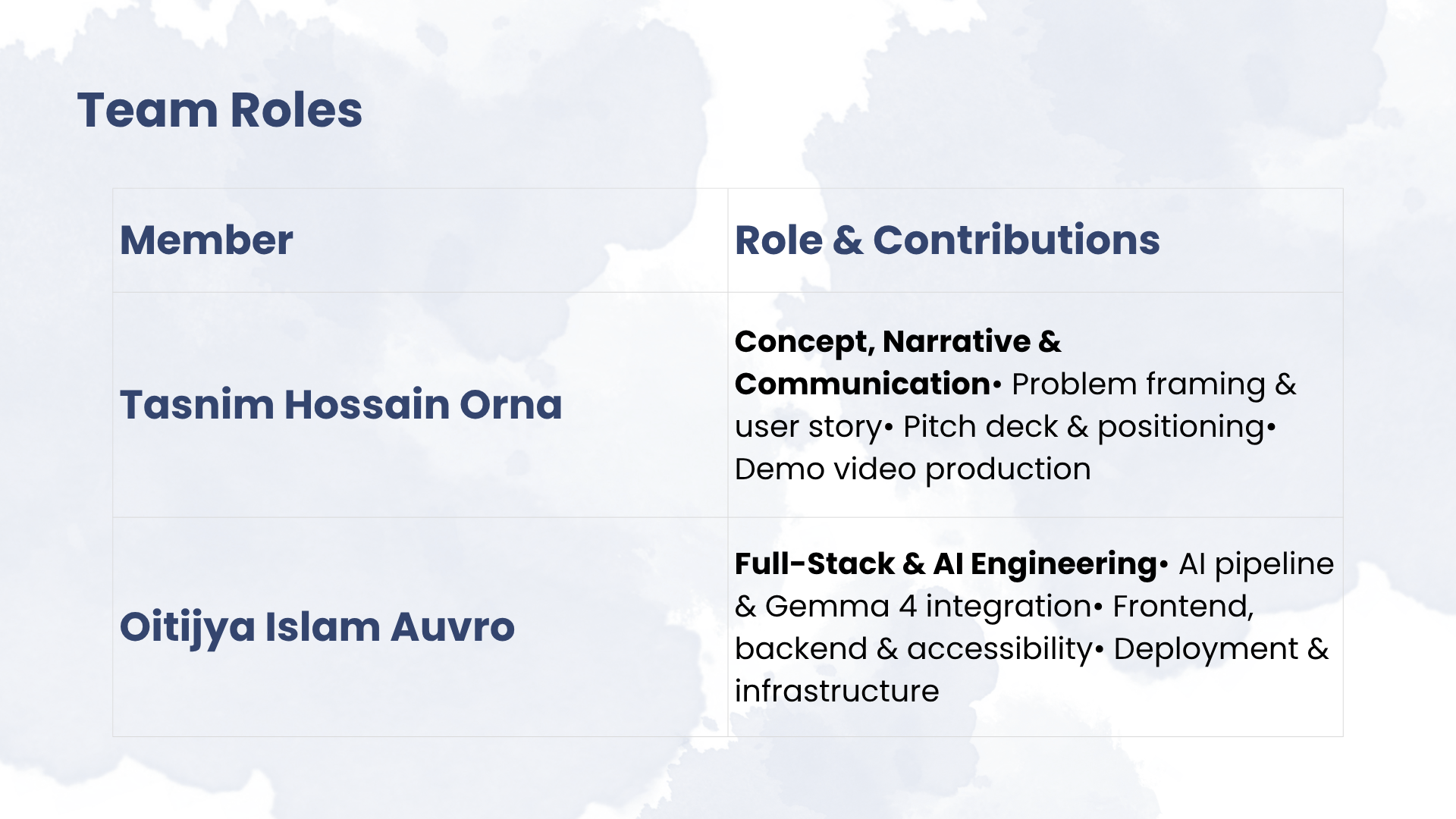
| Member | Contribution |
|---|---|
| Tasnim Hossain Orna | Concept, narrative and communication — identified and framed the problem, user story and positioning, presentation design, demo video production |
| Oitijya Islam Auvro | Full-stack and AI engineering — the AI description pipeline and prompt design, Gemma integration, backend and API, frontend, accessibility implementation, and cloud deployment |
Built With
- azure
- docker
- express.js
- ffmpeg
- gemma
- google-ai-studio
- next.js
- node.js
- pdf.js
- react
- tailwindcss
- typescript
- web-speech-api
- yt-dlp

Log in or sign up for Devpost to join the conversation.