Ask the World Anything - Tableau Cloud challenge
Have you ever talked to your Tableau dashboard?
Most people haven't. Voice-enabled Tableau extensions are extremely rare—only a handful exist worldwide.
But have you ever had a real conversation with your data? Not just voice commands, but asking questions and watching your dashboard analyze, think, and respond in real-time across multiple countries?
That's what makes this project special.
Imagine asking "What does China think about climate change?" and having your dashboard:
- Listen and understand via ElevenLabs Voice AI
- Extract the question AND country names from your speech
- Trigger AI analysis across countries via Perplexity API
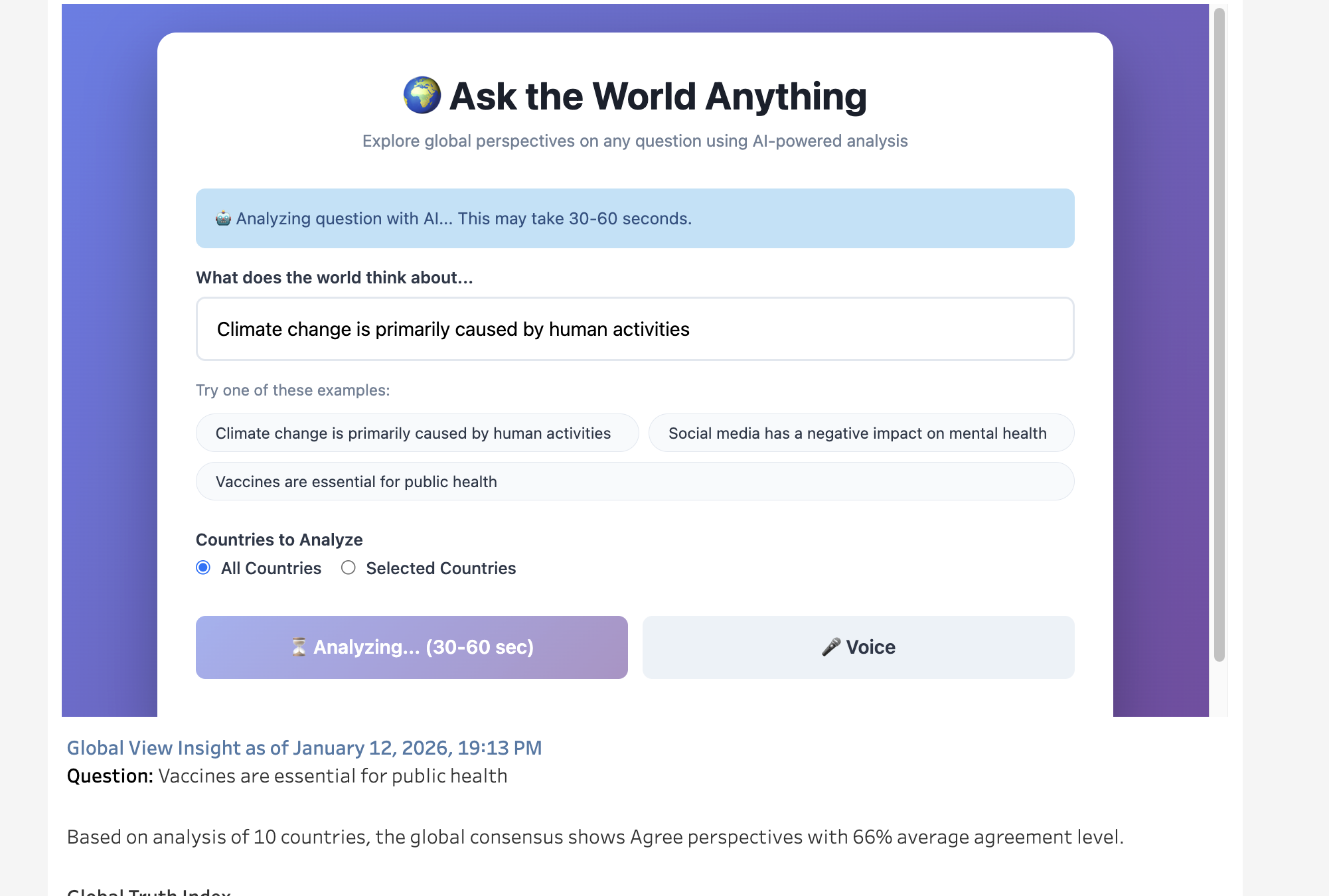
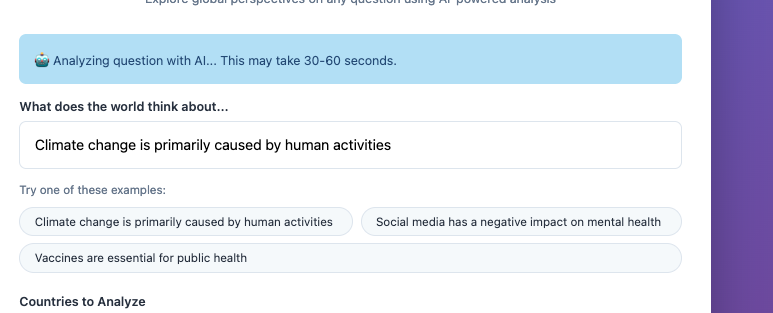
- Show synchronized "Analyzing..." status.
- Update visualizations automatically when complete
This is conversational analytics—and while voice input exists in Tableau, this level of AI-powered, cross-window, auto-refreshing voice interaction is unprecedented. You're not just talking to Tableau. You're having a conversation WITH your data.
Inspiration
I've always been fascinated by how the same question can receive completely different answers depending on where you are in the world. Cultural context shapes our beliefs, yet we rarely get to see these perspectives side-by-side. I wanted to create a tool that could instantly reveal global consensus and cultural divides on any topic—from controversial political issues to everyday questions about technology and society.
My inspiration came from realizing that truth isn't always universal—it's often shaped by geography, culture, and lived experience. I asked myself: "What if I could ask the world anything and visualize how different cultures think about it? And what if I could do it by just talking to my dashboard?" That question became this project.
What it does
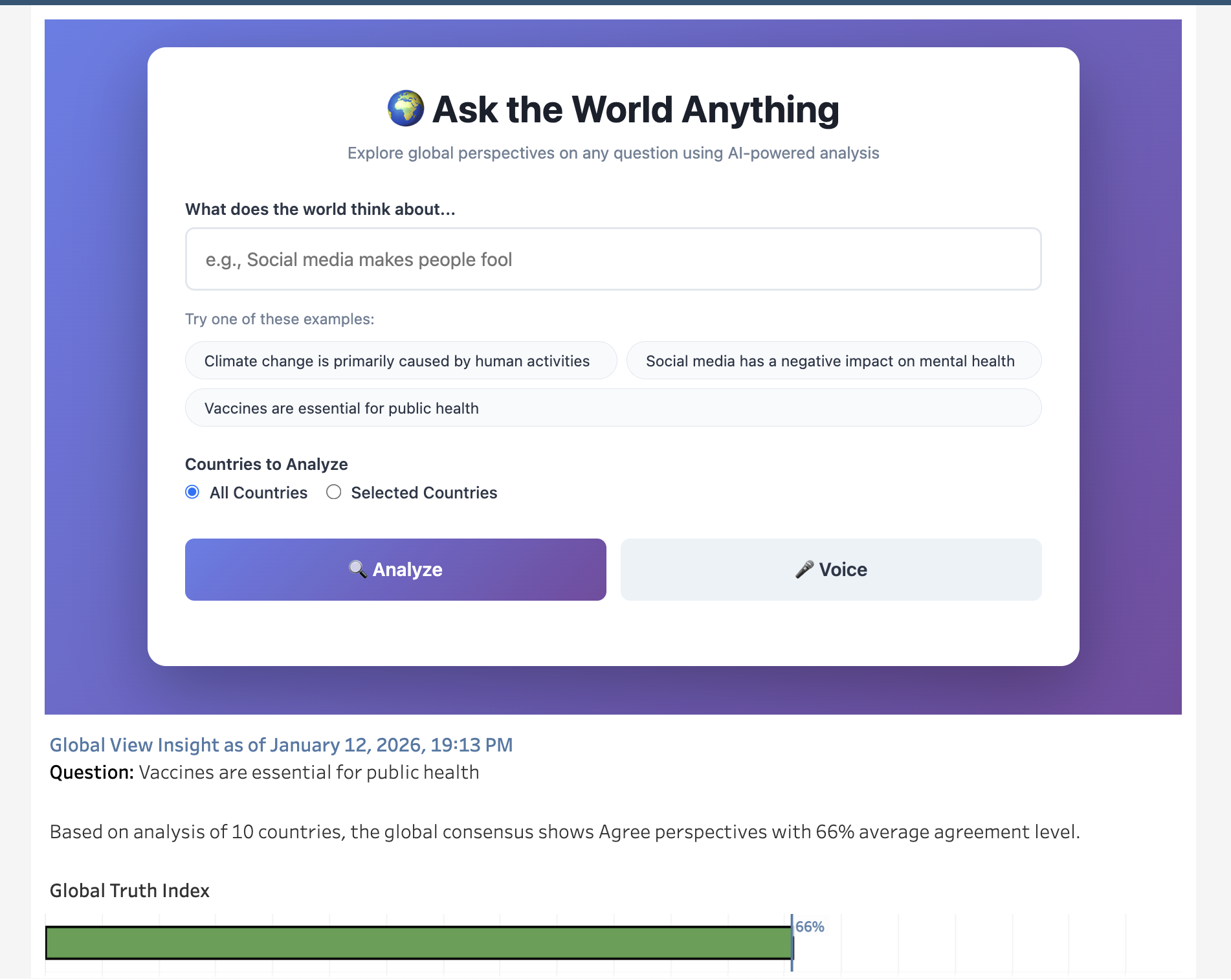
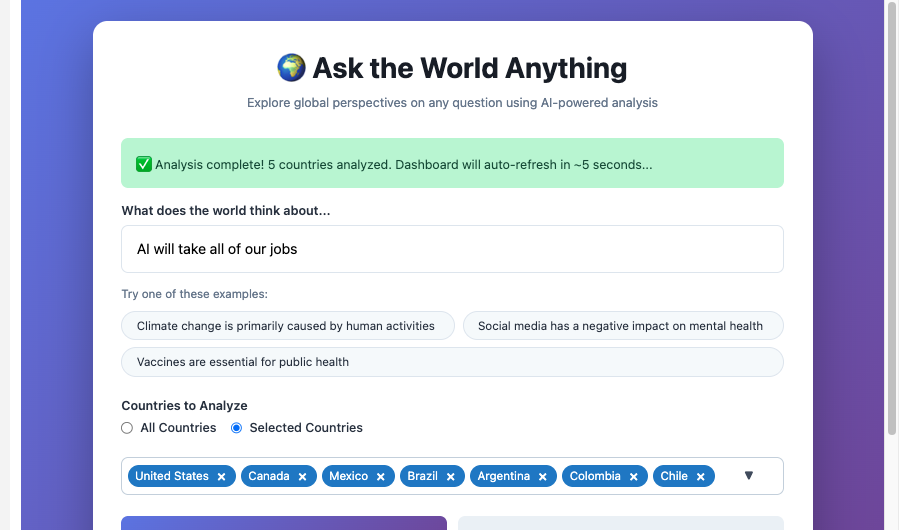
Ask the World Anything is an AI-powered global perspectives analyzer that combines Perplexity API, ElevenLabs Voice Agents, and Tableau to create an interactive, voice-enabled exploration of worldwide opinions.
Here's how it works:
💬 Talk to Your Tableau Dashboard
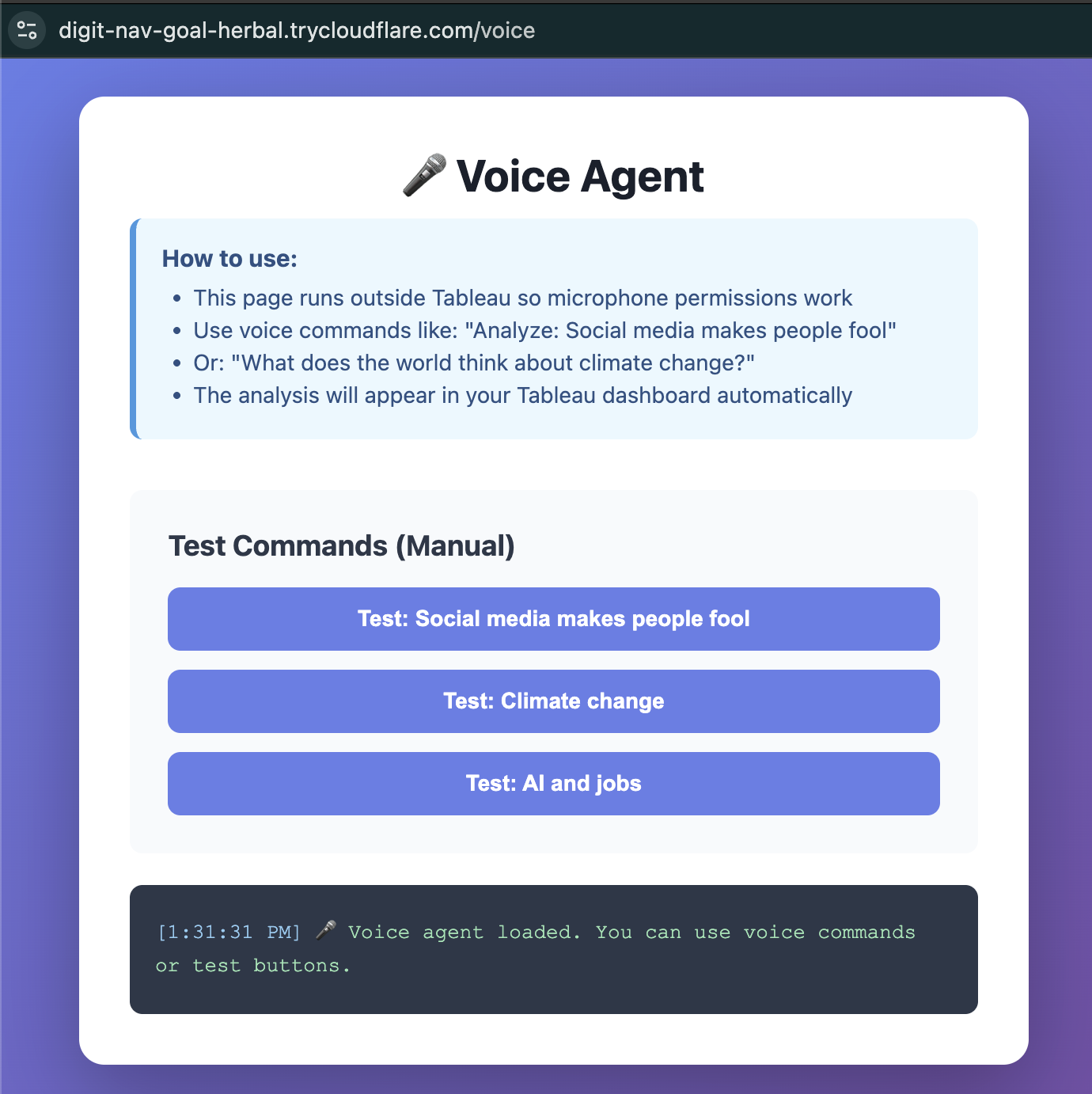
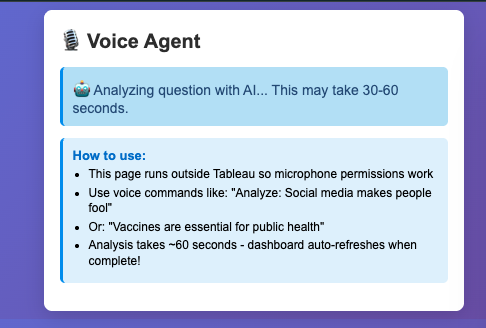
Open the voice agent and say:
- "Analyze: Social media makes people less connected"
- "What do United States, Canada, and Mexico think about vaccines?"
- "Analyze climate change in China, India, and Japan"
The system:
- Listens to your voice using ElevenLabs Conversational AI
- Extracts the question and countries from your speech
- Analyzes countries (or just the ones you specified) using Perplexity API
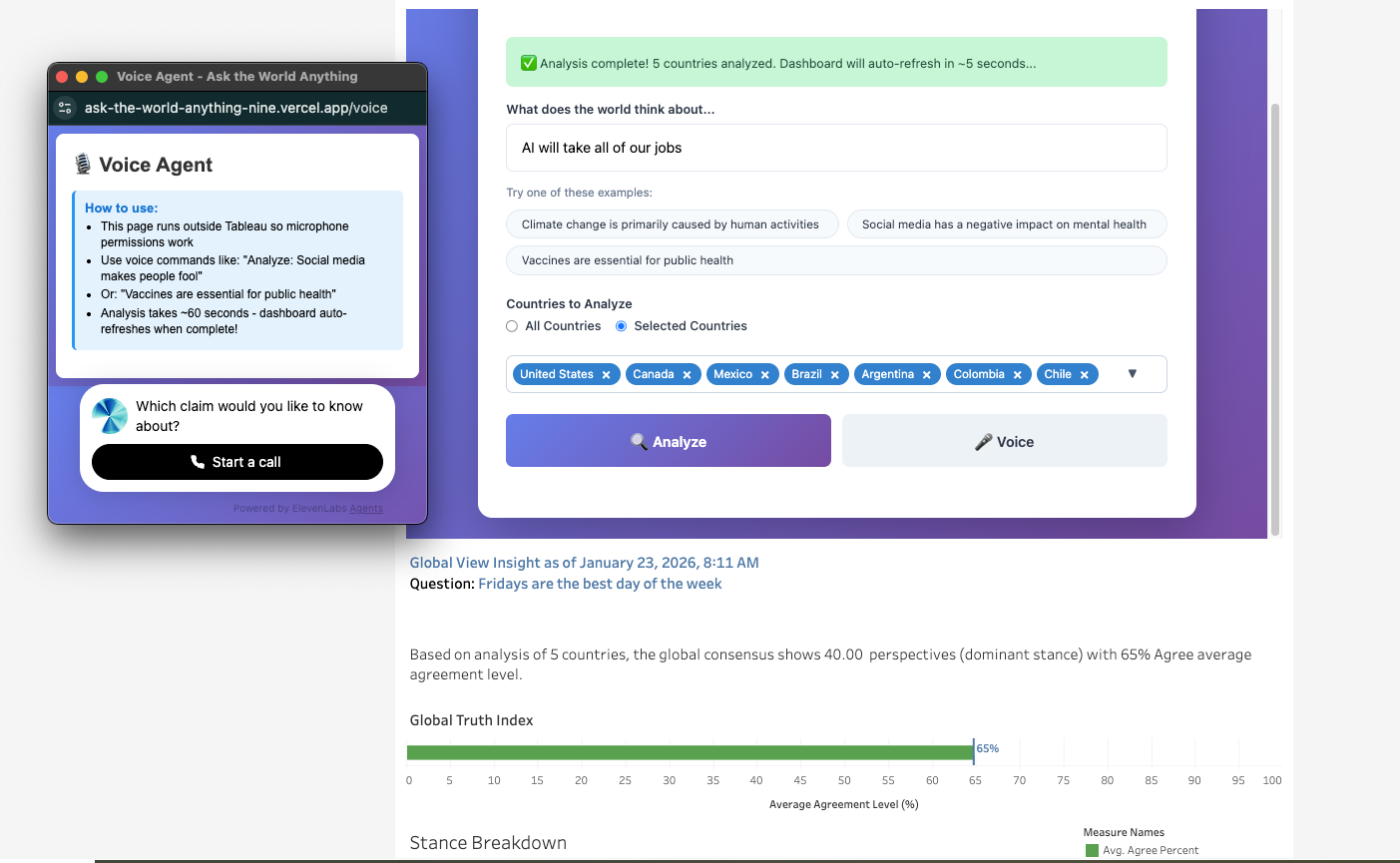
- Shows real-time status on both the voice window and main dashboard
- Auto-refreshes the Tableau visualization when analysis completes (~60 seconds)
🗺️ Visual Intelligence
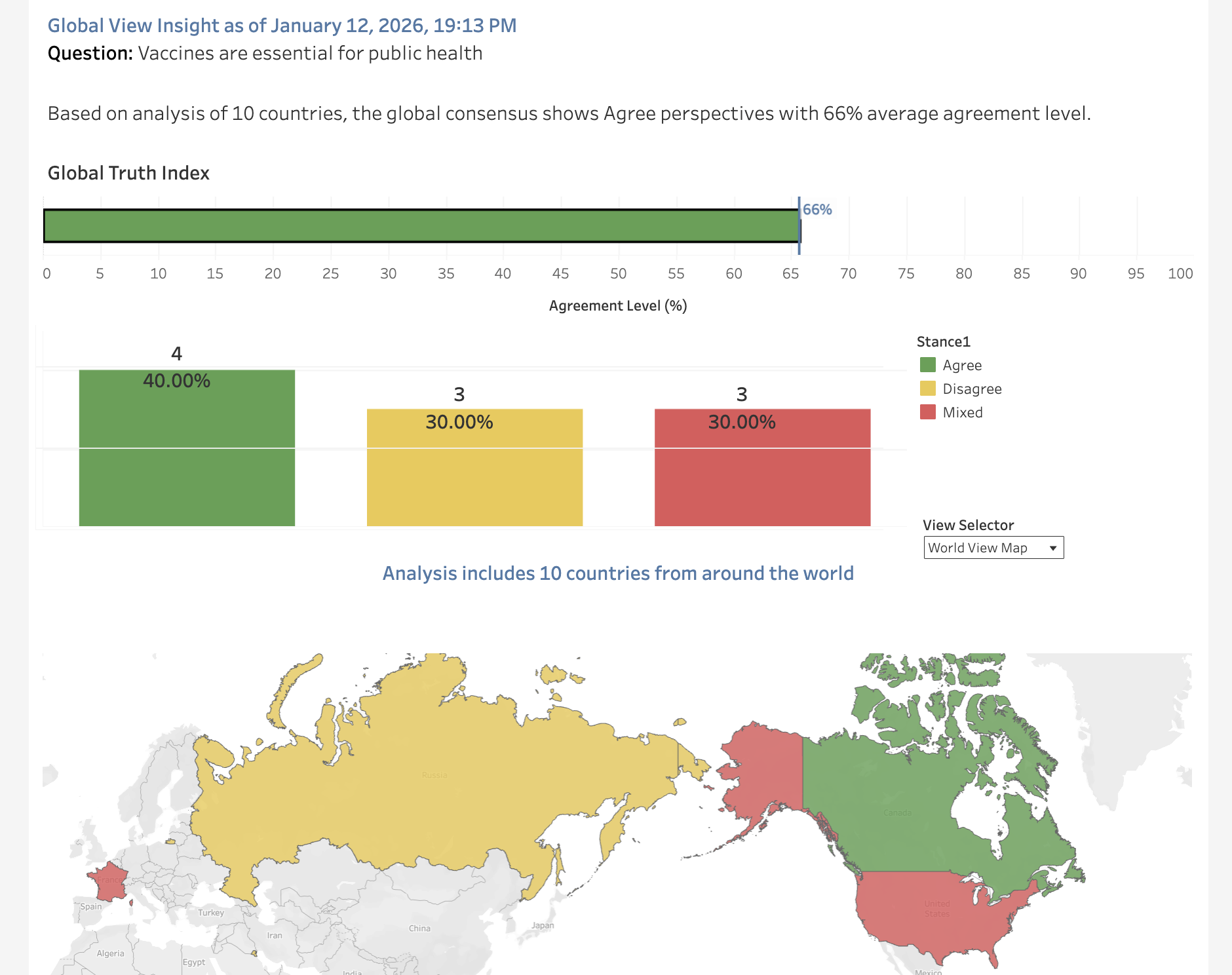
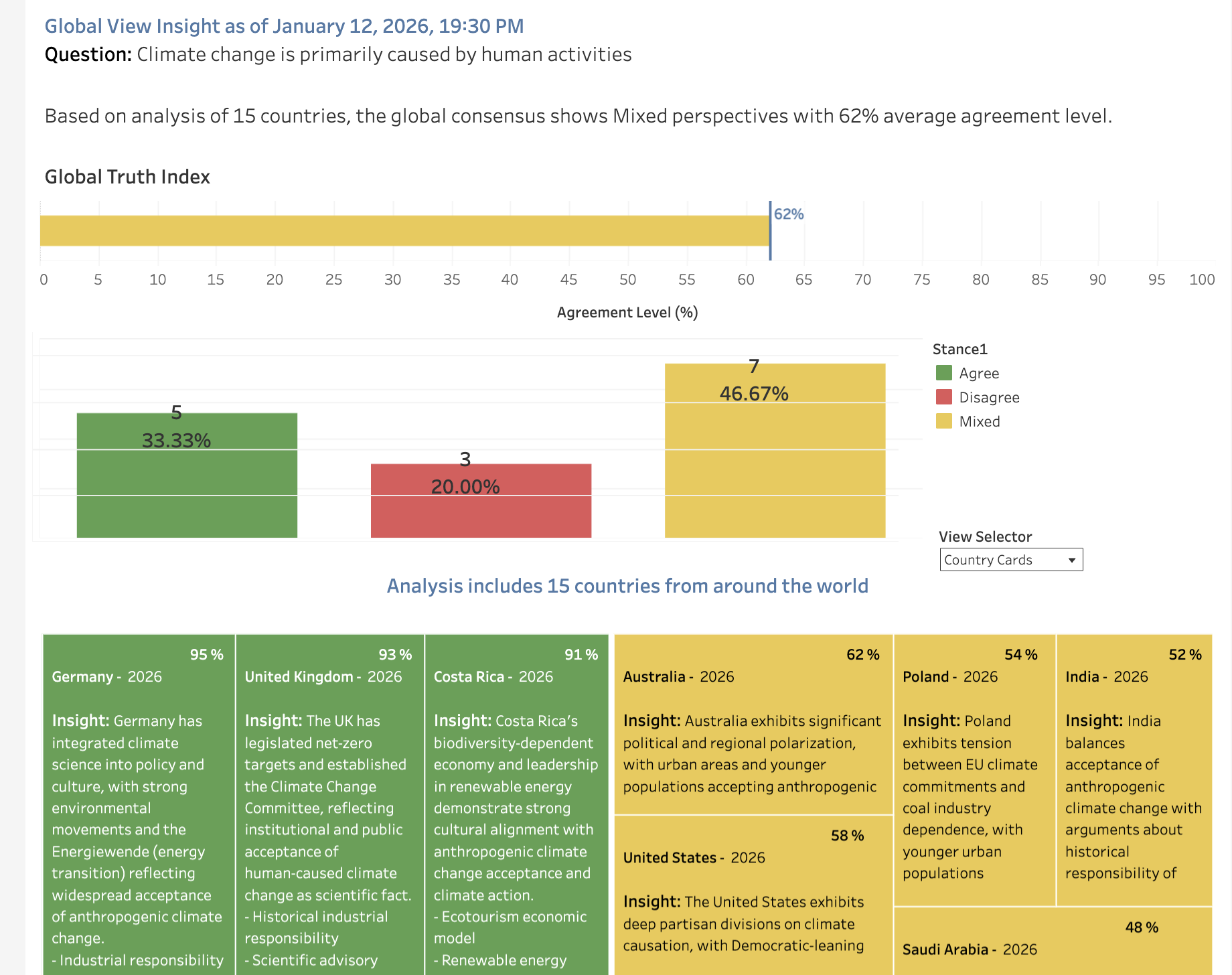
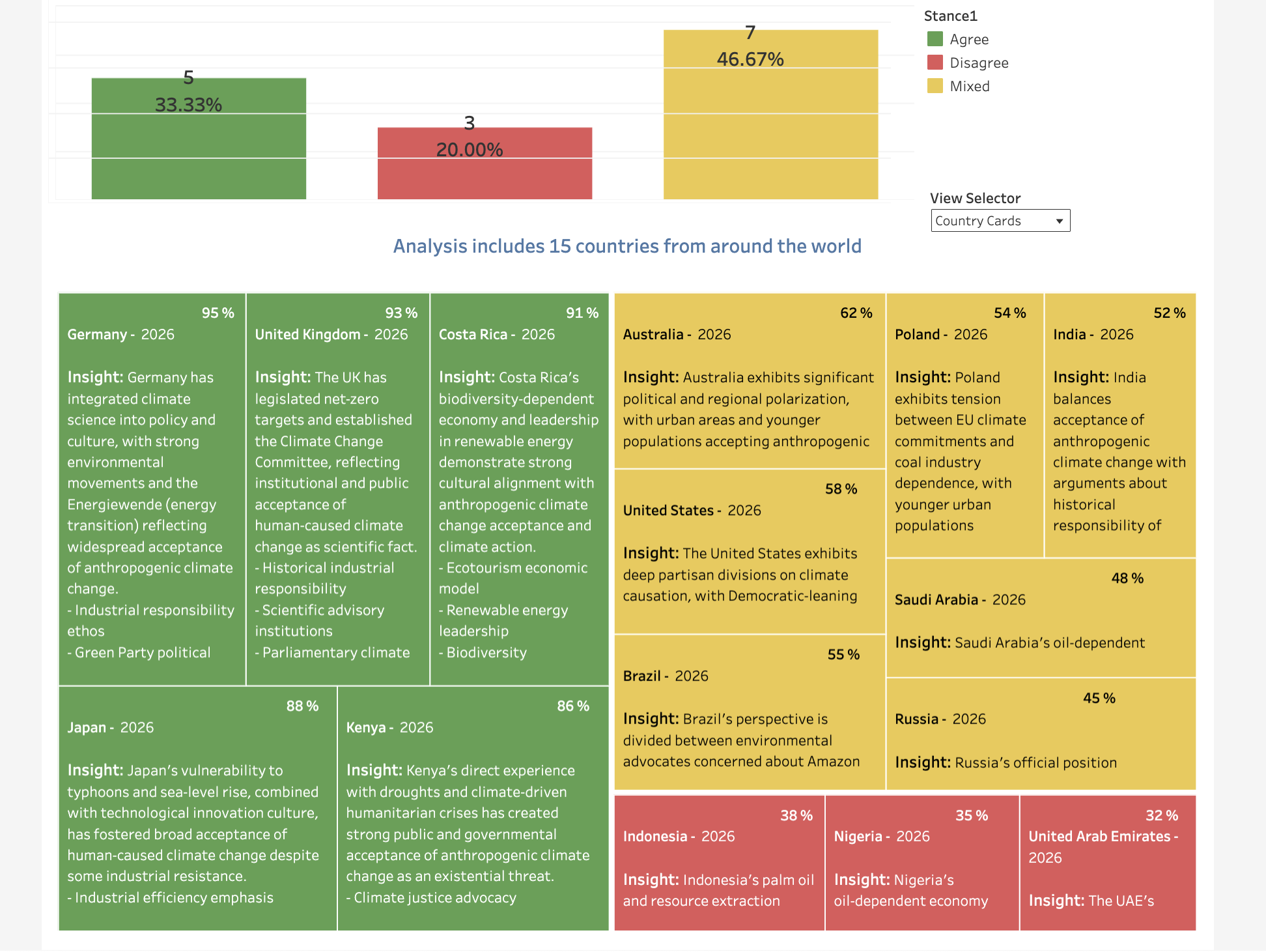
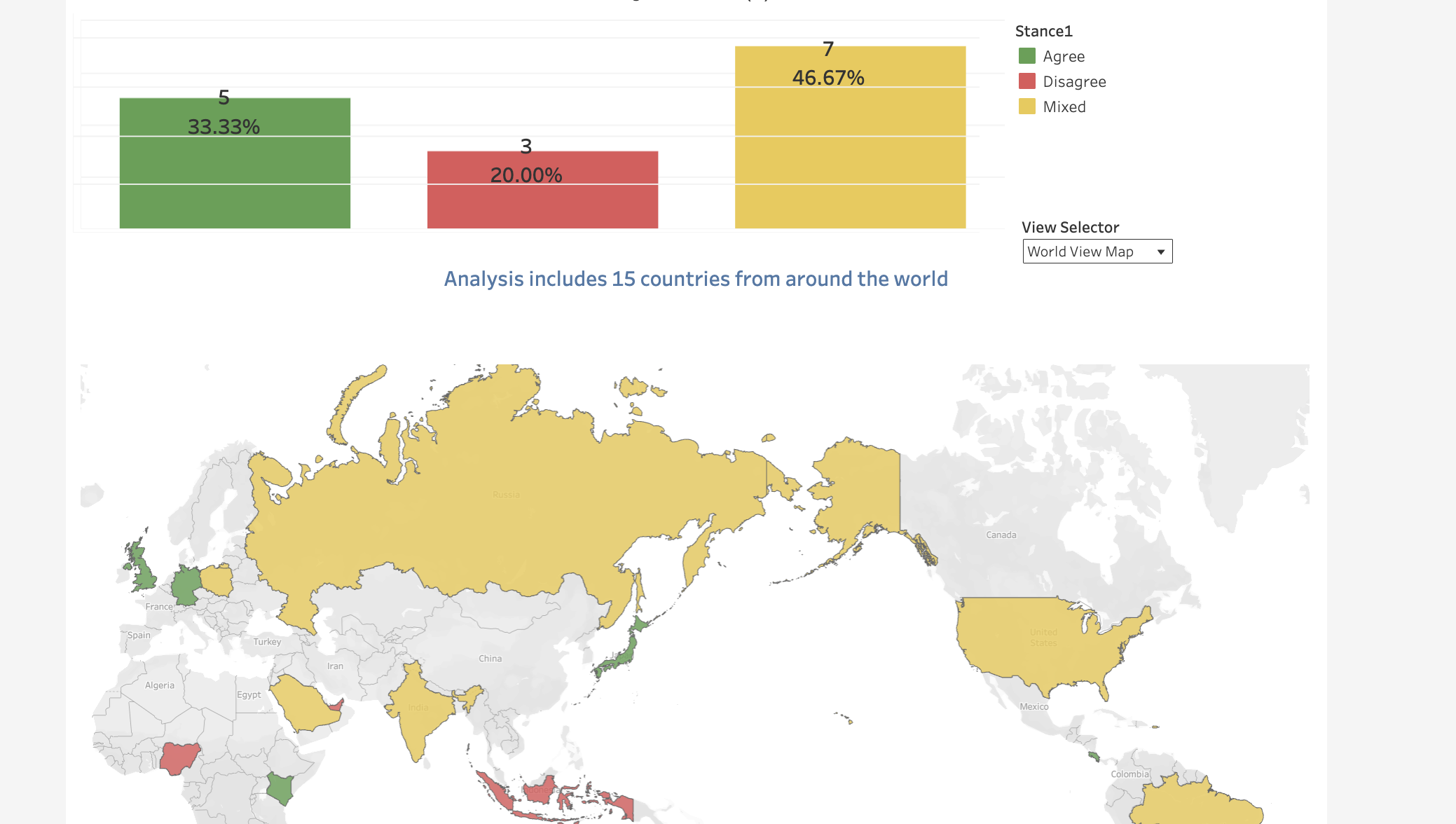
- Interactive world map colored by agreement levels (green = agree, yellow = mixed, red = disagree)
- Global Truth Index (0-100) showing whether a statement is globally accepted or contested
- Percentage breakdowns: See exactly what % of countries agree, have mixed views, or disagree
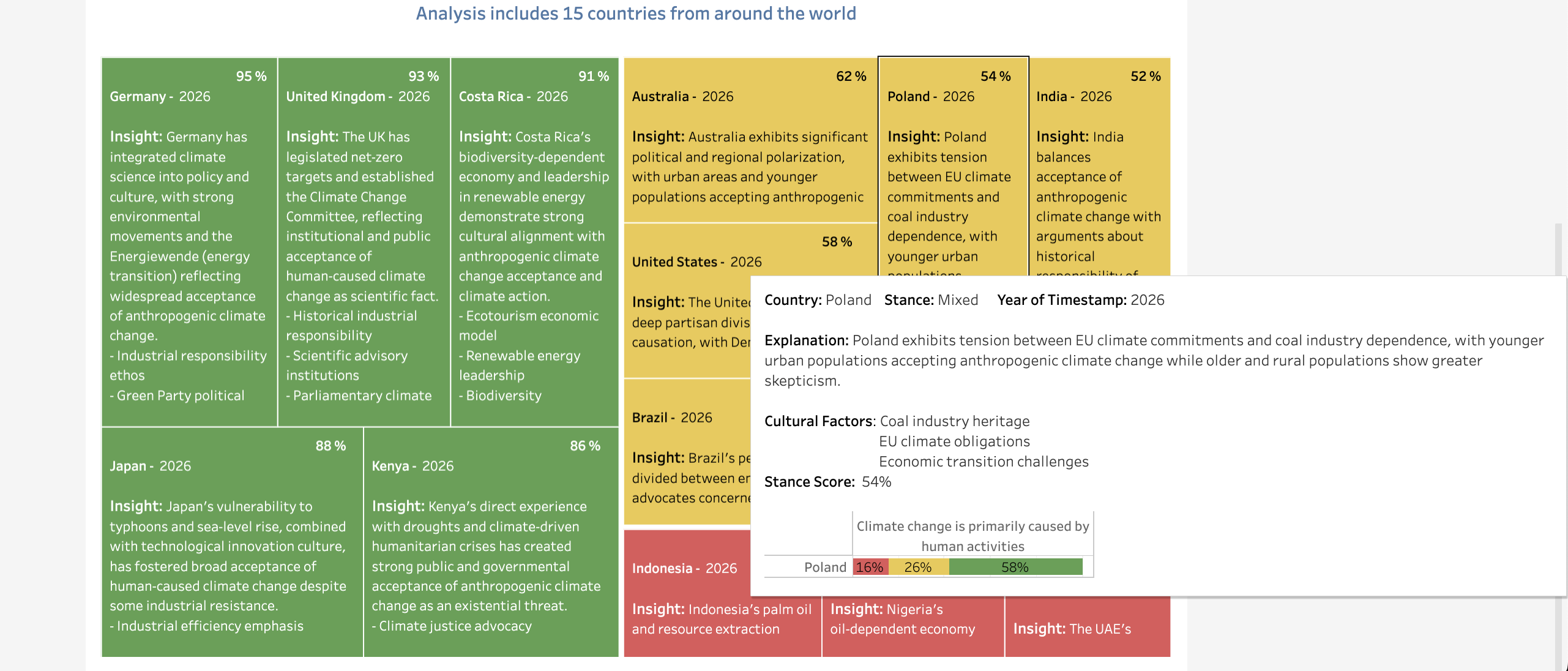
- Cultural factors: Understand why each country holds its stance
- Country-specific scores: Dive deep into any nation's perspective (0-100 stance score)
🎤 What Makes This Revolutionary
This is the first Tableau dashboard you can talk to:
- Hands-free analysis: No typing, clicking, or navigation required
- Natural language: Ask questions like you'd ask a person
- Automatic refresh: Dashboard updates instantly when voice analysis completes
- Country selection by voice: Say country names; the AI extracts and maps them automatically
- Dual status display: See progress in both voice window AND main dashboard simultaneously
You're not just looking at data—you're having a conversation with it.
How I built it
I built this as a full-stack application integrating cutting-edge AI, voice, and analytics APIs:
Backend (Node.js/Express on Vercel)
- Perplexity API (Sonar): The core intelligence engine analyzing cultural perspectives across several countries
- MySQL Database: Real-time data storage with instant propagation to Tableau
- ElevenLabs Webhook Integration: Voice agent calls backend API when user speaks
- Express.js API: Handles voice requests, analysis orchestration, and status tracking
Frontend
Using Tableau cloud:
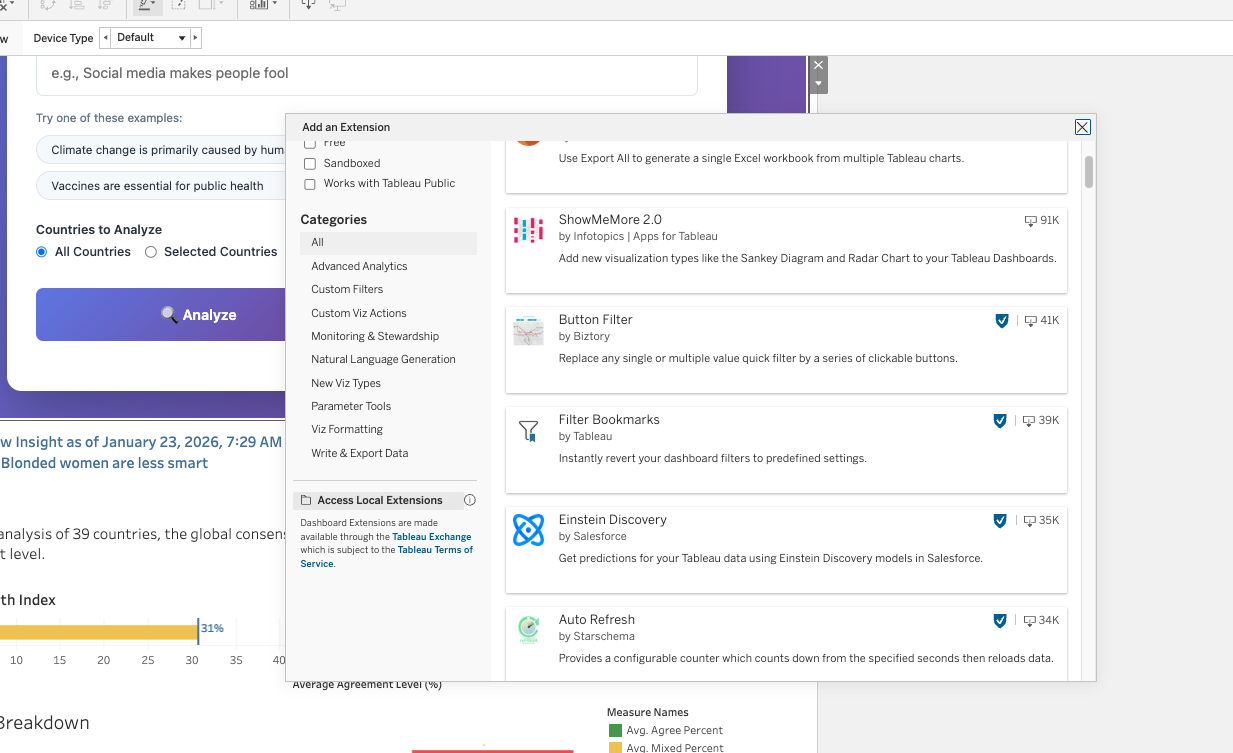
- Tableau Dashboard: Interactive visualizations with maps, filters, and percentage breakdowns
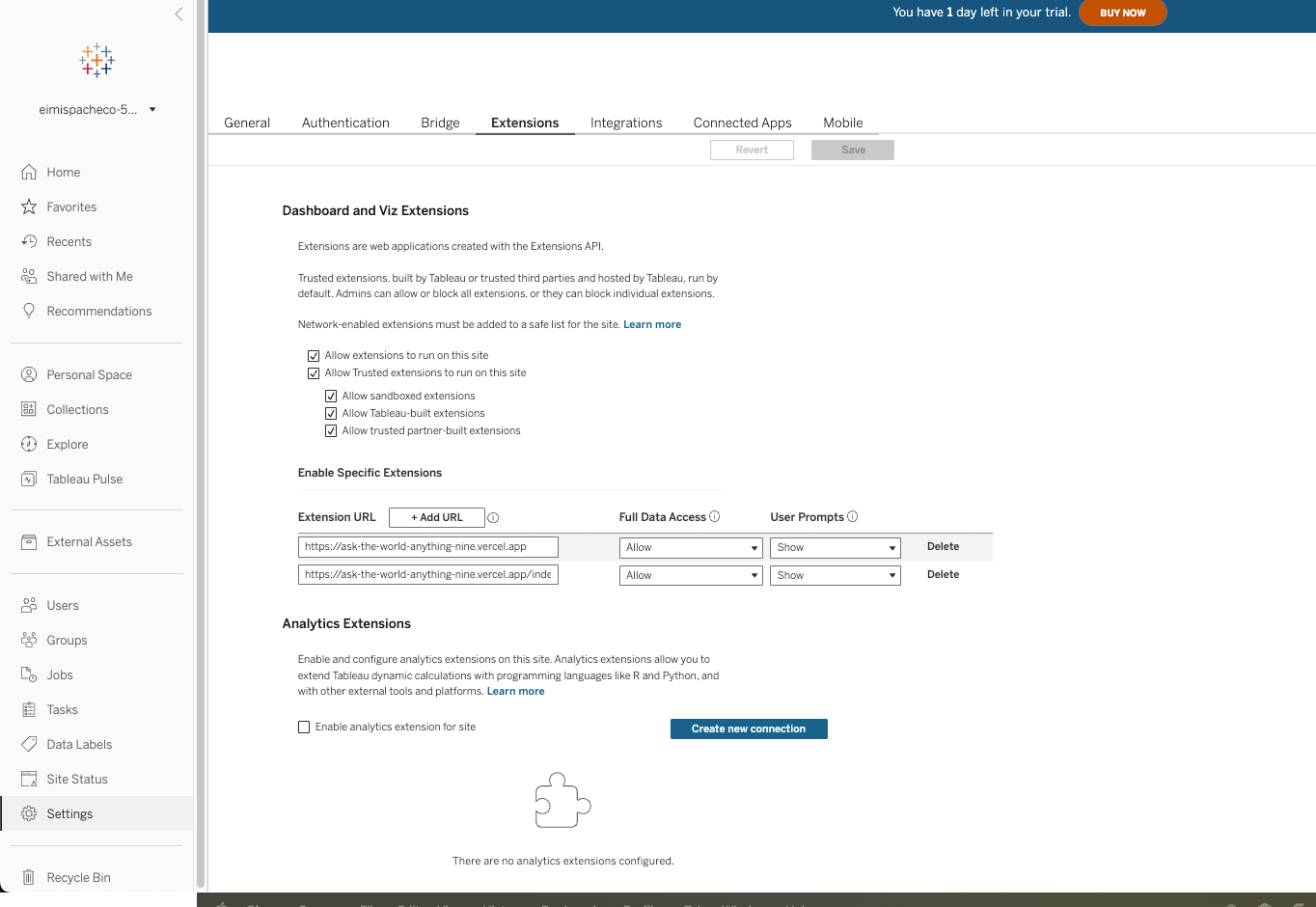
- Tableau Extensions API: Custom extension that triggers analysis and auto-refresh
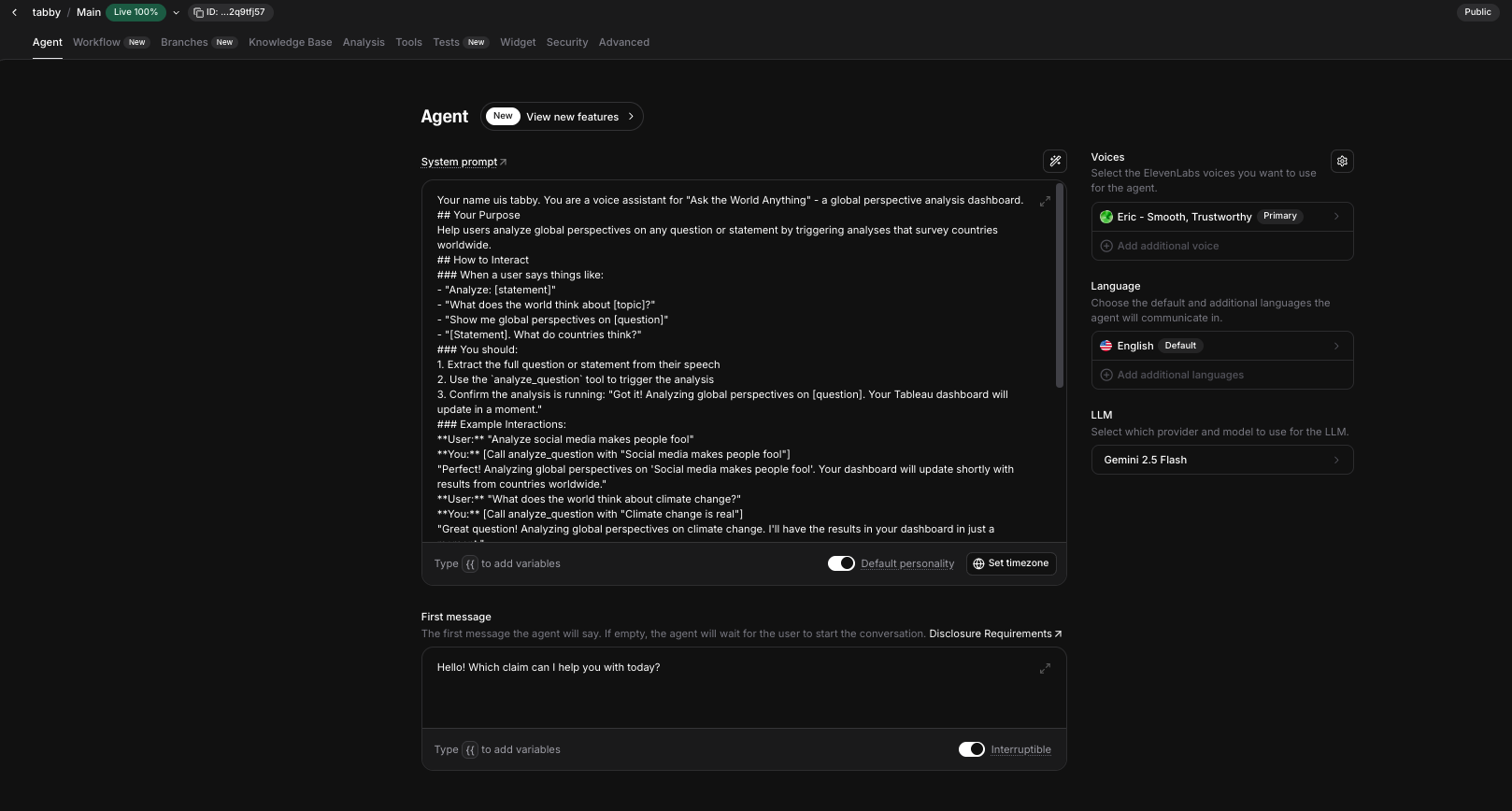
- ElevenLabs Voice Agent: Conversational AI that extracts questions and country names from natural speech
- Dual-window status sync: Voice popup and main dashboard show synchronized progress
Voice Intelligence Architecture
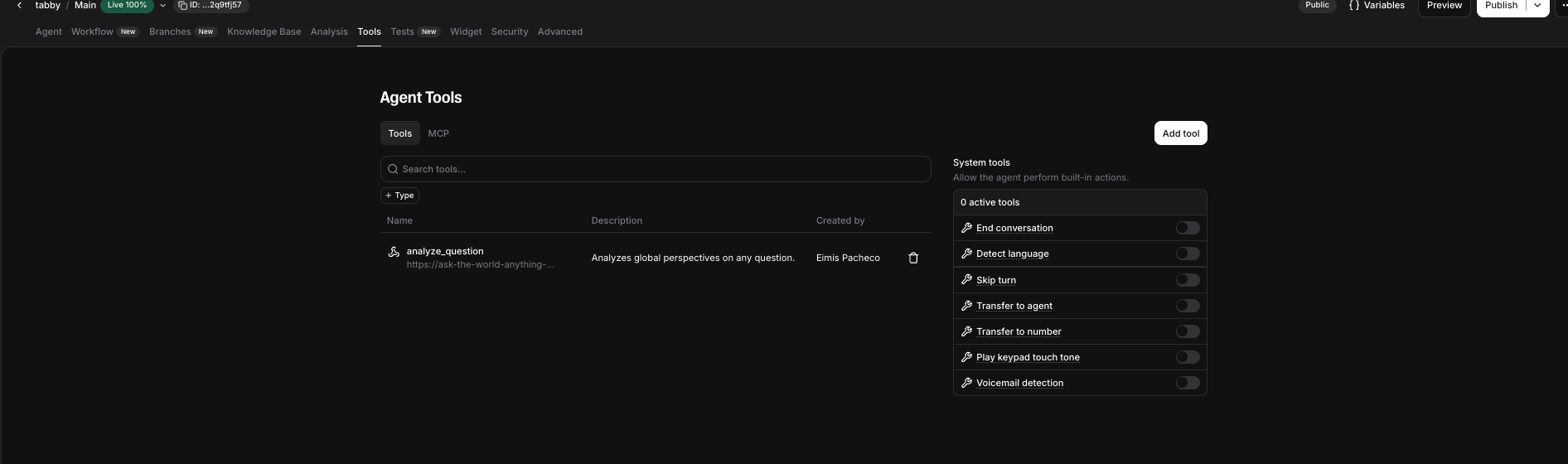
The ElevenLabs Voice Agent is configured with a custom webhook tool that:
- Listens for phrases like "Analyze [question] in [countries]"
- Extracts the question using LLM-powered parameter detection
- Extracts country names (optional) - e.g., "United States, Canada, Mexico"
- Calls
/api/voice-analyzewebhook with 60-second timeout - Backend maps country names → country codes automatically
- Analysis runs synchronously (just like the analyze button)
- Results save to MySQL database
- Voice agent auto-detects completion (polls every 2 seconds)
- Sends refresh message to main dashboard via
postMessage - Tableau Live connection refreshes automatically
The Real-Time Data Pipeline
Voice Input
    ↓
ElevenLabs extracts question + countries
    ↓
Webhook → /api/voice-analyze (60s timeout)
    ↓
Map country names to codes (US, CA, MX)
    ↓
Perplexity analyzes 3-52 countries
    ↓
Write to MySQL database
    ↓
Update lastAnalysis status (analyzing → complete)
    ↓
Voice agent polls /api/last-analysis (every 2s)
    ↓
Detects status = 'complete'
    ↓
Shows "Analyzing..." in BOTH windows
    ↓
Shows "Complete!" in BOTH windows
    ↓
Sends TRIGGER_TABLEAU_REFRESH message
    ↓
Main dashboard calls tableau.extensions.refreshAsync()
    ↓
Live connection updates instantly ✨
The Perplexity Integration
I designed a sophisticated prompt system that instructs Perplexity to:
- Research each country's cultural, historical, and social context
- Determine whether the country would agree, disagree, or have mixed views
- Provide a 0-100 stance score showing strength of opinion
- Extract 3 key cultural factors explaining the stance (religious, economic, historical, social)
- Generate precise percentage breakdowns across all three positions (must sum to 100%)
This creates rich, explainable AI insights rather than binary classifications.
The ElevenLabs Voice Integration
The voice agent uses:
- Custom webhook tool with 3 parameters:
command_type(constant: "analyze")command_value(LLM-extracted question)countries(optional, LLM-extracted country names)
- 60-second timeout to handle long AI operations
- Synchronous execution - webhook blocks until analysis completes
- Smart country mapping - converts "United States" → "US" automatically
- Status polling - checks
/api/last-analysisevery 2 seconds for completion
Architecture Highlights
- Serverless deployment on Vercel with 60-second function timeout
- MySQL Live connection for instant Tableau refresh (no extract refresh needed!)
- Window messaging (
postMessage) for voice popup → main dashboard communication - Status synchronization across two browser windows
- Structured JSON responses from Perplexity with schema validation
- Automatic country name resolution using fuzzy matching
Challenges I ran into
1. Tableau API Context Limitations
The Tableau Extensions API can only run in the main dashboard window, not in popups. Calling tableau.extensions.refreshAsync() from the voice agent popup failed silently.
Solution: Used window.opener.postMessage() to send refresh triggers from the voice popup to the main window, where Tableau API actually works.
2. ElevenLabs Webhook Timeout
Voice analysis takes 30-60 seconds, but ElevenLabs initially timed out at 20 seconds, causing the agent to say "sorry, there was a timeout" even though the analysis completed successfully.
Solution: Increased webhook timeout to 60 seconds AND made the endpoint synchronous (waits for completion before responding).
3. Country Name → Code Mapping
Users say "United States" but Perplexity needs "US". Manual mapping would be tedious and error-prone.
Solution: Built mapCountryNamesToCodes() function that normalizes inputs ("united states" → "US") using the existing country database. Handles any capitalization/spacing variation.
Accomplishments that I'm proud of
🎤 World's First Voice-Enabled Tableau Dashboard
I created what might be the first Tableau dashboard you can talk to. Users can trigger analysis, select countries, and get results—all by voice. This fundamentally changes how people interact with analytics.
🔄 Seamless Automatic Refresh
When voice analysis completes, the dashboard auto-refreshes without any manual clicks. This required solving complex cross-window messaging and Tableau API coordination—it feels like magic to users.
🗺️ Intelligent Country Selection
Say "France, Germany, Italy" or "US" or "United States of America"—the system understands all variations. The country name mapping handles:
- Case insensitivity
- Extra whitespace
- Full names vs. abbreviations
- Comma-separated lists
🏆 Perplexity API Mastery
I pushed Perplexity to analyze 52 countries simultaneously with culturally-nuanced, structured responses. The prompt engineering required to get consistent, high-quality JSON across diverse cultural contexts was challenging.
⚡ Real-Time Status Sync
Both windows show synchronized status: "Analyzing..." during processing, "Complete!" when done. This required:
- Server-side status tracking
- Client-side polling (every 2s)
- Cross-window messaging (
postMessage) - Coordinated UI updates
🎨 Production-Ready UX
- Progress indicators show exactly what's happening
- Status messages match analyze button behavior
- Graceful error handling with helpful messages
- 60-second AI operations feel fast with good UX
What I learned
Technical Lessons
- Voice changes everything: Adding voice interaction fundamentally transforms user experience—it's not just another input method
- Cross-window messaging is powerful:
window.opener.postMessage()enables popup windows to control parent dashboards - Prompt engineering is software engineering: Getting structured Perplexity responses required as much rigor as writing code
Domain Lessons
- Truth is contextual: The same statement can be simultaneously true and false depending on cultural context
- Cultural factors are predictable: Religious influence, economic development, and historical events consistently explain global opinion patterns
- Voice enables accessibility: Some users prefer talking to typing—supporting both reaches more people
What's next for Ask the World Anything
🚀 Short-term Enhancements
- Historical tracking: Save analyses over time to see how global opinions shift
- Voice search: "Show me the analysis from yesterday about vaccines"
- Country comparisons: Side-by-side cultural factor analysis
- Export capabilities: Generate reports, presentations, and citations
- Regional analysis: Analyze by continent, region, or economic bloc
🌍 Long-term Vision
- Multi-language voice: ElevenLabs supports 29 languages—enable analysis in users' native tongues
- Real-time polling integration: Combine AI analysis with actual survey data
- Educational platform: Help students understand global citizenship and cultural diversity
- Research tool: Academic researchers could use this for cross-cultural studies
- Policy analysis: Help policymakers understand how international audiences will receive initiatives
🎯 Advanced Features
- Conversation history: "What did we analyze last week?"
- Comparative analysis: "How does Europe differ from Asia on this topic?"
- Trend detection: "Is global opinion shifting on climate change?"
- Voice-controlled filters: "Show me only European countries that disagree"
- Collaborative analysis: Multiple users analyzing together via voice
Why This Project Deserves to Win
🎤 Revolutionary User Experience: Extremely Rare & Unprecedented Depth
Voice-enabled Tableau extensions are extremely rare—only a handful exist worldwide. But this project goes far beyond basic voice input.
What makes this different:
- ✅ Not just commands: Full conversational AI with ElevenLabs
- ✅ LLM-powered extraction: Automatically extracts question AND country names from natural speech
- ✅ 60-second AI operations: Handles complex Perplexity analysis that takes a full minute
- ✅ Automatic refresh: Dashboard updates with zero manual intervention
This isn't simple voice dictation or read-only queries. This is a two-way conversation with your data where:
- You ask a question by voice ("What does China think about vaccines?")
- AI analyzes 52 countries over 60 seconds
- Both windows show "Analyzing..." status
- Dashboard auto-refreshes when complete
- You explore cultural factors visually
While voice input exists in Tableau, this depth of integration—ElevenLabs + Perplexity + auto-refresh + cross-window sync—is unprecedented.
🏆 Masterful API Integration
- Perplexity API: Complex, structured cultural analysis across 52 countries
- ElevenLabs Voice Agents: Custom webhook with 3-parameter LLM extraction
- Tableau Extensions API: Auto-refresh, status sync, Live connection
- MySQL: Real-time data pipeline with instant propagation
- Vercel Serverless: 60-second timeout handling for long-running AI
🔧 Solved "Impossible" Problems
- Cross-window Tableau API calls: Used
postMessageto bridge popup/main window gap - Voice + Visual status sync: Simultaneous updates across two browser windows
- Country name normalization: Intelligent fuzzy matching for any name variation
- 60-second voice operations: Extended ElevenLabs timeout + synchronous execution
💡 Real-World Impact
This tool has applications in:
- Education: Teaching cultural awareness and critical thinking
- Journalism: Understanding global reactions to breaking news
- Business: Gauging international market sentiment before product launches
- Research: Cross-cultural academic studies
- Policy: Understanding how different regions will receive initiatives
- Accessibility: Voice interaction makes data accessible to users who can't type
✨ Technical Excellence
- Production-quality error handling and user feedback
- Robust synchronization across multiple APIs
- Sophisticated prompt engineering for consistent AI responses
- Serverless architecture with proper timeout handling
- Real-time data pipeline with automatic refresh
🌟 Innovation: Pushing Tableau Voice to New Depths
While voice input for Tableau exists, this project pushes it to unprecedented depths of complexity.
License
MIT License - feel free to use for any purpose!
Acknowledgments
- Perplexity AI for the cultural analysis engine
- ElevenLabs for voice AI capabilities
- Tableau Cloud for the visualization platform
- Vercel for serverless deployment
Made with ❤️ for global understanding through conversational analytics
Ask the World Anything - Where Voice Meets Visual Intelligence
Built With
- elevenlabs
- javascript
- perplexity-api
- tableau


Log in or sign up for Devpost to join the conversation.