-
-
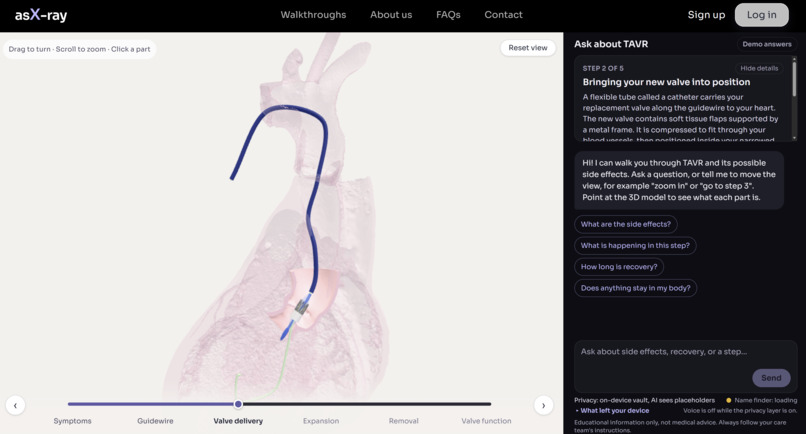
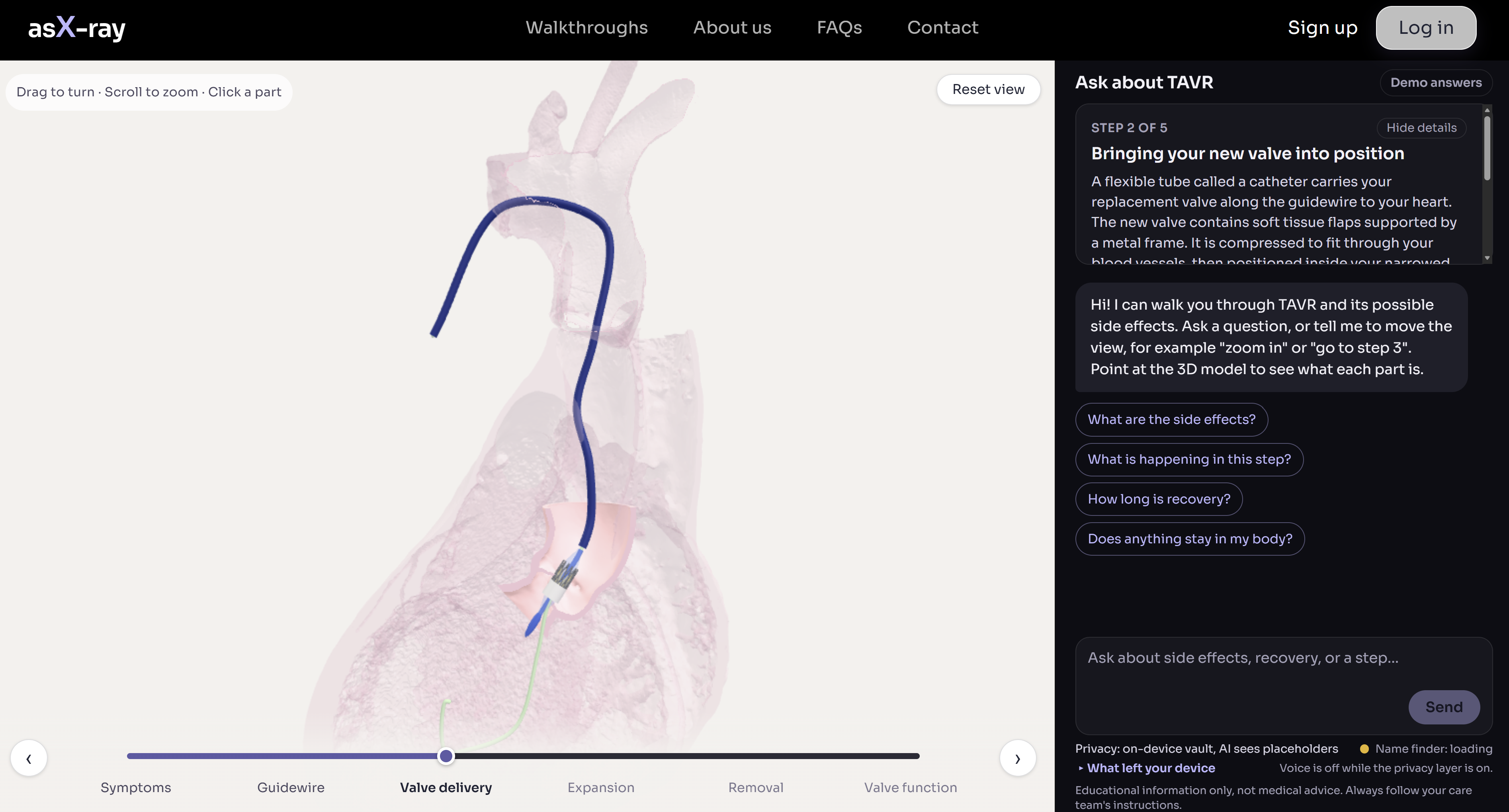
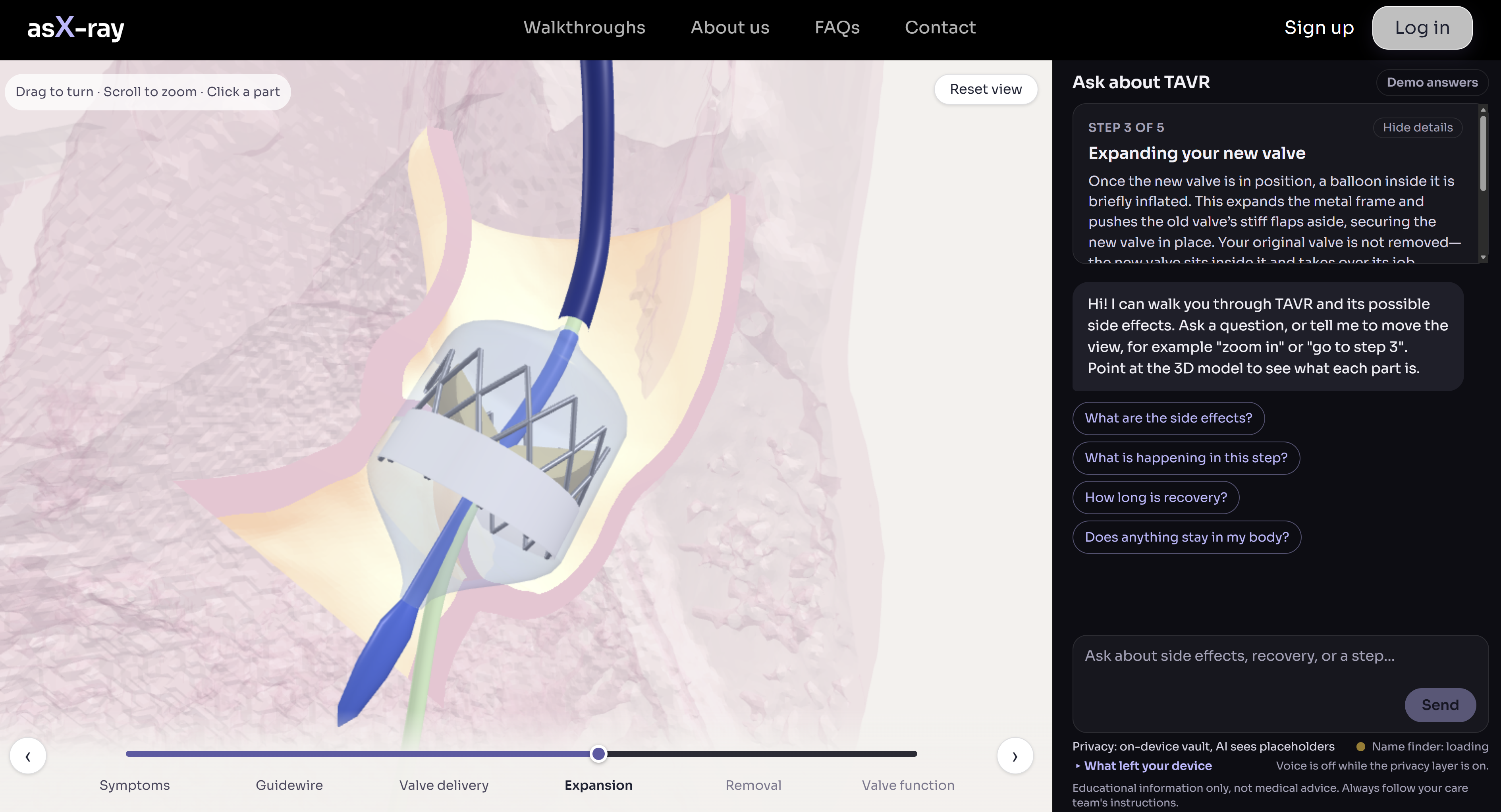
Ask-Ray Walkthrough Page
-
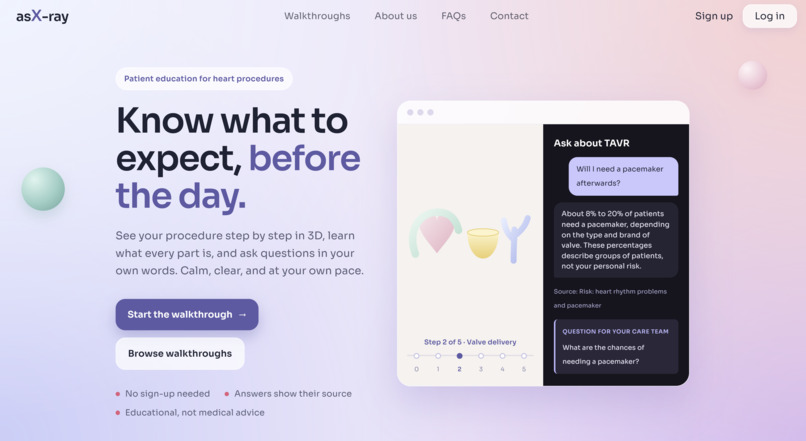
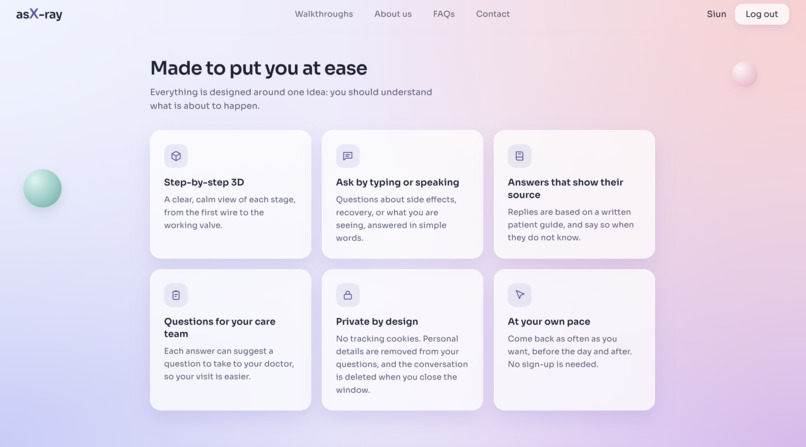
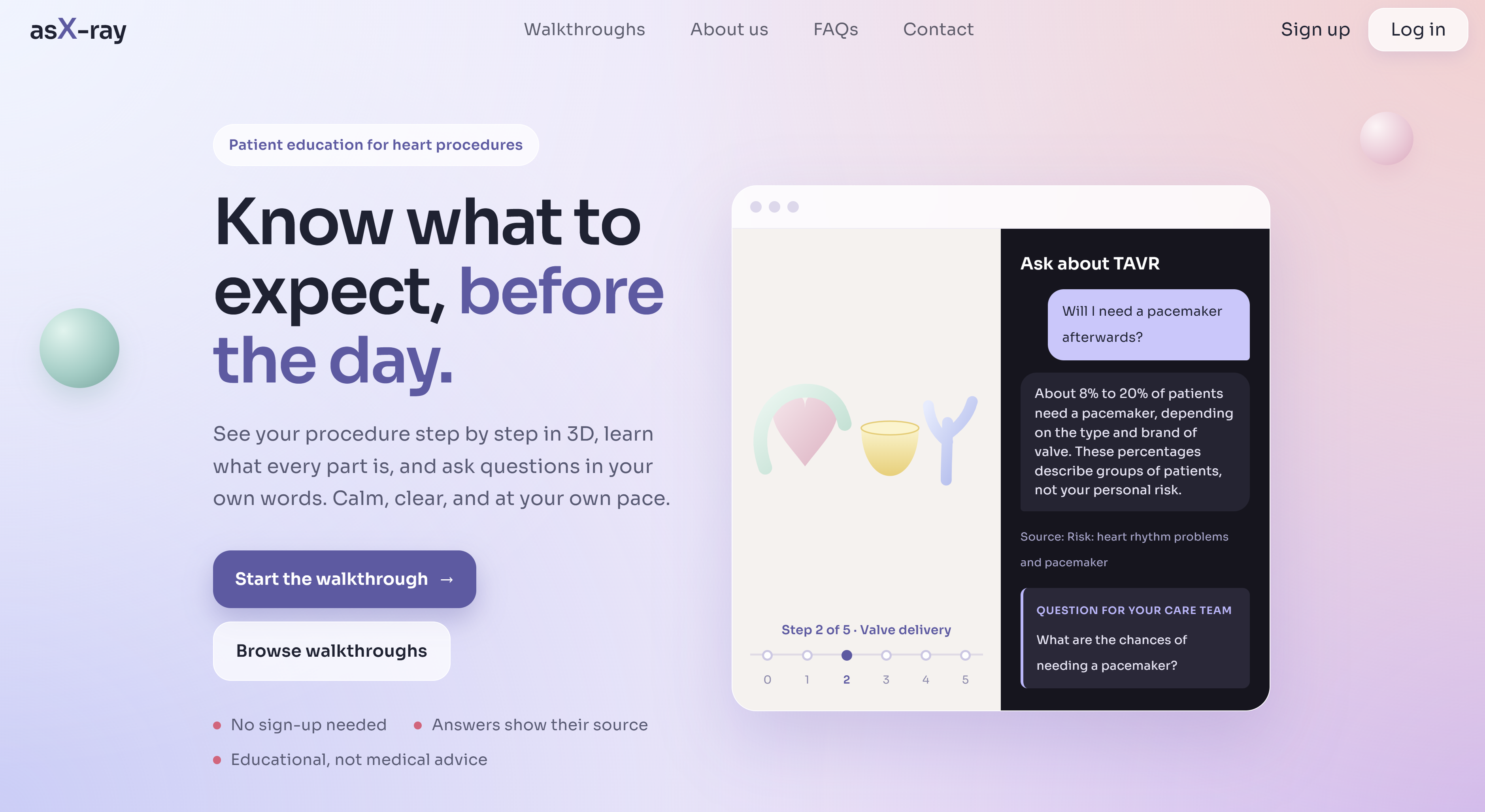
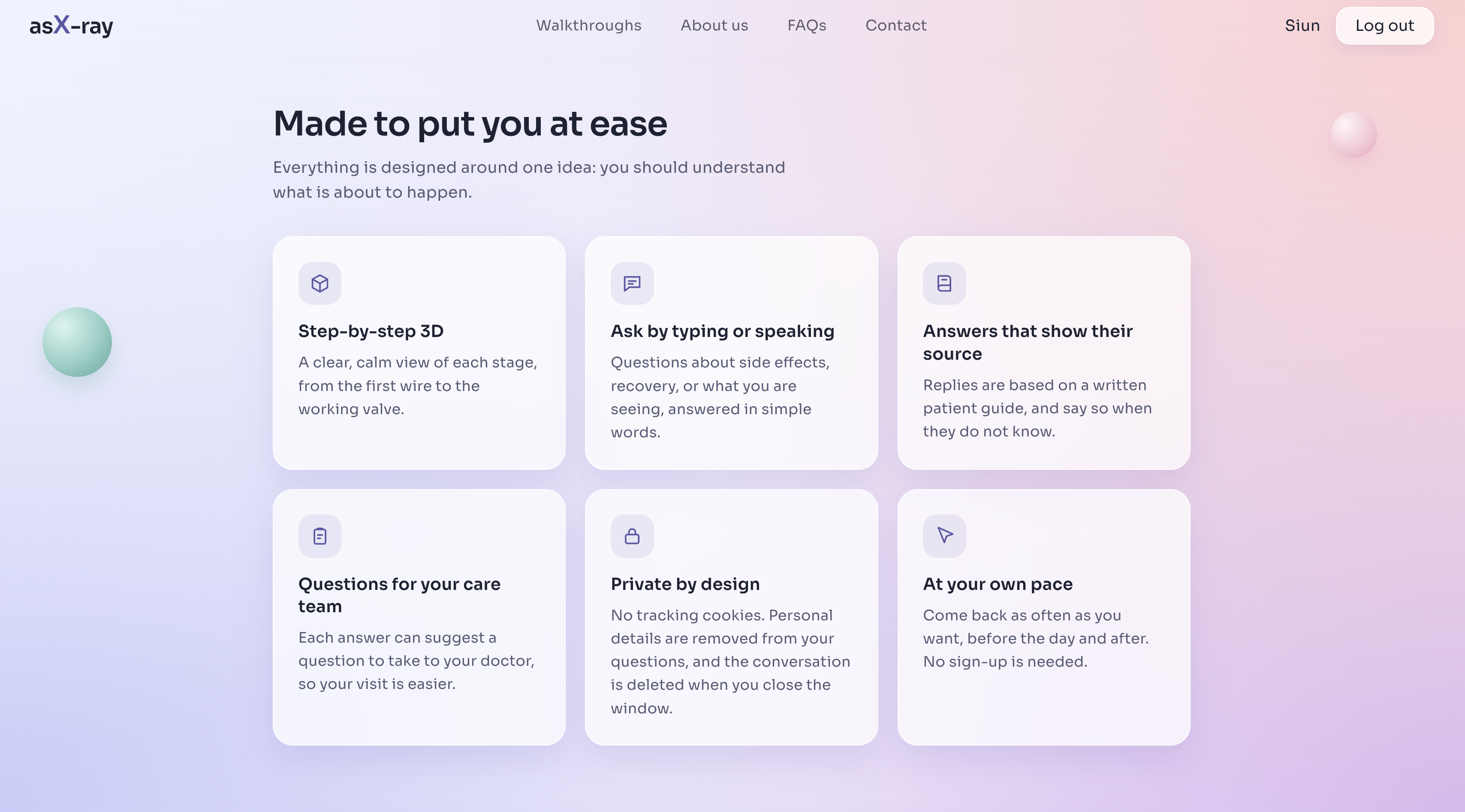
Ask-Ray Home Page
-
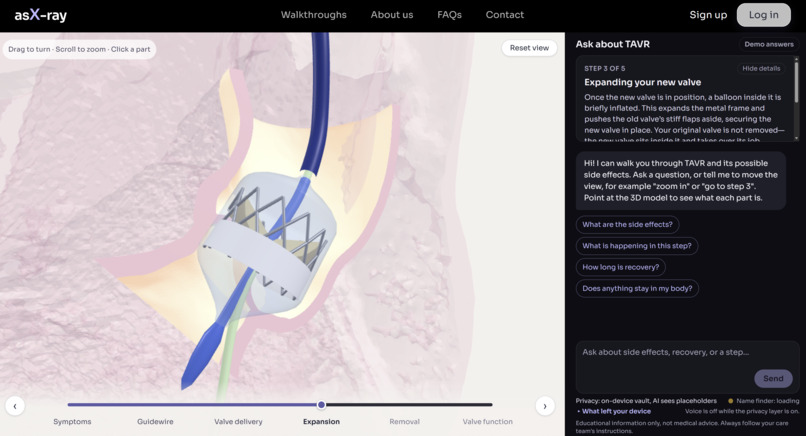
Ask-Ray Walkthrough Close-Up
-
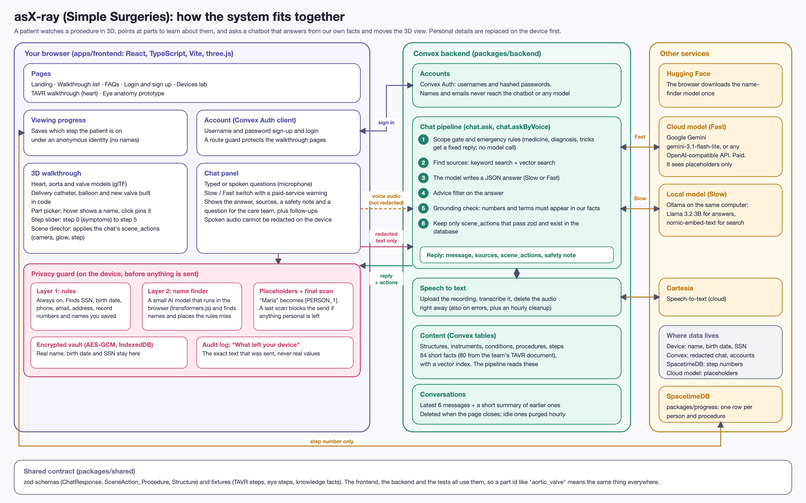
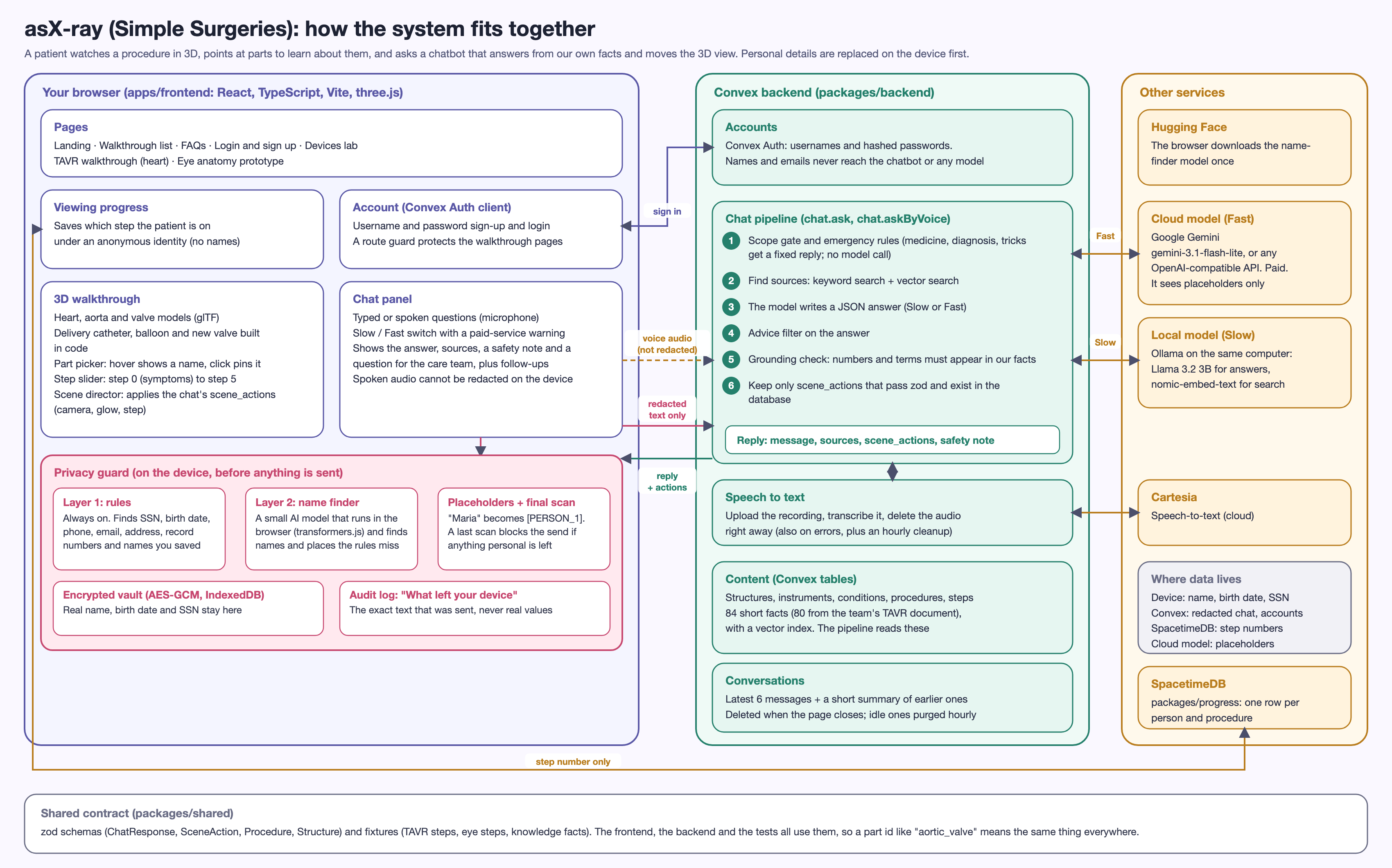
Ask-Ray Architecture Diagram
-
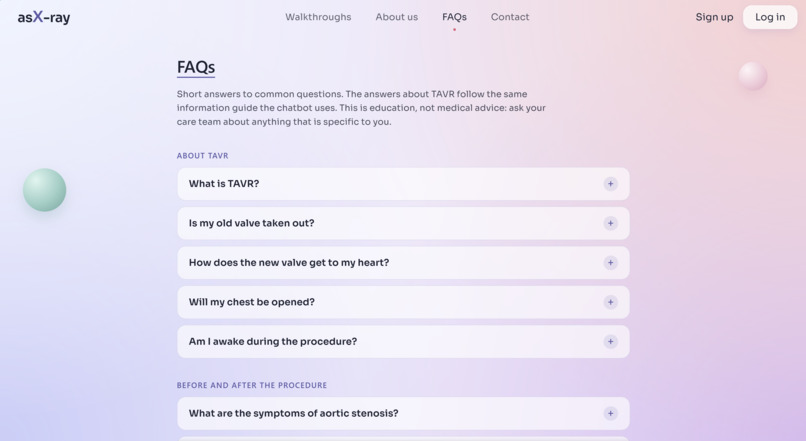
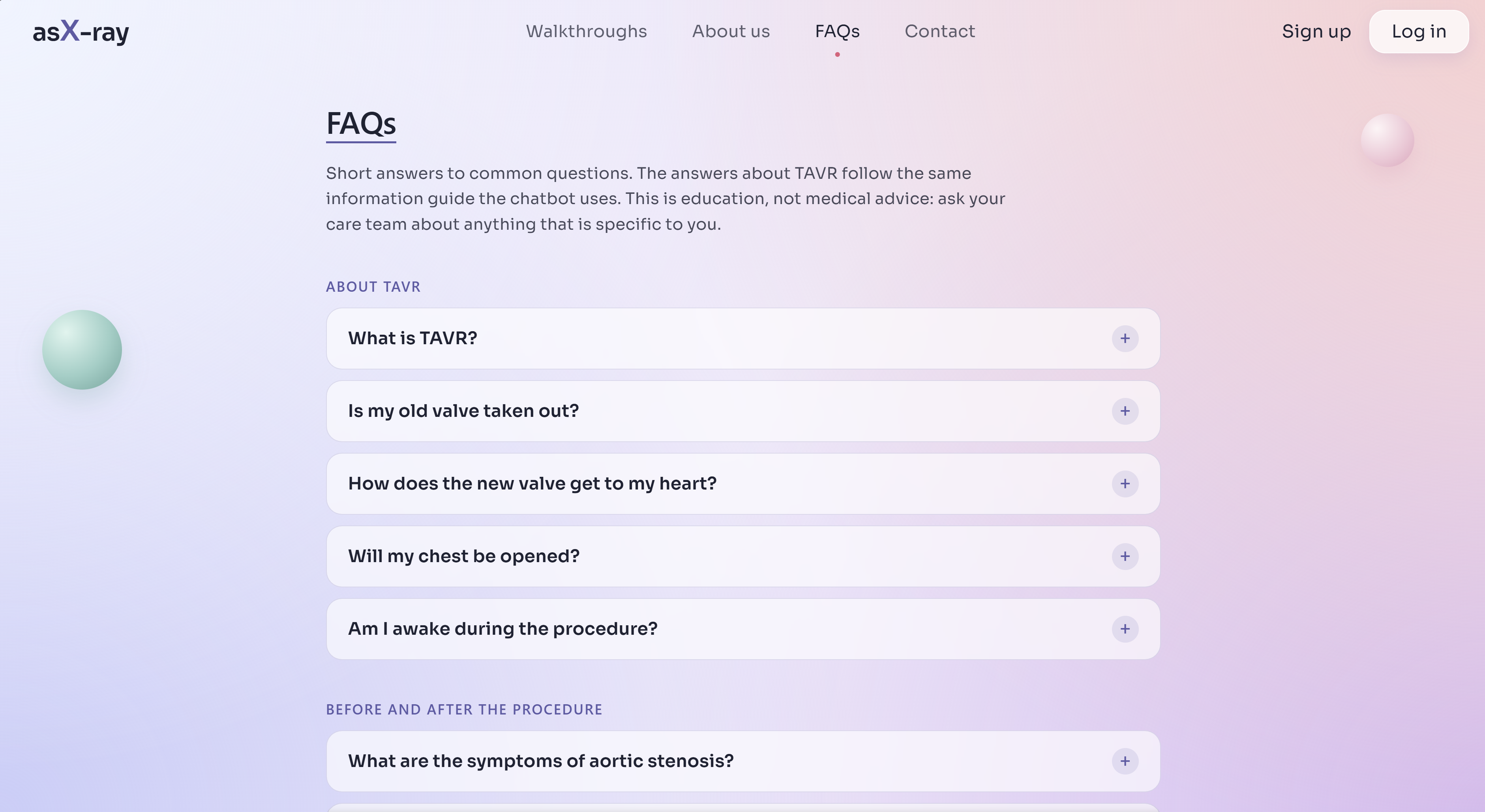
Ask-Ray FRQ Page
-
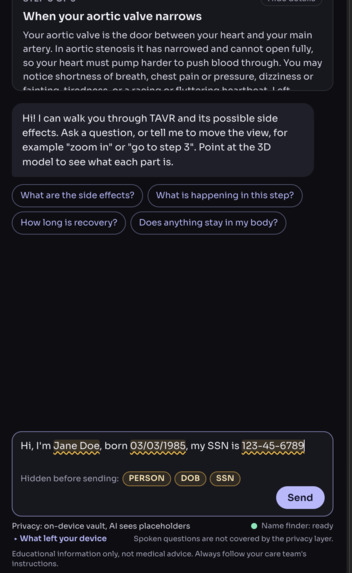
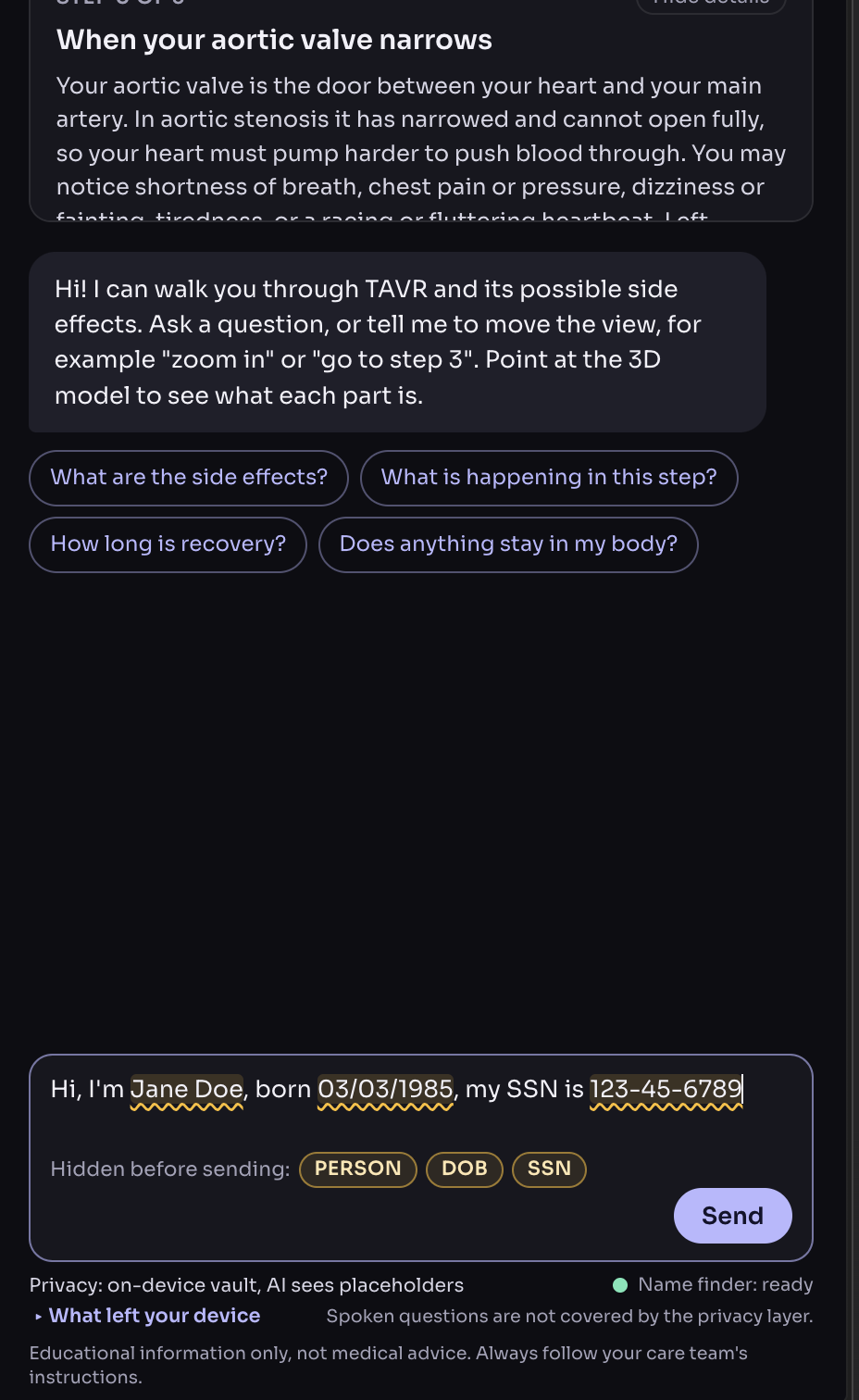
Microsoft Security Vault Detection
-
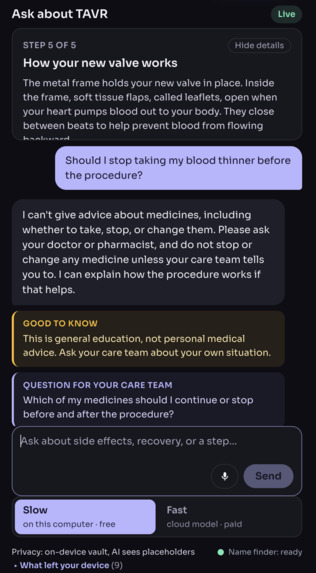
-
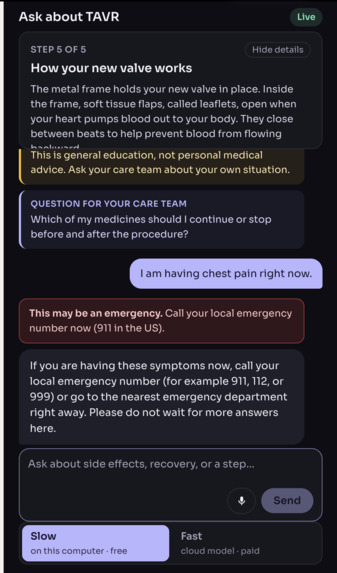
-
-
-
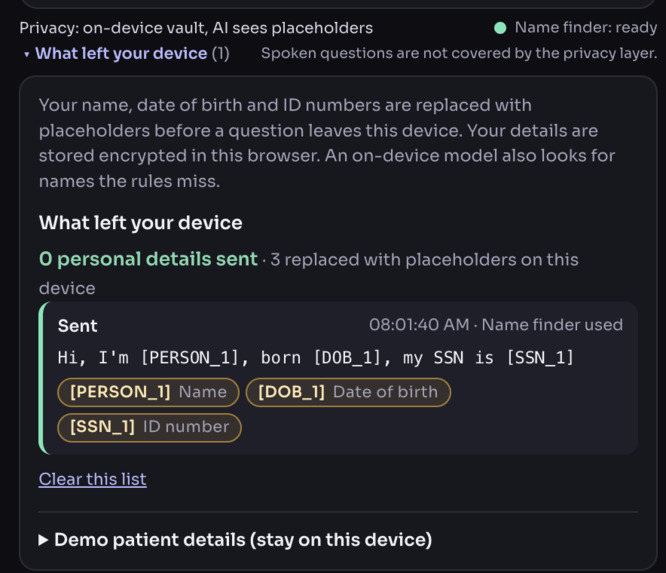
Security Validation
Ask-Ray (asX-ray)
An AI-powered, patient-centered medical visualization tool designed to educate and reassure patients before their procedures.
Educational prototype, not medical advice. Ask-Ray explains how a procedure works in general. It does not diagnose, does not advise on medicines, and sends personal decisions back to the patient's care team. All data is fake educational content, and no real patient data is used.
1. Inspiration
The idea for Ask-Ray began with one team member's grandmother, who needed heart surgery. Even after hearing her doctor's explanation, she struggled to understand what would happen during the procedure. The uncertainty left her deeply anxious, and seeing that made us wonder how we could help patients feel more informed and prepared.
A 2018 study on preoperative anxiety found that 40.5% of patients experienced high anxiety before their procedure, as measured by the APAIS (Aust et al., 2018). A separate 2022 study found that preoperative anxiety, particularly relating to cardiac surgery, may be reduced through education (Ng et al., 2022).
Medical explanations can be overwhelming, especially when someone is already worried about their health. A patient may nod along while still having questions they do not know how to ask. Written instructions and static diagrams can also be difficult to connect to what will actually happen inside the body.
We wanted to give patients a way to revisit those explanations, explore the procedure visually, and ask questions at their own pace. That became Ask-Ray: a patient education tool that brings interactive 3D visualization, step-by-step explanations, and conversational questions together in one place.
2. What it does
Ask-Ray is a patient education prototype focused on TAVR, or transcatheter aortic valve replacement. It is designed to help patients explore their procedure through a guided 3D walkthrough with accessible explanations and an integrated chatbot.
The experience brings several features into one screen:
- Step-by-step explanations: Each stage of the procedure is paired with a corresponding 3D scene and a plain-language explanation. The walkthrough has six steps: step 0 introduces the symptoms that lead to the procedure (only the heart is shown), and steps 1 to 5 show guiding a wire, bringing the new valve into position, expanding it with a balloon, removing the equipment, and how the new valve works.
- A clickable timeline: Users can return to a missed step or revisit a section they want to understand more clearly.
- Interactive anatomy: Users can rotate and zoom the 3D model. Hovering over a structure shows its name, and selecting it displays a description and its role in the procedure. The delivery catheter, balloon, and new valve move through the heart as the steps advance.
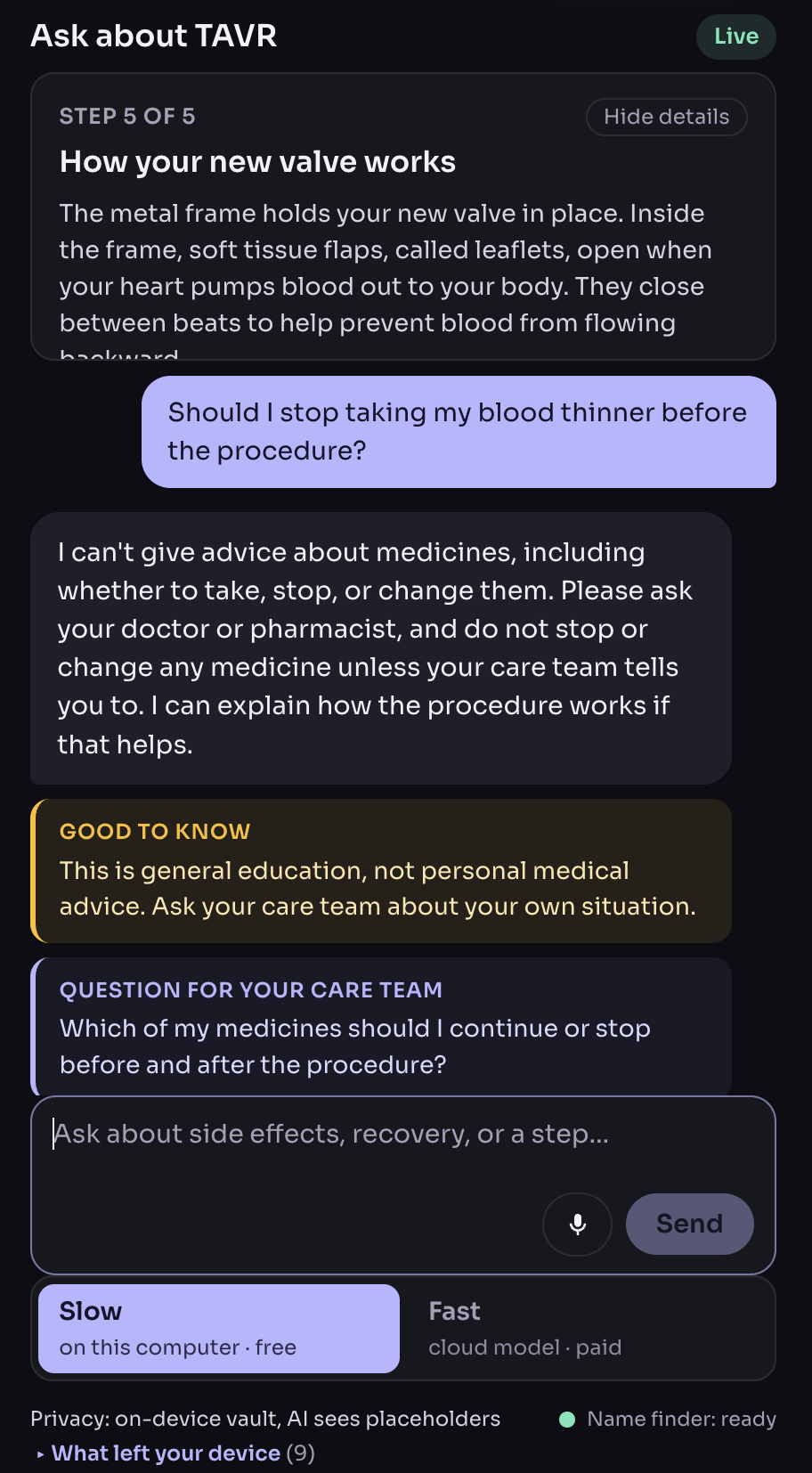
- Questions alongside the walkthrough: Patients can ask the chatbot about what they are viewing without leaving the page. Responses cite supporting content from our TAVR knowledge base and include a short safety note and a question to bring to the care team.
- Chat-connected visualization: Supported requests can focus or highlight a structure, move to another step, or adjust the camera.
- Slow or Fast answers, chosen per question: Slow runs a small model on the user's own computer (free, and the question stays on that machine). Fast uses a cloud model; it is quicker, but it is a paid service, so the app warns the user before it is turned on.
- Optional voice input: Users can speak a question and have its transcription processed through the same question-answering flow.
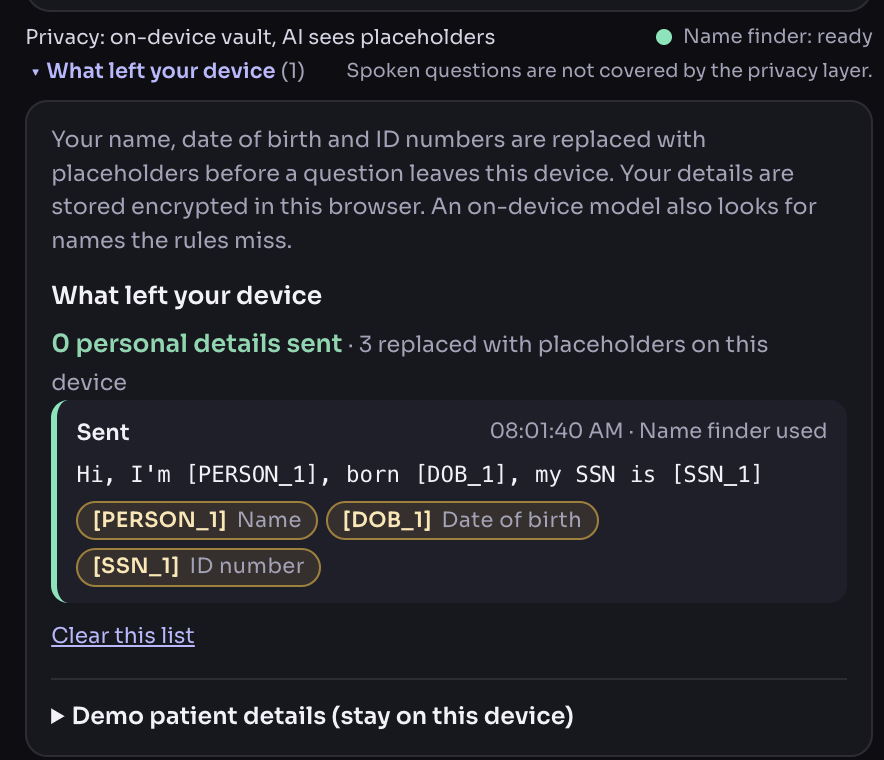
- Privacy by design: Names, birth dates, phone numbers, and similar details are replaced with placeholders on the user's device before a question is sent, and a panel lists exactly what text left the device.
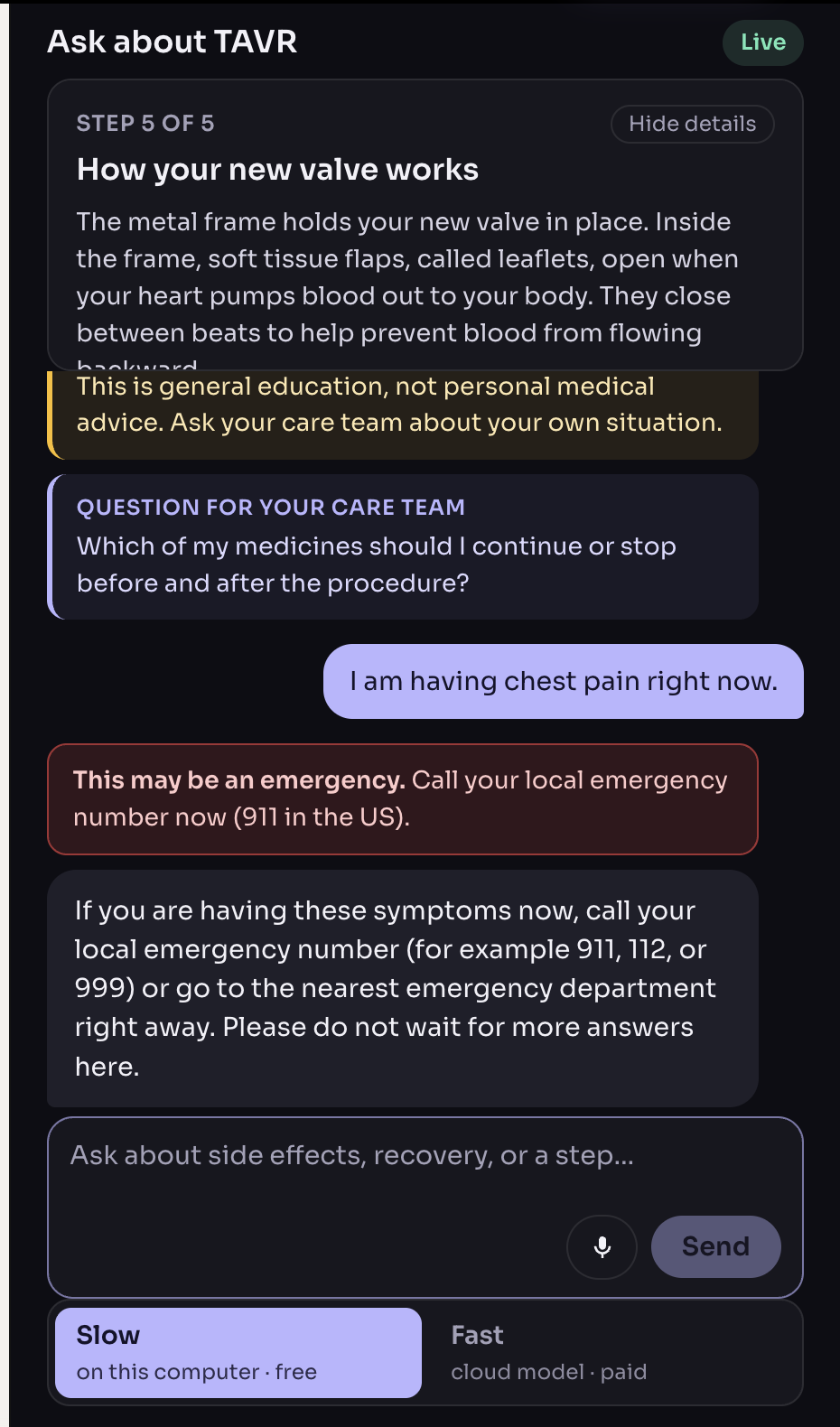
- Safe by rule: Questions about medicines, diagnosis, or personal medical decisions get a fixed reply that points to the care team, and emergency symptoms get an emergency message first.
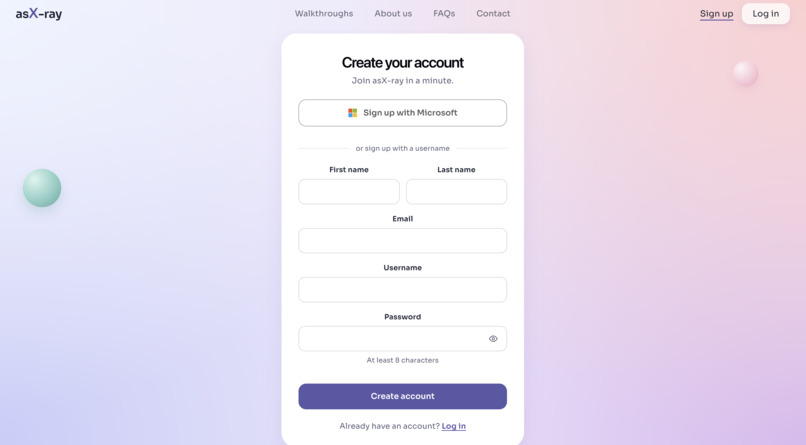
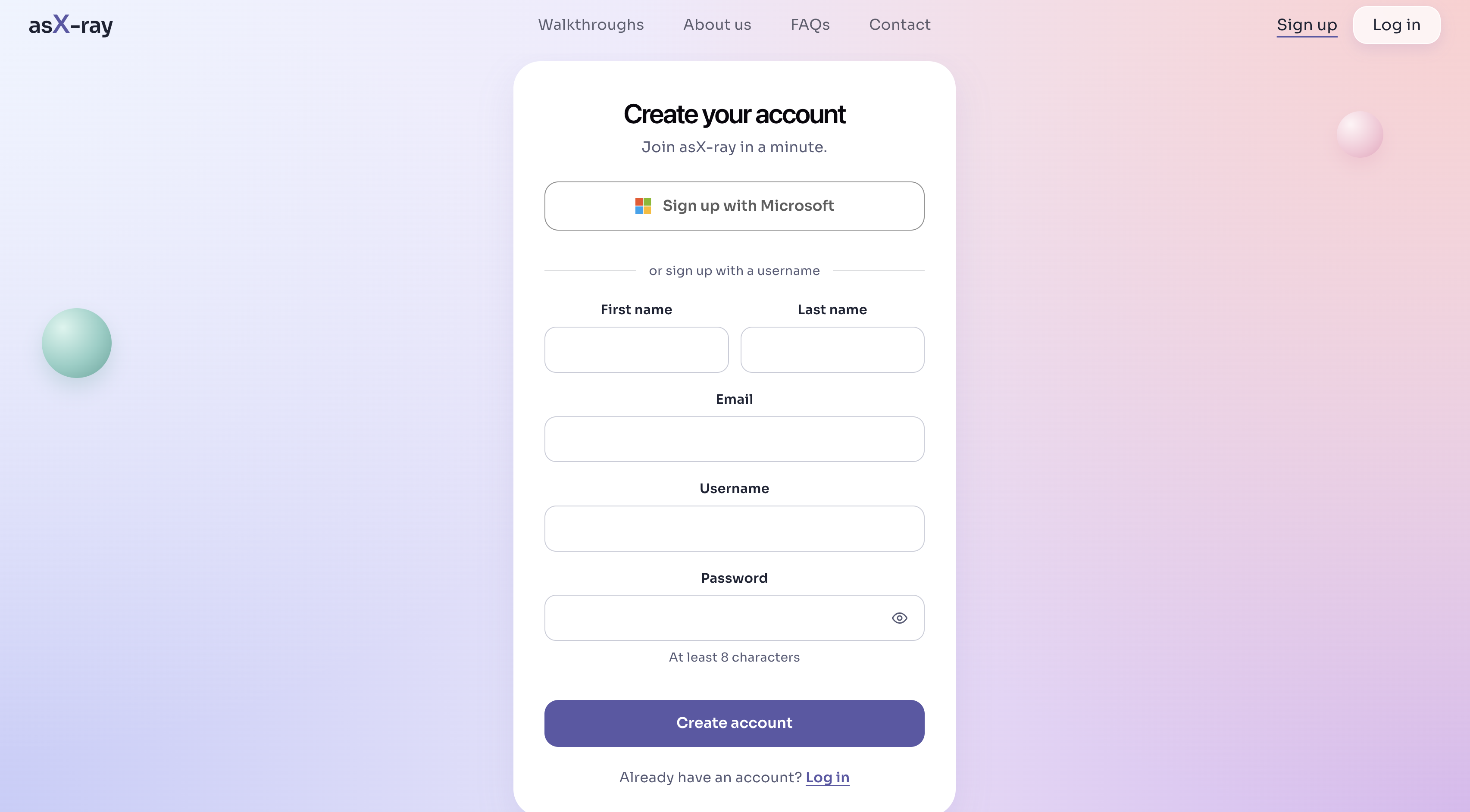
- Accounts and progress: Users can sign up with a username and password, and the walkthrough remembers which step they reached. A "Sign up with Microsoft" button is included as a preview for a future release.
- FAQs and a second topic: A FAQ page answers common questions, and a small eye-anatomy prototype shows that the same walkthrough layout can host other topics.
Our goal is to let patients work through the procedure at a comfortable pace and prepare more specific questions for their care team.
3. How we built it
Technology stack. React, TypeScript, Vite, three.js, Convex, Convex Auth, SpacetimeDB, Hugging Face Transformers.js, WebCrypto, IndexedDB, Web Workers, Zod, Groq, Gemini, Ollama, Cartesia, Vitest, pnpm, and GitHub.
What we used each technology for
Frontend
- React 19, TypeScript, and Vite: the website, including the landing page, login and sign-up, the walkthrough list, the FAQs, and the walkthrough itself.
- three.js: the interactive 3D heart. Each procedure step is scene data (camera, highlights, opacity) rather than a video, so the chatbot can control it. The heart is a single mesh, so its chambers and vessels are named by outlines drawn on the model. The catheter, balloon, and balloon-expandable valve are built in code and move with each step.
- CSS Modules: the styling, with a soft pastel look.
Backend
- Convex: the backend, including the database, serverless functions, file storage, scheduled cleanup jobs, vector search, and the chatbot pipeline. It is organized in a strict-TypeScript pnpm monorepo.
- Convex Auth: username and password accounts with hashed passwords, plus a login requirement for the walkthroughs.
- Retrieval (RAG): the chatbot answers from a sourced knowledge base of 84 short, single-topic facts (80 from the team's TAVR guide and four heart-anatomy facts we wrote). Retrieval combines BM25 keyword search with Convex vector search using reciprocal rank fusion. The answer is checked before it is shown: advice-like wording is filtered, numbers are checked against the sources, and any 3D command whose target does not exist is dropped.
- Safety layer: the language model only writes friendly wording, and rules in our own code decide what reaches the patient. A scope gate answers medication, diagnosis, and personal-decision questions with fixed replies, rule-based emergency detection works even if the model fails, and percentages always carry a note that they describe groups of patients, not the individual.
- Groq (gpt-oss-20b) and Gemini (gemini-3.1-flash-lite): cloud language models for the chatbot's Fast answers. Any OpenAI-compatible provider works.
- Ollama (Llama 3.2 3B, with nomic-embed-text embeddings): an optional local model for the Slow answers, so a question can be answered on the user's own machine.
- Cartesia (ink-whisper): speech-to-text for spoken questions. The audio is deleted right after transcription.
- Zod: a shared contract so the frontend and backend agree on every chat reply and 3D command.
Privacy layer (runs in the browser)
- Rule-based detector (TypeScript): finds SSNs (including spelled-out digits), dates of birth, phone numbers, emails, addresses, and record numbers.
- Hugging Face Transformers.js (a BERT NER model) in a Web Worker: an on-device name finder, so the text is never sent anywhere to find names.
- WebCrypto (AES-GCM) and IndexedDB: an encrypted on-device vault that keeps the real values.
- Result: the chatbot only sees placeholders such as
[PERSON_1]. A final check blocks any message that still looks personal, and a "What left your device" panel shows exactly what text was sent.
Viewing progress
- SpacetimeDB: saves which step a person last viewed, under an anonymous identity, and shows a "Your progress" card. The module was tested locally and is not published to the cloud yet.
Testing and tooling
- Vitest, ESLint, and oxlint: 509 automated tests and code checks, including red-team scenarios that run a deliberately misbehaving mock model through the safety layer.
- pnpm monorepo and GitHub: one repository for the frontend, backend, shared contract, and progress module, with one pull request per change.
Voice input and development tools
For voice questions, the browser records audio and uploads it to Convex storage. A backend action sends it to Cartesia's ink-whisper speech-to-text API, then passes the transcript into the existing chat pipeline. API keys remain in backend environment variables.
We used Mana for ideation and 3D graphics implementation and Claude Code for implementation, code review, and debugging.
Notes for judges
All data is fake educational content. The app is privacy-preserving by design: personal details are replaced on the user's device before anything is sent. It is not a medical device and makes no compliance claims (it is not HIPAA certified). One known gap: spoken questions are transcribed on the server, so spoken details cannot yet be replaced on the device; the text is still cleaned of common contact and ID patterns afterwards.
4. Challenges we ran into
Finding and adapting usable 3D models
Finding compatible anatomical models was harder than expected. Even for a single heart procedure, we needed to combine models from different sources and adapt their geometry for a consistent scene.
Some models required modification in external tools, and animating changes in shape during the procedure required additional work. The heart arrived as a single mesh, so we had to name its parts by position instead of by mesh, and we had to route the catheter and valve through the narrow opening of the old valve. For our eye prototype, a 118 MB source model had to be cut into parts and simplified to about 3.5 MB to run in a browser. We also revised the initial visualization abstractions so model loading, animation, and interactions could work with the rest of the app.
Keeping a small model grounded
The local 3B model sometimes invented details or confused information across long lists of facts. We split the knowledge base into single-topic chunks, shortened the prompt, and added examples of both a supported answer and an appropriate uncertainty response.
We also added grounding checks and cited fallback snippets for answers that fail validation. These are engineering safeguards; the medical content still needs clinical review.
Handling sensitive questions
We needed to define the chatbot's boundaries explicitly. We added rule-based handling for medication advice, personal risk estimates, treatment eligibility, emergency symptoms, and attempts to override the system's instructions.
We tested these controls with a deliberately misbehaving mock model. This helped us check the application's behavior independently of whether the model followed its prompt.
Balancing privacy, voice input, and deployment
Local inference required a local backend because a cloud Convex deployment cannot reach Ollama on a user's computer. This means the free Slow mode cannot run on a hosted site, which we have not solved yet.
Voice input introduced another trade-off: Cartesia is a cloud service, and audio is transcribed on the server before any text guard can run, so our on-device privacy guard cannot replace spoken details. In local mode, cloud transcription is disabled unless explicitly enabled. We also added recording deletion after transcription, periodic cleanup for abandoned uploads, redaction of common contact and ID patterns, and chat-session cleanup.
Reducing latency
Local responses could take 10–20 seconds on a laptop. We shortened the context, kept the model warm, and used rule-based conversation summaries to limit additional inference.
Camera commands such as zooming and rotating bypass the model entirely. We also handled differences in browser recording formats and transcription length, and made frontend timeouts configurable.
Working through a first hackathon
Three of our four teammates were attending their first hackathon, and two were working in a language other than their first language. Alongside unfamiliar tools, fatigue, and limited time, this made clear communication especially important.
We also had to keep refining what distinguished Ask-Ray: the connection between the procedure walkthrough, the explanation, and the patient's questions.
5. What's next for Ask-Ray
Our first priority is to complete and refine the TAVR experience. Before use with real patients, the content needs clinical review, and the product needs evaluation with patients and clinicians to understand whether the walkthrough is clear, useful, and accessible.
From there, we would like to expand to additional heart procedures and eventually surgeries involving other parts of the body.
We also envision a clinician-facing workspace where care teams could add approved, patient-specific explanations and preparation or recovery instructions. This would let the educational experience reflect information supplied by the patient's own care team.
On the technical side, accounts already exist, and future work includes connecting the Microsoft sign-in for real, tying chat sessions to signed-in users, rate limiting and a budget for the cloud model, deploying the site (including a way to offer the free local mode on a public site), local speech-to-text so spoken details can be replaced on the device and voice works fully offline, and further improvements to rendering and response speed.
Longer term, we would like to explore partnerships with healthcare providers and develop Ask-Ray into a sustainable patient education product.
Try it out
The project runs locally; the free Slow mode needs Ollama on the same computer.
- Code: [add the GitHub repository link]
- Demo video: [add the demo video link]
- Run locally:
pnpm install, thenpnpm dev:frontend(website) and optionallypnpm dev:backend(live chatbot). The README lists the settings.
Credits
The eye model is "Cross Section of Eye - Anatomy" by Erik Ao (https://sketchfab.com/3d-models/cross-section-of-eye-anatomy-4bf3236c8fe2407ea3f494a93b8f5aa2), licensed under CC BY 4.0, which we cut into parts and simplified for the web. The TAVR facts come from our team's document "Information about TAVR: data for chatbot". [add the sources and licenses of the TAVR heart and valve models]
Team
[add team member names and roles]
APA references
Aust, H., Eberhart, L., Sturm, T., Schuster, M., Nestoriuc, Y., Brehm, F., & Rüsch, D. (2018). A cross-sectional study on preoperative anxiety in adults. Journal of Psychosomatic Research, 111, 133–139. https://doi.org/10.1016/j.jpsychores.2018.05.012
Ng, S. X., Wang, W., Shen, Q., Toh, Z. A., & He, H. G. (2022). The effectiveness of preoperative education interventions on improving perioperative outcomes of adult patients undergoing cardiac surgery: A systematic review and meta-analysis. European Journal of Cardiovascular Nursing, 21(6), 521–536. https://doi.org/10.1093/eurjcn/zvab123
Built With
- azure
- claude
- mana
- three.js
- typescript

Log in or sign up for Devpost to join the conversation.