Inspiration
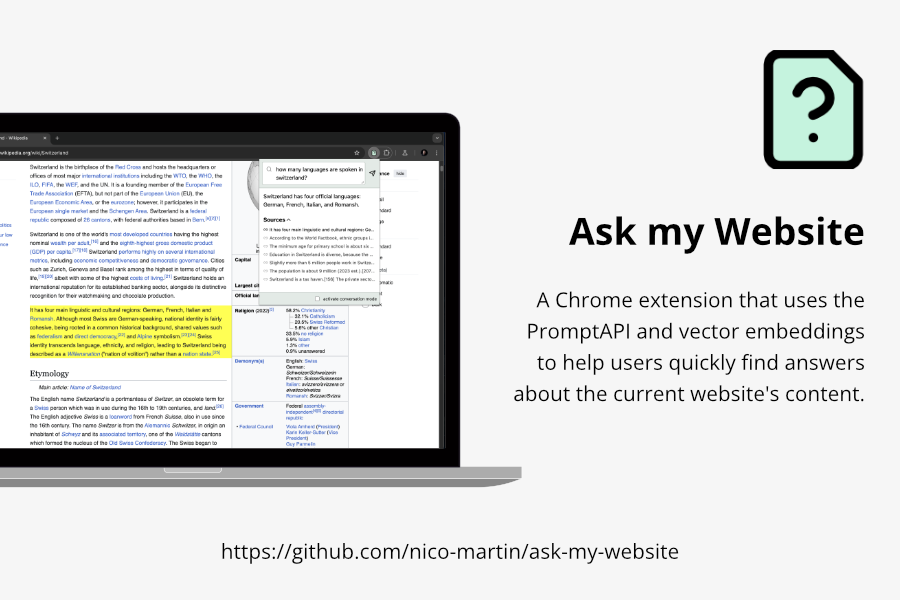
Imagine having an assistant that works seamlessly on any website, helping you quickly find the content you need. Not in a clunky or intrusive way, but with a simple and subtle interface. That’s the idea behind "Ask My Website." It’s a Chrome extension designed to answer questions about a website’s content.
Large content
The PromptAPI, like most small LLMs, has a limited capacity for processing tokens - currently capped at 6,144 tokens. This means that in most cases, we cannot simply use document.body.innerText as input and rely on the LLM to identify the relevant parts. Instead, we need a method to extract only the relevant sections of the website beforehand.
Sources
Having an LLM answer a question always carries a certain risk of generating hallucinations. The best way to address this issue is to provide users with the sources on which the answers are based. This allows users to evaluate the trustworthiness of the response themselves.
User Experience
While researching, I noticed that most existing extensions rely on the sidePanel approach. This approach occupies a significant amount of horizontal space and remains constantly visible.
For my extension, I wanted to create a more subtle user interface that only appears when needed. To achieve this, I decided to use the extension popup for the classic input and incorporate a small icon on the website for conversation mode.
What it does
Retrieval Augmented Generation (RAG)
The core of the extension is a RAG set up. This means that it uses a predefined prompt layout that is populated with the relevant content:
- The content of the website is parsed and split into sections. Each section consists of the heading (H1, H2, H3) and the following paragraphs (p, li or td tags)
- Each paragraph is then vectorized using a
sentence-transformerslibrary with Transformers.js - Once the use asks a question the extension will find the most similar paragraphs and adds its section as context to the prompt. The paragraph itself is considered a "source"
- While generating the prompt it does use the
session.countPromptTokensmethod to evaluate the length of the prompt and to make sure it sends as much context as possible. - The prompt is then sent to the PromptAPI and the answer is displayed to the user
- The sources are displayed as well and can easily be accessed
Conversation mode (Speech-to-speech)
But then again, writing can be quite annoying. Therefore the extension also provides the "conversation mode". Once activated the user sees a little icon in the bottom right corner. Now they can just press the space bar, ask a question and the extension will read the answer out loud. So it also has a complete speech-to-speech option to interact with the site.
No typing and no clunky Popup. Just ask and listen.
How I built it
The extension consists of three parts:
- contentScript: Parses the content, manages the VectorDB and injects the conversation-mode.
- popup: initializes the VectorDB and provides a simple Form to interact with the page and the PromptAPI.
- serviceWorker: runs the PromptAPI either as a one-time result message, or as a stream
For the VectorDB I am using the all-MiniLM-L6-v2 sentence-transformers model with Transformers.js
For the UI I am using Preact an extremely small virtual DOM library.
I have also tried to use built-in browser APIs as much as possible, such as the WebSpeechAPI and the SpeechSynthesisAPI.
Challenges I ran into
Different contexts
Since the Prompt API in Chrome Extensions is already in origin trial, I wanted to rely completely on the chrome.aiOriginTrial.languageModel instead of the self.ai.languageModel that would only be available in Chrome Canary.
But this also means I had to orchestrate the communication between different contexts: serviceWorker for the PromptAPI, contentScript for the VectorDB and the popup for the form.
RAG
The crutial part in RAG is the "retrieval". When speaking about a website, it is quite easy to parse the content and create semantically correct segments. But the again, how do we find the relevant parts for a specific query? For me the thing that works best is vector embeddings on a paragraph level. Embeddings for single sentences are too specific, while whole sections are too vague. So when relevant content is found, I don't just add the paragraph, but the whole section as context so as not to lose the context.
User Experience
The popup is in my opinion a better way to interact with the user than a sidePanel. It takes less space and also only the space it actually needs. Also with the conversation mode I wanted to hav a very minimalistic UI that just works without a lot of distraction.
Accomplishments that I am proud of
- I have built a more complex chrome extension for the first time.
- I found a pretty solid solution that orchestrates the VectorDB and the PromptAPI
- I've created a pretty good User Experience
What we learned
- how chrome extensions work
- how I can parse a website and convert it into a VectorDB
- How to use the PromptAPI in a chrome extension
What's next for Ask my Website
As a next stept I want to publish it in the extensions webstore. Besides that I also went to dig deeper in the VectorDB part and expreiment with maybe more reliable ways to retrieve relevant data to a query.
Built With
- preact
- promptapi
- transformersjs


Log in or sign up for Devpost to join the conversation.