Inspiration
The inspiration for Ask My PDF came from repeatedly struggling with long, dense PDF documents technical documentation, reports, and study material where finding precise answers felt inefficient and time-consuming. Traditional search is largely keyword-based and often misses context, while uploading sensitive documents to online AI tools raises serious privacy concerns.
A turning point came while going through my office handbook, which was a massive document of around 50–60 pages. Whenever I needed clarity on a small policy or rule, I found myself spending an unreasonable amount of time digging through the handbook to locate the relevant section. It was frustrating and clearly inefficient.
That experience made me realize how powerful an AI-driven, RAG-based solution could be in real-world scenarios like this. Instead of manually searching through large documents, I could simply ask a question and get a clear, contextual answer in minutes, without compromising privacy.
This motivated me to build Ask My PDF as a local-first, private, and genuinely useful tool that allows users (and teams) to interact with large documents intelligently and efficiently using AI.
What it does
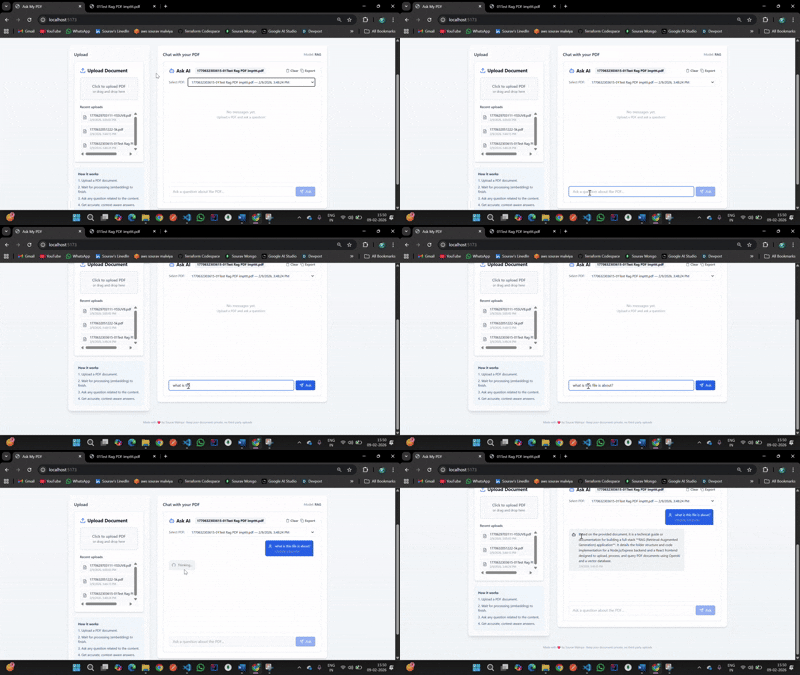
Ask My PDF is a RAG (Retrieval-Augmented Generation) application that allows users to:
- Upload PDF documents
- Automatically extract and chunk their text
- Generate embeddings and store them in a vector database
- Ask natural language questions
- Receive answers grounded strictly in the document content
Users can query a specific PDF or ask questions across all uploaded documents, all while keeping their data local.
How I built it
The project is built using a clean full-stack architecture:
Frontend: React + Vite
- Drag-and-drop PDF upload
- Responsive UI
- Async chat experience
- Drag-and-drop PDF upload
Backend: Node.js + Express
- PDF parsing and text extraction
- Chunking and metadata handling
- REST APIs for upload, chat, and listing PDFs
- PDF parsing and text extraction
LLM: Google Gemini 3 via
@google/genai- Embeddings + answer generation
Vector Store:
- Chroma (preferred, Docker-based)
- Local JSON fallback when Chroma is unavailable
- Chroma (preferred, Docker-based)
At a high level, the RAG flow looks like:
$$ \text{Question} \rightarrow \text{Embedding} \rightarrow \text{Similarity Search} \rightarrow \text{Relevant Chunks} \rightarrow \text{LLM Answer} $$
Challenges I ran into
Vector database availability:
Chroma isn’t always running locally.
→ Solved by building a JSON-based fallback vector store.Chunk size tuning:
Chunks that were too small lost context, while larger chunks reduced retrieval accuracy.Prompt grounding:
Early answers hallucinated, so prompts had to be refined to ensure the model only used retrieved context.Async UX complexity:
Handling uploads, embeddings, and chat responses without blocking the UI required careful state management.
Accomplishments that I'm proud of
- Built a fully working RAG system from scratch
- Implemented a graceful fallback when external services fail
- Designed a privacy-first, local-only workflow
- Created a clean and usable frontend for a complex AI pipeline
- Integrated a modern LLM into a real-world application
What I have learned
- How RAG systems work end-to-end in practice
- Real-world use of embeddings and vector similarity search
- Designing systems with resilience and fallbacks
- Prompt engineering to reduce hallucinations
- Building AI products that balance usability, performance, and privacy
This project strengthened both my AI system design and full-stack development skills.
What's next for Ask My PDF
Planned improvements include:
- Highlighting exact source passages used in answers
- Multi-document comparison queries
- Streaming responses for better UX
- Authentication and user-specific document libraries
- Optional cloud deployment while keeping local-first defaults
Ask My PDF is just the beginning.. there’s a lot of room to grow it into a powerful personal knowledge tool.
Built With
- axios
- chromadb
- docker
- gen-ai
- google-gemini
- ingesture
- javascript
- node.js
- rag
- react


Log in or sign up for Devpost to join the conversation.