-
-
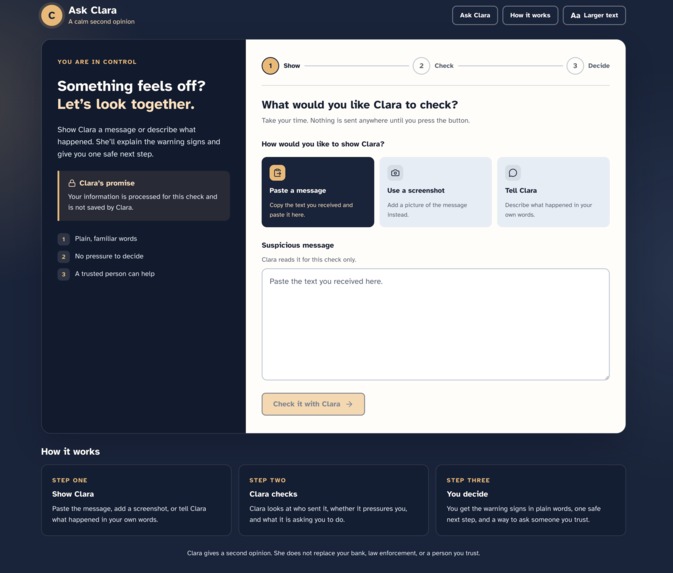
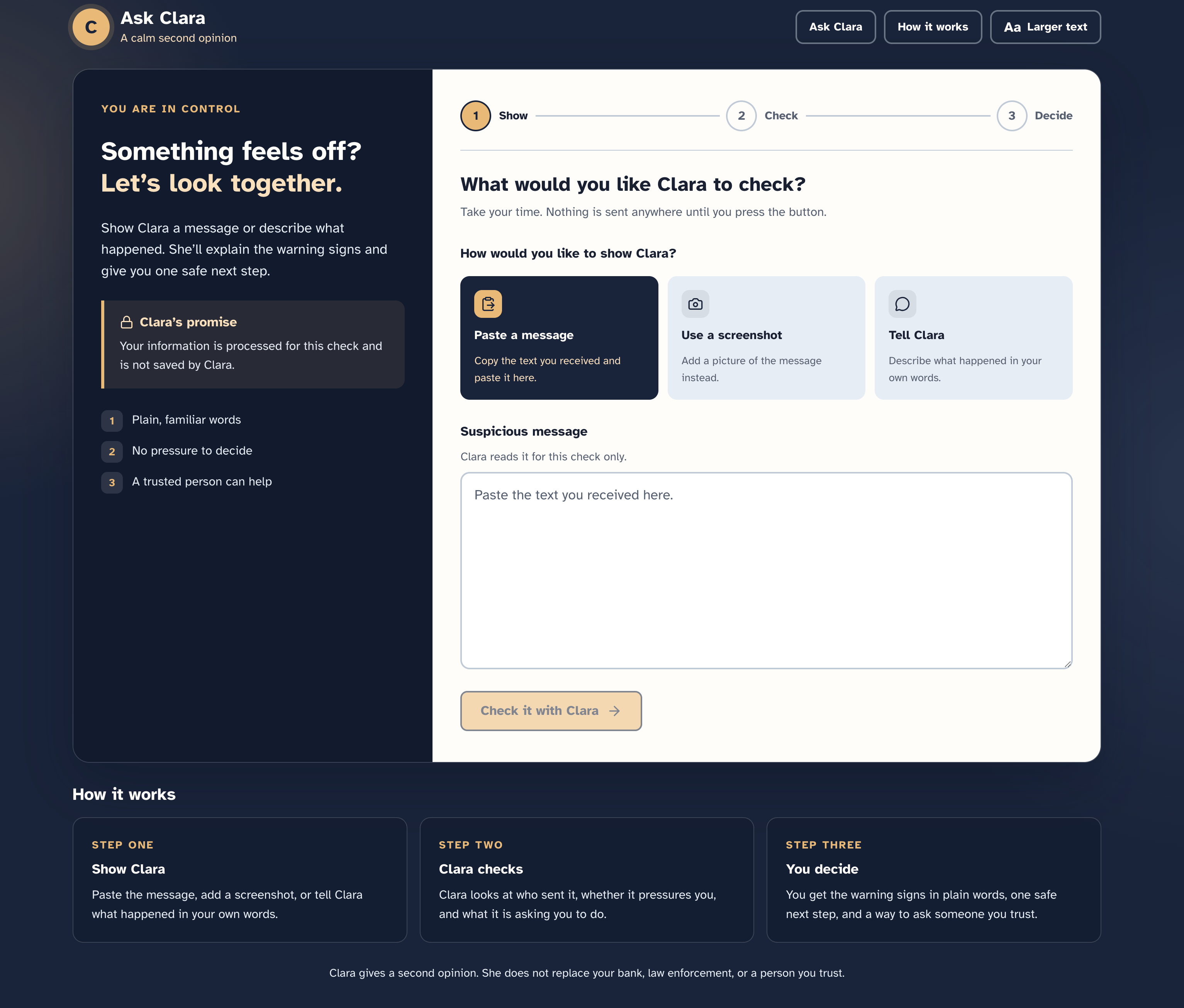
Ask Clara page overview
-
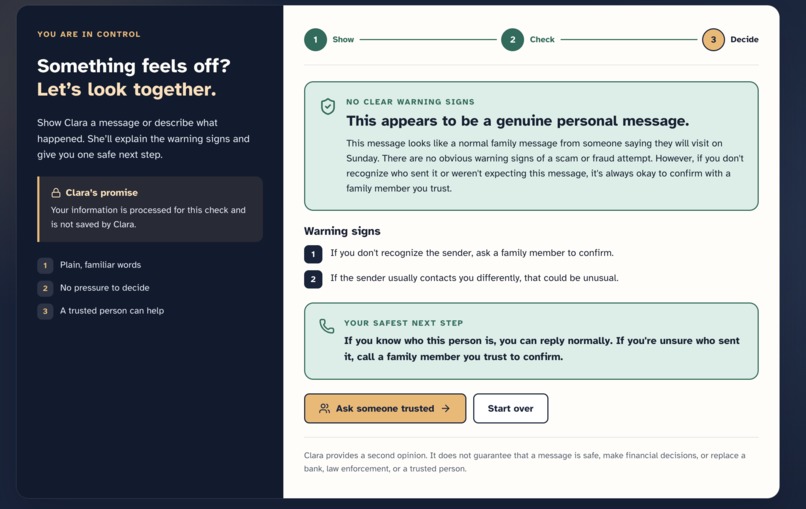
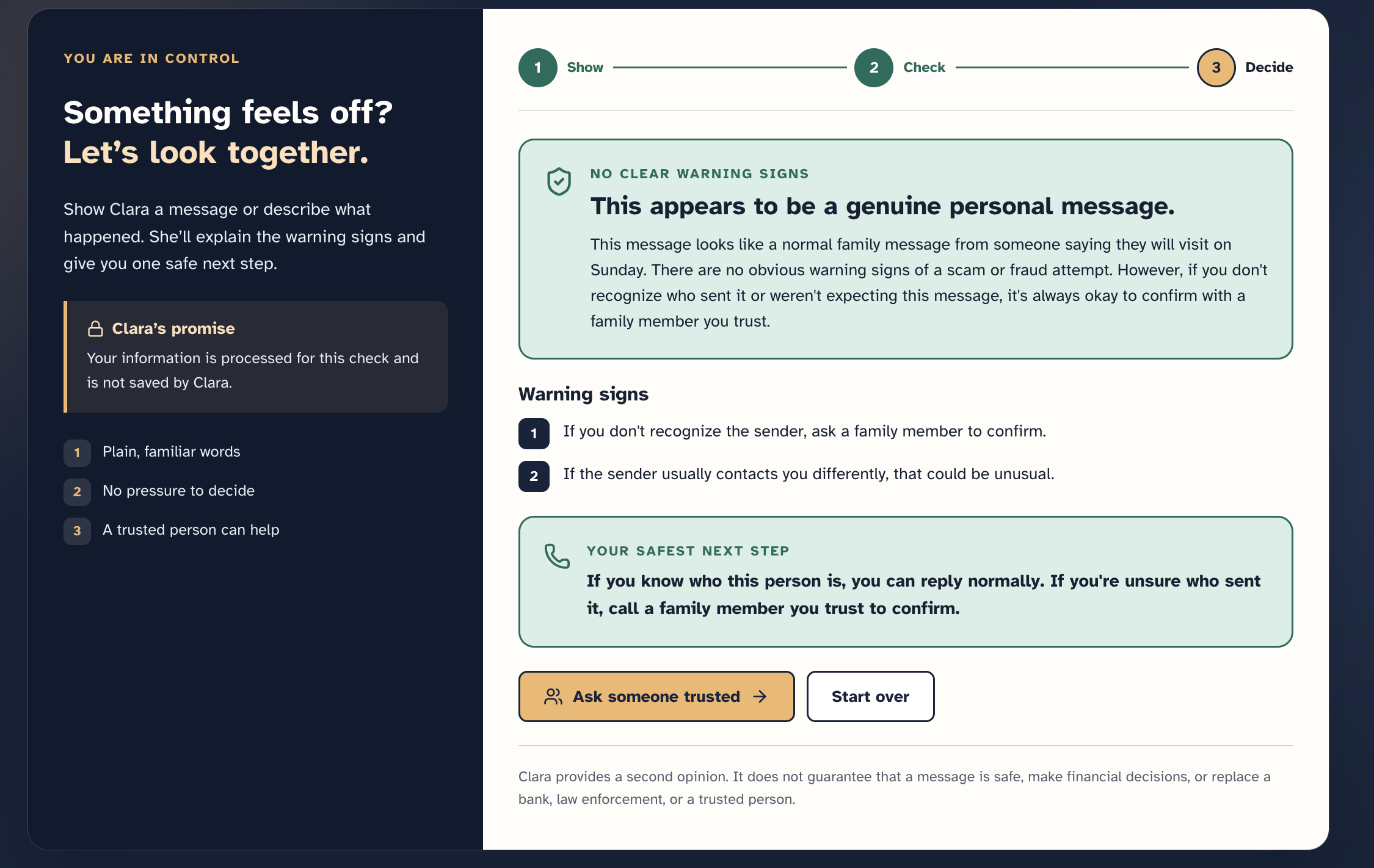
Ask Clara - no scam detected
-
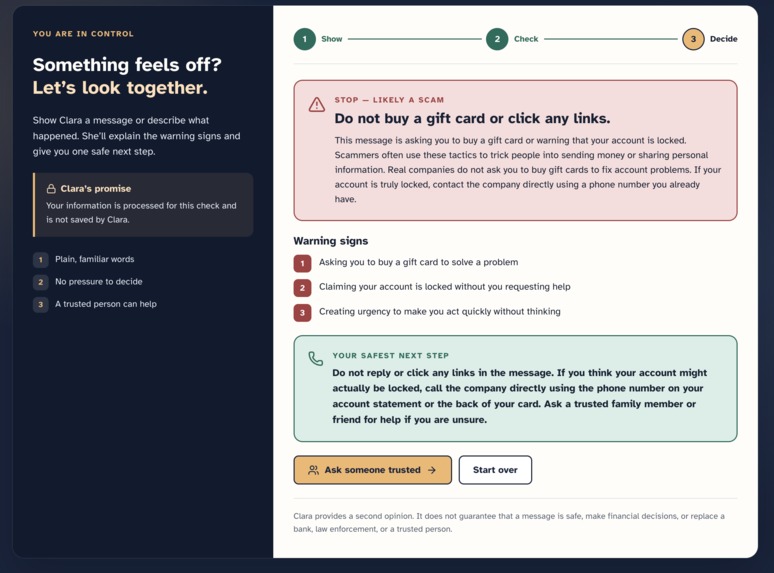
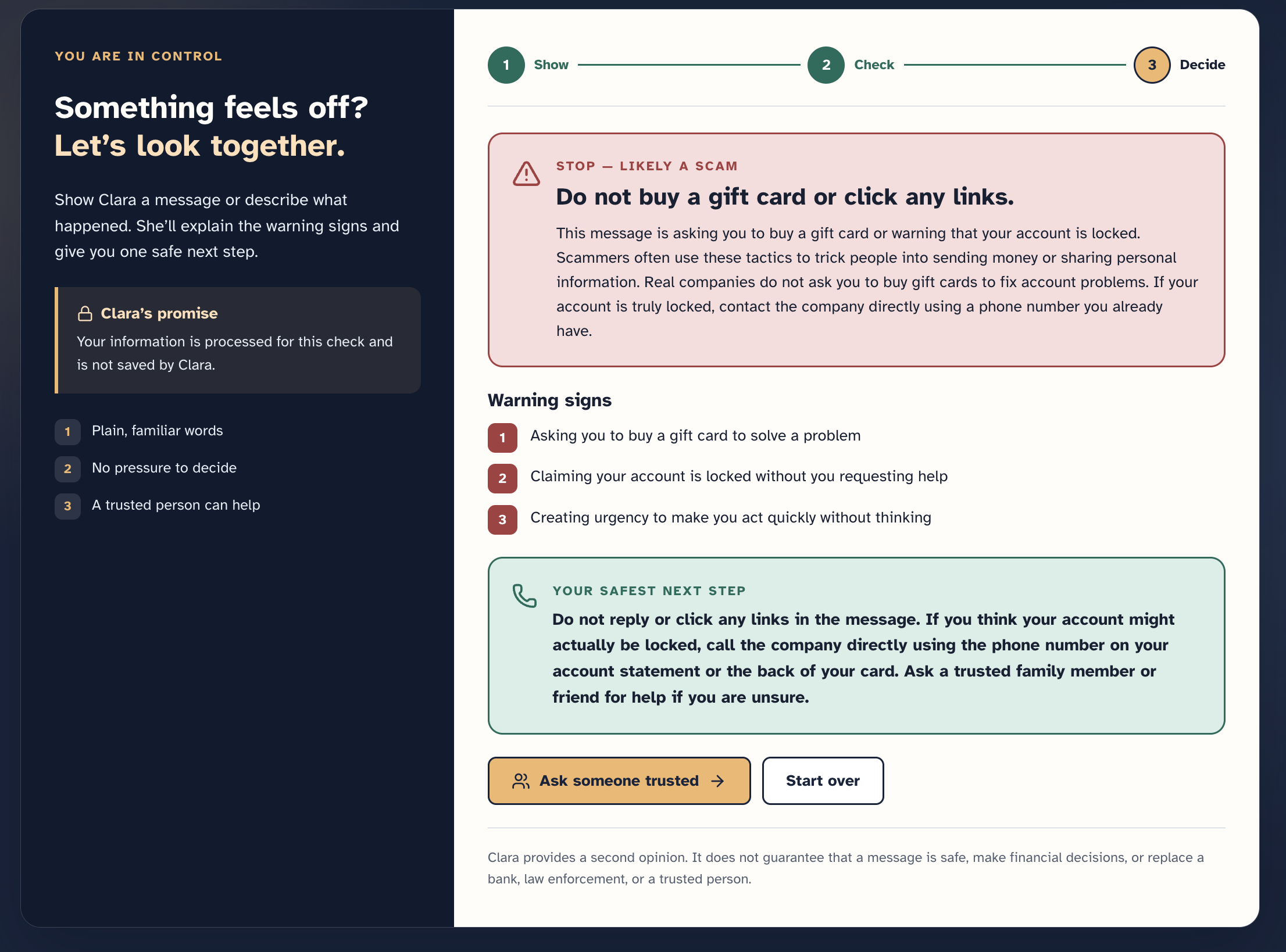
Ask Clara - scam detected
-
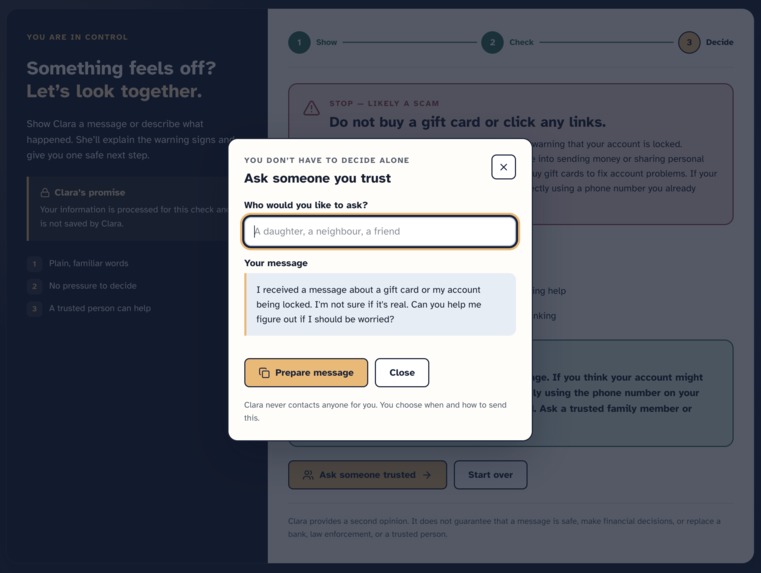
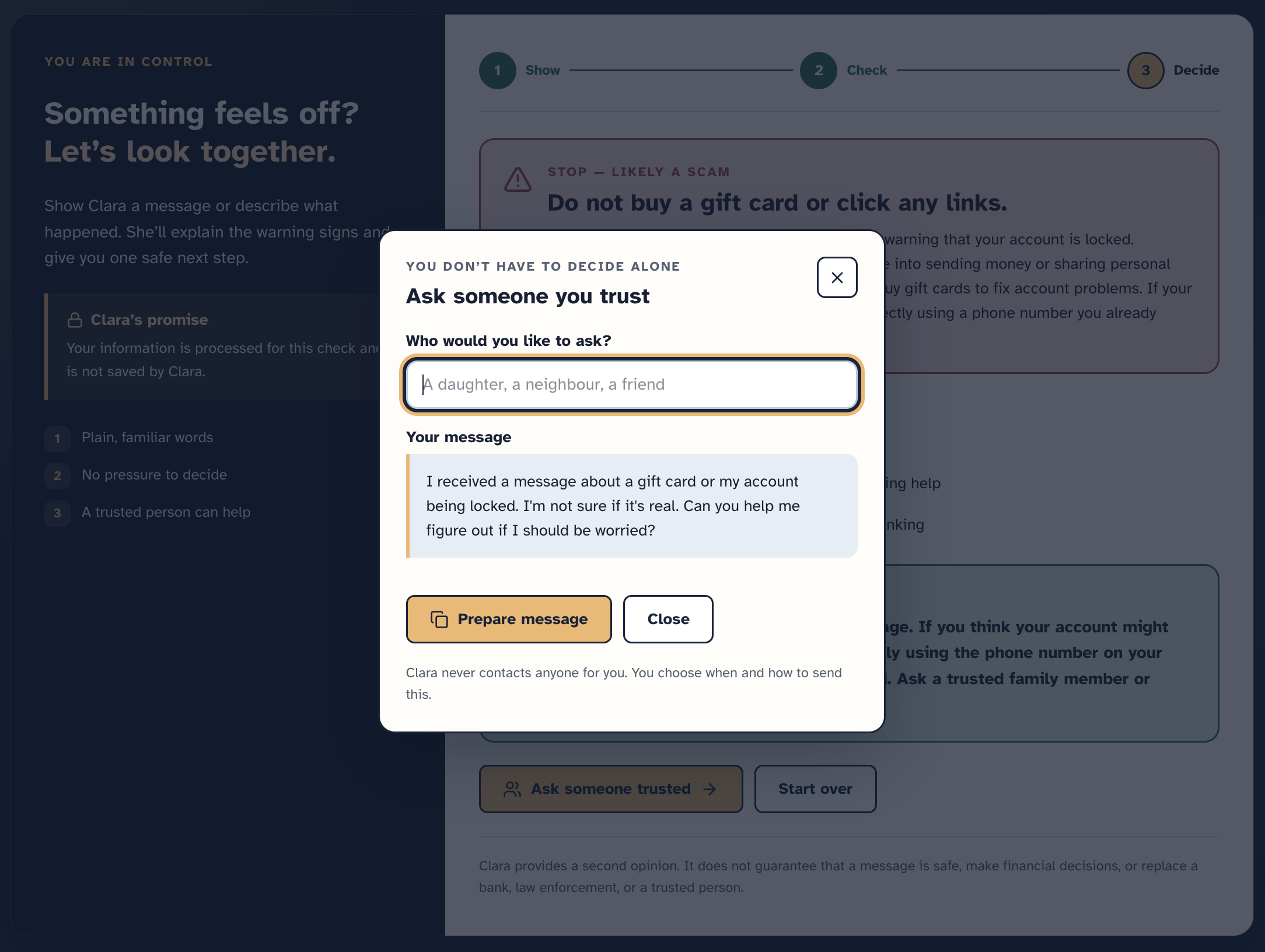
Ask Clara - safe next step
Ask Clara Inspiration: It's a Tuesday afternoon. Margaret is folding laundry when her phone rings.
"Grandma, it's me. I'm in trouble."
The voice sounds shaky. Scared. Almost right.
"I was in an accident. Please don't tell mom and dad yet — I just need $3,000 for bail, and a lawyer is going to call you next."
Her hands go cold. She doesn't stop to ask why he calls her "Grandma" instead of "Nana," what he's called her since he was four. She doesn't notice the background noise doesn't match a police station. She just knows: her grandson needs her, and she has to move fast.
The lawyer never calls. A text does.
Wire the bail here. Do not tell anyone.
That's the moment scammers are counting on. Not because Margaret is careless. Because she's a grandmother who loves someone, and love doesn't stop to fact-check.
We design accessible interfaces for people who are often left out of AI products. Clara started as a question we kept hearing from parents and grandparents: “Is this real?” They were not asking for a lecture on phishing. They were asking what to do in the next minute.
We built Ask Clara so that question has somewhere to go before the send button. A pause. A friend you can show a message to at 11 p.m. One honest voice saying: “Wait. Let’s look at this together first.”
What it does: Ask Clara is an accessible AI safety companion for older adults. You paste a suspicious message, describe what happened, or upload a screenshot. Clara returns a plain-language second opinion:
A risk level in words: low concern, caution, likely scam, or unclear Up to three warning signs One safest next step (for example, call the number already on the back of the card) A short note you can share with someone you trust Clara never tells you to click the link, reply to the sender, or send money. She does not say a message is safe. She does not replace a bank, law enforcement, or a person you already trust.
The interface is built for older eyes and keyboards: large type, real labels, a clear Show → Check → Decide flow, and live updates for loading, results, and errors. Risk is never color alone.
How we built it: We shipped a Next.js 16 app (TypeScript, Tailwind) with a single analysis contract: ClaraAnalysis. The same Zod schema validates the request, the model output, the API response, and the result in the browser.
On the server, POST /api/analyze starts a new Strands agent each time and calls Amazon Bedrock (BedrockModel + structured output). We did not train a model and we do not open the user’s suspicious URL.
If AWS is not configured, the UI still works with a prepared demo result. If Bedrock fails, we return 502 — we do not silently show the gift-card mock, so a birthday text cannot look like a scam by accident.
Screenshots send the image bytes (JPEG, PNG, WebP, or GIF) to Bedrock, not only a filename. HEIC from some iPhones is not supported yet.
For Amplify Hosting we learned that AWS_ env names are reserved, so the app also accepts CLARA_AWS_REGION, CLARA_AWS_ACCESS_KEY_ID, and CLARA_AWS_SECRET_ACCESS_KEY. Newer Claude models need an inference profile ID (us.anthropic.…), not the bare foundation model ID.
Challenges we ran into:
- Bedrock model IDs. Haiku 4.5 rejected on-demand invocation until we used the geo inference profile.
- Amplify’s AWS_ prefix. The first deploy failed; we had to rename secrets for Hosting and still keep local AWS_* in .env.local.
- Honesty vs. a pretty demo. A mock that always returns “gift-card scam” would look great in a pitch and lie in production. We kept the mock only when credentials are missing.
- Screenshots. The first version sent Screenshot uploaded: IMG_1234.png. That is not analysis. We wired multimodal input so Clara can read the picture.
- Safety copy. Every line had to stay a second opinion — never “this is safe,” never “click here.”
Accomplishments that we're proud of:
- A working end-to-end flow in two days: paste, tell Clara, or show a screenshot, then a real Bedrock answer.
- One Zod contract from agent to UI, so a malformed model reply cannot reach Margaret.
- An interface that treats older adults as the primary user, not an afterthought.
- A trusted-person summary so Clara is a bridge to a human, not a replacement.
- Deploying toward Amplify without putting keys in the repo.
- A product we can explain in one sentence: a pause before you click, reply, or send money.
What we learned:
- Accessible AI is mostly product and contract, not a bigger model. Structured output and a stable schema mattered more than prompt theatrics.
- AWS details are the demo: inference profiles, IAM, and Hosting env names will block you before the UX does.
- Love-and-urgency scams are not a “tech literacy” failure. The product has to respect that.
- If the fallback and the live path return the same gift-card speech, you cannot tell whether Bedrock is on. - Always test a boring family message next to a scam.
What's next for Ask Clara:
- Test the language with older adults and caregivers
- Redact account numbers and other sensitive details before they reach the model
- A small eval set of scam vs ordinary messages
- Amazon Bedrock Guardrails for PII and denied topics
- HEIC support for iPhone camera rolls
Clara provides a second opinion. If she gives Margaret ten seconds to notice “Grandma,” or to text her daughter before she wires anything, she’s done her job.
Built With
- bedrock
- nextjs
- strands-agents
- tailwind
- typescript
- zod



Log in or sign up for Devpost to join the conversation.