Inspiration
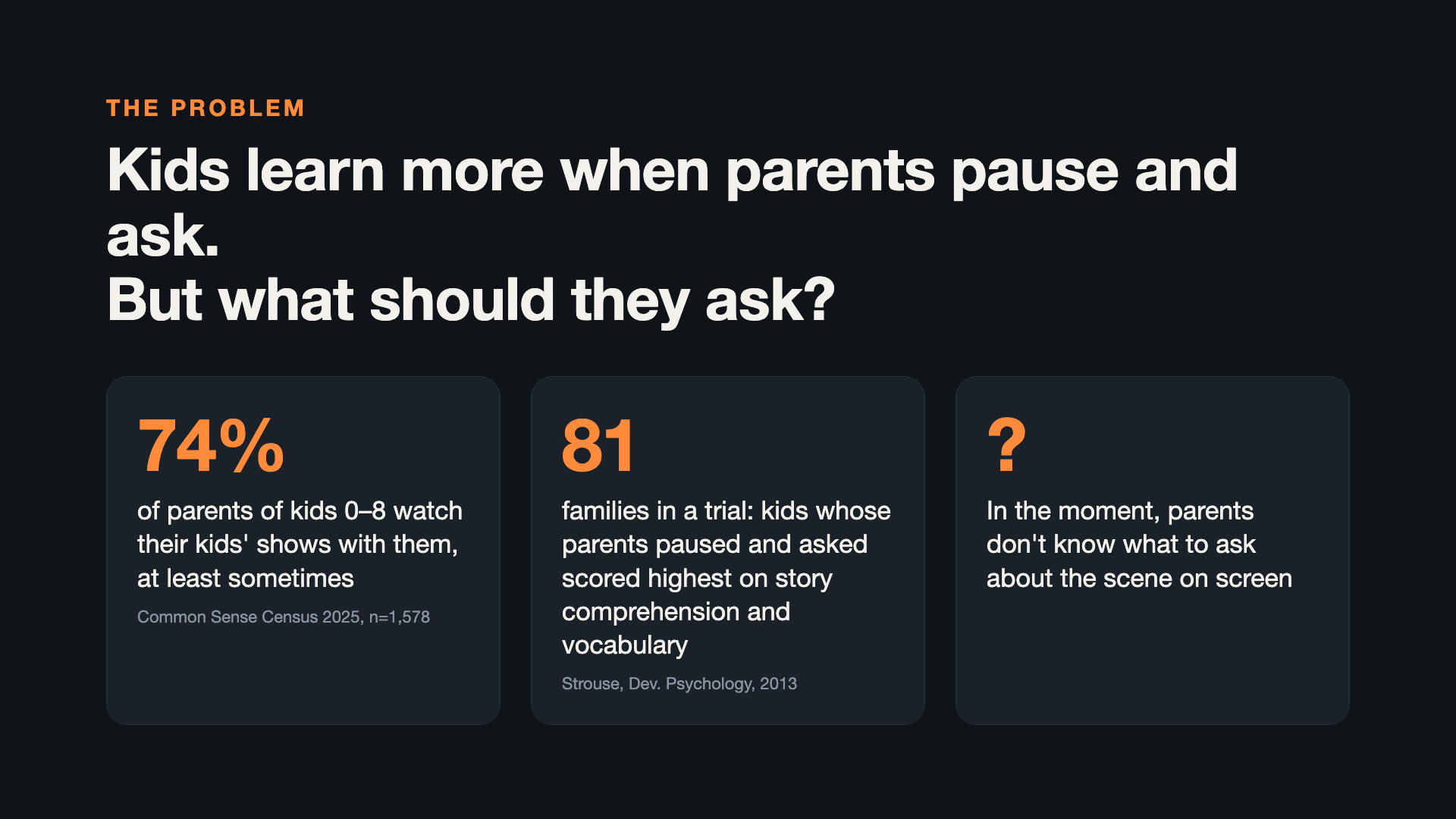
Most parents watch shows with their young children: in the Common Sense Census 2025 (1,578 parents of kids 0–8), 74% said they co-view their child's TV shows at least sometimes. Research shows that this time can be much more valuable. In a 4-week trial with 81 families of 3-year-olds (Strouse et al., Developmental Psychology, 2013), children whose parents paused the video and asked "dialogic" questions scored higher on story comprehension and vocabulary than children whose parents only commented or did nothing.
But in the moment, on the couch, most parents don't know what to ask — and they shouldn't have to prepare. We wanted the TV to quietly hand the parent the right question at the right moment, without taking the remote away from the family.
What it does
- The parent picks a show on Fire TV.
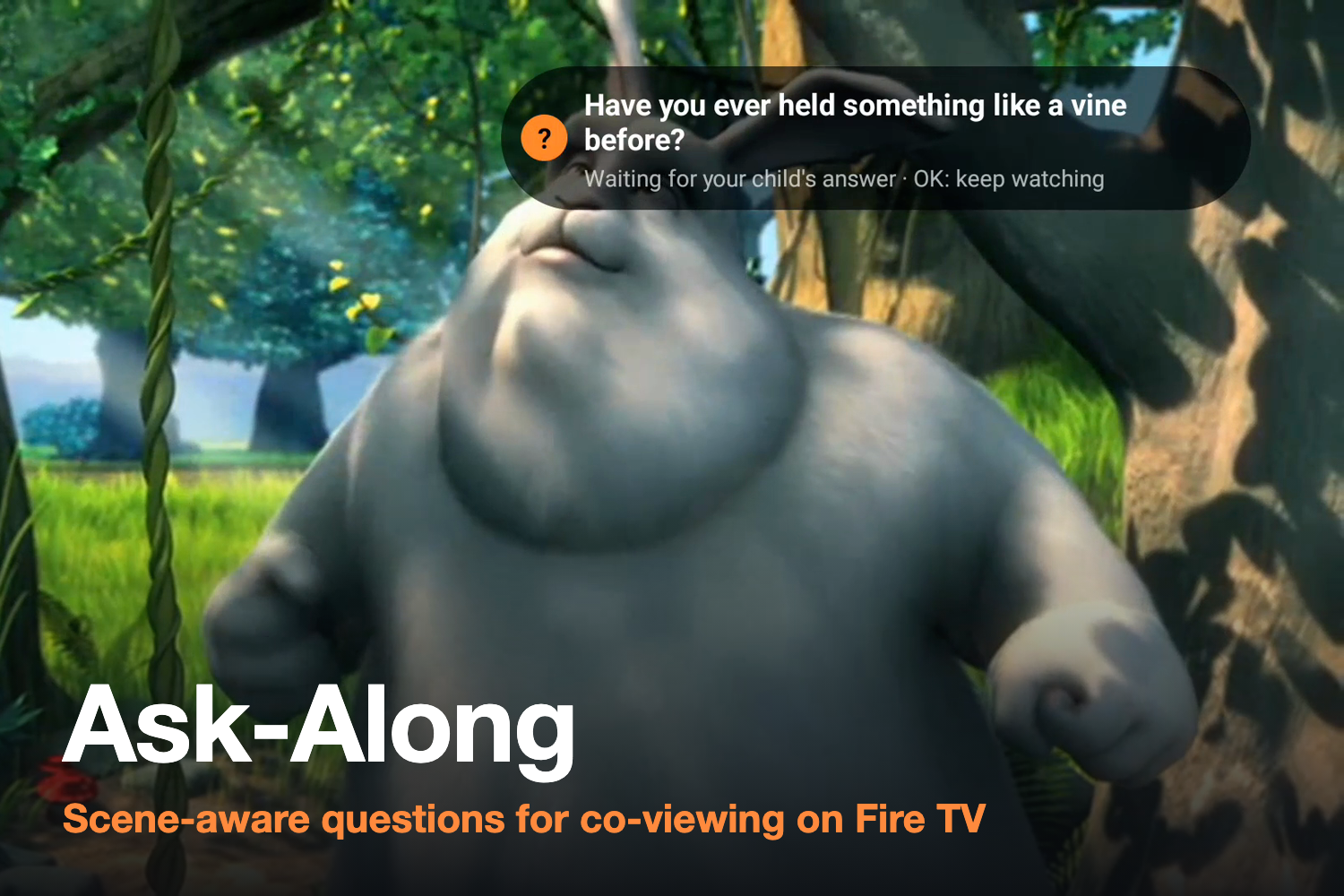
- While it plays, a small card appears with a question for the child, about what is on screen right now (for example: "Have you ever held something like a vine before?").
- OK pauses the show while the child answers. OK again resumes.
- The card is shown only while that scene is on screen; when the scene changes, it disappears, so the question never refers to something that is no longer visible.
- If a question doesn't fit, Back skips it. Skips are sent to the cloud, and a question skipped three times is no longer shown.
- Playback goes through Media Session, so on a Fire TV device "Alexa, pause / play / rewind" control the same player.
- Questions follow the CROWD types from dialogic reading research (completion, recall, open-ended, wh-, distancing) and rotate between them.
How we built it
Cloud (AWS, us-east-1)
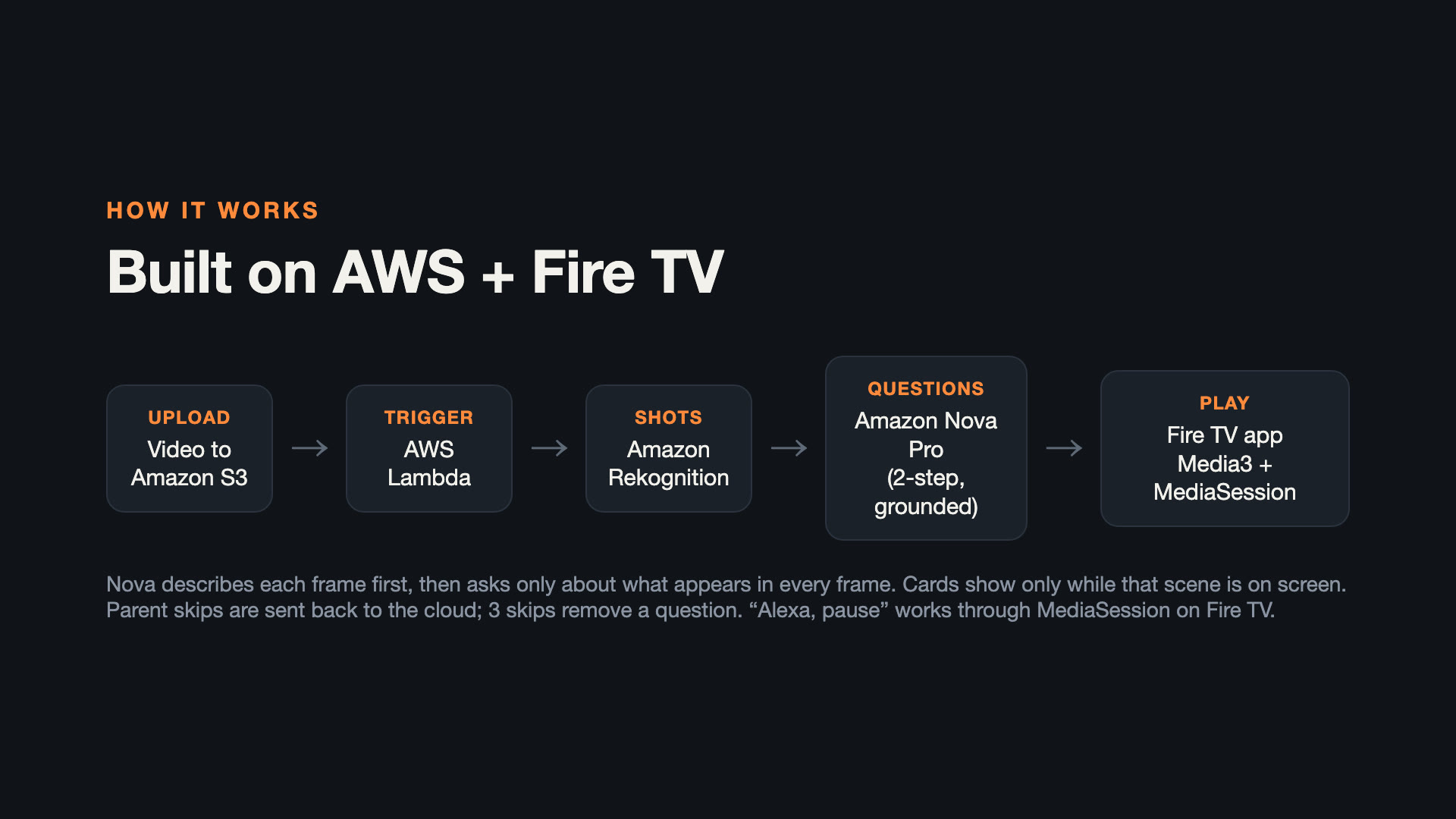
- A video is uploaded to Amazon S3 with its metadata (title, where the story ends before the credits, and the character names).
- The upload triggers an AWS Lambda function (Python, arm64).
- Amazon Rekognition segment detection (SHOT) splits the video into shots. We first used ffmpeg's scene detector, but it missed fast whip-pans; Rekognition found them.
- For each target moment, the function picks a shot that lasts long enough, extracts 5 frames from the part of the shot where the card will be shown, and asks Amazon Nova Pro (Bedrock Converse API) in two steps:
- describe each frame separately (characters, objects, action);
- write one question using only the characters and objects that appear in all frames. If the question names a character that is not in every frame, it is regenerated; if the frames are not one continuous scene, the shot is skipped and a nearby one is tried.
- The questions (with show/hide times) are saved as JSON in S3. A second Lambda behind a Lambda function URL serves the title list (with short-lived presigned video URLs), the questions, and records skips.
Fire TV app (Fire OS / Android)
- Kotlin, Media3 ExoPlayer and Media3 MediaSession, D-pad-only UI designed for 10-foot viewing.
- The app loads a title's questions when playback starts, shows each card only between its start and end time, and handles OK / Back / left / right on the remote.
- Built for Fire OS 6+ (minSdk 25). Tested on the Android TV emulator (API 31, arm64), as allowed by the hackathon FAQ.
Demo video: narration with Amazon Polly (neural voice), screen recordings from the emulator, open films from the Blender Foundation (CC BY).
Challenges we ran into
- Questions that didn't match the screen. Giving Nova the whole video produced wrong timestamps (a 596-second video was reported as 334.9 seconds) and scene mix-ups. We switched to still frames at times we choose, then to the two-step "describe, then ask about what is in every frame" approach.
- Cards outliving their scene. In the first build, a question about the penguin was still on screen after the scene had changed to the llama. Cards now carry an end time = the end of the shot.
- Fast camera moves. ffmpeg missed whip-pans; Rekognition SHOT detection fixed it.
- Lambda function URL returned 403. Since October 2025, function URLs with auth type NONE also need
lambda:InvokeFunction(with theInvokedViaFunctionUrlcondition). Our AWS CLI version had no option for it, so we added it with boto3. - Emulator video decoding. A 640x359 H.264 file could not be decoded on the emulator; we re-encoded to 1280x720 and added an on-screen error message instead of a silent black screen.
Accomplishments that we're proud of
- An end-to-end pipeline: upload a video → questions are ready 1–2 minutes later for a 2.5-minute film and 3–9 minutes later for a 10-minute film (measured Lambda durations) → they appear on the TV at the right scene.
- We measured quality honestly instead of guessing (see below), and designed the product around the result: one-button skip and automatic removal of bad questions.
Accuracy — measured, not assumed
We checked questions frame by frame against the scenes on two open films, across several versions of the pipeline. Depending on the version and run, between 5 and 9 of every 10 questions matched the scene. Errors come from the model misreading a frame (for example describing a bird that is not there). That is why the parent always stays in control.
What we learned
- For video understanding, choosing the frames yourself is far more reliable than handing the model a whole video.
- "Only ask about what appears in every frame" removes a whole class of mistakes.
- Measuring with a fixed set of scenes made every change comparable.
What's next
- A "question track" delivered with each title, like subtitles, for kids' streaming services — starting with Amazon Kids+.
- A review screen for the content team, and more languages (Japanese first).
- Trying newer multimodal models on Bedrock and comparing them with the same evaluation set.
Credits
- Big Buck Bunny — © Blender Foundation | peach.blender.org — CC BY 3.0
- Caminandes 3: Llamigos — © Blender Foundation | caminandes.com — CC BY
- Research: Strouse, G. A., O'Doherty, K., & Troseth, G. L. (2013). Effective coviewing: Preschoolers' learning from video after a dialogic questioning intervention. Developmental Psychology, 49(12), 2368–2382.
- Statistics: Common Sense Media, The Common Sense Census: Media Use by Kids Zero to Eight (2025).
Links
- Code: https://github.com/shokiku/ask-along
- Demo video: https://youtu.be/hDw48AKMZBg
Built With
- amazon-bedrock
- amazon-nova
- amazon-polly
- amazon-rekognition
- amazon-web-services
- android
- aws-lambda
- ffmpeg
- fire-tv
- kotlin
- media3
- python

Log in or sign up for Devpost to join the conversation.