The Problem
The Terminal is Missing in VR. Virtual reality promises immersive workspaces -- but the moment you need a terminal, the dream breaks. Typing on a virtual keyboard is agony. Pointing a controller at tiny monospace text is like performing surgery with oven mitts.
The terminal -- the developer's most powerful tool -- is the one thing VR still can't handle.
We set out to change that.
What if you could draw on the terminal? What if circling an error told the AI to explain it? What if underlining a file path opened it? What if the most natural human input -- ink on a surface -- became the interface between you and the command line?
What Asha-VR Does
Asha-VR is a VR-native smart terminal that turns the Logitech MX Ink stylus into a precision interface for the command line in virtual reality. It renders a bash-compatible shell as a floating panel in your VR workspace, then lets you draw on it -- screenshot, trace, circle, underline -- to control what would otherwise be uncontrollable.
The MX Ink's pressure-sensitive tip brings the precision of pen-on-paper to the terminal. Instead of fighting a virtual keyboard, you write directly. Instead of parsing dense output with your eyes alone, you annotate it.
Ink-Driven Interaction: Screenshot, Trace, Command
The MX Ink doesn't just point at the terminal -- it draws on it:
- Circle an Error -- Draw a circle around a stack trace or error message. Asha-VR screenshots the region, feeds it to the AI copilot, and the explanation appears in a floating panel beside your markup. Press the stylus button to accept a suggested fix.
- Underline to Select -- Drag the stylus tip across a file path, a command, or a block of output. The traced text is selected with pixel precision -- no more fumbling with invisible cursors. Flick the button to copy, double-tap to open.
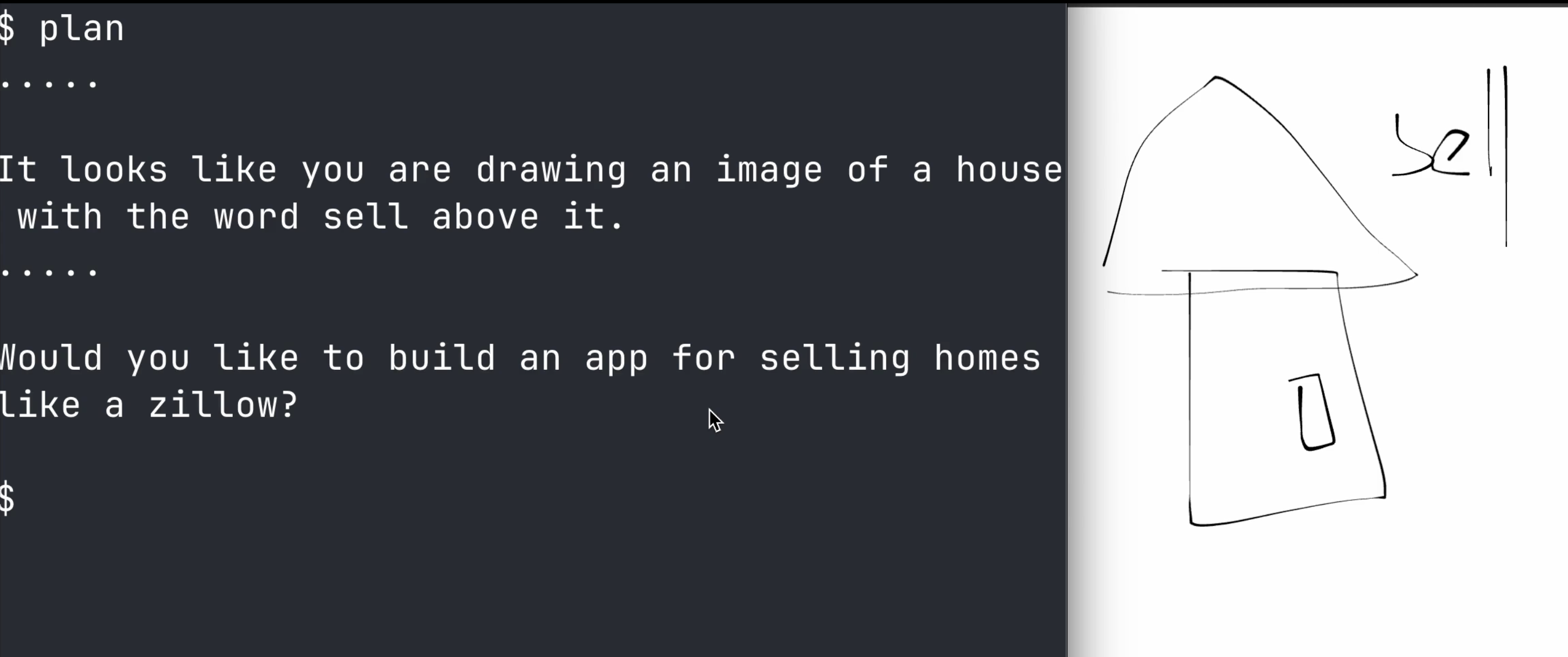
- Sketch to Plan -- Need to think through a pipeline before you build it? Draw a quick flowchart in the air or on a virtual surface next to your terminal. Asha-VR's spatial canvas persists your sketches alongside your shell session, so your notes live where your work lives.
- Trace a Command -- Write a command with the stylus tip on the input region. Handwriting recognition converts your ink to text. For short commands, this is faster than any virtual keyboard -- and far more natural.
- Annotate and Journal -- Draw on any terminal output to mark it up. Annotations feed into Asha's mistake journal, so the AI copilot learns not just what went wrong, but what you noticed about it.
Why MX Ink Changes Everything for VR Terminals
The fundamental problem with terminals in VR isn't rendering -- it's input. Asha-VR already renders beautiful terminal panels in VR. But without MX Ink, interacting with them means:
- Virtual keyboards: Slow, error-prone, breaks spatial flow
- Controller pointing: Too imprecise for monospace text grids
- Voice: Can't handle syntax, special characters, or pipes
- Hand tracking: Not reliable enough for text-level precision
MX Ink solves this because a stylus is the natural precision instrument. Its pressure-sensitive tip gives you variable control -- light touch to hover and preview, firm press to confirm. Haptic feedback confirms every action under your fingertip. And because it supports simultaneous hand tracking, you can hold the stylus in one hand and gesture with the other -- selecting a terminal panel, resizing it, or pulling up a file browser while the pen stays ready.
The Copilot Meets the Pen
Asha's AI copilot -- already capable of explaining errors, suggesting fixes, and maintaining a mistake journal -- becomes dramatically more useful when you can point at what you mean:
- Gestural Prompting -- Instead of typing "explain the error on line 43," circle line 43. The copilot sees exactly what you see.
- Ink as Context -- Your annotations become part of the prompt. A question mark drawn next to a variable tells the copilot you're confused about it. An arrow between two outputs asks it to explain the relationship.
- Spatial Voice + Ink -- Say "what does this do?" while pointing the stylus at a command. The copilot combines your spoken question with your spatial reference for precise, contextual answers.
Draw It, Ship It
The same ink that controls your terminal can create what runs inside it.
Draw a rough wireframe of a login page next to your terminal. Asha-VR captures the sketch, sends it to the AI, and generates a working component -- code in the terminal on your left, live preview floating on your right.
The loop is immediate: the terminal, the AI, the preview, and the physical environment become one continuous workspace.
The Vision
The terminal shouldn't be the thing that forces you out of VR.
Every other creative tool has made the leap -- 3D sculpting, whiteboarding, video editing -- all native in headsets now. But the command line, the developer's most powerful tool, has been stuck behind glass because nobody solved the input problem.
MX Ink solves the input problem. A pressure-sensitive stylus turns the terminal from a read-only viewport into an interactive surface. Screenshot what you see. Trace what matters. Circle what's broken. Sketch what's next -- and watch it come to life.
With Asha-VR and MX Ink, the terminal isn't a window you escape to your desktop for. It's a surface you draw on, an instrument you wield, and a canvas where your next app begins -- one stroke at a time.

Log in or sign up for Devpost to join the conversation.