Inspiration
Dyslexia is a reading disorder that affects more than 3 million people in the United States, regardless of age. Approximately 1 in 5 children experiences dyslexia, and their struggles in school are often misattributed to “lack of intelligence or effort.” Based on our team’s first-hand experiences with volunteering for HuskyADAPT, UW’s on-campus accessibility club, we have come to understand the vital need for fostering diversity and inclusion in tech. We aim to reduce the stigma surrounding dyslexia and other cognitive disorders. Not only does this technology benefit those who experience difficulty with reading, it also supports those who are learning a new language or who are learning to read for the first time. Research has shown that the recommended reading time for beginners is 15-20 minutes a day, and that reading comprehension is a crucial skill for development and later success in life. Yet, this can be difficult to achieve in those who may feel intimidated by the thought of reading. ReadMe3D provides all users with an immersive MR experience that is specifically designed to build reading skills, which will boost literacy rates and empower everyone to read with confidence.
What it does
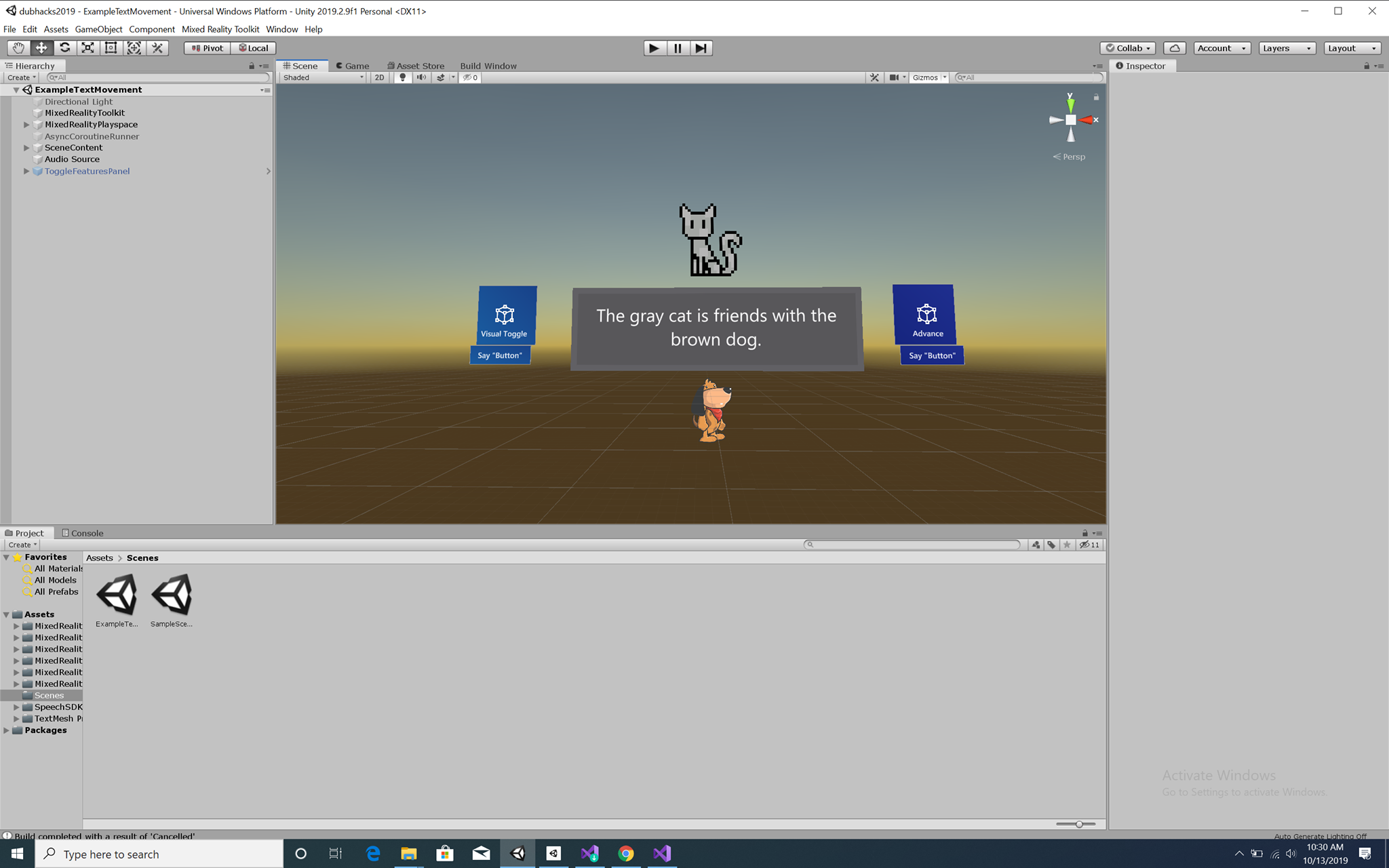
In ReadMe3D, we have developed dynamic and interactive reading support techniques, such as populating relevant pictures and text-to-speech functionality. Using cutting-edge technology like the Microsoft HoloLens 2, we have smoothly integrated these features to enhance the user’s interaction with both the real world and their reading material. Currently, these features allow readers to both hear the pronunciation of each word and utilize visual cues to augment their understanding. Readers can use these multisensory features to build confidence and motivation to continue reading.
How we built it
The core functionality of this app is built in Unity using C# and the Mixed Reality Toolkit. We built upon existing SDKs such as the Microsoft Immersive Reader SDK to integrate different methods of presenting text in a more accessible way. One way in which we attempted to tie the Immersive Reader SDK into the Unity app was by creating a node.js website and exploring all of the functionality that Azure has to offer. Though we didn’t have enough time to fully incorporate the SDK with our Unity program, we were extremely inspired by the mission of Immersive Reader and we hope to continue working towards integrating this in the future.
Challenges we ran into
Some major challenges that we ran into included having a lack of documentation for Microsoft HoloLens 2, as this is a new, emerging technology that has not been explored too much yet or deployed by other users. This was an extremely difficult, but fun challenge to tackle as it was rewarding when our app finally worked on the headset. Another roadblock that we faced was implementing the Immersive Reader SDK via Azure. As the documentation was very complex and we ran into some authentication issues, it was difficult for us to get the website up and running. Our attempts to use Azure have not yet come to fruition, but we hope to continue working towards this so that Immersive Reader is also available in Mixed Reality.
Accomplishments that we're proud of
Our team is extremely proud to be developing for the HoloLens 2. Especially as we had very sparse prior Unity and Azure experience, we were proud to be able to overcome the steep learning curve and deploy to the HoloLens. We are also excited about our idea to help people build reading skills, as we believe that this is an extremely important problem to tackle and it often becomes unnoticed, or worse, stigmatized. It is our passion to use technology to push the envelope in accessibility, and we hope that this project can spark this conversation.
What we learned
Throughout this project, we have learned substantially about HoloLens and Mixed Reality, the stigma surrounding dyslexia and other invisible / cognitive disabilities, and the increasing number of ways that accessible technology can be utilized in everyday life. Accessible design is critical for expanding the possibilities for all abilities in tech, and we have realized that it is everybody’s responsibility to advocate for and develop accessible products. On the technical side, our team has gained experience with Unity, HoloLens, and Azure, which we have not had much exposure to before.
What's next for ReadMe3D
Our current iteration of ReadMe3D is just the beginning! Another planned feature includes separating syllables and indicating word tense for greater clarity and understanding when reading. In addition to adding these cues, readers will be able to move and interact with the cues. We also hope to completely integrate the Immersive Reader SDK with Unity and the HoloLens, and we would also love to improve upon the user interface of the program to provide more options and make the project much more personalized. Computer vision and OCR can be used to identify text in real-time, which users can then click on to open up our dynamic reading interface. This not only keeps the user engaged with their surroundings, but it makes it so that everyday life can be more accessible to them. We look forward to expanding what’s possible for all readers with ReadMe3D!


Log in or sign up for Devpost to join the conversation.