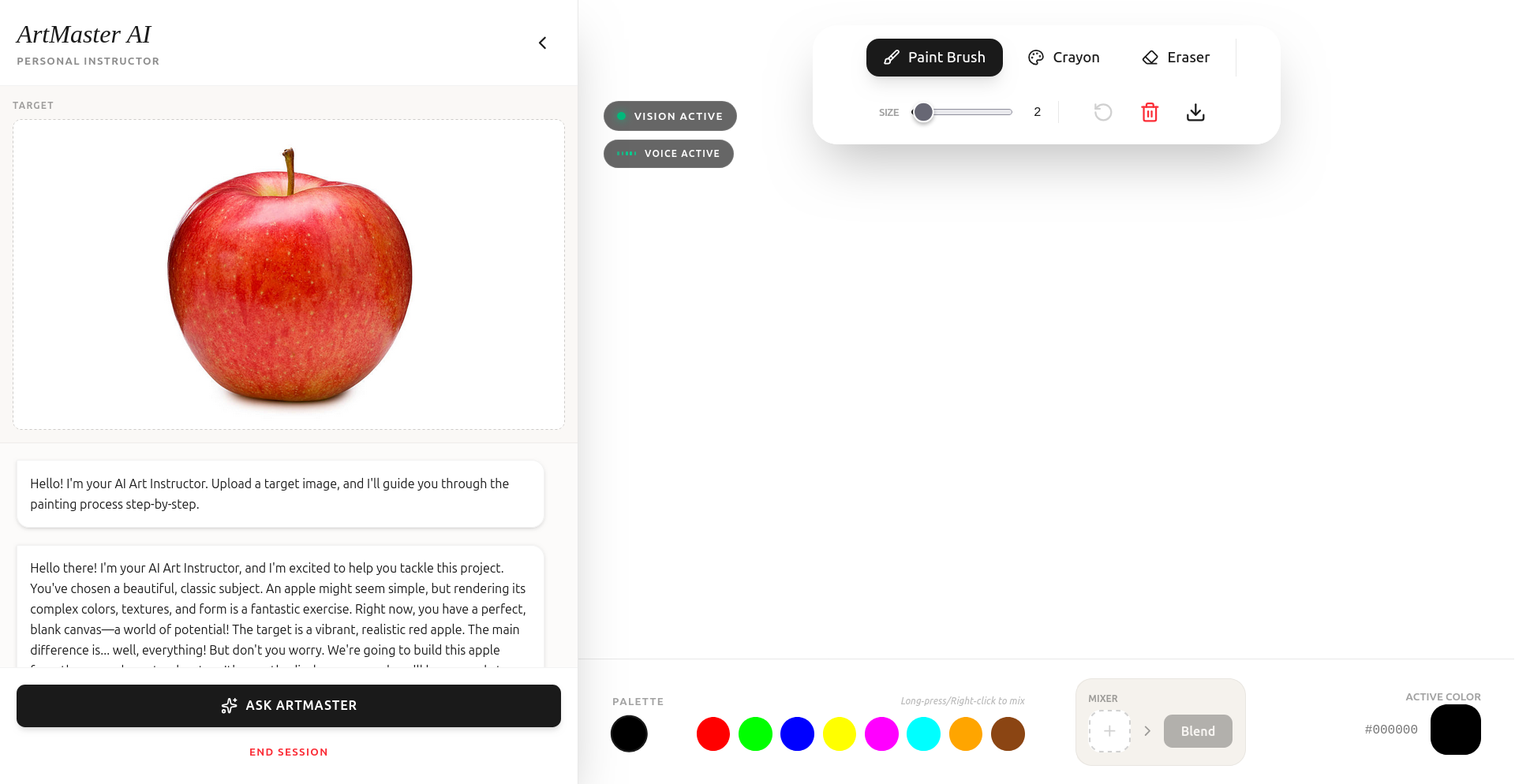
ArtMaster AI: Real-Time Art Instructor
ArtMaster AI is a full-stack web application designed to provide real-time, interactive art instruction using the Gemini Live API. It allows users to recreate target images while receiving immediate voice and visual feedback from an AI Art Instructor.
🚀 Features & Functionality
- Real-Time Voice & Vision: Uses the Gemini Live API to stream canvas frames every 2 seconds and process user voice input simultaneously.
- Interactive Canvas: Built with
react-konva, supporting multiple brush types (Paint, Crayon), adjustable sizes, and undo/redo functionality. - Advanced Color Mixer: A unique "Color Mixer" tool where users can drop primary colors to create custom shades, mimicking real-world paint mixing.
- Proactive Art Mentorship: The AI instructor acts as a warm, encouraging mentor, providing tips on color theory, composition, and technique.
- Periodic Auto-Analysis: Every 60 seconds, the app performs a deep analysis of the user's progress using Gemini 3 Flash, providing a detailed status report in the chat.
- Visual Feedback: Real-time "Vision Active" and "Voice Active" indicators provide visual confirmation of the AI's engagement.
🏗️ Architecture
The application follows a modern, frontend-heavy architecture optimized for low-latency streaming.
- Frontend: React (SPA) with Vite for fast builds and HMR.
- State Management: React Hooks (
useState,useRef,useEffect) for managing canvas state, chat history, and live session lifecycle. - Audio Engine: Custom
AudioManagerclass handling PCM 16-bit audio capture (16kHz) and playback (24kHz resampling) using the Web Audio API. - AI Integration: Direct integration with
@google/genaion the client-side for real-time multimodal interaction.
🛠️ Technology Stack
- Framework: React 19, TypeScript
- Styling: Tailwind CSS 4.0
- Canvas Rendering: Konva / React-Konva
- AI Models:
gemini-2.5-flash-native-audio-preview-09-2025(Live Session)gemini-3-flash-preview(Auto-Analysis)
- Animations: Motion (formerly Framer Motion)
- Icons: Lucide React
📖 How to Use the UI
- Upload Target: Click the "Target Image" button or drag-and-drop an image you want to recreate.
- Start Live Session: Click the "Start Live Session" button. Ensure you grant microphone permissions.
- Paint: Use the toolbar to select your brush type and size.
- Mix Colors: Open the Color Mixer, add drops of different colors, and click "Mix" to create a new color for your palette.
- Interact: Speak to the instructor! Ask for advice or just listen to its proactive tips.
- Chat History: Review the instructor's detailed periodic feedback in the chat sidebar.
☁️ Deployment to GCP (Cloud Run)
This application is containerized and ready for deployment to Google Cloud Run.
1. Prerequisites
- A Google Cloud Project with Billing enabled.
- Google Cloud SDK installed and initialized.
- Docker installed locally (optional, if using Cloud Build).
2. Build and Push the Image
You can use Google Cloud Build to build and push the image directly to Google Artifact Registry:
# Replace [PROJECT_ID] with your actual GCP Project ID
gcloud builds submit --tag gcr.io/[PROJECT_ID]/artmaster-ai
3. Deploy to Cloud Run
Once the image is pushed, deploy it to Cloud Run:
gcloud run deploy artmaster-ai \
  --image gcr.io/[PROJECT_ID]/artmaster-ai \
  --platform managed \
  --region us-central1 \
  --allow-unauthenticated \
  --set-env-vars="GEMINI_API_KEY=your_api_key_here"
4. Configuration Details
- Dockerfile: Uses a multi-stage build to keep the production image small. It builds the React app and serves it using a lightweight Node.js server.
- Production Server: The
server.jsscript uses Express to serve the static files indist/and handles SPA routing (redirecting all non-file requests toindex.html). - Port: The application listens on the port specified by the
PORTenvironment variable (defaulting to3000), which is required by Cloud Run. - Environment Variables: Ensure
GEMINI_API_KEYis set in the Cloud Run environment for the AI features to function.
🔍 Findings & Learnings
- Model Naming Conventions: During development, it was discovered that using
-latestaliases (e.g.,gemini-3-flash-latest) can sometimes lead to 404 errors in preview environments. Explicitly using-previewversions (e.g.,gemini-3-flash-preview) ensured stability. - Live Session Race Conditions: Initializing the microphone and camera streams inside the
onopencallback of the Live API can lead to race conditions where the session object isn't yet fully assigned to a Reactref. Moving the initialization logic to follow the resolution of theconnectpromise proved more robust. - Audio Resampling: The Gemini Live API expects 16kHz PCM input but returns 24kHz PCM output. The
AudioManagerhad to be specifically tuned to handle these different sample rates within the sameAudioContextto prevent "chipmunk" or distorted audio. - Prompt Engineering for Mentorship: Designing the
systemInstructionto be "warm and proactive" significantly improved user engagement. Instructing the AI to explain the "why" behind color mixing advice made the tool feel more like an educational platform than just a drawing app.
📊 Data Sources
- Gemini API: Primary source for all intelligence, vision analysis, and voice generation.
- Picsum Photos: Used for high-quality placeholder seeds for target images during testing.
- Web Audio API: Used as the source for real-time PCM data.
Built With
- ai
- canvas
- css
- gemini-2.5-flash-native-audio-preview-09-2025
- lucide
- motion
- react-19
- react-konva
- tailwind
- typescript


Log in or sign up for Devpost to join the conversation.