-
-
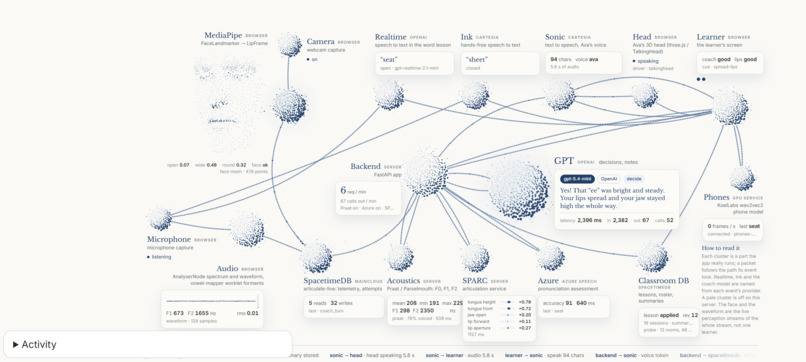
Spacetime Live Tech Stack
Inspiration
How can deaf and hard-of-hearing people practice their speech if they cannot clearly hear their own voice? Knowing family members who are deaf, we have seen how difficult it can be to understand how to articulate words without accessible feedback. Lip reading can help someone follow visible mouth movements, but it cannot show what happens inside the mouth.
We wanted to make sound visible. By combining visual demonstrations with feedback from the learner’s own voice, we could create another way for deaf and hard-of-hearing people who choose spoken communication to practice.
What it does
We designed Articulate, a visual speech-practice companion that combines sound visualization, mouth and tongue demonstrations, and adaptive coaching to help deaf and hard-of-hearing users practice English articulation.
We combine audio measurements, Microsoft Azure pronunciation assessment, the Koel Labs XLSR English phoneme model, a 3D face demonstrating mouth movements, and dynamic 2D tongue animations for specific sounds and words. These demonstrations illustrate how a sound can be produced; they do not measure the learner’s actual tongue or throat position.
A person being able to learn through repeated attempts and visual feedback is powerful. Articulate gives learners a way to see differences between attempts, receive one specific cue, and try again without relying entirely on hearing themselves.
We built this project in multiple parts:
We have a fixed chart that can track F1 and F2 formants from user audio input, with targets for ee, oo, and ah. A ring fills while the sound stays inside the target region, giving the user a visual guide for practicing vowel sounds.
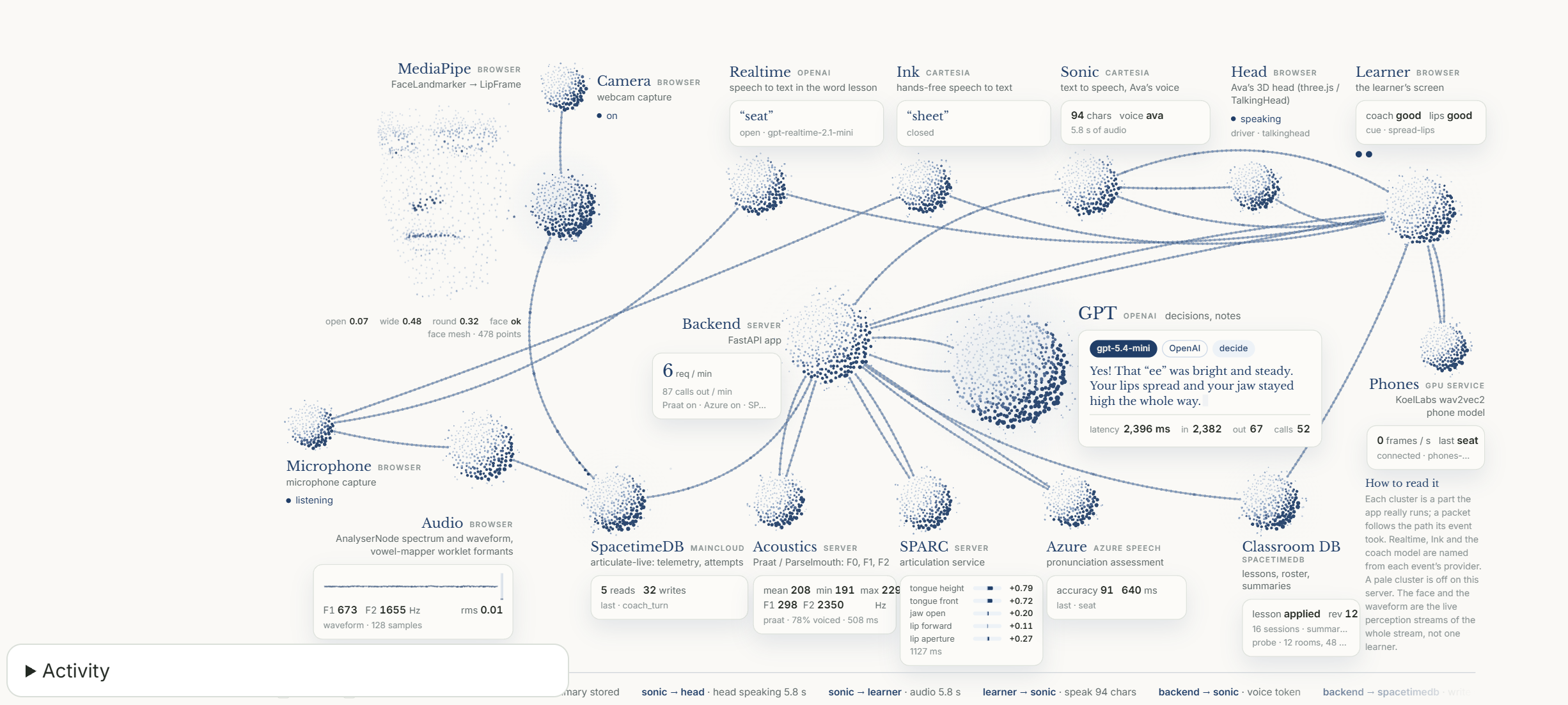
Cartesia Sonic speaks, and OpenAI writes the coaching text. After an audio attempt, recent attempts for that profile are saved with lesson progress. The coaching model reads those records alongside the new measurements and phrases one line of feedback. If the same cue has already been tried without the desired result, the next instruction can suggest an easier attempt or a different cue.
We use a Ready Player Me model to help demonstrate facial and mouth movements, with Three.js components representing the opening and closing of the jaw, lips, and other visible features. The face demonstrates a cue visually to supplement the audio and formant chart.
The side view of the tongue is a hand-drawn SVG of the palate, teeth, lips, jaw, and tongue, with seven poses that blend into each other. We can demonstrate a lesson cue by showing illustrative tongue movements for the consonants and words the user is prompted to say.
We use SpacetimeDB to connect the teacher dashboard with the learner’s practice. The teacher’s board and the learner’s lesson stay in sync because lesson changes are committed through reducers, and each screen subscribes to the view it is authorized to see. A teacher can select one learner or the whole class, adjust a lesson, and see when the learner receives and applies the change.
The classroom roster updates through live subscriptions. Alongside it, our live system view shows events moving through the audio, coaching, voice, and database pipeline, making the connection between a learner’s attempt and the system’s response visible.
Challenges we ran into
F1 relates broadly to vowel openness, while F2 relates broadly to how far forward or back a vowel is produced. The challenge was turning these acoustic measurements into an intuitive visualization without treating them as direct measurements of mouth or tongue position.
We also incorporated the Koel Labs XLSR English phoneme model to help identify speech sounds. This gave us another source of information for word practice, alongside the continuous formant measurements. Rather than expecting one frequency or volume measurement to explain an entire word, we could combine sound identity, timing, and acoustic feedback.
We sampled different words from other hackers using a DJI microphone to collect a more diverse set of examples. We used those samples to develop reference tracks that users could follow, while recognizing that one speaker’s recording cannot be a universal target for every voice.
Consonants were more of a struggle because learners cannot see the tongue moving inside another person’s mouth. Additionally, consonants, unlike sustained vowels, can involve closures, bursts, and sharp transitions that are difficult to visualize using volume and frequency alone.
We designed our practice game to combine vowel sounds with timed consonants for specific words and sentences. The game gives learners a visible path to follow and feedback on their attempt, while the mouth and tongue demonstrations help explain the sound they are practicing.
Another challenge was keeping the classroom responsive while audio analysis and coaching happened in the background. Local visual feedback needs to remain usable while the backend processes an attempt, and a teacher’s lesson change needs to arrive without interrupting a recording already in progress.
Accomplishments that we're proud of
Within this project, we managed to bring together visual sound feedback, facial demonstrations, adaptive coaching, and live classroom coordination into one experience. Our features work together to tailor practice based on previous attempts and the learner’s current lesson.
We are especially proud of connecting the teacher and learner experiences. A teacher can make a lesson change in the dashboard, and the learner can see that change appear in their next practice. The live system view also makes the underlying flow visible instead of leaving the processing hidden behind a loading screen.
What we learned
We learned that modeling words cannot be done using a single voice as a universal reference. Everyone has a different vocal tract and speaking pattern, so a fixed set of points cannot represent the only correct way to produce a word.
It is important to collect realistic sample data and treat the 2D representation as a guide rather than a perfect path. The goal is to give the learner useful feedback about their attempt without confusing natural differences between speakers with mistakes.
The magic really happens in the feedback loop: the learner makes an attempt, sees what happened, receives one specific cue, and tries again. Connecting that loop to a teacher gives us a way to combine independent practice with human guidance.
We also learned that visualizing a sound and explaining how to produce it are different tasks. Acoustic measurements help describe the sound, while the animated mouth and tongue provide illustrative practice demonstrations. Keeping those roles clear helped us build more understandable feedback.
What's next for Articulate
We want to do more research with deaf and hard-of-hearing people who choose spoken communication, alongside speech-language pathologists, to understand which visual cues are useful and which need improvement.
We also want to expand our reference recordings across different voices and accents, improve phoneme timing for consonants, and make the visual targets more adaptable to each learner.
For the classroom experience, our next steps are secure account-based profiles, progress that follows learners across devices, and better tools for teachers to review comparable attempts and adjust lessons.
Most importantly, we want to evaluate whether Articulate’s feedback is understandable, accessible, and useful during real practice. Our prototype demonstrates the interaction; testing with learners and specialists will guide what we build next.


Log in or sign up for Devpost to join the conversation.