-
-
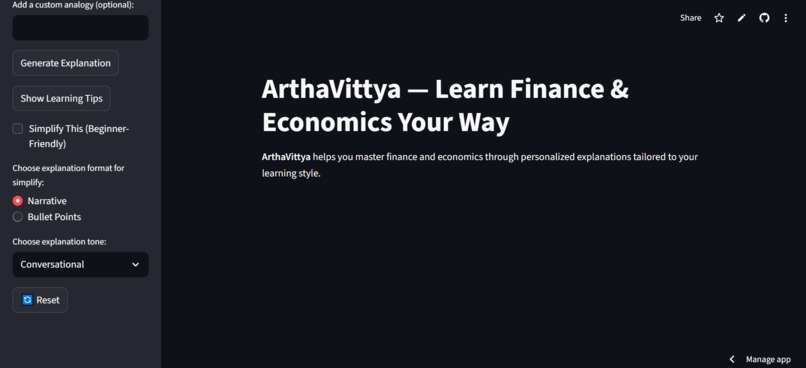
landing page
-
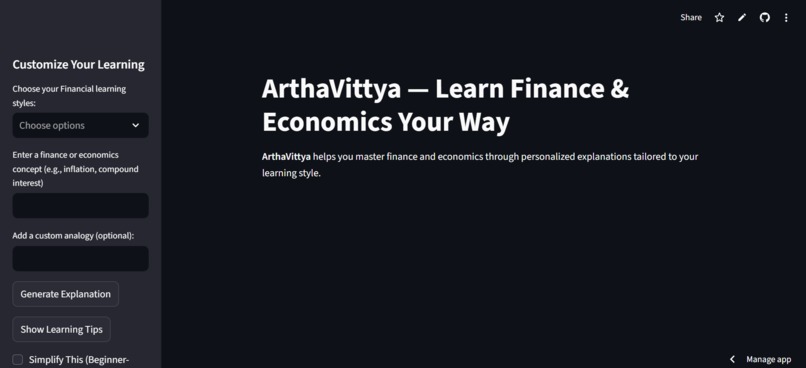
landing page
-
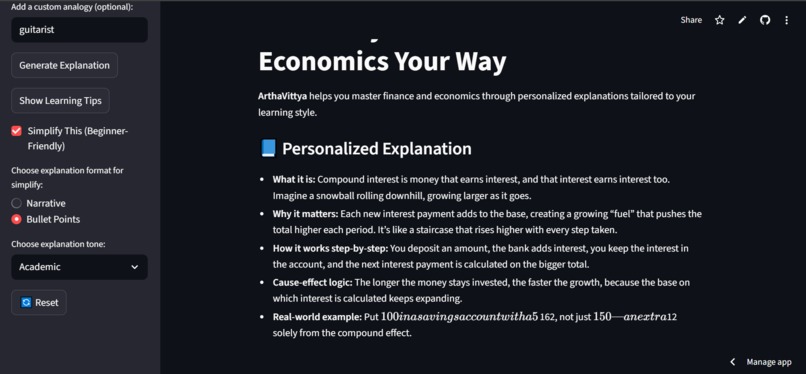
Output using simplify and bulletpoints format and academic explanation tone
-
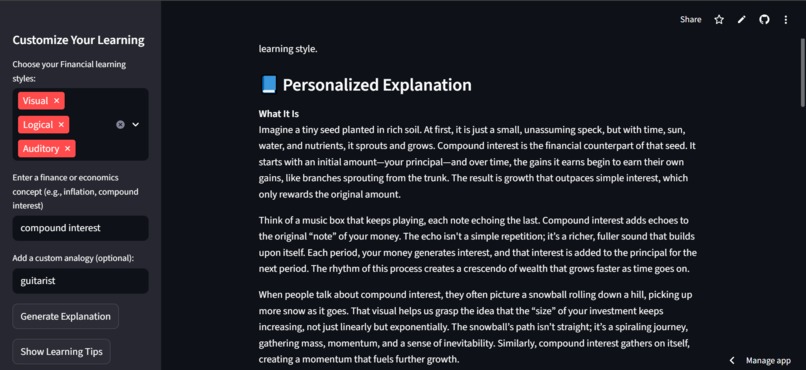
Output in narrative format
-
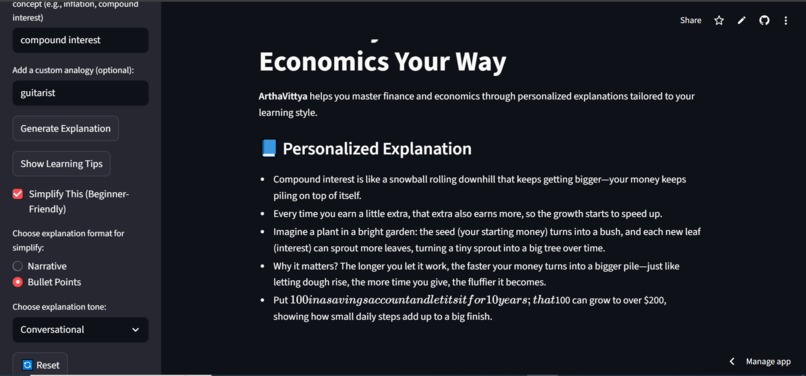
Output using simplify and bulletpoints format and conversational explanation tone
-

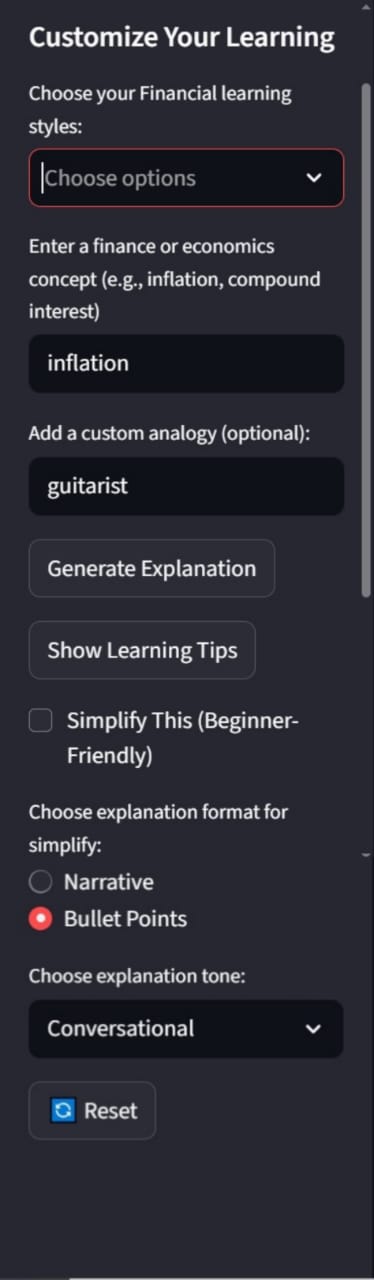
sidebar


Inspiration
In today’s economy, understanding financial and economic concepts is more important than ever. But are these ideas truly accessible in the real sense? I noticed a gap not in the availability of information, but in how it’s delivered. Everyone learns differently, and yet most resources still rely on dense jargon, abstract graphs, and one-size-fits-all explanations. ArthaVittya was born from the belief that no one should be left behind just because they couldn’t decode heavy words or rigid formats. If we want financial literacy to be universal, we need tools that adapt to the learner and not the other way around. The name ArthaVittya combines “Artha” (meaning wealth or purpose in Sanskrit) and “Vittya” (meaning finance), reflecting the app’s mission: to make financial understanding purposeful, personal, and accessible to all. I also intentionally included real-world case studies and interesting facts in the generated outputs, not just to make learning fun, but to show users where and how these concepts actually apply. This is because learning finance and economic concepts can be heavy, so finding a balance is essential.
What it does
ArthaVittya is a Streamlit-based web application that explains economic and financial concepts. The app tailors its explanations using GPT-OSS hosted on Hugging Face. It’s designed to be intuitive, inclusive, and genuinely helpful.
- Adaptive Explanations Based on Learning Style Users select one or more learning styles from:(Visual, Auditory, Kinesthetic, Reading/Writing, Logical)
- The app dynamically generates an explanation that suits both the topic and the learner’s cognitive preferences.
- Simplified Mode: Users can choose bullet points or a narrative format for beginner-friendly summaries.
- Custom Analogies: Optional analogies are woven into the explanation to make abstract ideas relatable.
- Tone Control: Choose between conversational or academic tone to match your comfort level.
- Learning Tips: Style-specific advice helps users absorb concepts more effectively.
- The app uses this format :
- What It Is – A clear, engaging intro using relatable language
- How It Works – Step-by-step breakdown with sensory metaphors and logical flow
- Real-World Example – A vivid scenario that makes the concept tangible
- Case Study or Cool Fact – Something surprising or practical to spark interest
- Takeaway – A punchy insight or metaphor that sticks Secure API Integration: Hugging Face API is accessed via Streamlit Secrets for safe deployment.
How we built it
- Frontend: Built with Streamlit for rapid prototyping and clean UI
- Backend: Integrated Hugging Face’s GPT-OSS model via secure API calls
- Learning Style Logic: Prompt engineering to adapt explanations based on user-selected formats
- Deployment: Hosted on Streamlit Cloud with secrets management for API security
- Design: Custom thumbnail and hero image to reflect the brand’s clarity and realism
- Managed API integration securely using .env for local testing and Streamlit Cloud secrets for deployment. Added requirements.txt, .gitignore, and MIT license to make the project open source and reproducible.
Challenges we ran into
Picking the right tech stack
I chose Streamlit for its simplicity and because it made integrating GPT-OSS via Hugging Face incredibly easy. It runs locally, supports deep customization, and can be fine-tuned later. But working solo meant figuring out everything: layout, logic, deployment, and debugging.
Designing adaptive learning styles
Deciding which styles to include (narrative, bullet points, simplified, academic, conversational) and how to structure them required careful consideration. Due to constraints, the ui is not exactly how I had envisioned earlier, but the logic behind the styles was carefully considered.
Building components from scratch
Understanding how Streamlit works, how to structure the app, and how to connect everything took time, especially during coding the logic and flow of the app.
Prompt engineering for style-specific output
Getting GPT-OSS to follow different learning styles wasn’t reliable. I had to keep refining prompts, testing responses, and figuring out what the model actually listens to, as sometimes it ignored the format, and sometimes it overcomplicated things.
Manual testing across styles
Each format needed its own logic. I tested concepts manually to make sure explanations matched the selected style and weren’t just generic rephrasings. It wasn’t just about getting the output but whether or not the explanation felt right for that kind of learner.
Deployment API integration
Setting up secrets, integrating Hugging Face, and debugging Streamlit Cloud without logs, using fallback logic. So I had to learn and understand how to handle environment variables and deployment securely, what .env is, GitHub, and Streamlit Cloud secrets before getting it done.
Accomplishments that we're proud of
- Designed a learning experience that aims to create impact.
- Learned to work with AI as a collaborator, not just a tool.
- Began thinking about User Experience by reducing cognitive load, offering choices, and making the app feel approachable. Since different learning styles still tend to be underrepresented.
- Successfully deployed my app with secure API integration.
- Made the project reproducible and open source by adding requirements.txt, .gitignore, and an MIT license.
What we learned
- Using AI to assist with code, debug logic, and refine prompts, but at the same time, I also had to understand what it was doing, adapt it, and make it work for my vision.
- Prompt engineering isn’t just about getting the model to respond; it’s about guiding tone, structure, and clarity. I learned how to shape AI output to match different learning styles, and how subtle changes in phrasing can completely shift the result.
- Designing for diverse learners requires empathy. I had to think like a UX designer, not just about what the app does, but how it feels, how much cognitive load it creates, and whether the explanation actually lands.
- I learnt deployment and secure API Integration, and how to focus on leveraging the model's capabilities and make it work, bringing my vision into reality
What's next for ArthaVittya
While this version of ArthaVittya focuses on adaptive explanations, there’s room to explore deeper personalization and interactivity. I’d consider:
- Improving the UI for smoother navigation and reduced cognitive load
- Work on the simplification and adaptive learning style prompt for better results for each type of learner (logical, visual, etc.)
- Adding a topic-based quiz generator to help users test their understanding
- Integrating a database to support selective memory by letting users choose what the app remembers instead of storing everything by default. This balances personalization with privacy and gives learners control over their own data.
- Adding a mindmap maker
- Adding image and audio generation
- Expanding learning styles and adding multilingual support
- Building a feedback loop to refine explanations over time
This project helped me think deeply about inclusive design, adaptive learning, and how to make complex ideas feel approachable. That mindset will carry forward into whatever I build next.

Log in or sign up for Devpost to join the conversation.