
Inspiration 🧙
I was inspired to create Wizard Magic Tower because I wanted to bring a little bit of magic into the world of graphic design. As someone who enjoys making my own picture frames and adding cool borders to my photos, I thought, why not build an app that can do all of that and more? The idea was to create a place where designers could come and perform magical tricks, just like a wizard in their tower, using generative AI to make complex design tasks simple and fun.
What it does
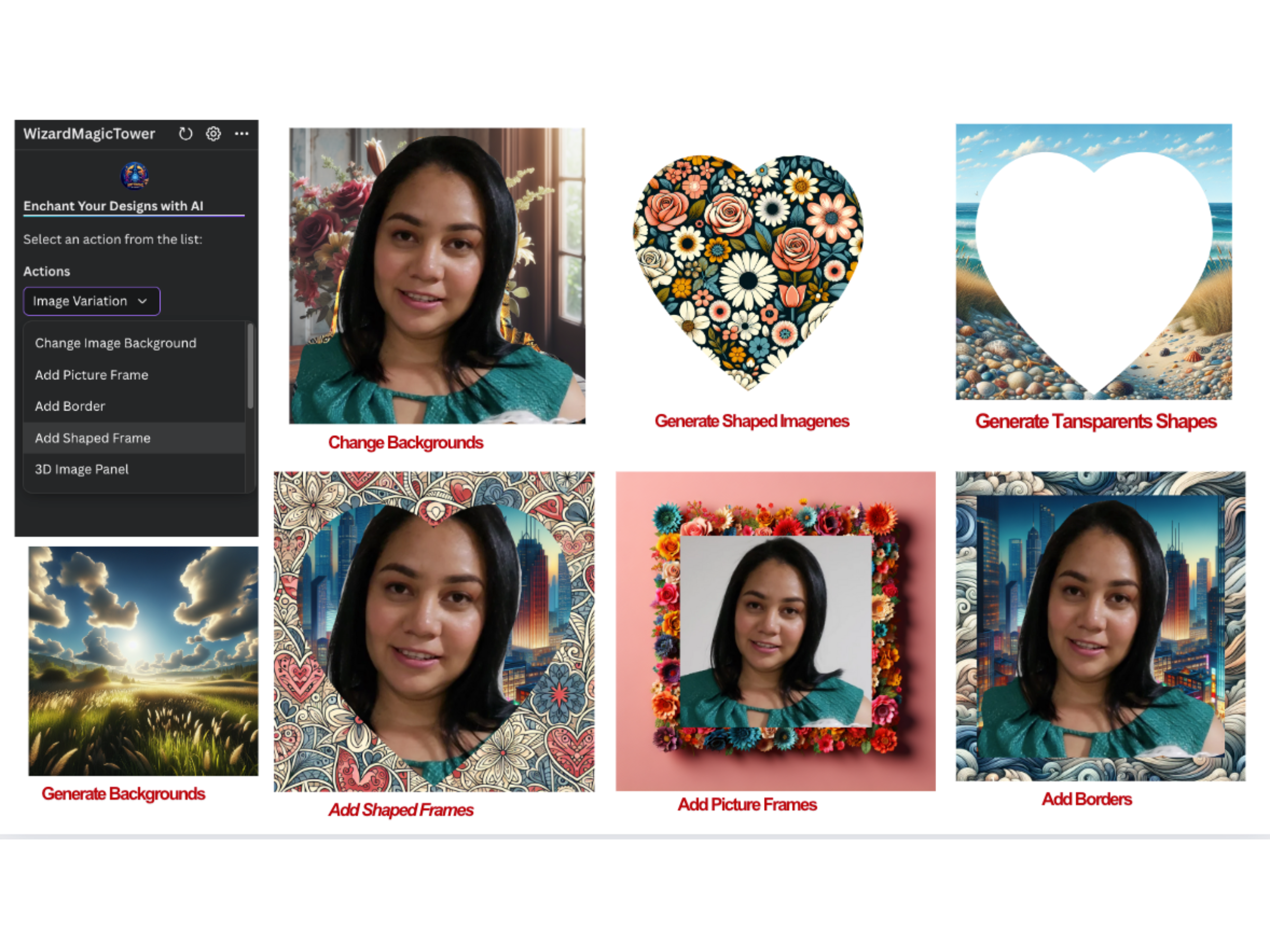
Wizard Magic Tower is a powerful tool for graphic designers. The app lets you easily create and modify backgrounds, add unique frames and borders, generate transparent shapes like hearts, stars, and circles, and explore image variations. You can also create shaped images with AI-generated images inside them and even add text frames with multiple options. It’s like having your own personal design wizard that makes complicated tasks feel easy.
Here’s the complete list of 10 actions you can perform using Wizard Magic Tower:


How I built it
Building Wizard Magic Tower was an exciting journey. I used a combination of Canva SDK, React, Javascript, Node.js, and TypeScript in the backend. These were challenging for me since I don’t typically work with these programming languages, but I was determined to learn and push through. The app’s core functions revolve around the generative AI capabilities, which allow users to perform all kinds of creative tasks with just a few clicks. Integrating these technologies and ensuring they worked seamlessly together was both challenging and rewarding.
In the demo. I'm using a very short prompt, but the more detailed your prompts, the better the results you'll get. You don't need to create perfect prompts because, behind the scenes, the original prompt is sent to Gemini Flash Text Generation, which refines it before it's sent to the Gemini Image Generation. This ensures your prompts are always optimized for the best results.

Prompt engineering was key to the success of the project in achieving the desired results
Initially the backend was in typescript but then I changed to a serveless architecture with Python, using Amazon Lambda and API gateway, the cost was part of my challenges too.
To the Judges (How I meet the criteria) :
- Technological Implementation: Does the project demonstrate quality software development? Does the project thoroughly leverage Canva’s Apps SDK or Connect APIs? How is the quality of the app or integration submission?
Anwer: I spent time reading through the entire Canva SDK, studying and understanding the code and Canva App UI Kit, as well as learning about Canva's design guidelines and standards.
I took advantage of Canva’s Apps SDK and existing Canva assets and resources, ensuring they were integrated appropriately and aligned with the logic of each of my features.
The 'Perform the Magic' button will be activated depending on the type of action the user wants to take.
In some cases, an image must be selected for it to become active, while in others, it won't be necessary. Depending on the user's selected action, other controls will either become visible or remain hidden.
- Design: Is the UX and design of the project well thought out? Is there an effective use of frontend and backend in the software? Does it incorporate Canva’s Design Guidelines?
Anwer: I made sure to familiarize myself with each existing component in Canva and used them in a convenient way. I took at look at each component in the following link: https://www.canva.dev/docs/apps/app-ui-kit/storybook/?path=/story/welcome-%F0%9F%8E%89--welcome
I went through all these pages to ensure that I was following Canva's standards. https://www.canva.dev/docs/apps/design-guidelines/typography/#do https://www.canva.dev/docs/apps/app-listing-guidelines/
- Potential Impact: How big of an impact could the project have on Canva’s users or a third party product’s users? Does it fill a major gap in the product? Is this something users have been asking for?
Anwer: I offer a ready to use product. They do not have to put the lego pieces together because my app does the work for them.
- Quality of the Idea: How creative and unique is the project? Does the concept exist already? If so, how much does the project improve on it?
Anwer: I explored the existing Canva apps and noticed that nothing quite like mine existed. While there are already AI-powered apps, what sets mine apart is its specific focus. Unlike the more generic apps that simply generate AI images, my app combines the power of AI with additional JavaScript capabilities and already existing components, to create a ready-to-use product.
My app has multiple funcionalities, multiple actions.
Moreover, my app ensures that users always get the best results, even if their prompts aren’t perfect, by automatically refining them for optimal outcomes.
Challenges I ran into
One of the biggest challenges I faced was getting comfortable with Canva SDK, React, Node.js, and TypeScript. These technologies were new to me, and it took some time to get up to speed. Ensuring that the generative AI features worked smoothly within the app was another challenge.
I was new to the Canva SDK, which required a period of learning. Working alone and not being good at making presentation videos 😅.
There were a lot of moving parts, and getting everything to sync up took some trial and error. But with persistence, I was able to overcome these obstacles.
Accomplishments that I'm proud of
I’m really proud of the fact that I was able to build Wizard Magic Tower from scratch, even though I was working with new technologies. Seeing the app come together and knowing that it could help designers create amazing, unique designs with ease is incredibly satisfying. I’m also proud of the way I was able to incorporate generative AI into the app, making it a truly magical tool for users.
What I learned
Through this project, I learned a great deal about Canva SDK, React, Node.js, and TypeScript. These were all new territories for me, and I’m proud of how much I was able to learn and apply in such a short amount of time. I also gained a deeper understanding of how generative AI can be used to enhance the creative process in design.
What's next for Wizard Magic Tower
Looking ahead, I plan to add even more magical features to Wizard Magic Tower. I want to continue expanding the app’s capabilities, adding new shapes, frames, and backgrounds, and exploring even more ways to use AI to make the design process easier and more creative. The goal is to make Wizard Magic Tower the go-to tool for designers looking to add a touch of magic to their work.
I want to improve the performance of the same.


Log in or sign up for Devpost to join the conversation.