-
-
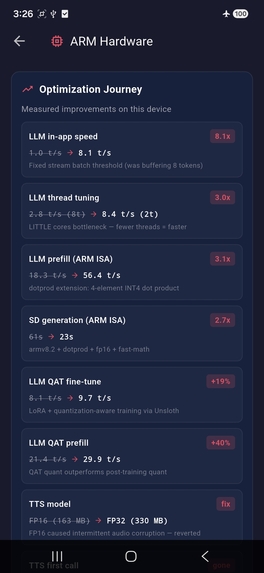
optimization journey
-
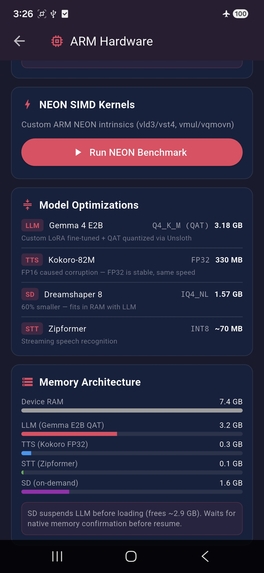
NEON + models + RAM
-
loading screen
-
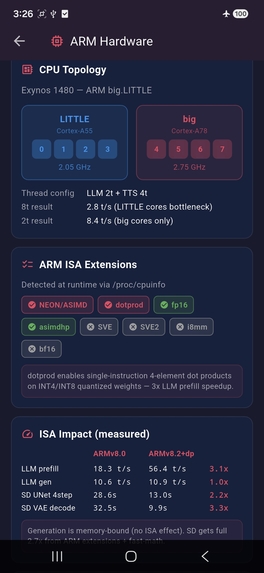
CPU topology + ISA
-

Yuki chat

Inspiration
We started with a simple question: how much AI can a cheap phone actually run?
Not a flagship. Not with cloud fallback. A Samsung Galaxy A55 5G — $150–300 used-to-new (Q2 2026 market prices) — the kind of phone most people actually own. Running in airplane mode.
The answer surprised us. With careful optimization for the Arm Cortex-A78 CPU, we fit a complete AI companion that can hold voice conversations, see through the camera, and generate images. All offline, all under 7.4GB of RAM.
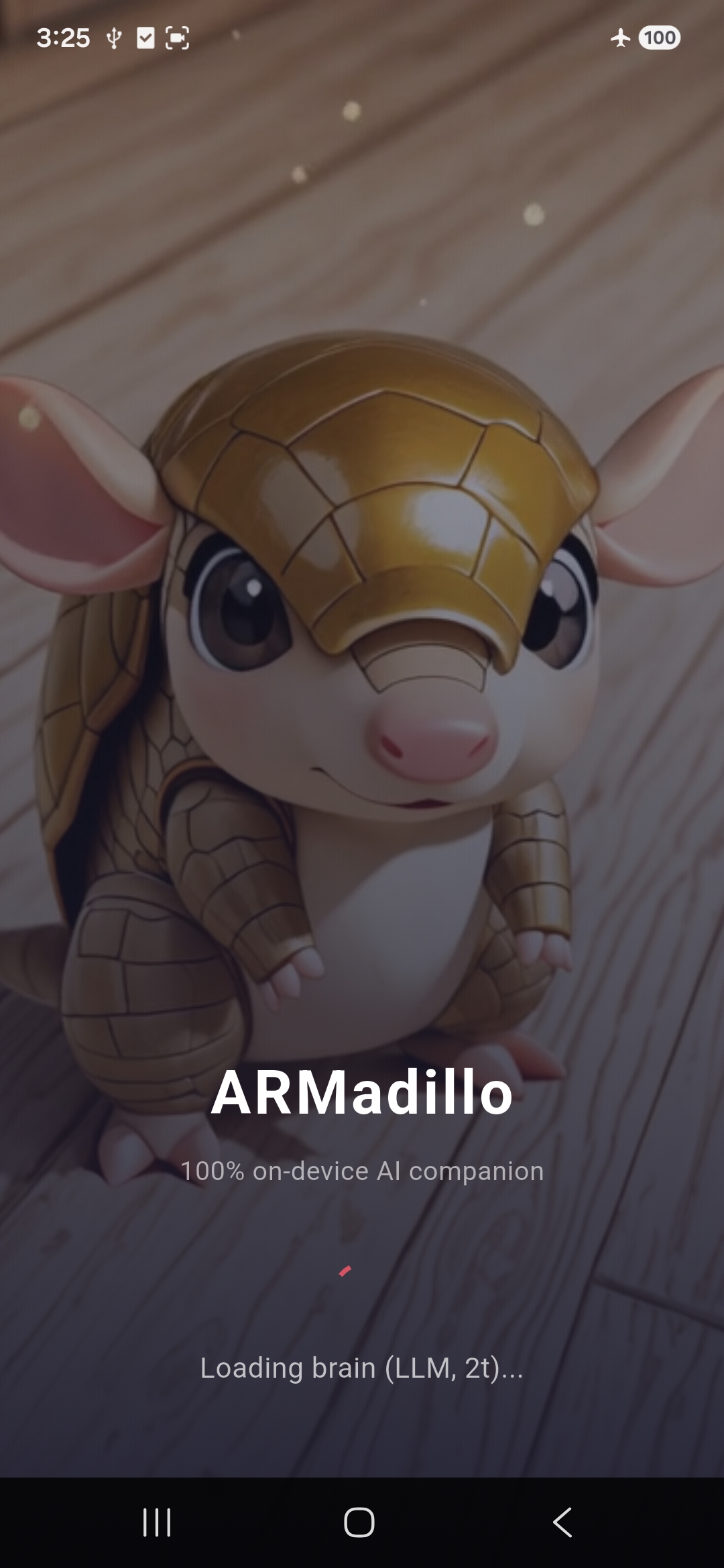
We called it ARMadillo — because like its namesake, it's small, armored (privacy-first), and surprisingly capable.
What it does
ARMadillo is an on-device AI companion with four interconnected capabilities:
Voice Conversation — Speak naturally and hear spoken responses. A streaming speech recognizer captures your words, a 4.65-billion-parameter language model thinks about them, and a neural text-to-speech engine speaks back. The pipeline overlaps: TTS begins synthesizing the first sentence while the LLM is still generating the second.
Camera Vision — Point your camera at anything. The multimodal vision model (Gemma 4 E2B with mmproj) identifies objects, reads text, describes scenes, and answers questions about what it sees.
OCR Translation — Point the camera at foreign text — a sign, a menu, a book page. Lightweight on-device OCR (Google ML Kit) extracts the text in milliseconds, then the LLM translates it to English. No heavy speech model needed; the right tool for each subtask.
Image Generation — Ask ARMadillo to draw anything. A quantized Stable Diffusion model (LCM Dreamshaper, 4-step inference) generates 256x256 images in ~23 seconds, entirely on the CPU. Built-in content safety filtering via prompt engineering ensures appropriate outputs.
Character Personas — Choose from different AI personalities, each with their own animated avatar, voice behavior, and special abilities. A fantasy narrator who runs D&D encounters with dice rolls. A helpful assistant for daily tasks.
Everything works in airplane mode. There is no server, no API key, no telemetry, no data leaving the device.
How we built it
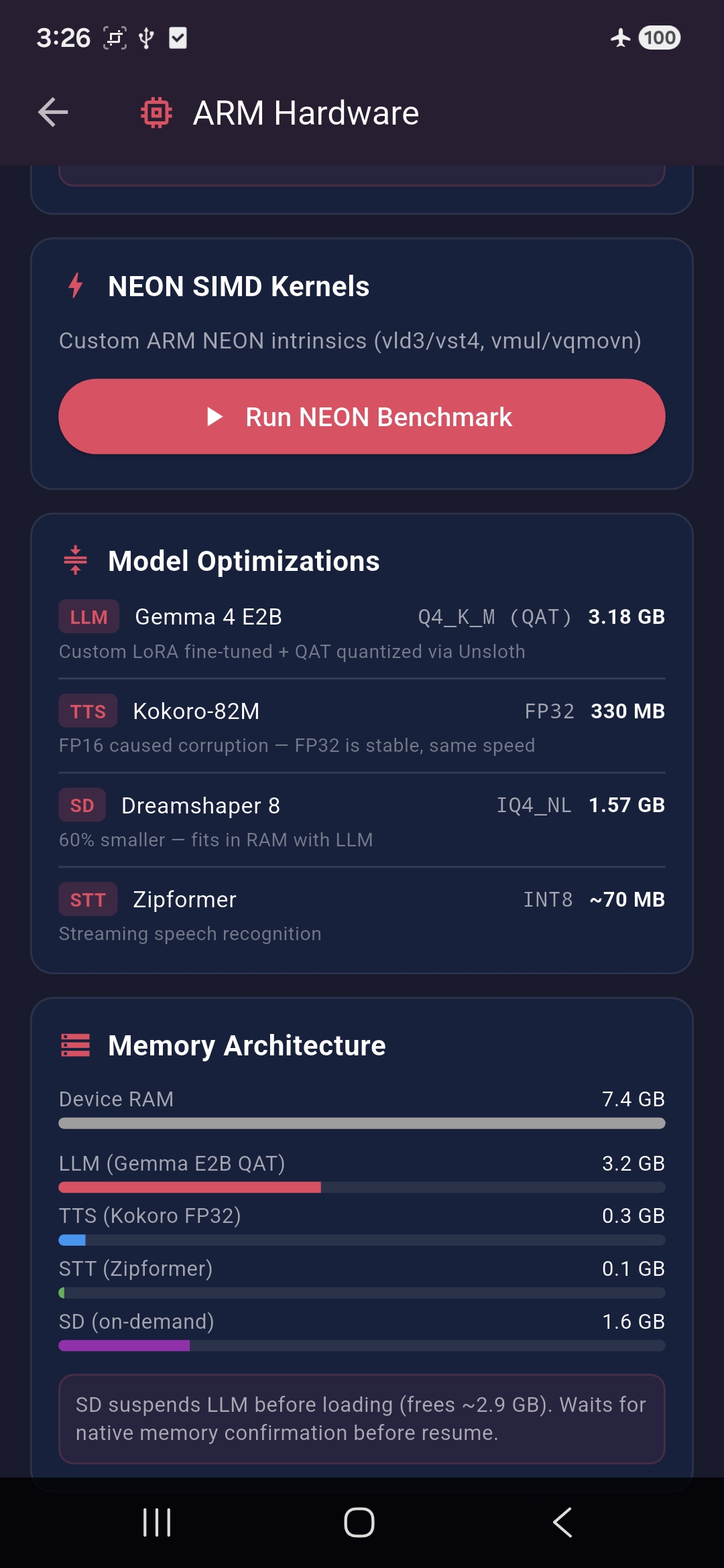
The core challenge was fitting four AI models into 7.4GB of shared RAM on an Arm Cortex-A78 CPU — with no GPU acceleration (the Mali-G68 shares system RAM, making GPU offload impossible).
The stack:
- Flutter for cross-platform UI
- llamadart (llama.cpp bindings) for LLM inference — Gemma 4 E2B, custom LoRA fine-tuned and QAT-quantized to Q4_K_M
- sherpa_onnx for both speech recognition (streaming Zipformer) and text-to-speech (Kokoro-82M)
- stable-diffusion.cpp source-built for arm64 with ARM-optimized compiler flags
- Custom ARM NEON SIMD kernels for audio and image processing
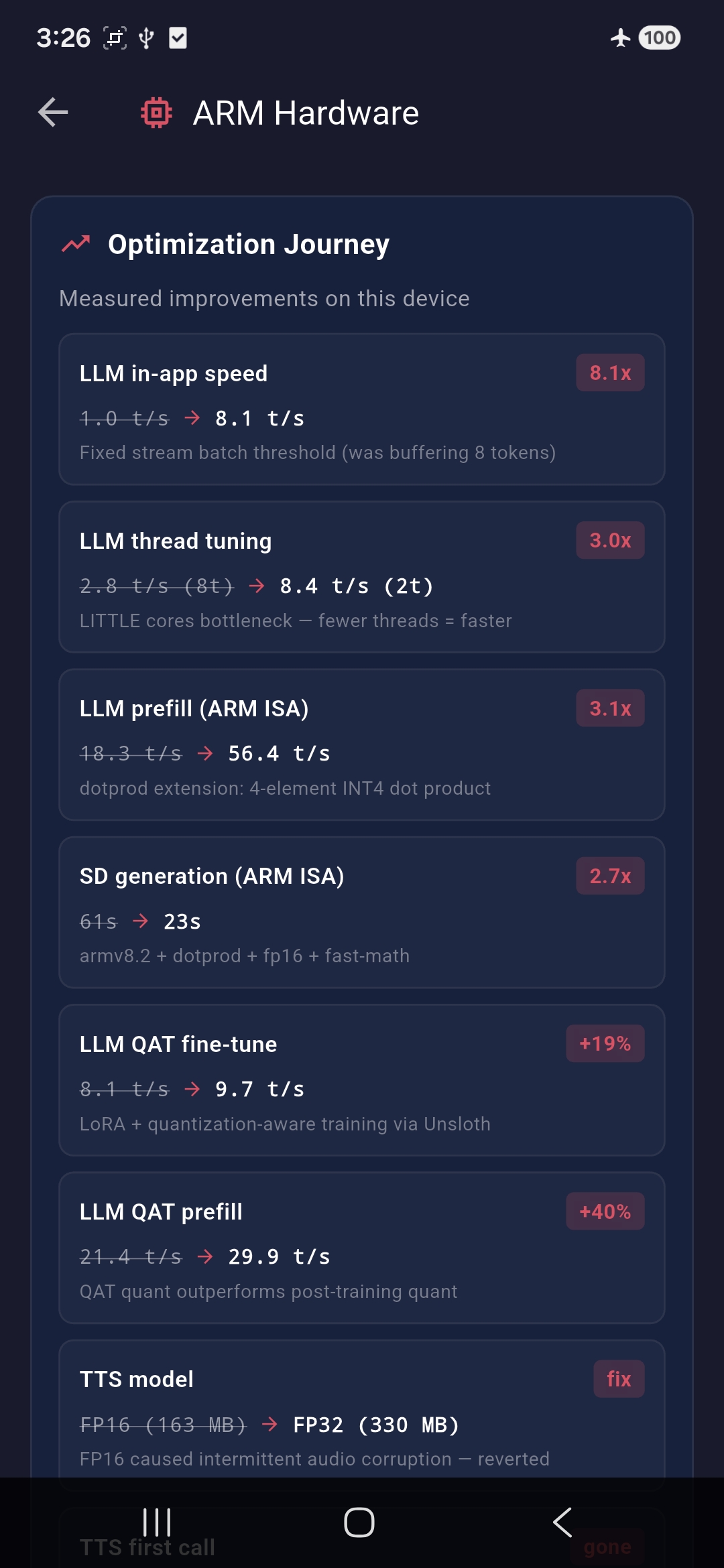
The optimization journey is where the real work happened. We documented 11 distinct optimizations, each with before/after measurements:
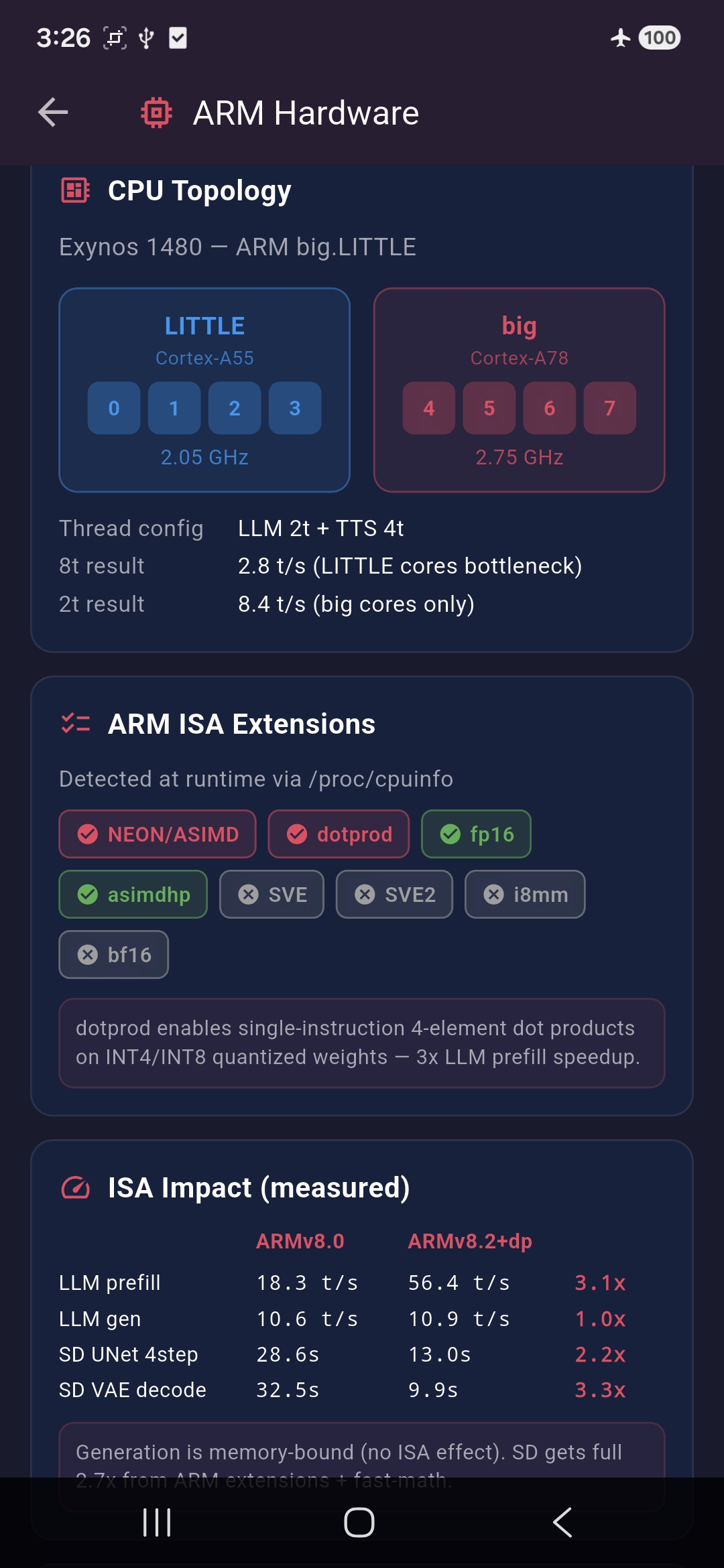
ARM ISA backend selection — Benchmarked three ARM instruction set levels. The
dotprodextension (INT8 dot product) delivered a 3x prefill speedup for quantized models. llamadart ships 7 ARM CPU backends and auto-selects the best at runtime.Stable Diffusion ARM build — Source-compiled stable-diffusion.cpp with
-march=armv8.2-a+dotprod+fp16 -O3 -ffast-math. Result: 2.7x faster image generation (61s down to 23s). The VAE decoder benefited most from FP16 vector arithmetic (3.3x speedup).LLM streaming fix — Discovered that llamadart's token stream batcher was holding 8 tokens before delivery, creating a 7.8x overhead. Setting the batch threshold to 1 token recovered full native speed: 1.0 tok/s became 8.1 tok/s — an 8.1x improvement with a one-line config change.
Custom NEON SIMD kernels — Wrote ARM NEON intrinsics for two hot paths: audio float32-to-int16 conversion (20.5x faster) and RGB-to-RGBA image conversion (14.3x faster).
FP16 TTS model — attempted and reverted — Converted the Kokoro TTS model from FP32 to FP16, cutting size from 330MB to 163MB. However, on-device testing revealed intermittent audio corruption: Kokoro returned all-Infinity values on some synthesis calls, producing garbage audio. Swapping back to FP32 eliminated the issue completely — not all models tolerate FP16 equally. We documented this negative result.
Thread count tuning for big.LITTLE — The Exynos 1480 has 4 big Cortex-A78 cores and 4 LITTLE Cortex-A55 cores. Using all 8 threads was catastrophic (2.8 tok/s) because LITTLE cores bottleneck the batch. Using 2 big cores gives 8.4 tok/s and leaves cores free for TTS.
TTS pipeline optimization — Sentence-level pipelining starts TTS on the first complete sentence while the LLM generates the rest. Combined with warmup synthesis at init (eliminating ONNX JIT penalty) and 1.15x playback speed, this minimizes perceived latency.
On-demand model swapping — The four models total more RAM than the device has. We solved this by suspending the LLM (freeing ~3GB) before loading Stable Diffusion (~1.6GB), then resuming afterward. The user sees a brief reload but never an OOM crash.
Core pinning experiment — Implemented
sched_setaffinityvia Dart FFI to test manual core assignment. Tested all configurations. Result: the Linux CFS scheduler already makes optimal decisions on this SoC. Manual pinning consistently made things worse. We documented this negative result because knowing what doesn't work is valuable.Vulkan GPU evaluation — Tested GPU offload via llamadart's Vulkan backend. The Mali-G68 shares system RAM, so a 2.9GB model plus app memory exceeds capacity. CPU-only is the correct architecture for shared-memory mobile GPUs.
Custom LoRA fine-tuning with QAT quantization — Fine-tuned Gemma 4 E2B with LoRA (rank 16, 31 training examples) using Unsloth's quantization-aware training, then exported directly to Q4_K_M GGUF. QAT simulates quantization noise during training, so the model learns to be robust to INT4 precision loss. The result: a custom-trained model that runs at 9.65 tok/s generation and 29.88 tok/s prefill on-device. Character personas and app-specific behavior baked into the weights instead of eating context window with long system prompts.
Challenges we ran into
The RAM puzzle. Four models that collectively need more RAM than the device has. We solved this with on-demand loading: image generation suspends the LLM, generates, then resumes. But this required careful engineering — the suspend must complete before the new model loads, or they briefly coexist and trigger an OOM kill.
big.LITTLE core contention. When the LLM and TTS run concurrently during sentence pipelining, they compete for the 4 big Cortex-A78 cores. TTS drops from 1.04x real-time factor (isolated) to 1.79x (concurrent), causing audible gaps between sentences. We mitigated this with sentence pipelining and speed tuning, but it's a fundamental constraint of running compute-heavy workloads on a heterogeneous CPU.
The streaming token mystery. Our LLM was generating at 1.0 tok/s in-app despite native benchmarks showing 8.1 tok/s. The culprit was a token batching layer designed for network streaming efficiency — it buffered 8 tokens before sending them across the Dart isolate boundary. A one-line configuration change fixed an 8x performance gap.
TTS FP16 corruption. We converted Kokoro-82M from FP32 to FP16 to save 167MB. But then intermittent audio corruption appeared: some synthesis calls returned all-Infinity float values, producing garbage WAV files. The breakthrough came from swapping back to FP32: zero corruption. FP16 precision loss in Kokoro's internal attention/flow computations causes occasional numerical overflow. Reverted to FP32 — reliability beats size.
Accomplishments that we're proud of
- 8.1x LLM speedup from a one-line config fix — sometimes the biggest wins are the simplest
- 2.7x Stable Diffusion speedup from ARM compiler flags alone
- Custom fine-tuned and self-quantized LLM — LoRA + QAT quantization outperforms off-the-shelf post-training quants by 19-40%
- 5 AI models on a $150–300 phone — voice, vision, OCR translation, image generation, all offline
- 11 documented optimizations with before/after measurements on real hardware
- Custom NEON SIMD kernels that run 14-20x faster than scalar code
- In-app ARM stats screen showing CPU topology, ISA features, and live benchmarks — the optimization work is visible to users, not hidden
- Negative results documented — core pinning, GPU offload, and FP16 TTS all don't work on this device, and that's useful knowledge
What we learned
dotprod is the single most impactful ARM extension for quantized AI. It provides a 3x prefill speedup for INT4/INT8 models. FP16 extensions add only ~1% on top for quantized weights. Generation speed is memory-bandwidth bound regardless of ISA level.
The Linux scheduler is smarter than manual core pinning on Android big.LITTLE SoCs. Every manual affinity configuration we tested performed worse than the default scheduler.
Shared-memory mobile GPUs cannot accelerate large language models. The Mali-G68 GPU and CPU share the same 7.4GB RAM pool. There's simply not enough memory for both the model and the app. CPU-only inference is the correct architecture.
On-device AI is a resource management problem, not just a model optimization problem. Making one model fast is easy. Making four models coexist — sharing cores, swapping RAM, pipelining across isolates — is where the real engineering challenge lives.
Quantization-aware training beats post-training quantization. By fine-tuning with simulated quantization noise (QAT via Unsloth), the resulting INT4 model retains more of the original model's knowledge. Our self-quantized GGUF outperforms an off-the-shelf post-training quant of the same base model on the same hardware — 40% faster prefill, 19% faster generation.
FP16 model conversion is not always safe. Converting Kokoro-82M TTS from FP32 to FP16 saved 167MB but introduced intermittent numerical overflow. Always validate quantized models end-to-end, not just on accuracy benchmarks.
What's next for ARMadillo
- Higher-resolution image generation (384x384, 512x512) with optimized VAE decode
- Streaming TTS with sub-sentence chunking for even lower perceived latency
- Exploring ARM i8mm (INT8 matrix multiply) on newer SoCs for further quantized inference speedup
- Battery profiling and power-aware scheduling

Log in or sign up for Devpost to join the conversation.