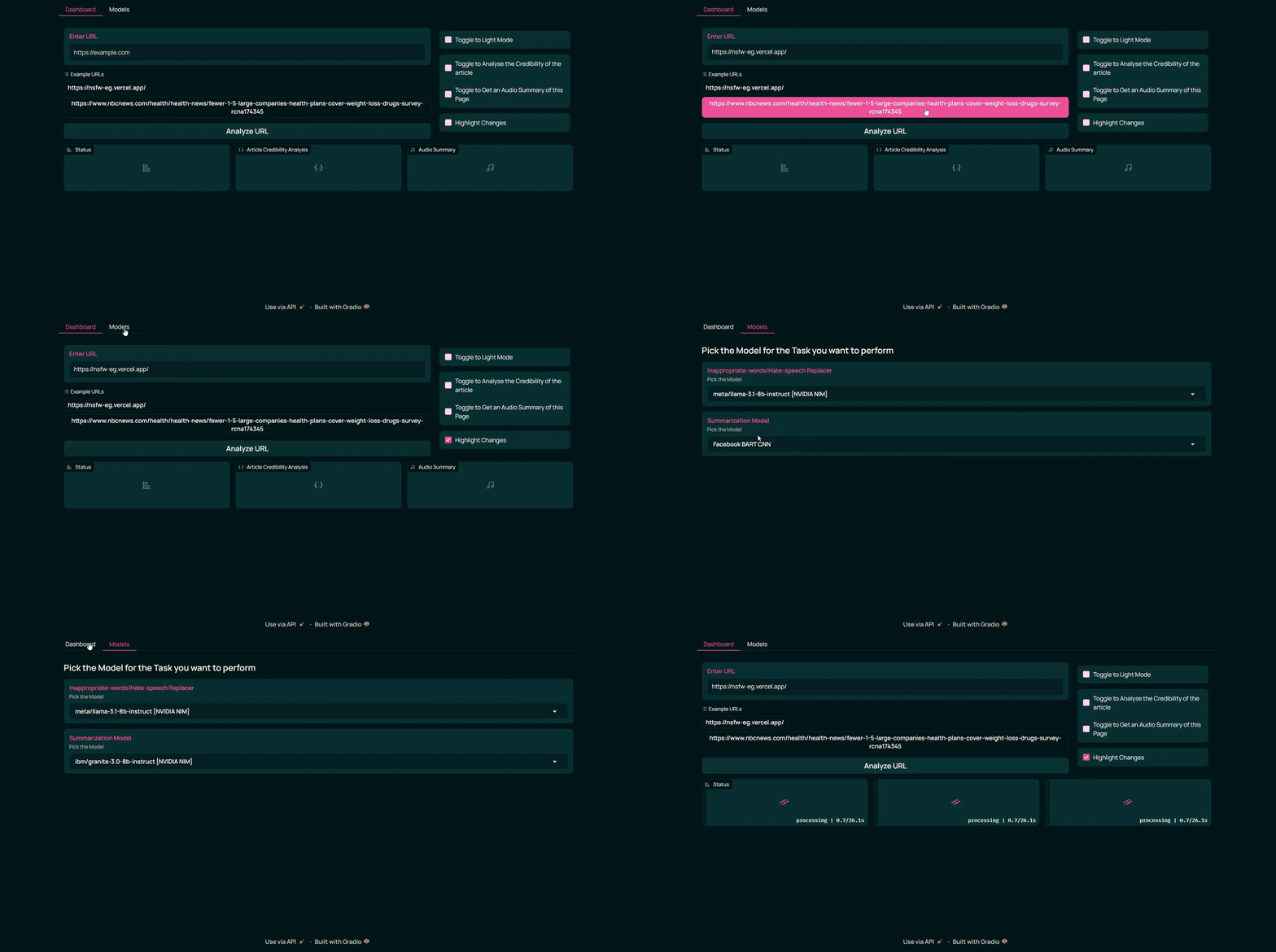
What it does :
Arishta Browser is a prototype browser designed for content moderation using a multimodal approach. In essence, it addresses a problem that should have been resolved by now. It offers a range of features aimed at enhancing user experience and ensuring safe browsing:
- Inappropriate Content Replacement: Automatically replaces inappropriate words or hate speech with positive alternatives. Users can toggle a highlight option to view the changes made.
- Custom NSFW Image Replacement: Replaces NSFW images with user-selected custom images, allowing for personalized and appropriate browsing.
- Audio Summaries: Converts webpage content into concise audio summaries, providing a podcast-like experience for users on the go.
- Article Credibility Analysis: Evaluates the reliability of articles, including any embedded videos, ensuring users access trustworthy information.
- Dark/Light Mode Toggle: Features a built-in dark and light mode toggle that applies to the web content, offering a visually comfortable experience.
- NVIDIA NIM Model Integration: Enables seamless switching between various NVIDIA NIM models, giving users flexibility in model selection.
- API Inferencing: Enables users to access the browser's functionalities programmatically via APIs, allowing seamless integration into other applications or workflows.
Arishta Browser combines advanced features with a user-friendly interface, making it a unique tool for safe and efficient browsing.
How we built it :
We built Arishta Browser in the NVIDIA AI Workbench environment, which provides a containerized setup for seamless AI project development and deployment. The project leverages several cutting-edge tools and technologies, including:
- Gradio: Used for creating an intuitive user interface.
- Hugging Face Transformer Models: Four models were integrated for advanced AI functionalities.
- YT-DLP with FFmpeg: Employed to download YouTube videos for analyzing the credibility of articles.
- Google Gemini: Utilized for advanced analytical tasks.
- NVIDIA NIM LLM Models: Integrated four powerful models for seamless language processing.
- ElevenLabs: Used for generating audio summaries, enhancing accessibility and usability.
- Flask: Handles API inferencing to facilitate smooth backend operations.
This robust stack ensures Arishta Browser delivers reliable, innovative features with ease of use and flexibility.
Challenges we ran into :
The entire journey of building Arishta Browser was filled with challenges, as evident from this.
To mention a few:
- Working with a containerized environment for deploying an LLM was initially quite tricky, especially when integrating tools like ffmpeg and yt-dlp for the video-based model. [ Plus the issue with bot detection or IP ban link ]
- I faced a significant learning curve, transitioning from building an Electron.js-based browser to a PyQt5-based browser, and finally arriving at a Gradio-based 'browser-like' prototype. These shifts were the result of several wrong decisions along the way.
Despite the obstacles, each challenge contributed to invaluable learning and the creation of a functional prototype.
Accomplishments that we're proud of :
- Submitting a project for a hackathon that required GPU capabilities, without owning a dedicated graphics card, was another major challenge. I had to endure multiple hours of waiting for the build process to complete, all while carefully ensuring the system didn’t crash during the process. This added a layer of difficulty but also taught me resilience and resourcefulness.
- To keep the GitHub repo or Docker Hub from getting cluttered with large models, I implemented a solution where the models are downloaded during the build time, but only if they don’t already exist at the
/tmppath. This approach ensured a clean repository while still maintaining the persistence of the models.
What we learned :
- Learning how to work with LLMs in a containerized environment locally was a crucial part of the journey.
- I learned how to persist the models across every run of the container without relying on volumes or mounts. This ensured that the models remained intact between container restarts, streamlining the workflow and eliminating the need for constant reloading or reconfiguration.
- Understanding how LLMs behave in production environments provided valuable insights into their performance and limitations.
- Realizing that containers do not inherently support GUI rendering was another important takeaway, requiring alternative approaches for UI-based functionalities.
What's next for Arishtha Browser :
- The next stage of my plan is to build an MVP version of this project. Once that’s complete, moving on to the next step will be crucial.
- Installing the browser on computers can provide schools and universities with a safer online experience for their students. Businesses can leverage the browser to maintain a secure and professional online space. Community centers, libraries, and public kiosks can adopt the browser to safeguard users, ensuring a respectful and safe browsing experience for everyone, regardless of age or background.
- Streamers and content creators can also benefit from using the browser to avoid accidentally displaying inappropriate content during live streams, maintaining a clean and professional public image while adhering to platform guidelines. The potential use cases continue to grow, offering more opportunities to ensure safety and professionalism online.

Log in or sign up for Devpost to join the conversation.