-
-
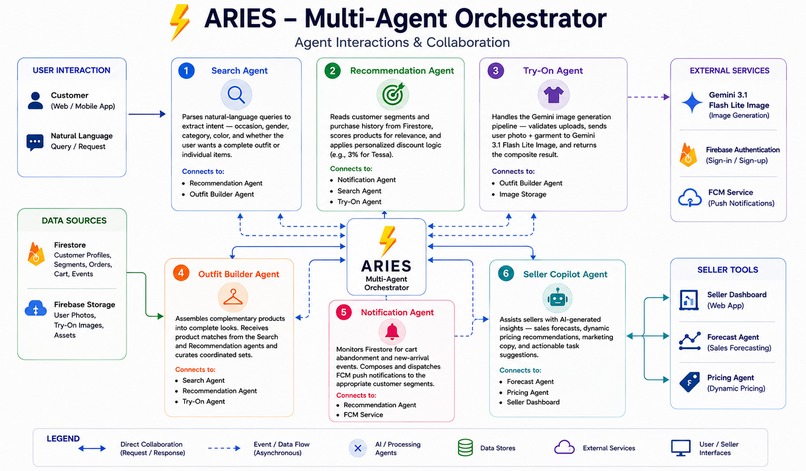
Aries Agent
-
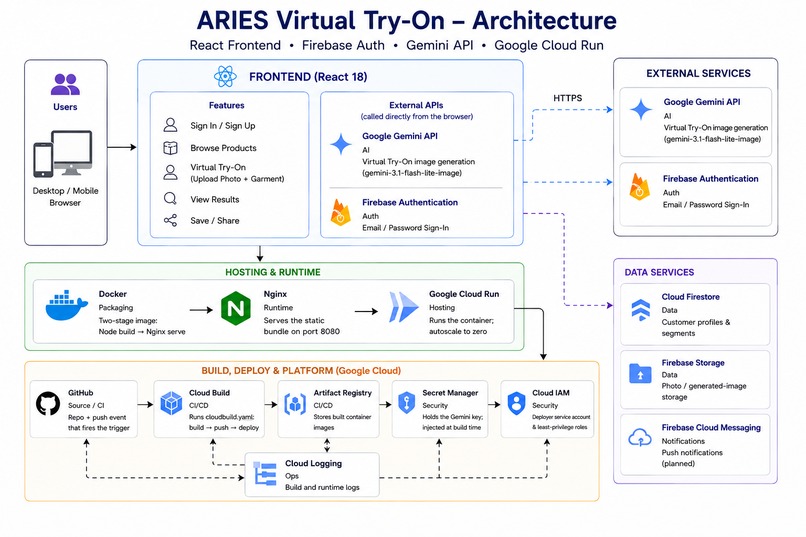
Aries Architecture
-
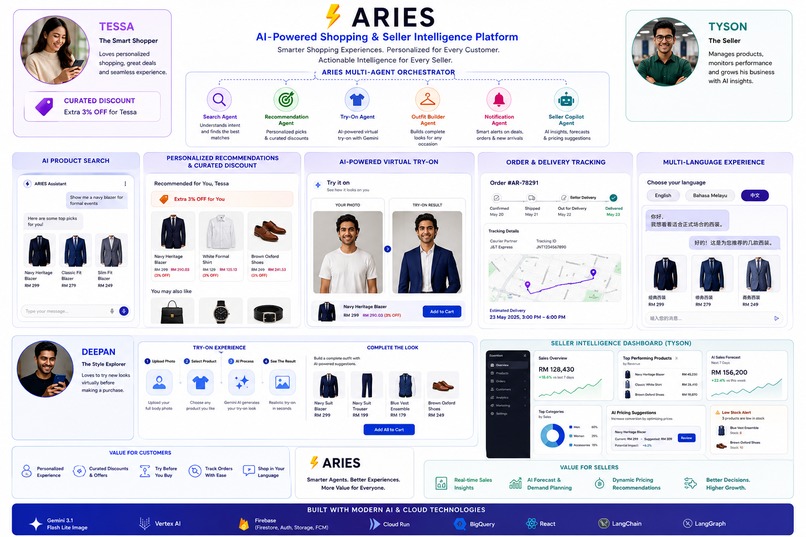
Aries Overview
TCC RAPTOR ARIES — AI-Powered Retail Virtual Try-On Platform
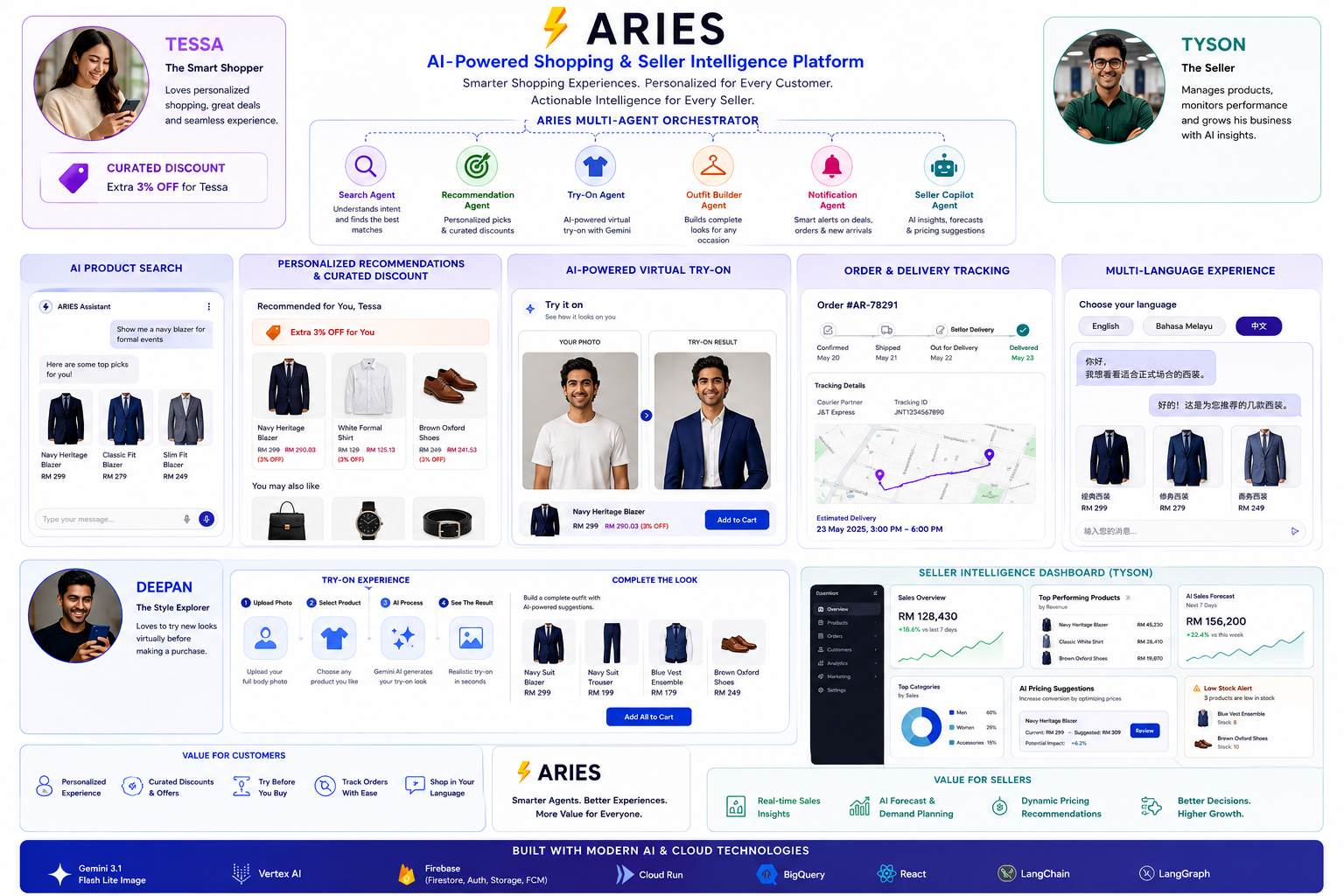
Smarter shopping for customers, actionable intelligence for sellers — powered by the ARIES multi-agent AI system on Google Gemini.





🔗 Live demo: https://tcc-raptor-retail-ru2czwsr6a-el.a.run.app
Created by Deepan Raj — Senior Solution Architect (Azure, AWS & GCP) · TCC RAPTOR · [email protected]

What is this?
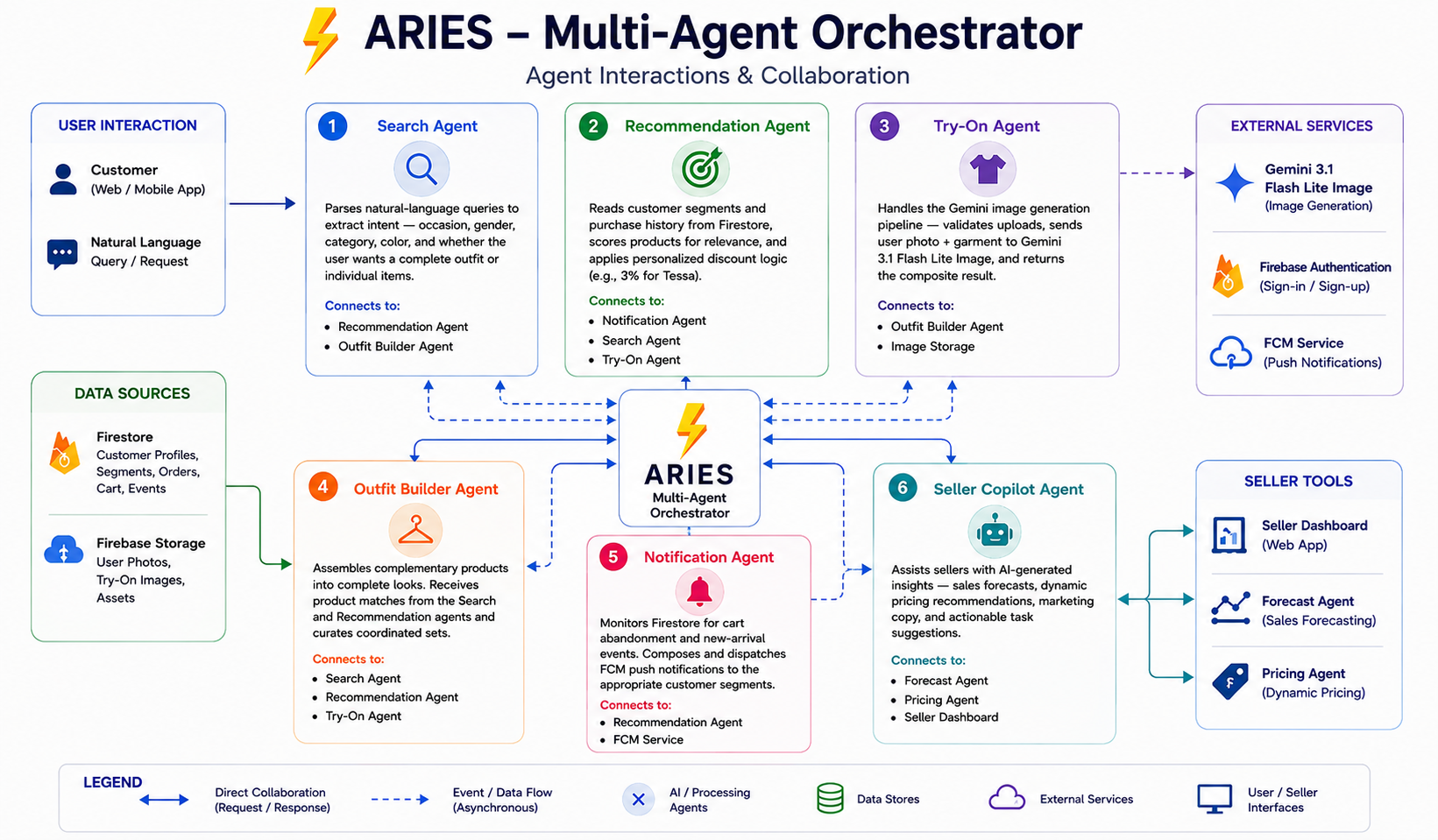
An AI retail platform: customers browse, search in natural language, and try clothing on their own photo (Gemini 3.1 Flash Lite Image), while sellers get an AI dashboard with forecasts, dynamic pricing, and a copilot. The ARIES multi-agent orchestrator coordinates the search, recommendation, try-on, outfit-builder, notification, and seller-copilot agents.
Highlights: natural-language product search · personalized recommendations & discounts · AI virtual try-on · outfit builder · seller intelligence dashboard · multi-language UI · Aries voice chatbot.
🚀 How to Run
Prerequisites
- Node.js 18+ and npm
- A Google Gemini API key (for the Virtual Try-On feature) — create one in Google AI Studio
1. Install dependencies
npm install
2. Configure environment
Create a .env file in the project root:
VITE_GEMINI_API_KEY=your_gemini_api_key
VITE_*variables are compiled into the app at build time..envis git-ignored — never commit it. In production the key is injected from Google Secret Manager (see Deployment).
3. Start the dev server
npm run dev
Then open the printed URL (Vite defaults to http://localhost:5173).
4. Build for production (optional, local)
npm run build     # outputs static site to dist/
npm run preview   # serve the production build locally
All scripts
| Command | What it does |
|---|---|
npm run dev |
Start the Vite dev server with hot reload |
npm run build |
Production build → dist/ |
npm run preview |
Preview the production build locally |
npm run typecheck |
Type-check with TypeScript |
npm run lint |
Lint with ESLint |
🧩 Architecture
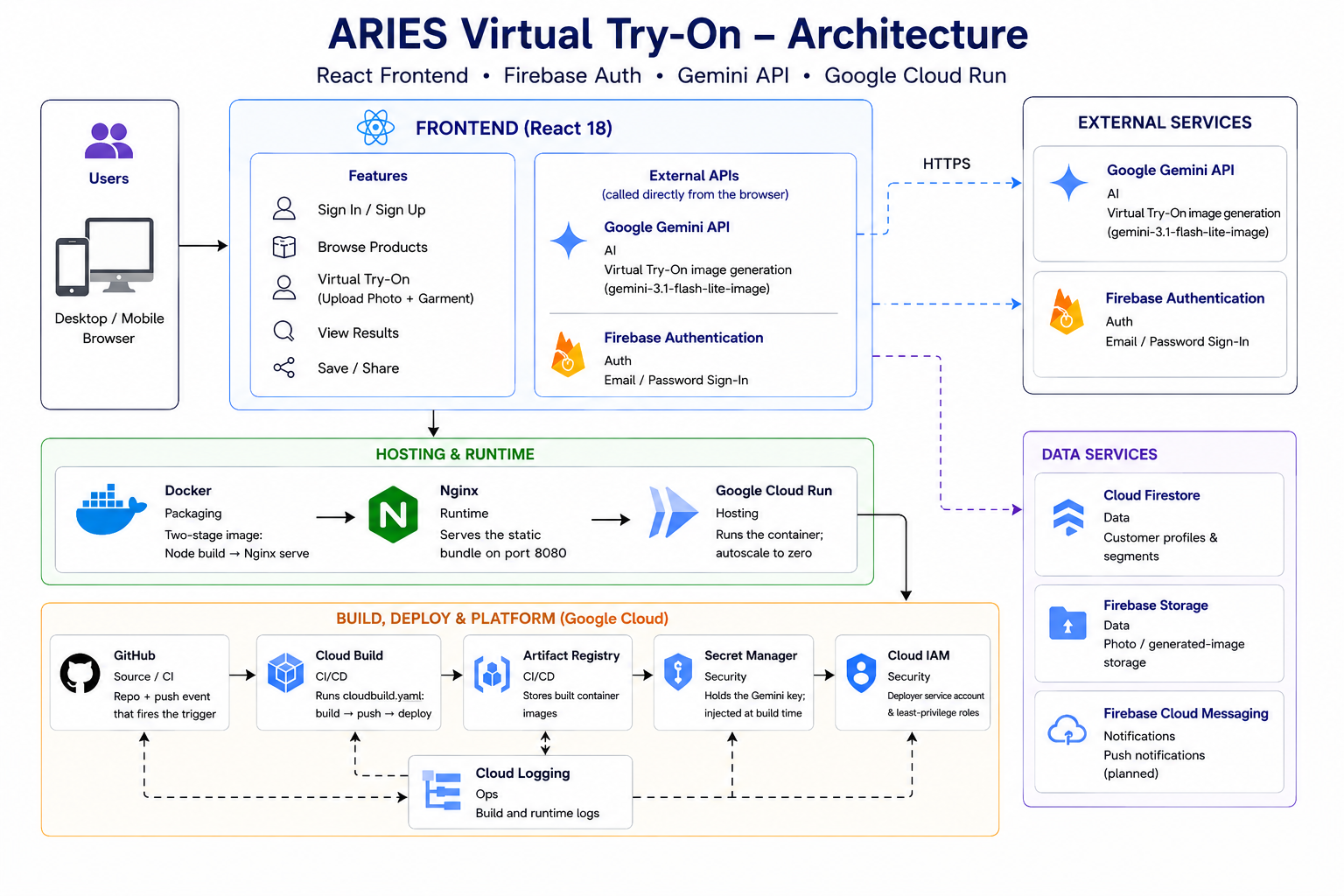
The frontend is a React SPA; the browser calls Gemini and Firebase Auth directly, while the app is hosted on Google Cloud Run. The ARIES orchestrator coordinates the AI agents.


📐 Full architecture → ARCHITECTURE.md
Deploy pipeline & runtime request flow, build-time secret handling, and the IAM model — with detailed diagrams.
☁️ Deployment
Containerized (multi-stage Docker → Nginx) and running on Google Cloud Run. Every push to main auto-builds and deploys through Cloud Build, with the Gemini key injected from Secret Manager at build time.
git push origin main # → Cloud Build → new Cloud Run revision (~4 min)
🚀 Full deploy runbook → DEPLOYMENT.md
Step-by-step: GCP project setup, Secret Manager, Artifact Registry, the Cloud Build trigger, and Cloud Run.
🛠️ Tech Stack
| Layer | Technology |
|---|---|
| Frontend | React 18 · TypeScript · Vite · Tailwind CSS · React Router · Lucide |
| AI | Google Gemini 3.1 Flash Lite Image |
| Backend | Firebase (Firestore · Auth · FCM · Storage) |
| Hosting | Google Cloud Run (Nginx, scale-to-zero) |
| CI/CD | GitHub → Cloud Build → Artifact Registry → Cloud Run |
| Secrets | Google Secret Manager |
📁 Project Structure
.
├── src/
│   ├── components/    # UI components (Header, modals, ProductCard, VirtualTryOn…)
│   ├── pages/         # Routes (Home, Product, Category, seller/*)
│   ├── context/       # Auth, Cart, SellerAuth React contexts
│   ├── lib/           # aiSearch, firebase, ariesEngine
│   ├── data/          # Product catalog & seller mock data
│   └── public/        # Static assets (product images + README diagrams)
├── Dockerfile         # Multi-stage build → Nginx (port 8080)
├── nginx.conf         # Static serving + SPA fallback
├── cloudbuild.yaml    # CI/CD pipeline: build → push → deploy
├── ARCHITECTURE.md    # As-built architecture & pipeline (diagrams)
└── DEPLOYMENT.md      # Step-by-step deploy runbook
📚 Documentation
| Document | What's inside |
|---|---|
| ARCHITECTURE.md | How the deploy pipeline & runtime work — diagrams, secret handling, IAM |
| DEPLOYMENT.md | Step-by-step deploy runbook (GCP → Secret Manager → Cloud Build → Cloud Run) |
License
Proprietary to TCC RAPTOR. All rights reserved.
Built With
- cloudrun
- firebase
- firestore
- gemini3.1
- github
- google-cloud
- googlescretmanager
- javascript
- react
- tailwindcss
- typescript
- vite


Log in or sign up for Devpost to join the conversation.