-
-
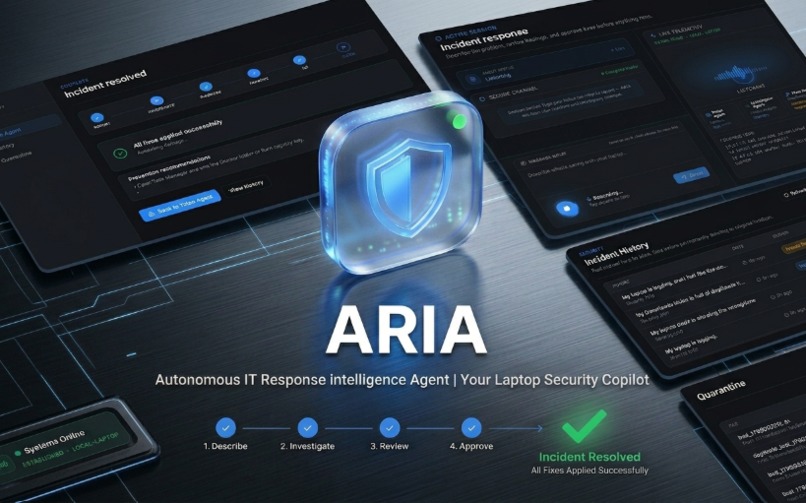
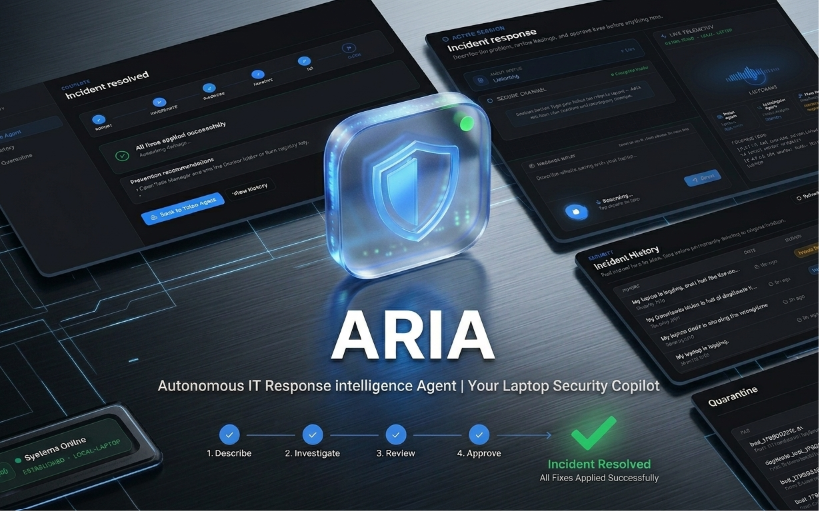
Meet ARIA
-
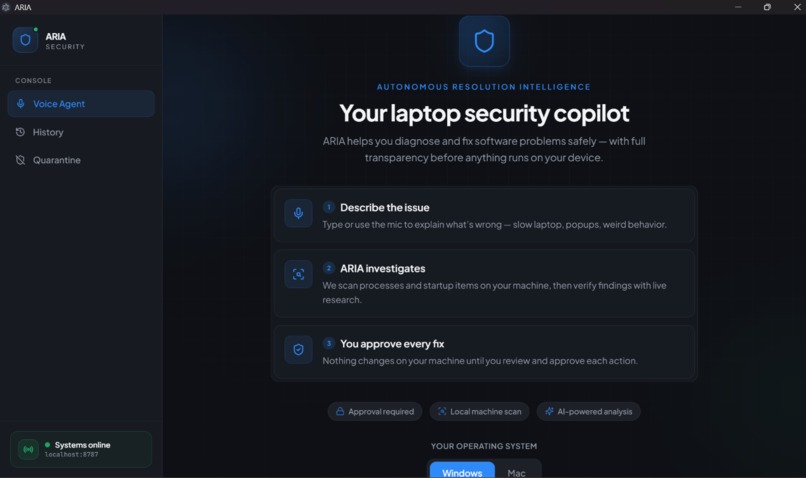
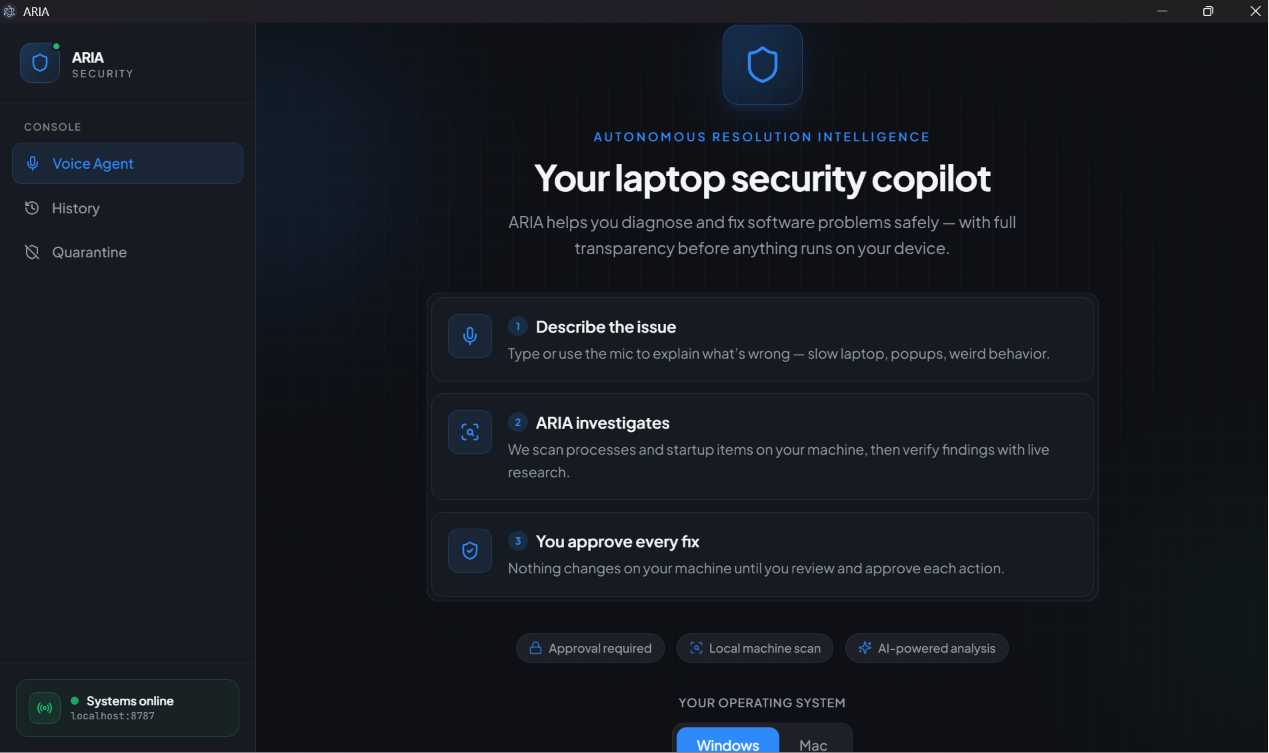
Describe the problem by voice or text. ARIA scans locally and never changes anything without your approval.
-
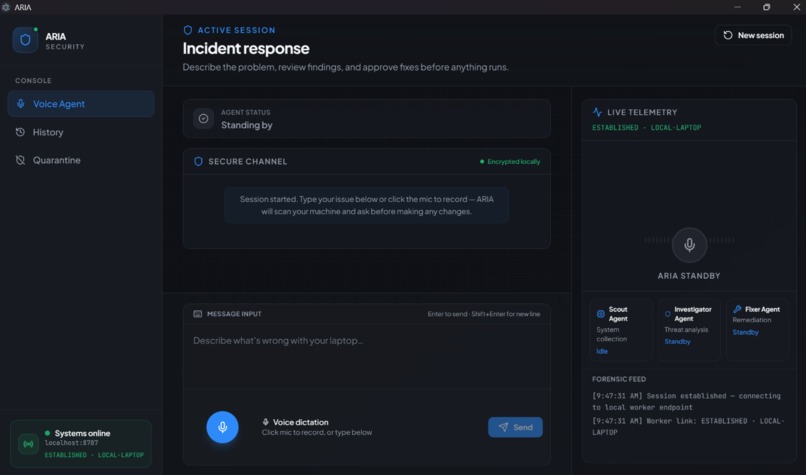
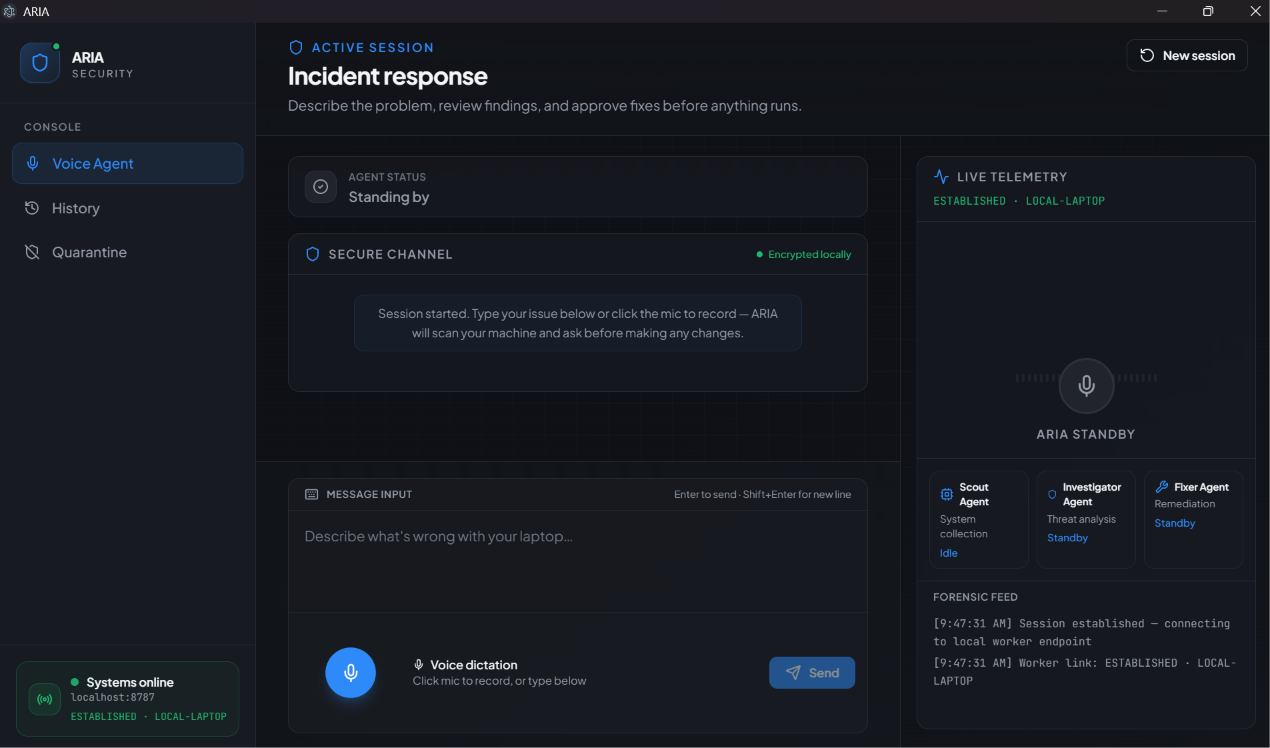
Voice-first incident console with live telemetry. Scout, Investigator, and Fixer agents coordinate while you stay in control.
-
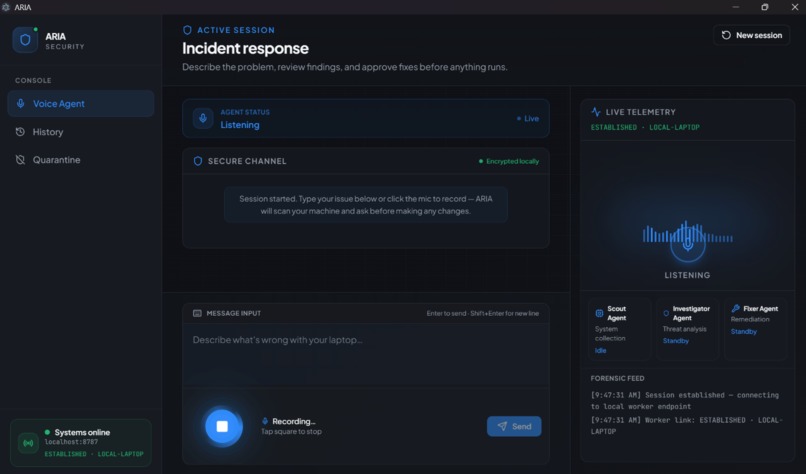
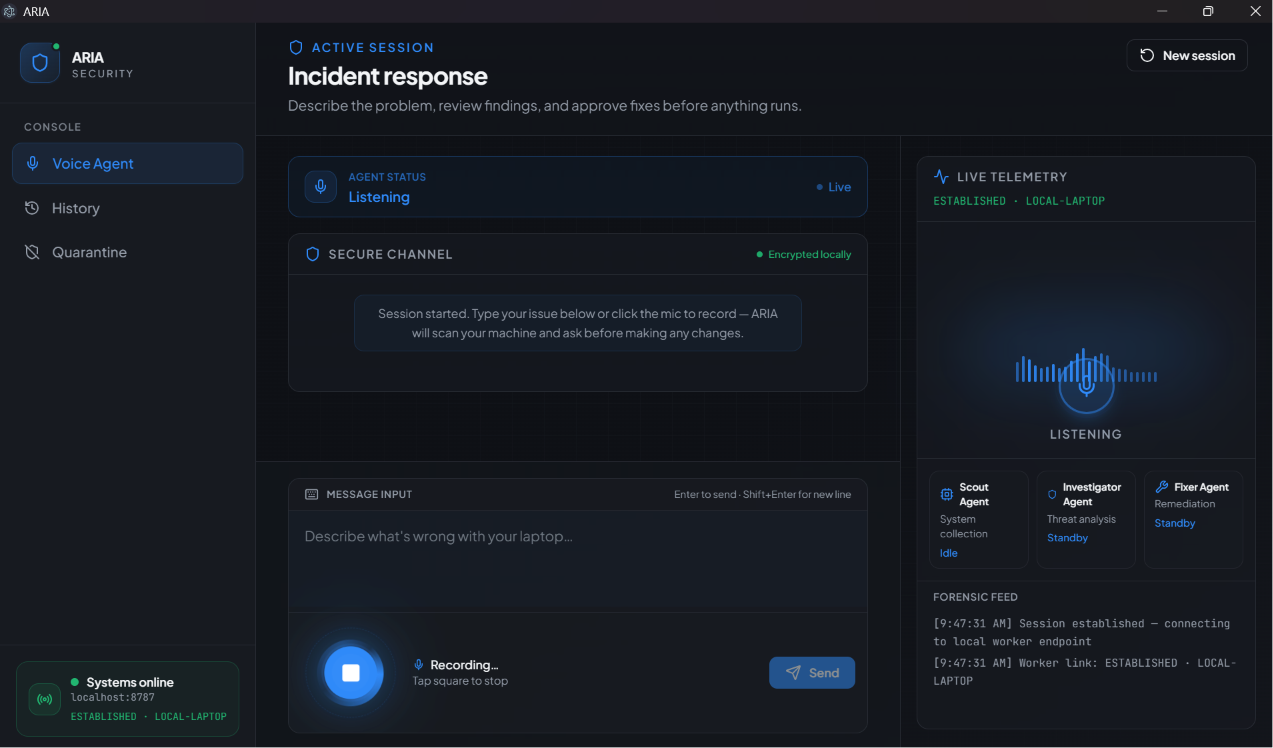
Deepgram-powered voice input — speak naturally (“my laptop is slow”) and ARIA starts the investigation.
-
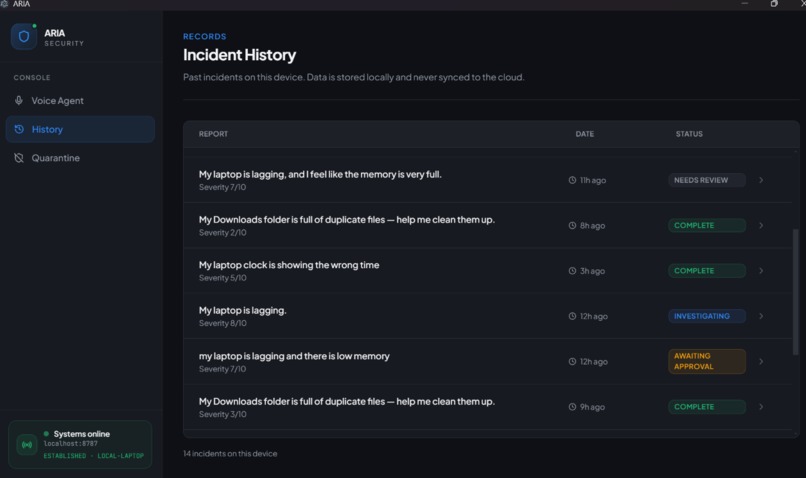
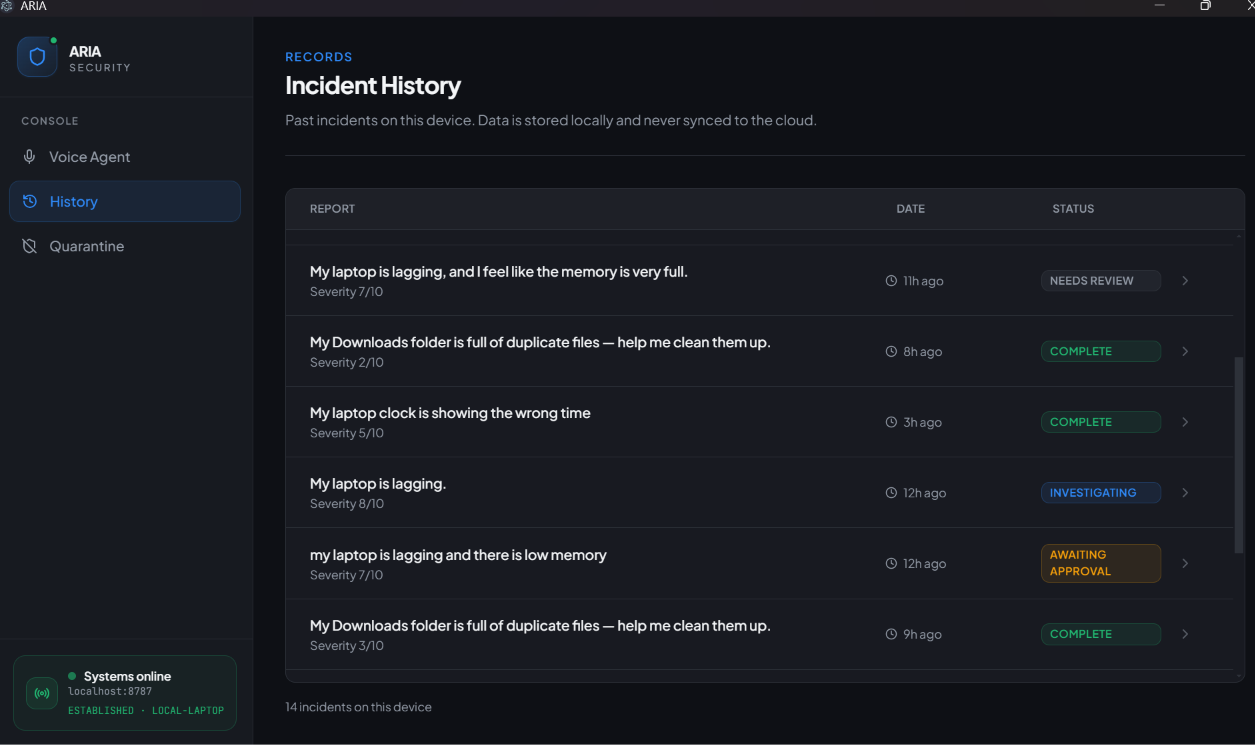
Every session is saved locally on your device — full audit trail with severity, status, and timestamps. Nothing synced to the cloud.
-
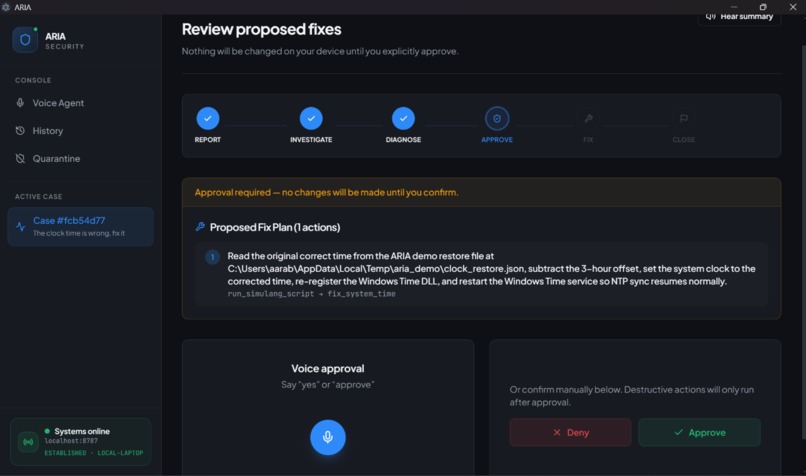
Every session is saved locally on your device — full audit trail with severity, status, and timestamps. Nothing synced to the cloud.
-
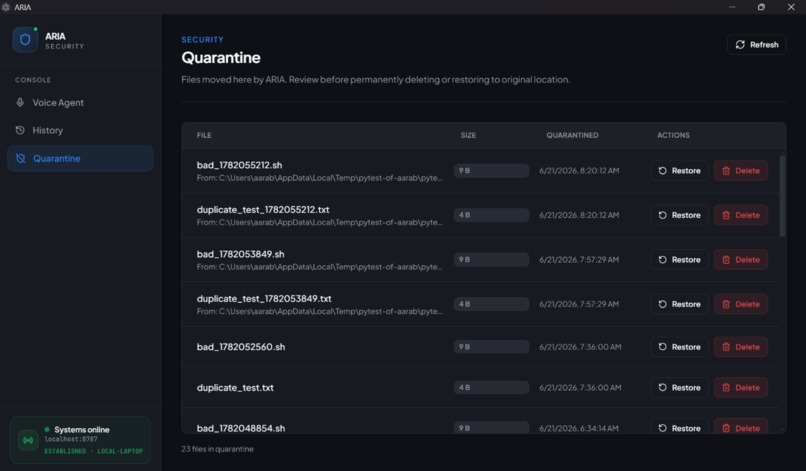
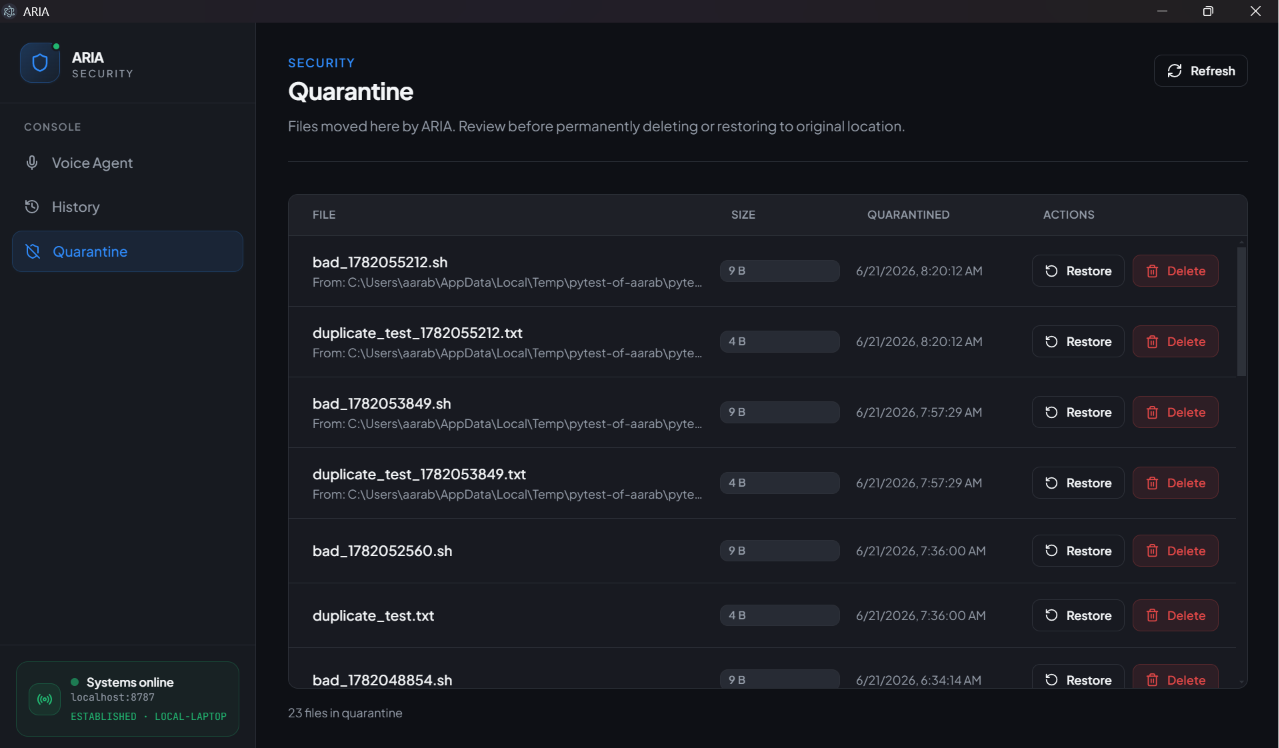
Quarantine console — suspicious files are isolated locally. Restore or permanently delete from one screen.
-
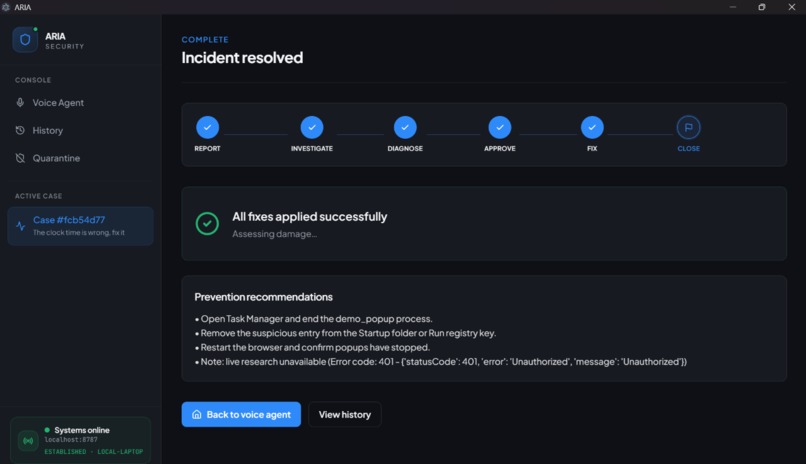
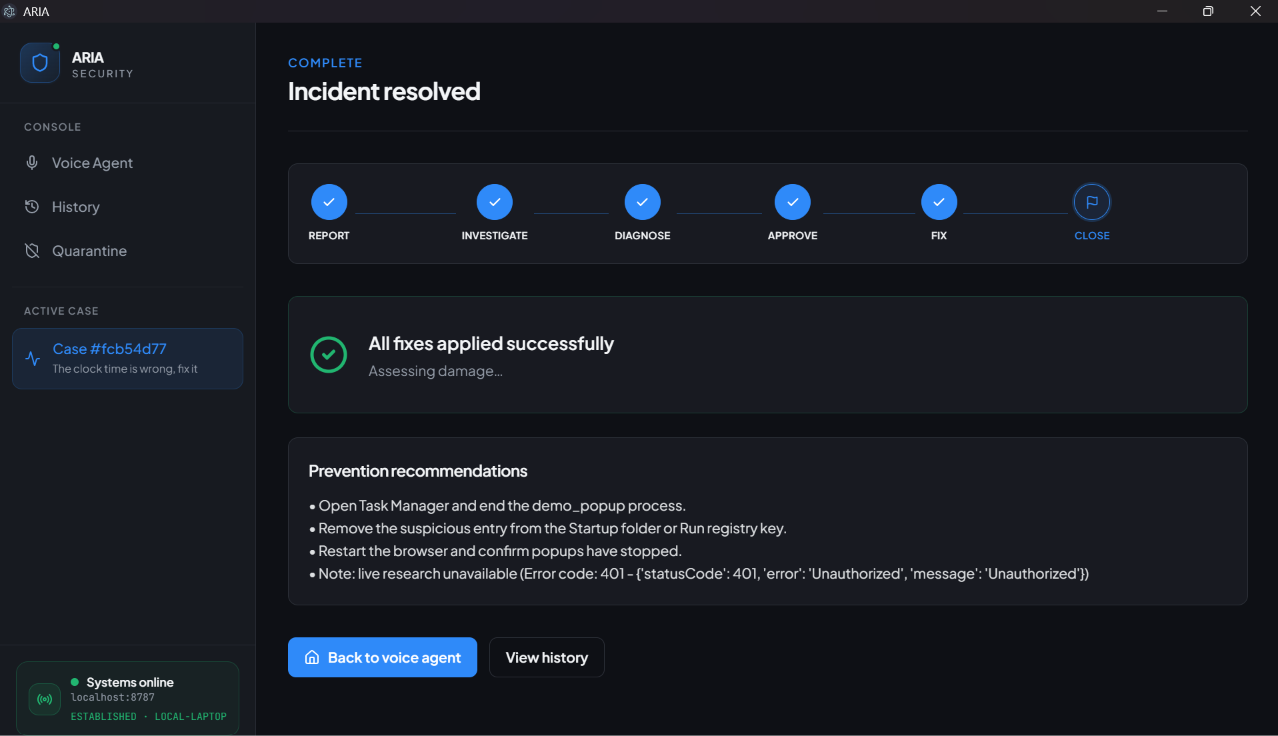
End-to-end resolution — from report to fix to prevention recommendations, with a spoken summary and saved incident record.
Inspiration
When a cyberattack or IT incident hits, the human response often takes days — days the business stays exposed, damage spreads unchecked, and trust erodes. The average incident takes 3–7 days to fully investigate and resolve. For 90% of small and mid-size businesses, a dedicated 24/7 security team simply isn't affordable. And even when help exists, investigation is slow, manual, and entirely dependent on whoever is available that day.
Existing tools detect and alert. They don't investigate and fix in real time — especially not in plain English, especially not for someone who would never open Task Manager.
We built ARIA (Autonomous IT Response Intelligence Agent) to close that gap. Any incident. Any machine. Minutes — not days. Speak naturally, get a verified diagnosis, approve each fix, and walk away with a full incident record.
What it does
ARIA is a voice-first desktop agent that runs an end-to-end incident pipeline on your machine.
You describe the problem by voice or text — slow performance, popups, weird startup behavior, anything that feels off. ARIA creates an incident, scans locally (processes, startup items, and other system signals when relevant), and uses Claude to diagnose what's actually going on. Suspicious indicators aren't taken at face value: Browserbase verifies them against live web research before anything is recommended.
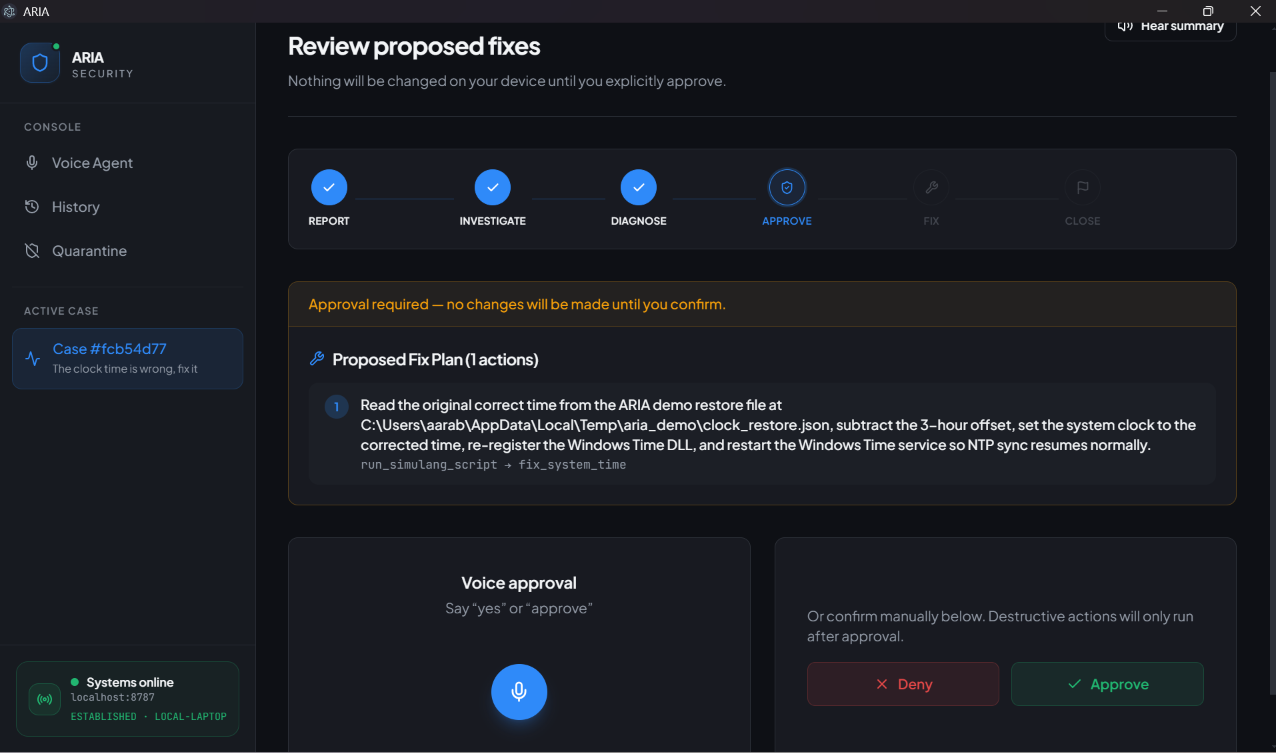
Before any fix runs, you review and approve each action — kill a process, quarantine a file, block a connection. Nothing destructive happens without your sign-off. Routine fixes run through Python for deterministic operations; OS-level actions can execute via Simulang, which drives the OS through accessibility APIs on macOS and Windows. After remediation, ARIA gives you a spoken summary and saves the incident to local history so you can revisit what happened.
The whole loop — report, investigate, verify, plan, approve, fix — is designed for someone who would never open a terminal on their own.
ARIA complements tools like Windows Defender: Defender scans for known signatures; ARIA investigates behavior, explains everything in plain English, and fixes what it finds with human oversight.
What we handle:
| Scenario | What ARIA does |
|---|---|
| System slowdown / popups | Finds root-cause processes, verifies threats, terminates or quarantines with approval |
| Suspicious file detected | Analyzes behavior, checks reputation via Browserbase, quarantines if malicious |
| Malicious startup persistence | Identifies bad startup entries and removes them safely |
| Duplicate / clutter files | Identifies duplicate files and removes them with approval |
Supported actions (including network blocking) are available in the fix engine; our hackathon demos focus on popup, miner, startup, and duplicate-file scenarios via scripts/demo_break.py.
How we built it
ARIA is a local Electron app with a React frontend and a FastAPI backend orchestrating a multi-stage incident pipeline — everything runs on the user's machine, no second control laptop required.
Voice layer (Deepgram): Deepgram powers speech-to-text (live dictation) and text-to-speech (spoken summaries). Users describe problems and approve fixes by voice or text in the dashboard.
Orchestrator (Claude): Claude selects investigation targets, analyzes findings, builds atomic fix plans, and runs validation checks. Scout, Investigator, and Fixer are logical roles within a single orchestrator loop — not separate bots. Each recommended action maps back to evidence from the scan, not generic "clean your computer" advice.
Threat verification (Browserbase): Suspicious filenames and network indicators are checked via Browserbase Search + Fetch, so verdicts are grounded in external research rather than model guesswork.
Investigation (psutil + Python): Fast, deterministic local data collection — processes, network, startup items, recent files — keeps the pipeline responsive while Claude reasons over structured findings. The scan report UI highlights processes and startup items; other signals are collected when the investigation needs them.
Remediation (Python + Simulang): Routine fixes (kill process, quarantine, startup removal) run through native Python scripts; complex OS-level actions execute as generated TypeScript scripts via Simulang, using accessibility APIs instead of brittle screen-scraping or vision models.
Safety & approval: A validation gate before presentation (validate_fix), protected-process blocklists and system-path guards, and explicit user approval for every action before execution. Users approve decisions one at a time through voice or the dashboard.
Frontend: React, TypeScript, Tailwind, Zustand, and Framer Motion — dark cinematic UI, live findings, decision cards, and incident timeline. Incident history stored as local JSON on-device.
Challenges we ran into
Autonomous fixes need guardrails, not just a smarter model. The scariest failure mode wasn't a crash — it was the agent doing the wrong thing and reporting success. We added independent validation: fix plans must match scan evidence before they're shown, and a safety harness blocks protected OS processes and system paths.
False positives on real OS processes. Innocent processes like python.exe, explorer.exe, or dev tools kept showing up as suspicious. We built explicit allowlists and protected-process blocklists so ARIA never kills something that would brick the machine or kill itself mid-demo.
Voice ↔ long-running pipeline. A full investigation takes time. We bridged that with streaming progress to the UI and clear spoken updates so the user knows ARIA is working, not stuck.
Scope discipline. Our original vision included a two-laptop enterprise setup, Fetch.ai uAgents, Redis, Arize, and Sentry. For the hackathon we cut to a lean single-machine build — and kept the validation gate even when we dropped everything else, because autonomous remediation without guardrails isn't trustworthy.
Demo reliability under pressure. A polished UI means nothing if the sick-machine scenario isn't reproducible. Break/cleanup scripts saved us more time than chasing edge cases nobody would see in a five-minute judge visit.
Accomplishments that we're proud of
- Real end-to-end flow on a real machine — voice in, verified diagnosis, gated remediation out. Not a mock dashboard.
- Minutes, not days — full investigate → verify → approve → fix loop completes in under ~2 minutes for our scripted demo scenarios.
- Human-in-the-loop at the action level — users approve each kill, quarantine, and block individually, not a blanket "fix everything."
- Sponsor integrations that each do real work — Deepgram for voice, Browserbase for verification, Simulang for execution. Claude isn't a chat wrapper — it is the reasoning engine.
- Accessible by design — voice-first so any employee, regardless of technical skill, can report and resolve incidents.
- Safety as first-class engineering — validation gates, protected-process blocklists, and pytest coverage for the safety harness.
- Reproducible demos — we can plant a sick-laptop scenario, run ARIA live, and clean up reliably every time.
What we learned
Autonomous remediation is less about picking the best LLM and more about where you put the gates. Validation before presentation and explicit approval before every execution matter more than clever prompts.
Splitting investigation (fast, deterministic collection with psutil) from execution (Python for routine fixes, Simulang for complex OS actions) kept the pipeline responsive and fixes reliable.
Reproducibility beats perfection. Scripts to break and un-break the machine matter more than polish on edge cases.
Honest limitations build judge trust. No fleet dashboard, no rollback yet, local-only audit trail — naming these made our design story stronger, not weaker.
What's next for ARIA (Autonomous IT Response Intelligence Agent)
- Fleet & IT visibility — central dashboard so IT teams see what happened across machines
- Rollback & recovery — undo path if an approved fix goes wrong
- Enterprise deployment — ARIA control plane connecting to endpoints across a local network (our original two-machine vision)
The core vision stays the same:
"Your AI IT Department. Any Incident. Any Machine. Minutes — Not Days."
Anyone should be able to talk to their laptop and get it fixed safely — without waiting on IT for every popup.
Built With
- anthropic
- browserbase
- css
- deepgram
- electron
- fastapi
- macos
- psutil
- python
- react
- simulang
- tailwind
- typescript
- vite
- websockets
- windows

Log in or sign up for Devpost to join the conversation.