-
-
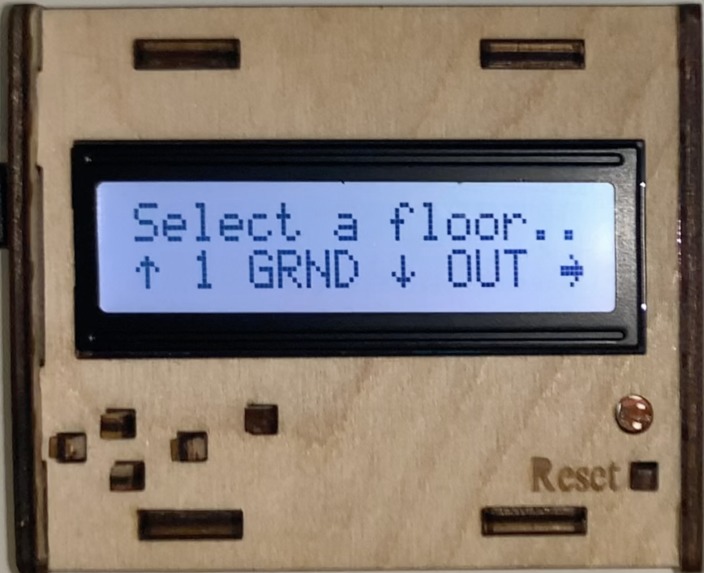
Startup menu (UP = 1st floor, DOWN = ground floor, RIGHT = outside, SELECT = sends data to Serial Monitor)

What it does / How to use
The Arduino Control Panel represents the interface of a system that simplifies setting adjustment of smart-home devices. All actions are carried out through the Arduino buttons, with easy-to-follow directions on-screen.
The structure of the house is as follows:
- First Floor (Bedroom 1, Bedroom 2, Bathroom)
- Ground Floor (Living Room, Kitchen, Hall
- Outside (Garden, Garage)
All rooms in the house have lights, heating, and lamps. The garden has a water-controller as an additional device.
Once plugged in, the startup menu prompts the user to select a floor to enter. The arrows shown on the LCD signal what buttons take the user where, for example, an up arrow means one should press the uppermost button. After selecting a floor, repeat the process to choose a room, and again to choose a device for that room.
Device adjustments available are:
- levels (brightness for light/lamps or temperature for heating)
- on-times and off-times.
To adjust the settings of a device, first set the new level (or keep the current), then the scheduled on/off hours and minutes (depending on the device's current state). Use the up/down buttons to change the values, before pressing the select button to confirm each value.
The Serial Monitor can be used in parallel to the Arduino for debugging and to display all the current values for every device in the house. Do this by pressing select when on the startup menu.
Things to note:
- users can only set on-times for devices currently off, and vice versa
- users cannot adjust times without adjusting the device level first, similarly, new levels cannot be set until times are also confirmed.
How I built it
Built in the Arduino IDE, with Arduino C/C++
Accomplishments that I'm proud of
This was my first attempt at any form of hardware/embedded systems programming. I was pleased to produce a fully working solution that met all the basic requirements and most of the advances ones too.
What I learned
Became more familiar with less-common data types such as structs and enums, and how they can be used to properly structure data in a C program. Also learnt that C is a very difficult language, but a firm understanding of it can really help to improve your understanding of programming.
Built With
- arduino
- c/c++

Log in or sign up for Devpost to join the conversation.