Inspiration
I always wonder that when we click on the calculator app on the phone or on the laptop how we click the function and we get the answer. The answer is coding behind that. So I googled that thing there were so many languages like python, JS, Java for making the calculator. Then I sat down and keep thinking about can I make a project using Arduino and using C++ and C languages. Then I got my answer from my MoM because she always said that never ever keep anything in your mind, if you want to show up that idea then you have to show up on the appropriate platform and I find the DefHacks Worldwide 3.0 as the best option.
What it does
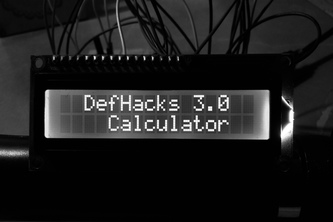
Like I mentioned it is just like a basic calculator in function hit the number and you select one of the four operations and click on equal to (=) then you get the answer.
How we built it
Since this project lies under Machine Learning so it has two parts; Hardware and Software. So the Hardware part is Arduino and the software is Arduino IDE which is a text editor in which I used C++ and C programming languages.
In this project I used the following languages:-
- Arduino UNO
- 4x4 Keypad
- 16x2 LCD display
- 10k Potentiometer
- Breadboard
- Jumper Wires
Circuit Diagram; https://drive.google.com/file/d/1qR14uOJs75niE_5kIuA1UA_qZJ_LIktz/view?usp=sharing
Code; https://github.com/Yeshovir-04/Arduino-Calculator/blob/main/Code
Software; Arduino IDE (download it from the Microsoft Store).
These links above, are the key part of the project. It works in a very efficient order that you see the circuit diagram (I had to make one) and you type the code along with the coding you need to include the libraries because it C and C++ languages. Then you upload and the Calculator is ready!!
Challenges we ran into
The main that every time a software engineer runs into compiling the code same as that I tried and tried And faced a number of problems while writing the code but eventually it tested around 16 times and after the calculator worked and every calculation that I tried were Correct and then few mistakes came out from which I learned and I may not repeat that again.
Accomplishments that we're proud of
I am proud that from the day I started with Machine Learning I used to face a number of problems while connecting the wires to the appropriate pin of the motherboard and Now onwards I don't have any of the issues and While I was making the calculator for the first time it was done in around 20 mins and that's the thing that I'm proud of.
What we learned
We learned that how a calculator functions on your mobile phones or laptops. As I said Machine Learning is being used in this project and one good mentor told me that Machine Learning is not just about connecting the wire in the appropriate place it's about how you can make the Model smarter and have as many features as you can like you have BOTs in the discord just like that.
What's next for Arduino Calculator
I have few projects in mind that I need to work on as the hackathon get's over. One is making a DIY ventilator for the home which is Portable because in this Pandemic situation people are helpless and if I make the project and it is considered by the judges then It would be a proud moment for me also for the community and the other idea is to make a live coronavirus outbreak kind of a tracker which will show the Live number of deaths, recovered and cases as well in any country where you want.

Log in or sign up for Devpost to join the conversation.