Inspiration
Modern AI coding tools have become incredibly good at generating code, but they still depend on developers to provide clear architectural direction. I often found myself rebuilding large parts of projects because I jumped straight into implementation before fully designing the system.
Existing diagramming tools create static diagrams, while architecture documentation quickly falls out of sync as projects evolve. I wanted a workspace where architecture, documentation, and implementation planning could stay connected throughout the entire design process.
That idea became ArchiText.
What it does
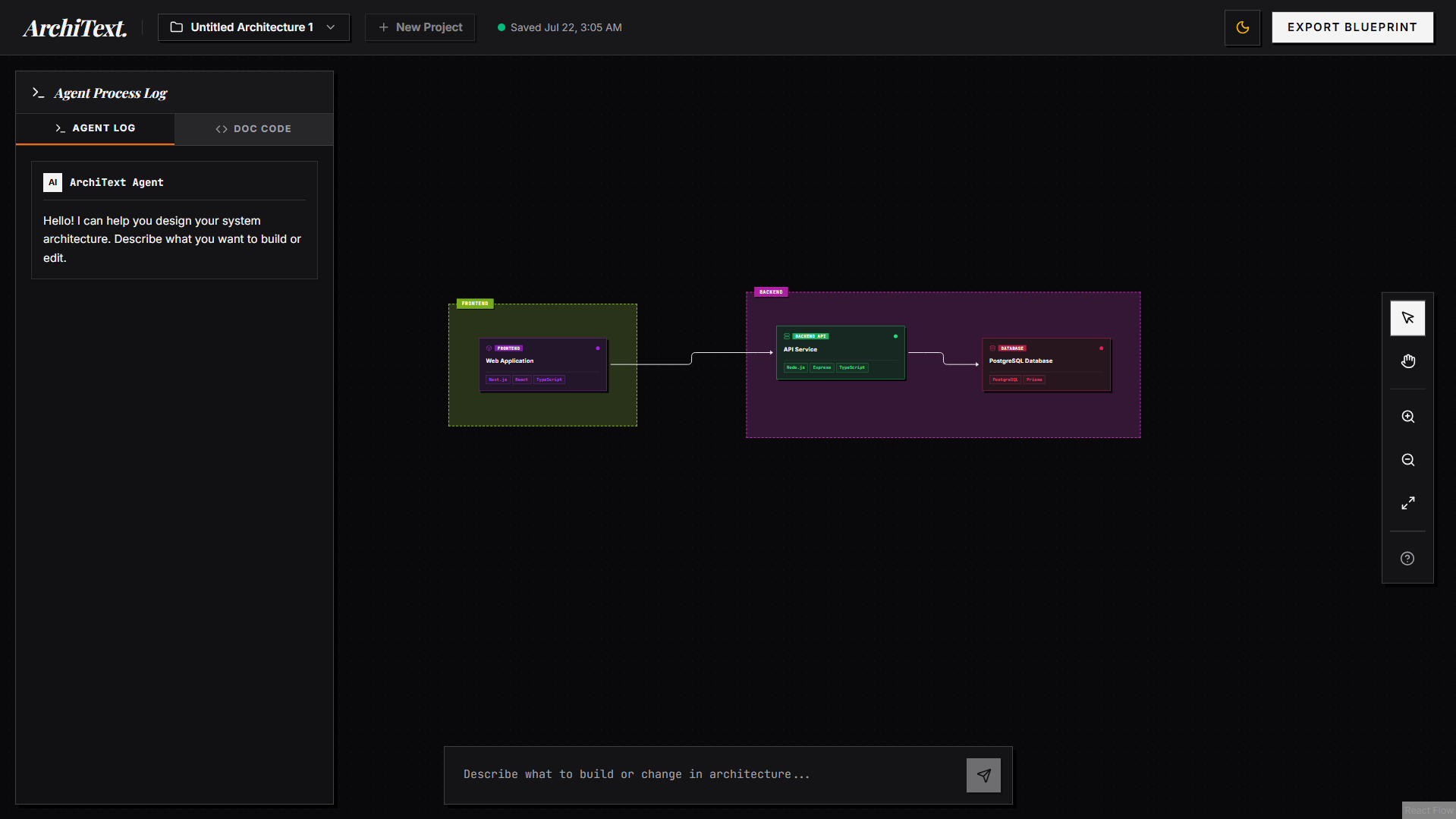
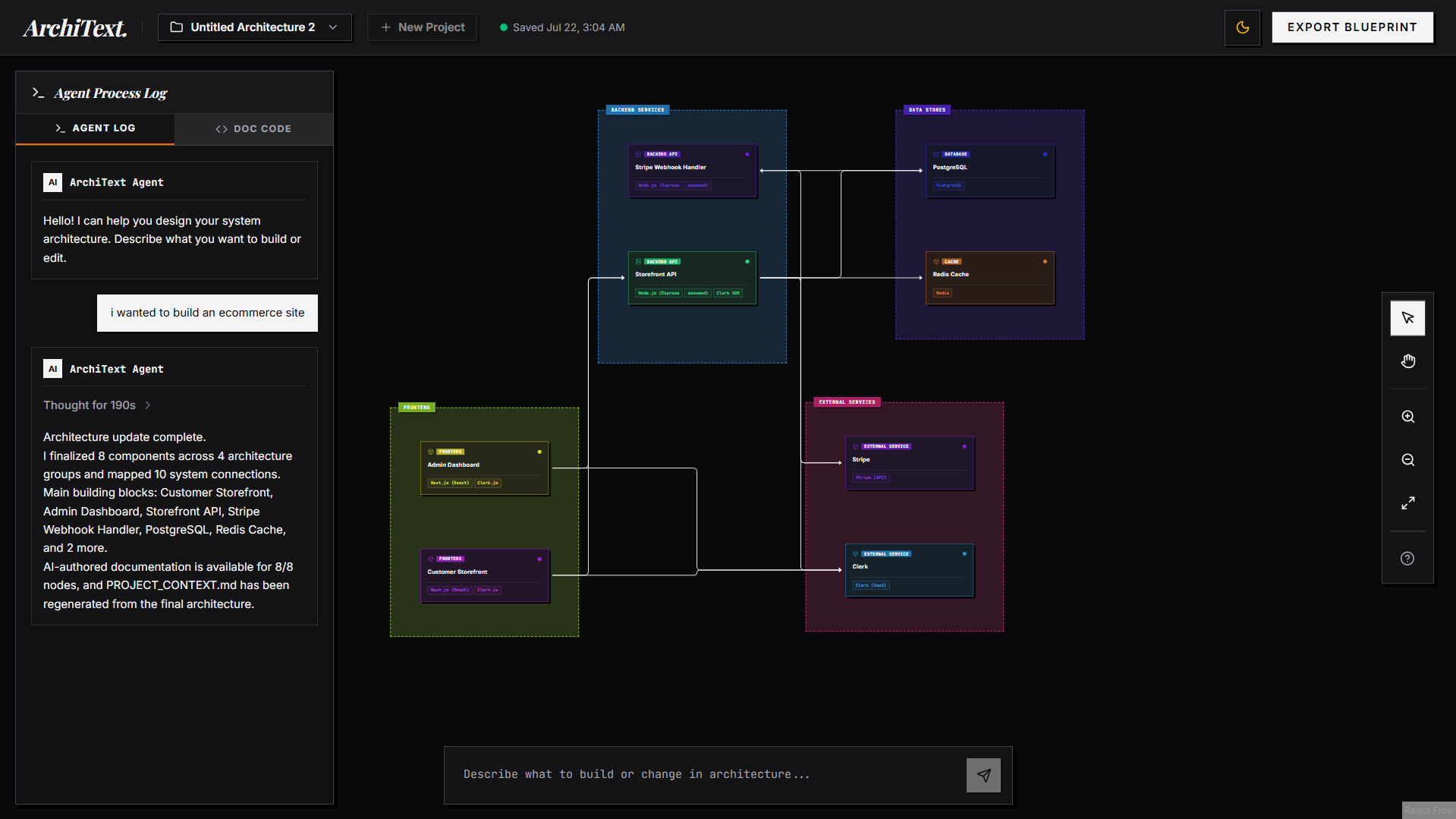
ArchiText is an interactive software architecture workspace that helps developers design applications before implementation begins.
Users describe their application in natural language, answer architectural questions when required, and receive a complete visual architecture together with detailed technical documentation.
Every component contains its own implementation notes, responsibilities, dependencies, and engineering details.
The architecture is represented as both an interactive graph and structured Markdown. Any changes made visually or through the documentation remain synchronized automatically, allowing developers to work from whichever view they prefer.
Projects are stored locally using IndexedDB, automatically saved as users work, and can be exported as complete project blueprints containing organized documentation, architecture files, and project context ready for implementation.
How we built it
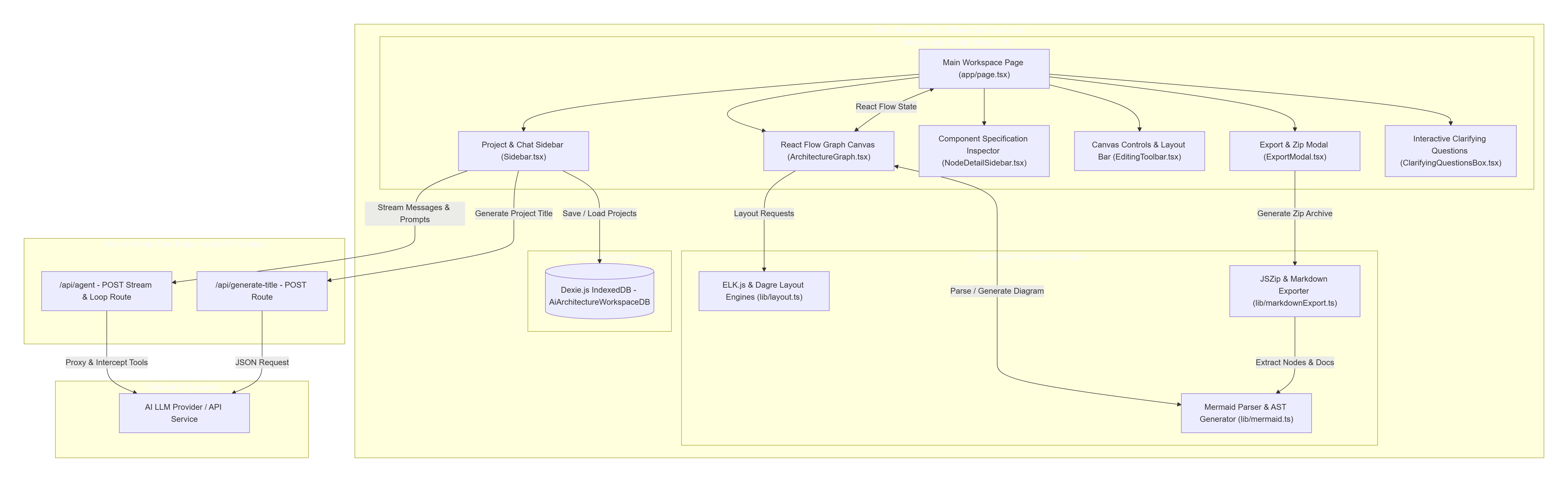
ArchiText is built using Next.js, React, TypeScript, React Flow, ELK.js, Dexie, Tailwind CSS, JSZip, and the Vercel AI SDK.
At its core is a two way synchronization engine that keeps an interactive architecture graph and structured Markdown perfectly synchronized.
A custom parser continuously converts Markdown into graph nodes and relationships while preserving edits in both directions.
The application includes an autonomous architecture workflow that analyzes existing diagrams, asks clarifying questions whenever important engineering decisions are missing, updates only the relevant parts of the architecture, validates the generated design, and creates detailed documentation for every component.
To make the experience practical for real projects, ArchiText also includes automatic graph layouts, offline first storage using IndexedDB, debounce based auto saving, per component documentation, and a structured export system that generates complete project blueprints with organized file structures.
How AI Intelligence (GPT-5.6 & Codex) Built ArchiText
GPT-5.6 and Codex served as co-pilots throughout the entire lifecycle of ArchiText—bridging high-level product reasoning with complex, production-grade system implementation.
While GPT-5.6 provided deep architectural intelligence, technical strategy, product reasoning, and trade-off evaluation, Codex acted as the primary AI pair programmer—designing clean codebase structures, implementing bi-directional AST parsers, writing real-time synchronization engines, and resolving low-level engineering bugs.
Strategic Role Division: GPT-5.6 vs. Codex
| Capability Domain | GPT-5.6 (Strategic Architecture & Reasoning Advisor) | Codex (AI Pair Programmer & Implementation Engine) |
|---|---|---|
| Product Vision & Architecture | Designed the high-level system topology, specified the 16-step agent execution loop, and formulated the interactive clarifying question strategy. | Implemented the Next.js 16 App Router structure, React Flow canvas wrapper, and Dexie.js database schemas. |
| State & AST Synchronization | Modeled the co-equal state synchronization pattern between Mermaid text blocks and visual React Flow graphs. | Built the custom bracket-counting AST parser (lib/mermaid.ts) that handles multi-line labels, subgraphs, and database shapes without syntax loss. |
| Graph Layout Engineering | Evaluated graph layout algorithms and recommended ELK.js layered layout over naive grid positioning. | Integrated elkjs (lib/layout.ts), coding dynamic height math (getVisualNodeSize) based on tech stack badge wraps and text lengths. |
| Persistence & Export Pipeline | Formulated the offline-first privacy model and specified the multi-file project .zip blueprint archive hierarchy. |
Wrote sanitizeNodes() in lib/db.ts to strip un-serializable DOM functions from IndexedDB, and built JSZip export routines in lib/markdownExport.ts. |
| Debugging & Problem Solving | Reasoned through complex edge-case trade-offs, provider tool schema errors, and performance bottlenecks. | Executed step-by-step code refactoring, fixed JSON schema parameter issues in lib/ai-provider.ts, and optimized re-renders. |
Deep-Dive Technical Contributions
1. Two-Way Document & Visual Canvas Synchronization
- Stateful AST Parser Design: Codex and GPT-5.6 designed the custom stateful Mermaid parser (
parseMermaidinlib/mermaid.ts). GPT-5.6 conceptualized the bracket-counting accumulator algorithm to handle edge cases like multi-line node labels, database cylinder shapes[()], directional edge protocols, and subgraph extractions. - Bi-Directional State Sync: Codex implemented reactive state hooks linking visual drag-and-drop canvas events directly to live Markdown text updates without losing component metadata (
### Component: <node-id>).
2. Autonomous Agentic Workflow & Tool Orchestration
- 16-Step Autonomous Execution Loop: Designed and engineered the multi-step agent loop (
runAgentLoopinlib/agent/ai-agent.ts) using the Vercel AI SDK. Defined strict parameter schemas for tools includinginspect_architecture,add_node_to_diagram,connect_nodes_in_diagram,enrich_node_details, andvalidate_mermaid_syntax. - Interactive Clarifying Questions Engine: Formulated the
ask_user_questionsstate machine and UI component (ClarifyingQuestionsBox.tsx), enabling the AI Agent to pause execution and present interactive decision cards to users when architectural ambiguities arise. - API Parameter Interceptor: Built the custom fetch interceptor in
lib/ai-provider.tsto sanitize JSON tool schemas ($schema&additionalProperties) for seamless LLM provider tool execution.
3. Advanced Dynamic Graph Layout Kernel
- ELK.js Integration: Codex integrated the Eclipse Layout Kernel (
elkjs) intolib/layout.ts, crafting dynamic height calculation algorithms (getVisualNodeSize) that scale based on character lengths and tech stack badge rows. - Nested Subgraph Coordinate Math: Solved complex spatial offset calculations for nested child nodes inside group nodes across Left-to-Right (
LR) and Top-to-Bottom (TD) view directions.
4. Offline-First Storage Guards & Zip Exporter
- IndexedDB Serialization Guard: Solved browser storage clone errors by writing
sanitizeNodes()inlib/db.tsto scrub non-serializable DOM event listeners from React Flow objects before committing to Dexie.js. - Multi-File Blueprint Exporter: Engineered
markdownExport.tsandExportModal.tsx, leveragingJSZipto bundle complete system blueprints into downloadable.zipproject archives structured by subgraph folder hierarchies.
Summary
Together, GPT-5.6 served as an intelligent design advisor and system architect, while Codex acted as a tireless AI pair programmer—allowing ArchiText to be built faster, cleaner, and with a significantly more resilient architecture.
Challenges we ran into
Keeping the visual architecture and the underlying Markdown synchronized without losing user edits was one of the most difficult engineering challenges.
Another challenge was designing an architecture editing workflow that updates only the affected sections instead of regenerating the entire architecture after every modification.
Building layouts for large software systems while maintaining readability required combining multiple layout strategies and handling nested groups correctly.
Creating a reliable offline first experience also required solving IndexedDB serialization issues, efficiently storing complex graph structures, and restoring projects exactly as users left them.
Accomplishments that we're proud of
We built a workspace where visual architecture, structured documentation, and implementation planning remain synchronized instead of becoming separate sources of truth.
We're proud of creating a smooth architecture design workflow that guides users through important engineering decisions before generating the final system design.
We also developed an offline first experience with automatic saving, detailed component documentation, interactive architecture visualization, and structured project exports that are immediately useful during development.
What we learned
Building ArchiText reinforced that successful software projects begin with good architecture rather than simply generating code.
We learned that maintaining consistency across multiple representations of the same project is significantly more challenging than generating them independently.
Throughout development we gained valuable experience designing parser driven workflows, graph editing systems, browser based persistence, automatic layout algorithms, structured documentation generation, and AI assisted architecture planning.
What's next for ArchiText
Our immediate goal is to transform ArchiText from a local architecture workspace into a collaborative platform for software teams.
Future development includes secure authentication, cloud synchronization, real time collaboration, project sharing, version history, reusable architecture templates, and team workspaces.
We also plan to integrate directly with popular AI coding tools, source control platforms, and development environments so architecture can evolve alongside implementation.
On the technical side, we want to expand architecture validation, generate richer implementation blueprints, support larger enterprise scale systems, and provide deeper analysis of system design decisions before development begins.
While the current version stores projects locally using IndexedDB for speed and privacy, future versions will support secure cloud storage with user accounts, allowing developers to seamlessly access and continue their projects across multiple devices.
Built With
- ai-sdk
- codex
- gpt5.6
- gpt5.6-terra
- nextjs
- openai
- vercel


Log in or sign up for Devpost to join the conversation.