-
-
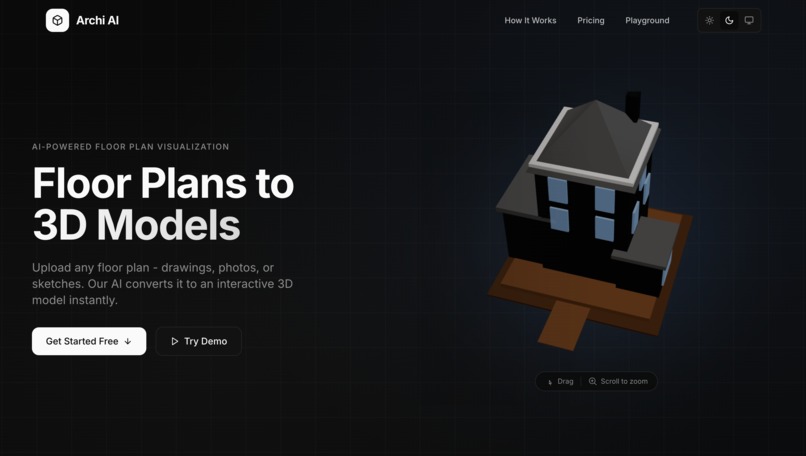
Home page
-
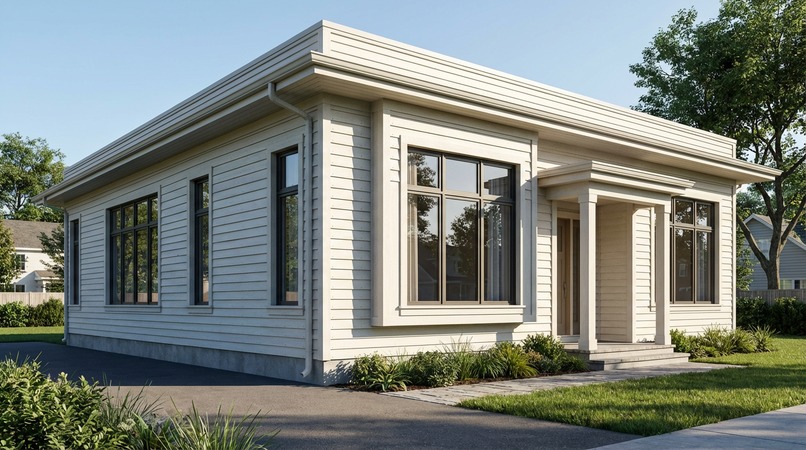
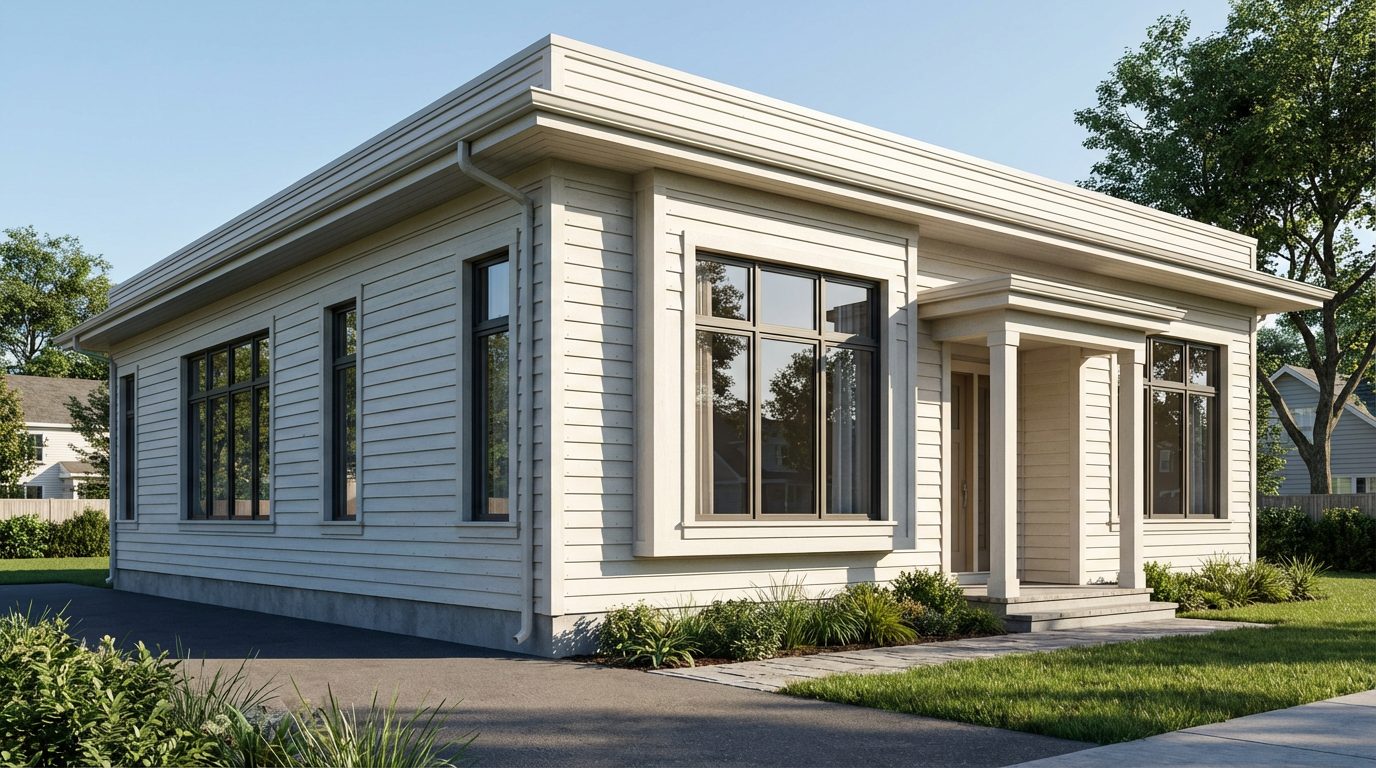
Generated realistic 3D render
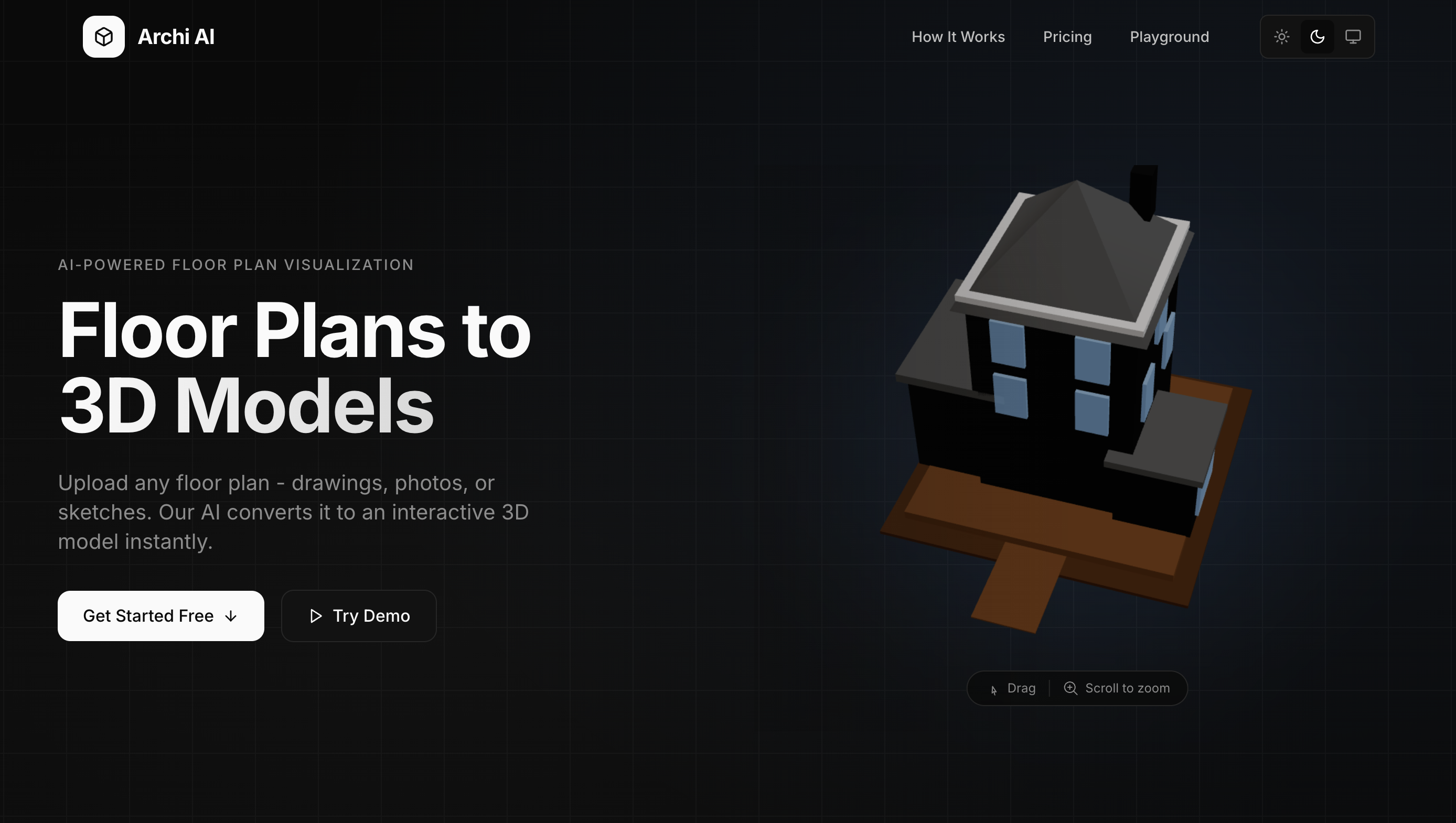
Archi AI
Transform any floor plan (from professional blueprints to napkin sketches) into an interactive 3D model you can explore and modify using natural language.
Inspiration
Architecture has a communication problem. Homeowners struggle to visualize renovations from flat 2D drawings. Architects spend hours explaining spatial concepts that clients can't quite picture. Contractors misinterpret plans, leading to costly mistakes. We know this firsthand, before I had the opportunity to get into software design and engineering, my background was in Building Technology where I learned important principles from architectural design to building codes and laws.
During my Master's thesis at Liverpool John Moores University, I built an AR application using Google's ARCore module to visualize architectural plans. While the technology worked, the barrier to entry was too high, users needed precise CAD files and technical knowledge to get started.
When we saw Gemini 3's multimodal capabilities, we realized the missing piece was intelligence. What if AI could understand any floor plan, even a rough sketch on a napkin? What if we could simply tell your floor plan what to change? That's the moment Archi AI was born: the idea that architecture should be as simple as drawing, speaking, and exploring.
The vision is democratization. A first-time homebuyer should be able to sketch their dream layout on paper, photograph it, and walk through it in 3D within seconds. An interior designer should be able to say "make the kitchen open concept" and watch walls disappear. Architecture should be accessible to everyone, not just those who can read blueprints.
What It Does
Archi AI is a web application that converts 2D architectural floor plans into interactive 3D models using Google Gemini 3, then lets users modify them through natural conversation.
Core Workflow
Upload Any Floor Plan
- Professional CAD drawings
- Phone photos of blueprints
- Hand-drawn sketches on paper
- Even napkin doodles
AI-Powered Parsing
- Gemini Vision analyzes the image
- Automatically identifies rooms, walls, doors, and windows
- Extracts dimensions (estimated if not labeled)
- Outputs structured data for 3D rendering
Interactive 3D Exploration
- Orbit around your floor plan in full 3D
- Click rooms to see dimensions and square footage
- Toggle room labels and measurement overlays
- Smooth, responsive controls optimized for both desktop and mobile
Natural Language Modifications
- Voice or text commands to modify the layout
- "Make the master bedroom 20% bigger"
- "Add a window on the north wall of the kitchen"
- "Remove the wall between the kitchen and dining room"
- "Show me this in a modern minimalist style"
- Changes render in real-time as you speak
AI Design Analysis
- Accessibility audit (ADA compliance checks)
- Building code validation (egress windows, doorway widths)
- Natural light assessment
- Traffic flow analysis
- Actionable recommendations with specific measurements
Key Differentiators
- Zero friction input: No CAD software required, a phone photo works
- Conversational interface: Modify spaces by describing what you want
- Instant feedback: See changes happen in real-time 3D
- Professional insights: Get architect-level analysis without hiring one
How We Built It
Architecture Overview
┌─────────────────────────────────────────────────────────────────┐
│                       USER INTERFACE                            │
│  ┌──────────┐  ┌──────────┐  ┌──────────┐  ┌────────────────┐   │
│  │  Upload  │  │ 3D View  │  │ Analysis │  │ Chat (Voice)   │   │
│  │  (D&D)   │  │ (R3F)    │  │ Panel    │  │ Web Speech API │   │
│  └────┬─────┘  └────┬─────┘  └────┬─────┘  └───────┬────────┘   │
└───────┼─────────────┼─────────────┼────────────────┼────────────┘
        │             │             │                │
        ▼             │             ▼                ▼
┌───────────────────────────────────────────────────────────────────┐
│                    GEMINI 3 FLASH API                             │
│                                                                   │
│  ┌─────────────────┐  ┌─────────────────┐  ┌──────────────────┐   │
│  │     VISION      │  │ FUNCTION CALLING│  │    JSON MODE     │   │
│  │                 │  │                 │  │                  │   │
│  │ • Image→JSON    │  │ • resize_room   │  │ • Analysis       │   │
│  │ • Room detect   │  │ • add_opening   │  │ • Code checks    │   │
│  │ • Wall extract  │  │ • remove_wall   │  │ • IRC/ADA refs   │   │
│  │ • Opening ID    │  │ • rename_room   │  │                  │   │
│  └─────────────────┘  │ • change_style  │  └──────────────────┘   │
│                       │ • calc_area     │                         │
│                       └─────────────────┘                         │
└───────────────────────────────────────────────────────────────────┘
        │                        │                    │
        ▼                        ▼                    ▼
┌───────────────────────────────────────────────────────────────────┐
│                      ZUSTAND STORE                                │
│  ┌──────────┐  ┌──────────┐  ┌──────────┐  ┌──────────────────┐   │
│  │FloorPlan │  │  View    │  │ Analysis │  │  Chat History    │   │
│  │  State   │  │  State   │  │ Results  │  │  (Multi-turn)    │   │
│  └──────────┘  └──────────┘  └──────────┘  └──────────────────┘   │
└───────────────────────────────────────────────────────────────────┘
        │
        ▼
┌───────────────────────────────────────────────────────────────────┐
│                 REACT THREE FIBER 3D ENGINE                       │
│  ┌──────────┐  ┌──────────┐  ┌──────────┐  ┌──────────────────┐   │
│  │  Room3D  │  │  Wall3D  │  │Opening3D │  │ Floor/Ceiling    │   │
│  │ (floors) │  │ (struct) │  │(door/win)│  │   Components     │   │
│  └──────────┘  └──────────┘  └──────────┘  └──────────────────┘   │
└───────────────────────────────────────────────────────────────────┘
        │
        ▼
┌───────────────────────────────────────────────────────────────────┐
│               REALISTIC VISUALIZATION (Optional)                  │
│  ┌─────────────────────────────────────────────────────────────┐  │
│  │  fal.ai (Nano Banana Pro) / Vertex AI Imagen                │  │
│  │  • Photorealistic exterior renders                          │  │
│  │  • Configurable: roof, materials, lighting, environment     │  │
│  └─────────────────────────────────────────────────────────────┘  │
└───────────────────────────────────────────────────────────────────┘
Gemini 3 Integration Deep Dive
1. Vision API for Plan Parsing
We crafted a detailed prompt that instructs Gemini to analyze floor plan images like an expert architect. The model identifies:
- Room boundaries and types (bedroom, kitchen, bathroom, etc.)
- Wall positions with interior/exterior classification
- Door and window locations
- Dimensional estimates based on standard room sizes
The output is structured JSON that feeds directly into our 3D rendering pipeline.
2. Function Calling for Modifications
We defined six core functions that Gemini can invoke:
resize_room- Change room dimensions by percentage or absolute valuesadd_opening- Insert doors, windows, or archwaysremove_wall- Create open concept layoutschange_room_style- Apply visual presetsrename_room- Update room labelscalculate_area- Compute square footage
When users speak naturally ("make the living room bigger"), Gemini interprets intent and calls the appropriate function with correct parameters.
3. Long Context for Analysis We serialize the entire floor plan, all rooms, walls, openings, and dimensions into Gemini's context window. The model then reasons about:
- ADA accessibility requirements
- Building code compliance
- Spatial relationships and traffic flow
- Design optimization opportunities
3D Rendering Pipeline
- Coordinate Normalization: All floor plan data uses a 0-100 normalized grid
- Geometry Generation: Rooms become floor polygons, walls become extruded shapes with openings cut out
- Material System: Room types map to colors; style presets modify textures
- Interaction Layer: Raycasting for room selection, orbit controls for navigation
- Real-time Updates: Zustand state changes trigger immediate re-renders
Challenges We Ran Into
1. Parsing Inconsistent Floor Plans
The hardest technical challenge was handling the infinite variety of floor plan inputs. Professional CAD drawings have clean lines and labels. Phone photos have shadows, angles, and glare. Hand sketches have wobbly lines and ambiguous symbols.
Solution: We invested heavily in prompt engineering. Our parsing prompt includes specific instructions for handling missing labels (estimate from standard room sizes), interpreting common symbols, and maintaining confidence scores. We also built fallback logic, if Gemini returns low confidence, we surface this to users and suggest uploading a clearer image.
2. Coordinate System Alignment
Converting 2D parsed data into correct 3D positions was surprisingly tricky. Floor plans have no inherent scale, and Gemini's coordinate extraction isn't pixel-perfect.
Solution: We normalized everything to a 0-100 abstract grid, then scaled at render time. This decoupled parsing from rendering and made the system more robust to varying input sizes.
3. Natural Language Ambiguity
Users say things like "make it bigger" without specifying which room or how much. They might say "the bedroom" when there are three bedrooms.
Solution: We gave Gemini full floor plan context in every chat request, including room names and types. We also instructed the model to ask clarifying questions when requests are ambiguous ("Which bedroom would you like to resize the master bedroom or bedroom 2?").
4. Real-time 3D Performance
Complex floor plans with many rooms and walls can strain browser rendering, especially on mobile devices.
Solution: We implemented level-of-detail optimizations, limited polygon counts per wall, and used Three.js's instancing where possible. We also added <Suspense> boundaries to prevent the entire UI from blocking during 3D scene updates.
5. Voice Recognition Reliability
The Web Speech API is inconsistent across browsers and struggles with architectural terminology.
Solution: We display interim transcripts so users see what's being recognized, and we made the text input equally prominent so voice isn't the only option. We also kept commands simple and conversational rather than requiring specific keywords.
Accomplishments That We Are Proud Of
The "Napkin to 3D" Moment
The first time we photographed a hand-drawn sketch and watched it transform into a walkable 3D model, we knew we had something special. This single interaction demonstrates the full power of Gemini's multimodal capabilities in a way that's immediately understandable to anyone.
Voice Commands That Actually Work
Natural language interfaces often feel gimmicky. Ours doesn't. When you say "add a window to the kitchen" and watch a window appear on the wall in real-time, it feels like magic. The function calling architecture makes this possible. Gemini handles the language understanding while our deterministic code handles the execution.
Professional-Grade Analysis
The AI analysis feature surfaces insights that would typically require hiring an architect or building inspector:
- "Your hallway is 28 inches wide, below the 32-inch ADA minimum for wheelchair access"
- "The second bedroom lacks an egress window as required by building code"
- "Consider opening the wall between kitchen and dining to improve traffic flow"
These aren't generic tips, they're specific to the uploaded floor plan with actual measurements.
Accessibility from Day One
We built Archi AI to be accessible to everyone. You don't need CAD software, architectural training, or expensive tools. A smartphone camera and your voice are enough. This aligns with our core belief that spatial design should be democratized.
Clean, Maintainable Codebase
Despite the complexity (3D rendering, AI integration, voice input, real-time state), the codebase is well-organized with clear separation of concerns. Types are comprehensive, components are focused, and the Zustand store provides a single source of truth.
What We Learned
Gemini 3's Multimodal Power is Real
Before this project, multimodal AI felt like a demo feature. Building Archi AI proved it's production-ready. Gemini's ability to understand visual layouts, reason about spatial relationships, and respond to natural language, all-in-one model is genuinely transformative.
Function Calling Changes Everything
The function calling API is underrated. It bridges the gap between fuzzy natural language and precise programmatic actions. Instead of parsing text outputs, we receive structured function calls that map directly to application logic. This pattern will define the next generation of AI-powered applications.
Prompt Engineering is Software Engineering
The parsing prompt went through 20+ iterations. Small wording changes produced dramatically different outputs. We learned to treat prompts like code, version controlled, tested against edge cases, and continuously refined. The "temperature" parameter alone required careful tuning (low for parsing, moderate for chat).
3D on the Web Has Matured
React Three Fiber makes 3D feel like writing React components. The abstractions are intuitive, performance is solid, and the ecosystem (Drei helpers, postprocessing, etc.) covers most common needs. We're bullish on 3D web experiences becoming mainstream.
Users Think in Natural Language
We initially designed complex UI controls for modifications-sliders, input fields, dropdown menus. Usability testing revealed users preferred just describing what they wanted. This reinforced our commitment to the conversational interface as the primary interaction model.
What's Next For Archi AI
Short-term Roadmap
AR Mode Leverage WebXR to let users place their floor plan in physical space. Walk through your future home renovation while standing in your current living room.
Furniture Placement Add the ability to furnish rooms with AI-suggested furniture layouts. "Furnish this living room for a family of four" would place appropriately sized sofas, tables, and storage.
Export Capabilities Generate professional outputs: PDF floor plans with dimensions, 3D model files (glTF/OBJ) for use in other software, and shareable links for collaboration.
Multi-floor Support Extend the parsing and rendering to handle multi-story buildings with staircases and vertical circulation.
Long-term Vision
Real Estate Integration Partner with real estate platforms to let home buyers visualize properties before visiting. Upload a listing's floor plan and explore it in 3D.
Contractor Collaboration Enable contractors to annotate and comment on floor plans, creating a shared workspace between homeowners and builders.
Permit Assistance Expand the analysis engine to generate documentation for building permits, automatically checking local code requirements.
Generative Design Move beyond modification to creation. Describe your requirements ("I need a 3-bedroom house with an open kitchen and home office") and let Gemini generate floor plans from scratch.
Try It
🔗 Live Demo: https://www.archi-ai.xyz/
📂 Source Code: https://github.com/AbisoyeAlli/Archi-AI
📹 Demo Video: https://youtu.be/e0rkLp7PuMQ
Built With
- drei
- gemini
- next.js
- react-three-fiber
- server-components
- tailwind
- typescript
- vercel
- web-speech-api
- zustand

Log in or sign up for Devpost to join the conversation.