Inspiration
Arapai is named after Arapai, a community in Soroti District, Uganda — the location of the project’s first demo. There, internet access is a daily constraint: even when data bundles are loaded, connectivity is often slow or unusable because of poor signal, except in a few spots. Cloud AI tutors that need a stable connection are not a realistic option for most classrooms.
The goal is simple: develop AI that schools can own, run, and trust offline — without the internet as a bottleneck. Teachers still need scenario-based practice, explanations at the right level, and answers grounded in local curriculum materials, not generic chatbot replies.
We built this as an on-device tutor on an ordinary 8 GB laptop, with no cloud dependency during normal use.
What it does
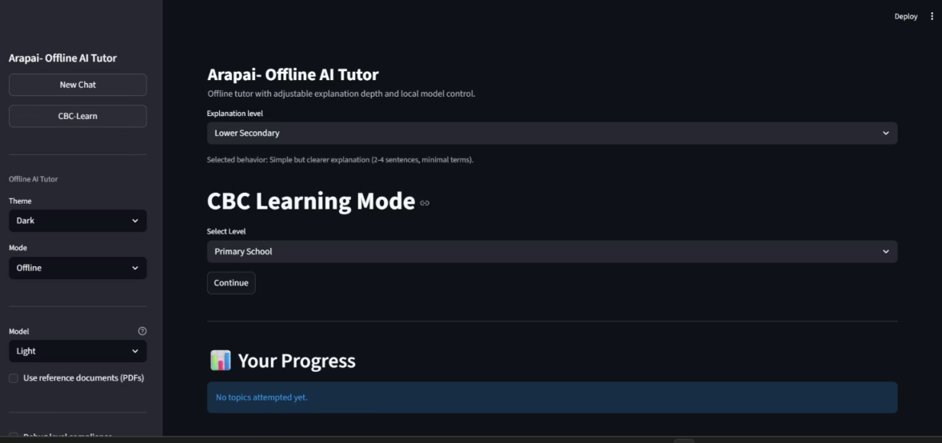
Arapai is an offline AI education tutor with four main capabilities:
- Leveled chat tutoring — Students choose explanation depth (Basic → Technical). The tutor adjusts length, jargon, and structure.
- Safe math — Arithmetic is solved deterministically (no
eval()), including mixed prompts like “calculate, then explain.” For(48 ÷ 6) + 7 × 2, the engine returns 22 using standard precedence. - CBC-Learn mode — Scenario questions (e.g. electricity, open circuits) with feedback and “Explain my mistake” after wrong answers.
- Optional RAG — Teachers add PDF notes; Arapai retrieves relevant excerpts with FAISS and grounds answers in local material.
Everything runs on-device. Peak memory on the Light tier is about 703 MB — well under a typical 7 GB school-laptop budget.
How we built it
We used a modular Python backend and a Streamlit front end:
| Module | Role |
|---|---|
llm_engine.py |
GGUF load, inference, benchmark telemetry |
tutor_engine.py |
Level compliance and reply validation |
math_engine.py |
Safe parser/evaluator + mixed math+explain replies |
demo_replies.py |
Vetted demo responses for sample prompts |
rag_engine.py |
Lazy FAISS retrieval over ingested PDFs |
cbc_engine.py |
Hybrid keyword scoring + curated mistake explanations |
prompt_builder.py |
Truthfulness and level-aware prompts |
Model path: TinyLlama 1.1B Chat (Q4_K_M GGUF) via llama.cpp, downloaded with download_model.sh.
RAG path: PDF → chunk (500 chars, 50 overlap) → embed → FAISS index.
Scientific example (Prompt 2): For a long thin vs. short thick wire, resistance scales roughly as R ∝ L/A — longer/thinner wire → higher R → lower current (I = V/R) → dimmer bulb.
We also built benchmark.py to measure tokens/sec, time-to-first-token, and peak RSS so we can track efficiency, speed, and answer quality on real hardware.
Challenges we ran into
- Small models, big expectations — TinyLlama often hallucinates on science and math. We added deterministic math paths and curated demo replies for reliable classroom demos.
- Memory pressure — Loading RAG embeddings plus the LLM caused native crashes on Windows. We unload RAG before inference, cap threads, and retry in safe mode after access violations.
- Streamlit reruns — Theme changes interrupted generation. We split “save message” and “generate reply” so pending answers resume after UI reruns.
- Fragile RAG setup — Empty or corrupt indexes and a broken ingestion import blocked retrieval. We fixed the package import and added clear UI warnings.
- First reply latency — Cold model load can take 1–2 minutes on the first question; we added spinners and sidebar status so users know the app is working.
Accomplishments that we're proud of
- A working offline tutor on an 8 GB laptop with measured peak RSS 703 MB
- Cross-disciplinary design: on-device LLM + RAG + CBC assessment + symbolic math in one app
- Closed learning loop: quiz → feedback → “Explain my mistake”
- Four explanation levels with automated compliance checking
- Reproducible benchmarks via
benchmark.pyandbenchmark_results.json - Complete deployment package:
metadata.json,REPORT.md,download_model.sh, and documented model paths - Demo-ready sample prompts that are instant, correct, and level-compliant
What we learned
- On-device LLMs need hybrid systems — pure generation is not enough for education; deterministic tools (math, curated demos, RAG) improve trust and accuracy.
- Memory budgeting matters as much as model choice: lazy loading, unloading RAG before inference, and tier selection keep you under hardware limits.
- UX for offline AI must account for cold starts, reruns, and clear error states — especially on school hardware.
- Prompt compliance (length, structure, banned meta-phrases) helps small models stay usable as tutors.
- Measurement matters — tracking peak RSS, latency, and domain accuracy helped us design for real laptops, not just “it runs on my machine.”
What's next for Arapai
- Auto-generate CBC scenarios from ingested PDFs (with teacher review)
- Persistent student progress and teacher dashboards
- Additional local languages beyond English
- Pre-built RAG indexes for common school subjects
- One-click lab installer for classroom deployment
- Broader validation on Ubuntu and low-cost school hardware
Built With
- llama
- python
- streamlit


Log in or sign up for Devpost to join the conversation.