Elevator pitch (Devpost tagline field):
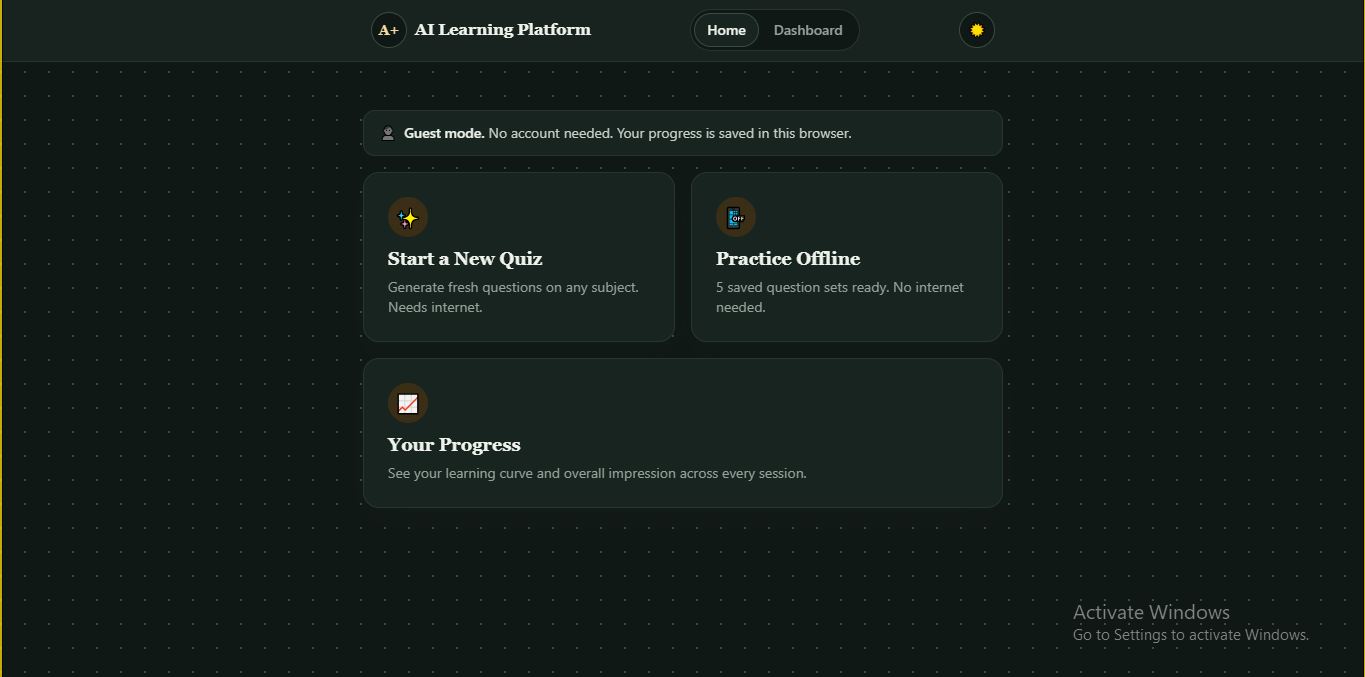
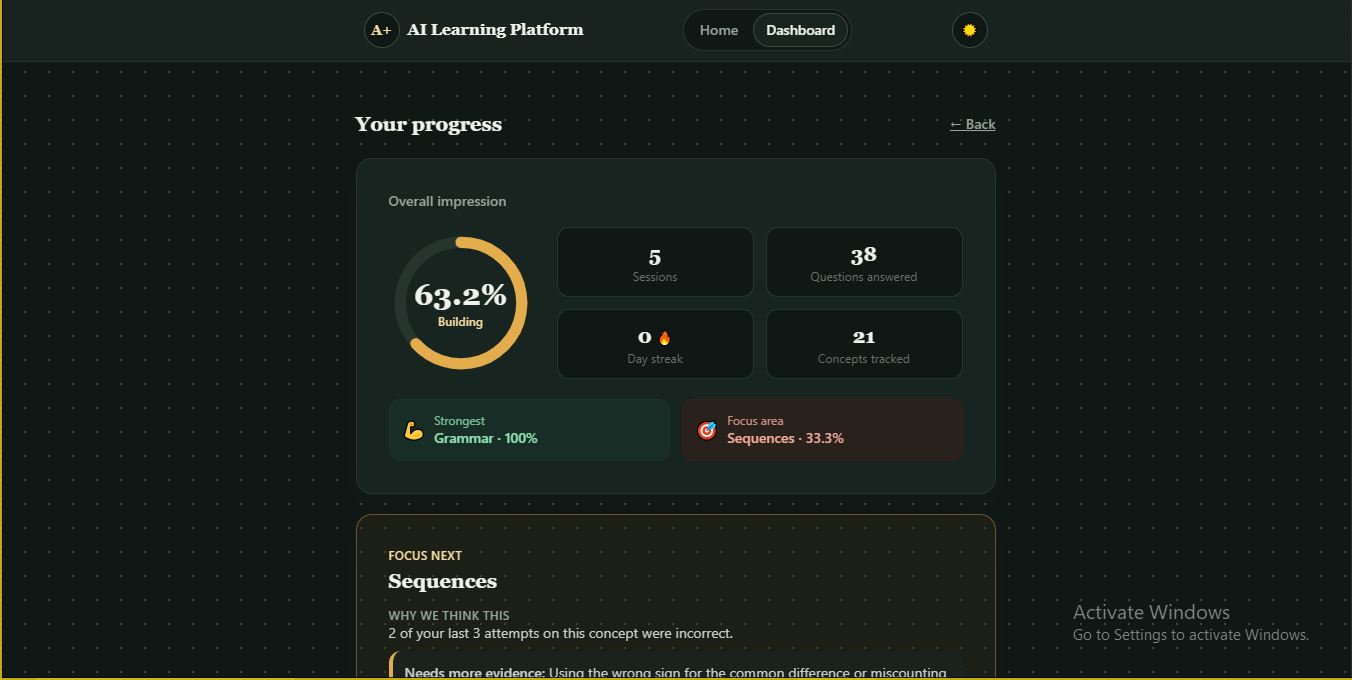
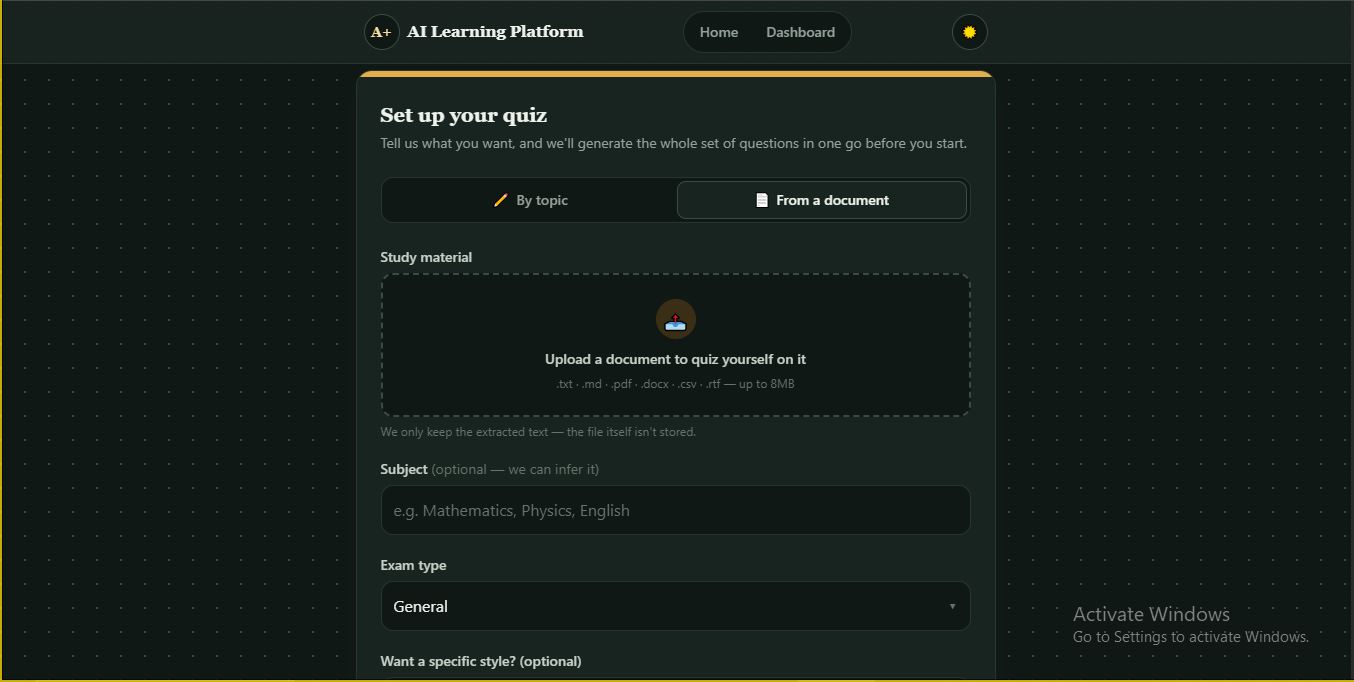
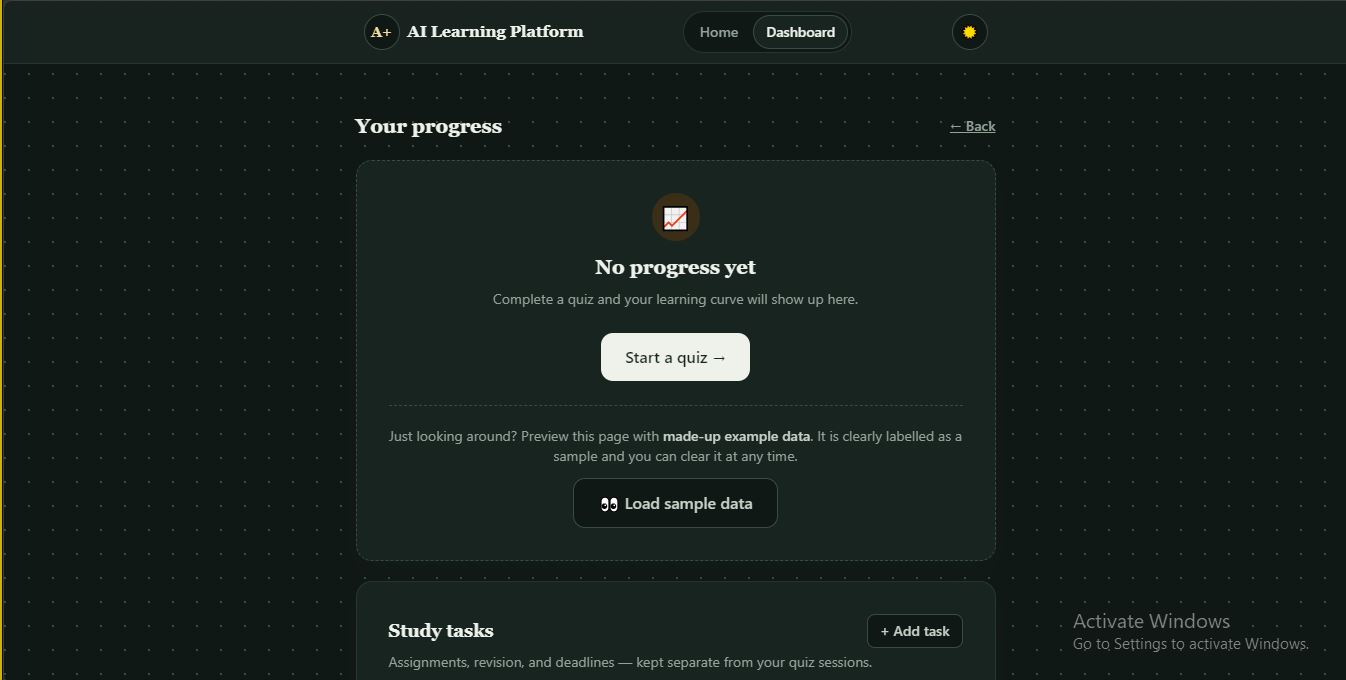
AI-generated exam practice that explains why you got it wrong, tracks your weak concepts over time, and tells you exactly what to study next. No account needed. Try it in 60 seconds No sign-up. Open the app and you are in guest mode, with a private session saved in your browser. Click Start a New Quiz, type a subject (for example Physics) or upload an existing study material, choose an exam type, and press Get Questions. Answer a few questions. After each one you see the correct answer and an explanation of the specific misconception behind a wrong choice. Open Dashboard to see your learning curve, concept mastery, and a Focus next recommendation. Short on time? On an empty dashboard press Load sample data. It is clearly labelled as example data and can be cleared at any time. Want to be quizzed on your own notes? Choose From a document and upload a PDF, Word file or text file.
Inspiration
Studying for high-stakes exams like WAEC, NECO and JAMB usually means grinding through the same recycled question banks until students memorise answers instead of understanding the material. Worse, most students have no real way to know where they are weak. They finish a practice test, see a score, and walk away with no idea which concepts are tripping them up, so they re-study everything instead of the parts that matter. For students preparing without a tutor, or in under-resourced schools, this is even more costly: every wasted study hour is time they cannot get back. I built Aptly because that gap is real and common. Static question banks run out, flashcard apps do not adapt, and score reports do not explain anything. Students need a tool that generates fresh questions on demand, adapts to their subject and exam, and builds an honest record of their strengths and misconceptions, so studying becomes targeted instead of a guessing game.
What it does
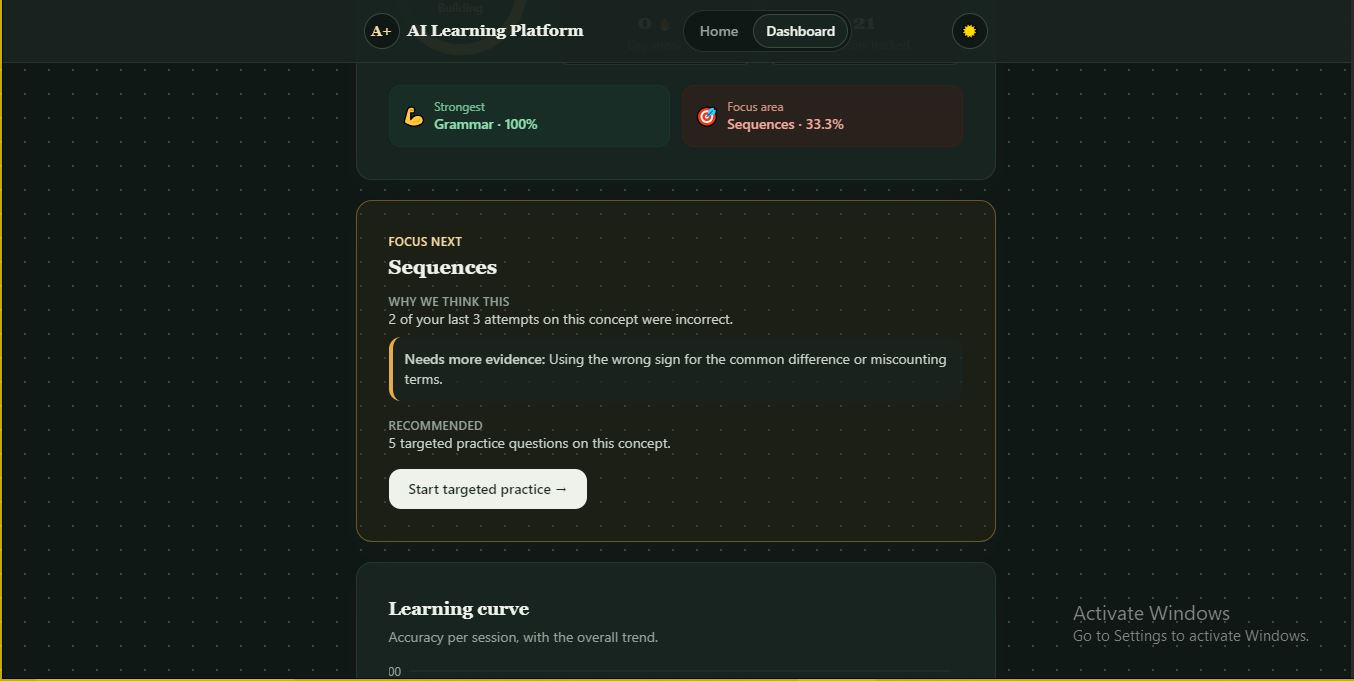
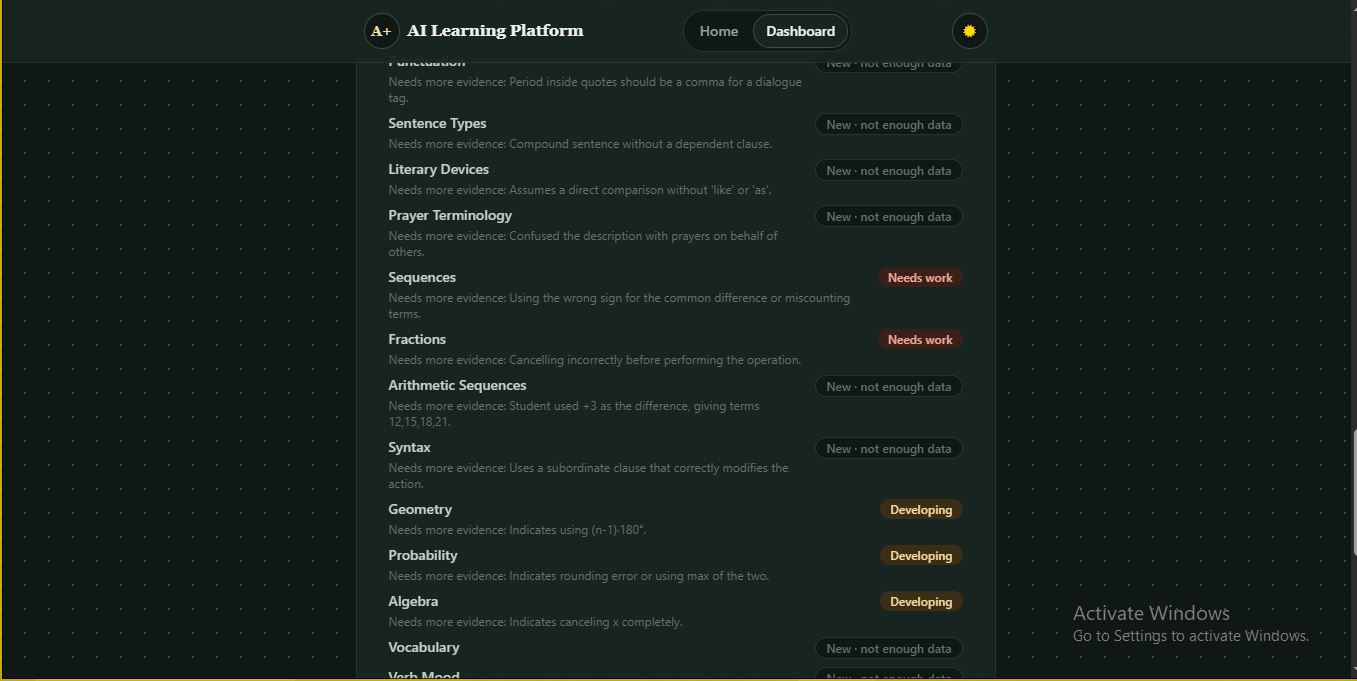
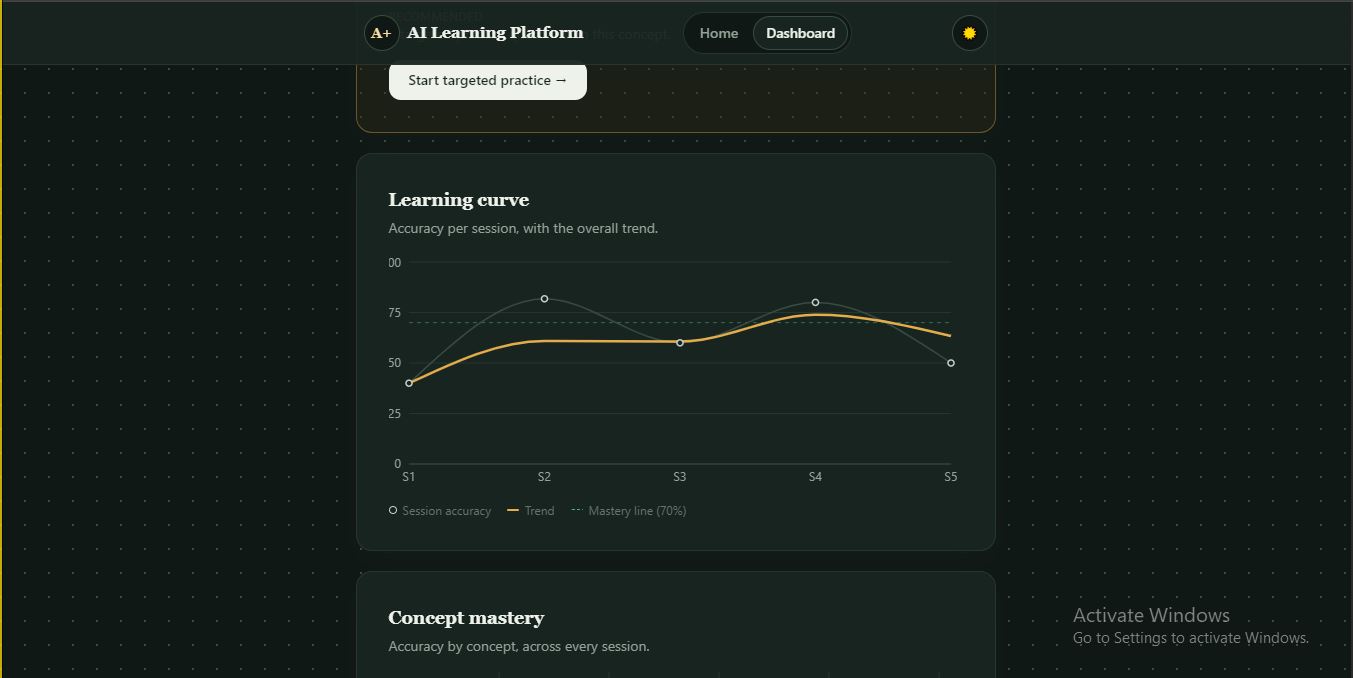
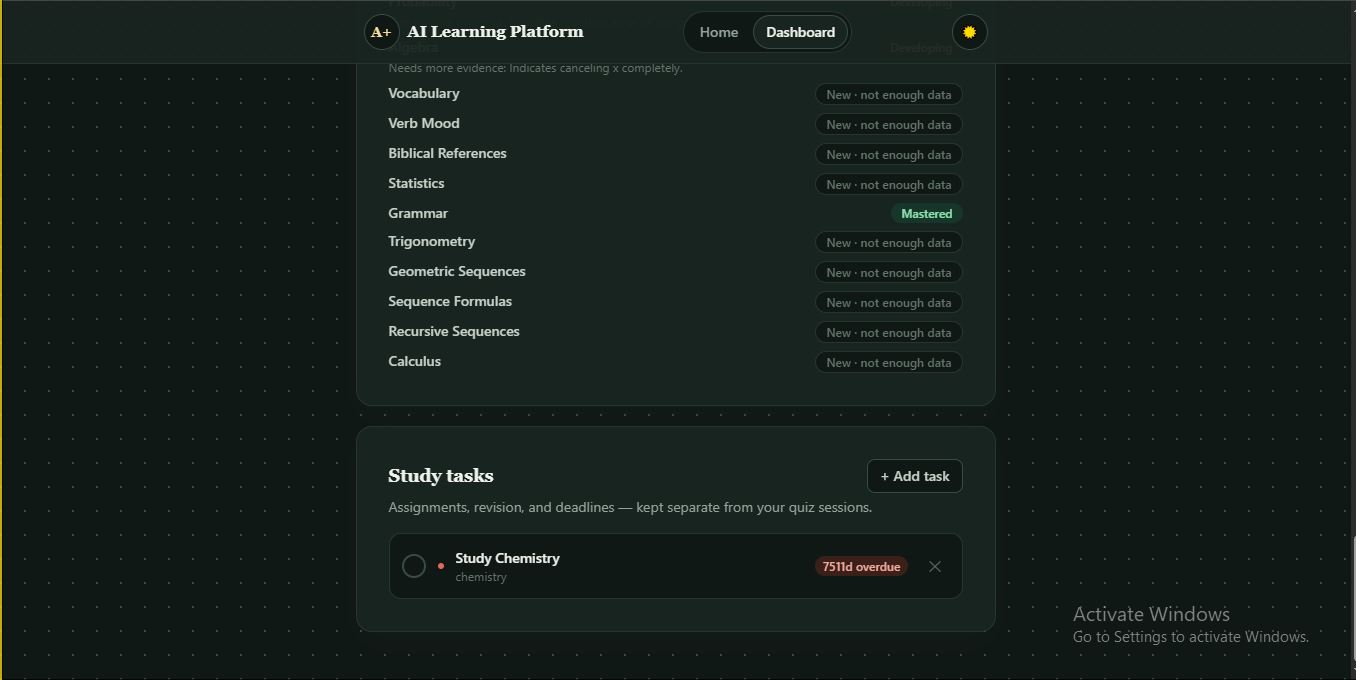
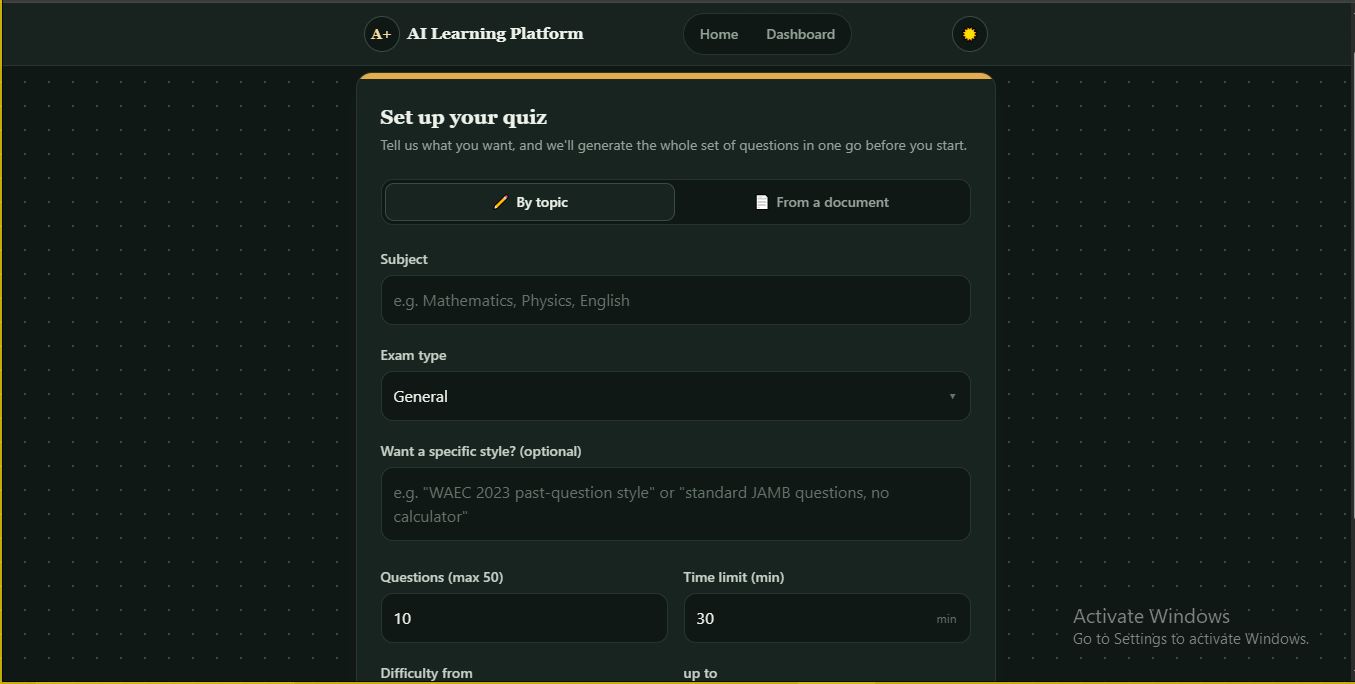
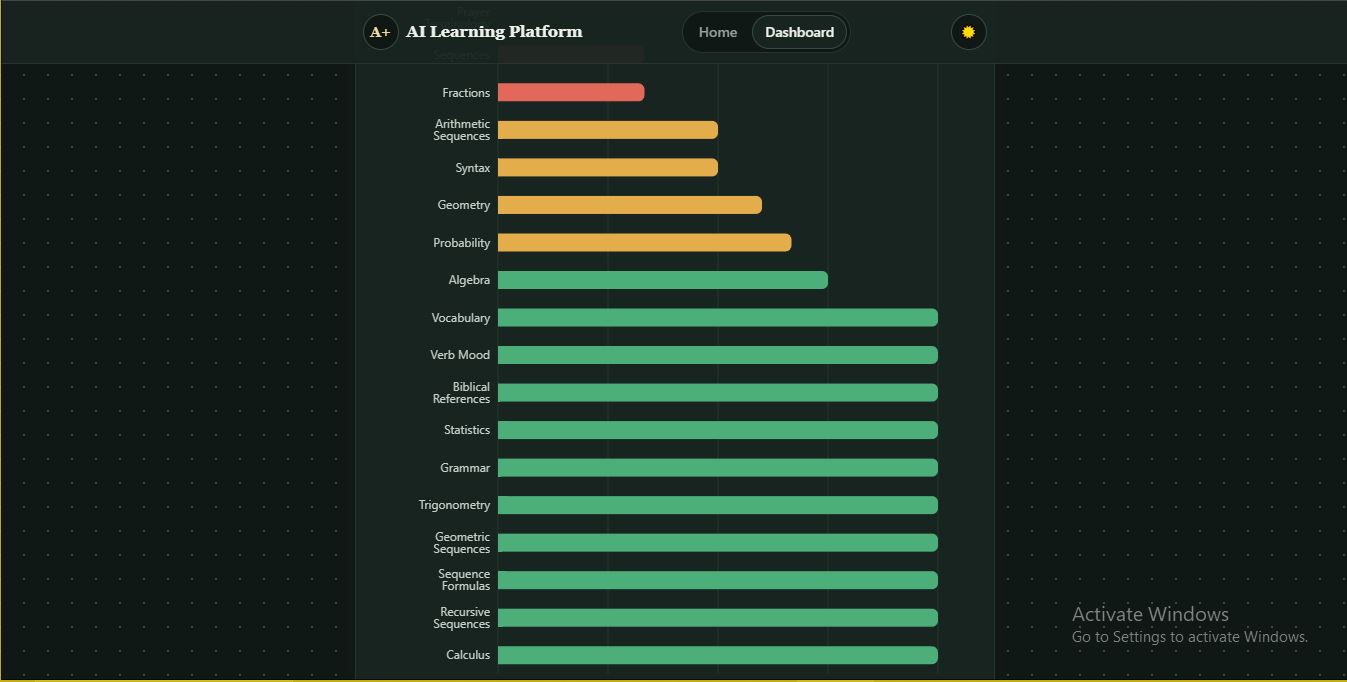
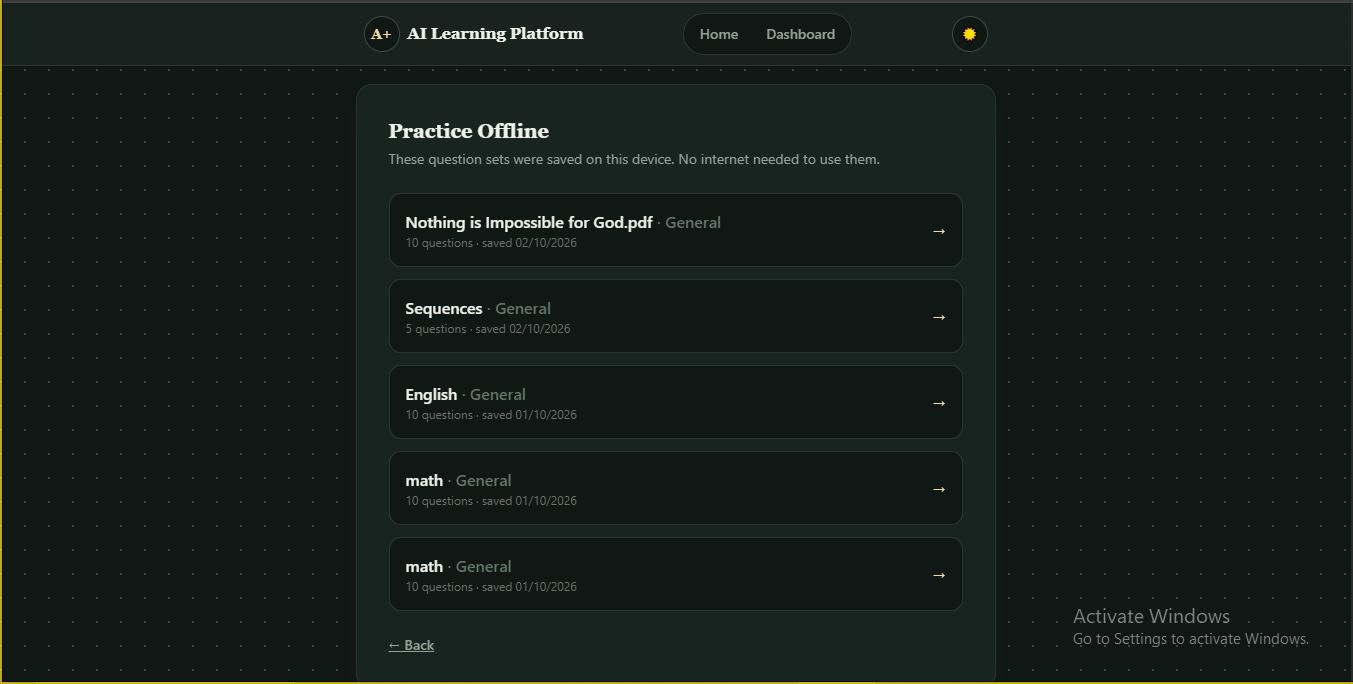
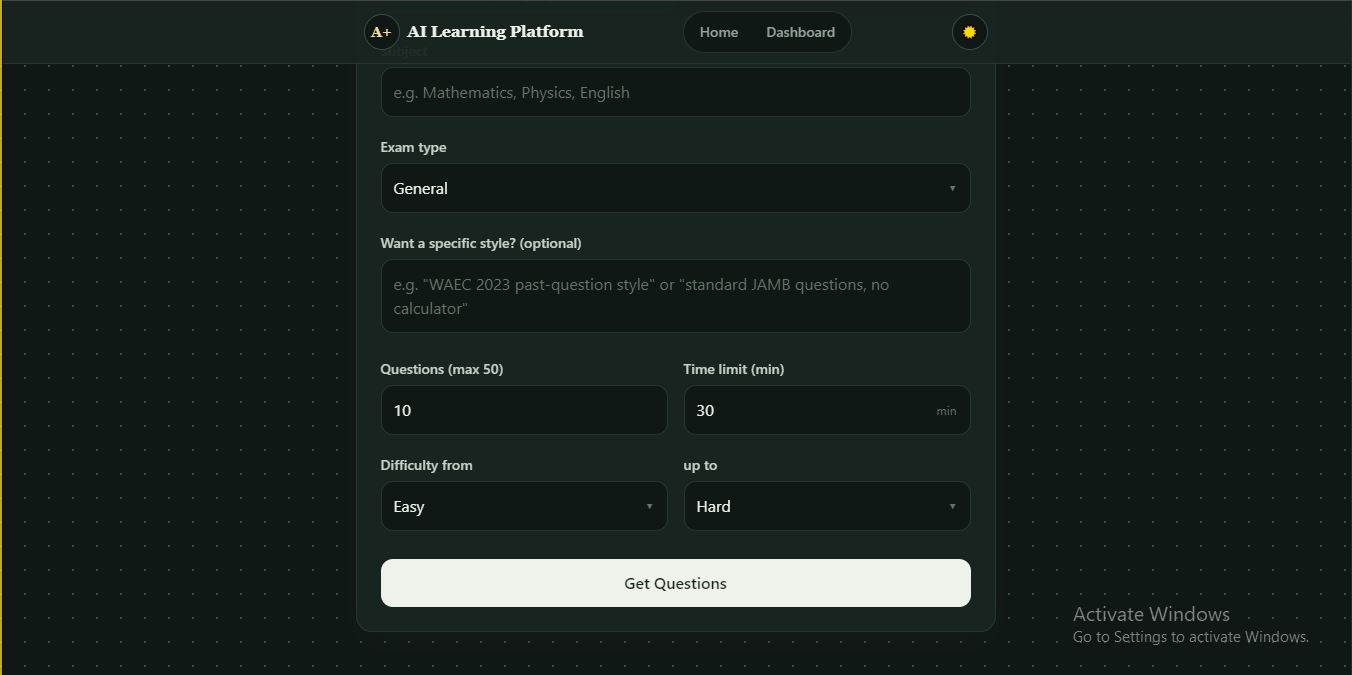
Aptly is an AI tutoring platform that generates practice questions for any subject or exam, then treats every answer as diagnostic evidence about what the student understands and what they do not. Practice that fits the student Two ways to start: by topic, or from the student's own study material (.pdf, .docx, .txt, .md, .csv, .rtf, up to 8 MB). Document quizzes are grounded in the uploaded content, so students practise on their actual coursework. Fully configurable: subject, exam type (General, WAEC, NECO, JAMB), free-text style instructions such as "JAMB style, no calculator", 1 to 50 questions, an Easy to Hard difficulty range, and a time limit. Generated on demand: questions come from an LLM rather than a fixed bank, and a Retry always produces new ones. Unbiased answer positions: options are shuffled in code, so "always pick A" does not work. Diagnosis, not just grading Server-side grading against the stored correct answer. Nothing about the score is trusted from the browser. Misconception feedback: each wrong option carries a note about what choosing it suggests (for example "confuses velocity with speed"), and the student gets an explanation aimed at that specific misunderstanding. Evidence-based confidence labels: a single wrong answer is never called a weakness. The label moves from Needs more evidence to Possible misconception to Likely weakness only as the same pattern repeats in stored attempts. Adaptive learning Adaptive difficulty: a correct answer raises the next question's difficulty, a wrong one lowers it. Weak-concept targeting: once a concept is flagged WEAK, upcoming questions lean toward it, capped at three in a row so a session never becomes monotonous. Instant next question: the next question is fetched while the student reads feedback, so moving on feels immediate. A dashboard that shows what to study Overall accuracy, sessions, questions answered, day streak, and concepts tracked. Learning curve: accuracy per session with a smoothed trend line and a 70% mastery line. Concept mastery: per-concept accuracy with a status of New, Developing, Weak or Mastered, plus the suspected misconception for each. Focus next: the single most urgent concept, the evidence behind it (for example "3 of your last 6 attempts were incorrect"), a before-and-after accuracy comparison once there is enough data, and a one-click targeted practice quiz. Retry without losing history A Retry button starts a brand-new quiz with the same setup. It avoids questions the student has already seen and weights toward the concepts they missed. The original attempts are never overwritten, so the history that powers the diagnosis only ever gets richer. Offline practice Every online quiz is saved on the device. Students can replay saved question sets with no internet at all. Answers are queued locally and synced when the connection returns. The server re-grades each one and ignores duplicates, so every genuine answer is recorded exactly once. Study tasks and reports A built-in task list for homework, revision and deadlines (title, subject, due date, priority), and a downloadable report after each quiz. Instant access for everyone There is no login wall. Each browser gets a private guest session, so a teacher, judge or student can try Aptly in seconds. An empty dashboard can load clearly labelled sample data so the insights can be previewed without taking several quizzes. It is marked with a banner, a dashed border and a SAMPLE tag on every card, it is stored only in the browser, and it is replaced automatically by real results once a quiz is completed.
How it works
Setup. The student chooses a topic or uploads a document and sets the exam type, difficulty range, question count and time limit. One generation call. The backend asks the LLM for the whole question set in a single request, constrained to strict JSON. Each question carries its concept, difficulty, explanation, the most common misconception, and a short note for each wrong option. The batch is stored in PostgreSQL, so answering questions afterwards needs no extra AI call. Grading. Each answer is graded server-side by exact match against the stored answer. For a wrong answer, Aptly uses the note for the exact option the student picked, then the question's general misconception, and only calls the AI as a last resort. Evidence. Every attempt is saved as a new, permanent row. The confidence label is computed from the attempts actually stored for that student, never estimated. Concept profile. Attempts are grouped by concept. Concept names are normalised (case, accents, punctuation, simple plurals) so "Quadratic Equations" and "quadratic equation" count as one concept. A concept needs at least 3 attempts before it can be called Weak (50% or below) or Mastered (80% or above). Adaptation. The next question is chosen from the unanswered ones by difficulty and by the student's current weak concepts, and the dashboard turns the profile into a "Focus next" recommendation.
How I built it
Frontend. React with Vite and Tailwind CSS v4, charts with Recharts. State is managed with hooks, and refs are used where synchronous access matters, such as guarding against double submissions. The dashboard and its charting library load on demand, so the first screen paints quickly. The interface is responsive, supports light and dark themes, uses large touch targets, and is keyboard accessible. The quiz timer counts down to a wall-clock deadline, so it stays accurate even when a phone throttles a background tab. Backend. FastAPI (Python) with Pydantic validation, connected to PostgreSQL through an asyncpg connection pool rather than an ORM, which keeps the concept-aggregation queries predictable and fast. AI. Question generation and fallback analysis run on Groq with an open-weights reasoning model. Because a reasoning model spends part of its output budget on hidden reasoning, each request sets an explicit token budget scaled to the question count, caps reasoning effort low, and automatically retries once with a doubled budget if a response is cut off. Calls have a hard timeout so a slow provider can never hold a request open. Data model. The most deliberate decision was making attempts append-only. Each attempt carries a client-minted idempotency key, enforced with partial unique indexes: a retried network request is a harmless duplicate, while answering the same question again later is a new, permanent row. The schema is fully idempotent (IF NOT EXISTS throughout), so it can be re-applied safely. Cost and speed. Topic-based quizzes with identical settings reuse a recent stored set instead of calling the LLM again, which keeps AI spend roughly flat as popular subjects get more traffic. Reuse is capped and time-limited so content still refreshes. Documents. Text is extracted from uploads and only the text is stored, never the file. For long documents, four evenly spaced windows across the whole text are sent to the model, so questions cover the beginning, middle and end rather than only the introduction. Safety without a login. Each browser's random ID keeps one learner's quizzes, documents and tasks separate from everyone else's, and every query is scoped to it. Because the endpoints are open, quiz generation and uploads are rate-limited per client, free-text inputs that reach the AI prompt are length-capped, uploads are size-limited with sanitised filenames and protection against oversized PDFs and Word "zip bombs", and CORS is restricted to configured origins. Deployment. Frontend on Vercel and backend on Render, with environment-specific settings injected through environment variables.
Challenges I ran into
Retry could destroy the evidence. My first schema stored one attempt per question, so a retry or an offline replay could silently overwrite an earlier answer, wiping out exactly the data the misconception engine needs. Fixing it meant redesigning attempts as append-only with idempotency keys that separate a genuinely new attempt from a duplicated request. Truncated AI responses. Larger quizzes sometimes failed with "max completion tokens reached before generating a valid document". The reasoning model was spending its budget on hidden reasoning before writing any JSON. I set a budget scaled to the batch, capped reasoning effort, and added one automatic retry with a doubled budget. Answer-position bias. The model kept putting the correct answer first, reinforced by an example in my own prompt, so a student could score well without knowing the material. I now shuffle options in code, while protecting options that refer to others by letter (such as "A and B") and keeping "All of the above" pinned last. Misleading CORS errors. An unhandled crash returned a 500 from outside the CORS middleware, so the browser reported a CORS failure and sent me hunting for a configuration bug that did not exist. The error handler now attaches the right headers, so real server errors show up as real errors. Authentication was becoming the product. I first built full email and password login with Supabase, and my backend verified every token itself. Then Supabase rotated my project onto a new asymmetric signing key and valid logins started failing with "Invalid session", which meant supporting both the legacy HS256 secret and the newer keys verified through a public key set, while rejecting any algorithm and key mismatch. It worked, but it also made me ask who Aptly is for. A student, teacher or judge should be able to try it in seconds, not after creating an account. So I removed login on purpose and replaced it with private per-browser guest sessions, then hardened the open endpoints with rate limits and input limits to compensate. Opaque failures. When my Groq key was revoked, every quiz failed with the same vague message, which made a real incident look like a random outage. I now keep the student-facing message friendly while the server logs the provider's real error, so a bad key is identifiable in minutes. A quiz that could freeze mid-session. A slow or sleeping free-tier backend could make an answer fail and leave the student stuck. Failed submissions now release the selection so the student can simply tap again, requests have timeouts with clear messages, the next question is prefetched, and offline mode remains available as a safety net. Accomplishments that I'm proud of The core loop works end to end: tracking accuracy per concept, surfacing the weakest one, and generating a quiz aimed at it, so the app is a system rather than a stack of separate features. Misconception diagnosis: instead of marking an answer wrong, Aptly says why it is wrong, attaches an honest confidence label, and explains that specific misunderstanding. Safe Retry: students can retry as often as they like and the diagnostic history only gets richer, never lossy. The same idempotency design makes offline sync and duplicate requests completely safe. Evidence over guesses: weaknesses require repeated evidence, and every number on the dashboard is computed from stored attempts. Concept normalisation that matters: evidence for "Quadratic Equations" and "quadratic equation" merges into one tracked concept instead of silently splitting a student's history. Accessible by design: instant guest access, a responsive and accessible interface, and a labelled sample-data preview that never mixes with real results. A real, deployed product, built solo, across frontend, backend, database, AI integration and hosting.
What I learned
Design data integrity in from the start. Ask "what does this data need to prove, permanently?" before writing the schema, not after. A generic error is a debugging tax with interest. Separating what the student sees from what the operator logs turns an hour of guessing into minutes of fixing. LLMs have systematic biases. Position bias and hidden reasoning-token usage only showed up by looking closely at output at scale. Resilience is a feature. For a student in a timed practice quiz, a dropped request is not an edge case. It is the moment the product earns or loses trust. Authentication is a product decision, not just a technical one. Verifying tokens correctly matters, and so does asking whether a login belongs in front of your audience at all.
What's next for Aptly
Resume interrupted quizzes and automatic retry with backoff for transient network failures. Smarter AI error handling: distinguishing an invalid key, a rate limit, an outage and a retired model. Optional accounts so progress follows a student across devices, without a login wall for first-time users. More question types: short-answer and free-response questions graded by the LLM, for exams that mix formats. Spaced repetition: schedule when to revisit each weak concept, turning passive tracking into an active study plan. Richer misconception patterns: flag recurring misunderstandings across sessions ("the same speed versus velocity confusion three times"). Classroom mode: a teacher view of class-wide weak concepts, with assignable targeted practice. Deeper document ingestion: retrieval over long documents and OCR for scanned PDFs, so it scales to full textbooks. Installable offline-first app with background sync for students with unreliable data access. Scale: more aggressive caching, smaller specialised models for grading, and always-on hosting.
AI-use disclosure
I used Claude (Anthropic) as a coding and review assistant throughout this project: scaffolding backend endpoints, refactoring frontend components, writing tests to verify fixes, and reviewing security-sensitive code. In the final stage it also helped me remove the login flow, harden the open endpoints, polish the interface, add the sample-data preview, and write documentation. Product and design decisions were mine, including the append-only attempt model, the idempotency-key design, the decision to offer instant guest access instead of a login wall, and the evidence thresholds behind every diagnosis. The AI accelerated implementation and caught issues I might have missed, and I reviewed the result.
Built With
- fastapi
- groq
- javascript
- postgresql
- python
- react
- render
- supabase
- tailwindcss
- vercel

Log in or sign up for Devpost to join the conversation.