-
-
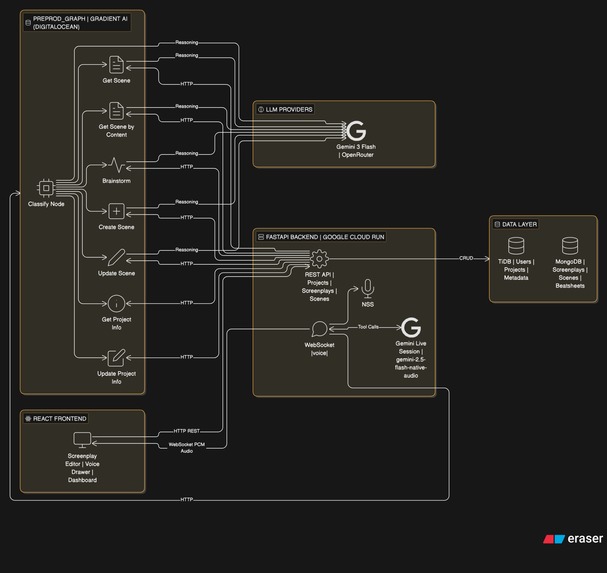
Project Architecture
-
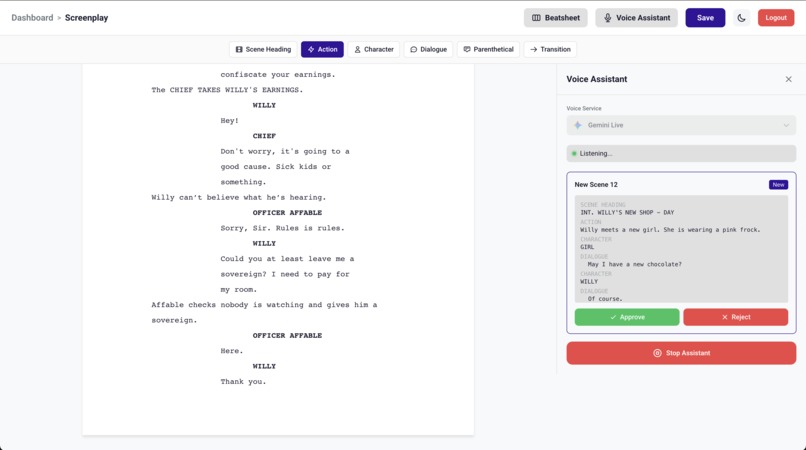
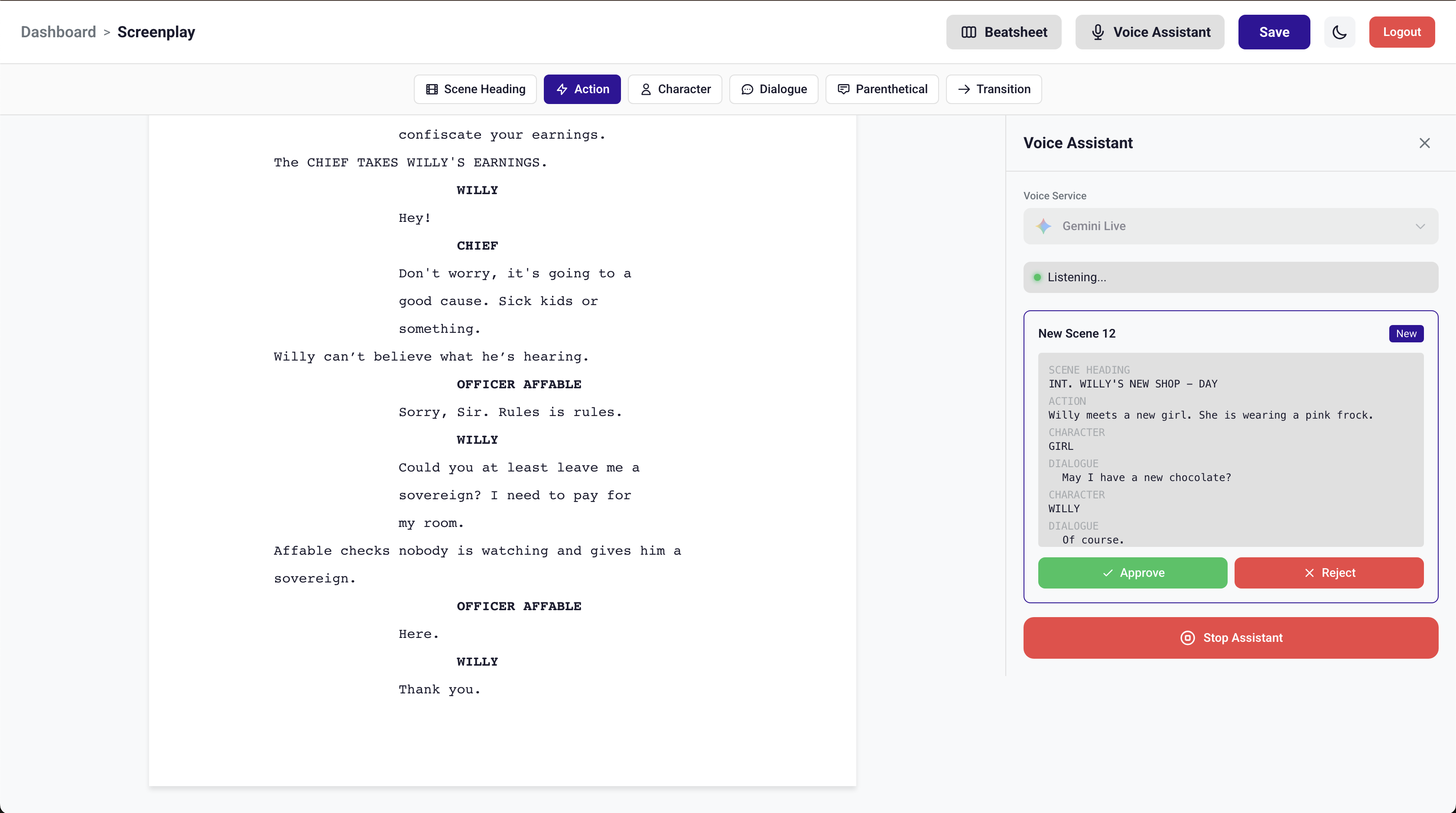
Gemini Live API creates scene by taking notes
-
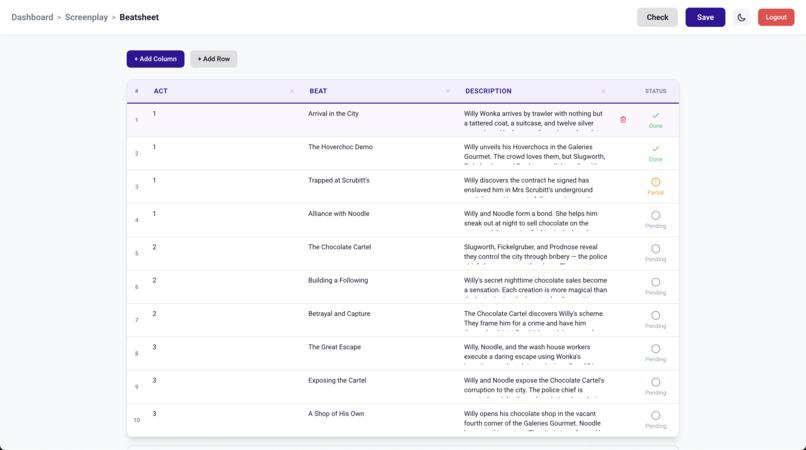
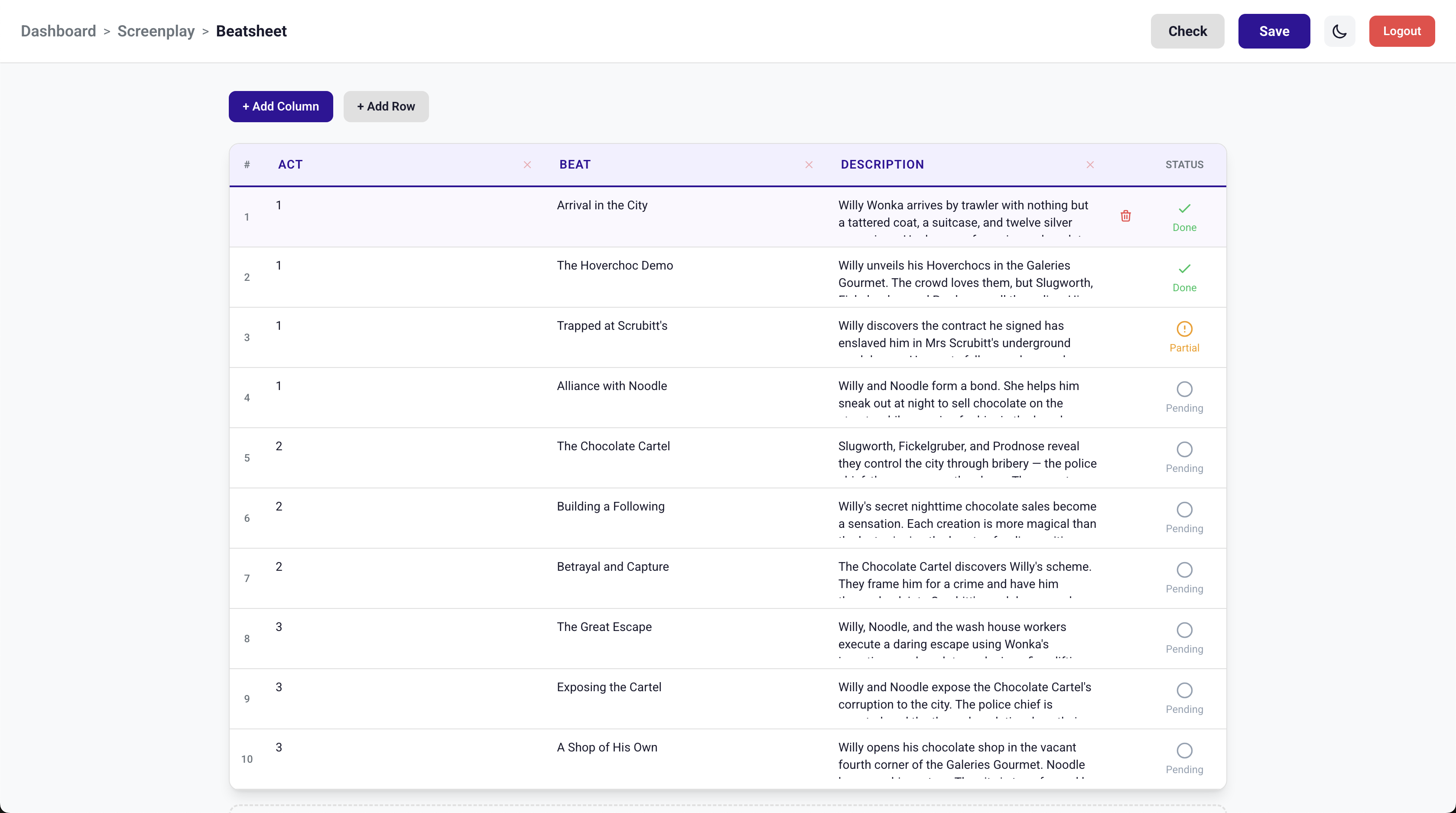
Beatsheet checking
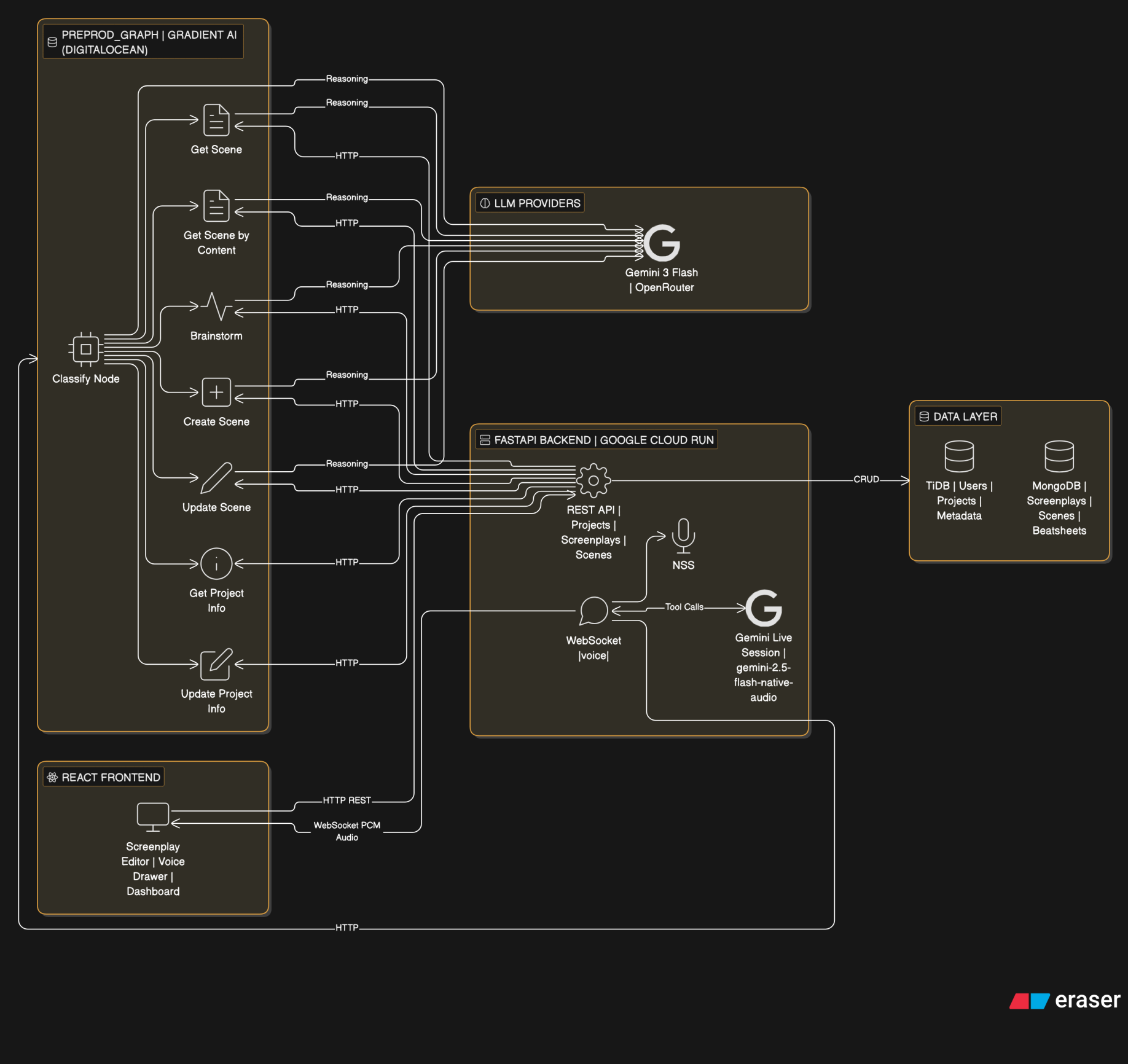
Pitch
APS (AI Pre-Production Studio) is a collaborative screenplay writing platform with an AI-powered voice assistant. Writers can speak naturally to query, create, and edit scenes in real-time — the assistant understands screenplay structure, maintains context across the project, and handles everything from brainstorming to formatting.
At the core of this system is a LangGraph agent deployed on Gradient AI. This agent handles all the complex reasoning — classifying user intent, fetching the right data, calling LLMs for structured output, and coordinating multi-step operations like "find the kitchen scene and change the dialogue." Gradient AI made deploying this stateful graph trivial — push the code, get an HTTP endpoint, done. No container orchestration, no infra headaches. The agent runs as a persistent service that the backend calls via REST, and Gradient handles scaling, health checks, and restarts automatically.
Architecture
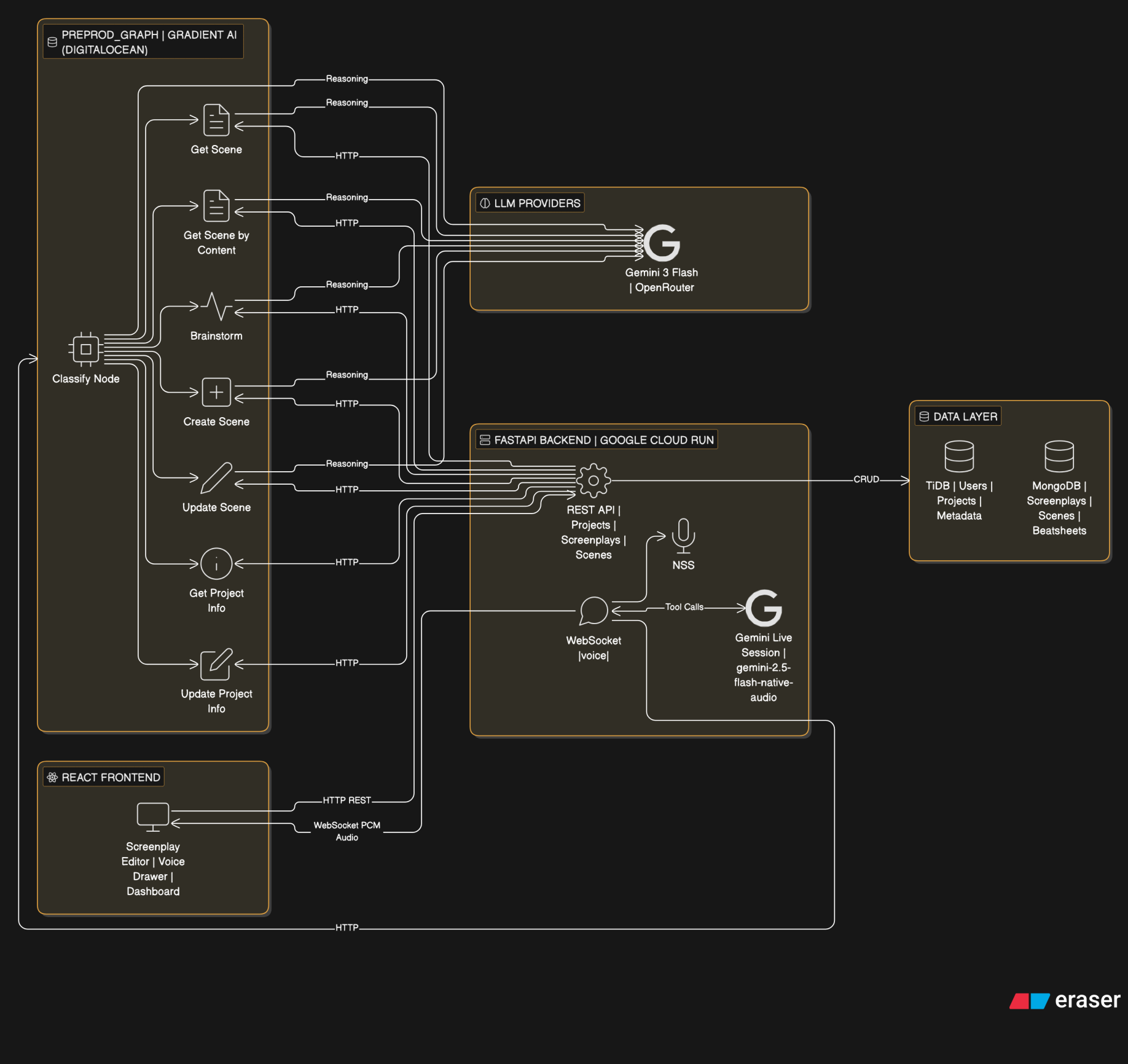
The system has three layers:
- React frontend with a custom screenplay editor and voice assistant drawer
- FastAPI backend handling auth, database operations, WebSocket voice streaming, and REST APIs
- Preprod Graph (LangGraph agent) deployed on Gradient AI, handling all AI reasoning
The frontend connects to the backend via REST for data and WebSocket for real-time voice. When the voice assistant needs to perform complex operations (scene lookup, brainstorming, scene creation/editing), the backend calls the preprod graph over HTTP. The graph orchestrates LLM calls and backend data fetches, then returns structured results.
This is the high level architecture of the entire project.
Gradient AI
Gradient AI is the deployment platform for the preprod graph agent. Here's what made it work well:
- LangGraph agent deployed as a single service with one config file (
.gradient/agent.yml) - Zero-config HTTPS endpoint — backend just calls
POST /get-scene,/brainstorm,/update-scene, etc. - Auto-reload on push — update the graph logic, push to repo, Gradient redeploys
- Environment variables managed through the platform (API keys for OpenRouter, backend URL)
- No Docker, no Kubernetes, no load balancer setup — just Python code and a requirements.txt
- Health check endpoint (
/health) monitored automatically
The graph itself is a LangGraph StateGraph with a classify-and-route pattern:
- A classify node (LLM-based) determines user intent from the query
- Routes to one of 7 specialized nodes: get_scene, get_scene_by_content, brainstorm, get_project_info, create_scene, update_scene, update_project_info
- Each node orchestrates its own multi-step flow (backend API calls + LLM reasoning)
- Shared utilities (
scene_fetch.py) keep search logic consistent across nodes
This is the langgraph deployed on Gradient AI.  from backend
- Formats and returns it conversationally
Brainstorm Ideas
- User says "what should happen next" or "give me ideas"
- Voice model fires
brainstorm_ideastool - Graph pulls existing scene summaries from the screenplay
- Checks beatsheet status to see which story beats are covered
- LLM suggests next directions based on uncovered beats
2. Create Data
Add new content to the screenplay through voice narration.
Add Scene to Screenplay
- User narrates a scene naturally — describing setting, action, characters, dialogue
- User signals completion with a key phrase ("end scene", "that's it")
- Voice model fires
create_scenetool with the full narration - LLM parses narration into proper screenplay format (scene heading, action, character, dialogue, parentheticals, transitions)
- A preview of the formatted scene appears in the voice drawer
- User approves or rejects via buttons (SVG icons)
- On approval → scene saves to MongoDB → editor reloads with the new scene highlighted
3. Update Data
Modify existing screenplay content through voice instructions.
Update Scene
- User says "update the first scene, change juggling to photography"
- Voice model fires
update_scenetool with the full instruction - LLM identifies which scene (by position or content keywords)
- Graph fetches the scene using shared search utilities
- LLM applies surgical find-and-replace edits — only changing what was asked, preserving all IDs, structure, and unchanged text
- Updated scene preview shown in the voice drawer for approval
- On approval → scene replaces the original in MongoDB → editor reloads and highlights it
Update Project Information
- User says "change the project name to..." or "update the description"
- Voice model fires
update_project_infotool - Graph fetches current project info from backend
- LLM extracts which fields to change from the instruction
- Backend applies the update via PATCH endpoint
The TechStack
- React + TypeScript — Frontend with custom screenplay editor (ProseMirror-based) and voice assistant drawer
- FastAPI (Python) — Backend REST API + WebSocket server for voice streaming
- MongoDB — Screenplay document storage (scenes, elements, revisions)
- TiDB — Relational data (users, projects, screenplay metadata)
- LangGraph — Stateful agent graph with classify-and-route pattern
- Gradient AI — Deployment platform for the LangGraph agent (DigitalOcean)
- Gemini 3 Flash — LLM for reasoning, classification, and structured output (via OpenRouter)
- Gemini Live API — Real-time voice conversation (speech-to-speech via WebSocket)
- Google Cloud Run — Backend deployment
Not the END!
The platform is designed for the full pre-production pipeline. Upcoming additions:
- Outlines — Structured story outlines that feed into scene generation
- Storyboard — Visual scene planning with AI-generated shot descriptions
- Beatboard — Visual beat mapping tied to the beatsheet for story structure tracking


Log in or sign up for Devpost to join the conversation.