-
-
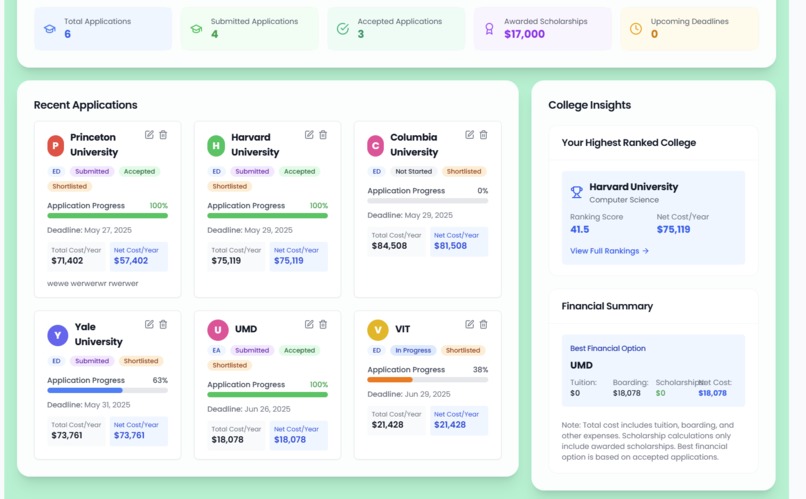
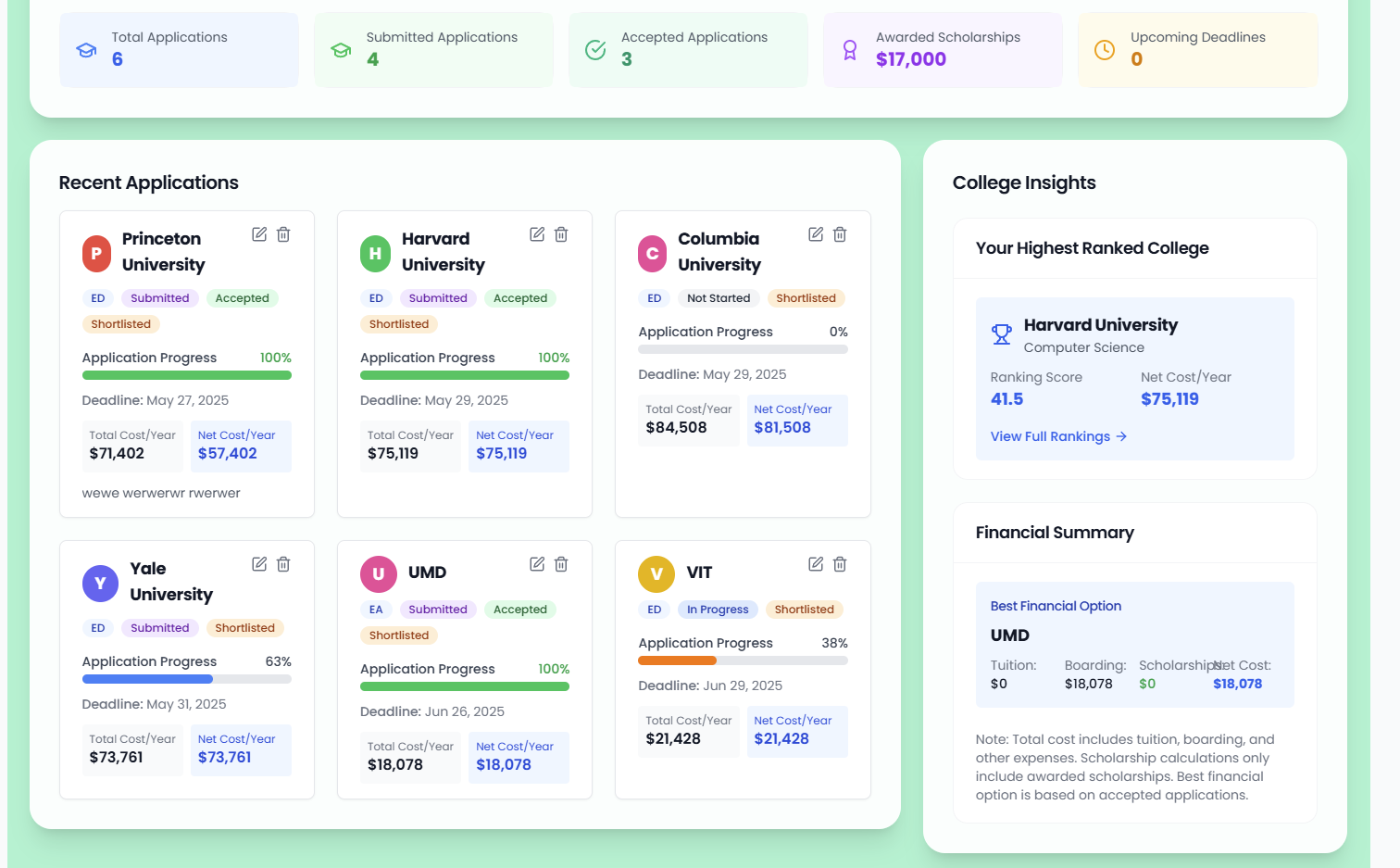
Dashboard
-
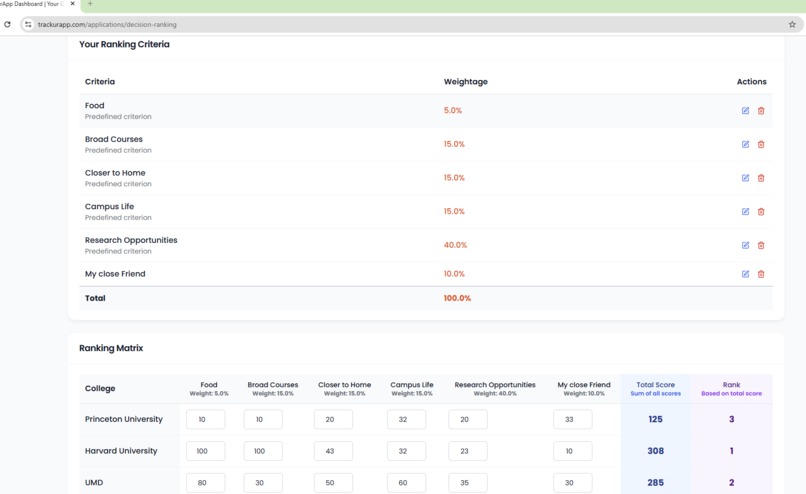
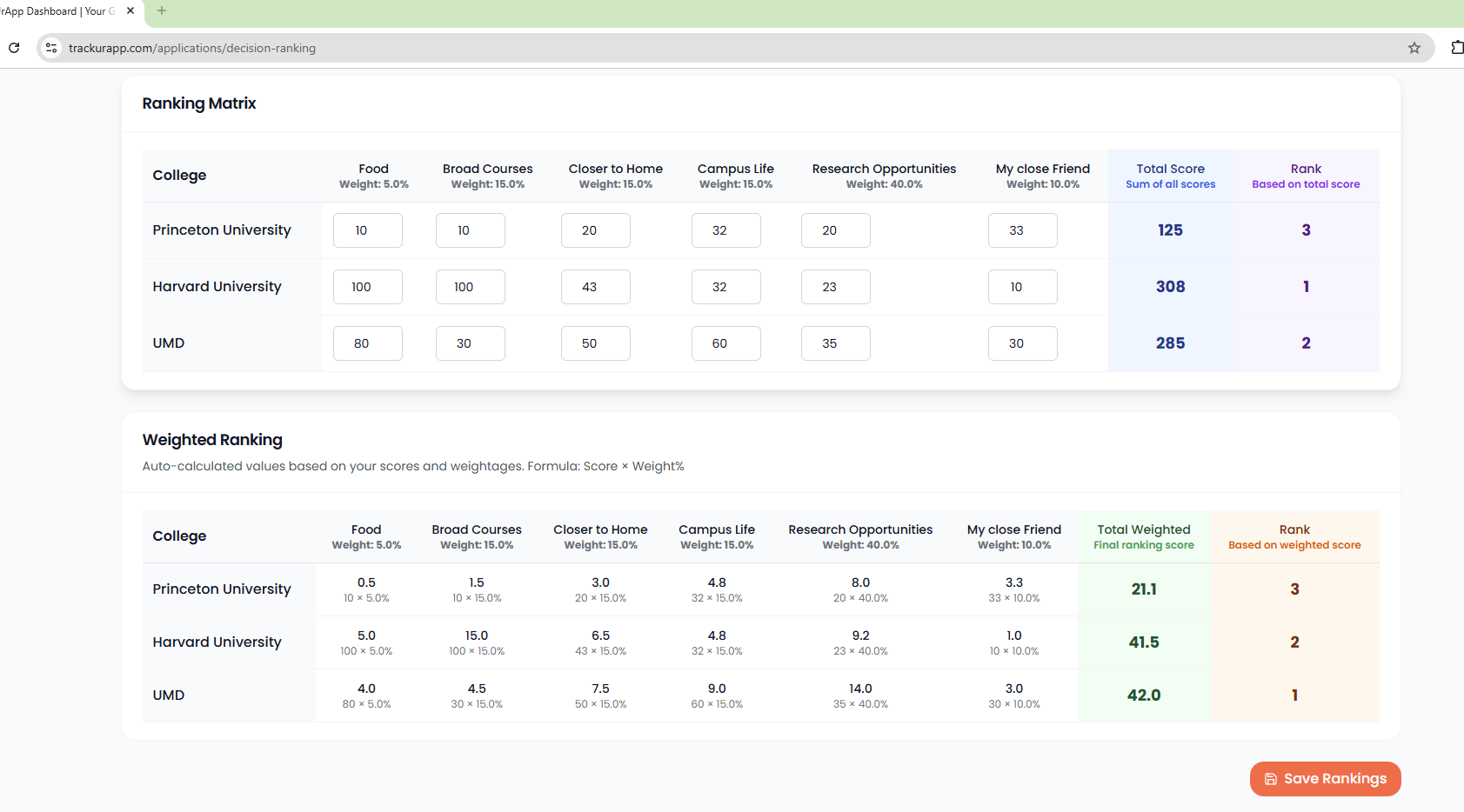
Ranking Sample (Without Weights)
-
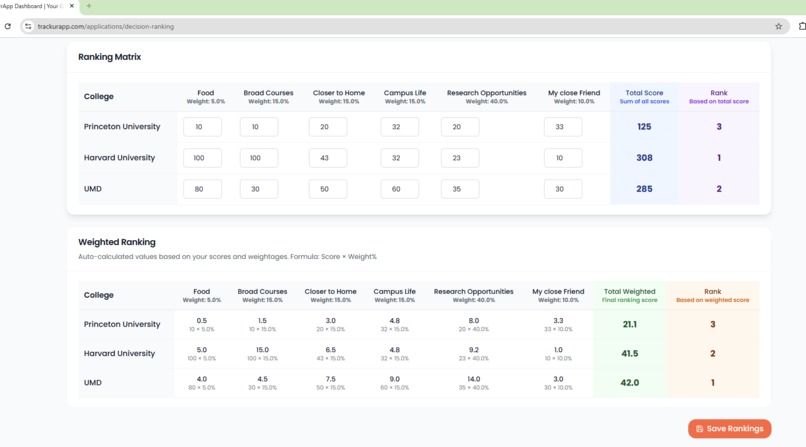
Ranking Sample (With Weighted Score)
-
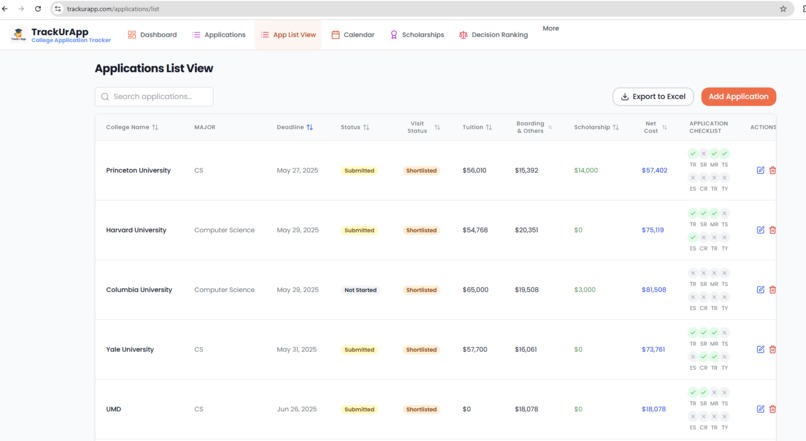
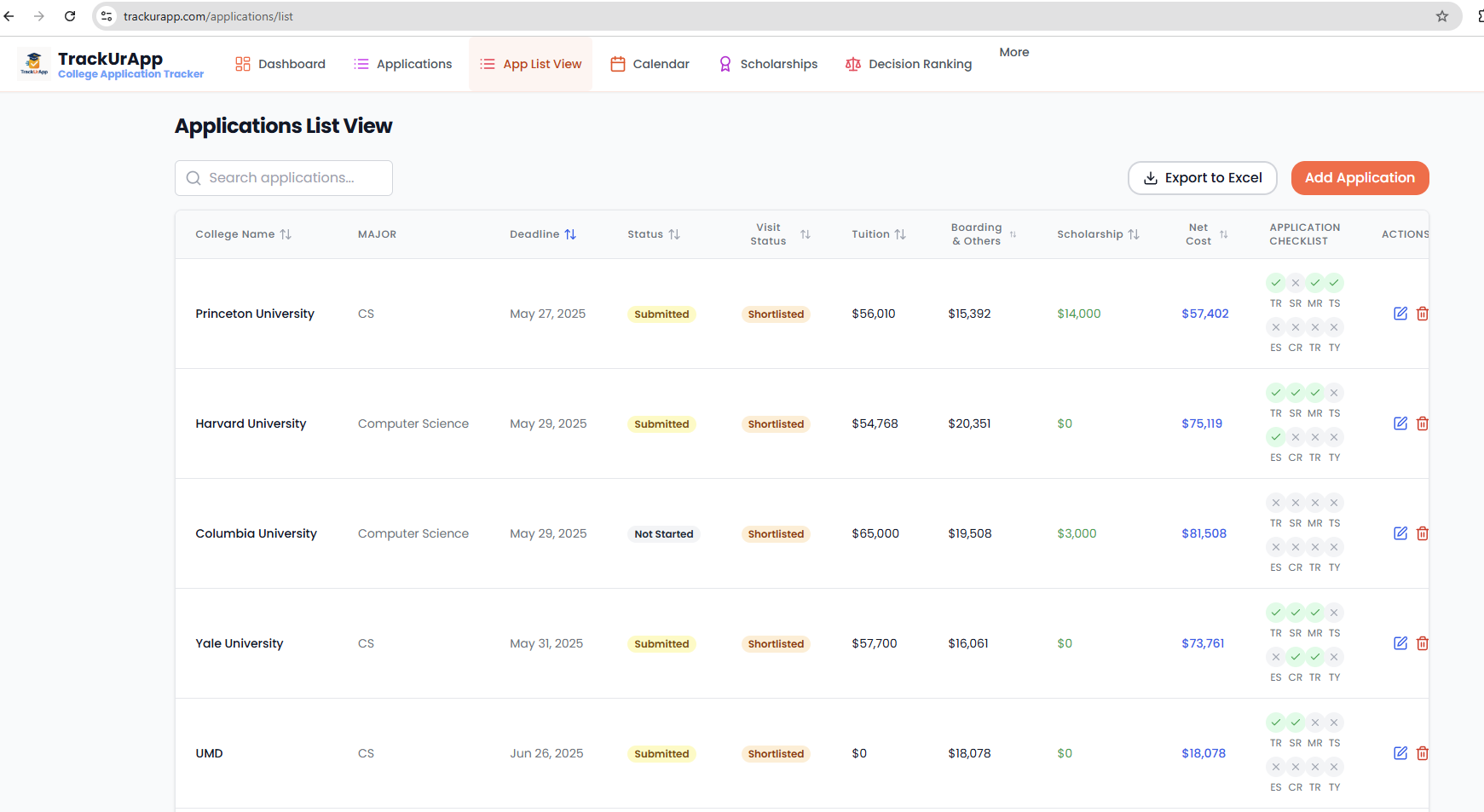
App List View (Sort, Track Checklist view)
-
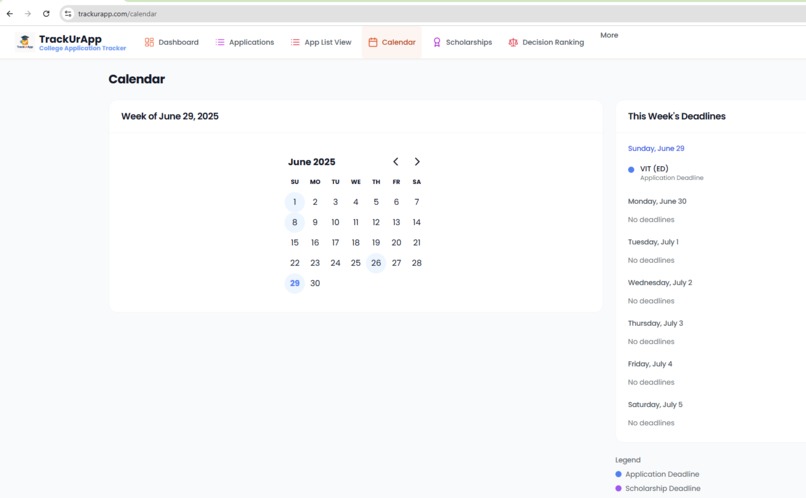
Application Calendar, and Due dates
-
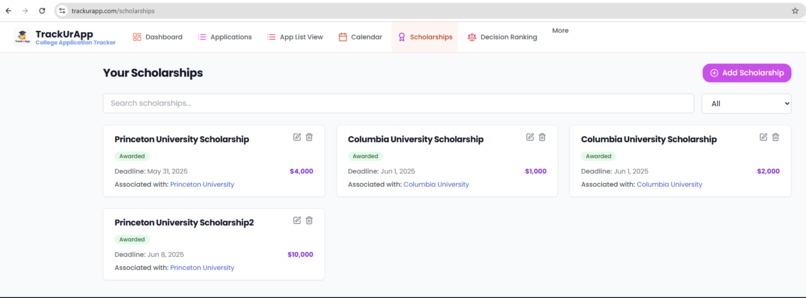
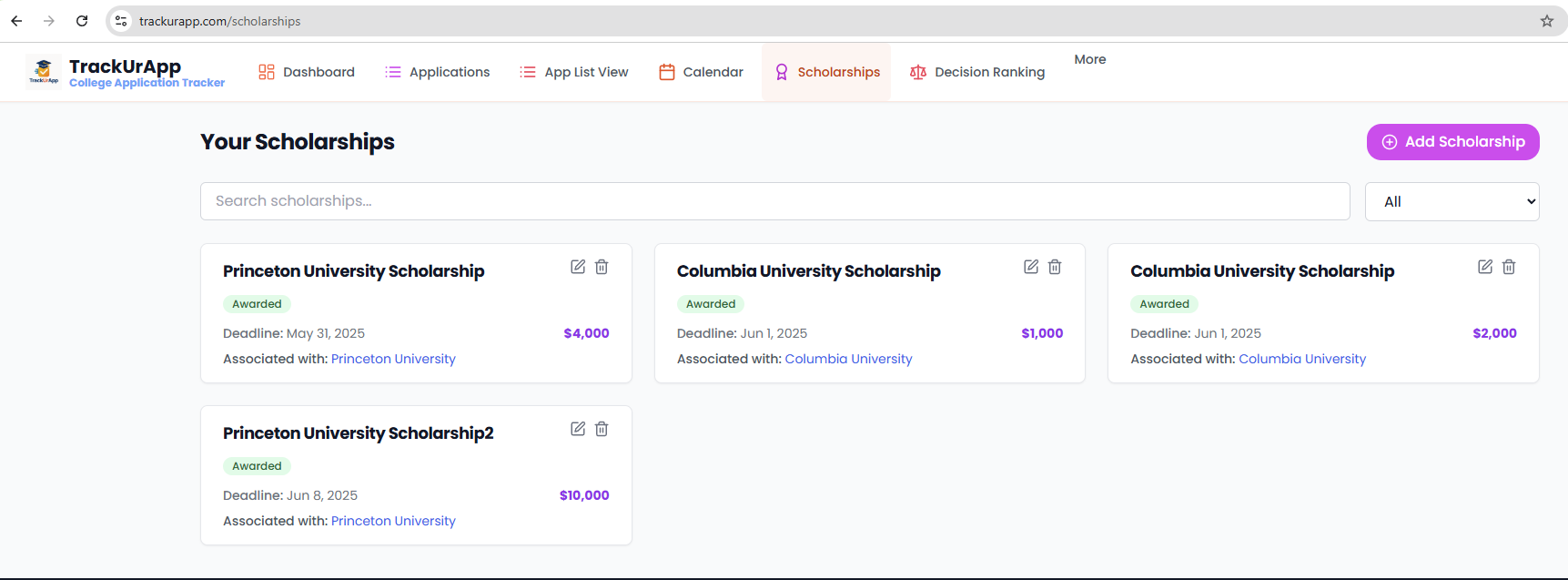
Scholarship Award Tracker (Used for Net cost Calculations)


Inspiration
My inspiration for TrackUrApp came from a personal challenge: helping my high school senior (kid) navigate the complex college application process. I struggled to efficiently track applications, scholarships, and post-submission requirements, and later faced the difficulty of objectively comparing accepted colleges to make an informed choice. This hands-on experience, initially managed with cumbersome spreadsheets, highlighted a clear need for a dedicated app to simplify this journey for both students and parents.
What it does
College Application Tracking: Users can research, add, edit, and monitor the status of multiple college applications, including application type (ED, EA, RD, Rolling), deadlines, and decision statuses.
Detailed Checklists: Each application is accompanied by a comprehensive checklist to track the submission of transcripts, test scores, essays, recommendation letters, and other required supplemental materials.
Scholarship Management: Students can track both college-specific and independent scholarships, including amounts, deadlines, and statuses (Not Started, In Progress, Submitted, Awarded, or Rejected).
Financial Insights: The platform helps users calculate the net cost of attendance for each college by factoring in tuition, room and board, and awarded scholarships.
Decision Ranking Tool: A unique feature that allows users to define custom criteria (e.g., location, academics, campus life), assign weights to each, and score colleges to generate an objective, weighted ranking. This helps in making data-driven decisions.
Calendar View: An integrated calendar visually displays all upcoming application and scholarship deadlines, helping users stay organized and avoid missing critical dates.
User Authentication: Secure user registration and login via email/password and Google OAuth, powered by Supabase Auth.
8 .Subscription Management: A system to manage user access levels (Free, Pro) with features for promo code validation and redemption, and integration with Stripe for subscription payments.
Data Export: Users can export their application data to Excel for offline access or sharing with school counselors, parents and friends
Admin Panel: Provides administrators with tools to manage system settings and promotional codes.
How we built it
I built this application from scratch, leveraging the capabilities of Bolt.new after learning about their hackathon. My process began by describing the project's goals and providing dashboard samples, which allowed Bolt to generate the initial database tables and front-end application structure.
Once the Minimum Viable Product (MVP) was ready, I sought feedback from friends and family. Their positive comments on the UI and responsiveness were encouraging. Initially, the application was primarily designed for desktop use, as I developed and tested it on a laptop. However, valuable feedback from a user highlighted the need for mobile responsiveness, which I subsequently incorporated.
Starting with a core set of features, I progressively added more functionalities, allowing the project to grow into a comprehensive tool.
Challenges we ran into
Developing this application presented several interesting challenges, primarily related to effectively communicating complex requirements to the AI and refining intricate feature implementations.
Authentication Setup: Initially, configuring user authentication proved challenging. This was largely due to my inexperience in crafting precise and clear prompts for the AI. I learned the importance of breaking down requests and providing focused instructions, which significantly improved the AI's ability to assist with this critical functionality.
Decision Ranking Tool Complexity: The Decision Ranking screen, with its nuanced design and calculation requirements, was particularly demanding. Achieving the desired outcome required persistent iteration and a deeper understanding of prompt engineering. By leveraging prompt enhancement techniques and providing detailed examples of weightage calculations and ranking logic, the AI eventually grasped the full scope of the design, though this process took several days of dedicated effort
Accomplishments that we're proud of
- Able to build a fully functional application in one month, spending a couple of hours every week
- Glad, I can put out the Decision Ranking tool to the public to use to finalize their college decision
What we learned
- Importance of clear requirements
- How easy is it now to develop an application
- How easy is it to integrate with Stripe and the Supabase database
- Excited about how well AI can code and excited about the future.
What's next for TrackUrApp
- Promote the App in schools, on social media, among friends, family, and consultants.
- Add features (Med school Application tracking and other specific college applications)
- Add a Parent View (Allow parents to view the site in read-only mode), so they don't need to check the application status with their kids constantly. :)
- Try to keep the user cost low to cover deployment and subscription costs.
Built With
- ionos
- netlify
- react
- supabase
- vue


Log in or sign up for Devpost to join the conversation.