-
-
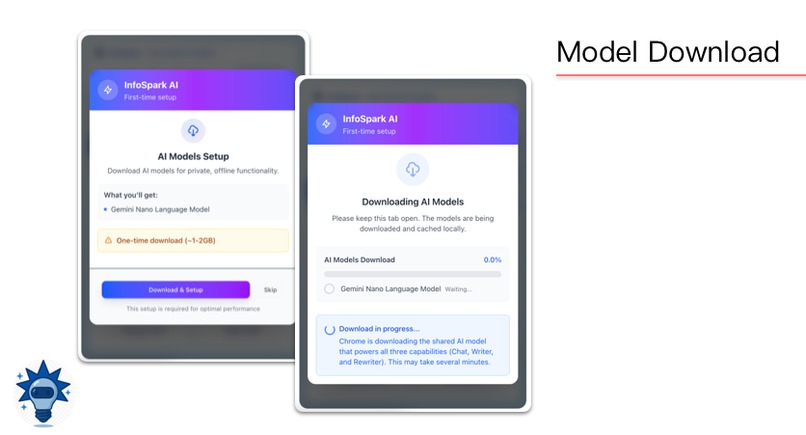
Model Manage
-
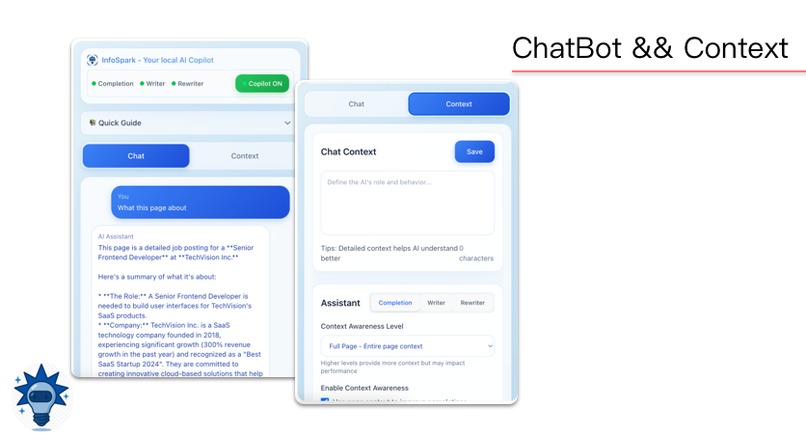
Chatbot & Context
-
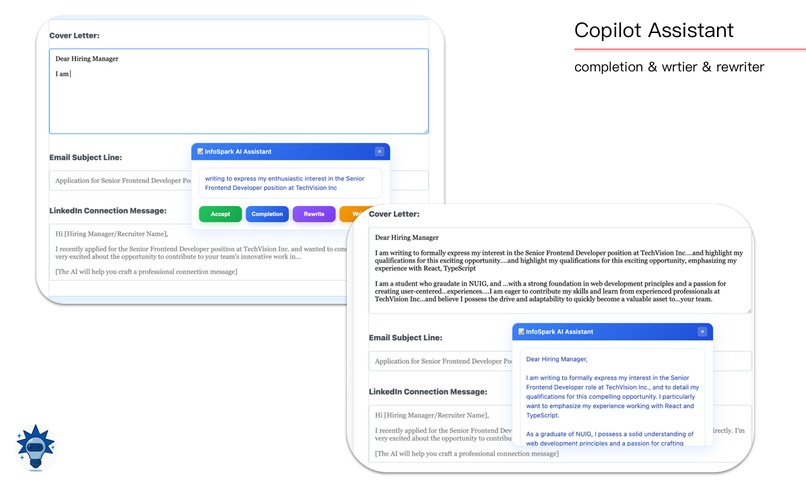
Copilot Assistant
-
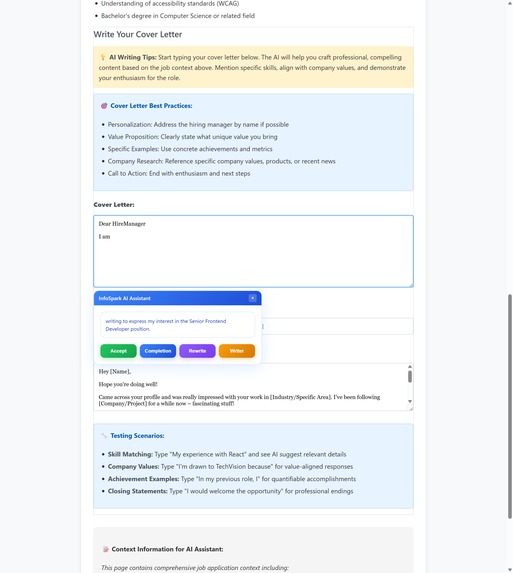
Completion
-
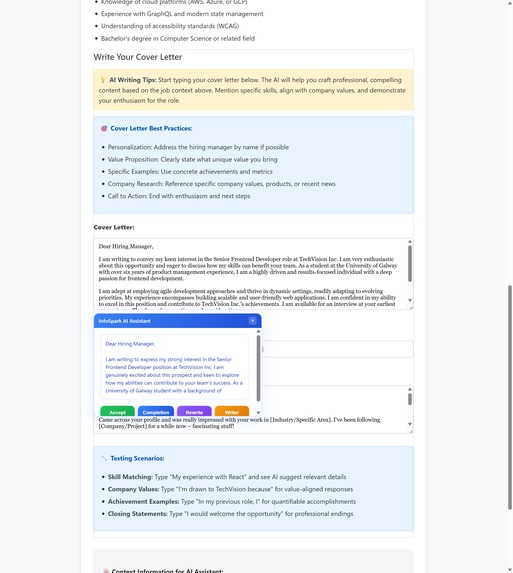
Rewrite and Write
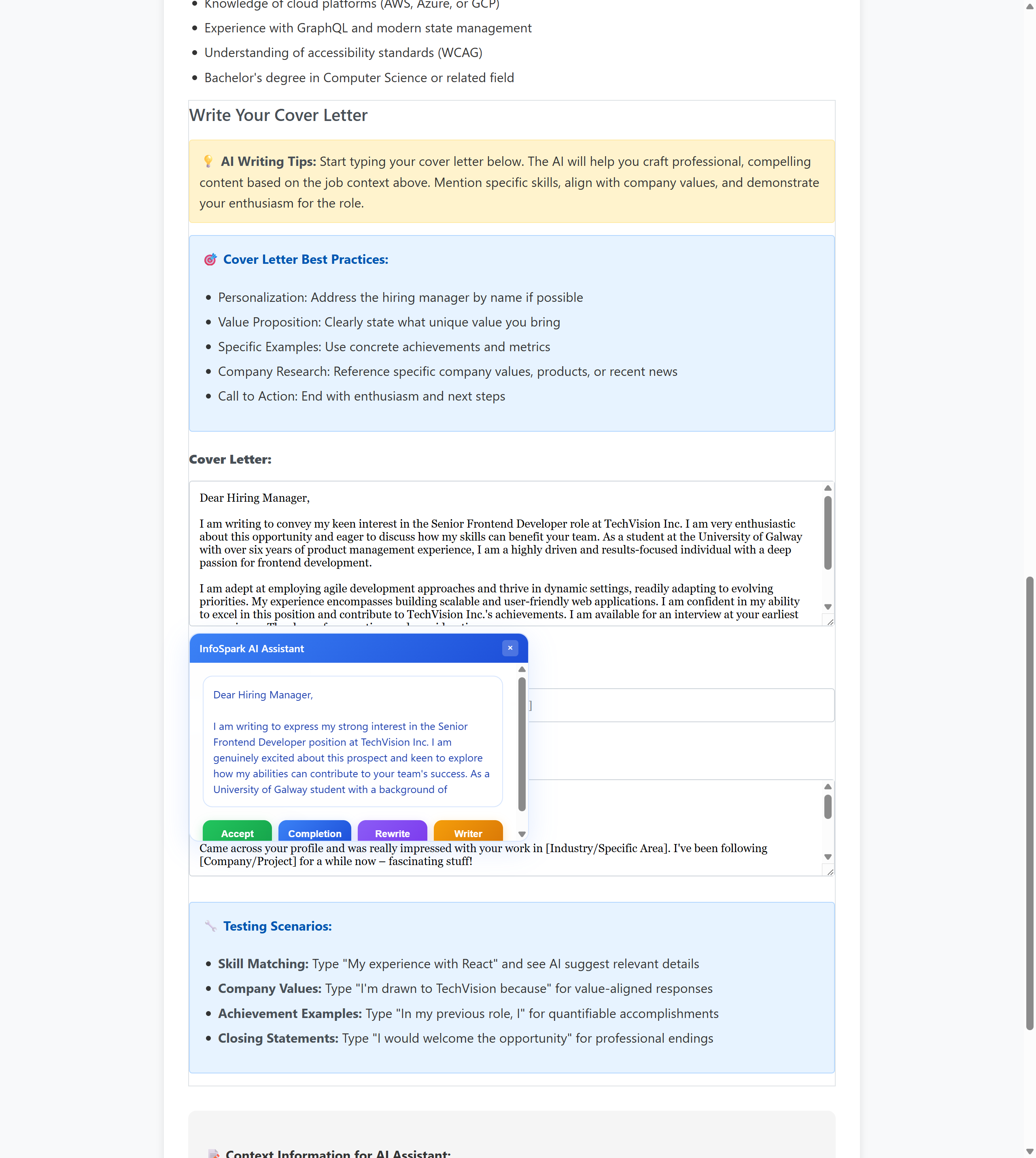
Inspiration
It’s quite interesting how this idea started, it actually grew out of my own job-hunting journey. As a native Chinese speaker studying in Ireland, I often found myself struggling when filling out online job applications, writing emails to recruiters, or networking with friends. My language skills alone weren’t always enough to handle every situation, and I didn’t have any handy tool to help me polish or optimize my writing.
That’s when I started thinking: what if there was a tool that could instantly refine poor text, automatically generate useful content, and even predict what I might want to say next? As a regular user of code agents, I realized that the Copilot-style interaction perfectly matched what I needed simple, smart, and intuitive for everyday users. I saw it as the ideal way to make text writing more efficient and accessible.
At first, I considered using paid APIs to build this extension. However, I soon realized that for most people, the recurring costs could be significant — and token usage is often invisible, which makes the expense unfair and unpredictable.
Just then, I came across this Hackathon, and I was genuinely grateful to see Google’s open initiative. It feels like a real gift to the open-source community — timely, empowering, and inspiring!
What it does
Our system is built around two key components, designed to make text interaction smarter and more seamless:
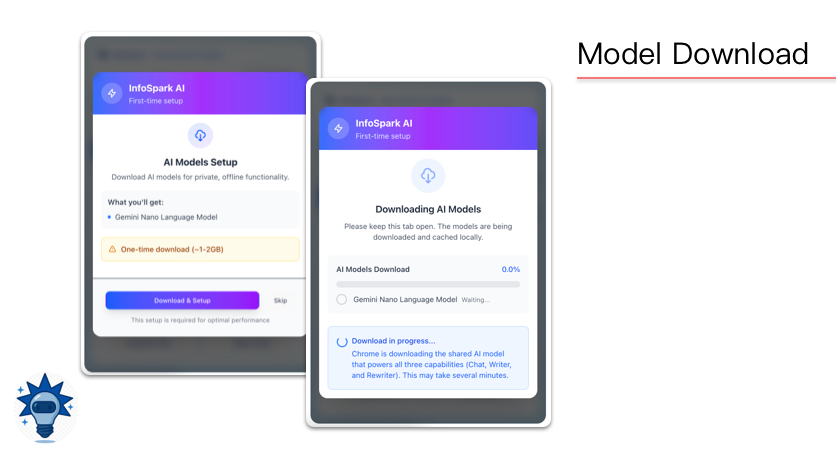
Important Notes: To ensure a smooth user experience, we've included a first-time setup guide, as the model needs to be downloaded beforehand. This way, users will be able to utilize the application only after successfully downloading the appropriate model.
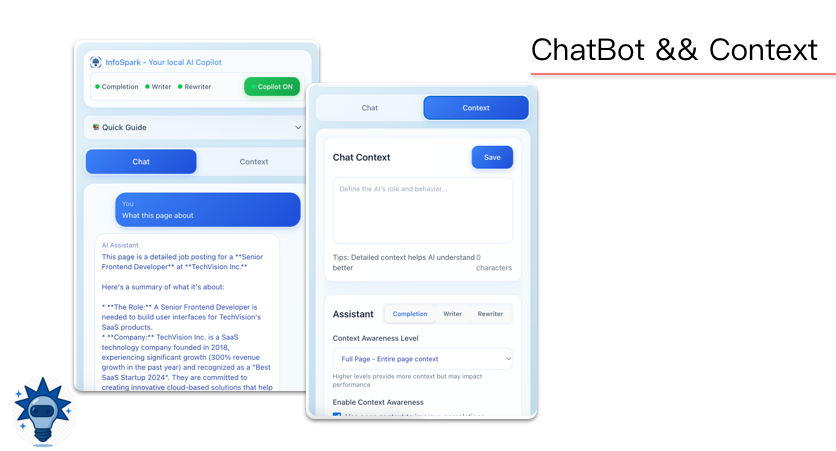
1. Multi-turn Chatbot
An intelligent conversational agent that supports multi-turn dialogue powered by the Prompt API.
It allows users to customize and manage conversation contexts, understand the content and intent of the current web page, and engage in interactive discussions directly within the browser.
This enables fluid, context-aware communication — from answering questions to assisting with on-page tasks.

2. Copilot Assistant
The Copilot activates whenever you interact with an input box or text area on a webpage.
It provides real-time writing support through an intuitive floating panel.
All Copilot features deliver streaming output for a smooth, responsive experience, and include Caching & Reuse to store repeated generations and reduce overhead.
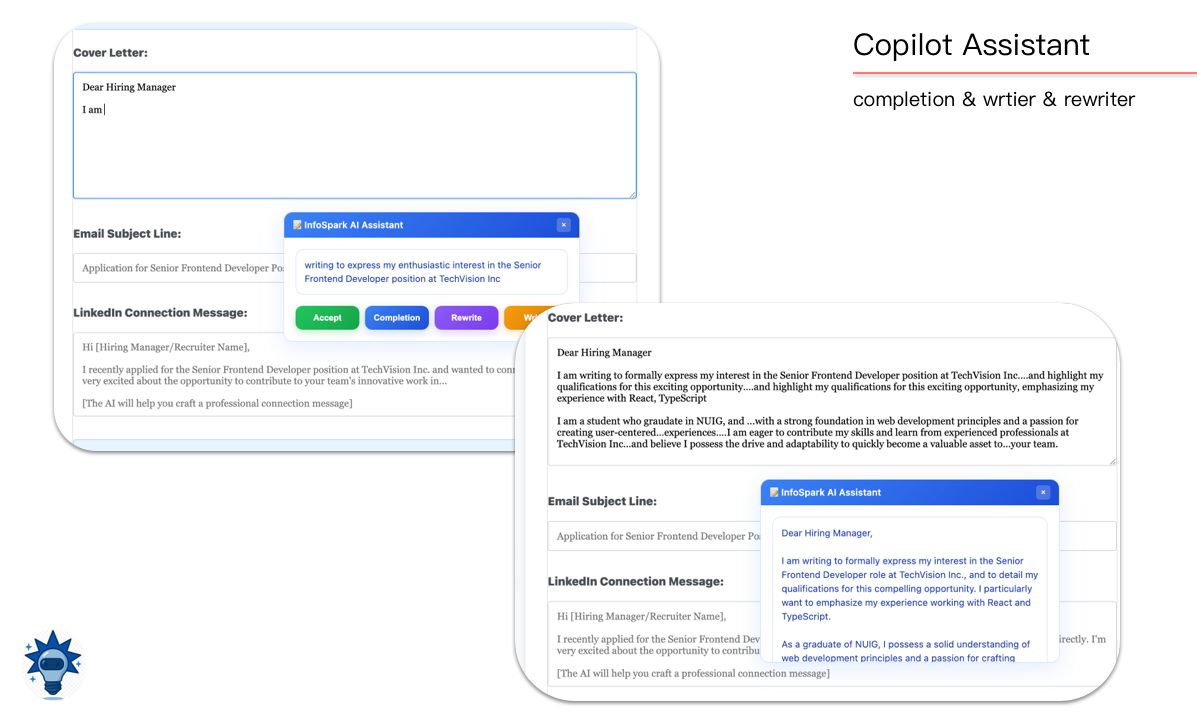
Completion
- Smart Completion: Predicts and completes your text naturally based on context.
- Supports three levels of perception — detecting only input content, nearby elements (default), or the entire page.
- These levels can be freely switched to enhance completion accuracy and flexibility.
- Supports three levels of perception — detecting only input content, nearby elements (default), or the entire page.
- Prompt-based Generation: Creates new content using your current text as a cue — perfect for drafting emails, summaries, or creative text.
Writer & Rewriter
- Rewriting & Polishing: Refines your writing for clarity, fluency, or tone, using real-time streaming for a seamless experience.
- Adaptive Context Control: Lets you adjust output style, tone, or format on the fly to match your preferences.
- Memory & Personalization: Optionally remembers recent inputs or style choices to maintain consistency across sessions.
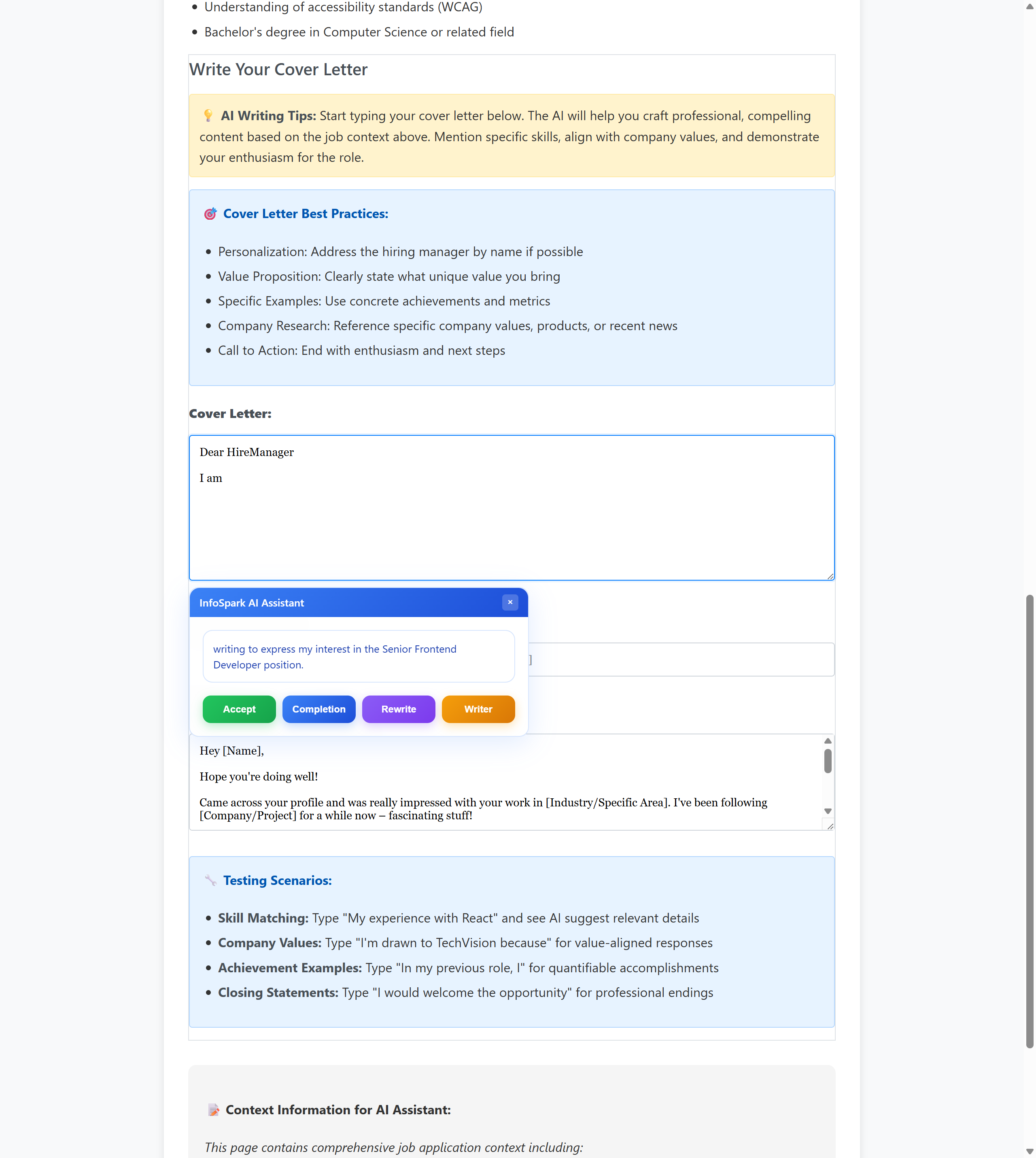
3. Seamless Interaction Design
The Copilot tracks focus-in and focus-out events to trigger suggestions precisely when needed.
You can quickly accept results using the TAB key or cancel with ESC.
Together, these features create a smooth, non-intrusive writing experience that feels both intelligent and natural.
How we built it
1. Frontend Extension (Popup Interface)
The popup interface is built with React, consisting of two main components:
- A Context Component that manages the user’s context and configuration states.
- A Chat Component that handles multi-turn dialogue interactions.
Both components communicate with background services through Chrome Messaging and Chrome Storage, ensuring seamless data synchronization and state management.
2. Background Service (background.js)
Serving as the core orchestration layer, background.js implements a modular architecture with clear separation of concerns:
- StateManager: Handles Copilot enable/disable state and tab management with persistent storage.
- SessionManager: Manages AI model lifecycles (LanguageModel, Writer, Rewriter) with intelligent session creation and destruction.
- MessageHandler: Processes inter-component communication with unified error handling and response formatting.
- StreamHandler: Manages real-time streaming responses with
AbortController-based interruption and smart completion logic. - AIAssistantBackground: Main orchestrator that coordinates all components and handles Chrome extension events.
3. Content Script (content.js)
This is the bridge between the extension and the webpage.
It defines a Copilot class that manages element detection, interaction handling, and UI rendering directly within the web page.
The class communicates with the background service through persistent ports, and all related UI styles and behaviors are encapsulated for easy initialization and destruction of Copilot instances within page scripts.
4. Communication Architecture
To ensure efficient coordination between the three layers (Popup, Background, and Content Script), we implement a sophisticated modular communication architecture.
Communication Patterns
Chrome Messaging API: Handles all command-based communication through our custom
MessageHandlerclass, which provides:- Unified error handling and response formatting
- Promise-based async communication patterns
- Automatic message routing to appropriate handlers
- Session lifecycle management (create, reset, status checks)
- Unified error handling and response formatting
Chrome Ports API: Maintains persistent bidirectional connections for real-time operations:
- Streaming AI Responses: Real-time text completion, writing, and rewriting with
AbortControllerinterruption. - Multi-stream Management: Concurrent handling of completion, writer, and rewriter streams.
- Smart Resource Cleanup: Automatic connection cleanup and abort handling on disconnection.
- Streaming AI Responses: Real-time text completion, writing, and rewriting with
Chrome Storage API: Provides intelligent state and context management:
- Persistent Configuration: Copilot state, user preferences, and panel positions.
- Context Caching: Page text snapshots with smart invalidation strategies.
- Session Continuity: AI model parameters and prompt templates across browser restarts.
- Persistent Configuration: Copilot state, user preferences, and panel positions.
Advanced Features
- Context-Aware Communication: Multiple context levels (none / paragraph / full-page) with intelligent truncation.
- Error Recovery: Robust error handling with graceful fallbacks and user notifications.
- Performance Optimization: Debounced operations, intelligent caching, and resource pooling.
5. Built-in AI Integration
- The Prompt module maintains two independent sessions: one for multi-turn dialogue and another for completion assistance.
- Both the Writer and Rewriter modules leverage streaming generation, producing fluent, long-form text based on user prompts and contextual cues — delivering real-time, natural writing assistance.
Challenges we ran into
Since this was my first time developing a Chrome extension, and I wasn’t very familiar with native JavaScript, much of the process involved learning by doing. Along the way, I encountered several key challenges:
Session Management Managing multiple sessions locally turned out to be quite challenging — running several sessions simultaneously can heavily consume system resources.
- Solution: We decided to persist only the multi-turn chat session while creating and destroying other sessions dynamically. When switching between different modes, inactive sessions are immediately terminated to reduce memory usage.
DOM Manipulation Working directly with the DOM was often tricky due to the diverse structures of different websites. We tried to use the simplest and most lightweight implementation possible to maintain compatibility and avoid bloated scripts. Still, occasional script conflicts or unexpected behaviors could occur on complex web pages.
Completion Logic Complexity Implementing text completion was another difficult part. The process involves complex comparisons and prompt handling, which can be limited by local hardware and isn’t natively optimized for such workloads. With limited manpower, we couldn’t build a fully robust completion engine, but through prompt engineering and caching strategies, we made the results reasonably accurate and fast.
Accomplishments We’re Proud Of
We set out to build a user-friendly and practical tool that genuinely improves everyday writing experiences.m I’m proud that we’ve successfully created an innovative and functional Copilot system that leverages built-in AI models to provide useful assistance . all for free and in a way that’s accessible to everyone.
We developed a well-structured application framework, following a Script → Background → Frontend architecture. Each system operates independently, avoiding unnecessary coupling and ensuring modularity.
Our session management design proved effective — even with multiple sessions running, the service remains smooth and responsive, with minimal delay on high-performance machines.
What We Learned
Deep Dive into Chrome Extension Development We gained hands-on experience with the core features of Chrome extensions, including message passing, port communication, and storage management. Building this project from scratch gave us a full understanding of how background services, content scripts, and popup interfaces work together to create a seamless browser experience.
Designing for Real Users This was our first time building a multifunctional extension, and it taught us a lot about the importance of product details. Small decisions — such as when to trigger the Copilot panel, how to handle completion delays, or how to switch between sessions smoothly — turned out to have a huge impact on user experience. We learned how to balance functionality, responsiveness, and simplicity, and how even subtle improvements can make the product feel much more natural to use.
Resilience and Growth The development journey wasn’t always smooth — we faced technical setbacks and moments of self-doubt. But through persistence, teamwork, and continuous iteration, we completed something meaningful. The process reminded us that real progress often comes from embracing challenges, staying patient, and learning from every obstacle — and that sense of accomplishment at the end was truly rewarding.
What's next
- Explore more efficient session initialization methods to improve performance and enhance the overall interaction experience.
- Optimize text completion capabilities — the current implementation struggles with managing long-text outputs, occasionally producing irrelevant or incoherent content.
- Research advanced similarity computation techniques similar to those used in real Copilot systems, aiming to achieve more contextually relevant completions.
- Improve caching mechanisms to enhance generation smoothness and ensure a more seamless user experience. --write help by infospark
Built With
- built-in-ai
- chrome
- css
- html
- javascript


Log in or sign up for Devpost to join the conversation.