Inspiration
I'm a university student applying to multiple internships, research fellowships, and hackathons over the next few months. Every day, I was manually checking my Gmail inbox for application updates — confirmations, rejections, assessment invites — and logging each one by hand into a spreadsheet. It's exactly the kind of repetitive, multi-step chore an autonomous agent should handle instead of a human doing it manually.
What it does
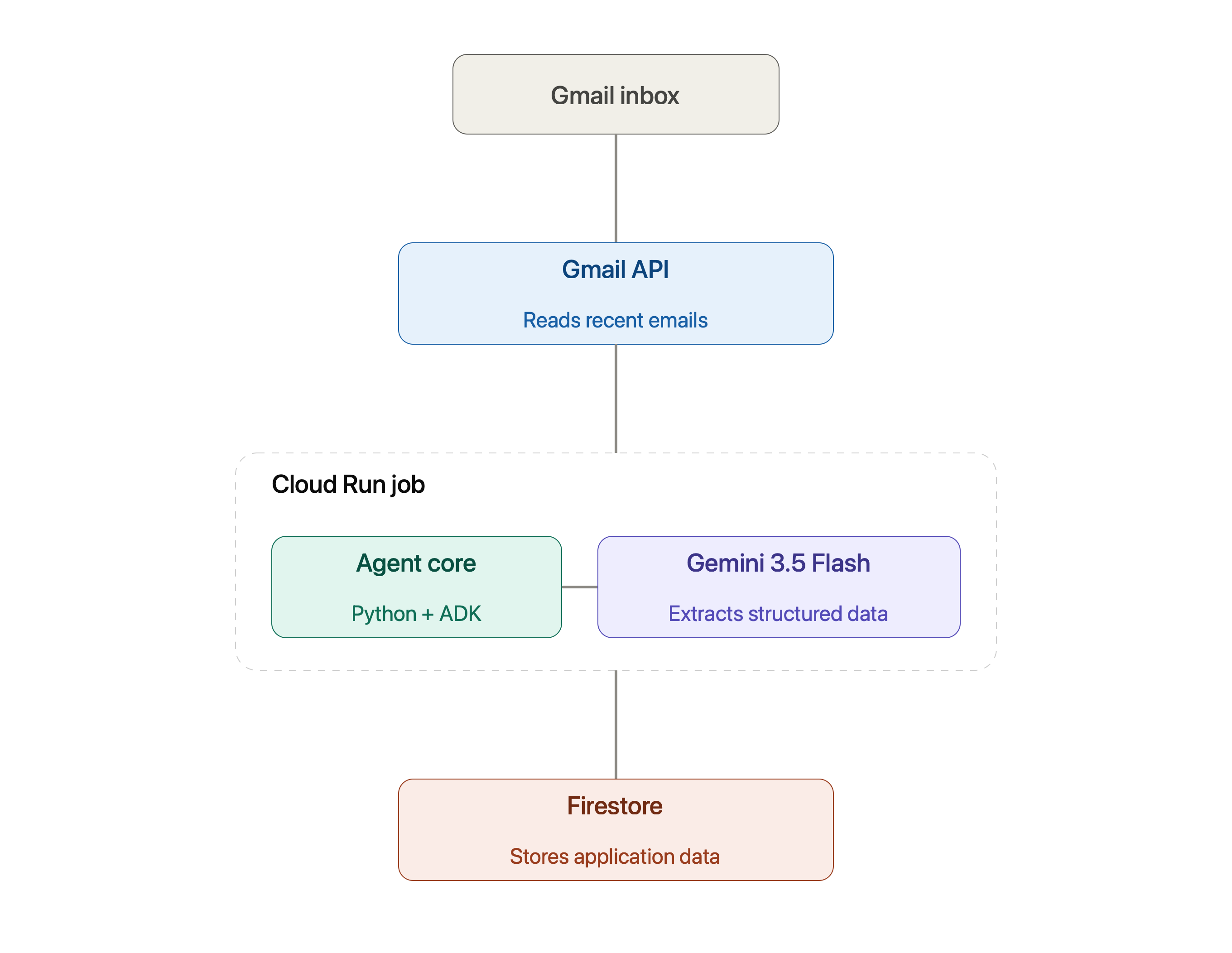
The Application Tracker Agent connects to Gmail, reads recent emails, and uses Gemini 3.5 Flash to determine whether each one is related to a job/internship/hackathon application. For the ones that are, it extracts the company name, application status (applied, rejected, assessment invite, offer), and any deadline mentioned, then saves the structured result directly into Firestore. It runs as a Cloud Run Job, meaning it executes autonomously in the cloud rather than requiring my laptop to be on.
How I built it
- Gmail API for reading inbox data (read-only access)
- Google ADK used during development of the agent logic
- Gemini API (gemini-3.5-flash) for extracting structured data from unstructured email text
- Firestore for persistent storage of tracked applications
- Cloud Run Jobs for autonomous, serverless execution
- Python 3.11, deployed via Docker and Cloud Build
The pipeline: Gmail API reads emails → Gemini extracts structured JSON (company, status, deadline) → results are written to Firestore.
Challenges I ran into
- Cloud Run Services vs Jobs: my first deployment attempt used Cloud Run Services, which expects a container to listen on a port for incoming requests. My agent is a batch-style task that runs once and finishes — it never opens a port, so the deployment failed a health check. Switching to Cloud Run Jobs (built for run-to-completion tasks) was the correct architectural fix.
- OAuth token expiry: Gmail's OAuth refresh tokens for apps still in "Testing" mode expire after a short period. I had to rebuild the authentication flow so the deployed agent reuses and refreshes a locally-generated token rather than trying to open an interactive browser login on a server with no browser available.
- Secrets management for Cloud Build: files excluded via
.gitignore(for GitHub) were also being silently excluded from my Cloud Build uploads by default, meaning my credentials never made it into the deployed container. Adding a separate.gcloudignorefile fixed this — keeping secrets out of GitHub while still including them in the Cloud Build upload.
What I learned
Building and deploying an autonomous agent end-to-end taught me the real difference between "code that works locally" and "code that works unattended in the cloud" — authentication, secrets management, and matching the right Cloud Run deployment model to the actual shape of the workload all mattered more than I expected going in.
What's next
Adding a Cloud Scheduler trigger so the agent runs automatically on a recurring basis (e.g., every hour), rather than being manually triggered — turning it into a genuinely "set and forget" background agent.
Built With
- docker
- firestore
- gmail-api
- google-adk
- google-cloud
- google-cloud-run
- google-gemini
- oauth2
- python

Log in or sign up for Devpost to join the conversation.