
Inspiration

Out of my personal frustration, many times I was waiting for the check after the meal, waiter not to be found, you are running late for the movie. We devised mechanism to close the check digitally, saves the time for guest, merchant can turn tables fast and less paper work for waiter.

How it works

Think of Uber for restaurant payments - retrieve the bill from POS in real-time and pay for it from mobile app using most secure payment methods like Android/ApplePay.

NextSeat is a consumer app that will connect with Clover system and retrieve the bill in real time. Guest can close the check at his will. To start with consumer reserves a seat on selected Clover enabled restaurant. During the reservation, the system automatically creates a consumer account on Clover if one doesn't already exist by searching with consumer mobile number. Once the reservation is successful, consumer goes to the restaurant, occupies the table which he has already reserved.

Waiter attends the guest and takes the order as usual, without interfering with restaurant hospitality. Order is taken on Clover POS.

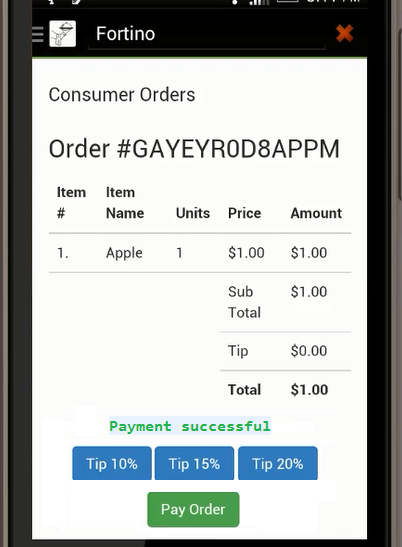
Once the consumer is ready to leave, instead of waiting for the check in traditional way, guest uses consumer app again to view and pay the bill from the phone.

The consumer app simply fetches and shows the unpaid orders of consumer from Clover as shown below.

Consumer App Pay at Table

Challenges I ran into

SSL Certification installation for accessing Clover REST API.

Clover Merchant oAuth setup and pay token generation

Clover emulator setup and APK installation.

Accomplishments that I'm proud of

We have built secure framework to retrieve the bill from pos and also pay for it with CC on file or using Android Pay.

What I learned

Clover API.

What's next for App

NextSeat enhances the dining experiences at three stages (before, during, and after) meal..Imagine OpenTable that works right from a POS system.

Share this project:

Updates

posted an update —

The following snippets helps to get clover merchant info and as well search customers by name and mobile number.

public class CloverClient { public static class Response { int statusCode; String response;

    public Response(int statusCode, String response) {
        this.statusCode = statusCode;
        this.response = response;
    }

    public String toString() {
        return "statusCode=" + statusCode + ", " + response;
    }
}

private static final String CLOVER_BASE_URL_V3 = "https://sandbox.dev.clover.com/v3/merchants/";
protected static HttpClient client;
static {
    client = HttpClientBuilder.create().setUserAgent("Next Set 2.0 Client").build();
}

protected String merchantId;  
protected String authKey;       

public CloverClient(String merchantId, String authKey) {
    this.merchantId = merchantId;
    this.authKey = authKey;
}

protected void setCommonHeaders(HttpRequestBase request) {
    request.setHeader("Accept", "application/json");
    request.setHeader("Authorization", "Bearer " + authKey);
}

public Response get(String url) {
    int statusCode = 500;
    String responseStr = null;
    try {
        HttpGet request = new HttpGet(url);
        setCommonHeaders(request);

        HttpResponse response = client.execute(request);
        statusCode = response.getStatusLine().getStatusCode();
        responseStr = EntityUtils.toString(response.getEntity());
    } catch (Exception e) {
        e.printStackTrace();
    }
    return new Response(statusCode, responseStr);
}

public Response post(String url, String payload) {
    int statusCode = 500;
    String responseStr = null;
    try {
        HttpPost request = new HttpPost(url);
        setCommonHeaders(request);
        request.setEntity(new StringEntity(payload));

        HttpResponse response = client.execute(request);
        statusCode = response.getStatusLine().getStatusCode();
        responseStr = EntityUtils.toString(response.getEntity());
    } catch (Exception e) {
        e.printStackTrace();
    }
    return new Response(statusCode, responseStr);
}

public Response getMerchantInfo() {
    String url = CLOVER_BASE_URL_V3 + merchantId;
    return get(url);
}

public Customer searchCustomer(String lastName, String phoneNumber) {
    String url = null;
    if (lastName != null) {
        url = CLOVER_BASE_URL_V3 + merchantId + "/customers?filter=lastName=" + URLEncoder.encode(lastName) + "&expand=phoneNumbers";   
    } else {
        url = CLOVER_BASE_URL_V3 + merchantId + "/customers?expand=phoneNumbers";   
    }

    Response response = get(url);
    JSONObject responseJSON = (JSONObject) JSONValue.parse(response.response);
    JSONArray customersJSONArray = (JSONArray) responseJSON.get("elements");
    JSONObject customerJSON = null;
    JSONObject phoneNumbersJSON = null;
    JSONArray phonesJSONArray = null;

    String phone = null;
    Customer customer = null;
    if (customersJSONArray != null) {
        for (int i = 0 ; i < customersJSONArray.size() ; i ++) {
            customerJSON = (JSONObject) customersJSONArray.get(i);
            phoneNumbersJSON = (JSONObject) customerJSON.get("phoneNumbers");
            phonesJSONArray = (JSONArray) phoneNumbersJSON.get("elements");

            if (phonesJSONArray == null) {
                continue;
            }

            for (int j = 0 ; j < phonesJSONArray.size() ; j ++) {
                phone = String.valueOf(((JSONObject) phonesJSONArray.get(j)).get("phoneNumber"));
                if (phone != null && phone.equals(phoneNumber)) {
                    customer = new Customer();
                    customer.setId(String.valueOf(customerJSON.get("id")));
                    customer.setFirstName(String.valueOf(customerJSON.get("firstName")));
                    customer.setLastName(String.valueOf(customerJSON.get("lastName")));
                    customer.setPhoneNumber(phoneNumber);
                    break;
                }
            }

            if (customer != null) {
                break;
            }
        }
    }

    return customer;
}

}

Log in or sign up for Devpost to join the conversation.

Submission history