-
-
Architect
Inspiration
97% of the web is inaccessible to screen readers.
Not because the information isn't there — but because modern web interfaces rely on visual cues that screen readers cannot parse: date pickers rendered as calendar grids, dynamic dropdowns with no ARIA labels, React SPAs where the DOM never reflects what the user actually sees.
A blind user trying to book a flight on Google Flights doesn't fail because the site is broken. They fail because the interface was never designed to be navigated without sight.
We asked: what if the agent could simply look at the page — the way a sighted person does?
What it does
Apollos is a voice-controlled AI agent that navigates the web on behalf of blind and low-vision users.
The user speaks their intent naturally:
"Find me the cheapest flight from Ho Chi Minh City to Tokyo next month"
The agent:
- Clarifies ambiguity before starting — asking whether direct or connecting flights are preferred, rough dates, etc.
- Navigates autonomously — opening Google Flights, filling in origin, destination, and dates by interpreting screenshots with Gemini Vision
- Narrates every step in natural language — "I'm on the search form, entering departure date..." — so the user is never left in silence
- Surfaces options mid-task — "I found two options: Vietnam Airlines $298 with one stop, or Japan Airlines $341 direct. Which do you prefer?"
- Escalates gracefully when it reaches payment or sensitive forms — handing off to a human assistant via voice call rather than guessing
The result: a user who cannot see the screen completes a real web task, with full awareness of what the agent is doing at every step.
How we built it
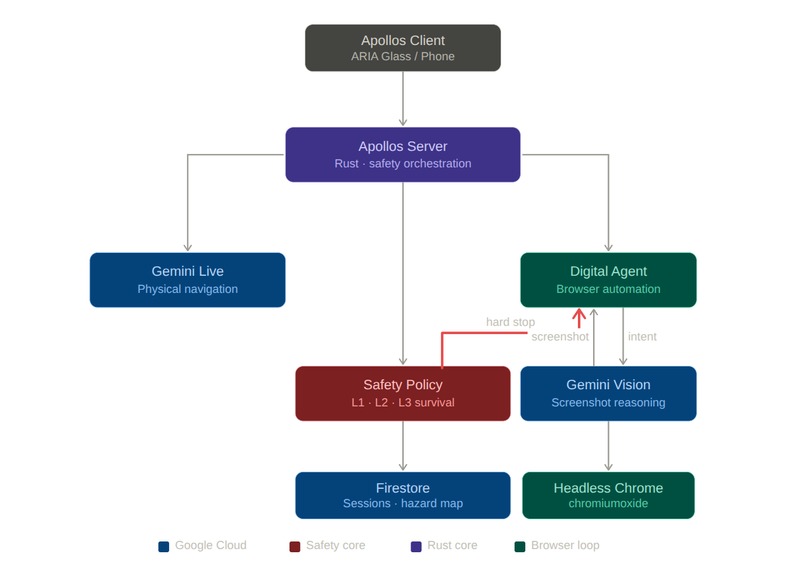
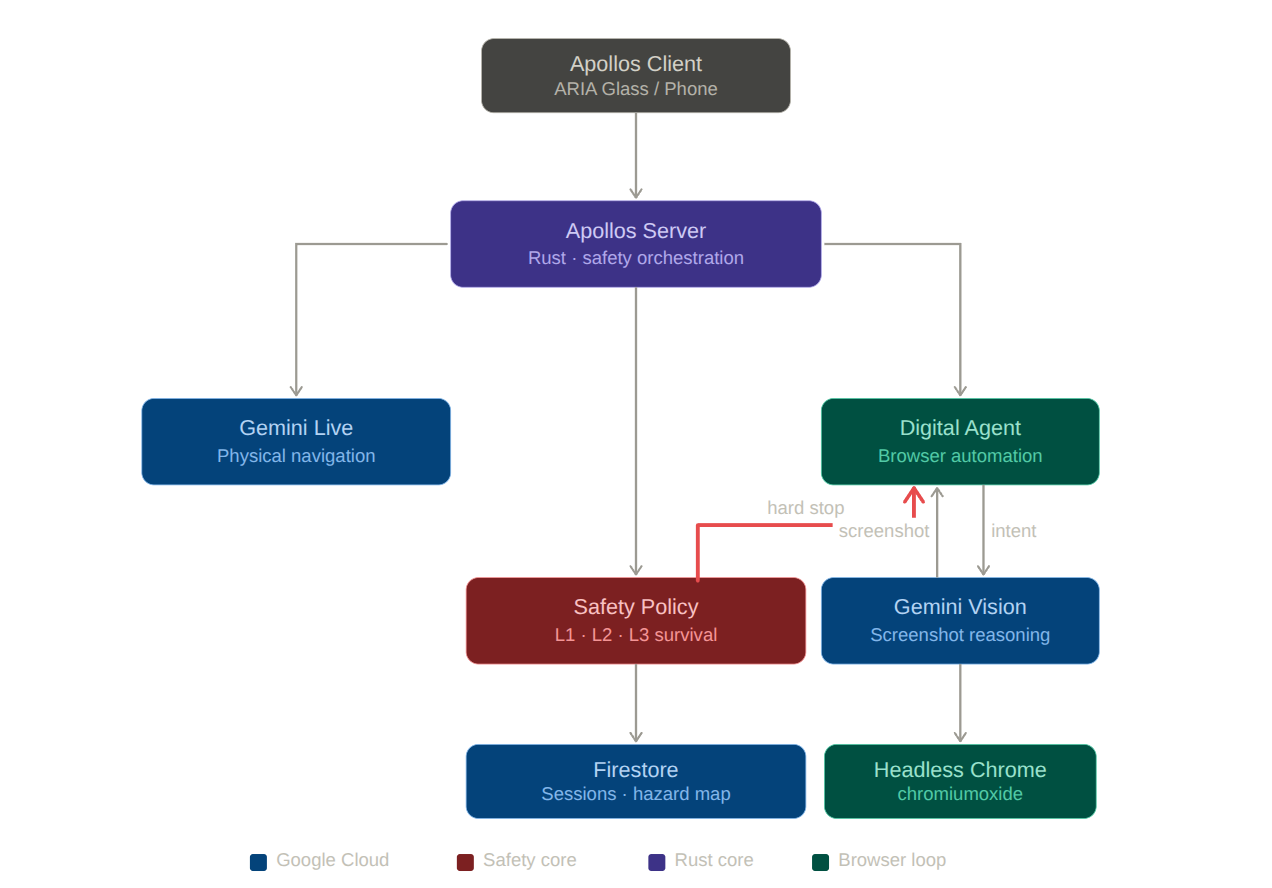
The core loop is a Rust-native agentic system running on Google Cloud:
Voice intent
    → Gemini Vision (screenshot reasoning → AgentAction JSON)
    → chromiumoxide (headless Chrome execution)
    → status narration back to user
    → repeat until Done or Escalate
Gemini Vision receives a PNG screenshot of the current browser state
plus the user's intent and conversation history. It responds with a single
structured action: click, type, navigate, scroll, wait,
ask_user, done, or escalate.
The ask_user action was the key architectural insight. Rather than failing
silently when the intent is ambiguous, the agent pauses, emits a question
through the voice channel, and waits for the user's reply via a
oneshot::channel — resuming the loop with the answer incorporated into
context.
Safety is handled at the system prompt level for sensitive actions
(payment pages, personal data forms → always escalate) and at the
architecture level for physical safety: a hard-stop signal cancels the
browser agent immediately via CancellationToken, ensuring the AI never
delays a safety response.
Challenges
The date picker problem. Google Flights' calendar grid has no
aria-label on individual date cells — the classic accessibility failure
we were trying to solve, now our own obstacle. The solution was to instruct
Gemini to type dates as text into the field rather than click the grid.
Screen readers can't do this. Gemini, looking at a screenshot, can.
Pause/resume across an async boundary. Implementing ask_user required
bridging an HTTP endpoint into a running tokio task without polling.
The solution was a oneshot::channel stored in session state — the HTTP
handler sends the user's answer, the loop unblocks.
Knowing when to stop. The most important capability isn't navigation — it's recognizing when not to proceed. Payment confirmation, OTP fields, irreversible actions: the agent must escalate these to a human, not guess. This is enforced in both the system prompt and a lexical guard in Rust.
What we learned
The 97% statistic is real and immediate. Testing on Google Flights — a site that has invested in accessibility — revealed multiple interactions that remain genuinely impossible for screen readers but trivial for a vision model. The gap isn't about broken sites. It's structural.
The most powerful feature isn't automation. It's narration. Blind users interacting with an agent that silently does things reported significantly higher anxiety than one that narrates each step. The agent saying "I'm scrolling down to see more options" is not a UX nicety — it's trust.

Log in or sign up for Devpost to join the conversation.