-
-
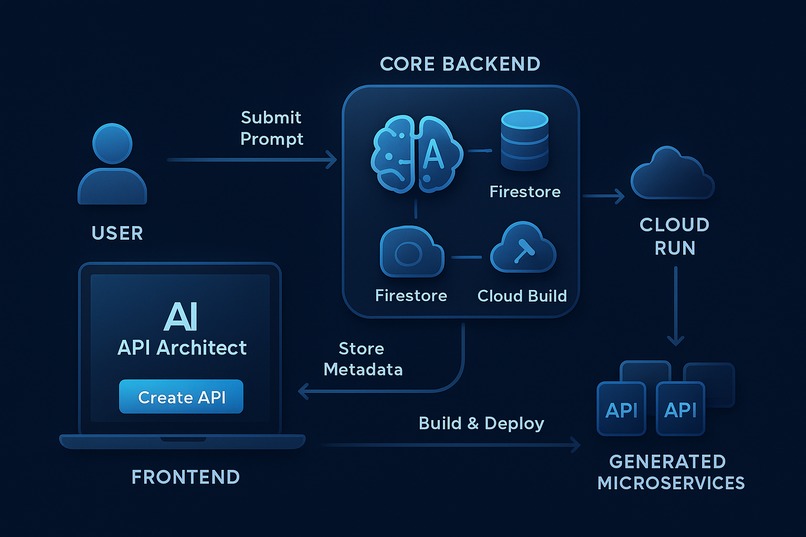
System Architecture Diagram
Inspiration
As a developer, my most valuable asset is creative momentum. The idea for API Architect was born from a frustration with a universal momentum-killer: the "30-minute distraction." Needing a simple backend for a frontend feature—like a contact form or a webhook receiver—often spirals into a half-hour of repetitive DevOps: scaffolding servers, writing validation models, creating Dockerfiles, and wrestling with cloud deployment commands.
I asked myself: "What if I could collapse that entire workflow into a single sentence?" I was inspired by the power of Google Gemini and the seamless scalability of Google Cloud Run to create a tool that lets developers like me stay in their creative zone, transforming a natural language idea into a live, production-ready microservice in seconds, not hours.
What it does
API Architect is an AI-powered DevOps platform that fully automates the creation, deployment, and management of microservices. The entire process is designed to be fast, transparent, and developer-centric.
A developer simply describes the API they need in plain English. My system then:
- Understands the Intent: The frontend calls the FastAPI backend, which immediately saves a
PENDINGrecord to Firestore and uses aBackgroundTaskto start the pipeline without blocking the UI. - Generates a Secure Spec: The backend calls the Google Gemini API (via AI Studio), guided by a precise system prompt, to generate a structured JSON specification for the API endpoint, including path, method, and data schema.
- Synthesizes Code: It renders a production-ready Python/Flask/Gunicorn application from a set of secure, vetted Jinja2 templates. I never execute arbitrary AI-generated code, ensuring security and reliability. The generated source code is zipped and uploaded to Google Cloud Storage.
- Automates Deployment: A Google Cloud Build pipeline is triggered. This pipeline builds the container, pushes it to Google Artifact Registry, and deploys it as a new, independently scalable service on Google Cloud Run.
- Provides Real-time Feedback & Unprecedented Transparency: The dashboard updates in real-time via polling, showing the new service transition from "Pending" → "Building" → "Deployed". Critically, I've built in powerful transparency features: from the UI, users can download the exact zipped source code used for the build (via a signed GCS URL) and download the complete Cloud Build logs directly for any generated service.
The end result is not just a live API endpoint, but a complete, auditable build artifact that gives developers full confidence and control.
How I built it
I designed and built API Architect with a modern, decoupled, multi-service cloud architecture.
Frontend: The UI was initially prototyped using Google AI Studio's code generation capabilities and then manually refined into a professional application. It's a responsive React (TypeScript) SPA built with Vite and styled with Tailwind CSS + shadcn/ui. Deployed on Vercel, it uses Firebase Authentication for user management and TanStack Query (React Query) for efficient server state management, including polling for real-time status updates.
Core Backend (
api-architect-core): The brain of the operation. It's a robust asynchronous API built with FastAPI (Python) and deployed as a serverless container on Google Cloud Run. This service orchestrates the entire workflow. It uses FastAPI'slifespanevents to correctly manage shared, persistent async clients for Google Cloud services, andBackgroundTasksto provide an immediate, non-blocking user experience.Generated Microservices: Each API generated by a user is its own independent Flask/Gunicorn application, containerized and deployed on Google Cloud Run. This multi-service approach (core service + generated services) perfectly leverages the Cloud Run ecosystem.
Google Cloud Integration: I leveraged a suite of powerful Google Cloud services:
- Google Cloud Run is the foundation for the entire backend.
- Google AI Studio (Gemini) provides the intelligence for the natural language interface.
- Google Cloud Build is the automated DevOps engine.
- Google Artifact Registry securely stores all container images.
- Google Cloud Firestore acts as the database for tracking service metadata and status.
- Google Cloud Storage stores the zipped source code artifacts for user download.
- Google Secret Manager securely manages the Gemini API key.
Challenges I ran into
Building a full-stack, cloud-native application as a solo developer was an incredible learning experience. I encountered and overcame a series of real-world engineering problems:
- Environment & Dependency Hell: I faced significant challenges with Python dependency conflicts (especially
pydantic-coreand its Rust compiler) and low-level interpreter incompatibilities. I systematically resolved this by establishing a stable, pinned set of dependencies on Python 3.12. - Cloud vs. Local Discrepancies: I hit classic "it works on my machine" problems, including file system access errors in the read-only Cloud Run environment (fixed by explicitly using
/tmp) and networking redirect loops (fixed by correctly configuring Gunicorn with--forwarded-allow-ips). - Asynchronous Client Management: I learned that initializing async Google Cloud clients on every request leads to resource exhaustion and intermittent failures. I refactored the backend to use FastAPI's
lifespancontext manager to create a single, shared client instance on startup—the correct, production-ready pattern.
Accomplishments that I'm proud of
I am incredibly proud of building a fully functional, end-to-end platform from the ground up that is not just a "black box." The transparency features—allowing users to download their generated source code and build logs directly from the UI—are a key differentiator that I believe embodies the spirit of open and understandable developer tools. Seeing the entire complex CI/CD pipeline work flawlessly, from a simple sentence to a live, auditable, and downloadable microservice, is the accomplishment I'm most proud of.
What I learned
This project was a deep dive into the realities of building and deploying modern cloud-native applications. I learned the critical importance of:
- Robust Configuration: Explicitly configuring every layer, from IAM permissions and CORS policies to Dockerfile commands and CI/CD build contexts, is non-negotiable.
- Systematic Debugging: When faced with cryptic errors, using tools like the browser's Network tab and Cloud Run's application logs is the only way to find the true root cause.
- The Power of Serverless: Google Cloud Run is an incredible platform that allowed me to build and deploy a complex, scalable, multi-service application without ever having to think about managing servers.
What's next for API Architect
API Architect has a huge potential to grow. Future steps I'd like to explore include:
- Multi-Endpoint Support & Blueprint Designer: Allow users to define a whole service with multiple related endpoints.
- Redeploy/Edit Workflow: Enable users to edit their prompts and redeploy a new version of an existing service.
- Automated Testing: Generate basic
pytesttests alongside the Flask application. - Template Packs: Add support for other languages and frameworks like Node.js (Express) and Go.
Built With
- docker
- fastapi
- firebase-authentication
- github
- google-ai-studio
- google-artifact-registry
- google-cloud
- google-cloud-build
- google-cloud-firestore
- google-cloud-run
- google-gemini-api
- google-secret-manager
- gunicorn
- jinja
- pydantic-v2
- python-3.12
- react
- react-router
- shadcn/ui
- tailwind-css
- tanstack-query-(react-query)
- typescript
- vercel
- vite

Log in or sign up for Devpost to join the conversation.