Sahayak
Personal, caring follow-ups for Art of Living centres. Built for the Art of Living Hackathon, November 14–15, 2026 (#BuildForGood).
Live demo: https://aol-hackathon-sahayak.lovable.app (no login needed; choose coordinator or participant)
Problem
Problem statement 1: Help more people stay connected to the wisdom (and 2: free up volunteers to spend their time on people, not admin).
After someone finishes the SKY Happiness Program, staying connected depends on a coordinator remembering to reach out. Coordinators are volunteers with dozens of people each. Some participants deepen their practice; many quietly drift away and nobody notices until months later.
Users
- Coordinators and volunteers see who needs a caring next step today, with a drafted message ready to review.
- Participants see their own journey: practice, goals, upcoming events and messages from their coordinator.
What works
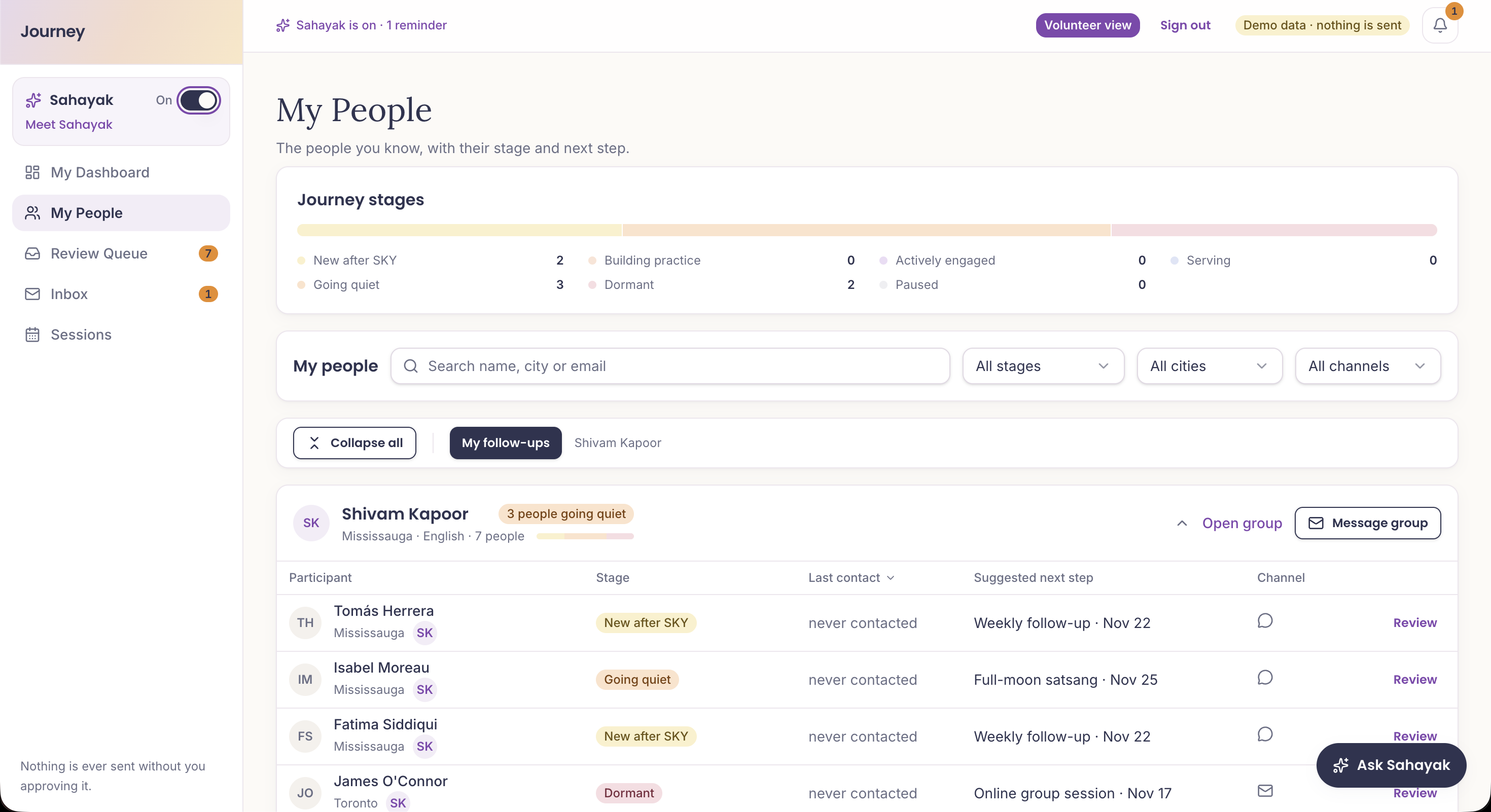
- Journey stages from real history. Each person is placed in one of seven stages (New after SKY, Building practice, Actively engaged, Serving, Going quiet, Dormant, Paused) by plain rules over their courses, attendance and contacts. Every stage comes with a one-line "why" built from the data.
- One suggested next step per person, scored on stage fit, interest, timing, distance, and program prerequisites from the catalog of 17 Art of Living programs.
- Review queue. One drafted message at a time. The coordinator approves, edits, changes channel or language (English / French), swaps to the alternate step, or skips with a reason.
- Nothing is sent without a coordinator pressing Approve. After approval the message appears in the participant's app and the person is paused for 14 days.
- Volunteer groups. People are grouped under the volunteer they most recently did a program with. Groups with people drifting away surface first, and a group invite can be drafted and approved in one step.
- Sahayak, an optional helper: a daily brief, reply reminders, an inbox with suggested replies, and an "Ask Sahayak" panel that answers from the coordinator's own records.
- Sessions with QR check-in, Impact (follow-up rate, journey funnel, people brought back), Team capacity and auto-assign, Programs catalog and Activity log.
- Participant app at
/me: home with practice tracker, journey path, goals, monthly progress calendar, calendar downloads (.ics) and replies to coordinator messages. Participants never see internal stage names, reason codes, drafts or other people. - Participant MCP server at
/mcpwith 11 tools, so a participant's own AI assistant can read and log practice, goals and events under OAuth.
Setup
Needs Node.js 22+ (or Bun).
git clone <this-repository-url>
cd <repository-name>
npm install
npm run dev
Open the URL that the command prints. npm test runs the 114 tests. npm run build makes a production build.
The app works without any keys. "Ask Sahayak" uses a language model when LOVABLE_API_KEY is set on the server; without it, answers come from the records with pre-written wording.
Deployment for Art of Living
- Fastest: open the project in Lovable and press Publish. Lovable hosts the app and the database together.
- Own hosting: run
npm run build, thennpx nitro deploy --prebuilt(Cloudflare Workers). SetSUPABASE_URL,SUPABASE_PUBLISHABLE_KEY, their twoVITE_copies and, optionally,LOVABLE_API_KEY. The database tables are indrizzle/migrations/. - Your own people: the sample participants are in
src/lib/journey/sample-data.ts, and all stage thresholds (14, 45, 60, 90, 120, 180 days) are insrc/lib/journey/config.ts.
Demo steps
Use the links in the app to move between pages. A browser reload resets the demo data.
- Open
/startand choose I'm a coordinator. - Turn Sahayak on in the sidebar. Read the daily brief: who is going quiet, and which volunteer group needs attention.
- Scroll to the people table. Open a person to see their timeline, their stage and the reason for it.
- Open Review Queue. The first draft is for Priya. Edit it if you like, then press Approve and send.
- Press Switch view, then choose I'm a participant. Open Messages (bottom right): the approved message is there. Type a reply.
- Log today's practice, then open My journey and My Progress.
- Switch back to the coordinator. Priya now shows as Paused ("contacted recently"). Open Activity Log and Impact to see the approval and the totals.
Repository layout
src/routes/: pages. Coordinator at/, participant under/me, role switcher at/start, MCP server at/mcpsrc/lib/journey/: stage rules, next-step scoring, message drafts, sample data and the shared storesrc/lib/sahayak/: the one core that the screens, server functions and MCP tools all callsrc/components/: screen building blocks (ui/is shadcn/ui)drizzle/,supabase/: database schema and migrationsdocs/: the original product spec (the build has since grown past it) and the hackathon opening presentationroadmap.md: what was built, in order.AGENTS.md: project rules
Responsible use
- Human-in-the-loop, always. No message, group invite or reply is recorded as sent until a coordinator approves it. The assistant only informs and suggests.
- Explainable, not a black box. Stages and next steps come from plain rules, and every suggestion shows its reason. With too little history the app suggests a gentle check-in, not a confident recommendation.
- Limits on the model. "Ask Sahayak" receives only name, city, stage, last contact and next step; never an email address or phone number. If the model fails, the app answers from the records.
- Respect for the person. "Do not contact" and anyone contacted in the last 14 days are paused and get no draft. Drafts carry no pressure or health promises and stay within 400 characters (WhatsApp, SMS) or 120 words (email).
- Privacy. Participants see only their own data. Account data is protected by row-level security, and every assistant tool call is written to an audit table.
- Tone check. The review screen flags pressure or promise wording such as "last chance" or "guaranteed" in a draft or an edit. It advises; the coordinator decides.
- Traceable. The activity log records each approval, edit and skip.
Tools used
- Lovable to build the app, with Lovable Cloud (Supabase Postgres, auth, row-level security) and the Lovable AI gateway
- Open-source components: React 19, TanStack Start, Router and Query, TypeScript, Vite, Tailwind CSS 4, shadcn/ui, Radix UI, lucide-react, Recharts, date-fns, Zod, qrcode.react, Sonner, Vaul, Supabase JS, Drizzle
- Model Context Protocol (
@lovable.dev/mcp-js) for the participant server - Vitest and Testing Library (open source) for tests
- Claude Code for the audit and final fixes
Next step
Connect the coordinator view to the same database as participant accounts, then add one real sending channel behind the existing Approve step.
Built With
- css
- javascript
- plpgsql
- typescript
