-
-
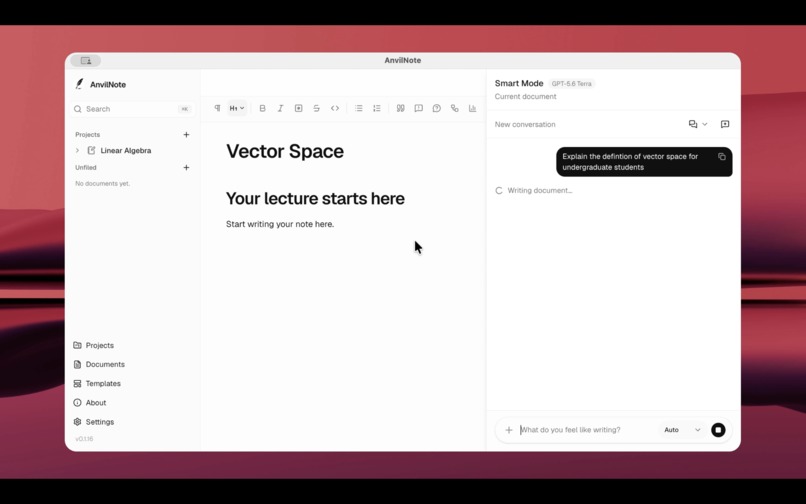
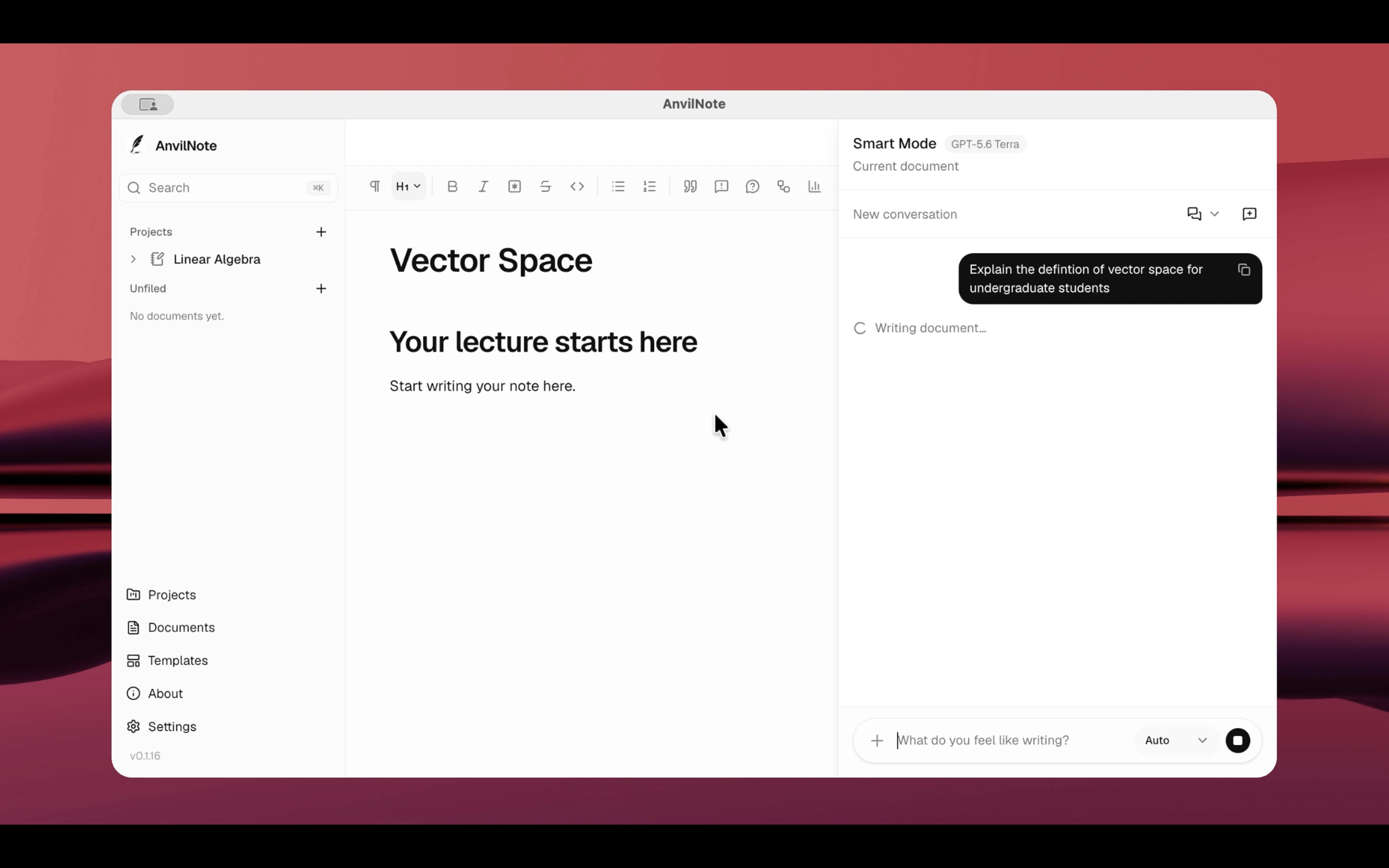
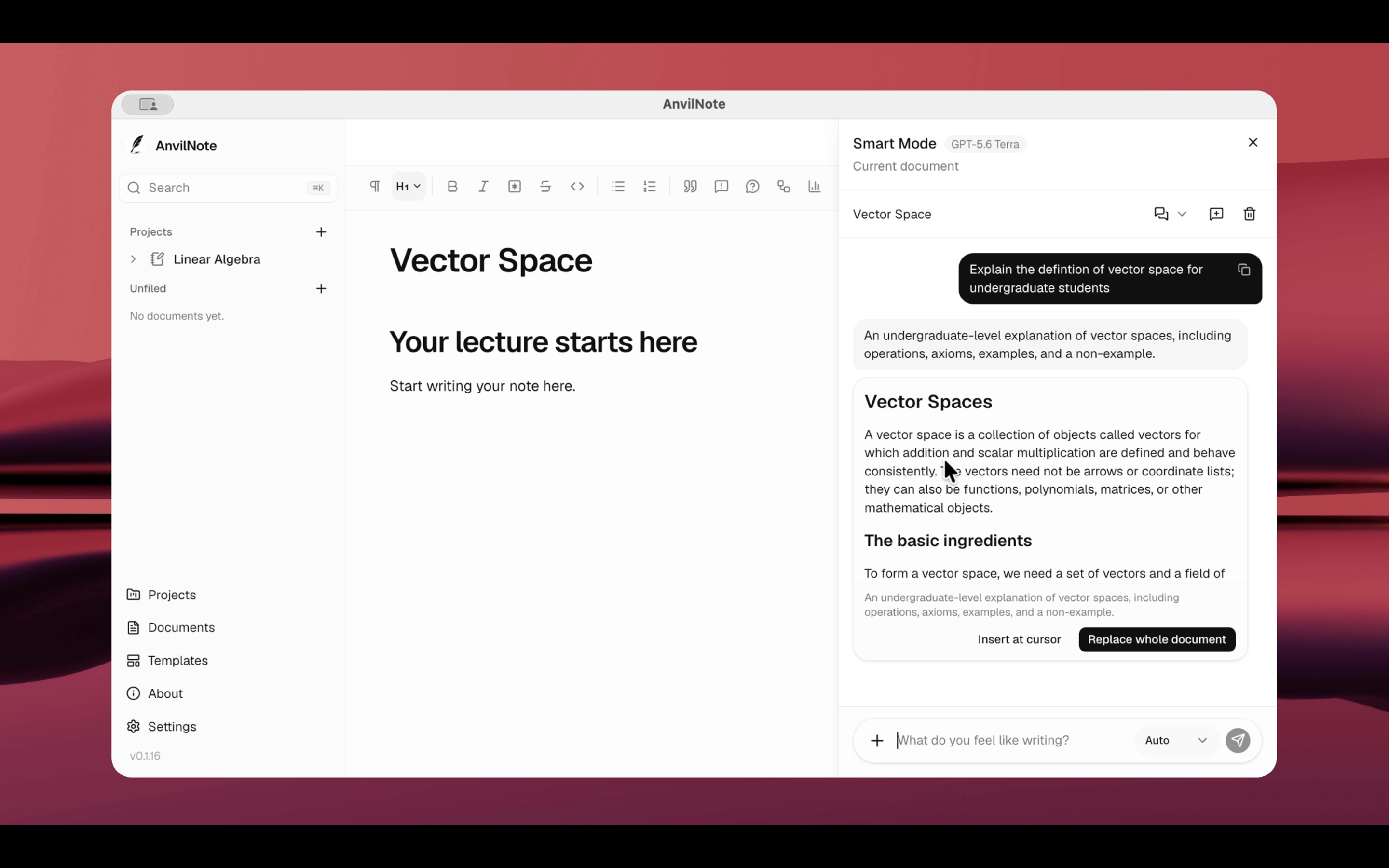
Describe what you want to write, and AnvilNote generates a structured draft directly inside the editor.
-
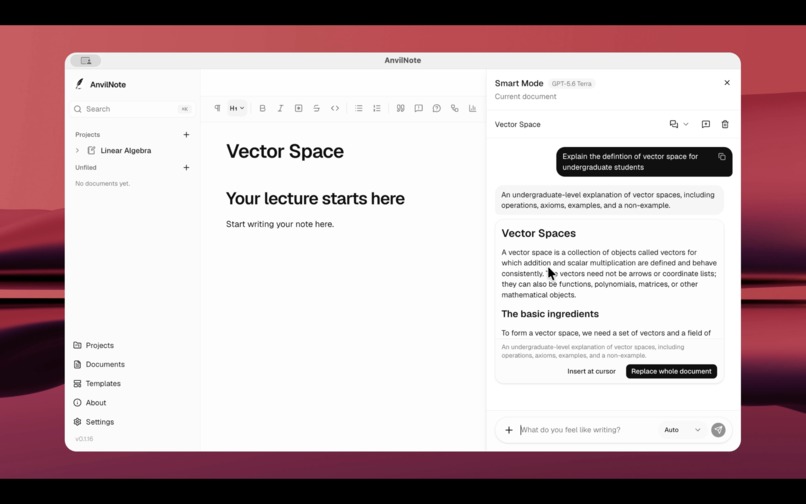
Generated content remains reviewable before it is inserted at the cursor or used to replace the entire document.
-
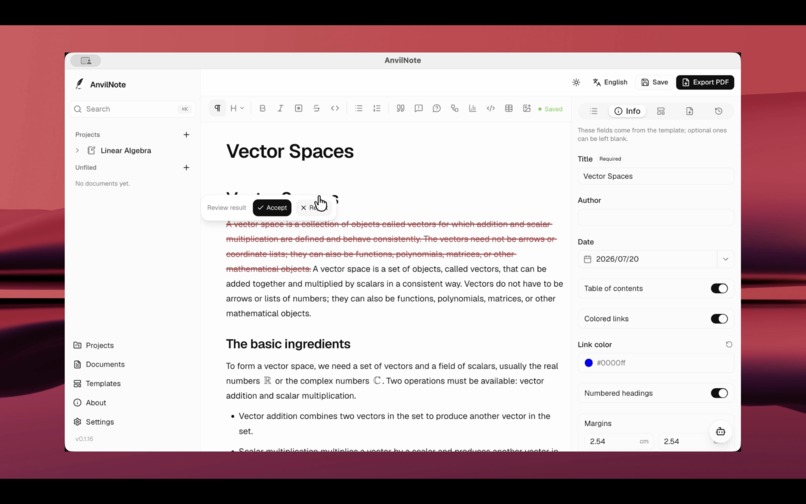
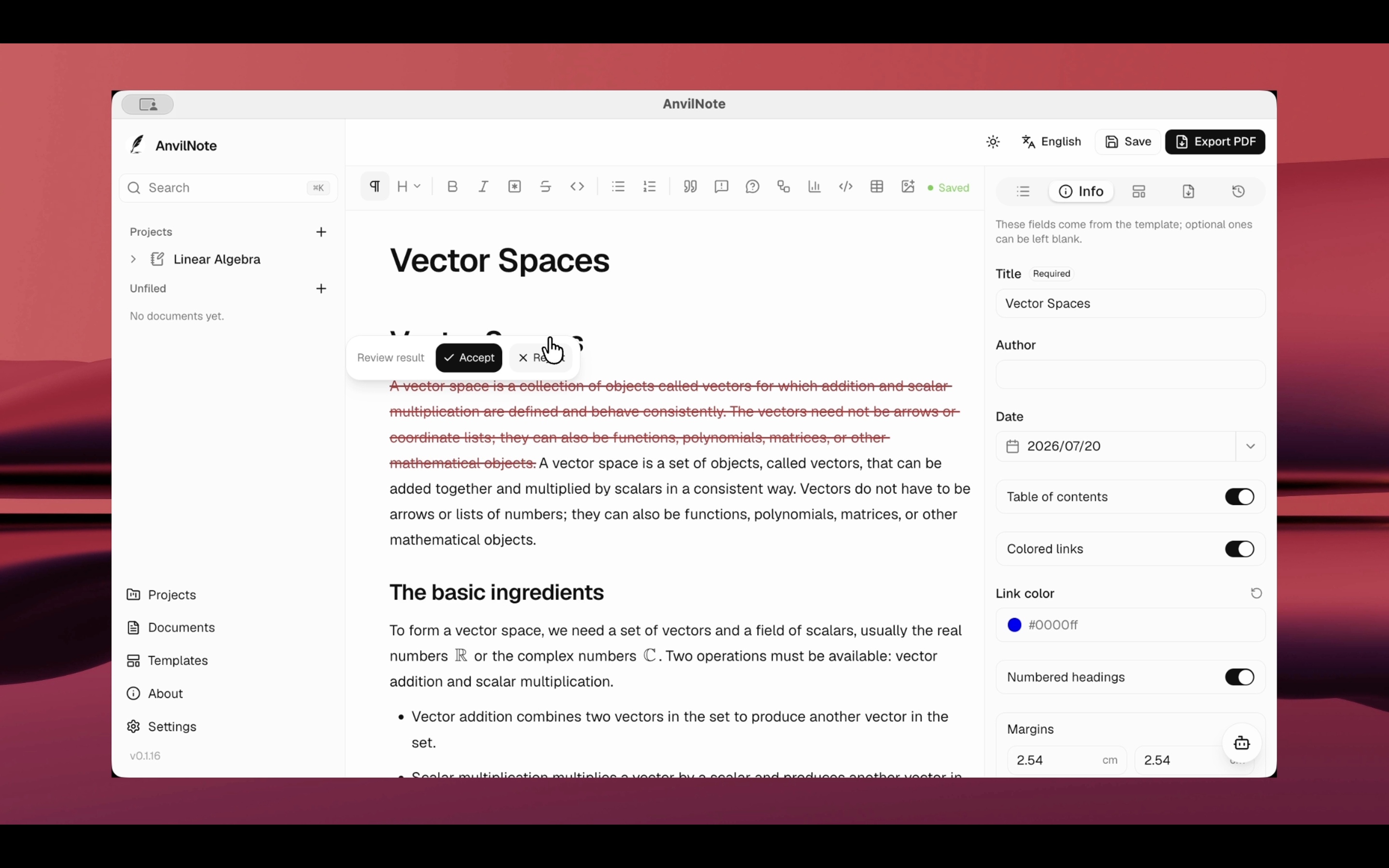
Select any passage, ask Smart Mode to revise it, compare the original and updated versions, and accept only the changes you want.
-
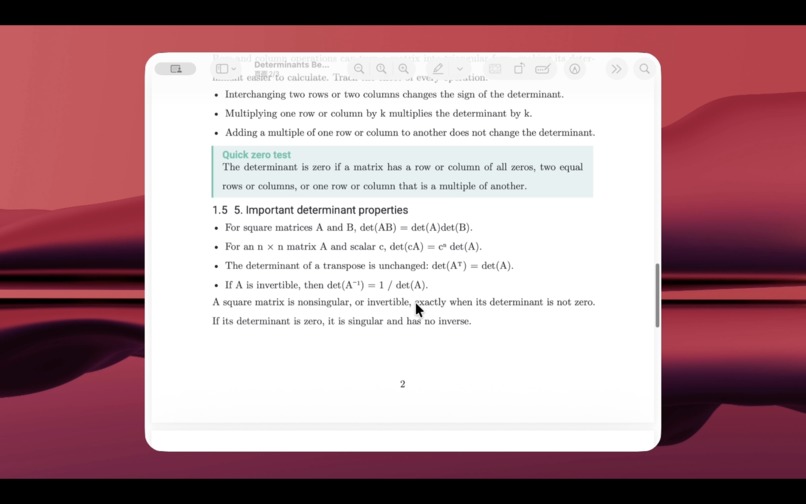
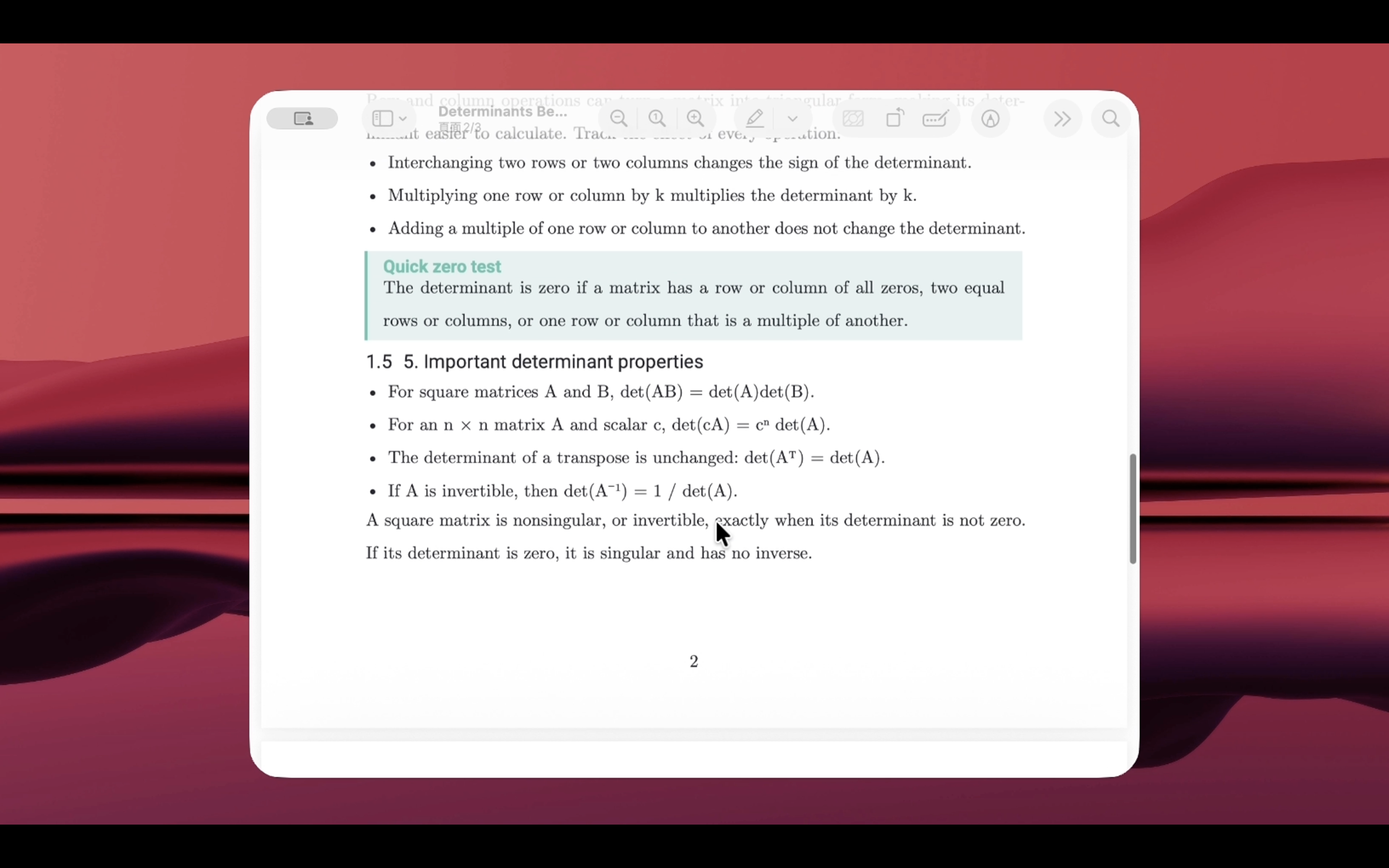
Turn editable notes into clean, consistently formatted PDFs using reusable Typst templates.
Inspiration
I started AnvilNote because I was not satisfied with the usual trade-off in note-taking software.
Simple editors are easy to use, but their exported documents often look plain or inconsistent. More advanced academic tools can produce excellent results, but they usually require users to learn a separate markup language or spend time adjusting formatting.
I wanted a quieter workflow: write naturally in a visual editor, then export the same content as a well-structured PDF or an editable Word document.
AnvilNote began as a local-first writing tool for lecture notes, reports, study materials, and technical documents. The goal is not to add more distractions to writing, but to help users move from rough ideas to a document they can actually submit, print, or share.
What it does
AnvilNote combines a visual document editor with a Typst-based rendering system.
Users can write normal paragraphs, headings, lists, quotations, mathematical expressions, code blocks, and tables. Tables support features such as merged cells, adjustable column widths, and custom row heights. Documents can then be exported using different templates without manually rebuilding the layout.
For PDF export, AnvilNote uses Typst to produce consistent and high-quality typesetting. DOCX export keeps supported mathematical expressions editable in Microsoft Word instead of converting them into images.
I also added Smart Mode, an optional AI writing assistant. It can:
- create a draft from an instruction
- create content from attached TXT, Markdown, PDF, or DOCX files
- rewrite selected text
- use an attachment as additional rewriting context
- show a preview before changing the document
- accept, reject, regenerate, or undo a result
Smart Mode does not silently replace the user's work. The user reviews the proposed document changes before applying them.
AnvilNote uses a bring-your-own-key model. Users connect their own OpenAI API key, and the desktop application stores it through a trusted system boundary instead of placing it in browser storage.
How we built it
AnvilNote is divided into several focused projects rather than one large codebase.
The web editor is built with React, Next.js, Tiptap, Tailwind CSS, and shadcn/ui. Tiptap provides the editing experience, while AnvilNote maintains its own document structure for AI operations and export.
The API is built with Node.js and Express. It handles document requests, attachment extraction, provider communication, usage information, cancellation, and error mapping.
PDF rendering is handled by a separate renderer built around Typst. The desktop application uses Electron and packages the editor, API, renderer, fonts, templates, and local resources into one application.
For Smart Mode, I created a separate anvilnote-ai-writer package. It contains:
- a provider-independent document AST
- strict Zod validation
- prompt profiles for composing and rewriting
- protected-content rules
- writing-style policies
- token and cost estimation
- an OpenAI provider using the Responses API
- safe conversion between provider output and AnvilNote documents
The provider uses Structured Outputs, but the result is still validated locally before it can reach the editor. This gives AnvilNote an additional safety boundary instead of trusting generated JSON directly.
Challenges we ran into
The most difficult part was not sending a prompt to a model. It was making generated content behave like a real document.
The editor, AI provider, renderer, and DOCX exporter all need to agree on the meaning of paragraphs, headings, marks, links, lists, tables, code, and mathematics. A small difference between two document representations can cause the entire result to fail.
One example involved text formatting marks. The provider schema required every text node to include a marks field, using either null or a validated array. During longer generation requests, the model sometimes omitted that field even though the strict schema marked it as required.
The failure was difficult to locate because the API key, model, network request, editor conversion, and local build were all working correctly. I added structure-only diagnostics that recorded whether marks were missing, null, an array, or an object, without recording the user's text or raw model response.
This showed that the field was already missing in the original provider output. The solution was a narrow normalization step that treats a missing marks field as null only for otherwise valid text nodes. Unknown marks, unsafe links, invalid objects, and other schema errors are still rejected.
Another challenge was keeping local development reliable across several repositories. The API, desktop application, editor, renderer, and AI package all have separate builds and tests, so integration problems can appear even when each project passes its own unit tests.
Accomplishments that we're proud of
I am proud that AnvilNote is becoming a complete document workflow rather than only another text editor.
The project can move content through several stages:
- visual editing
- structured document conversion
- optional AI-assisted drafting or rewriting
- preview and user approval
- PDF rendering
- editable DOCX export
I am also proud of the safety boundaries in Smart Mode. Generated content is validated against an allowlist, unsupported structures are rejected, links are checked, document size is limited, and protected editor content is not silently overwritten.
The AI provider is also separated from the rest of the application. OpenAI is the first supported provider, but the internal design allows additional providers to be added later without rebuilding the whole editor.
What we learned
The main lesson was that reliable AI features require much more than a good prompt.
A production writing assistant needs clear document contracts, validation, normalization, error handling, cancellation, cost information, safe credential storage, and a way for users to review changes.
I also learned that strict validation and practical compatibility need to work together. A system should not accept arbitrary malformed output, but it should be able to safely handle small, well-understood provider differences when they have an unambiguous meaning.
Most importantly, I learned that AI should support the writing process rather than become the writing process. The user should remain responsible for deciding what belongs in the final document.
What's next for AnvilNote
The next step is to improve stability and make AnvilNote easier for other people to try.
I plan to add more document templates, improve attachment handling, expand automated integration tests, and support additional operating systems. I also want to improve Google Drive backup so users can save documents to their own storage without depending on a paid AnvilNote cloud service.
Smart Mode will continue to support OpenAI first, while the provider architecture will gradually be opened to other services. Future versions may also include better source references, document comparison, and more precise control over how AI suggestions are applied.
AnvilNote will remain focused on the same idea: a calm writing space that can turn notes into documents without forcing users to choose between convenience and quality.
Built With
- api
- claude
- codex
- electron
- gpt-5.6
- next.js
- node.js
- openai
- react
- structure
- tiptap
- typescript
- typst


Log in or sign up for Devpost to join the conversation.