-
-
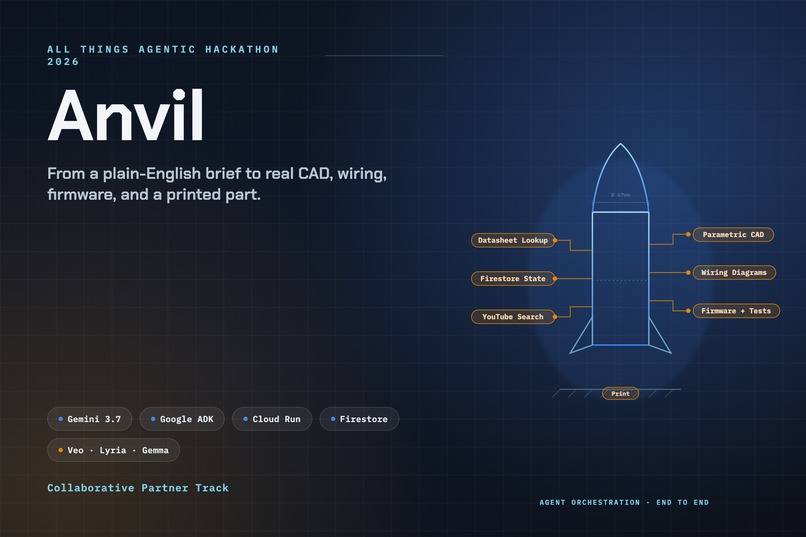
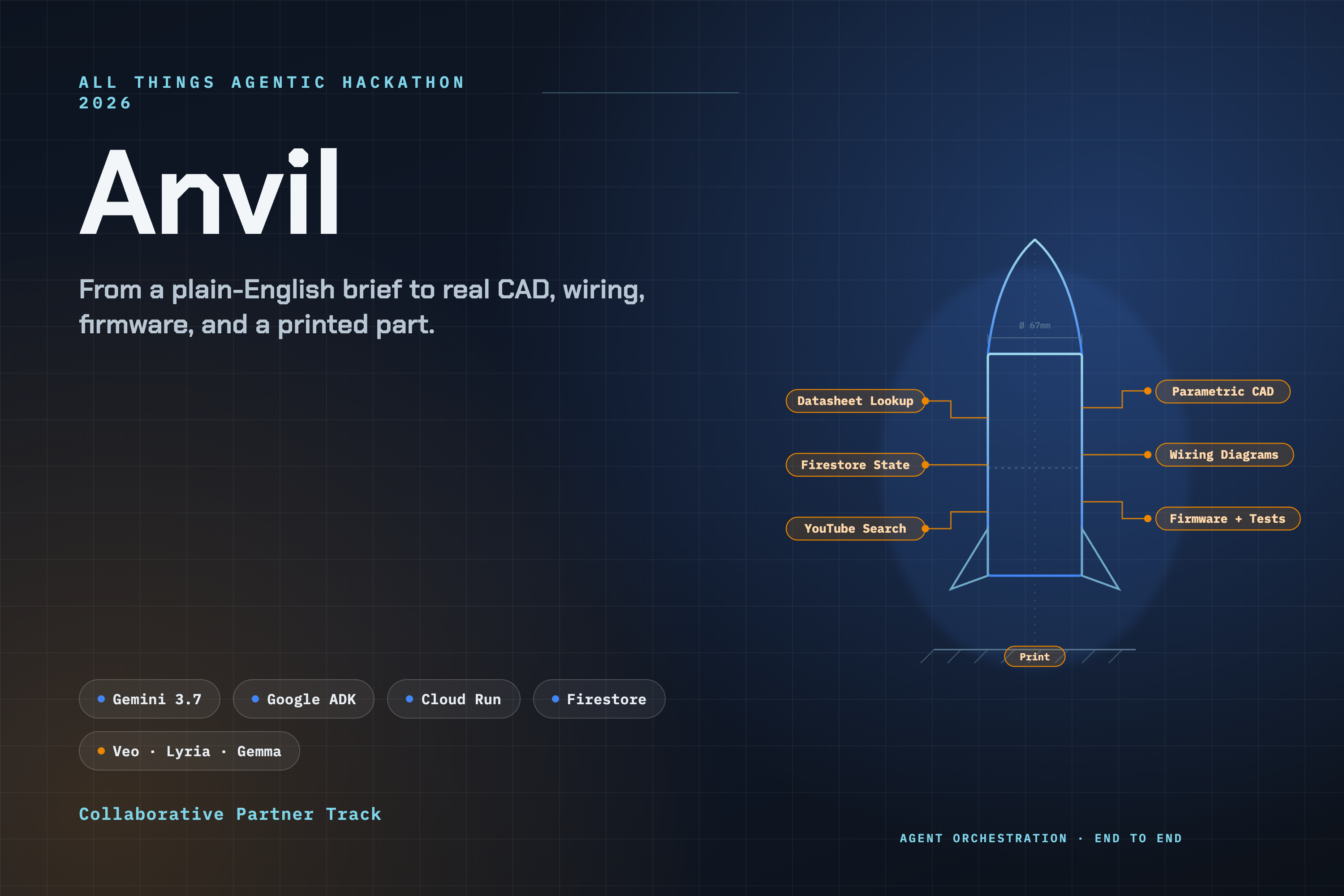
Thumbnail
-
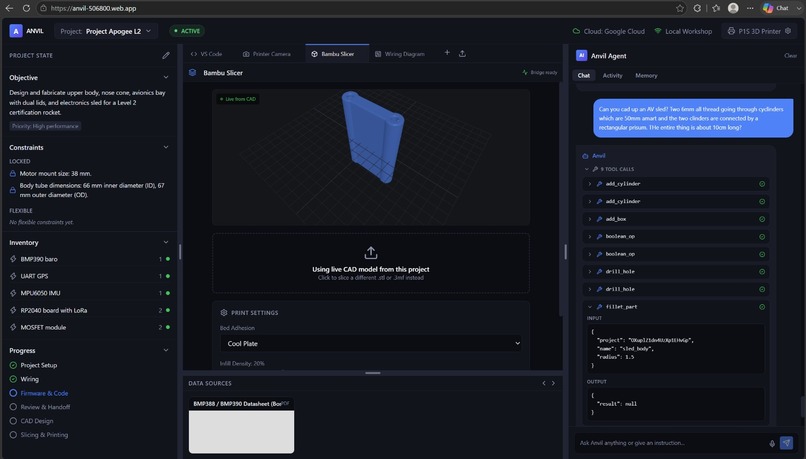
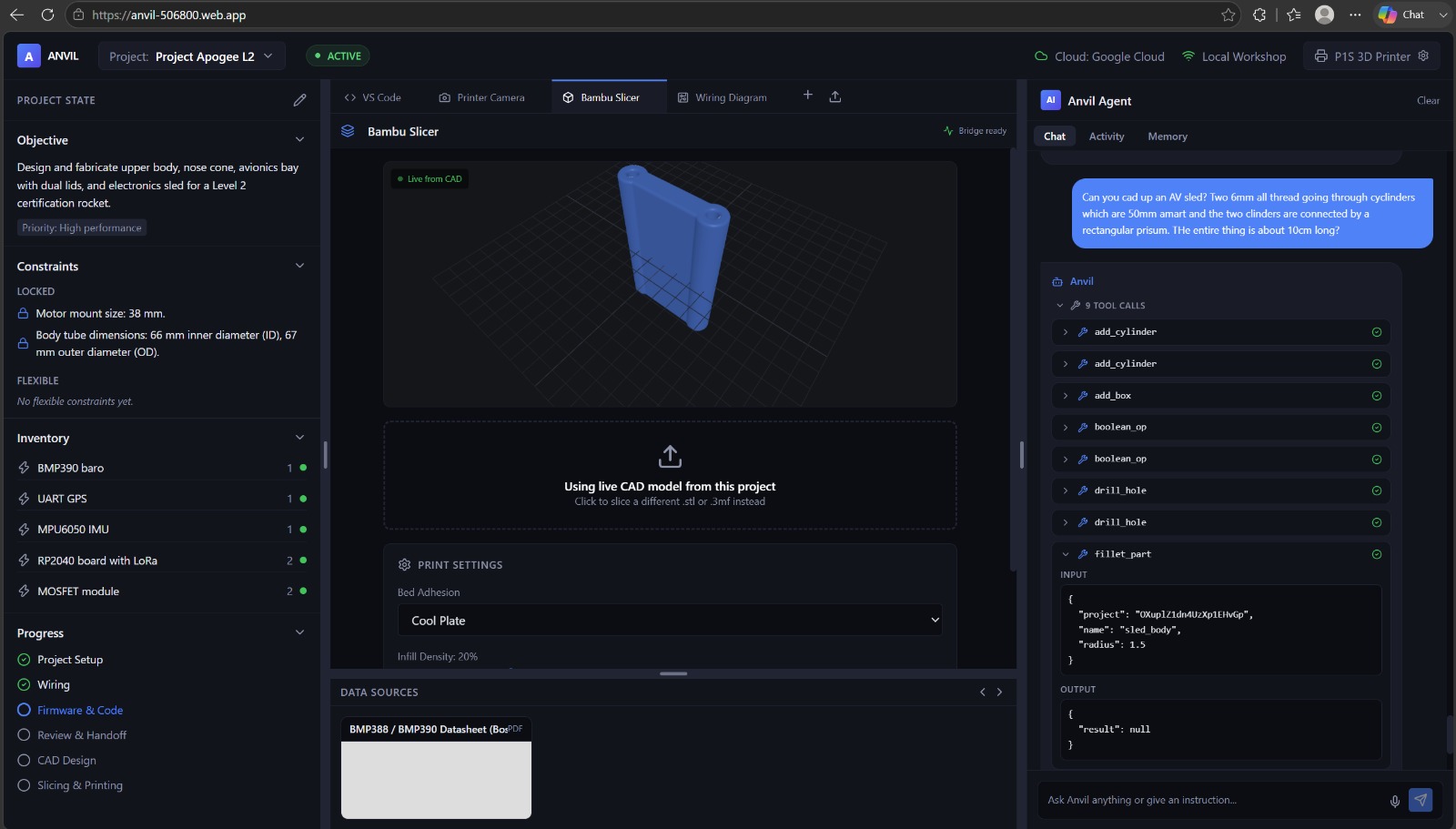
CAD Designing
-
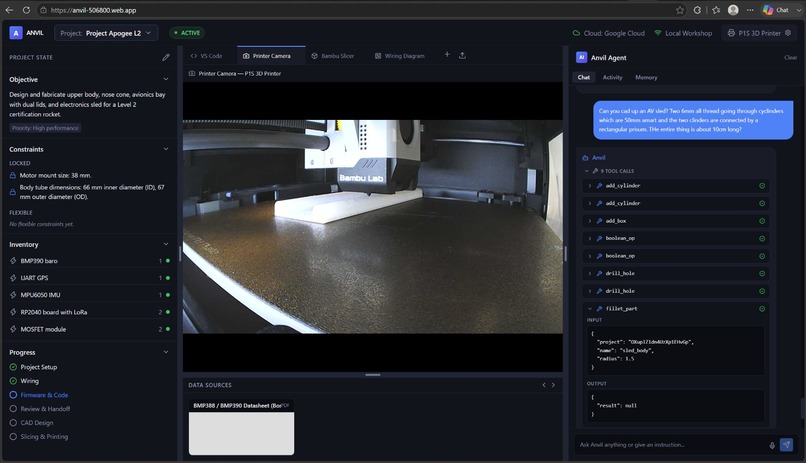
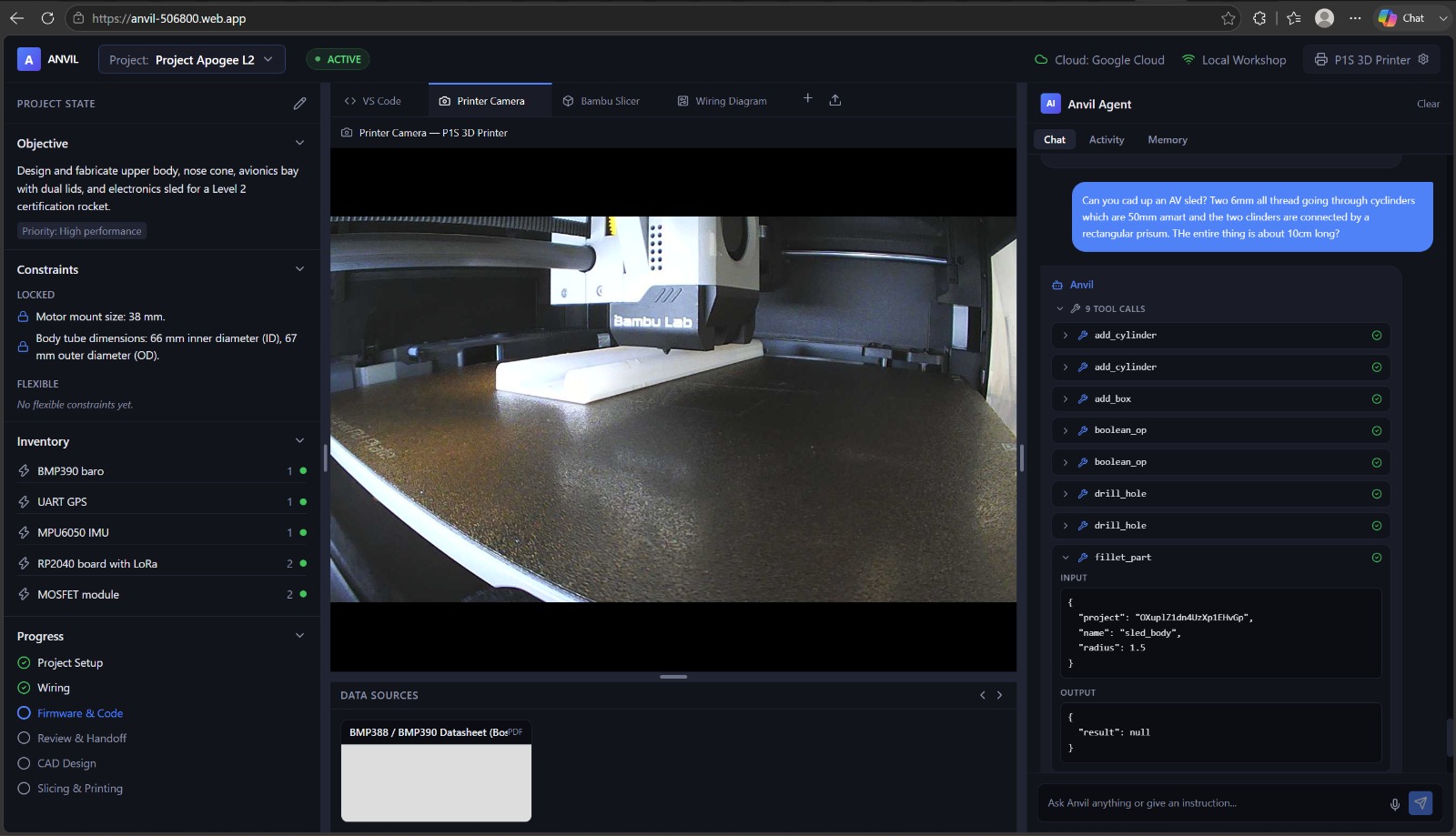
3D Printing
-
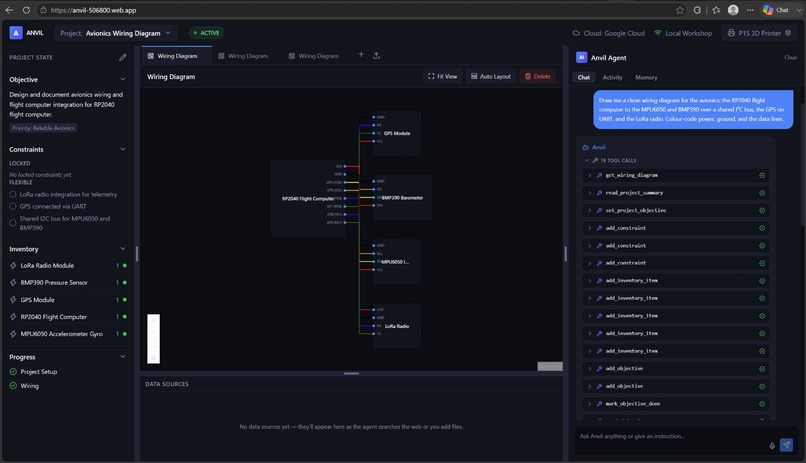
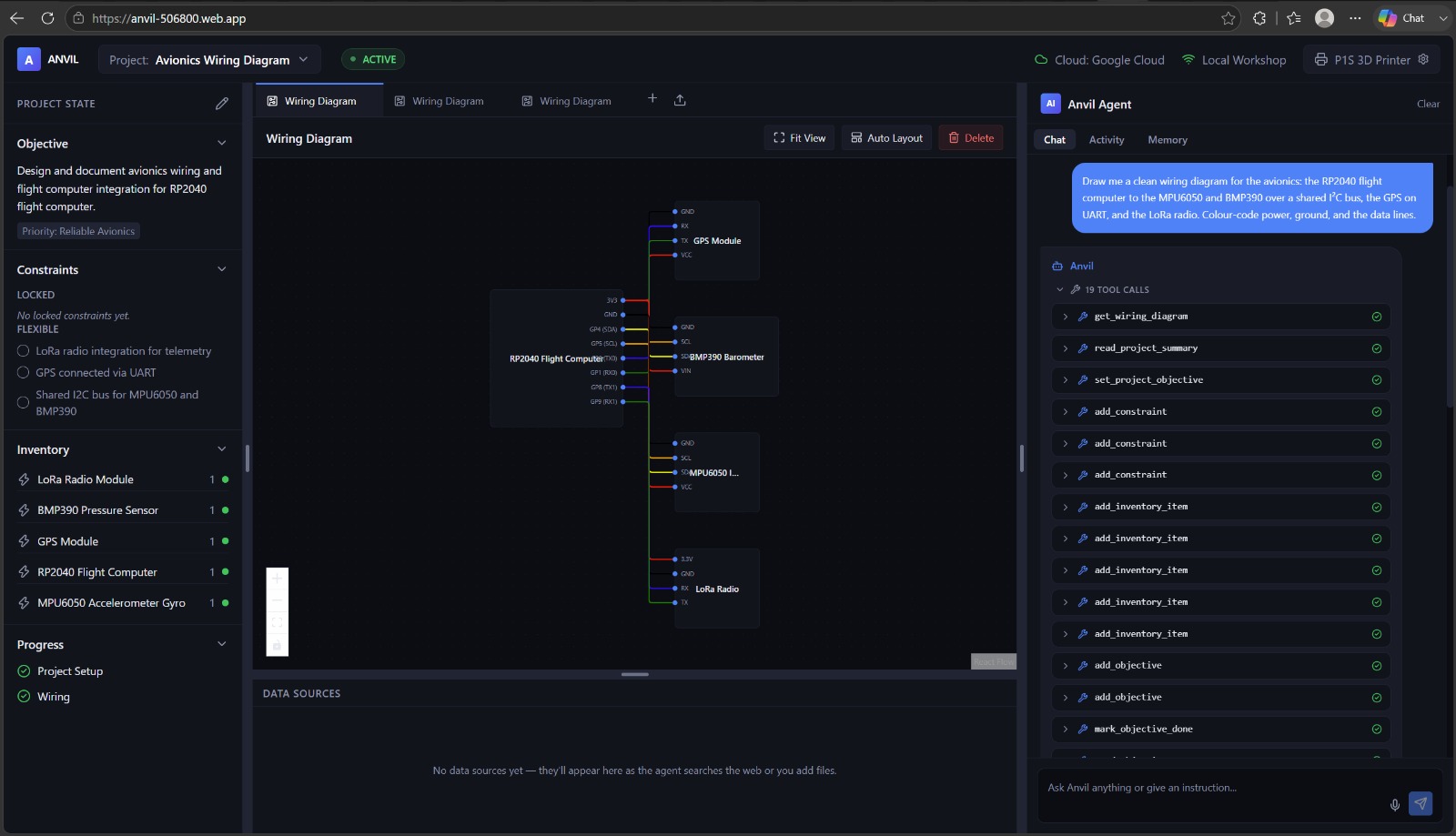
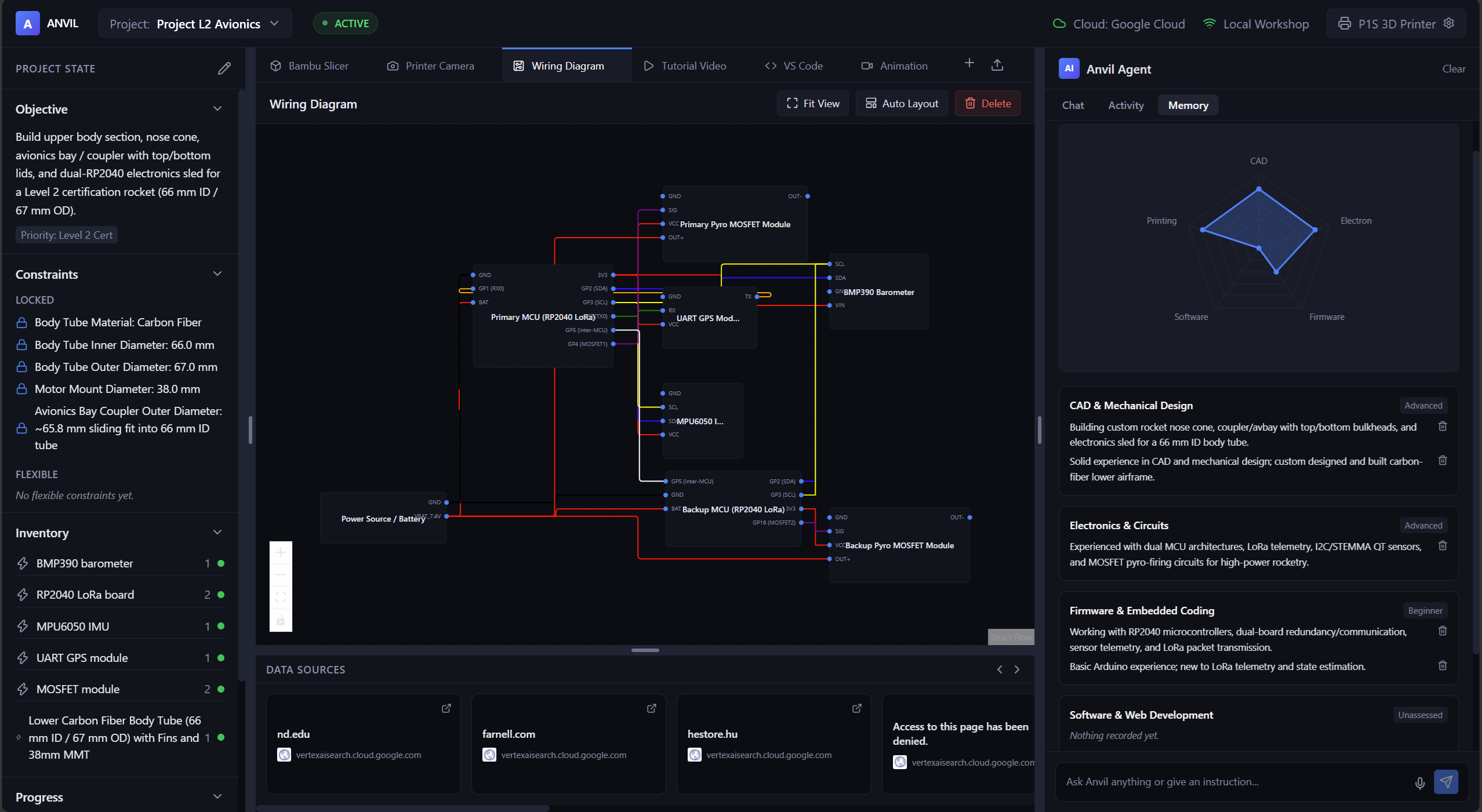
Wiring Diagram
-
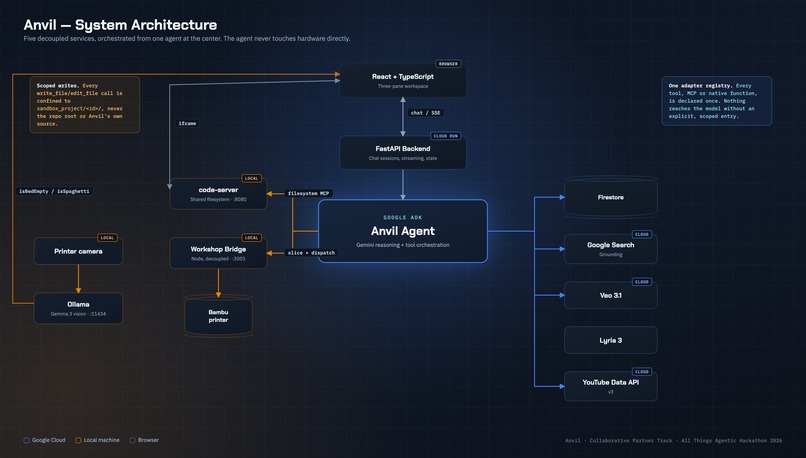
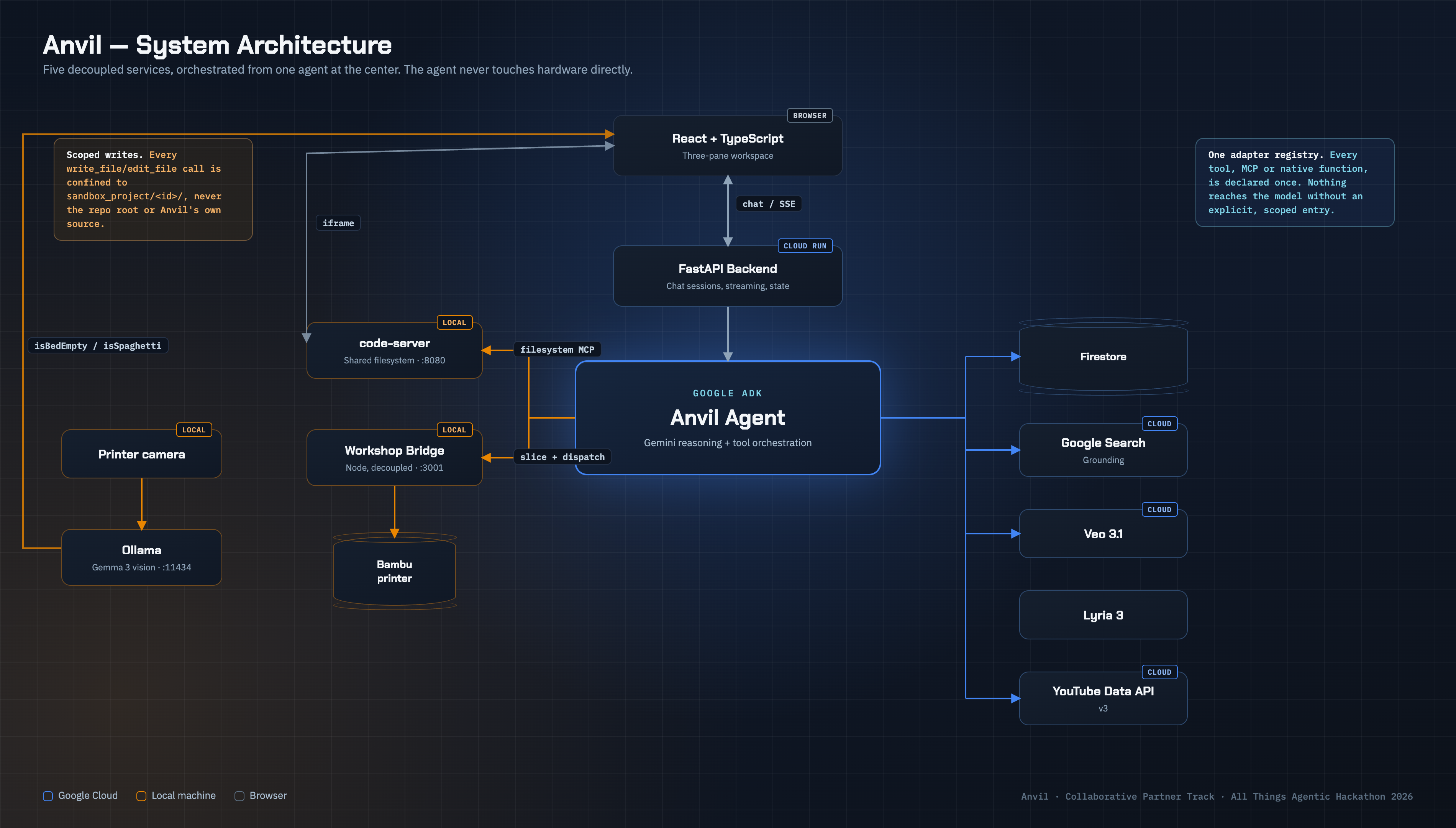
High Level Architecture
-
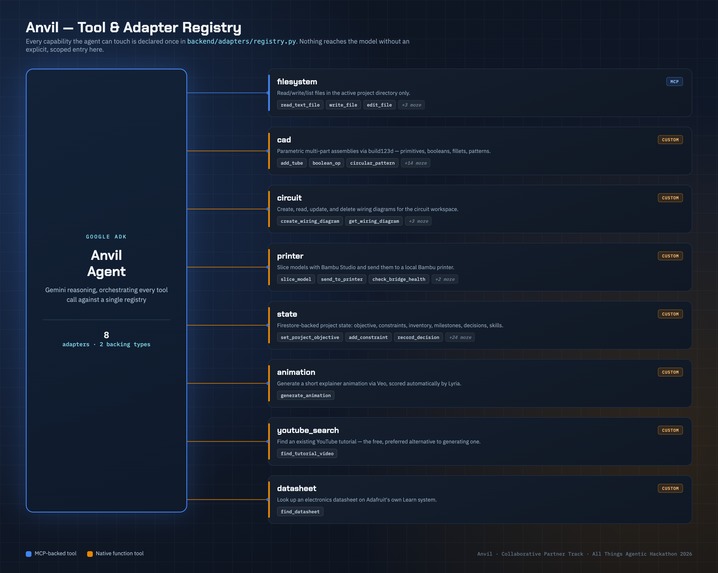
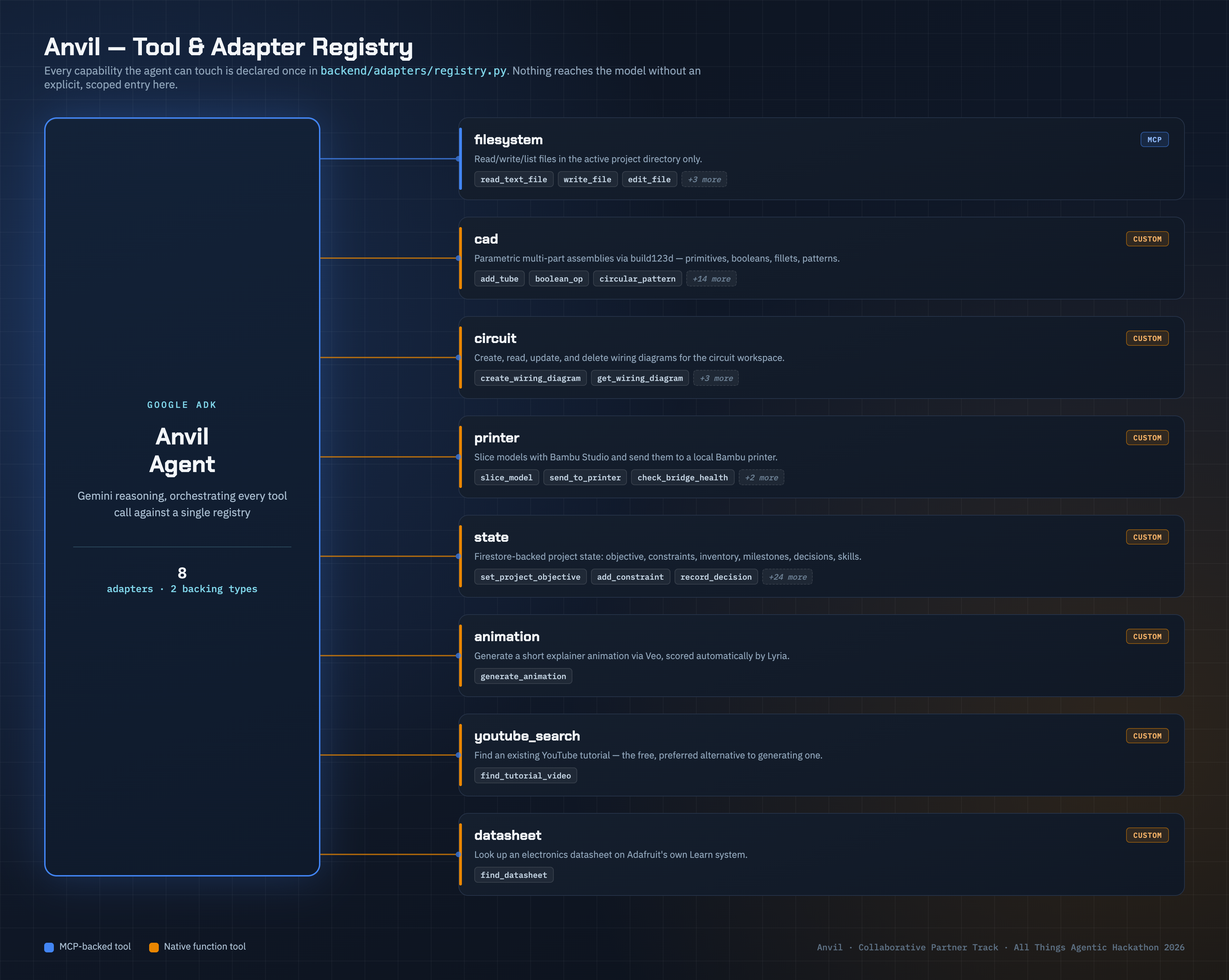
Tool Registry Architecture
-
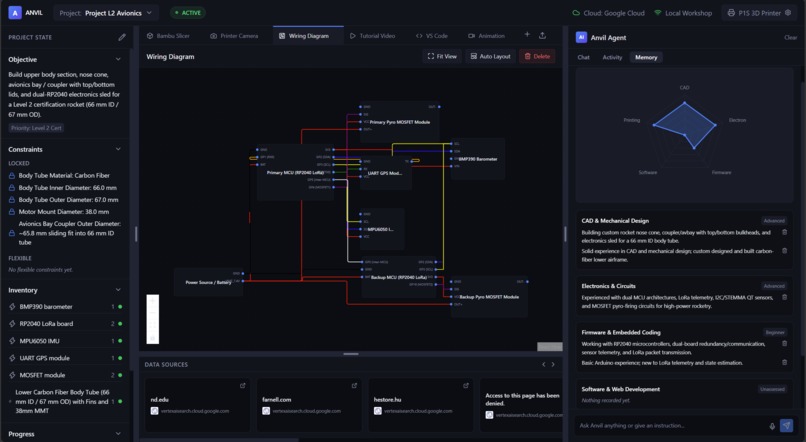
Wiring Diagram
-
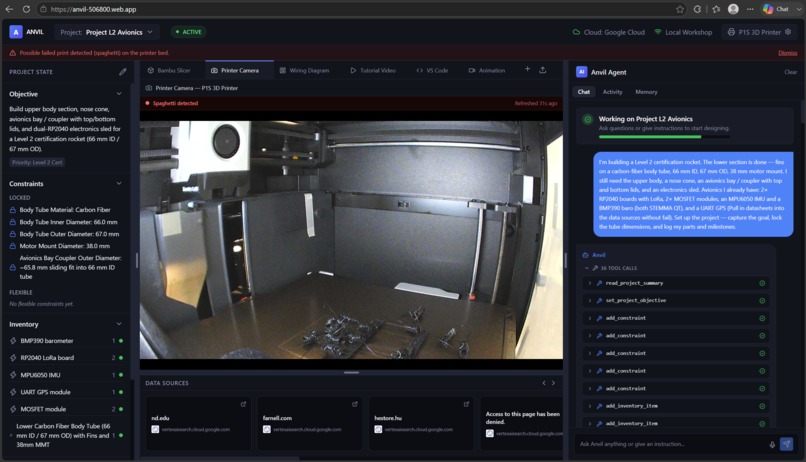
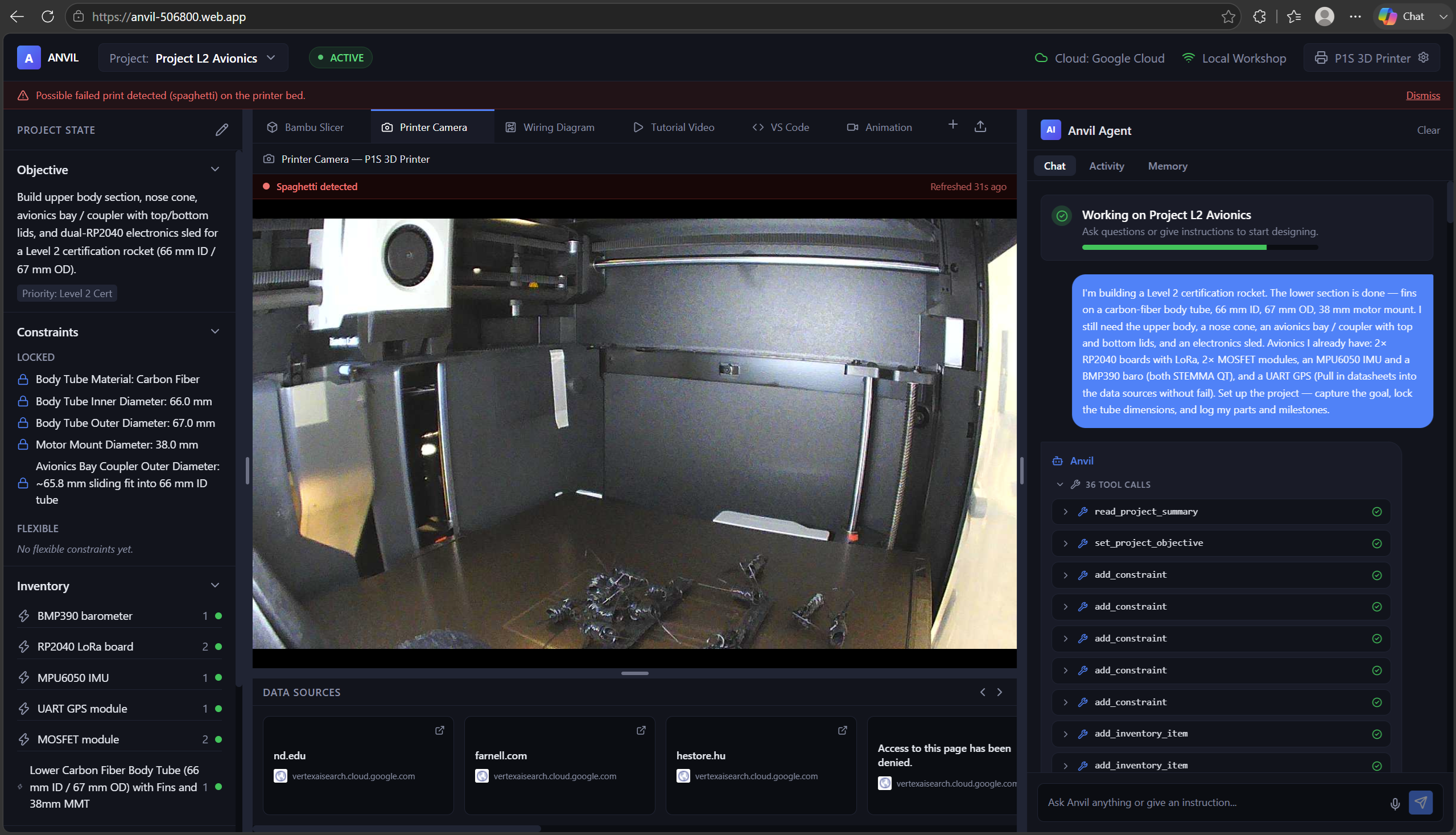
Gemma detecting 3D printer fail.
Inspiration
We love building things that fly: rockets, RC planes, whatever's next on the bench. We've felt this exact problem firsthand every time. Building real hardware means living in fifteen tabs at once: a CAD tool, a datasheet PDF, a parts search, a slicer, a printer dashboard, a forum thread for the one wiring gotcha nobody documented. None of those tools know about each other, or about your project. You're the integration layer, and every context switch costs you the thread you were holding. We've lost hours of a build weekend to exactly that.
So we built the partner we actually wanted at our own workbench: an agent that doesn't just answer questions about hardware, but sits in that integration-layer seat with you, holding the project's state, acting on it, and guiding the build the way an experienced partner would, not a search box.
What it does
Anvil is not a chatbot that answers questions about hardware. It's an agent that acts. Built on Gemini 3.7, it performs real agentic tool orchestration through Google ADK: a function-calling loop that holds a project's actual state and executes real tools against it, on its own initiative, not just talking about them. Where a task falls outside that agent loop, like generating video and audio, Anvil calls the Google GenAI SDK directly, so the right layer of the Google AI stack handles the right job.
Knows and remembers the project
It turns unstructured input, like a free-text brief, a scraped datasheet, or a live camera frame, into a structured, durable state machine in Firestore: objective, constraints, inventory, a milestone plan. It asks clarifying questions when it needs a signal it doesn't have, gauges the user's skill level across categories like CAD, electronics, and firmware, and records that read in memory so every later explanation is pitched at the right depth automatically. It grounds every answer the same way, pulling from a part's own datasheet first and falling back to Gemini's built-in Search grounding (a native Google ADK tool) only when project state doesn't already know, recording every source so what it read is as inspectable as what it wrote. And it tracks its own progress: real build stages checked off the moment that stage's actual work happens, so a builder always knows where the project stands without asking.
Designs and builds, for real
It composes real, multi-part parametric CAD assemblies (not single
primitives) from geometric primitives, boolean operations, fillets, and
circular patterns, built on build123d's OpenCascade BREP kernel and
constrained to whatever dimensions the project has already locked. It
draws native, colour-coded wiring diagrams straight from a
plain-English description: power, ground, and data lines laid out
automatically, rendered directly in the workspace rather than exported as
a flat image. And it writes real firmware, including its own tests,
directly into the project's files over the Model Context Protocol
(MCP), open in a genuinely embedded VS Code instance (code-server)
sharing that same filesystem: not a mockup of an IDE, the actual thing,
editable by a person at the same time.
Crosses into the physical world
It slices a model and dispatches it to an actual 3D printer, through a decoupled local bridge, and a local vision-language model running on-device watches the live camera feed for failures. The agent proposes, real hardware executes. When an explanation needs more than text, it finds a real tutorial before generating anything, and only reaches for a generated explainer, automatically scored with its own soundtrack and produced through the Google GenAI SDK, when nothing else answers the question. (More on this under "Multimodal, end to end" below.)
Why this is a Collaborative Partner
The track asks for an agent that actively guides a user step-by-step, asks clarifying questions, and adapts based on captured feedback: one that synthesizes or mutates data rather than just reading it, and ingests unusual, messy, or highly complex unstructured data streams. That's the design, not a bolted-on feature:
| The track asks for | What Anvil does |
|---|---|
| Actively guide a user step-by-step | Tracks a build through six real stages and tells the user the single next step, unprompted |
| Ask clarifying questions | Asks for a missing signal, like skill level, and requires approval before anything irreversible |
| Synthesize or mutate data, not just read it | A free-text brief becomes locked constraints and real geometry; a scraped datasheet becomes a structured project fact; a camera frame becomes a pass/fail signal |
| Ingest unusual, messy, or highly complex unstructured data | Natural-language briefs, scraped datasheet HTML, live camera frames, not clean structured API responses |
Multimodal, end to end
Anvil isn't a single chat window. Every modality a hardware project actually needs is a first-class surface in the workspace, not an attachment bolted on afterward:
| Modality | Surface in the workspace | Powered by |
|---|---|---|
| 3D geometry | Live CAD viewport rendering generated assemblies | build123d |
| Structured diagrams | Native, colour-coded wiring schematics | Custom circuit adapter |
| Code | A real embedded VS Code instance sharing the project's filesystem | code-server over MCP |
| Video | Real tutorials, plus generated explainers when nothing else exists | YouTube Data API, Veo 3.1 via the Google GenAI SDK |
| Audio | An automatically composed score muxed into generated video | Lyria 3 via the Google GenAI SDK |
| Vision | Live printer-camera monitoring, running locally | Gemma 3, on-device |
| Documents | A native PDF viewer for datasheets, pulled and stored automatically | Adafruit datasheet lookup |
| Voice | Speech-to-text input alongside typed chat | Browser speech recognition |
One agent, one workspace, not seven disconnected tools stitched together after the fact.
How we built it
| Layer | What it does | Built with |
|---|---|---|
| Agent | Reasons and orchestrates every tool call | Gemini, Google ADK |
| State | Holds durable project state, read back every turn | Firestore |
| Data sources | Pulls datasheets, tutorials, and search grounding | Adafruit, YouTube Data API, Google Search |
| Physical | Slices and dispatches prints, watches the camera | Local Workshop Bridge, Gemma 3 on Ollama |
| Generative | Renders explainer video with a scored soundtrack | Veo 3.1, Lyria 3, called directly via the Google GenAI SDK |
| Frontend | Three-pane workspace, streaming tool calls live | React, TypeScript |
| Infrastructure | Hosts and runs the backend container | Cloud Run, Docker |
Agent layer. Gemini reasons and orchestrates through Google ADK. Every tool the agent can touch is declared once in a single adapter registry: some backed by MCP toolsets (filesystem access), others as native Python function tools (CAD, circuit, printer, state, animation, datasheet lookup, YouTube search). Nothing reaches the model without an explicit, narrowly-scoped entry in that registry (more on why this matters under "Architectural soundness" below). The animation function tool itself drops down a level and calls the Google GenAI SDK directly, since Veo and Lyria generation don't fit ADK's function-calling loop the way the rest of the tools do; ADK orchestrates when to generate, the GenAI SDK handles how.
Data sources. Beyond the user's own conversation, Anvil pulls from: Adafruit's public Learn-system sitemap for electronics datasheets (no search API, just Adafruit's own published pages), the YouTube Data API v3 for existing tutorials, and Gemini's built-in Google Search grounding for anything project state doesn't already answer. Every source it uses gets recorded back into the project's own Data Sources list, so what the agent read is as inspectable as what it wrote.
State layer. Firestore holds everything durable: objective, constraints, inventory, milestones, decisions, and the skill profile. The system instruction reads that state back on every turn (including the skill profile, so calibration actually informs later answers instead of just populating a chart no one reads again).
Physical layer. The agent never talks to hardware directly. Slicing and printer dispatch go through a decoupled local Workshop Bridge, so the cloud backend can redeploy or restart without taking the printer connection down with it. A local Gemma 3 model, served over Ollama, watches the printer camera. It's the one loop that needs low-latency, always-on inference without a cloud round trip.
Generative layer. Veo 3.1 renders short explainer animations on
request; Lyria 3 composes a matching instrumental score and mixes it in
automatically. Both are invoked directly through the Google GenAI SDK
(google-genai) rather than through ADK, since this is one-shot
generation work, not multi-turn tool orchestration. Both are used
deliberately, not by default: the agent tries a free, real YouTube
tutorial first, and only generates when nothing better exists.
Frontend. A three-pane React/TypeScript workspace: project state on the left, a native workspace surface in the center (CAD viewer, wiring diagram, PDF viewer, video player, embedded VS Code), and the agent chat on the right, streaming tool calls live as they execute.
Infrastructure. FastAPI backend on Cloud Run, Firestore in Native mode, Docker for the container build.
Architectural soundness
The Architecture criterion asks how robust and modularized the system is, how it manages state, and whether tools are properly isolated and scoped for security. Those aren't afterthoughts here; they're how the adapter registry was designed from the start:
| Key Architectural Principles | How Anvil delivers it |
|---|---|
| A modular, robust architecture | One adapter registry is the single source of truth for every tool. MCP toolsets and native Python function tools are wired from the same list, so nothing reaches the model without an explicit, scoped entry. |
| Tools properly isolated and scoped for security | Every write_file/edit_file call is sandboxed to that project's own folder. The agent cannot touch the repo root or Anvil's own source tree, regardless of what a prompt asks for. |
| Real state management | Firestore holds every durable fact, and the system instruction is rebuilt from live session state on every single turn rather than assumed, so identity, memory, and calibration are all reconstructed correctly, every time. |
| Failure tolerance and decoupling | Every custom tool call is wrapped so a raised exception becomes a normal tool-call error the model can react to, not a crashed request. The demo video showcases recovery from tool call failures as well! The local Workshop Bridge is fully decoupled from the cloud backend, so a redeploy never drops the printer connection mid-print. |
| Right SDK for the right job | Multi-turn reasoning and tool orchestration run on Google ADK; one-shot generative media calls (Veo, Lyria) go straight through the Google GenAI SDK instead of being forced through the agent loop, keeping each layer doing what it's actually built for. |
Challenges we ran into
| Challenge | How we solved it |
|---|---|
| Stateless model, stateful behavior. Gemini remembers nothing between calls, so a missing project ID once caused a silent wrong-project write. | Rebuilt the system instruction from live session state every turn, instead of a static string. |
| Steering a general-purpose model into real CAD. Asked to design a part, a model will stop at one primitive unless taught otherwise. | Extensive CAD-specific tool guidance built directly into the system instruction. |
| Cloud/local decoupling under Firestore's constraints. The agent must never touch a printer directly, and Firestore rejects nested arrays. | A local Workshop Bridge owns the printer connection, and every tool's storage shape is designed around Firestore's rules from the start. |
| Two Google SDKs, one coherent agent. ADK's function-calling loop is the right fit for state-driven tools, but forcing Veo/Lyria generation through that same loop added latency and complexity for what is really a one-shot call. | Called the Google GenAI SDK directly from inside the animation function tool, so ADK still decides when to generate but the GenAI SDK handles the actual generation call. |
Accomplishments that we're proud of
- The skill-calibration loop actually closes. It's captured once, read back into the system prompt on every turn, and demonstrably changes explanation depth, not a chart nobody reads again.
- Nine Google models and services work together, each with a real job, not just to check a bonus box, spanning both Google ADK and the Google GenAI SDK. The full breakdown is in the tables above; nothing on that list is unused.
- A build that tracks its own progress. Six milestones, from Project Setup through Review, get checked off automatically the moment that stage's real work happens, not when asked. A builder always knows exactly where the project stands without having to ask.
What we learned
Grounding an agent's "understanding" of a user in something more than a single free-text estimate matters more than we expected. An ungrounded number in a database is worse than no number at all, because it looks authoritative without being earned. Asking one short, well-placed question produced a far more defensible skill read than trying to infer everything silently.
We also learned to be precise about what a tool actually guarantees versus what it merely renders: a schematic that looks correct and a schematic that's electrically verified are very different claims, and it's easy to blur that line under time pressure.
We also came away with a clearer sense of where Google ADK ends and the raw Google GenAI SDK begins: ADK is the right abstraction for anything that's part of the conversation's back-and-forth, but reaching past it to the GenAI SDK directly for one-shot generative calls kept the animation adapter simpler than trying to bend it into ADK's tool-calling shape.
What's next for Anvil
- From parts list to purchase: a bill of materials generated from the CAD assembly and wiring diagram, checked against real pricing and stock.
- A real board, not just a schematic: PCB layout and fabrication ordering, behind the same "design it, send it to be made" pattern the printer adapter already uses.
- A partner that knows what things cost: a running cost estimate across parts, print material, and board fab, with a flag when a choice blows the budget.
- Starting from something instead of nothing: reading an existing CAD file, wiring diagram, or half-finished repo instead of always starting from a blank brief.
- Speaking up, not just answering: proactive nudges (a print finishing, a part restocked, a test failing) instead of only responding when asked.
Built With
- build123d
- cloud-run
- code-server
- docker
- fastapi
- firestore
- gemini
- gemma
- google-adk
- google-cloud
- lyria
- model-context-protocol
- node.js
- ollama
- pydantic
- python
- react
- tailwindcss
- typescript
- veo
- vite
- youtube-data-api
- zustand


Log in or sign up for Devpost to join the conversation.