Description
This is project A4 of the the UCI Informatics 133 Winter Quarter Class '22. We were tasked over the span of two weeks to create a mobile app that meets rigorous design guidelines and fulfills all the basic requirements of allowing a user to track how much sleep they obtain each night.
The Grading Rubric: "This assignment will be graded on a scale of 10 points, broken down as follows:
- The ability to log overnight sleep (1 point)
- The ability to log sleepiness during the day (1 point)
- The ability to view these two categories of logged data (1 point)
- Either using a native device resource or backing up logged data (2 points)
- Following good principles of mobile design (2 points)
- Creating a compelling app (2 points)
[. . .] You can receive 1 point of extra credit for both using a native device resource and backing up logged data. Similar to the spirit of the assignment portion in A1, we will additionally give one point of extra credit to the most compelling apps submitted (about 10% of submissions). The maximum grade for this assignment is therefore 12/10."
The score I received for this project was 11.5/10, and was the highest score in the class.
Problem space
Sleep deprivation looms over a many college students, and there is an excess of sleep-aid applications on the app store to match. There is evidence that suggests mobile sleep tracking applications can lead to improved sleep outcomes, but some the features of many apps, like REM tracking or smart alarms, are often scientifically unsubstantiated to clinical sleep measurement tools like polysomnography (PSG).
Anti-Insomnia Sleeptracker is a light-weight mobile app that lets user track their nightly sleep and cuts away at all the bloat. It centers proven methods that can aid at least a little bit in helping users sleep better at night, like the promotion of sleep hygiene and sleep journaling.
Research Document: https://docs.google.com/document/d/1IjkZ-xIfOeDZAtSYclMVsSya8WyU4aiuuh-2sZHmSPM/edit?usp=sharing
How I built it
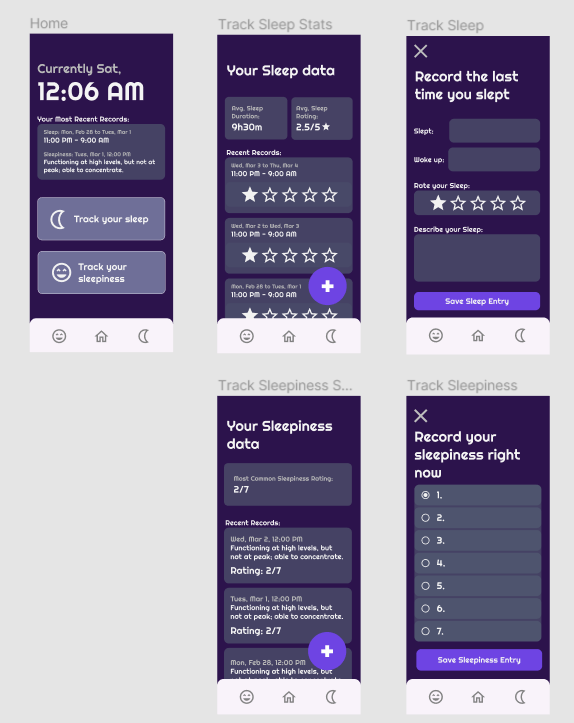
The project is a hybrid mobile app, built using the Angular framework with Ionic and Ionic Capacitor. The initial design for the app went through two rounds of prototyping on Figma. My housemates at the time were surveyed about their opinions of the first Figma prototype and the second prototype was adjusted accordingly.
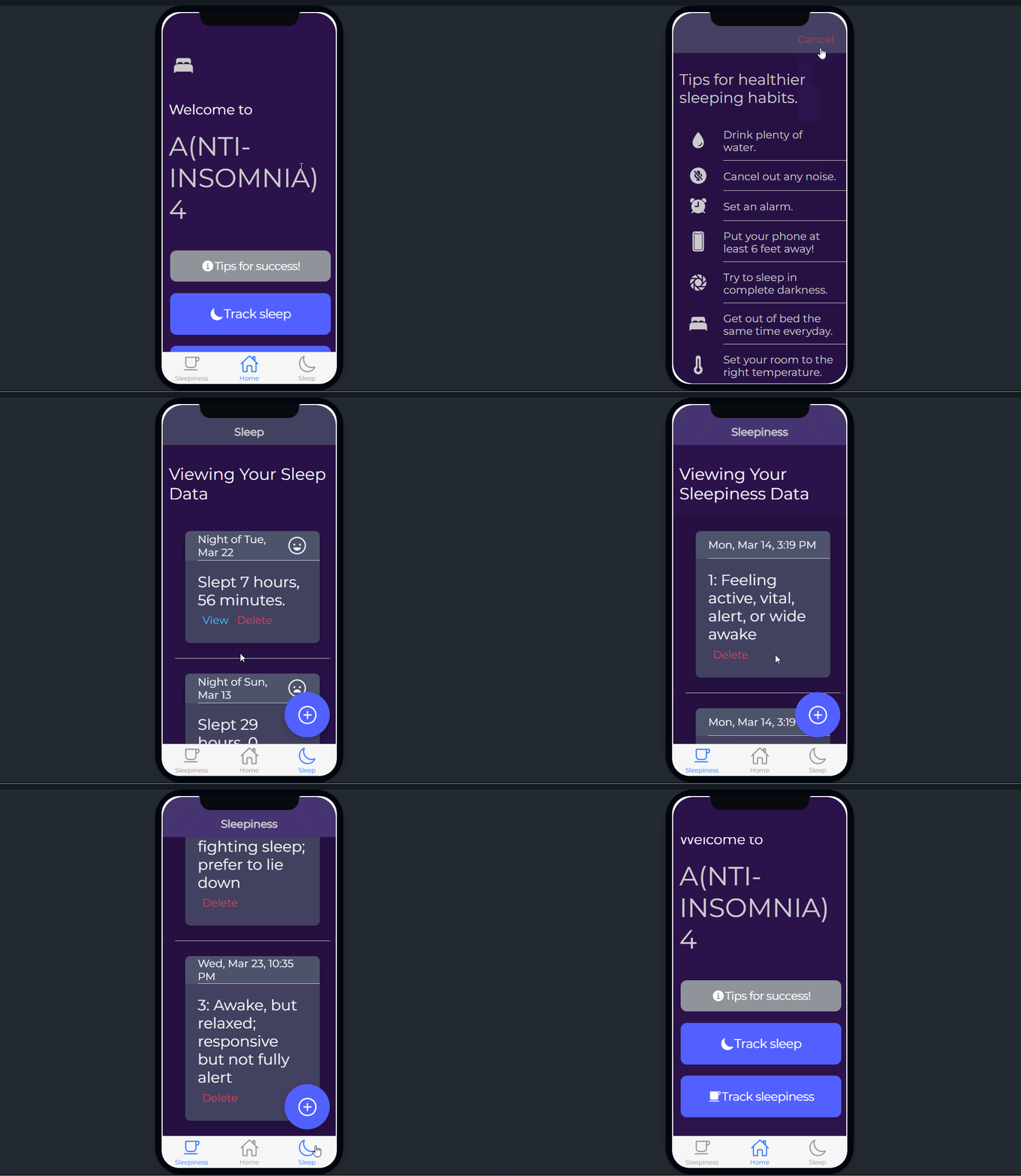
The designs were then translated the best they can into code, though not all intended features were implemented. I was operating under considerable time constraints coupled with my inexperience with creating mobile applications. Ionic and Ionic Capacitor were especially finicky when it came to utilizing the native's device resources, as I initially planned on implementing a timed notifications system. The Capacitor notifications plugin is notoriously difficult to use, and I simply could not get it to work and sank far too much time into. I already had limited time and decided to cut my losses and move on, and prioritize the actually required important features of the app.
Design Rationales
To create a compelling but in-scope app, I did quite a bit of research into various scientific articles about the actual effectiveness of many sleep apps, as the research document link above demonstrates. These studies revealed that many apps that purport to automatically track REM sleep or have "smart" alarms are not supported by empirical evidence. In fact, only "32.9% of sleep apps available in the Google Play Store demonstrated empirical evidence to support their claims, and 15.8% were developed with the input of clinicians" (Ananth, 2021, p. 84). More effective ways of helping to improve sleep, especially for college students, actually proved to be much simpler. So, sleep journaling and promoting tips for sleep hygiene, as promoted by actual clinicians, became the centerpiece of the compelling features I would add onto the app.
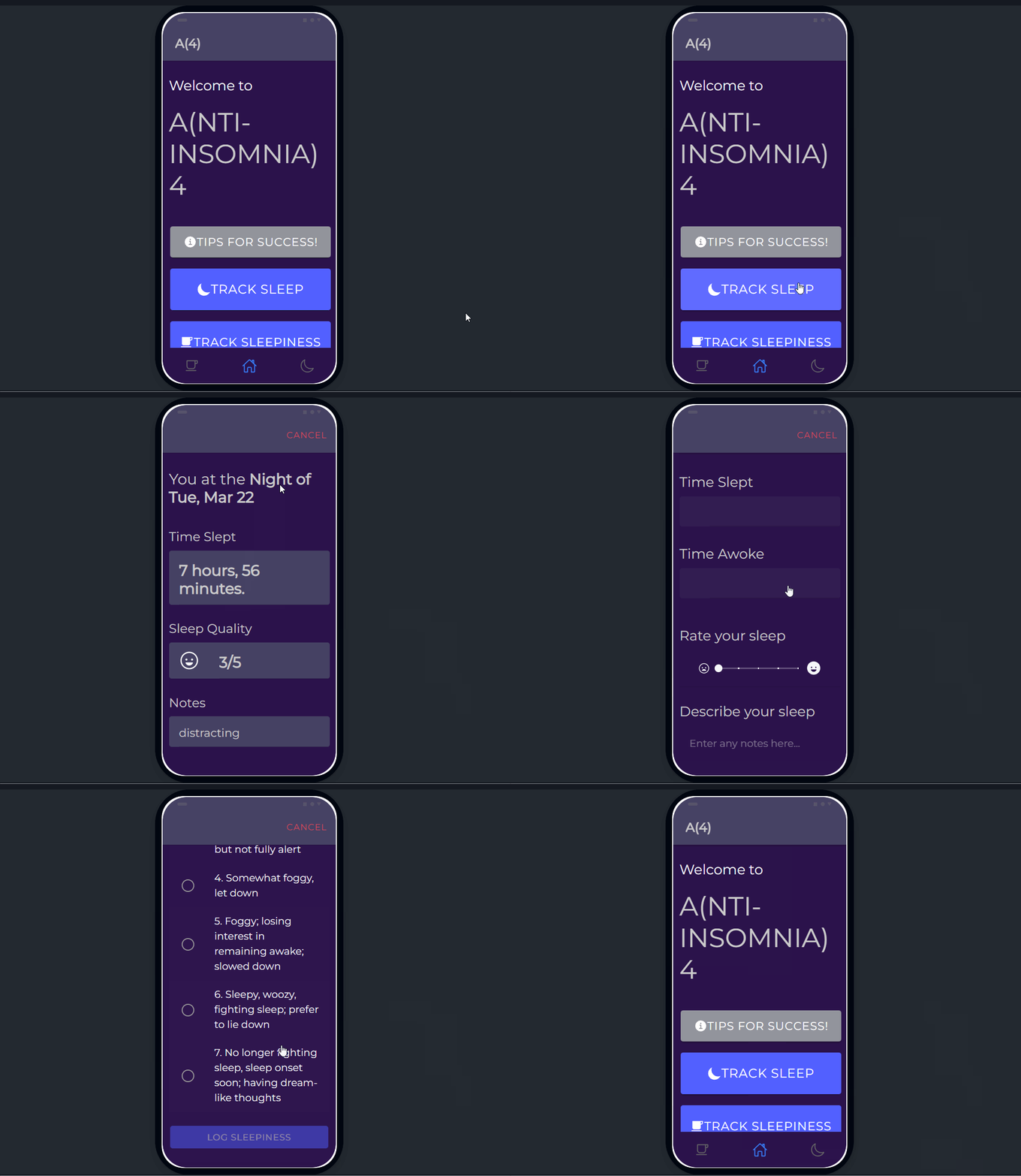
As the video demo shows—the app prototype running on Android Studio—a user can log their sleep for a given night, rate said sleep and journal their thoughts as well. Users also have the option to share their sleep data using the phone's native resources via text or email. Data is also retained on exit and re-open via Firebase and the Firestore database.
I implemented a useful initial view that makes it clear to initial users the primary features of the application and large action buttons to navigate to them, and there are plenty of "uh-oh" buttons throughout the different pages and modals of the app—there is an almost ever-present ion-tabs bottom navbar that can take users to any of the main pages whenever they want and modals and ion-alerts that all implement a cancel button to easily close them.
There is also error prevention in the form of functions that validates end times are greater than start times and buttons that don't enable unless all fields for entering the details of sleep or sleepiness are set. Android design guidelines were followed, leveraging a label-less navbar, the use of fab-floating action buttons to display the most important actions a user can take on a given page, a analogous color scheme that is easy on the eyes, and the construction of visually hierarchy through manipulation of text size, text weight, button colors, etc. to convey the most important parts of each page on the app.
Accomplishments that I'm proud of
I am proud to have attained one of the highest grades in the class for this assignment. This was my first time creating a mobile application using Angular and Ionic, and am eager to learn even more about adaptive, responsive and mobile design principles.
What's next for Anti-Insomnia Sleeptracker
The app could also benefit from far more extensive UX research and testing, maybe using college students as a research group for such studies. Furthermore, the app currently handles only one account on the Firebase and Firestore backend, and a future iteration should have a robust sign-up and log-in system that can handle multiple users. I also want to implement more features that could utilize native resources such as timed notifications. Maybe it'll even end up on the app store one day.
Built With
- andriod-studio
- angular.js
- figma
- firebase
- firestore
- ionic
- ionic-capacitor
- visual-studio-code


Log in or sign up for Devpost to join the conversation.