-
-
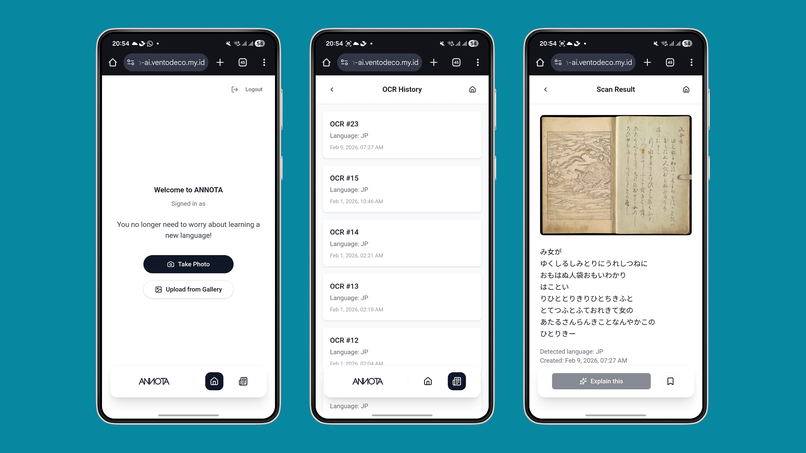
Annota UI OCR, history
Inspiration
I’ve always been fascinated by Japanese culture, but the language barrier specifically Kanji is a massive hurdle for many. While many apps teach vocabulary, few help you understand the Japanese you encounter in the real world in real-time. I wanted to create a tool that turns the world into a classroom, allowing users to "scan and learn" from physical books, signs, and menus instantly.
What it does
Annota is an AR-powered (or Camera-based) learning assistant. Users can point their camera at any Japanese text, and the app will:
- Identify the characters using Optical Character Recognition (OCR).
- Provide instant furigana (phonetic readings).
- Offer context-aware translations and grammar breakdowns.
- Save scanned words to a personalized flashcard deck for later review.
- We used text-to-audio easy for user if they don't confident pronunciation
How we built it
The project is built as a mobile-first Progressive Web App (PWA). We used React 19 + TypeScript + Vite for the frontend to deliver a smooth touch-first experience.
For the “brain” of the app:
- OCR Engine: We integrated Google Gemini 2.5 Flash (Vision via
google.golang.org/genai) to handle Japanese text extraction from uploaded images. - NLP / Annotation: We use Gemini prompt-based language analysis (structured JSON output for meaning, usage, word breakdown, alternatives), with an optional knowledge CSV lookup service for added context.
- Backend: A Go (
net/http) JSON API with PostgreSQL (core data), Redis (OAuth state), and Google OAuth + JWT manages user profiles, scans, annotations, and bookmarks.
Challenges we ran into
The biggest technical hurdle was vertical text recognition. Many Japanese books and signs are written vertically, which standard OCR often struggles with. We had to implement a custom pre-processing layer to rotate and segment the text blocks correctly before sending them to the recognition engine. Additionally, managing the latency between the camera feed and the translation overlay required significant optimization.
Accomplishments that we're proud of
Annota is an AR-powered Japanese learning tool that transforms real-world text into an interactive classroom. Using advanced OCR and natural language processing, the app identifies Japanese characters even challenging handwritten menus and provides instant, context-aware translations through "anchored" UI overlays that feel naturally integrated into the environment. We are particularly proud of our Text-to-Speech (TTS) integration, which allows users to hear native-level pronunciation for any scanned text, bridging the gap between reading and speaking. By blending computer vision with high-quality audio feedback, we’ve created a seamless experience that helps learners navigate and understand Japan with confidence.
What we learned
We learned a tremendous amount about the nuances of Japanese grammar and the complexities of computer vision. On the project management side, we learned how to prioritize "must-have" features (like OCR accuracy) over "nice-to-have" features (like social sharing) to meet our deadline.
What's next for Annota - Scan & Learn Japanese
For the next phase of Annota, we are moving into a focused production testing cycle with a cohort of at least 10 beta users to gather qualitative feedback and real-world usage data. This testing phase is critical for refining our core experience, as it will allow us to identify pain points and directly elaborate on our feature set based on actual learner needs. Our primary technical goal during this period is to significantly improve annotation consistency, ensuring that translation overlays and audio feedback remain stable and accurate across various lighting conditions and surfaces, ultimately turning user insights into a more robust and polished learning tool.
Built With
- csv
- gemini
- golang
- google-genai-sdk
- google-oauth
- json
- jwt
- postgresql
- react
- redis
- typescript
- vite

Log in or sign up for Devpost to join the conversation.