-
-
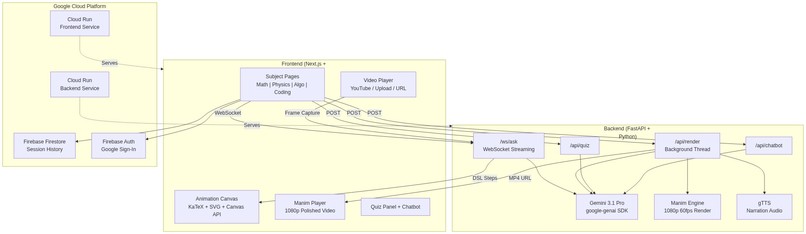
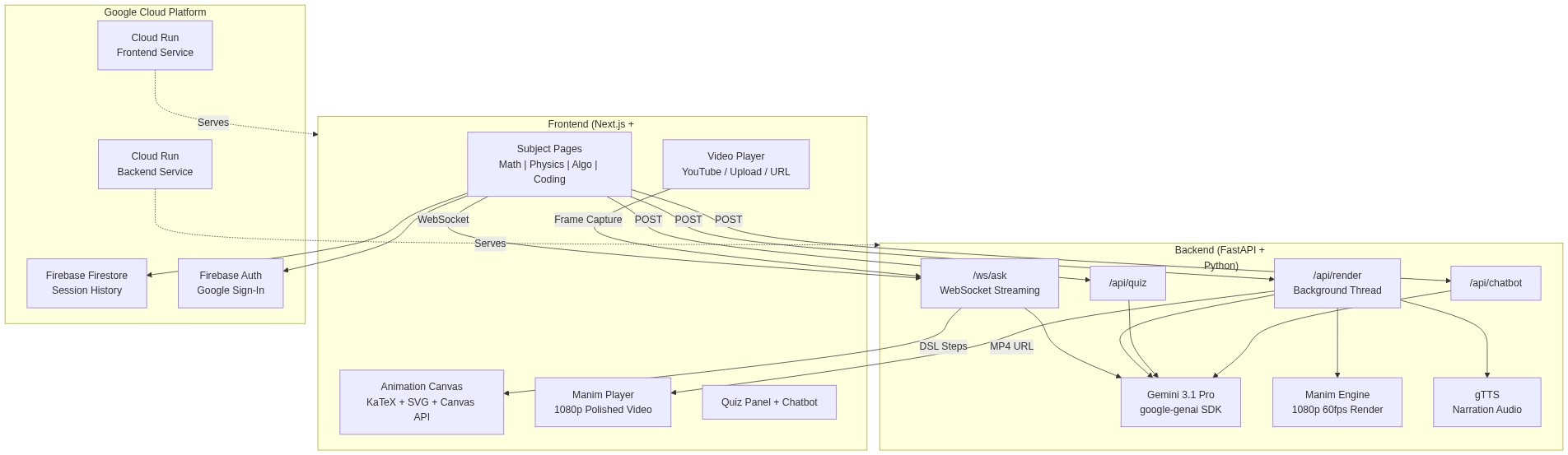
This is the architecture diagram
Inspiration
We're university students, and we've all been there — stuck on a lecture, rewinding the same 30 seconds over and over, still not getting it. You pause the video, Google the concept, and end up reading a wall of text that somehow makes it worse. We wanted a tutor that could just show us the answer, right there, step by step — animated, narrated, and visual. That's why we built AnimaMentor.
What it does
AnimaMentor lets you watch any lecture video inside the app. The moment you get confused, you pause, type your question (or snap a photo of the problem), and AnimaMentor generates an instant animated explanation — step by step, with rendered math, graphs, diagrams, and narration. It covers math, physics, algorithms, and coding.
After watching the explanation, you can take an auto-generated quiz to test your understanding, or ask follow-up questions to a context-aware chatbot that remembers the whole conversation.
Key features:
- Video player — upload a file, paste a URL, or paste a YouTube link
- Photo upload — snap a picture of a handwritten problem and the AI reads it
- Grade-level selector — explanations adapt to your level
- Step-by-step canvas animations — KaTeX math rendering, SVG number lines, Canvas graphs, free body diagrams, circuit layouts, array visualizations, and more
- Narrated walkthroughs — text-to-speech drives the animation forward, step by step
- Auto-generated quizzes — 5 timed questions after each explanation
- Follow-up chatbot — ask contextual questions without re-explaining the topic
- Session history — Firebase saves every session so you can revisit past explanations
How we built it
- Frontend: Next.js 15 + TypeScript + Tailwind CSS. Animations are rendered in-browser using Canvas API, SVG, and KaTeX for math expressions.
- Backend: FastAPI (Python) with WebSocket streaming. Questions are sent to Gemini, and animation steps stream back one by one via NDJSON over WebSocket — so the first step appears in seconds, not minutes.
- AI: Gemini powers everything — understanding the video frame, reading uploaded photos, generating structured animation scripts, creating quiz questions, and driving the chatbot.
- Animation DSL: We designed a custom animation script format with 20+ step types (expressions, graphs, number lines, highlights, transforms, free body diagrams, circuits, waves, arrays, trees, and more). Gemini outputs this structured format, and the frontend renders it live.
- Firebase: Firestore stores each session (question, explanation, steps, grade level) so students can come back to their history.
Challenges we ran into
- LaTeX everywhere: Getting math rendering right across Gemini output, KaTeX, narration text, and canvas was a constant battle. We had to build a sanitization pipeline that handles 30+ LaTeX symbol edge cases.
- Streaming animations: Making WebSocket streaming work smoothly — where each animation step arrives and renders while the next one is still being generated — took careful coordination between the backend queue, frontend state, and the speech-driven pacing system.
- Gemini output consistency: Getting the AI to reliably output valid structured animation scripts (not just free text) required extensive prompt engineering and retry logic for API errors.
- Subject-specific visuals: Math needs graphs and number lines, physics needs free body diagrams and circuits, algorithms need array and tree visualizations — each required its own rendering logic on the canvas.
Accomplishments that we're proud of
- The core loop works — you pause a video, ask a question, and within seconds you're watching an animated explanation with narration. It genuinely feels like having a tutor next to you.
- The animation DSL supports 20+ visual step types across 4 subjects, all rendering live in the browser.
- WebSocket streaming means you see the first step almost instantly, even while the AI is still generating the rest.
- Photo upload actually works — you can photograph a handwritten equation and get a visual breakdown of the solution.
What we learned
- Prompt engineering is half the battle when building AI apps — getting Gemini to output structured, renderable animation scripts consistently was harder than building the renderer itself.
- WebSocket streaming dramatically improves perceived performance compared to waiting for a full response.
- Building a custom animation DSL gave us way more control than trying to use an existing library — but it also meant building every renderer from scratch.
- LaTeX is deceptively hard to handle correctly across different rendering contexts.
What's next for AnimaMentor
- More subjects — chemistry diagrams, biology illustrations, and more
- Collaborative sessions — students can share an explanation link with classmates
- Cloud deployment — currently local, planning to deploy on Google Cloud Run
- Mobile app — snap a photo of your textbook and get an animated explanation on the go
Built With
- fastapi
- firebase
- firestore
- gemini
- katex
- next.js
- python
- svg
- tailwind
- typescript
- websocket


Log in or sign up for Devpost to join the conversation.