Inspiration
We’ve all been there: we open our phone or laptop intending to do something productive, and somehow, 30 minutes later, we’re doomscrolling.
That experience is what inspired us to build Anchor.
Most digital well-being tools focus on one thing: screen time. But spending an hour intentionally watching a movie is very different from opening YouTube to watch one tutorial and getting pulled into an hour of Shorts.
So instead of asking:
“How long have you been online?”
We wanted to ask:
“Are you still doing what you came here to do?”
Anchor is built around that idea. Rather than limiting how much time someone spends online, it helps users notice when their browsing starts moving away from their original intention.
What it does
Anchor is a Chrome extension that helps users stay focused on why they went online in the first place.
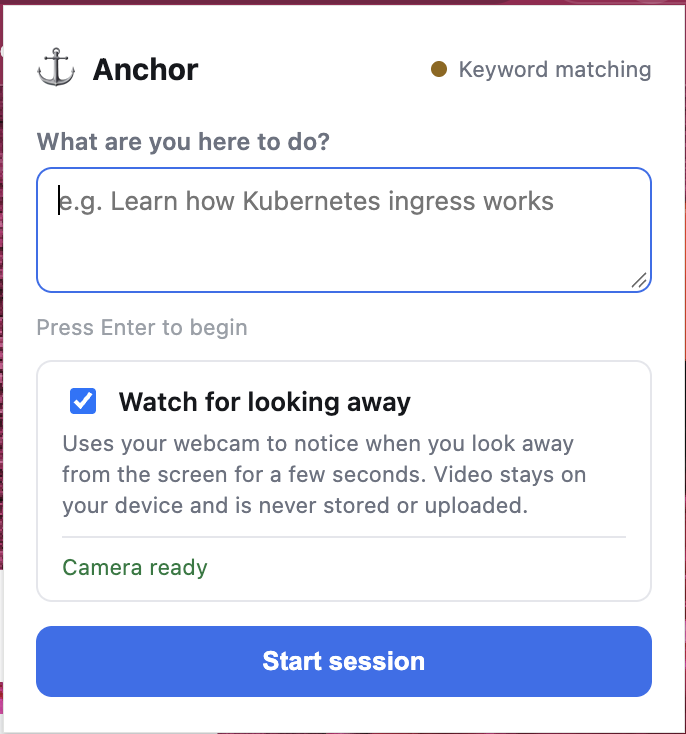
At the beginning of a browsing session, the user enters a goal, such as:
“Learn how Kubernetes ingress works.”
As the user browses, Anchor looks at the context of each webpage and compares it to that original goal. From there, it calculates an Intent Alignment score that represents how closely the current page relates to what the user originally wanted to accomplish.
But Anchor does not interrupt someone just because they open one unrelated page. Browsing naturally involves jumping between different topics, especially when researching.
Instead, Anchor looks for sustained drift.
For example:
Kubernetes Tutorial → Docker Networking → MacBook Review → YouTube Shorts
When that pattern continues and the user's browsing moves further away from their goal, Anchor steps in with a simple question:
“Still what you came here for?”
The user can then choose to:
- Return to a page that better matched their original goal
- Keep browsing
- Change their goal
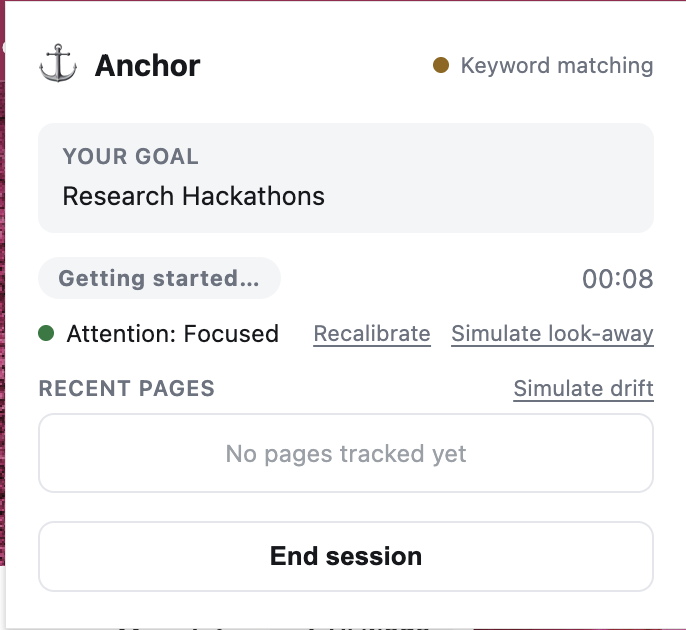
Anchor also includes an optional Attention Mode. Using the user's webcam, Anchor can detect when they repeatedly look away from or leave the screen. If that happens for long enough, it displays a larger reminder to bring their attention back to the session.
All webcam processing happens locally on the user's device. Video is never stored or uploaded.
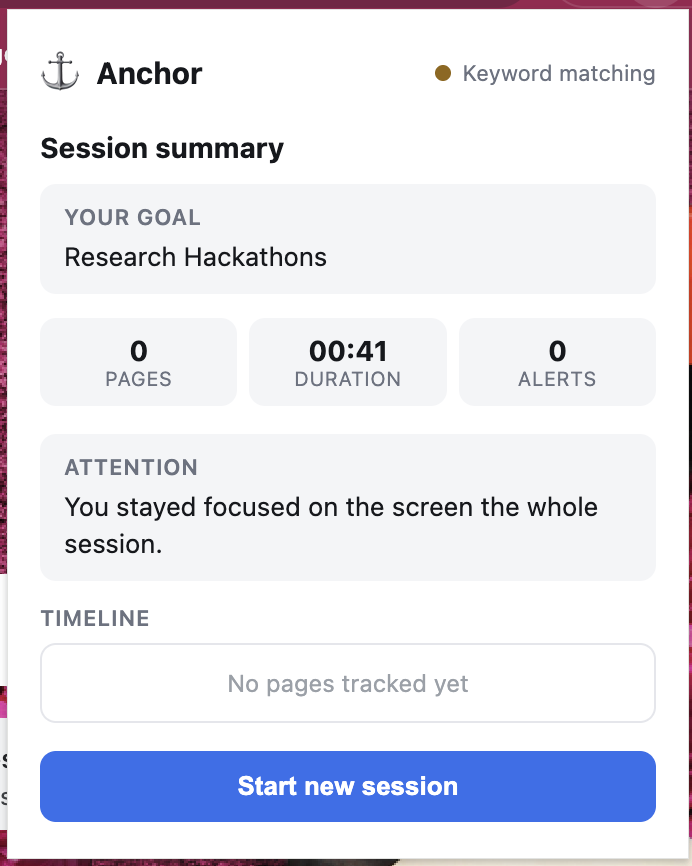
At the end of the session, Anchor provides a summary showing how the user's browsing changed over time.
Most importantly, Anchor is not designed to decide what someone should be doing. If a user intentionally wants to spend an hour watching YouTube, Anchor has no reason to stop them.
The goal is simply to help people recognize when intentional browsing turns into unintentional browsing.
How we built it
Anchor has three main components: the Chrome extension, the intent-alignment system, and the attention detector.
Chrome Extension
The extension was built using JavaScript, HTML, CSS, and Chrome Manifest V3.
The extension handles:
- Starting and ending browsing sessions
- Saving the user's goal
- Reading webpage context
- Tracking navigation between pages
- Displaying the drift intervention
- Showing the final session summary
A service worker manages session state while content scripts read information from the current page and display Anchor's interface.
Intent Alignment
For the intent system, we built a Python backend using FastAPI.
Anchor takes the user's goal and the current webpage context and converts both into embeddings using the all-MiniLM-L6-v2 sentence-transformer model.
We then calculate cosine similarity between the two embeddings to estimate how closely the webpage matches the user's goal.
Instead of reacting to a single score, Anchor tracks those scores across multiple pages. This allows the system to recognize a gradual pattern of drifting away from the original goal.
We also created a lightweight keyword-based fallback so the core extension can continue working even when the backend is unavailable.
Attention Detection
For Attention Mode, we used MediaPipe Face Landmarker running directly inside the browser with WebAssembly.
At the start of a session, Anchor performs a short calibration. During the session, it uses head direction to estimate whether the user is looking toward or away from the screen.
To improve the detector, we also built a small recording and evaluation system. It records labeled scenarios such as:
- Looking directly at the screen
- Turning away
- Looking at a phone
- Moving only the eyes
We can then replay those recordings through the attention detector and compare different thresholds to see which ones detect real distractions without creating too many false alarms.
Challenges we ran into
One of our biggest challenges was realizing that distraction and drift are not the same thing.
A user visiting one unrelated webpage does not necessarily mean they have lost focus. Research often involves exploring side topics before returning to the original question.
Because of that, we had to focus on patterns across multiple pages instead of making decisions from a single page.
Another challenge was interpreting semantic similarity scores. The raw output from the embedding model was not naturally an easy-to-understand percentage, so we had to calibrate the scores into a range that made sense for our use case.
Chrome's Manifest V3 architecture also created several technical challenges. Service workers can shut down when inactive, modern sites such as YouTube often change pages without performing a full reload, and offscreen documents cannot directly request camera permission.
We had to design around each of those limitations.
The attention detector presented another challenge: avoiding false alarms. A system that constantly interrupts the user would become another distraction itself. Instead of manually choosing thresholds that happened to work for us, we created an evaluation pipeline so we could measure how different settings affected detection accuracy and false positives.
Accomplishments that we're proud of
One of the things we're most proud of is that Anchor works as a complete system.
A user can:
Set a goal → Browse → Drift → Receive an intervention → Refocus → View a session summary
We were also able to combine multiple signals rather than relying on only one way of measuring attention.
Anchor combines:
- Semantic similarity between the user's goal and webpage content
- Patterns across browsing history
- Optional attention detection using computer vision
We are also proud of the privacy decisions we made while building the project.
Webcam footage is processed directly on the device and is never stored or uploaded. Anchor also avoids keeping a permanent browsing history.
Finally, we intentionally designed Anchor to recognize its own limitations. Browsing context can provide useful signals about whether someone is drifting, but it cannot perfectly determine whether someone is distracted.
Anchor uses those signals to create a helpful moment of reflection rather than pretending to know exactly what the user is thinking.
What we learned
One of the biggest things we learned is that screen time and intentional time are not the same thing.
Someone can spend two hours online and accomplish exactly what they intended to do. Someone else can open their laptop for a five-minute task and lose an hour scrolling through recommended content.
That difference became the core of Anchor.
We also learned that individual webpage scores are much less useful than the trend across multiple pages. Looking at browsing behavior over time gives much more context than trying to classify a single page as productive or distracting.
Another important lesson was that interventions have to be carefully timed.
If Anchor interrupts too often, it becomes part of the problem. The system has to recognize a meaningful pattern before deciding that an interruption is actually useful.
Finally, building the attention detector showed us the importance of testing machine-learning-based features against actual recorded data rather than simply adjusting thresholds until something appears to work.
What's next for Anchor
There are several directions we would like to explore next.
One of our biggest priorities is moving more of Anchor's analysis directly into the browser. Running the embedding model locally would allow webpage content to remain entirely on the user's device.
We would also like to introduce additional signals such as scrolling behavior and recommendation-chain detection to better distinguish purposeful browsing from passive consumption.
Another direction is making goals less manual. Instead of requiring users to type their intention every time, Anchor could eventually infer a likely browsing goal and allow the user to confirm or edit it.
We also want Anchor's reminders to become more personalized. Different interventions may work better for different people, so the system could eventually learn which types of reminders are actually useful to each user.
For the attention detector, we want to test with more people, devices, lighting conditions, and environments.
Finally, we would like to expand Anchor beyond Chrome and explore how the same idea could work across mobile devices, social media platforms, video platforms, shopping sites, games, and other places where intentional use can easily turn into passive consumption.
The long-term goal is simple:
Help people stay in control of why they went online in the first place.
Built With
- css
- fastapi
- html
- javascript
- python

Log in or sign up for Devpost to join the conversation.