The Problem I Live With
I have ADHD. Not the "oh I get distracted sometimes" kind. The kind where you stare at a task list you made yesterday and it feels like a foreign language. The kind where you know exactly what you need to do but your brain refuses to translate that knowledge into action.
Every task manager I've ever tried made the same assumption: that I could sit down, organize my thoughts into neat categories, assign priorities, and work through them systematically. That's like handing someone with a broken leg a pair of running shoes. The problem was never motivation. The problem was the gap between intention and action. I needed something that could take the messy, scattered chaos in my head and turn it into something I could actually act on.
That's why I built Anchor.
What Anchor Does
Anchor is an AI-powered task manager where you can brain dump your thoughts, messy, unstructured, whatever's in your head, and the AI organizes everything for you.
Type something like: "ugh, so much to do. dentist appointment sometime next week, need to figure out that birthday gift for Jake, the kitchen light is broken again, and I told my boss I'd send the proposal, but I haven't even started it."
And Anchor extracts clean tasks, assigns priority, breaks down vague goals into concrete steps, and tells you what to do first. No setup. No categories to configure. No friction.
The app has three core features:
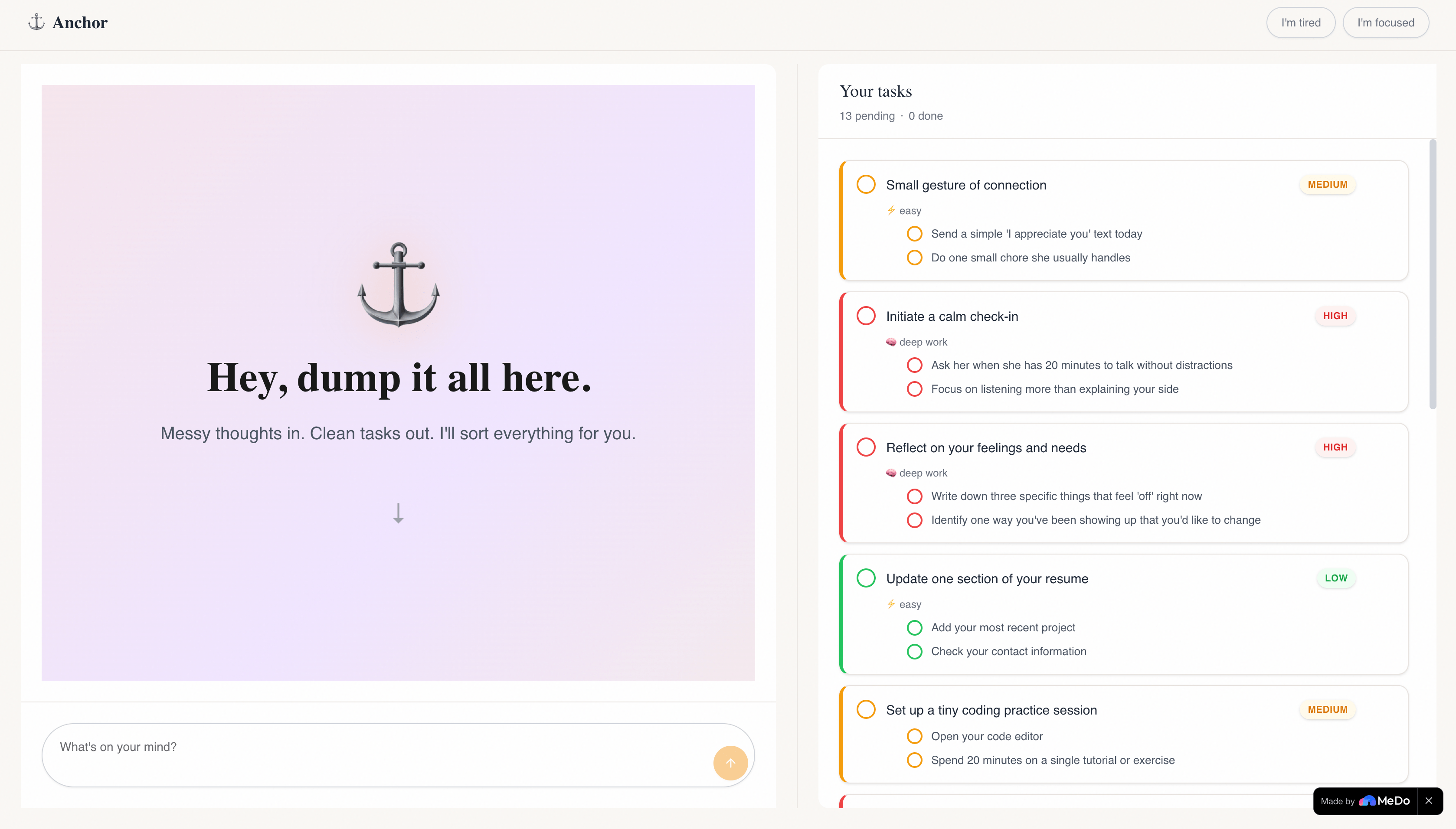
Brain Dump You type messy thoughts. The AI extracts structured tasks with titles, priority levels, and subtask breakdowns. Tasks appear in real time on a clean card-based interface.
Smart Suggestion After every brain dump, Anchor recommends one task to start with and explains why based on urgency, effort, and context. It's like having a friend tap you on the shoulder and say, "Do this one first."
Energy Mode Two simple buttons, "I'm tired" and "I'm focused," tell the AI your current state. It re-prioritizes your tasks accordingly. Low-effort wins when you're drained. Deep work when you're sharp.
How I Built It
Anchor is built entirely on MeDo, using their no-code platform to power the AI core of the application.
The architecture is simple by design:
MeDo handles all natural language processing. When a user sends a brain dump, the message goes to MeDo with a carefully engineered system prompt. MeDo extracts tasks, assigns priority, generates subtask breakdowns, and returns a structured response along with a warm conversational reply and a smart suggestion.
The UI is a two-panel layout. Chat on the left, task list on the right. The conversation IS the interface. Tasks update in real time as the AI processes each message.
Task cards use priority-based color coding. High priority gets a red left border, medium gets amber, and low gets green. Energy tags are displayed as subtle labels. Subtasks are indented beneath their parent task with their own checkboxes.
I used MeDo's platform to generate the full application through iterative prompting. I started with a detailed requirements document, then refined the UI through multiple rounds of feedback — adjusting the welcome screen, chat bubbles, task card design, and animations until the app felt polished and intentional.
What I Learned
Prompt engineering is architecture. The quality of MeDo's output depended entirely on how I structured my prompts. Vague instructions produced vague results. Specific, detailed prompts with clear constraints produced production-quality code. I learned to think of prompts the way I think of API specifications — every field, every edge case, every expected behaviour documented upfront.
Constraints breed creativity. With only 300 MeDo credits, I couldn't afford to experiment freely. Every prompt needed to count. This forced me to plan thoroughly before generating anything, which actually produced a better final product than if I had unlimited credits.
The best tools disappear. The most powerful thing about MeDo in Anchor is that users never think about MeDo. They just talk to Anchor. The AI feels like a natural part of the experience, not a bolted-on feature. Building with that philosophy changed how I think about AI integration in products.
Challenges I Faced
Getting the AI integration right was the hardest part. My initial approach assumed MeDo had a traditional API I could call from a backend. It took several iterations to understand that MeDo's strength is in its native platform capabilities. Adapting my architecture to work with MeDo's actual integration model required me to unlearn assumptions about how AI tools should be wired into applications.
Balancing simplicity with capability. It's tempting to add features such as analytics, recurring tasks, integrations, and user accounts. But Anchor's power comes from its simplicity. Every feature I considered adding had to pass one test: Does this reduce cognitive load or increase it? If it added complexity, it got cut.
Making the UI feel warm, not clinical. Most productivity tools look like spreadsheets with rounded corners. I wanted Anchor to feel like a deep breath. Getting the typography, colors, spacing, and animations to convey calm and warmth required more iteration than any other part of the project.
Why This Matters
Roughly 4-5% of adults have ADHD. Millions more struggle with executive function for other reasons — anxiety, depression, burnout, or just being human in an overwhelming world. The tools available to them assume they can organize themselves. Anchor assumes they can't, and works backwards from there.
This started as my problem. It turns out it's a lot of people's problem.
Built With
- ai
- google-fonts
- medo
- natural-language-processing
- react
- tailwindcss
- typescript


Log in or sign up for Devpost to join the conversation.