-
-
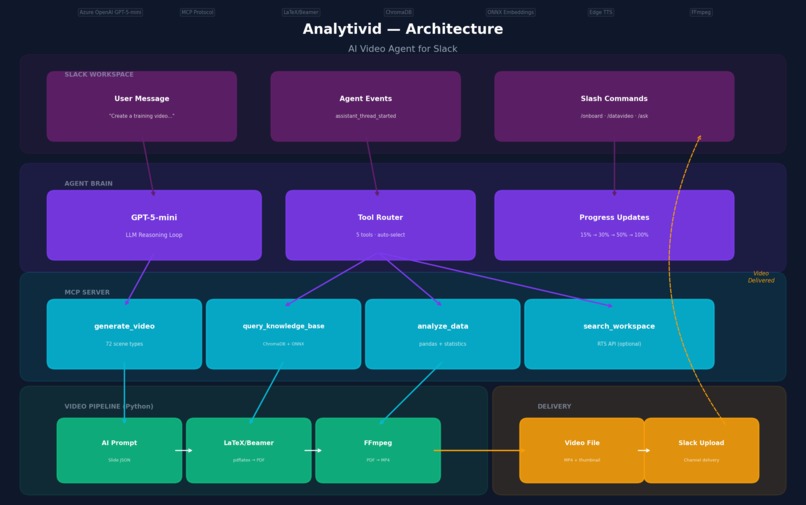
Architecture diagram
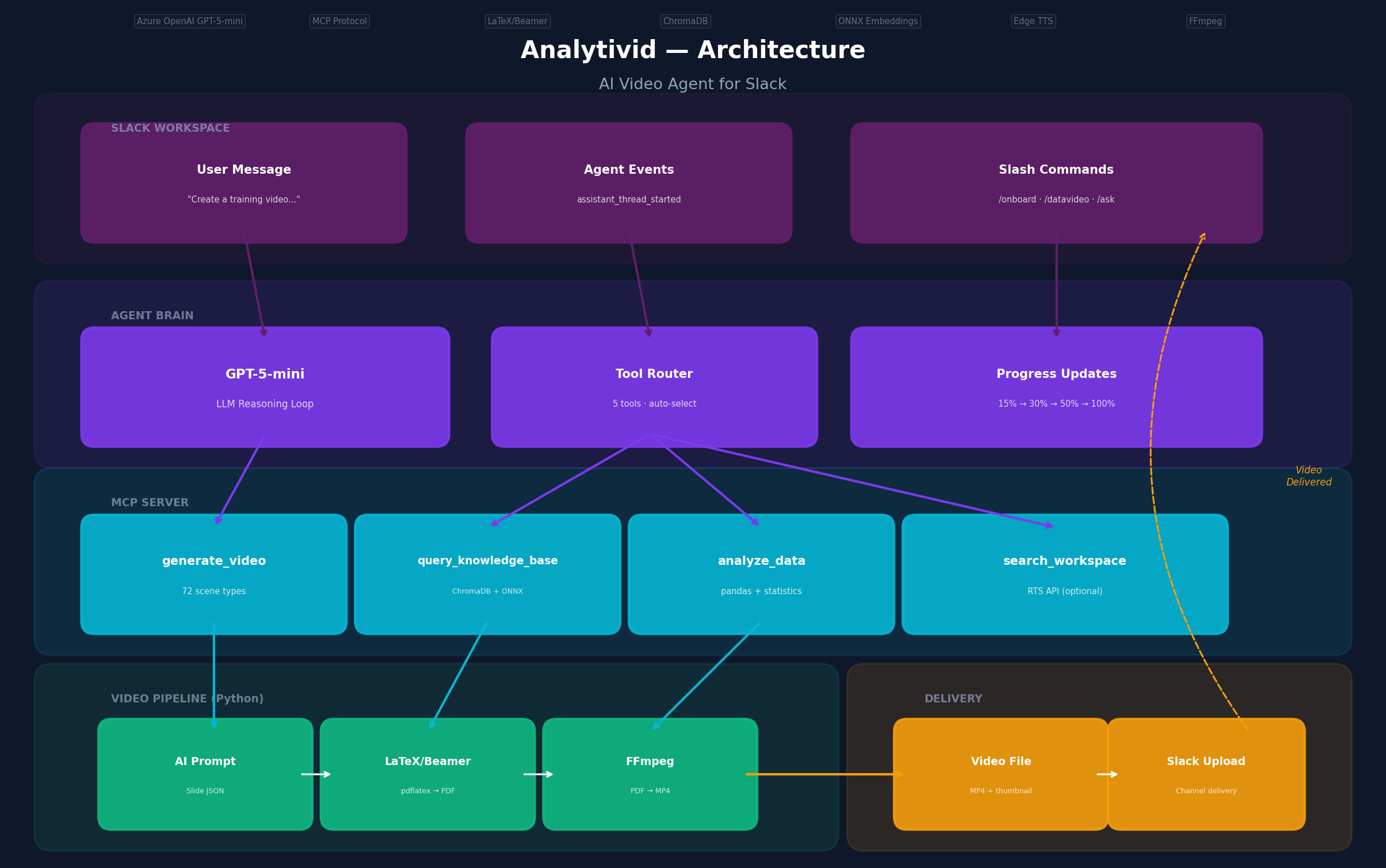
Project name: Analytivid
Tagline: Type a Slack message, get a professional video back.
Inspiration
Every week, someone on the team spends 2+ hours making the same kind of video — a weekly status update, an onboarding deck, a data report. They leave Slack, open PowerPoint or Canva, manually build slides, record a voiceover, export, and share the link back in Slack. The content is already in Slack — the messages, the data files, the project updates — but the video-making happens somewhere else entirely.
We wanted to flip that: bring the video factory into Slack so the team never has to leave.
What it does
You send a message in Slack like "Create a 10-slide training video on our Q4 sales performance" and Analytivid:
- Searches your workspace for relevant context (messages, files, conversations)
- Generates a structured presentation with 72+ scene types — flowcharts, timelines, data charts, comparisons, mindmaps, fishbone diagrams
- Renders each slide as a LaTeX frame with themed designs
- Compiles everything into an MP4 with AI voiceover
- Delivers the video back to your Slack channel with thumbnail preview
It also handles file uploads — drag a CSV into a thread and it analyzes the data, generates insights, and creates a visualization video. There are 17 built-in business templates for weekly reports, sprint demos, training modules, competitive analysis, and more.
How we built it
The stack: Node.js (Slack Bolt) + Python (LaTeX/Beamer + FFmpeg) + Azure OpenAI GPT-5-mini + ChromaDB + Edge TTS.
The agent loop. When you send a message, GPT-5-mini runs a reasoning loop with 5 tools: search_workspace, query_knowledge_base, generate_video, analyze_data, list_templates. It decides what to do — sometimes it searches first, sometimes it goes straight to video generation. The generate_video tool gets removed after the first call to prevent the AI from looping.
The video pipeline. Each of the 72 scene types is a separate Python module that takes structured JSON and outputs valid LaTeX. A shared design system handles themes, fonts, and text wrapping. The pipeline: JSON → LaTeX → pdflatex → PDF → PNG frames → FFmpeg MP4.
The two-stage data pipeline. Early on, asking one AI call to both analyze data and generate a video produced mediocre results. We split it: a dedicated analysis agent produces insights (metrics, trends, chart specs), then a video agent visualizes those insights. Two focused calls beat one overloaded call.
The MCP server. Video generation, RAG, and data analysis are exposed as MCP tools — so any MCP-compatible AI could use them, not just our agent.
The RAG system. ChromaDB with ONNX MiniLM-L6-v2 local embeddings indexes project files. When you ask for a "Q4 sales video," the agent can pull actual sales data from your workspace, not generic filler.
Challenges we ran into
Five scene types broke silently because tcolorbox wasn't in the LaTeX preamble. The pdflatex errors were cryptic — just "missing }" or "no line here to end." We had to systematically test all 72 scenes one by one to find which ones failed, then trace the error back to the missing package. Took a full afternoon.
GPT-5-mini doesn't support temperature. We had temperature: 0.7 set across three files. Every call failed with "Unsupported value." The model only works with default (1). We also hit that it requires max_completion_tokens instead of max_tokens, and certain API versions don't support certain parameters. Each bug was a separate production crash.
Text overflow in LaTeX frames killed compilations. When the AI generates content that's too long for a slide, the PDF compilation fails silently — no error, just no output. We built a context-aware wrapping system: bullet items wrap at 45 characters, paragraphs at 65, labels at 25. Plus an overflow protection function that wraps text in adjustbox when it's still too long.
The bot wouldn't respond to messages in threads unless @mentioned. Users expect to just type in a thread and get a response. We had to add thread state tracking and make the bot respond to any message in a thread it's already participating in — not just mentions.
Accomplishments that we're proud of
72 scene types that all compile cleanly. From fishbone diagrams to Gantt charts to Venn diagrams. Each one is a separate Python module. Getting consistent theming across all 72 — same fonts, same spacing, same color schemes — was the hardest part of the whole project.
The two-stage data pipeline works. Upload a CSV, get a professional analysis video back. The dedicated analysis agent produces much better insights than trying to do everything in one AI call. This was the biggest quality win.
Real-time progress in Slack. Watching "Generating slides... 30%" → "Adding voiceover... 80%" → "Rendering video... 95%" makes the 30-second wait feel manageable. We send Block Kit messages with context subtext at each stage.
What we learned
Split AI tasks. One AI call trying to analyze data AND generate a video produced mediocre results. Two calls — each with a single job — produced great results. Single responsibility works for AI like it does for code.
LaTeX was the right call. We considered web canvases and PowerPoint templates. LaTeX produces crisp, consistent output every time. The tradeoff is cryptic error messages, but the visual quality is worth it.
Progress communication matters more than speed. Users would rather wait 30 seconds with clear updates than 15 seconds with nothing. The percentage-based messages transformed the experience.
MCP decouples nicely. Exposing tools via MCP means the video generation, RAG, and data analysis aren't tied to one AI. Any MCP-compatible model could use them.
Project name: Analytivid
Tagline: Type a Slack message, get a professional video back.
Inspiration
Every week, someone on the team spends 2+ hours making the same kind of video — a weekly status update, an onboarding deck, a data report. They leave Slack, open PowerPoint or Canva, manually build slides, record a voiceover, export, and share the link back in Slack. The content is already in Slack — the messages, the data files, the project updates — but the video-making happens somewhere else entirely.
We wanted to flip that: bring the video factory into Slack so the team never has to leave.
What it does
You send a message in Slack like "Create a 10-slide training video on our Q4 sales performance" and Analytivid:
- Searches your workspace for relevant context (messages, files, conversations)
- Generates a structured presentation with 72+ scene types — flowcharts, timelines, data charts, comparisons, mindmaps, fishbone diagrams
- Renders each slide as a LaTeX frame with themed designs
- Compiles everything into an MP4 with AI voiceover
- Delivers the video back to your Slack channel with thumbnail preview
It also handles file uploads — drag a CSV into a thread and it analyzes the data, generates insights, and creates a visualization video. There are 17 built-in business templates for weekly reports, sprint demos, training modules, competitive analysis, and more.
Architecture
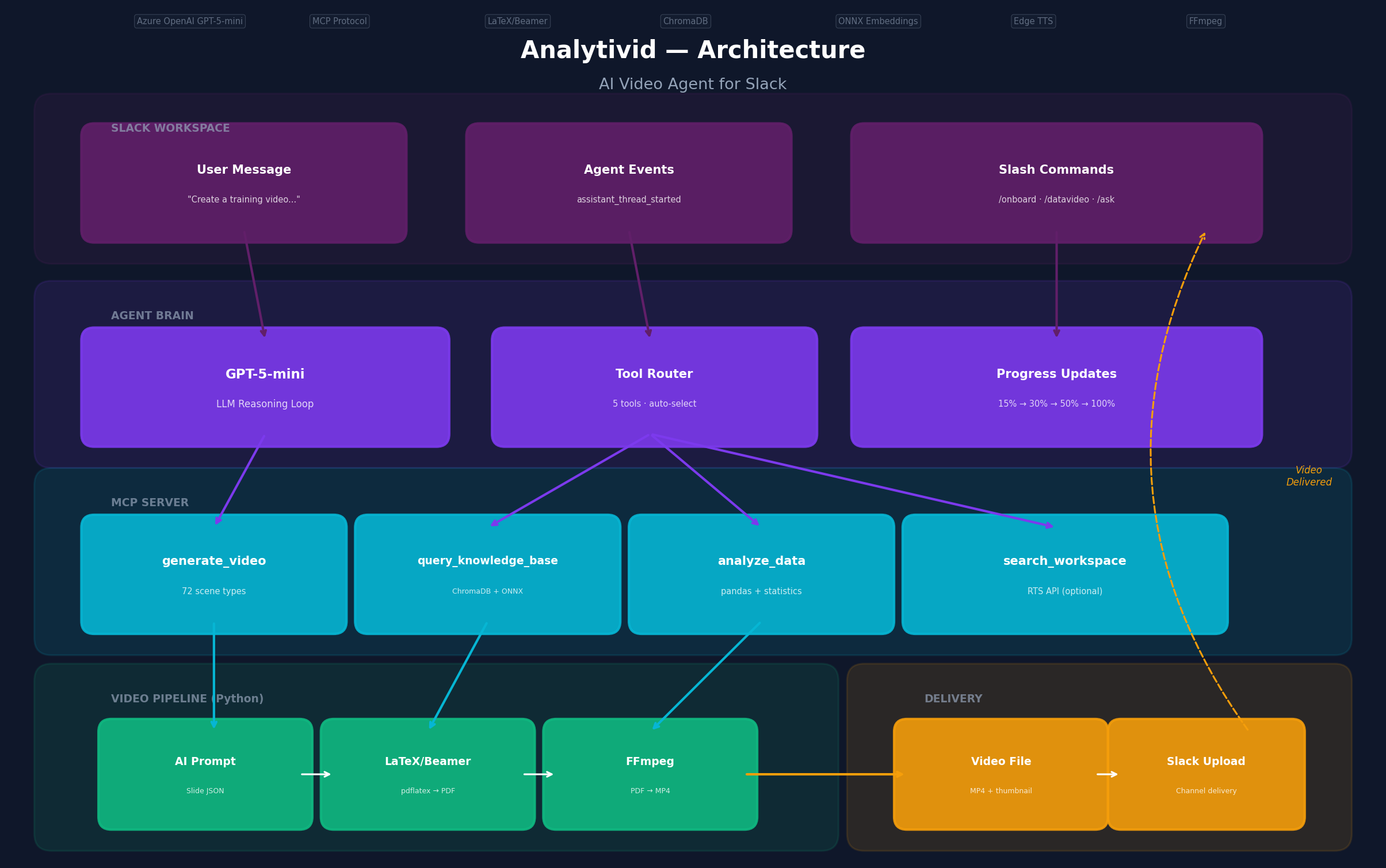
The system has four layers. The Slack Agent handles incoming messages, DMs, file uploads, and slash commands via Slack Bolt. The Agent Brain runs a GPT-5-mini reasoning loop that decides which tools to call — it has access to workspace search, RAG queries, video generation, data analysis, and template listing. The MCP Server exposes video generation and RAG as standard MCP tools, and the Video Pipeline takes structured JSON through LaTeX rendering, PDF compilation, PNG frame extraction, and FFmpeg MP4 assembly with Edge TTS voiceover.
How we built it
The stack: Node.js (Slack Bolt) + Python (LaTeX/Beamer + FFmpeg) + Azure OpenAI GPT-5-mini + ChromaDB + Edge TTS.
The agent loop. When you send a message, GPT-5-mini runs a reasoning loop with 5 tools: search_workspace, query_knowledge_base, generate_video, analyze_data, list_templates. It decides what to do — sometimes it searches first, sometimes it goes straight to video generation. The generate_video tool gets removed after the first call to prevent the AI from looping.
The video pipeline. Each of the 72 scene types is a separate Python module that takes structured JSON and outputs valid LaTeX. A shared design system handles themes, fonts, and text wrapping. The pipeline: JSON → LaTeX → pdflatex → PDF → PNG frames → FFmpeg MP4.
The two-stage data pipeline. Early on, asking one AI call to both analyze data and generate a video produced mediocre results. We split it: a dedicated analysis agent produces insights (metrics, trends, chart specs), then a video agent visualizes those insights. Two focused calls beat one overloaded call.
The MCP server. Video generation, RAG, and data analysis are exposed as MCP tools — so any MCP-compatible AI could use them, not just our agent.
The RAG system. ChromaDB with ONNX MiniLM-L6-v2 local embeddings indexes project files. When you ask for a "Q4 sales video," the agent can pull actual sales data from your workspace, not generic filler.
Challenges we ran into
Five scene types broke silently because tcolorbox wasn't in the LaTeX preamble. The pdflatex errors were cryptic — just "missing }" or "no line here to end." We had to systematically test all 72 scenes one by one to find which ones failed, then trace the error back to the missing package. Took a full afternoon.
GPT-5-mini doesn't support temperature. We had temperature: 0.7 set across three files. Every call failed with "Unsupported value." The model only works with default (1). We also hit that it requires max_completion_tokens instead of max_tokens, and certain API versions don't support certain parameters. Each bug was a separate production crash.
Text overflow in LaTeX frames killed compilations. When the AI generates content that's too long for a slide, the PDF compilation fails silently — no error, just no output. We built a context-aware wrapping system: bullet items wrap at 45 characters, paragraphs at 65, labels at 25. Plus an overflow protection function that wraps text in adjustbox when it's still too long.
The bot wouldn't respond to messages in threads unless @mentioned. Users expect to just type in a thread and get a response. We had to add thread state tracking and make the bot respond to any message in a thread it's already participating in — not just mentions.
Accomplishments that we're proud of
72 scene types that all compile cleanly. From fishbone diagrams to Gantt charts to Venn diagrams. Each one is a separate Python module. Getting consistent theming across all 72 — same fonts, same spacing, same color schemes — was the hardest part of the whole project.
The two-stage data pipeline works. Upload a CSV, get a professional analysis video back. The dedicated analysis agent produces much better insights than trying to do everything in one AI call. This was the biggest quality win.
Real-time progress in Slack. Watching "Generating slides... 30%" → "Adding voiceover... 80%" → "Rendering video... 95%" makes the 30-second wait feel manageable. We send Block Kit messages with context subtext at each stage.
What we learned
Split AI tasks. One AI call trying to analyze data AND generate a video produced mediocre results. Two calls — each with a single job — produced great results. Single responsibility works for AI like it does for code.
LaTeX was the right call. We considered web canvases and PowerPoint templates. LaTeX produces crisp, consistent output every time. The tradeoff is cryptic error messages, but the visual quality is worth it.
Progress communication matters more than speed. Users would rather wait 30 seconds with clear updates than 15 seconds with nothing. The percentage-based messages transformed the experience.
MCP decouples nicely. Exposing tools via MCP means the video generation, RAG, and data analysis aren't tied to one AI. Any MCP-compatible model could use them.
What's next for Analytivid
More data sources. Right now you upload a CSV. Next: connect directly to Google Sheets, Jira, Salesforce — pull data automatically.
Custom branding. Let teams set their own colors, logos, and voiceover styles so videos feel like they came from their team.
Scheduled generation. "Every Monday at 9am, generate a weekly status video from our project channel." Automated reports on autopilot.
Slack Canvas integration. Populate Slack canvases with structured content alongside the video — giving teams both formats.
Built With: Node.js, Python, Azure OpenAI, LaTeX, Beamer, FFmpeg, Edge TTS, ChromaDB, ONNX, Slack Bolt, MCP
Try it out: GitHub Repo | Sandbox: Slack Workspace testhackagent

Log in or sign up for Devpost to join the conversation.