-
-
splash screen
-
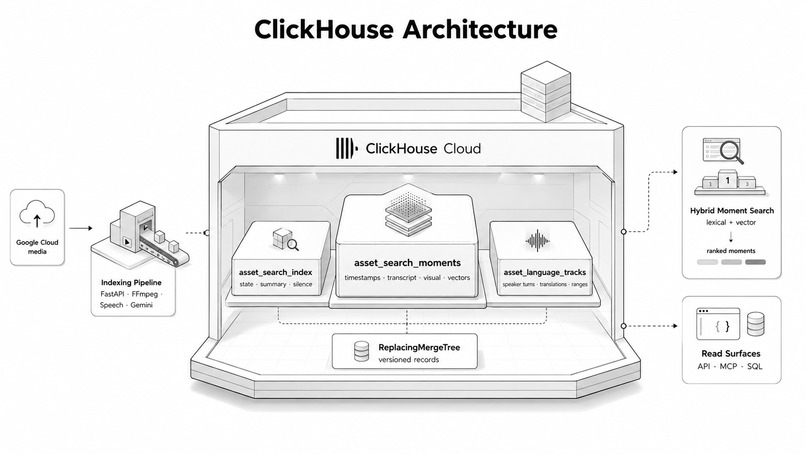
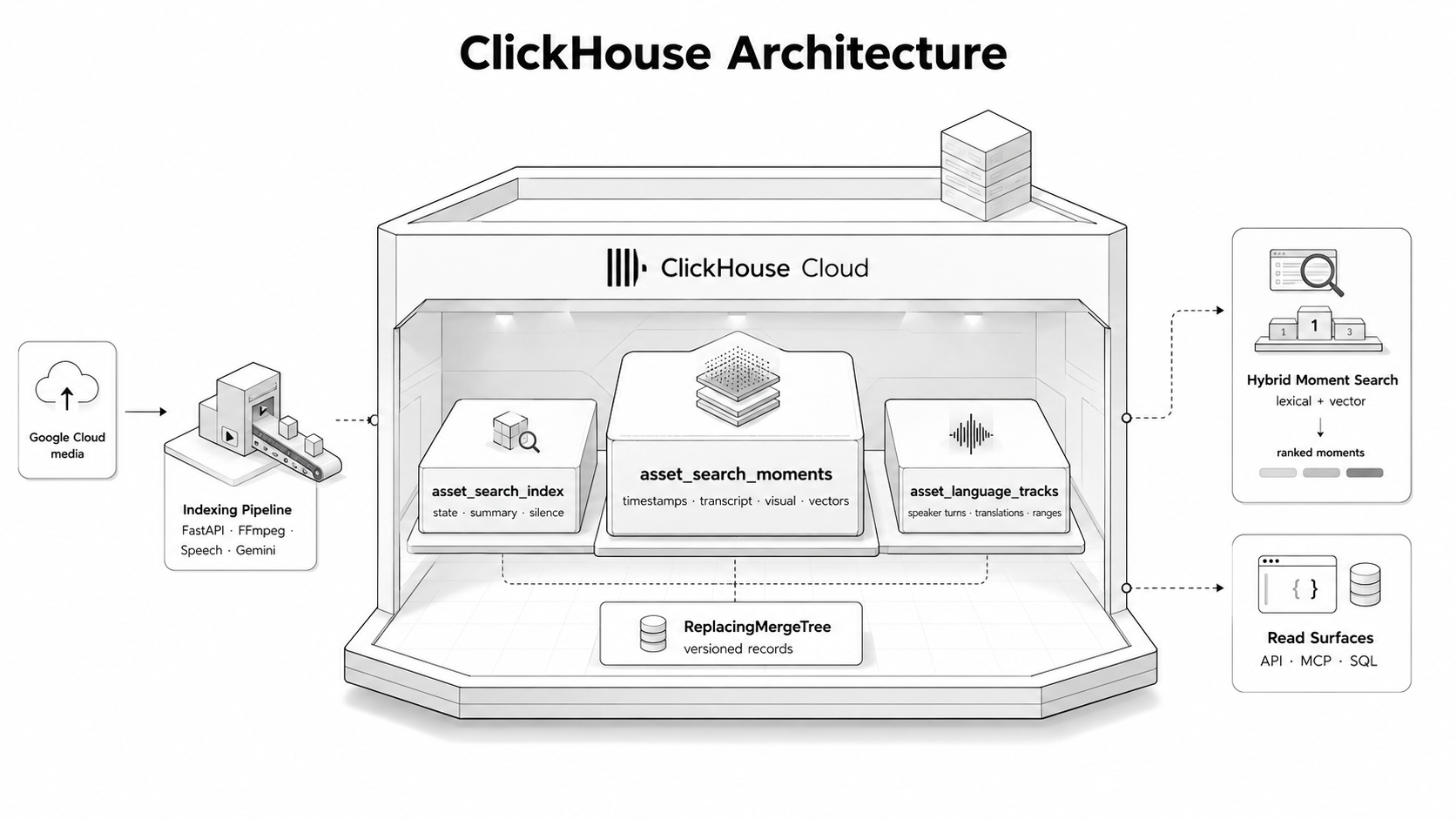
clickhouse architecture
-
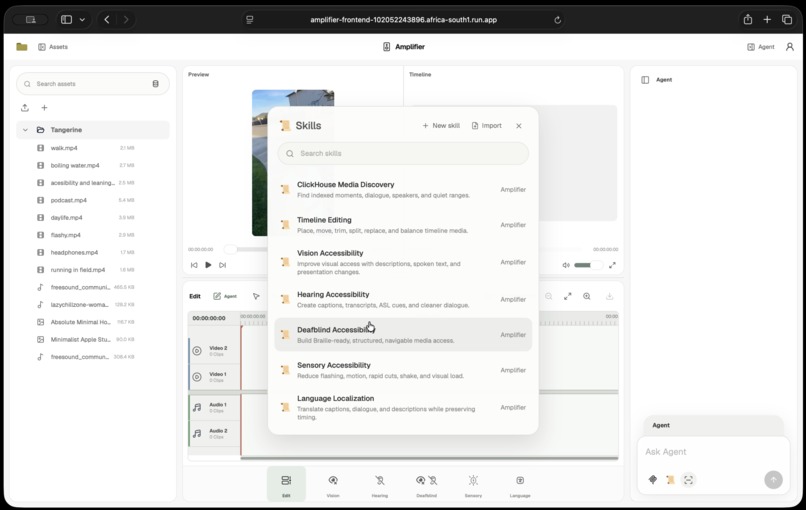
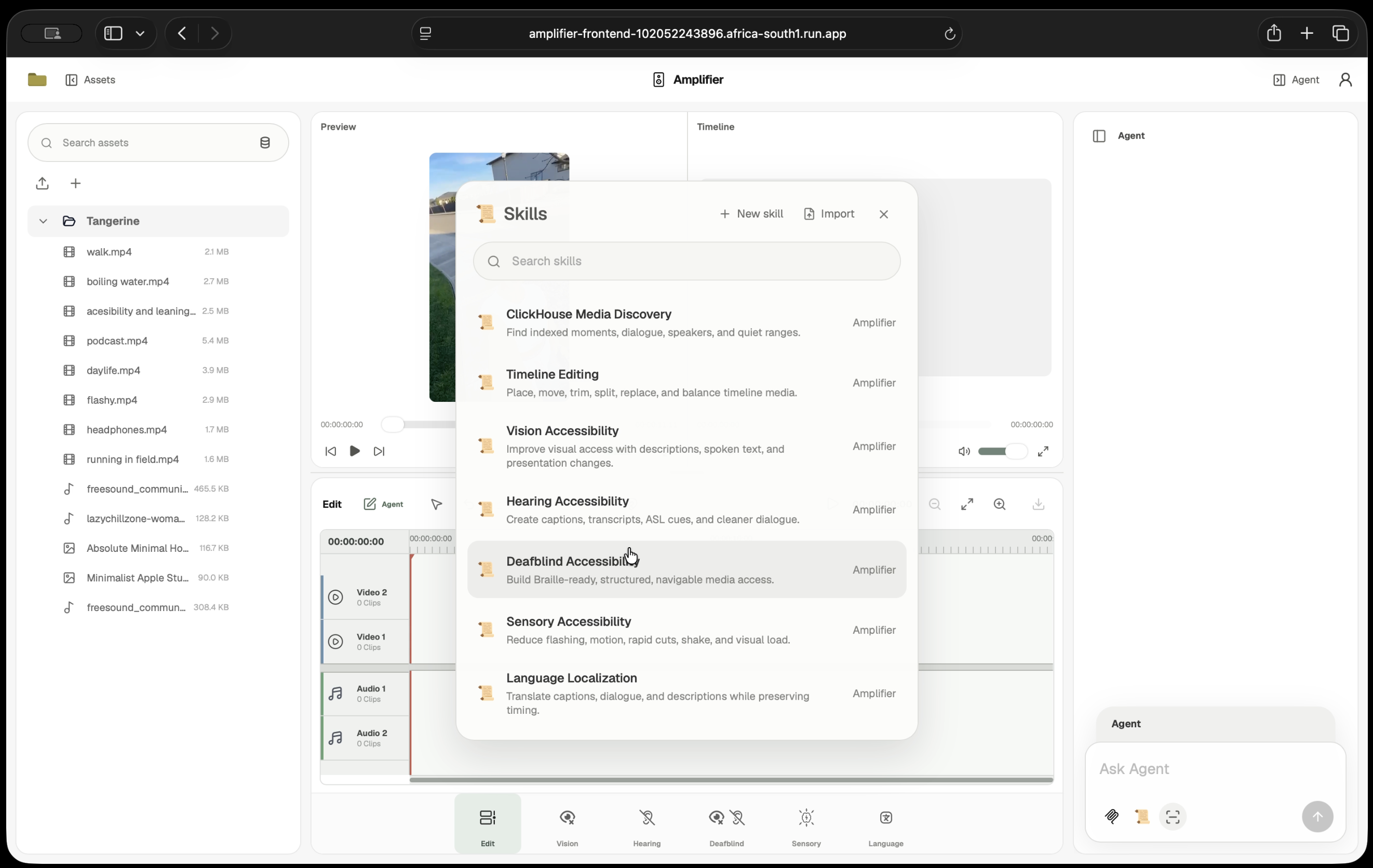
skils and mcp
-
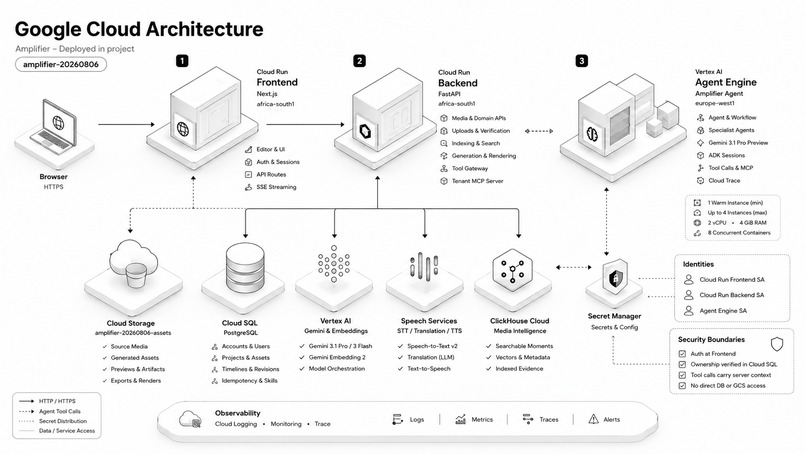
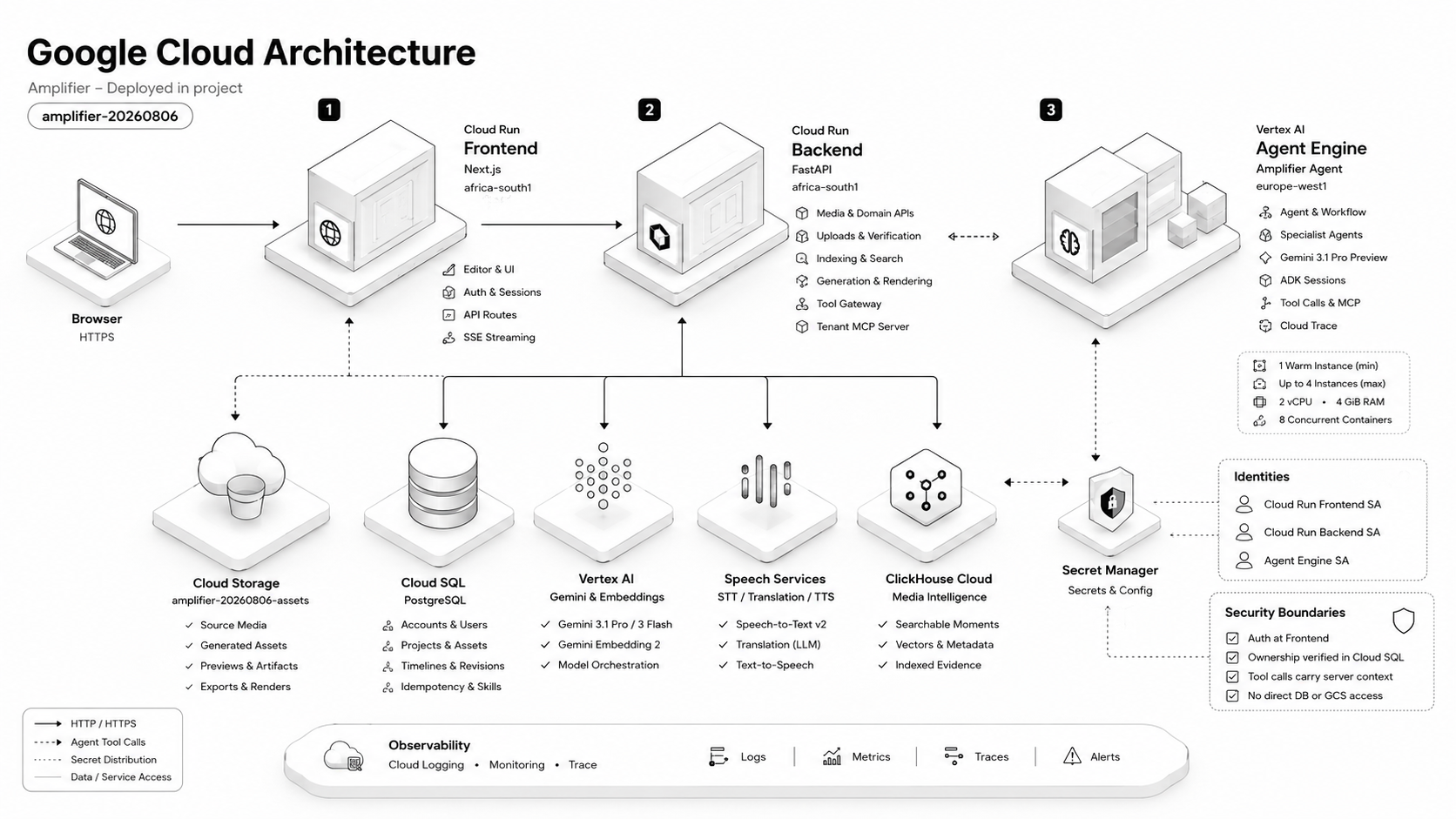
google cloud architecture
-
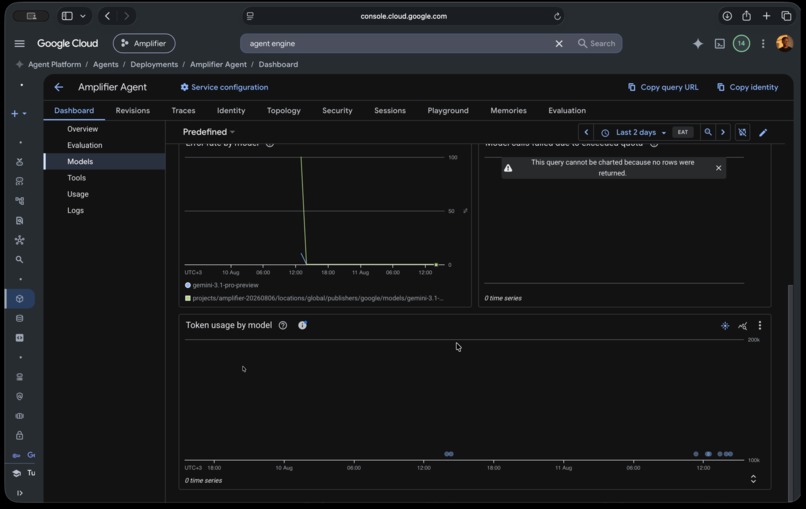
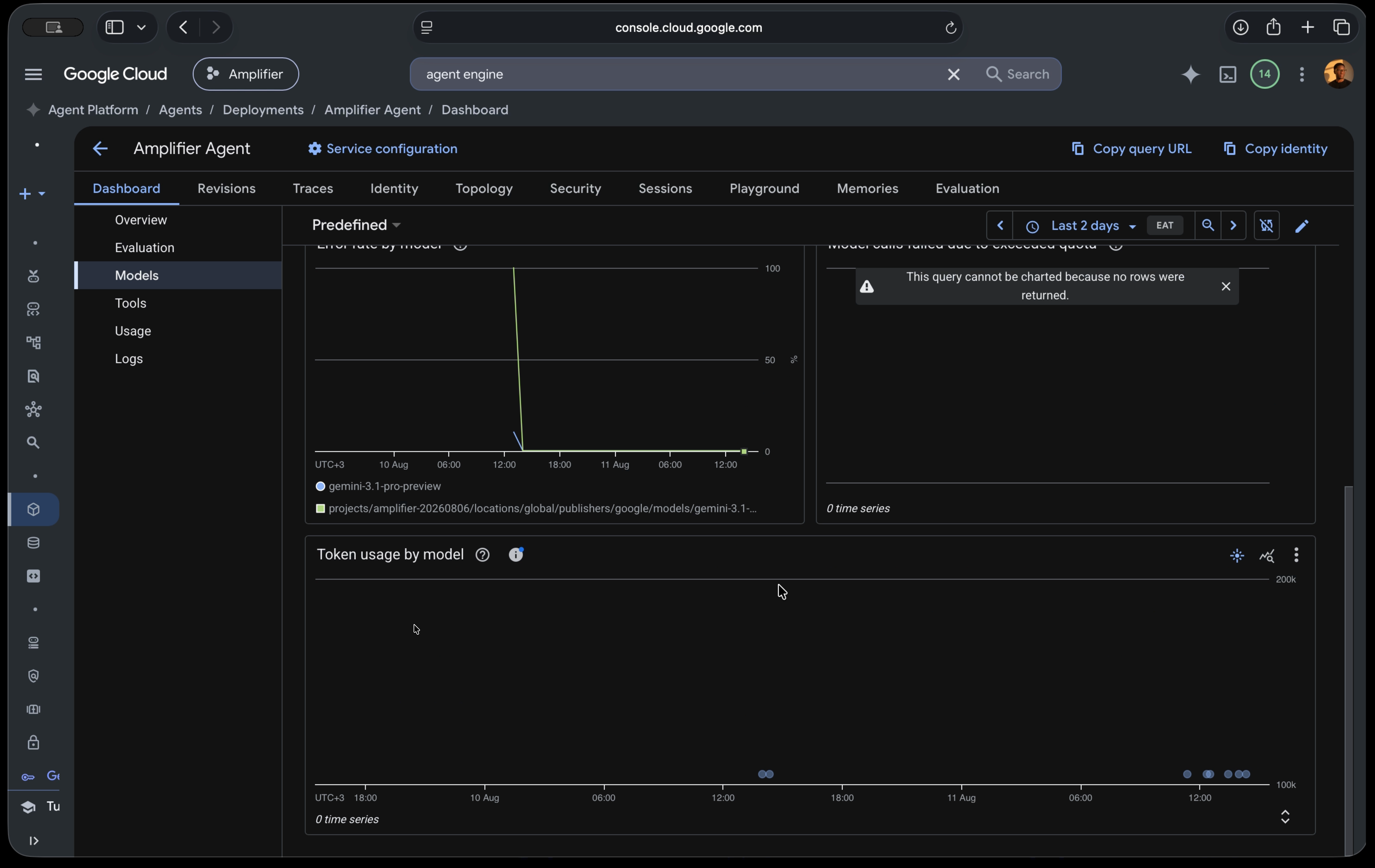
agent engine
-
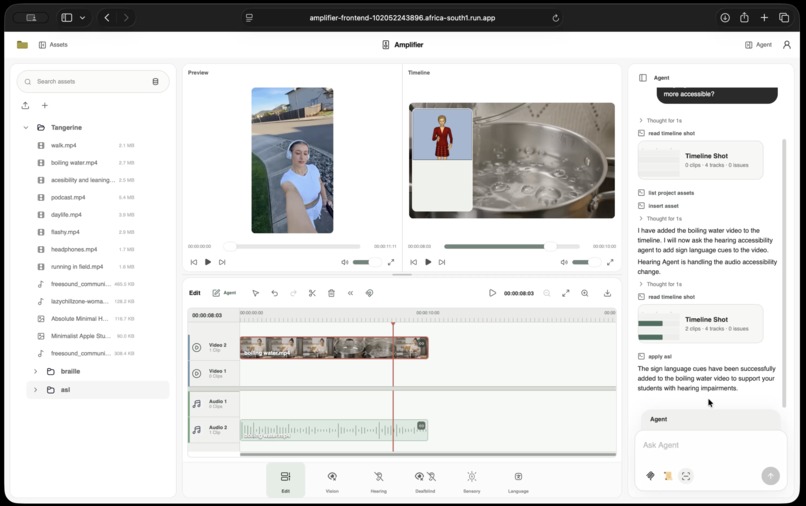
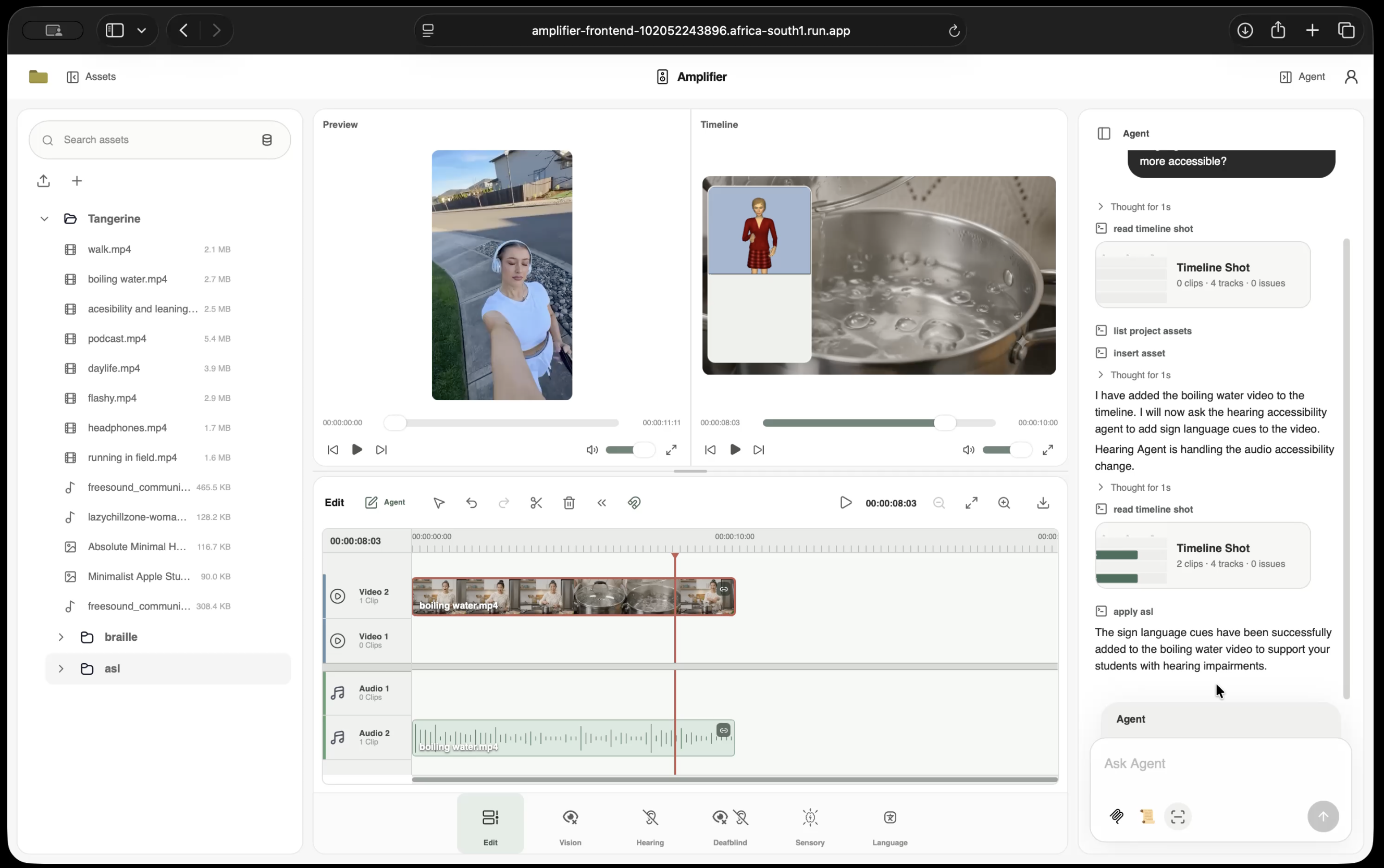
american sign language support
-
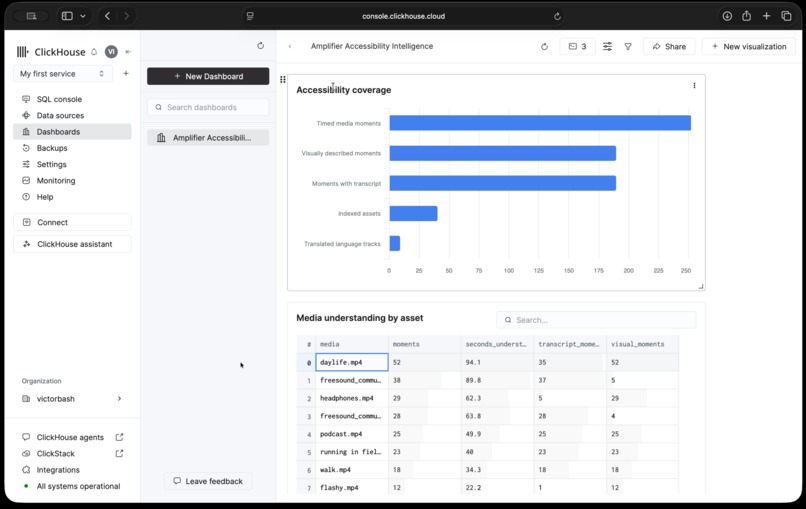
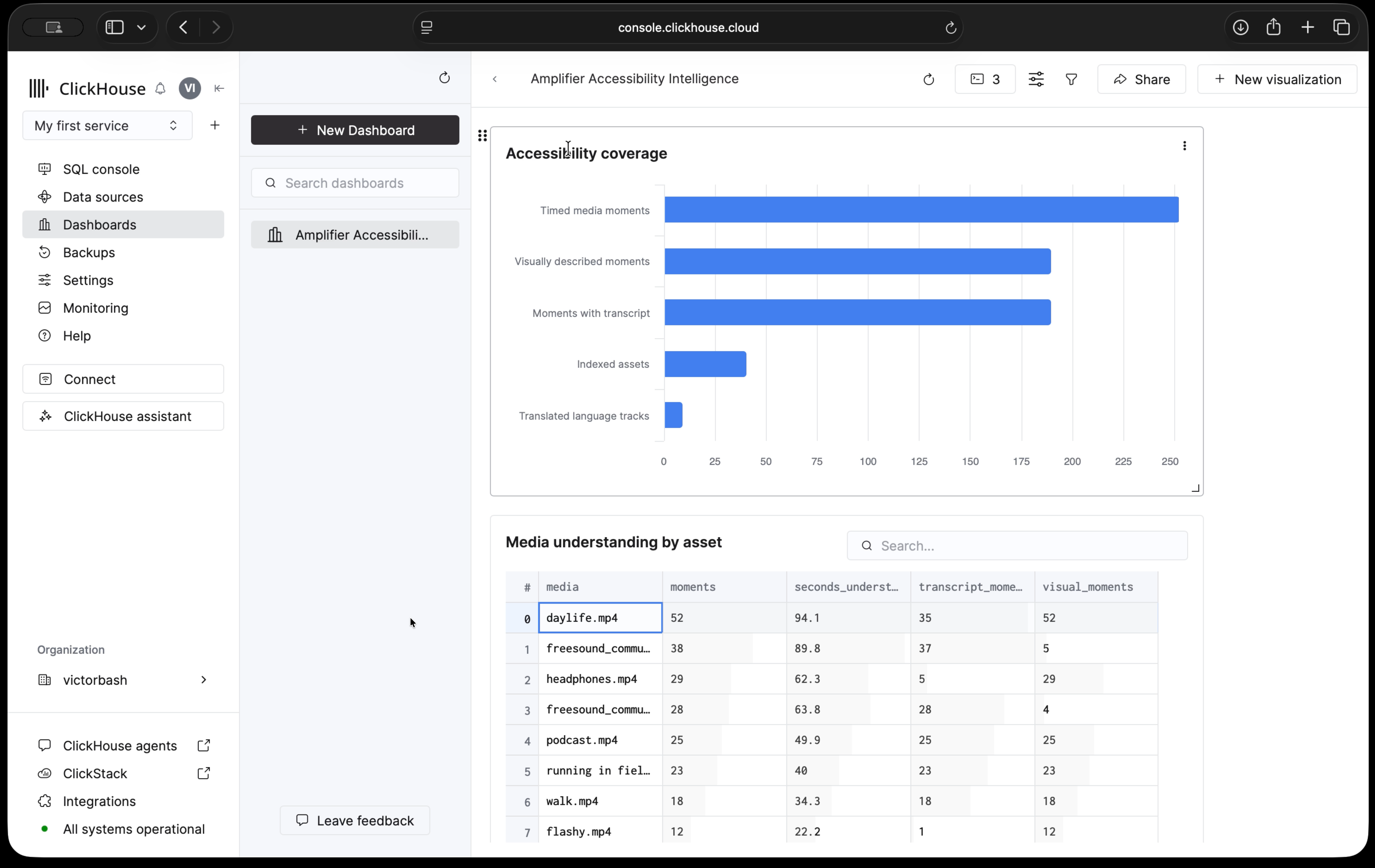
clickhouse
-
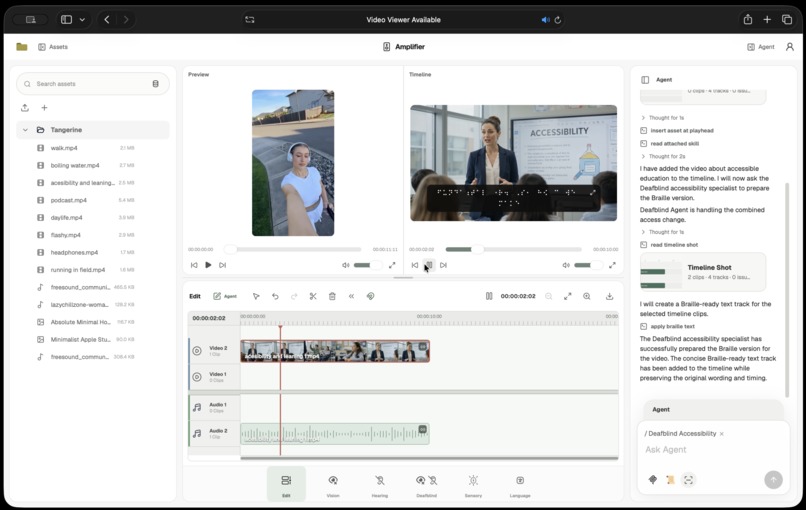
braille generation
-
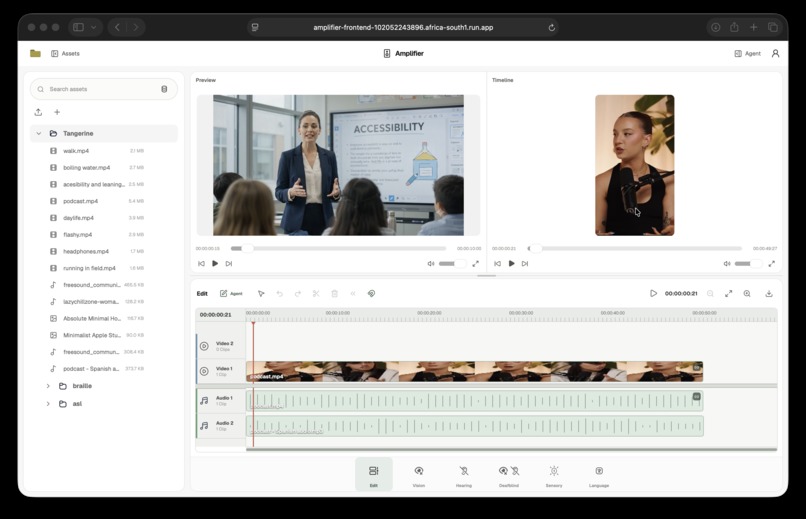
multilingual translate
Amplifier
Optimizing media for the full range of human needs and abilities.
Inspiration
A video is not accessible just because it can be played.
Someone who is Deaf may need captions or sign language. Someone who is blind may need the actions, expressions, setting, and on-screen text described aloud. A Deafblind person may need that same information as Braille or structured text. Flashing, rapid cuts, camera movement, crowded audio, small text, and language can make the same piece of media difficult or impossible for someone else to use.
The scale is significant. The World Health Organization estimates that 1.3 billion people — around 16% of the global population — experience significant disability (WHO, Disability and health). UNICEF estimates that nearly 240 million children have disabilities and identifies inaccessible learning materials as a barrier to participation (Accessible Digital Textbooks for All). A review of more than 100 studies also found that captions can improve comprehension, attention, and memory for Deaf and hearing viewers alike (Video Captions Benefit Everyone).
In practice, accessible media is still often created after the edit.
Captions may be made in one tool. Audio description may be produced somewhere else. Translation may begin from an exported transcript. Sign language becomes another asset. Braille becomes another document. Sensory changes may require a separate version of the video.
Then the original media changes.
A scene moves. A sentence is shortened. A clip is replaced. Captions can fall out of time, an audio description can describe a shot that has moved, and translated speech can end up attached to the wrong part of the video.
Amplifier was built around a simple idea: accessibility should live inside the media workflow and remain connected to the media it describes.
The media can change. The accessibility work should still know what it belongs to.
What it does
Amplifier is a media editor for making video, audio, and images accessible.
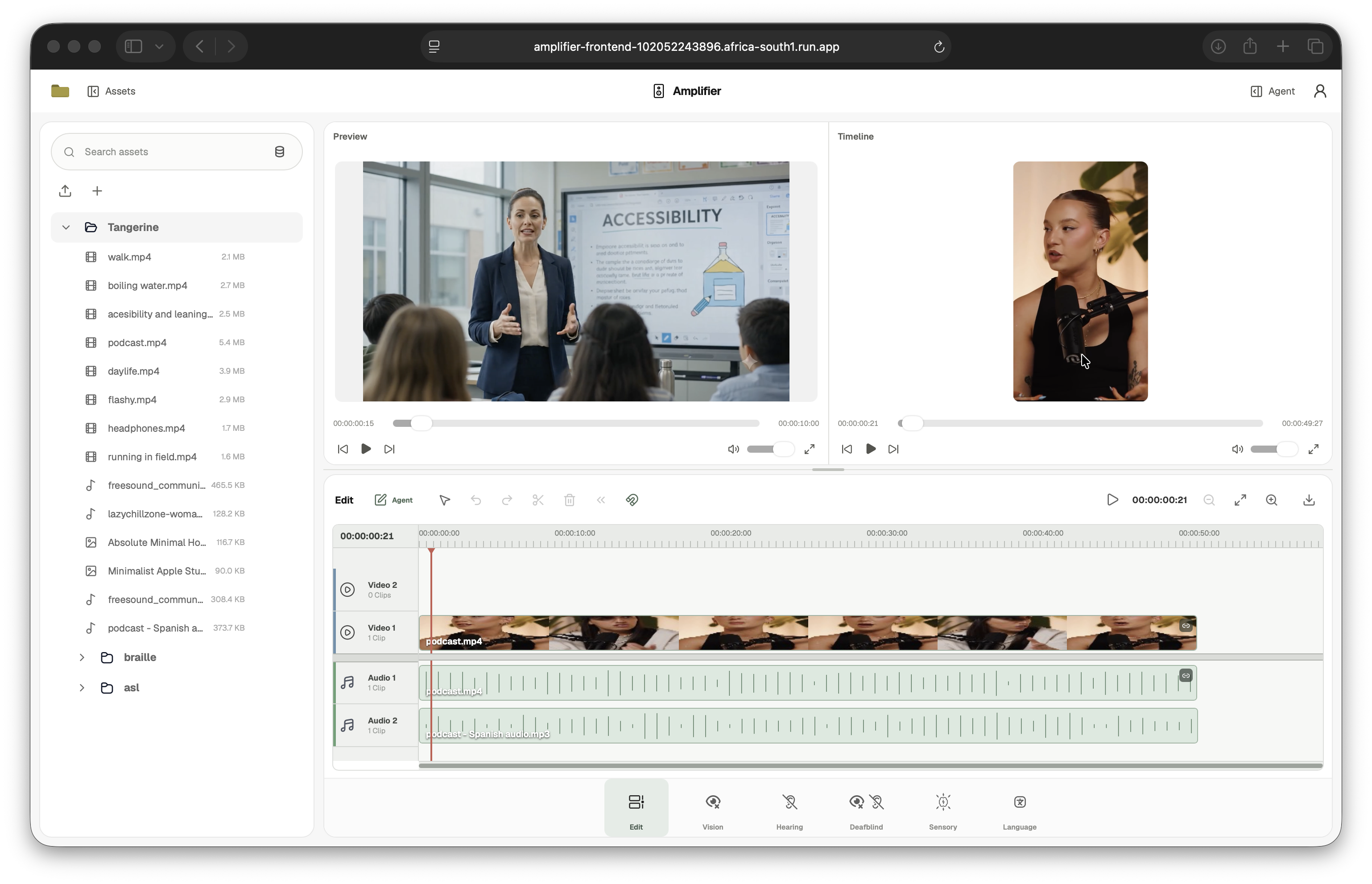
A creator can bring media into a project and produce captions, transcripts, audio descriptions, spoken on-screen text, ASL, Braille, clearer audio, sensory-safe video, larger text, colour-safe visuals, and translated speech.
The creator can make those changes directly on the timeline or ask the agent for the result they need. The agent can find the relevant media, select the correct clip, place media on the timeline, and carry out editing and accessibility work in the same request.
For blind and low-vision audiences, Amplifier can describe visual action, speak text shown on screen, enlarge text, increase contrast, and create colour-safe versions.
For Deaf and hard-of-hearing audiences, it can transcribe speech, create synchronized captions, generate an ASL track, and reduce background noise.
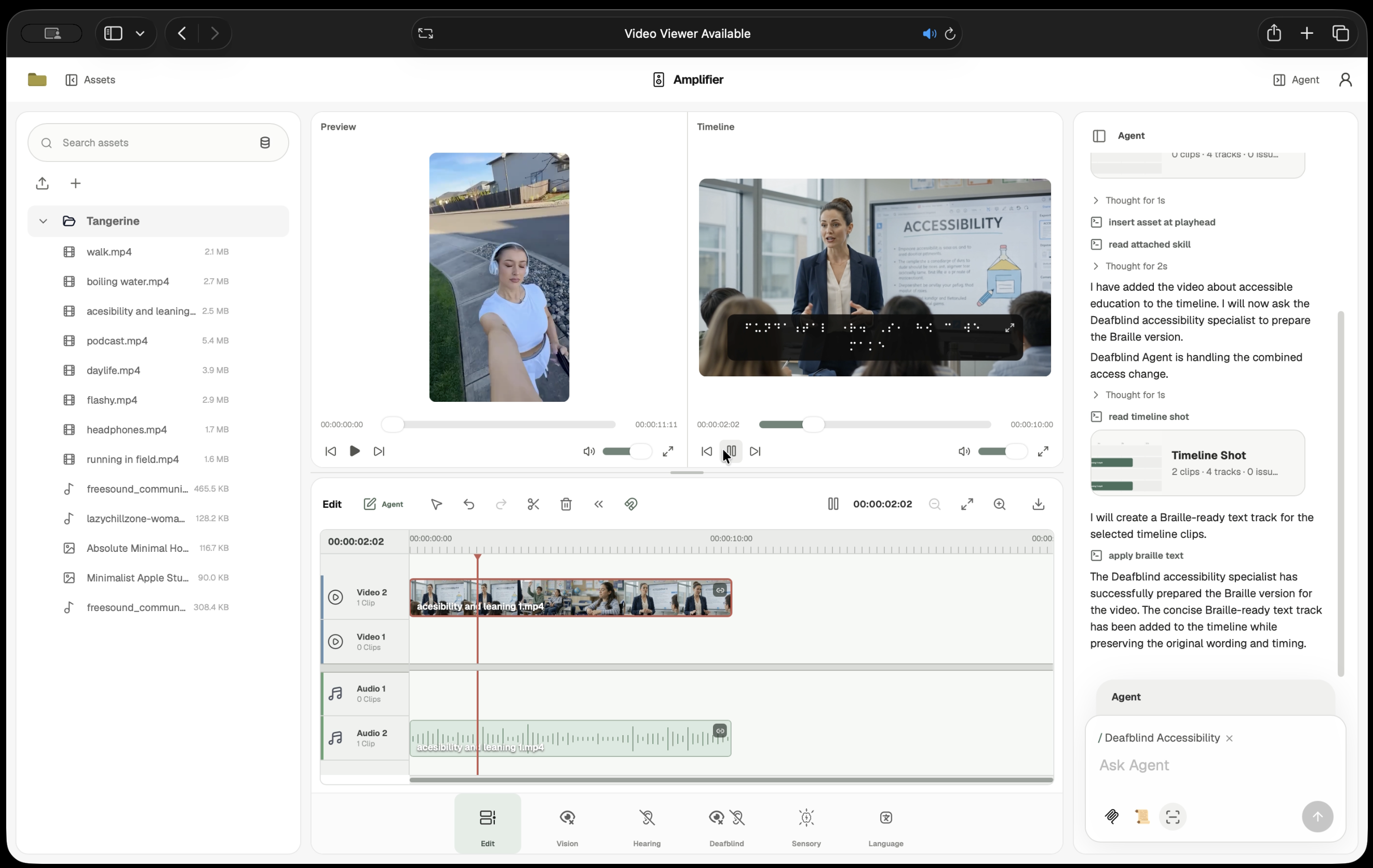
For Deafblind audiences, it can create Unified English Braille, downloadable BRF, structured descriptions, scene and speaker labels, navigation points, large-print text, and tactile cue information.
For people affected by flashing, motion, camera shake, rapid cuts, or heavy visual stimulation, Amplifier can create a calmer version of the selected video while preserving its original timing and audio.
For multilingual media, Amplifier can translate captions, audio descriptions, and spoken dialogue. In conversations with several speakers, it keeps speaker turns separate, assigns distinct synthetic voices, and fits the translated speech back into the original time windows.
The results stay connected to the project. Captions and ASL remain timed to the selected clip. Braille and transcripts can be downloaded. Generated audio and video return as project assets that can be previewed, placed, replaced, compared, or removed on the timeline.
Amplifier also makes project media searchable. A creator or agent can search for a spoken phrase, visual event, speaker turn, or moment of silence and receive the exact file and source time range where it occurs.
That means a request can begin with the media itself:
“Find the scene where the person reaches for the kettle and add audio description.”
Amplifier can locate that moment, place or select the correct clip, and continue the edit from there.
The workflow
UPLOAD MEDIA
     │
     ▼
UNDERSTAND THE FILE
scenes · speech · silence · speakers · moments
     │
     ▼
INDEX IN CLICKHOUSE
searchable text · timestamps · previews · embeddings
     │
     ▼
CREATOR REQUEST
“caption this” · “translate this” · “describe that scene”
     │
     ▼
AGENT FINDS THE RIGHT MEDIA AND TIME RANGE
     │
     ▼
ACCESSIBILITY SPECIALIST
Vision · Hearing · Deafblind · Sensory · Language
     │
     ▼
RESULT RETURNS TO THE SAME PROJECT AND TIMELINE
How we built it
The core technical challenge was giving the editor and its agents a reusable understanding of project media.
A filename such as interview_final_03.mp4 tells the system almost nothing about what happens inside the file. Sending the entire video back through a model every time someone asks a new question would repeat expensive work and make editing slower.
Amplifier analyzes media once, stores that understanding in ClickHouse, and reuses it across search, editing, captions, audio description, ASL, Braille, translation, and agent decisions.
ClickHouse is the shared media index
When a creator activates Moment Search, Amplifier builds a searchable representation of eligible project media.
                         ┌──────────────────────────────┐
                         │        PROJECT MEDIA         │
                         │ video · audio · images       │
                         └──────────────┬───────────────┘
                                        │
              ┌─────────────────────────┼─────────────────────────┐
              │                         │                         │
              ▼                         ▼                         ▼
     Gemini 3 Flash Preview          Chirp 3                  FFmpeg
     timed media moments             transcript               silence
     visual descriptions             speaker labels           preview frames
              │                         │                         │
              └─────────────────────────┼─────────────────────────┘
                                        │
                                        ▼
                              Gemini Embedding 2
                                        │
                                        ▼
                         ┌──────────────────────────────┐
                         │          CLICKHOUSE          │
                         │                              │
                         │ asset_search_index           │
                         │ asset_search_moments         │
                         │ asset_language_tracks        │
                         └──────────────┬───────────────┘
                                        │
                       ┌────────────────┼────────────────┐
                       │                │                │
                       ▼                ▼                ▼
                  MOMENT SEARCH      ADK / MCP      ACCESSIBILITY
                  exact + semantic   agent tools    pipelines
Amplifier stores three main forms of reusable media information:
| ClickHouse table | What Amplifier stores there |
|---|---|
asset_search_index |
Indexing state, a compact searchable document, media summary, silence ranges, summary embedding, and schema/model versions |
asset_search_moments |
Timed descriptions, transcript text, preview references, and 768-dimensional Gemini Embedding 2 vectors for moments inside a file |
asset_language_tracks |
Speaker turns, translated text, source ranges, language, and translation action so language work can be reused |
The search tables use ReplacingMergeTree so the current representation of an asset or moment can replace an older one. They are ordered around project and asset identity to keep queries scoped to the media being edited.
For text search, tokenbf_v1 data-skipping indexes reduce the candidate set. Semantic search then uses cosine distance over the stored embeddings. Search results return an owned asset ID together with exact source seconds, which lets the editor place the matching media directly on the timeline.
This makes search useful as an editing operation rather than a separate dashboard.
A request for “the person reaching for the kettle” can resolve to the correct file and seconds. A transcript already stored for search can also be reused for captions, ASL, Braille, speaker analysis, and translation. Silence already detected during indexing can help determine where audio description has room to speak.
ClickHouse is available directly to the agents
The Google ADK application connects to ClickHouse through a Streamable HTTP MCP server.
The MCP layer exposes four read-only media tools:
- search project moments;
- read a transcript;
- inspect silence ranges; and
- read speaker turns.
The agent never receives raw SQL and never chooses its own account scope. The server injects the authenticated account and project, verifies asset ownership against the application database, and then performs the ClickHouse query.
CREATOR
   │
   ▼
AMPLIFIER AGENT
   │
   ├── search project moments ─────────────┐
   ├── read transcript                    │
   ├── inspect silence                    ├──► MCP SERVER
   └── read speaker turns                 │        │
                                          │        ▼
                                          │   ownership check
                                          │        │
                                          └────────▼
                                               CLICKHOUSE
This gives the agents useful media context while keeping project boundaries enforced by the server rather than by model instructions.
The agent system
Amplifier uses Google ADK with Gemini 3.1 Pro Preview.
The main Agent owns project and timeline work. It can inspect files, search indexed media, insert exact moments, select clips, and perform timeline operations such as move, trim, split, replace, and mix.
Five task agents handle accessibility work:
| Specialist | Responsibility |
|---|---|
| Vision | Audio description, spoken on-screen text, contrast, larger text, colour-safe visuals |
| Hearing | Transcription, synchronized captions, ASL, noise reduction |
| Deafblind | Unified English Braille, BRF, structured text, labels, navigation, tactile cues |
| Sensory | Reduced flash, motion, camera shake, rapid cutting, and visual stimulation |
| Language | Caption translation, description translation, and timed multi-speaker speech translation |
The main Agent prepares the project before delegation. It finds or places the media, selects the correct clip, and sends one task to the specialist responsible for that form of access. The specialist returns the result to Agent, which can continue editing the same project.
Each role receives a limited tool set. Specialists do not receive general backend access. Tool failures return structured results so the agent can correct an invalid request and continue the workflow.
One real timeline
The timeline is stored in PostgreSQL on Cloud SQL.
Manual edits and agent edits go through the same timeline service. Every mutation includes the revision it started from and an idempotency key.
Before saving a change, the backend validates:
- account and project ownership;
- source duration;
- clip and trim ranges;
- track lanes;
- linked audio and video;
- overlap rules; and
- the current timeline revision.
A stale edit stops instead of overwriting newer work.
Before acting, an agent can also read a Timeline Shot containing the selected clips, tracks, playhead, start times, trims, durations, links, and timeline revision. This gives the model the current edit state without putting the entire project into its prompt.
Accessibility pipelines
The accessibility features combine model reasoning with deterministic media processing.
Google Speech-to-Text provides words, timestamps, and speaker labels. Google Translation LLM translates individual speaker turns. Chirp 3 HD generates distinct synthetic voices. FFmpeg fits translated speech into its original time windows and handles media transforms.
Liblouis produces Unified English Braille and BRF. Gemini plans ASL cues and sensory edits. The backend validates timestamps, SiGML, media output, encoding, duration, and timeline fit before accepting generated results.
System architecture
┌───────────────────────────────────────────────────────────────┐
│                        BROWSER EDITOR                         │
│                                                               │
│  media library · timeline · previews · agent conversation    │
└───────────────┬───────────────────────────────┬───────────────┘
                │                               │
                │ resumable upload              │ app + agent requests
                ▼                               ▼
      ┌──────────────────┐            ┌─────────────────────────┐
      │ Google Cloud     │            │ FastAPI on Cloud Run    │
      │ Storage          │            │                         │
      │                  │            │ project + media APIs    │
      │ original +       │            │ timeline service        │
      │ generated media  │            │ accessibility pipelines │
      └────────┬─────────┘            └───────┬───────┬─────────┘
               │                              │       │
               │                              │       │
               │                        ┌─────▼───┐   └──────────────┐
               │                        │Cloud SQL│                  │
               │                        │Postgres │                  │
               │                        └─────────┘                  │
               │                                                   │
               │                                        ┌──────────▼──────────┐
               │                                        │ Vertex AI           │
               │                                        │ Agent Engine        │
               │                                        │ Google ADK          │
               │                                        └──────────┬──────────┘
               │                                                   │
               │                                                   │ MCP
               │                                                   ▼
               │                                        ┌─────────────────────┐
               └──── media indexing ───────────────────►│ CLICKHOUSE          │
                                                        │ shared media index  │
                                                        └─────────────────────┘
The frontend and backend run as separate Cloud Run services. Cloud SQL stores accounts, projects, assets, timelines, skills, and idempotency records. GCS stores original and generated media. Vertex AI Agent Engine hosts the ADK application. ClickHouse stores the reusable media index used by search, agents, and accessibility workflows.
The browser receives agent text, tool calls, specialist handoffs, timeline changes, errors, and completion through one server-sent event stream.
Challenges we ran into
Giving the system useful media context
The agent needed more than filenames, but repeatedly passing full media through a model made requests slower and repeated work that had already been done.
We separated media understanding from current edit state.
ClickHouse keeps reusable knowledge of what exists inside project media. Timeline Shot gives the agent the smaller set of facts describing what is currently on the timeline.
Together, they let the agent answer two different questions efficiently:
CLICKHOUSE:    What happens inside the project's media?
TIMELINE SHOT: What is currently happening in this edit?
Keeping accessibility work synchronized
Different accessibility outputs depend on different parts of the source.
Captions follow speech. Audio description follows visual events and available pauses. ASL follows timed text. Braille can depend on structured transcript information. Translated speech has to remain inside the scene it belongs to.
We tied generated results to stable clip IDs and source times, reject invalid or changed cue timing, and use FFmpeg to fit generated audio into the intended source window.
Translating several speakers
A translated conversation needs speaker identity, timing, valid audio, separate voices, and speech that still fits the original scene.
Amplifier normalizes source audio to mono 16 kHz FLAC, obtains timed words and speaker labels, translates each speaker turn separately, assigns stable Chirp 3 HD voices, adjusts speaking rate, and uses bounded audio fitting where necessary.
The result can preserve the fact that two people were speaking instead of flattening the conversation into one generated voice.
Delegating work without breaking the live session
A single request can begin with Agent editing the timeline, move into Vision, Hearing, Deafblind, Sensory, or Language, and return to Agent.
We kept delegation sequential, preserve ADK event history, and require every specialist task to return a structured completed or blocked result. The browser can therefore keep one live session while the work moves between roles.
Direct uploads across Cloud Run and GCS
Our first deployed resumable upload flow used an internal Cloud Run URL instead of the browser's actual origin. GCS received the file, but the browser could not read the final completion response, so Amplifier could not continue with inspection and indexing.
We bound resumable sessions to the browser Origin, corrected the GCS policy for the deployed frontend and backend, and verified the flow from upload through completion, FFprobe inspection, project registration, indexing, and playback.
Accomplishments that we're proud of
Amplifier can take a creator from an uploaded file to an accessibility edit inside one working project.
The system can index media, search it by exact text or meaning, identify a precise source range, place or select the right clip, run the requested accessibility operation, register generated media, and commit the result to the same timeline.
The product currently covers:
- synchronized captions and transcripts;
- audio descriptions;
- spoken on-screen text;
- ASL;
- Unified English Braille and BRF;
- structured navigation and labels;
- translated multi-speaker speech;
- background-noise reduction;
- larger text;
- higher contrast and colour-safe visuals; and
- video with reduced flash, motion, camera shake, rapid cutting, or visual stimulation.
ClickHouse is part of the working edit path. It stores asset summaries, timed media moments, transcripts, silence, preview references, embeddings, speaker turns, and translation plans. It powers exact and semantic media search, supplies reusable evidence to accessibility workflows, reduces repeated media analysis, and gives the ADK agents project-scoped media access through MCP.
The deployed application uses the same architecture shown in the demo: Next.js and FastAPI on Cloud Run, PostgreSQL on Cloud SQL, original and generated media in GCS, Google ADK on Vertex AI Agent Engine, and the shared media index in ClickHouse.
What we learned
Accessibility works better when it stays attached to the media that created it.
Captions, descriptions, ASL, Braille, translated audio, and sensory alternatives depend on source identity and timing. Keeping those relationships inside the project makes the output easier to edit and less likely to become stale after a timeline change.
We also learned that media understanding becomes much more valuable when several features can reuse it.
A transcript can support search, captions, ASL, Braille, speaker analysis, and translation. Visual moments can support search, audio description, spoken text, and precise timeline placement. Silence can support both search and audio-description timing. ClickHouse gives those features a shared, reusable representation of the media.
The agent system also became more reliable when responsibilities were narrow. Agent owns the project and timeline. Each specialist owns one accessibility area. The backend owns deterministic checks such as project access, clip identity, time ranges, output validity, and timeline revisions.
The model decides what should happen. The application decides whether that change is valid.
What's next for Amplifier
The next step is accessible delivery.
Amplifier already previews synchronized accessibility outputs in the editor and exports formats such as SRT and BRF where supported. We want final delivery packages that can carry selectable captions, audio description, sign language, and translated audio beside the rendered video.
We also want revision-aware accessibility checks. When a timeline changes, Amplifier should be able to identify missing captions or descriptions, excessive caption reading speed, untranslated speech, flash risk, loudness issues, colour contrast problems, missing labels, and accessible versions that no longer match the current edit.
ClickHouse can make those checks project-wide. The same media index can answer questions such as:
- Which clips still have no captions?
- Which scenes have no description?
- Which languages are incomplete?
- Which accessible versions became stale after an edit?
- Which media has already been analyzed and can be reused?
Language support will expand beyond the current eleven targets, with more voices, Braille tables, and sign-language systems.
We also want stronger correction and approval workflows for blind, Deaf, Deafblind, low-vision, neurodivergent, photosensitive, and multilingual creators so generated accessibility can be reviewed by the people who use it before final delivery.

Log in or sign up for Devpost to join the conversation.