Inspiration
People selling on Amazon FBA spend a lot of time writing product listings. A good product can fail if the title is bad. A bad product can sell well if the title has the right keywords. Writing these titles takes a long time because you have to look at competitors and guess what keywords work.
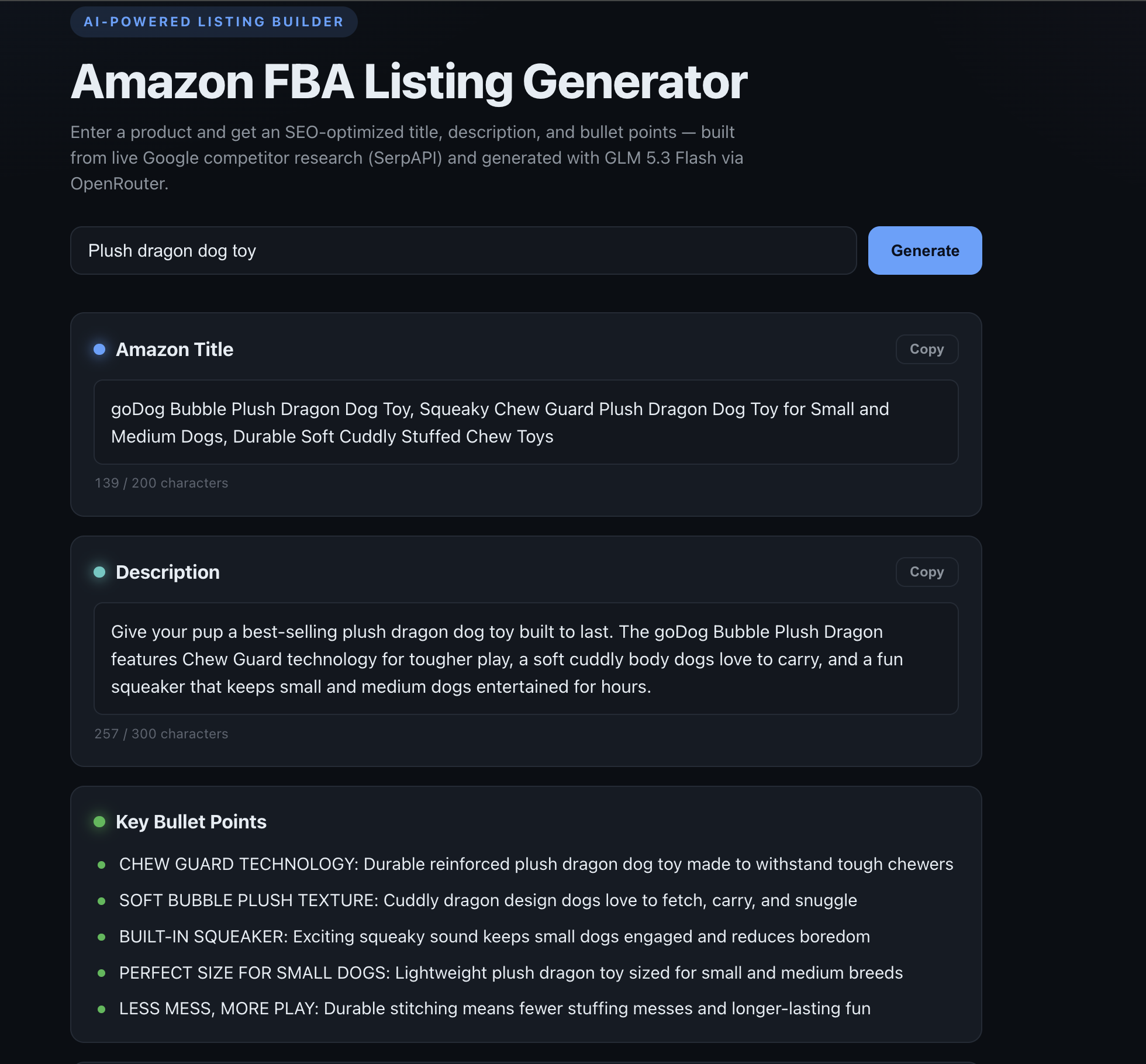
We wanted to make this easy. You type one thing, like "stainless steel water bottle," and the tool gives you a title, a description, bullet points, and a good price. It uses real data from what is selling right now.
How we built it
The system is simple. It searches three things at once using SerpApi, then sends that info to a language model:
$$ \text{product} \xrightarrow{\text{SerpApi}} \text{signals} \xrightarrow{\text{extract}} \text{keywords} \xrightarrow{\text{GLM 5.3}} \text{listing} $$
- It searches three places at the same time: Google Search (for titles and questions), Amazon (for competitor prices and reviews), and Google Autocomplete (for what people type).
- We use Python to find keywords. It counts how often words appear. For a group of words $T$, we find the top $k$ words $g$ using this math:
$$ \text{score}(g) = \sum_{t \in T} \mathbb{1}[t = g], \qquad K = \operatorname*{arg,top\text{-}}k_{,g}\ \text{score}(g) $$
- We find the lowest, middle, and highest prices on Amazon so the model can pick a good price.
- We use GLM 5.3 Flash through OpenRouter. It takes the research and turns it into a list with a title, description, bullets, and price. We use "tool calling" so the model always gives us the right format.
- We use FastAPI for the backend with a /generate endpoint. The frontend uses HTML, CSS, and JS. We host it on Vercel as a Python serverless function.
What we learned
- Reasoning models are different from chat models. GLM 5.3 Flash uses "reasoning tokens." These tokens cost money and count toward your max_tokens limit.
- Even if you ask for a specific format, the model might fail. If the response is too long, it gets cut off.
- If you tell a model to use a maximum number of characters, it often uses much less than that.
- Running three searches at once is fast and does not slow down the tool.
- Different AI providers work differently. Some give you a ready-to-use list, while others give you a text string that you have to turn into a list yourself.
Challenges we faced
- The missing title. Sometimes the /generate tool failed. This happened because the "reasoning" part used up too many tokens. If the reasoning plus the answer was more than max_tokens, the answer became empty:
$$ \underbrace{r}{\approx 700\text{-}850} + \underbrace{a}{\text{tool args} \approx 250} ;>; 1000 = M_{\max} $$
To fix this, we lowered the reasoning effort and increased max_tokens to 3000.
- We could not turn off reasoning. We tried to turn it off to save tokens, but the system said reasoning is required. We had to keep it but make it use fewer tokens.
- Deployment issues. At first, Vercel had security settings that blocked our deploys. We fixed this by using a personal token and setting up the project through the Vercel API.
- Text was too long. Sometimes the model wrote more than 300 characters, which caused an error. Now, instead of failing, the tool cuts the text at the end of a word or sentence.
What's next
We want to add price comparisons from Google Shopping, a way to make and test different titles, checks for Amazon character limits, and a way to save listings.
Built With
- claudecode
- openrouter
- serpapi
- vercel
- zai

Log in or sign up for Devpost to join the conversation.