
Inspiration
Politicians, scientists, and the older generation constantly talk about being aware of the impact we have on the earth and minimizing our carbon footprints, but so little do they explain how without completely overwhelming us with suggestions to completely change our lifestyles. Suggestions like biking to work at 6 a.m. may seem like a big change.
We hope to encourage self-education about one's carbon impact on the world by attacking an activity that people probably do more than drive to work... shopping, specifically online shopping. Amazon is the world's largest online retailer, with a worldwide revenue of $138.9 billion, and Amazon is the biggest online retailer in the United States. Over 50% of online purchases are made impulsively. The average American makes three impulse purchases each week, totaling about 156 per year.
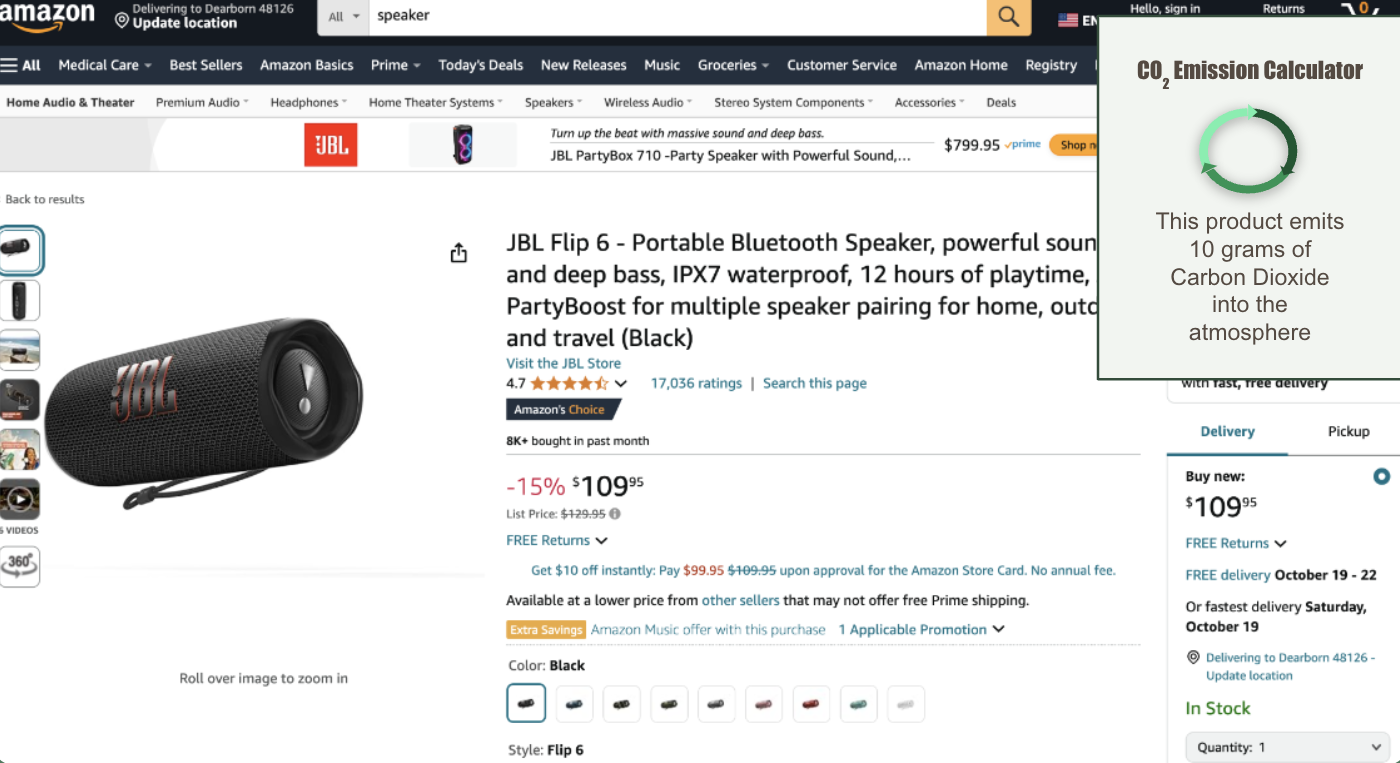
Our idea is to make a Google extension that can easily be downloaded through the Chrome extension store. As the user navigates to different products the pop-up will tell the user how much carbon is emitted into the atmosphere when shipping that product. By actively showing the user this they can compare multiple products on Amazon and actively try to minimize their harmful impact on our ozone layer.
We hope to teach the average American not only just how much their everyday impulse purchases harm the environment, but also we wish for the user to feel good about their purchases. As the user gets used to searching for the most efficient shops on Amazon and learns to buy more locally sourced goods, we hope the user will feel like they are actively helping the state of the world while also hopefully not getting too overwhelmed with the logistics of how much they have to change their lifestyles to achieve these sustainability goals.
What it does
Our Amazon CO2 Product Calculator is a Chrome extension the user can easily download. The extension will pop up in the corner every time the user navigates to a different product on Amazon and tells the user how much CO2 emissions are released with the shipment of the product. This in turn educates the user not only about which goods are more efficient to ship but also teaches the user about their impact on the environment.
How we built it
Our Chrome extension was built using many different components. We used many different APIs, we used a scraper, and we used a flask that ties all the components together to properly get the Chrome extension to work. Our scraper was coded first via Python notebook and scraped all the essential data we would need to compute CO2 emission, such as the address of where the product was shipping from. We then found an API that would calculate the CO2 emission based on the data we scraped. We modified the API to fit the parameters of the data we collected. From there we had a solid way of collecting data and calculating the information we wanted to output to the user. Now we just needed to figure out a way to put this on a pop-up via chrome extension. Chrome uses javascript so we needed a flask to properly feed the Chrome extension our data that was in Python. Our final project is a pop-up that will calculate the carbon emission of a product with just a click of a button.
Note some products on Amazon don't directly state where they are being shipped from as it just says "shipping from an Amazon warehouse." To work around this we have calculated the distance between the user and every warehouse in their state, and we take the average of those distances as we don't know which warehouse location will fulfill the request as Amazon does not disclose this information. We believe this is a sufficient workaround as Amazon will satisfy the product request from the closest warehouse and we don't know which one is so taking the average of all the nearest warehouses (a.k.a. warehouses in the same state), we should be able to a least get close to where the product is shipping from.
Challenges we ran into
As our group is comprised of entirely new hackathoners, it was difficult to connect all of the parts each person coded individually just as we coded in different languages and used different kinds of parameters and outputs. There were a lot of conceptual problems we ran into such as lack of data access or calculations that were too hard to compute, so we needed to be quick on our feet to brainstorm new ideas and workarounds, but in the end, we made do with what we could and are proud of our final result.
Accomplishments that we're proud of
Again as we are relatively new to the hackathon scene it was a bit overwhelming at times. We had to teach ourselves many new concepts and work with tools like APIs, Flask, and Chrome extensions which we had never done before. We are really proud of the perseverance we had as we ran through many roadblocks. We really liked the idea we came up with and really wanted to do it justice and have a final product we could show off. We learned so much in just the span of 24 hours and made some lifelong bonds not only with friends and competitors but also with our code. This project is my baby now, I raised it from the ground up ain't nobody bashing my child, I'm proud of it, even if it's a little rough around the edges. It took hard work for us to even get to a final product.
What we learned
We learned a lot about APIs and Scrapers, but also about Google Chrome's extension creator. It was honestly so different from what we've previously dealt with in the Computer Science field, and it felt very dignifying teaching ourselves how to use these new tools and actively use them to build an idea we thought up. Seeing our idea come to life is in itself such a cool experience. As we created something from nothing.
What's next
As of now we only really have it so we tell the user how much carbon it emits if the product is shipped. In the future, we can implement a comparison feature that shows the user the most fuel-efficient product, as well as calculate how much CO2 was emitted into the atmosphere at the creation of the actual product. There are so many ways to take this project and it can become all the more informative to the user.

Log in or sign up for Devpost to join the conversation.